

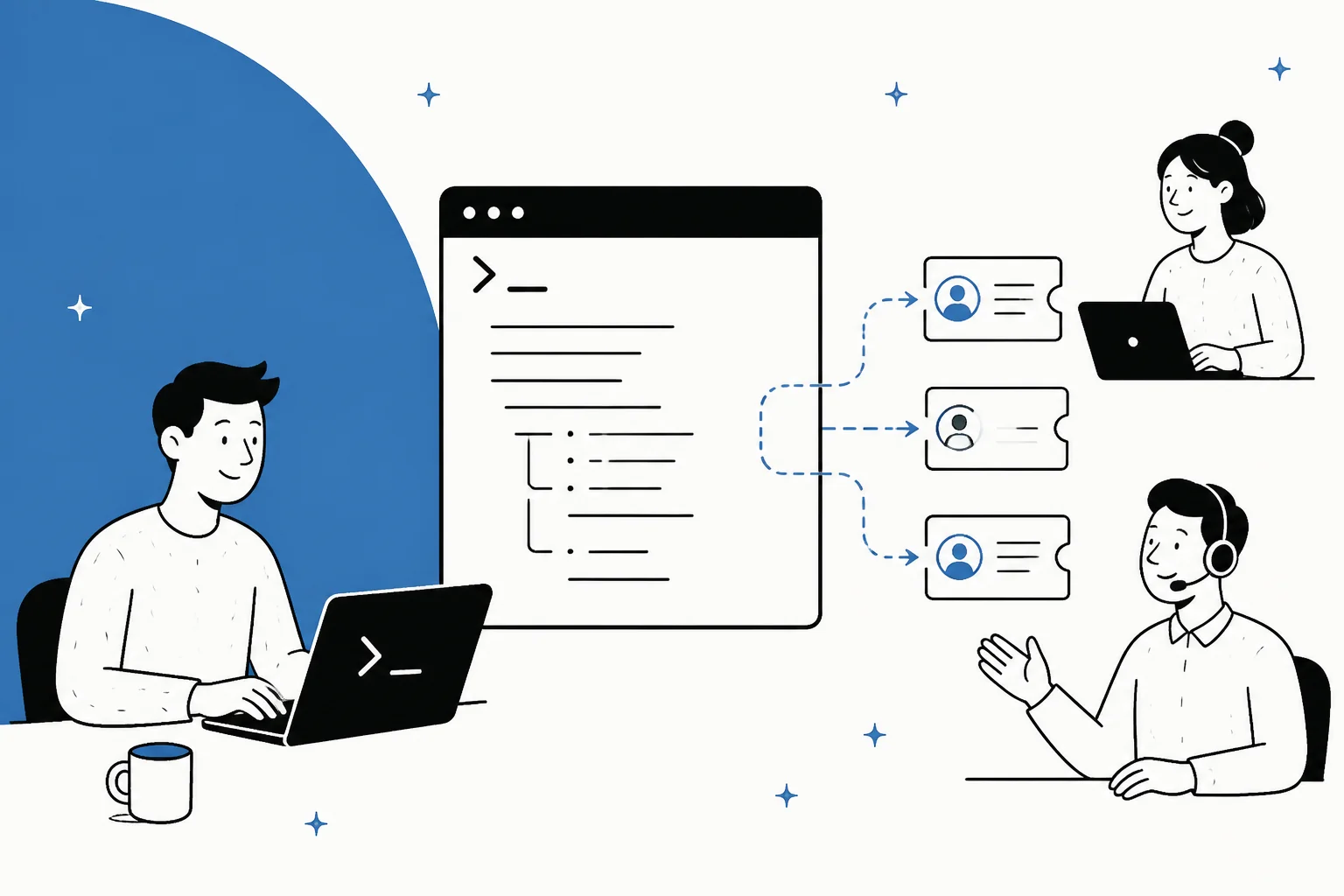
What people picture when they search "customer support CLI"
I build integrations at eesel, so I spend a lot of time in helpdesk APIs and other people's terminals. The request I hear most from developer-leaning support teams is some version of "I just want to manage this from the command line." Usually they are picturing a single binary: support resolve #4821, and the ticket closes with a correct answer.
That mental model quietly bundles two very different things. One is operating on tickets: bulk-tagging, reassigning, exporting, closing stale threads, mass-updating a custom field after a migration. The other is resolving tickets: reading the customer's problem, finding the right answer, deciding whether to escalate, and writing a reply that is safe to send. A basic helpdesk CLI only covers the first. An agent CLI can cover both when it operates a support system that already has the knowledge, judgment, and controls behind it.
It helps to see the terminal as three stacked layers, each with more autonomy than the one below it.
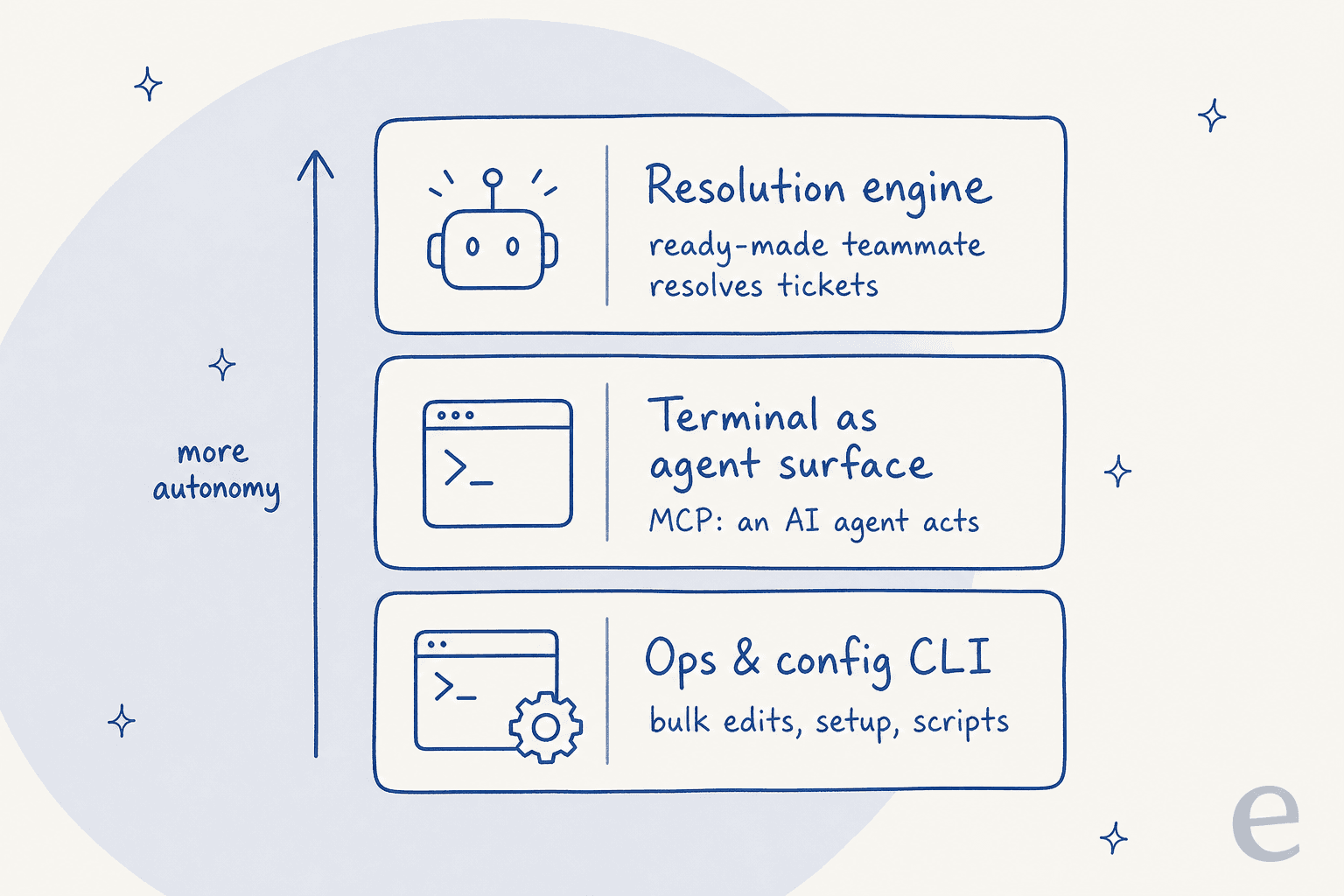
Most of the confusion comes from treating every terminal tool as the same product. The next sections separate the layers, then show how the eesel CLI connects the command line to the complete teammate above them.
Layer 1: the helpdesk CLI is a developer tool, not a ticket console
Start with the most literal reading. Does your helpdesk ship a command line tool? Zendesk does, and it is the closest thing to an official "customer support CLI" on the market. It is called zcli, it installs with yarn global add @zendesk/zcli, and it is built on oclif (the same framework behind the Heroku and Salesforce CLIs).
Here is the part that surprises people. Its command groups are apps, themes, connectors, profiles, login, and logout. That is the whole surface. You can create and package a Zendesk App, upload a Guide theme, wire an early-access connector, and manage OAuth profiles. What you cannot do is touch a ticket. There is no zcli tickets:create, no zcli tickets:reply, no zcli tickets:close. The tool exists to help developers build things on top of Zendesk, not to run the support queue from a shell.
That is not a knock on zcli. It is a well-maintained tool doing exactly its job (recent commits are moving auth from API tokens to browser-based OAuth, which is the right direction). It is just a different job than the one most "customer support CLI" searchers have in mind. If you install it hoping to close tickets and find only an app scaffolder, that gap is the whole reason this post exists. It is the same gap that shows up when people search for a customer support agent API and get a model endpoint instead of an agent.
Freshdesk, Gorgias, Help Scout, and Front do not ship a first-party CLI at all. So for every helpdesk except Zendesk, and for Zendesk itself once you want to touch tickets, you drop down to the next layer.
Layer 2: curl and the REST API is the real terminal path
This is where the actual work happens. Every serious helpdesk exposes its tickets over a REST API, and a REST API is something curl, bash, and jq can drive all day. When someone automates support "from the command line," this is almost always what they built, even if they imagined a purpose-made CLI.
A create-ticket call against Zendesk is a plain HTTP POST:
curl https://yourco.zendesk.com/api/v2/tickets.json \
  -u "$ZD_EMAIL/token:$ZD_TOKEN" \
  -H "Content-Type: application/json" \
  -d '{"ticket":{"subject":"Refund not received","comment":{"body":"Order #DL-4821"}}}'
The same shape covers updating a ticket, listing with pagination, adding comments, and exporting. Wrap a few of these in shell functions and you effectively have your own customer support CLI, tuned to exactly the operations you run. The same is true on the other platforms: Freshdesk has a documented ticket API, Gorgias offers both a REST and GraphQL API, and Help Scout has its own Mailbox API.
The catch is everything the happy-path snippet leaves out. You have to handle authentication and scopes, rate limits (helpdesk APIs return HTTP 429 with a Retry-After header, and the ceilings are per-minute and tiered by plan), idempotency so a retried POST does not create duplicate tickets, and error codes when a field validation fails at 2am. Freshdesk publishes its own rate-limit tiers and Gorgias its own API v2 limits, and they are all different, so a script that works against one helpdesk is not portable to the next.
None of this is hard, exactly. It is just real software you now maintain. And critically, it still only gets you the operating on tickets half. A curl script can close ticket #4821. It has no idea whether closing it was the right call. If you want the API to be the whole product, that is the headless customer support route, and it comes with the same 90% attached.
Layer 3: MCP turns the terminal into an AI agent surface
Here is the genuinely new layer, and the reason a "customer support CLI" feels more real in 2026 than it did two years ago. The Model Context Protocol (MCP) is a standard way to expose a tool's actions to an AI agent. Instead of hand-wiring every endpoint, you connect an MCP server once, and an agent running in your terminal (Claude Code, or any MCP client) can list tickets, read a thread, and post a reply as tool calls.
Front ships an official MCP server for free. Zendesk and Gorgias both let you connect an AI model through MCP-style connectors, and vendors like Freshworks have published an MCP gateway of their own. For a developer, this is the closest the ecosystem gets to typing a plain-language command and having support work happen: you ask the agent to "close every ticket tagged spam from last week," and it makes the API calls. It is the same idea behind wiring an AI helpdesk API, just driven from a terminal agent instead of a backend service.
MCP is a real step forward, and if you are already living in a terminal agent it is worth wiring up. But notice what it does and does not solve. MCP standardizes the connection, the way Claude Code MCP tools standardize how the agent reaches your systems. It does not decide how the agent should answer, what it may act on, or when it should stop and ask for help. Those decisions come from the agent system connected through MCP.
Where the eesel CLI fits
The eesel CLI puts an existing AI support teammate behind the command line. It is another entrance to the same agent and workspace as the dashboard, not a separate terminal-only copy. Connect Zendesk in the CLI and it appears in the dashboard. Change the instructions in either place and the same teammate follows them everywhere it works.
That shared state is the important bit. A person can set up and test the teammate interactively, a script can run repeatable checks, and a coding agent can complete the same work from structured JSON. Headless authentication through EESEL_API_TOKEN and EESEL_AGENT_ID lets it run in CI or on a server, while --dry-run shows what a write would do before it is sent.
The command set covers the lifecycle around the work, not just a prompt box: connect integrations, upload knowledge, edit instructions, configure automations, chat with the agent, approve held actions, and inspect activity. If you want an AI client to operate the teammate directly, eesel mcp token produces the setup for Claude Code or another MCP client.
The intelligence still has to live somewhere
Type resolve ticket #4821 and imagine everything that command has to be true for the resolution to be correct and safe. That is the work that actually matters, and it lives above the API entirely.
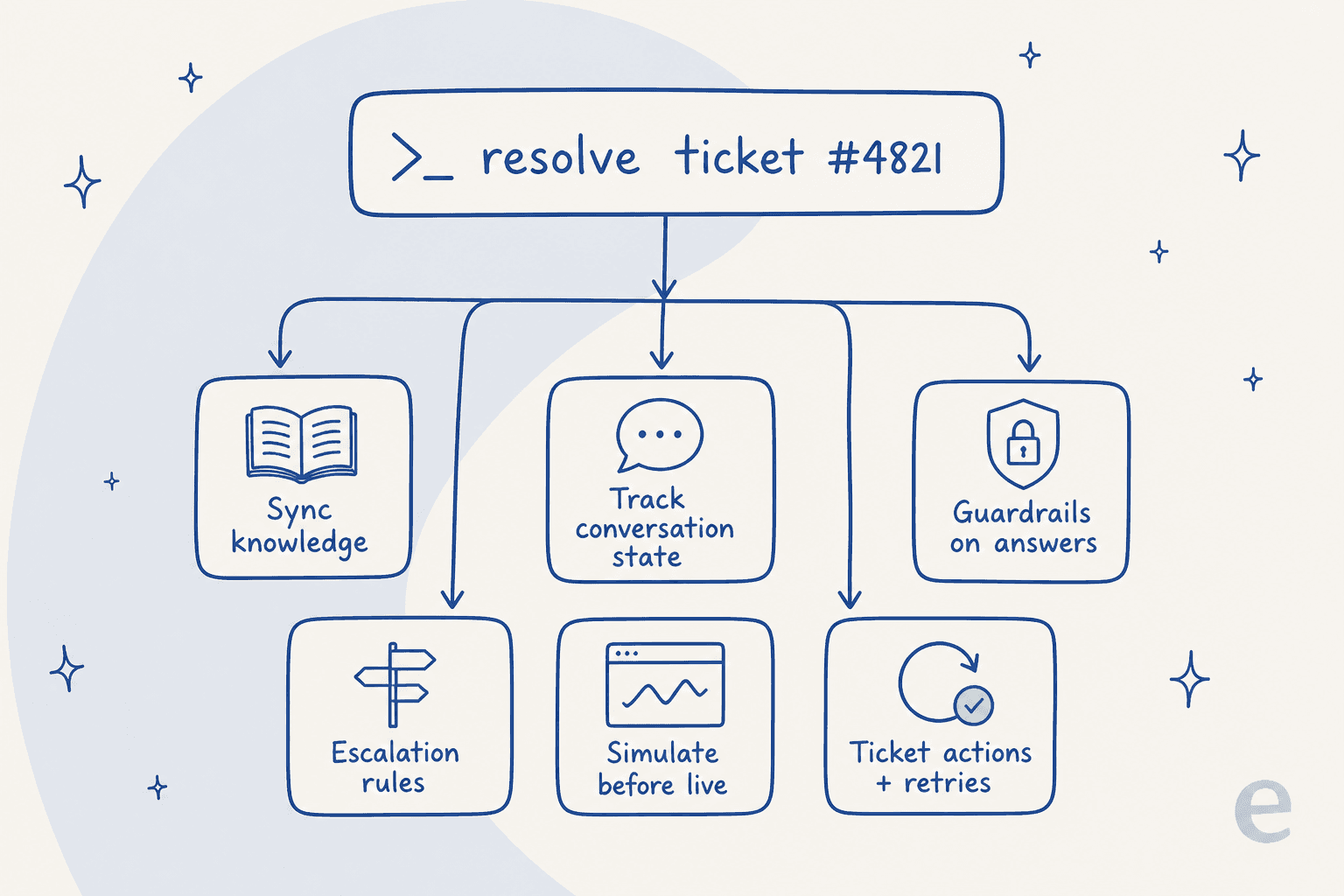
Every one of those is its own subsystem: keeping the agent's knowledge in sync with your help center and past tickets, tracking conversation state across a multi-message thread, guardrails so it answers only from approved sources and not the model's general training, escalation rules for when it should hand off to a human, and a way to test the whole thing before it touches a live customer. We have spent the last three-plus years putting AI agents on live support queues, and the lesson that stuck is that the model call is roughly 10% of the work. A command line does not create the other 90% by itself. It can expose systems you build and maintain, or operate a managed teammate that already includes them. The eesel CLI takes the second approach.
I hear the same realization on sales calls. One CX lead at a US healthcare platform, running around 500 Zendesk tickets a month, had already tried the native tooling and told us they found it "largely inadequate and overpriced," so they were looking to bring real automation to the whole process. That is the pattern: teams reach for the terminal because the packaged AI let them down, then discover the terminal only hands them the plumbing, not the intelligence. A technical evaluator at a hardware company put the real requirement plainly on another call: they needed assurance the AI answers only from approved knowledge, never from the open web. That is a guardrail, and a guardrail is not something you apt install.
This is the useful limit to understand. Structured commands make setup and operation repeatable, but they do not make AI judgment deterministic. A good customer support CLI therefore needs observability, approvals, testing, and a real agent behind it, not just a convenient way to send API calls.
Script it yourself vs connect a teammate
So you have two real paths once you get past the ops-and-config layer: build the resolution engine on top of a raw model API, or use a ready-made teammate and operate it through the dashboard, CLI, or MCP. Here is how they actually compare.
| Dimension | Script it on a model API | Use a ready-made teammate and CLI |
|---|---|---|
| Time to first resolved ticket | Weeks to months of engineering | Minutes, connect and go live |
| Knowledge sync | You build ingestion for help center + past tickets | Trains on existing tickets and docs automatically |
| Guardrails | You design and maintain them | Built in, answers from approved sources |
| Testing before live | You build a harness | Simulate on historical tickets before go-live |
| Escalation | You wire the handoff logic | Configurable per action, off by default |
| Cost model | Per token, on every message, solved or not | 1 credit per ticket (from $299/mo for 500), no per-seat fee |
| Terminal control | Whatever you build | CLI with structured JSON and headless authentication |
| Who maintains it | Your team, forever | The vendor |
The cost line is the one that decides most cases. A model API bills you per token on every message, retry, and retrieved chunk, whether or not the ticket got solved. A teammate that uses one credit per ticket ties the cost to the outcome you actually wanted. Neither is universally right, but if you do not have engineers who want to own an AI pipeline forever, the maintenance column is where the "build it in the terminal" plan quietly falls apart.
Which path actually fits you
There is no single answer, but there is a clean way to choose, and it comes down to what you actually want the terminal to do.
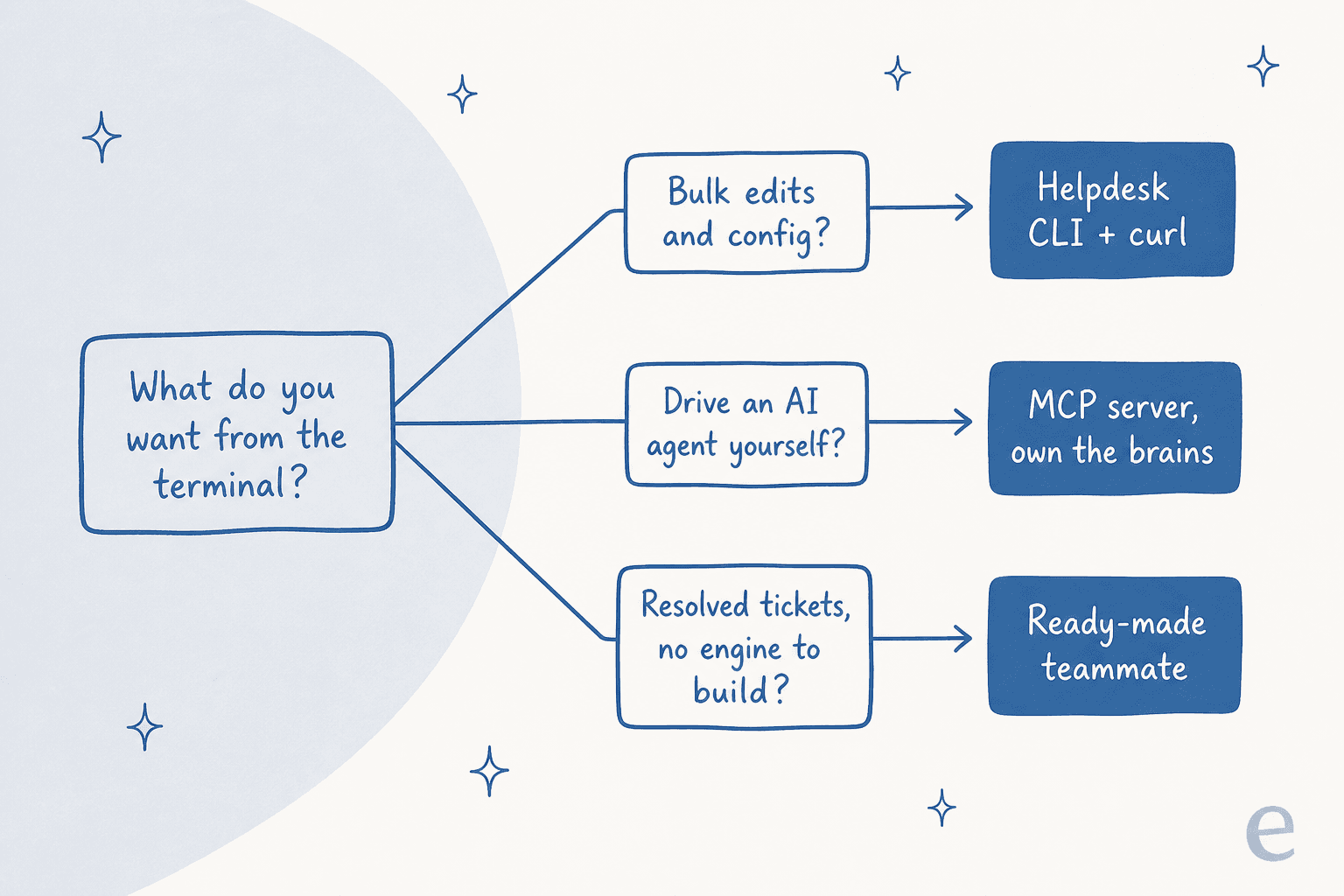
- You want bulk edits, exports, and config. Stay in the terminal. Use zcli for Zendesk app and theme work, and curl plus jq for ticket operations. This is the CLI's sweet spot and you should not overthink it.
- You want an AI agent you fully control. Wire an MCP server into your terminal agent and be ready to own the knowledge, guardrails, and testing yourself. Good if you have the engineering appetite and a real reason to keep it in-house.
- You want resolved tickets with an agent-friendly control surface. Use the eesel CLI to connect a teammate to the helpdesk you already run. You get terminal control without having to build the resolution engine behind it.
Most teams I work with land on a mix: curl scripts for the ops nobody should pay an AI to do, and a teammate for the resolution work that a script was never going to handle safely. That is not a compromise, it is just matching each layer to the job it is good at, the same way you would pick between AI and rule-based automation for any support workflow.
Try the eesel CLI with your support stack
If the layer you are missing is the resolution engine, the eesel CLI gives you a direct way to set it up and operate it. Start with an anonymous workspace or log in to an existing one, connect the helpdesk you already run, add your knowledge, and test the same teammate that appears in the dashboard.
You can simulate the agent on historical tickets before it touches a live customer, keep actions behind approvals while you test, and inspect its activity from the terminal. When you want a coding agent to take over the setup, use the CLI's structured JSON or generate an MCP token. It is one teammate with several entrances: the dashboard for visual work, the CLI for people and scripts, and MCP for AI clients.
Frequently Asked Questions
Is there a customer support CLI that resolves tickets?
What does the Zendesk CLI (zcli) actually do?
yarn global add @zendesk/zcli. There is no zcli tickets command, so bulk ticket work runs through the Zendesk API instead.