
Network failures happen. Your API request times out, so your client retries it. Without proper safeguards, that retry creates a second ticket, a third ticket, and suddenly your customer has three identical support requests in the system. Idempotency keys solve this problem by ensuring that repeated requests with the same key produce the same result without creating duplicates.
If you're building integrations with the Zendesk API, understanding idempotency keys isn't optional. It's essential for production-ready systems that handle real customer data.
What are idempotency keys and why do they matter?
An idempotency key is a unique identifier that clients include with API requests. When your server receives a request, it checks if it has seen that key before. If the key is new, the request is processed normally and the result is stored. If the key exists, the stored result is returned without re-executing the operation.
The concept comes from mathematics, where an idempotent operation produces the same result whether executed once or multiple times. In API terms, posting a ticket with the same idempotency key five times should create exactly one ticket and return the same response each time.
Here's why this matters for Zendesk specifically. Ticket creation is a write operation with side effects. Each ticket triggers notifications, routing rules, and potentially SLA timers. Creating duplicate tickets doesn't just clutter your system. It wastes agent time, confuses customers who receive multiple acknowledgments, and skews your metrics.
Real-world scenarios where idempotency saves you:
- Payment webhooks Your payment processor sends a webhook to create a ticket for failed transactions. The webhook retries on timeout. Without idempotency, each retry creates a new ticket.
- Bulk imports You're migrating tickets from an old system. The import script hits a network error and restarts. Without idempotency, you get duplicate records.
- Mobile apps A user taps submit twice due to lag. Without idempotency, they create two tickets.
Building reliable retry logic manually is complex. You need to track which requests succeeded, handle partial failures, and reconcile state across distributed systems. Idempotency keys push this complexity to the API layer where it belongs.
If you're looking to automate ticket creation without handling these edge cases yourself, our AI Agent manages idempotency automatically as part of its Zendesk integration.

How Zendesk's idempotency key implementation works
Zendesk implements idempotency through a simple HTTP header. To use it, include an Idempotency-Key header with a unique value in your request:
Idempotency-Key: {unique_key}
The value can be any string up to 255 characters. Zendesk recommends using UUIDs or other high-entropy identifiers.
When you make a request with an idempotency key, Zendesk's response includes an x-idempotency-lookup header:
x-idempotency-lookup: missThis is the first time this key has been seen. The request is processed normally.x-idempotency-lookup: hitThis key was used before. Zendesk returns the cached response from the original request.
Here's the critical part. Zendesk stores idempotency keys for 2 hours. After that window, a request with the same key will be treated as new. This means your retry logic needs to account for the expiration window. If you're retrying a request from yesterday, you'll create a duplicate.
Zendesk also validates that requests with the same idempotency key have identical parameters. If you send the same key with a different subject or description, you get a 400 error:
{
  "error": "IdempotentRequestError",
  "description": "Request parameters don't match the given idempotency key"
}
This prevents accidental misuse of keys across different operations. It also means you need to generate a fresh key for each distinct operation, not reuse keys across different tickets.
Important limitation: the idempotency key is not stored as part of the ticket. When you retrieve a ticket later, you won't see what key was used to create it. If you need to track this correlation, store it in your own system.
Not all Zendesk API endpoints support idempotency. The primary use case is ticket creation (POST /api/v2/tickets.json). Check the official documentation for the specific endpoint you're using.
Implementing idempotency keys in your code
Let's walk through a practical implementation. We'll use Python with the requests library, but the pattern applies to any language.
Step 1: Generate unique idempotency keys
Generate your idempotency key before making the first request, not during retries. The key should be unique per logical operation.
import uuid

idempotency_key = str(uuid.uuid4())

request_context = {
    'idempotency_key': idempotency_key,
    'payload': ticket_data,
    'attempt': 0
}
Use UUIDv4 or another random string with at least 128 bits of entropy. Avoid predictable patterns like timestamps, sequential IDs, or hashes of the payload alone. These can collide or be guessed.
Step 2: Add the header to your API requests
Include the idempotency key in your request headers alongside your authentication.
Python example:
import requests
import os

subdomain = os.getenv('ZENDESK_SUBDOMAIN')
email = os.getenv('ZENDESK_EMAIL')
api_token = os.getenv('ZENDESK_API_TOKEN')

url = f'https://{subdomain}.zendesk.com/api/v2/tickets.json'
auth = (f'{email}/token', api_token)

headers = {
    'Content-Type': 'application/json',
    'Idempotency-Key': idempotency_key
}

data = {
    'ticket': {
        'subject': 'Payment failed notification',
        'comment': {'body': 'Customer payment method declined'},
        'requester': {'email': 'customer@example.com'}
    }
}

response = requests.post(url, json=data, auth=auth, headers=headers)
cURL example:
curl https://yourcompany.zendesk.com/api/v2/tickets.json \
  -d '{"ticket": {"subject": "Test ticket", "comment": {"body": "This is a test"}}}' \
  -H "Content-Type: application/json" \
  -H "Idempotency-Key: 550e8400-e29b-41d4-a716-446655440000" \
  -u your@email.com/token:your_api_token \
  -X POST
JavaScript/Node.js example:
const response = await fetch('https://company.zendesk.com/api/v2/tickets.json', {
    method: 'POST',
    headers: {
        'Content-Type': 'application/json',
        'Authorization': 'Basic ' + Buffer.from(`${email}/token:${token}`).toString('base64'),
        'Idempotency-Key': idempotencyKey
    },
    body: JSON.stringify(ticketData)
});
Step 3: Handle responses and retries
Your retry logic should check the response status and headers to determine whether to retry.
import time

def create_ticket_with_retry(ticket_data, max_retries=3):
    idempotency_key = str(uuid.uuid4())

    for attempt in range(max_retries + 1):
        headers = {
            'Content-Type': 'application/json',
            'Idempotency-Key': idempotency_key
        }

        response = requests.post(
            url,
            json=ticket_data,
            auth=auth,
            headers=headers
        )

        # Check if this was a cached response
        lookup_status = response.headers.get('x-idempotency-lookup')
        if lookup_status == 'hit':
            print(f"Request was cached (attempt {attempt + 1})")

        # Success case
        if response.status_code == 201:
            return response.json()

        # Idempotency mismatch - don't retry, this is a logic error
        if response.status_code == 400 and 'IdempotentRequestError' in response.text:
            raise ValueError(f"Idempotency key mismatch: {response.json()['description']}")

        # Rate limited - wait and retry
        if response.status_code == 429:
            retry_after = int(response.headers.get('Retry-After', 60))
            time.sleep(retry_after)
            continue

        # Server errors - retry with exponential backoff
        if response.status_code in [500, 502, 503, 504]:
            if attempt < max_retries:
                backoff = (2 ** attempt) + (hash(idempotency_key) % 1000 / 1000)
                time.sleep(backoff)
                continue

        # Client errors (4xx) - don't retry
        response.raise_for_status()

    raise Exception("Max retries exceeded")
Key points for your retry logic:
- Reuse the same idempotency key across all retries of the same logical operation
- Don't retry on 400 errors with
IdempotentRequestErrorthis indicates a logic bug in your code - Respect rate limits (429) using the
Retry-Afterheader - Use exponential backoff for server errors to avoid overwhelming the API
For more details on the Zendesk ticket API structure, see our guide on creating Zendesk tickets using the API.
Best practices for production implementations
Once you have the basics working, consider these production-ready practices.
Key storage strategies. For high-volume systems, you may want to track idempotency keys in your own database or cache. This lets you:
- Detect if a key is about to expire (Zendesk's 2-hour window)
- Audit which operations succeeded or failed
- Implement custom deduplication logic beyond Zendesk's
Redis is a popular choice for this. Set a TTL slightly shorter than Zendesk's 2-hour window to avoid edge cases:
import redis

redis_client = redis.Redis(host='localhost', port=6379)

redis_client.setex(f"zendesk:idempotency:{key}", 5400, response_data)
Handle concurrent requests. If two requests with the same idempotency key arrive simultaneously, Zendesk will process one and return the cached result for the other. However, your client might see race conditions. Implement request deduplication at your application layer if this is a concern.
Request fingerprinting. To catch bugs where you accidentally reuse a key with different parameters, hash the request payload and store it with the idempotency key. Before sending, verify the hash matches:
import hashlib
import json

def get_request_fingerprint(payload):
    return hashlib.sha256(json.dumps(payload, sort_keys=True).encode()).hexdigest()

fingerprint = get_request_fingerprint(ticket_data)
store_key_with_fingerprint(idempotency_key, fingerprint)

if get_fingerprint_for_key(idempotency_key) != fingerprint:
    raise ValueError("Payload changed for existing idempotency key")
Logging and monitoring. Track idempotency key usage in your logs:
- Log the key and
x-idempotency-lookupstatus for each request - Alert on high rates of
hitresponses (may indicate excessive retries) - Monitor for
IdempotentRequestError(indicates bugs)
Testing your implementation. Write tests that verify your idempotency logic:
def test_duplicate_request_returns_same_ticket():
    key = str(uuid.uuid4())

    # First request
    response1 = create_ticket(ticket_data, idempotency_key=key)
    ticket_id = response1['ticket']['id']

    # Second request with same key
    response2 = create_ticket(ticket_data, idempotency_key=key)

    assert response2['ticket']['id'] == ticket_id
    assert response2.headers['x-idempotency-lookup'] == 'hit'
Common mistakes and how to avoid them
Even experienced developers make these errors when implementing idempotency.
Using predictable key patterns. Timestamps, sequential IDs, or simple hashes of the payload can collide or be guessed. Always use cryptographically random values like UUIDv4.
Generating new keys on retry. The whole point is to use the same key for retries. If you generate a fresh UUID on each attempt, you'll create duplicates instead of preventing them.
Ignoring the 2-hour expiration. If your retry logic spans more than 2 hours (perhaps due to extended outages), your idempotency key will no longer work. For long-running processes, implement your own deduplication layer.
Not handling parameter mismatch errors. When you get an IdempotentRequestError, it's usually a bug in your code. You're reusing a key with different data. Log these aggressively and fix the root cause.
Caching error responses incorrectly. Some implementations cache all responses, including 5xx errors. This means a transient server error gets "stuck" and all retries return the same error. Only cache successful responses (2xx status codes).
Race conditions in concurrent environments. Without proper locking, two threads might both check for a key's existence, both see it's missing, and both send requests. Use atomic operations or distributed locks if you're processing high volumes.
Automating ticket creation without the complexity
Building and maintaining API integrations takes time. You need to handle authentication, error retry logic, rate limiting, idempotency, and ongoing maintenance as APIs change.
If your goal is to automate ticket creation rather than build a custom integration, consider whether you actually need to write code. Tools like eesel AI can handle ticket creation and responses without any development work. The eesel AI agent for Zendesk manages idempotency and retry logic internally, so you get reliable ticket automation without writing a single line of retry code.
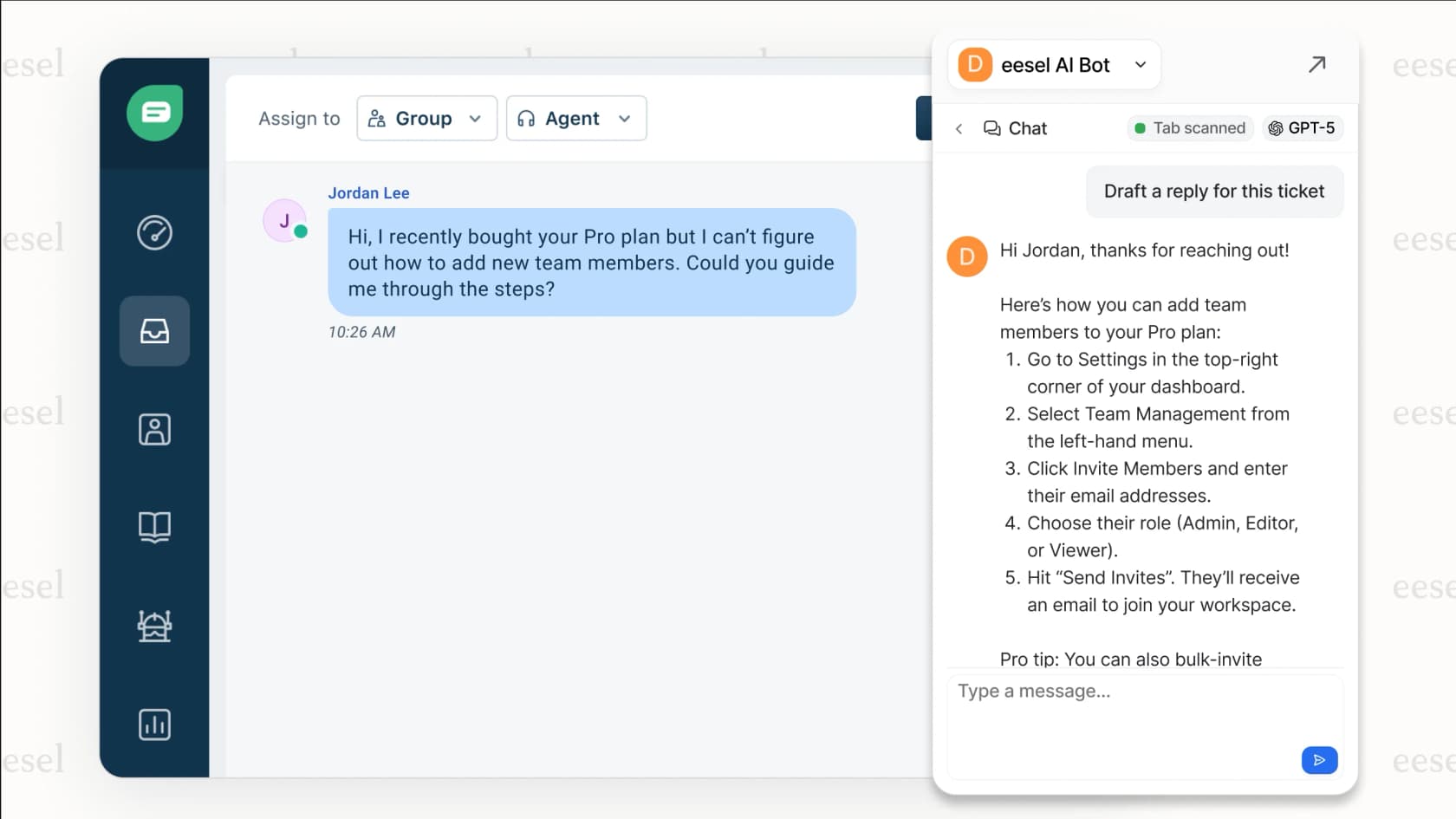
Here's the difference. With the API approach, you're writing scripts to create tickets that humans will respond to. With an AI agent, you're training a system to understand your business and handle the entire ticket lifecycle, from creation through resolution. You connect it to your Zendesk account, and it learns from your past tickets, help center articles, and macros.
The progressive rollout model means you start with the AI drafting responses for review, then expand to full automation as it proves itself. For teams looking to reduce ticket volume rather than just automate creation, this often delivers faster results than custom API development.
Our AI Copilot can also help by drafting replies that your agents review before sending, giving you AI assistance without the complexity of building idempotent retry logic yourself.