

What an AI agent CLI actually means
Strip away the hype and an "AI agent" is a loop: a model reads some input, decides on an action, calls a tool, reads the result, and repeats until it is done. A CLI, a command-line interface, is just a way to drive that loop from a terminal window rather than a graphical app.
Put them together and an AI agent CLI is a text-based control surface for an agent. You type a command to start it, hand it a task, point it at tools and files, watch what it does scroll past, and script the whole thing so it runs without you sitting there. It is the same instinct that makes developers prefer git on the command line over a clicky Git app: it is faster, it is repeatable, and it drops straight into other scripts.
The reason this pattern exploded is that the terminal turns out to be a great home for an autonomous agent. It can already run commands, read and write files, and pipe output into the next tool. Give a capable model that environment and you have an agent that can really get work done, which is exactly what the coding CLIs did first.
Why run an AI agent from the command line
A dashboard is friendlier for a first look. A command line wins the moment you want to do the same thing more than once. The pull is usually one of these:
- Repeatability. A command you can save is a command you can run again identically, drop in a script, or hand to a teammate. Clicking through a UI is neither.
- Automation. CLIs slot into cron jobs, CI pipelines, and webhooks. That is how an agent goes from "I ran it" to "it runs every night at 2am on its own."
- Speed and focus. No context-switch to a browser tab, no waiting on a page to load. For people who already live in the terminal, it is simply less friction.
- Version control. Configuration as text files means your agent's setup lives in Git next to your code, with history and review, instead of as clicks nobody can audit later.
None of that is support-specific, which is the first clue about where this all comes from. The tools that made "AI agent CLI" a phrase were built for engineers writing software, and it shows in what they are good at.
The AI agent CLI tools in 2026
There are three layers worth separating, because people lump them together and then wonder why the pieces do not fit.
Model-provider CLIs are the headline act. These are terminal agents shipped by the model labs themselves. Claude Code is Anthropic's, built to do deep multi-file work and native to MCP. Codex CLI is OpenAI's open-source terminal agent, written in Rust and licensed Apache-2.0. Google's Gemini CLI is also open source under Apache-2.0, with a large context window. They are superb, and they are aimed squarely at software engineering.
Framework CLIs are the build-your-own layer. Agent frameworks ship command-line tools to scaffold, run, and test agents you define in code. This is where a team that wants a custom support agent usually ends up: you write the loop, wire in the tools, and the CLI runs it. Total control, and total ownership of everything you build.
MCP is the wiring standard underneath both. The Model Context Protocol is an open standard Anthropic introduced in late 2024 for connecting an agent to external tools and data. Instead of hand-building an integration for every AI app, you expose your system once as an MCP server and any MCP-aware agent can use it. A CLI is how you drive the agent; MCP is how the agent reaches your helpdesk, your docs, and your order system.
Here is how the three compare for someone eyeing a support use case:
| Layer | Examples | Built for | You maintain | Support-ready out of the box |
|---|---|---|---|---|
| Model-provider CLI | Claude Code, Codex CLI, Gemini CLI | Coding, dev workflows | The model lab | No, it is a coding agent |
| Framework CLI | Agent frameworks' own CLIs | Custom agents in code | You, fully | No, you build the support logic |
| MCP servers | Helpdesk / docs / order-system servers | Tool + data access | Whoever runs the server | Only the plumbing, not the agent |
| Managed teammate | eesel, helpdesk-native agents | Answering tickets | The vendor | Yes, trained on your tickets |
The table makes the gap obvious. Every CLI in the top three rows is a way to build and run an agent. None of them is a support agent. That distinction is the whole story for this topic.
What a support-agent control surface has to do
Say you ignore the warning and decide to run a support agent from a terminal anyway. What does the control surface actually need to cover? Four jobs, and a coding CLI only helps with the first two.
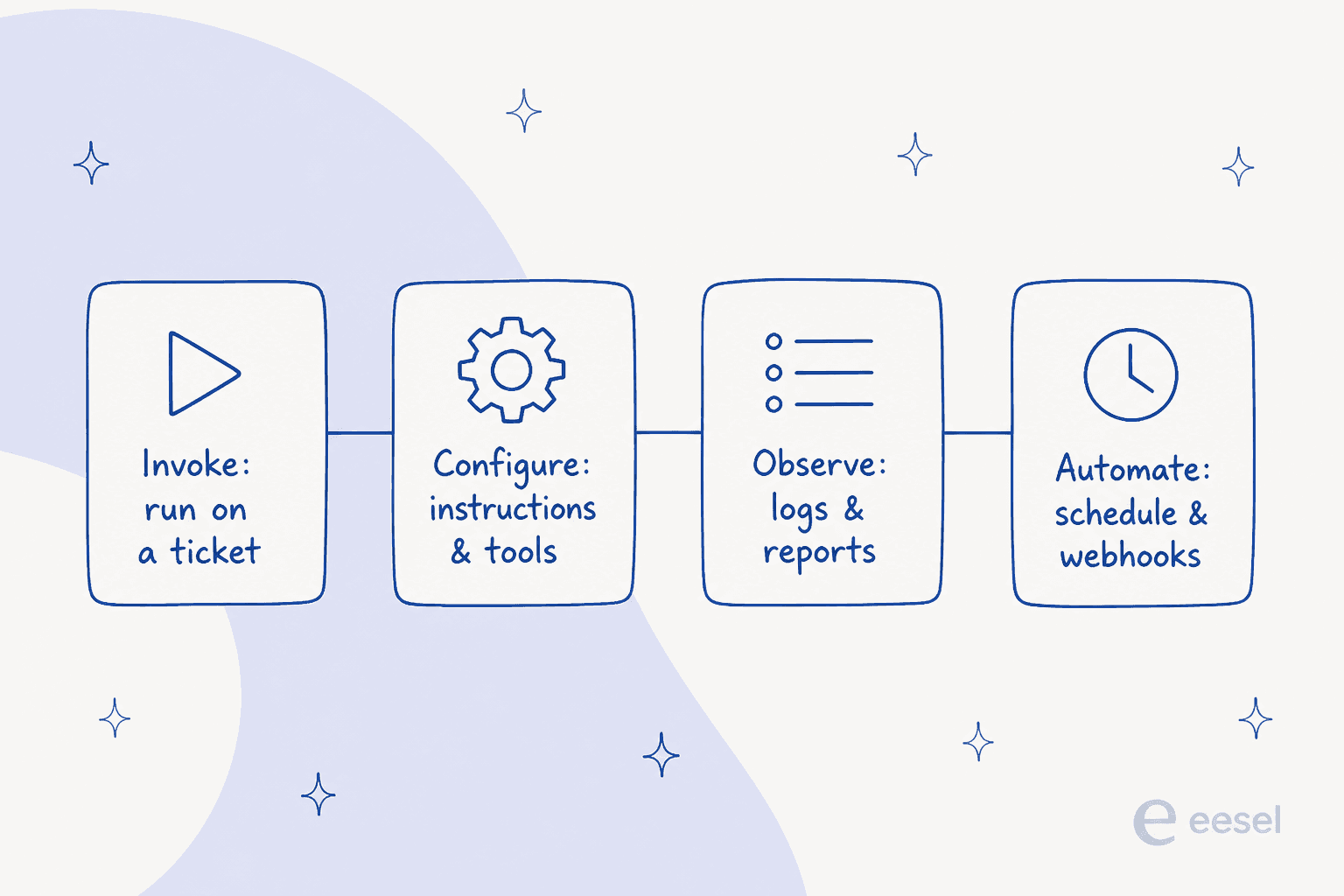
Invoke is running the agent against a ticket or a batch of them. Configure is setting its instructions, its tools, and the rules for when it is allowed to reply versus hand off. Observe is reading logs and reports so you can tell what it did and whether it was right. Automate is the schedule, the webhook, the trigger that fires it on every new ticket without a human in the loop.
The interesting thing is that "command line" is not the only way to hit these four. eesel's teammate, for instance, is configured in plain language and driven conversationally, so you can update how it behaves by describing the change rather than editing a config file.

Notice the tool call in the sidebar. Under the plain-language layer there is still a real, named tool doing the work, the same primitive a CLI would call, just without you writing the invocation by hand. For the Automate job, scheduled runs are a settings screen, not a cron file you babysit.
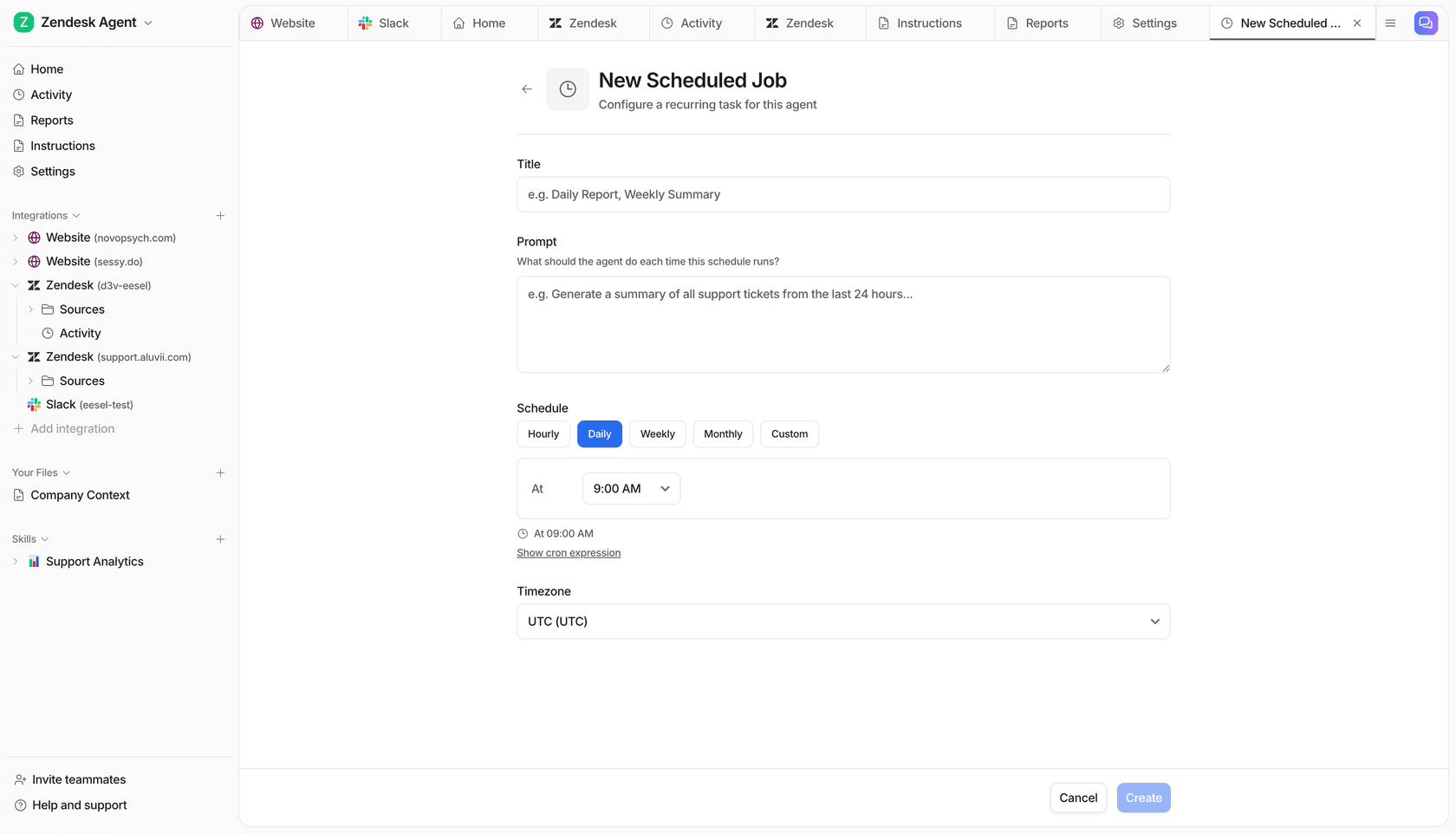
The point is not that command lines are bad. It is that for support, the four jobs matter more than the interface, and most of them are about your tickets and your rules, not about typing.
The catch: the CLI is the easy 10%
This is the part I want to be honest about, because I build eesel's integrations and I see where teams get stuck. Standing up a model in a terminal that answers a question really is a weekend project. It feels like you are almost there. You are not, and the gap is deceptive.
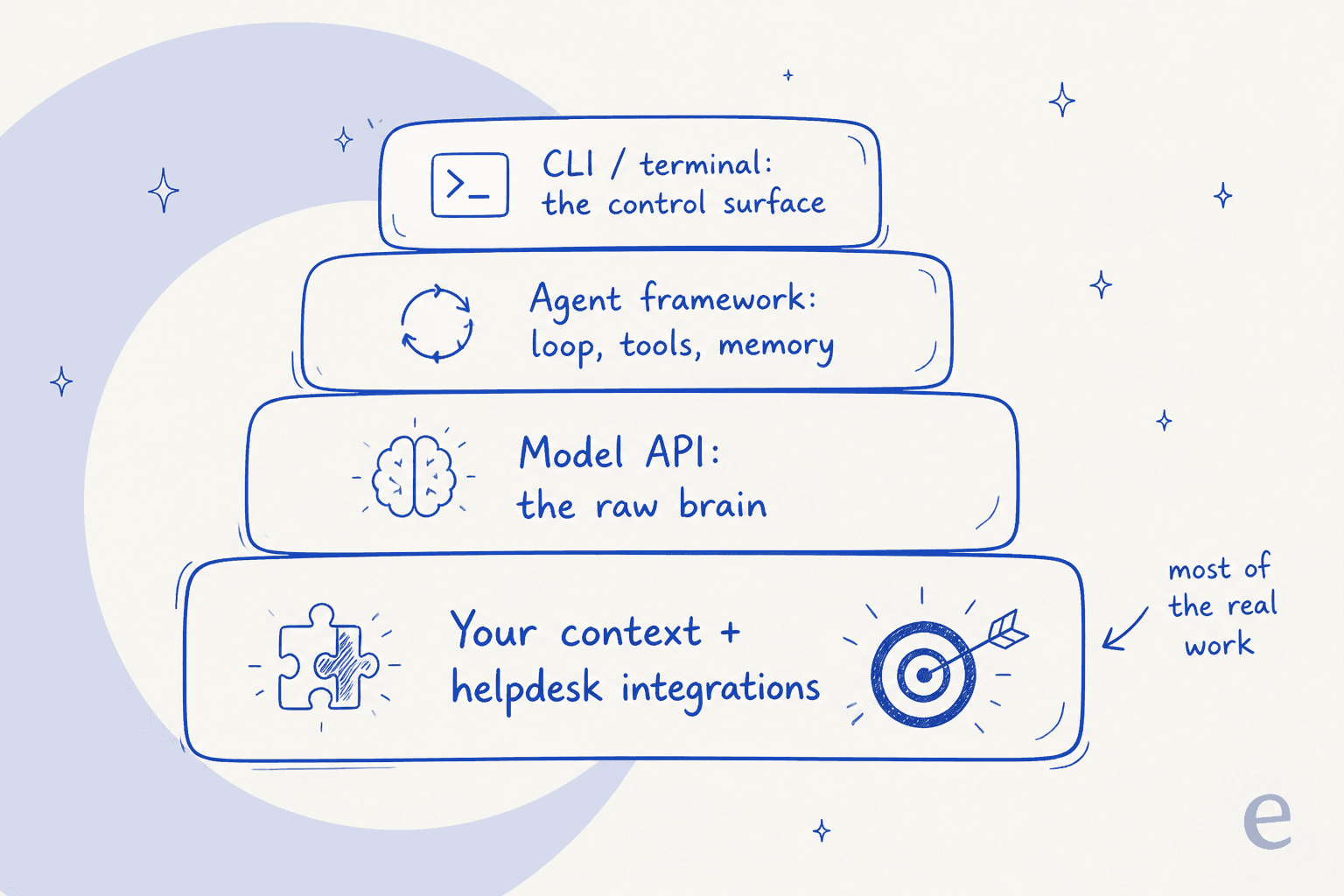
The CLI and the model are the top of the stack. The bottom, the part that decides whether the agent is any good, is everything else: ingesting your help center, past tickets, and macros so it answers in your voice; connecting to your helpdesk and order system to actually look things up and act; confidence rules so it only auto-replies when it should and leaves the rest alone; and a way to test all of it before a customer is on the other end. That is the 90%, and a coding CLI gives you none of it.
The biggest objection I hear from support leaders is about that last piece, control. As one put it:
"The AI will never be able to answer 100% of the questions... I need an AI who is only handling the tickets that it's confident to handle and all the other ones, leave them alone."
a DTC supplements CX lead, from an eesel sales call
Building that confidence-based routing yourself, on top of a raw CLI, is real work. And it never ends: the model changes, your product changes, your docs change, and the pipeline you glued together needs someone to keep gluing.
Build it yourself or hire a ready teammate
So the real decision is not "which AI agent CLI." It is whether you build the whole support pipeline yourself or hire a ready-made teammate that arrives with it done.
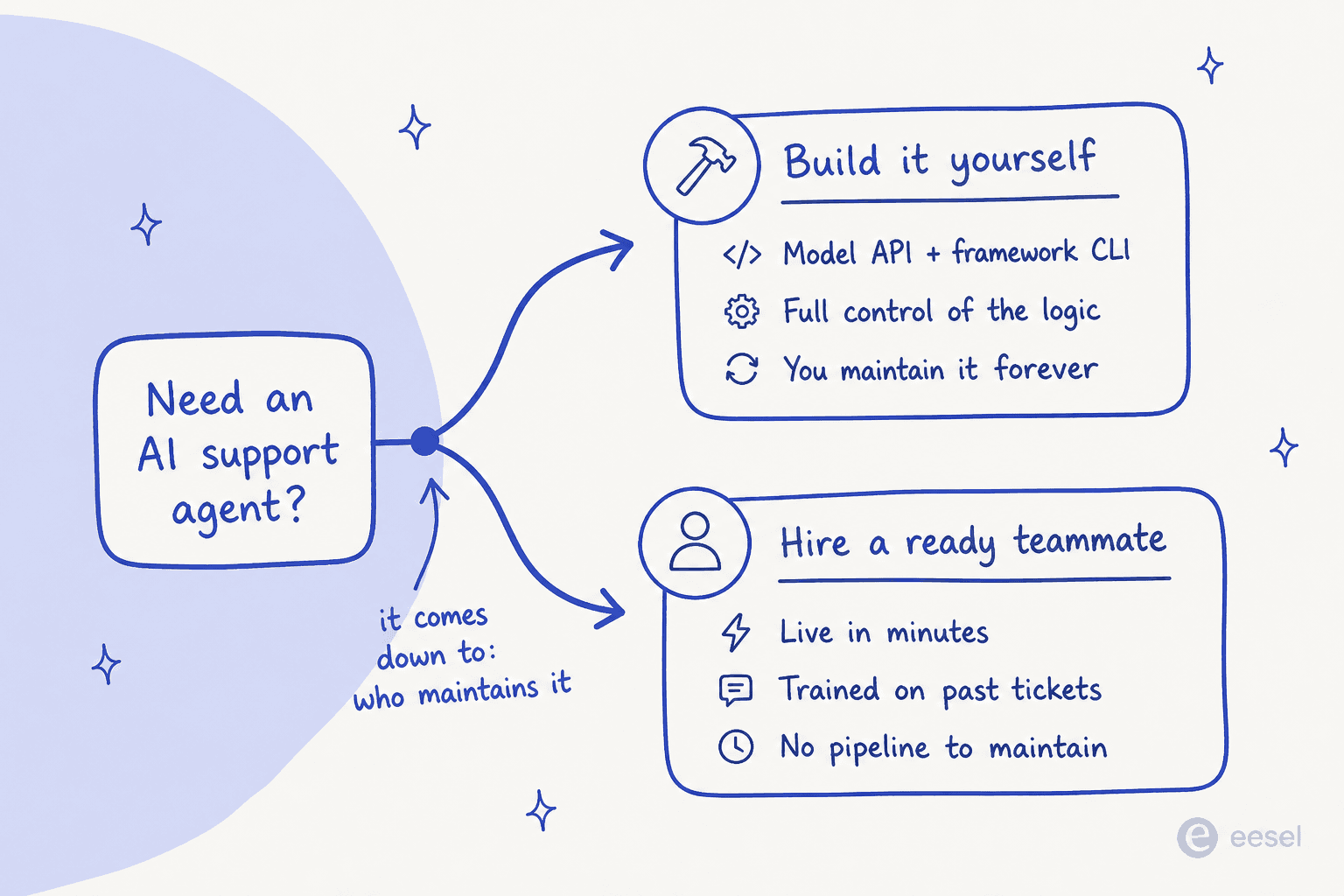
Building it yourself is the right call when the agent's logic is your actual product, or when you have engineers who want to own every layer and keep owning it. Some technical teams do go this way, and a few even leave managed tools to build on the Claude API directly. It is a legitimate choice, and I would not pretend otherwise.
But most support teams do not want to run an LLM application; they want their tickets answered. One eesel customer, an engineering lead at a Bitcoin-ATM and crypto-hardware company running a 300-plus-article knowledge base, put the trade-off plainly:
"We could try to write our own LLM application but we didn't want to invest our time into that. We wanted something that we would not have to maintain."
That is the deciding factor: who maintains it, forever. A CLI you build is a system you keep alive. A managed teammate is a system someone else keeps alive, and you point it at your helpdesk.
Try eesel
If the job is a support agent and not a coding copilot, eesel is the shortcut past the 90%. It is an AI helpdesk teammate that installs into the helpdesk you already run, Zendesk, Freshdesk, Gorgias, Slack and more, trains on your past tickets and docs, and joins the queue in minutes rather than a build cycle.
The differentiator is the part a CLI cannot hand you: you simulate the agent against your real ticket history before go-live, see exactly where it is strong and where it has gaps, and only turn on autonomy on the tickets it handles well. One customer, Gridwise, saw it resolve 73% of tier-1 requests in the first month. And when you do want programmatic control, the API and MCP-style tool access are there, so you get the scripting benefits of a CLI without owning the pipeline underneath it. Pricing is one fixed monthly price, from $299/month for 500 credits (1 credit per ticket or chat) with no per-seat fee, so the cost is predictable. You can try it free without a sales call.