


Cassidy is a good no-code platform for building AI agents on top of your own documents, and a poor fit if what you actually need is fewer support tickets. The knowledge base is real. The workflow builder beats most no-code canvases on depth, and the 2026 product ships fast, too. But every one of Cassidy's twelve published customer support templates ends the same way: a draft, or a triage decision, handed to a human. No resolution rate. No deflection number. No confidence threshold, anywhere in the public material.
The pricing story changed too. Cassidy no longer publishes a single dollar figure - the free Starter plan gives you 3 seats and 10,000 credits, and everything above that is a demo booking. Credits derive from tokens rather than tasks, so simply picking a Premium model can cost about five times more for the same job, and once the balance hits zero, the docs say your agents and workflows just stop.
I build integrations at eesel, so what caught my eye is what Starter leaves out: Slack, Microsoft Teams, API access, SSO, and every advanced integration, Zendesk included. On the free plan, there is no way to connect Cassidy to a helpdesk. If what you want is AI actually sitting on your support queue, not beside it, read that sentence twice - it's the reason I'd point a support team at eesel instead, where the helpdesk connection is where you start, and one credit is one ticket, not a token-based meter.
What Cassidy AI actually is
Three years back, I watched two paying customers' bots make up answers because the knowledge base had nothing that matched the question. One told a real energy customer about a solar-cell subscription that did not exist. Another, asked a product question, came back with "Oxygen (periodic table)." That's why every eesel rollout now simulates against historical tickets before it ever touches a live queue, and it's the lens I bring to any tool that claims its AI stays grounded in your documents.
Cassidy is a no-code platform for building AI agents and multi-step automations on top of your company's own knowledge. The homepage H1 is "Build AI Agents that handle your most complex work," and the meta description is more specific than most: an "AI Agent platform for document-heavy, operationally complex enterprises."
The company is Cassidy Inc., founded in 2023 and based in New York. It has raised $13.7M across two announced rounds: a $3.7M seed that closed in November 2023, and a $10M Series A led by HOF Capital in September 2025.
It was co-founded by Justin Fineberg, who runs an AI-education audience of more than 500,000 people and does most of the company's marketing himself. His co-founder Ian Woodfill spent two years building for the no-code platform Bubble beforehand. Woodfill's own April 2026 hiring post puts the team at "25 people, growing fast."
That Bubble lineage explains a lot about the product. Cassidy is a no-code builder first, an application second: a real strength if ten different teams need to build ten different things, and a real weakness if what you want is one thing that just works on day one.
Here is what it looks like in use. This is a Cassidy agent answering a question from synced company documents, with the sources it read shown as citation chips under the answer:
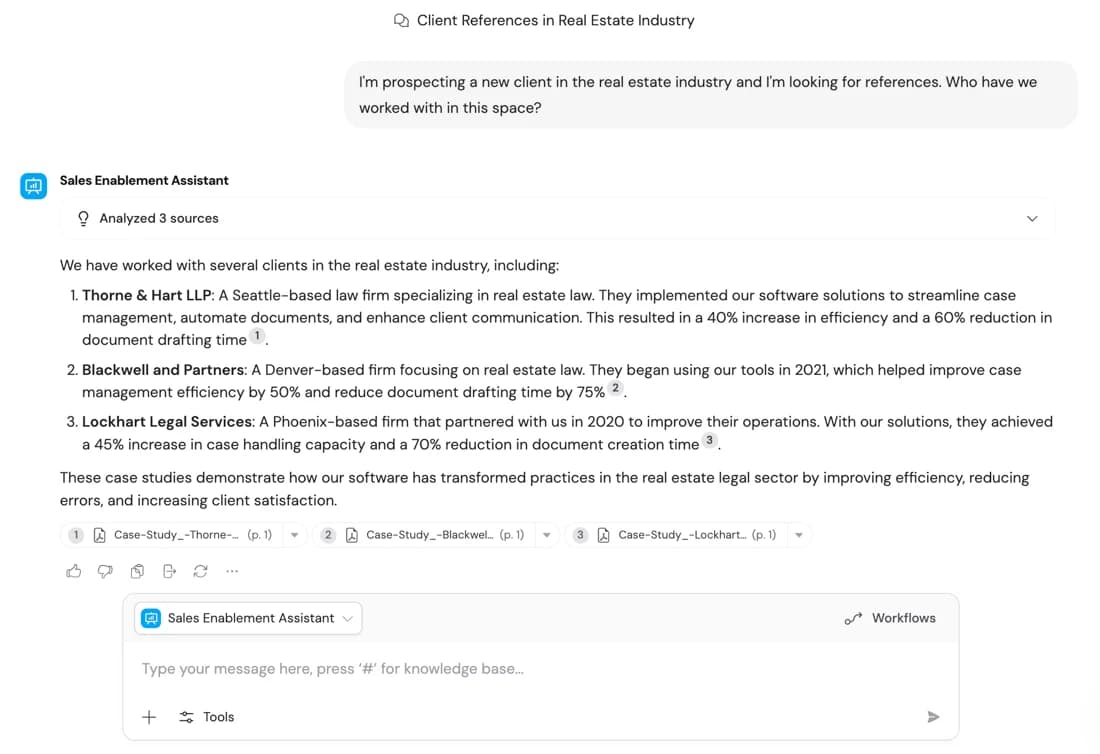
Citations under every answer is the right default. It's also the first thing I check in any tool that claims to ground its AI in your documents.
The verticals it sells into are named plainly on the homepage: insurance brokers and carriers, manufacturing and logistics, and professional services. The plays are submission intake, policy comparison, RFP drafting, spec search. Customer support is one of four use-case categories, and one of twelve solution categories in the sidebar. Support is a twelfth of Cassidy's taxonomy, not its centre of gravity.
How Cassidy works under the hood
Cassidy splits its own product into two halves, and that split is worth learning first, because it's how everything else hangs together.
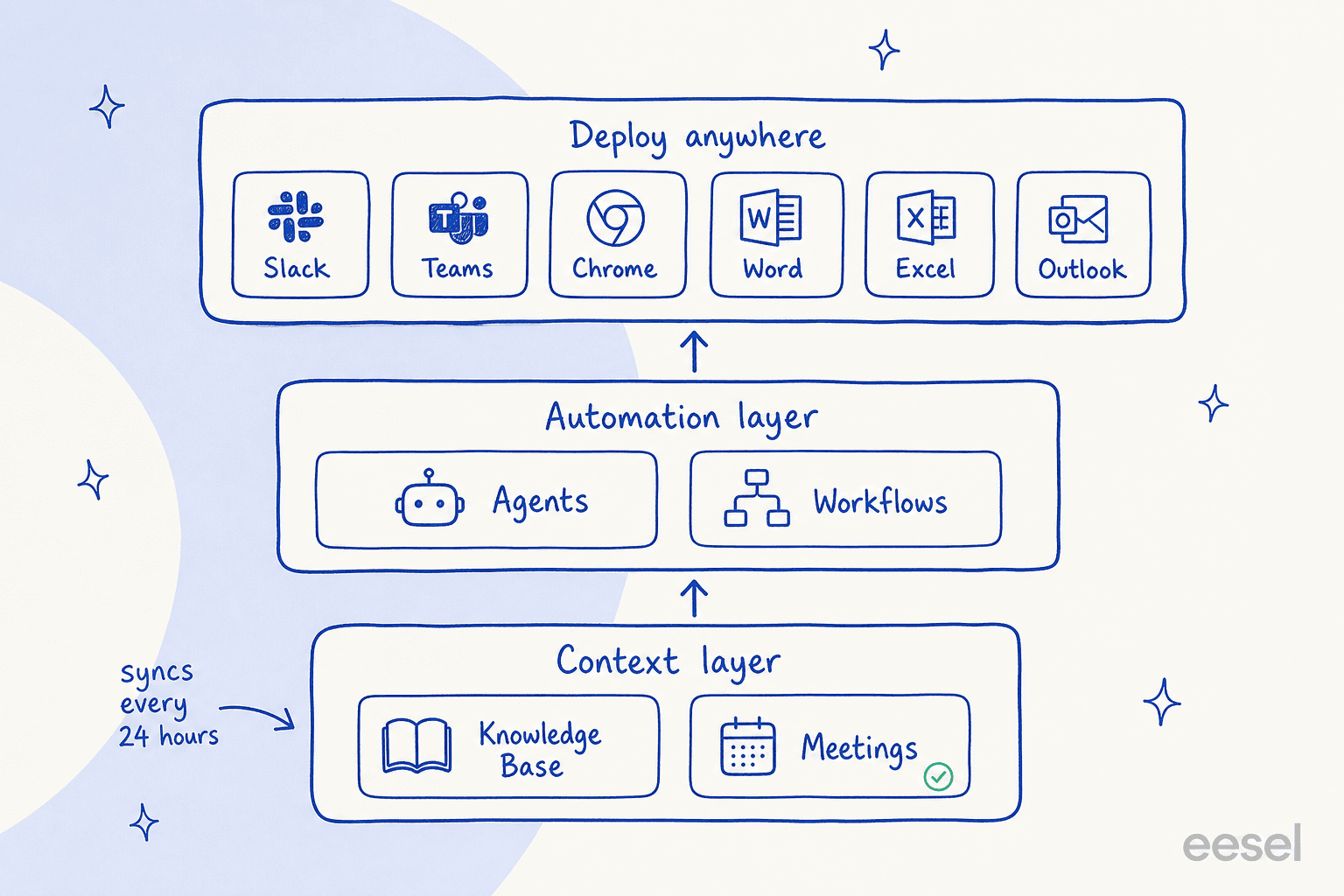
The context layer is the Knowledge Base plus Meetings. The automation layer is Agents plus Workflows. Everything gets deployed into Slack, Microsoft Teams, Chrome, Word, Excel and Outlook rather than into a product of its own.
The knowledge base
This is the part I'd rate highest. Content gets indexed with semantic search, and answers come back with source citations, the baseline you want from anything doing retrieval-augmented generation. What it accepts is broad: PDFs, Word, Excel, PowerPoint, CSV, plain text, source code files, plus audio and video that get transcribed automatically. Website crawling takes a starting URL and a crawl mode - Domain, Subdomain, Page, or a Custom glob pattern where * stops at a slash and ** crosses it.
There are two details that matter more than the feature list. First, Answer Hubs are curated question-and-answer pairs that return exact answers instead of summarised search, which is a smart hedge against the failure mode I opened with. Second, integration sources sync every 24 hours unless you are on Enterprise, per the sync docs. For a policy document that changed this morning, a 24-hour-stale answer is not a convenience problem. It is a wrong answer.
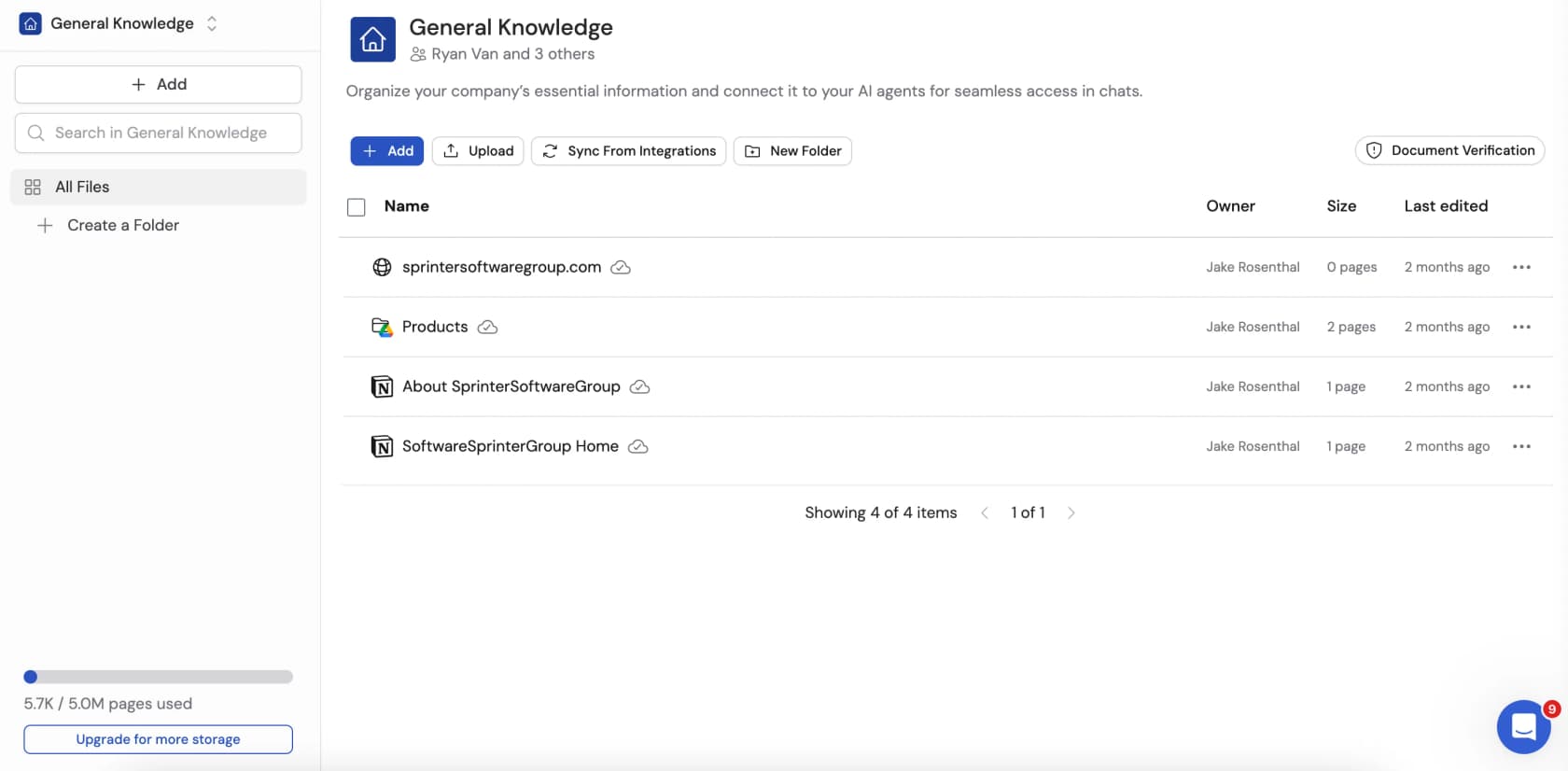
Governance here is decent. Collections and folders each carry their own access setting, and document verification lets an admin flag a document as potentially outdated and require review before agents keep using it. That governs what the agent reads, though, not whether it stays quiet when unsure. Document verification is also an Enterprise-only feature, so on the lower tiers, the only way to retire a stale document is deleting it.
One quirk to watch if you share agents across a team: if someone opens an agent that references a collection they cannot access, Cassidy automatically limits the scope of the search. That is the safe behaviour, but nothing in the answer says it happened, so two colleagues can ask the same agent the same question and get different answers with no warning.
The workflow builder
A Workflow is a trigger plus an ordered chain of actions, and the docs are refreshingly blunt about what that means: it "runs a defined sequence of steps every time." Five trigger families are supported - manual forms, scheduled, webhook, a dedicated inbound email address, and integration events including a new Zendesk ticket, a HubSpot or Salesforce record change, a Jira issue, or a meeting ending.
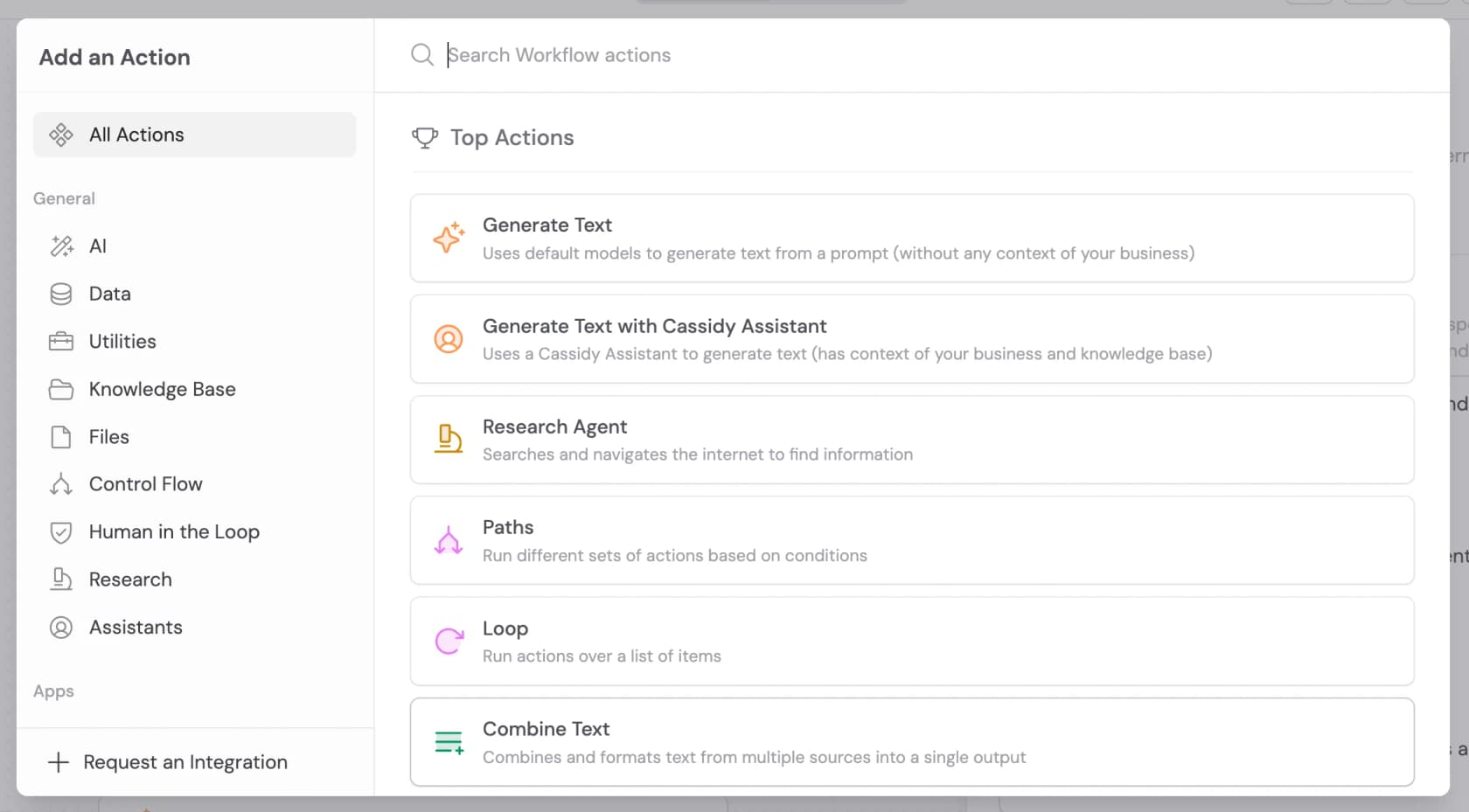
The action library itself is well labelled, and what I like is that Cassidy distinguishes plain "Generate Text" ("without any context of your business") from "Generate Text with Cassidy Assistant" ("has context of your business and knowledge base"). Plenty of platforms blur that exact distinction.
There are roughly 45 documented actions. The useful ones for support-shaped work are Search Knowledge Base, Categorize text, Analyze sentiment and Translate text. Control flow covers Paths, Loop, Only continue if, and Wait.
Two actions pause a run for a person: Request approval to continue, and Request input from team. That's real human-in-the-loop plumbing, and it's well built, too. Then there are two escape hatches for whatever the library doesn't cover: Send API request to any endpoint, and Run code, which executes custom JavaScript.
One thing catches almost everyone. The docs state it directly: "By default, actions do not have access to the output of earlier steps - you need to explicitly reference variables to connect them." You wire steps together by typing # and inserting a variable. It is a small thing that quietly turns "no-code" into "no-code, once you understand variable scoping."
The Workflow Copilot takes the edge off this. Describe what you want in plain language and it generates the trigger and the actions, while Restore checkpoint rolls back any change you didn't like. Its one hard rule, straight from the docs: "Do not manually edit the Workflow while the Copilot is working - your changes will be overwritten."
Models and integrations
Cassidy is model-agnostic and routes between tiers. The Standard tier lists GPT 5.2, Claude 4.6 Sonnet, Gemini 3 Flash and o4 Mini; the Premium tier lists o3, Claude 4.6 Opus and Gemini 3.1 Pro. Hold that thought, because the tier you pick is also the single biggest lever on your bill.
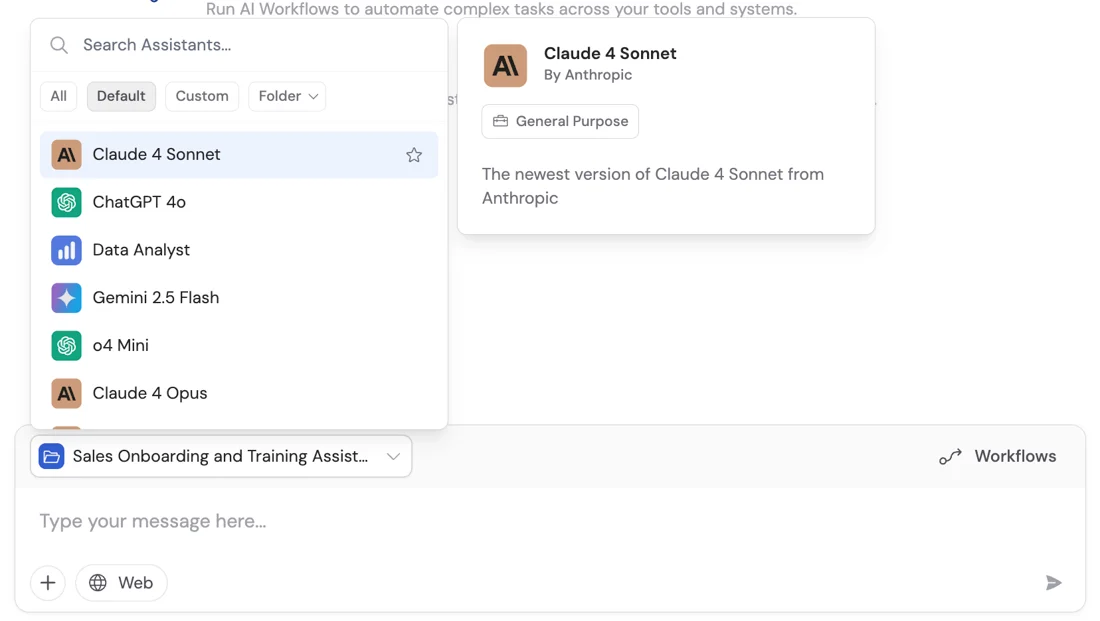
There's a related setting called Smart Search that deserves more attention than it usually gets. Turn it off and the agent searches your knowledge base on every request - accurate, but expensive. Turn it on and the model decides for itself whether to search. Cassidy's own guidance is to turn it off for any agent that must ground its answers in documents. The safe setting is also the costly one, and nothing in the interface tells you what that choice is doing to your bill.
On integrations, the marketing number is "100+". I counted the actual directory and it lists 73 integration pages. That is still a lot, and it covers the tools you would expect: Salesforce, HubSpot, Slack, Teams, Notion, Confluence, Snowflake, Workday, ServiceNow, Zendesk, Freshdesk, Jira Service Management. The caveat is depth - I opened /integrations/zendesk and the page is about four kilobytes of navigation chrome with no action list, no triggers and no setup steps. Breadth is verifiable from the public site; depth is not.
Cassidy AI pricing: the part that changed
If you remember Cassidy as a self-serve tool with a monthly price sitting on the homepage, that version is gone now. I checked the pricing page three ways - the rendered markdown, the bare-domain variant, and the full 339KB of raw HTML - and there isn't a single dollar sign on it.
The only dollar figure I could find anywhere in Cassidy's own public material is buried in a screenshot inside its billing documentation, and it is stale. This is the Stripe checkout illustrated on Cassidy's Manage plans page:
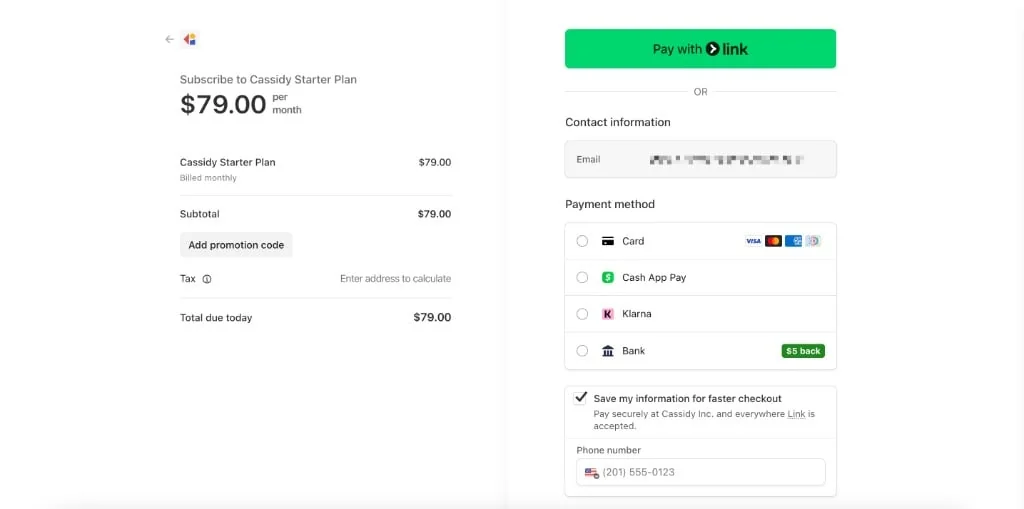
The docs still show a $79-a-month Starter plan while the live pricing page presents Starter as free. I won't claim to know exactly what changed, or when. What I can say: the marketing site and the documentation disagree about the shape of the cheapest plan, which is a bad sign for anyone trying to budget off public information alone.
Here is what the pricing page itself does state.
| Starter | Business | Enterprise | |
|---|---|---|---|
| Price | Free | Not published, "Custom" on every row | Not published, not in the table at all |
| How you buy | Self-serve signup | "Book demo" | Email support@cassidyai.com |
| Seats | 3 | Custom | Custom |
| Agents / Workflows | 5 / 5 | Custom | Custom |
| AI credits | 10,000 per month | Tailored | Tailored, rollover negotiable |
| Knowledge base storage | 30,000 pages on the plan card, "up to 100K pages" in the table | Tailored | Tailored |
| Source sync | Every 24 hours | Instant sync | Real time |
| Slack / Teams / Google Chat | No | Yes | Yes |
| API and browser embed | No | Yes | Yes |
| CRM and advanced integrations (Zendesk, ServiceNow, Jira, Salesforce) | No | Yes | Yes |
| SSO, audit logs, retention, GDPR tooling | No | Yes | Yes |
| LLM options | "Limited" | Full | Full |
Two things in that table carry the whole review. First, the same page gives Starter two different storage numbers, 30,000 pages on the plan card, 100K pages in the comparison table, both live at the same time when I checked. Second, the free plan has no Slack, no Teams, no API and no Zendesk connector, so the one thing most people would actually test, putting the assistant where the team already works, is exactly the thing the free plan won't do.
There is also a real third tier. Enterprise appears in the pricing FAQ and in the billing docs, but never as a column. The FAQ's Enterprise feature list overlaps almost exactly with what the table marks as Business, which reads like copy that predates a rename.
What a credit actually is
Credits aren't tasks, messages, or resolutions. Manage credits spells it out precisely: "Each call processes input tokens (your prompt, instructions, and Knowledge Base context) and generates output tokens (the AI's response). The number of tokens determines how many credits are consumed."
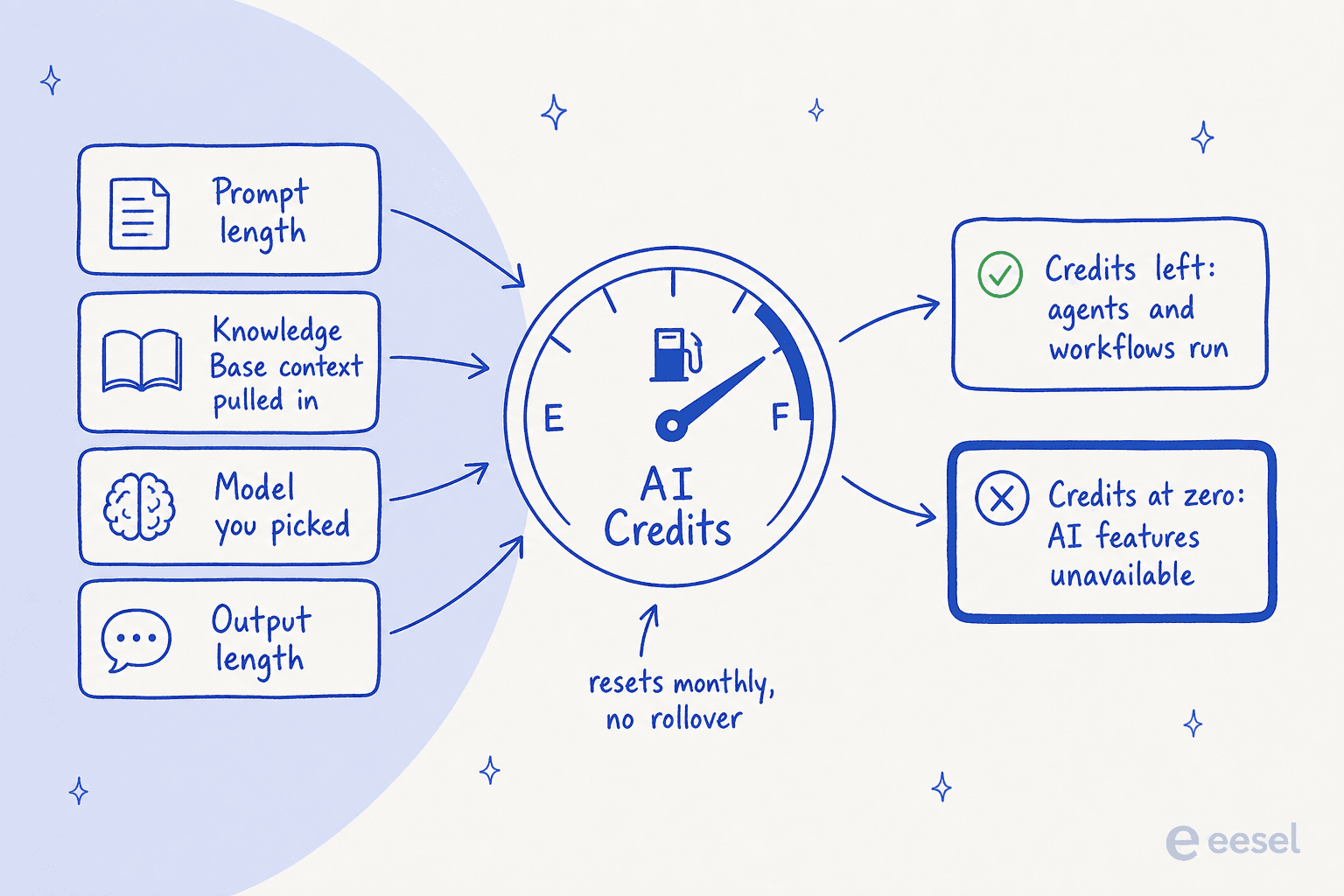
Cassidy's own credits article gives three numbers, and they are the only concrete ones that exist publicly:
- Agent chats cost between 1 and 30 credits, depending on complexity.
- Workflows cost from 1 to 100 credits, depending on scope and depth.
- Premium models consume roughly 5x more credits than Standard models.
Run the arithmetic on Starter's 10,000 credits and you get roughly 100 heavy workflow runs a month, or about 333 heavy agent chats. The same article names knowledge base access as a top burn driver, which is an awkward incentive: the thing that makes answers good is also the thing that makes them expensive.
There's no published dollar-per-credit rate, and this is stated as deliberate policy: "Rather than charging per individual credit, our pricing model factors in seats, features, support, and other benefits." Credits don't roll over, except on negotiated Enterprise agreements, and every top-up route runs through a conversation: upgrade the plan, or email support.
The contradiction worth knowing about
The pricing FAQ says: "You'll never be interrupted. Cassidy notifies you as you approach limits and offers seamless credit top-ups or plan upgrades."
The product docs say: "When your credit balance is exhausted, AI-powered features (Agent chats, Workflow runs) will be temporarily unavailable until credits are replenished."
Those cannot both be true. The usage docs back the second one and extend it: exceed storage and you cannot upload; exceed meeting hours and recording switches off. It is a hard cap, not a soft overage. I'd plan for the docs version.
To its credit, Cassidy does ship real cost controls: organisation alerts, per-user alerts, and per-user hard limits that block someone from credit-consuming actions once they hit their cap. The usage dashboard is at least clear about where things stand:
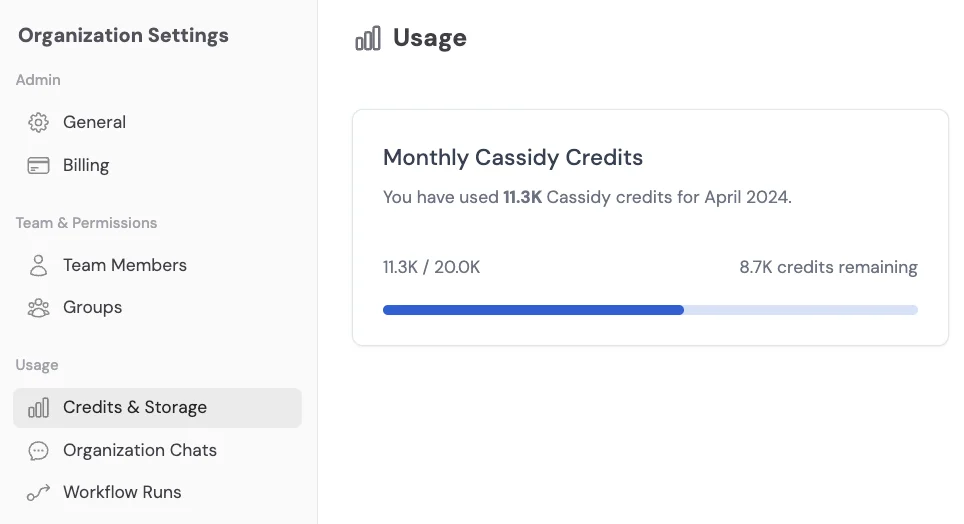
But the existence of that tooling tells you something too. You do not build a "Users Exceeding Credit Budget" panel unless burn is hard to predict.
Plug your own numbers in:
To be fair to Cassidy, its CEO has made the counter-case publicly, and in the same breath, half-concedes the problem:
"The right comparison isn't your CRM seat license, it's the loaded cost of the headcount or the agency retainer or the BPO contract that the AI is actually displacing."
He's right that anchoring AI spend to a seat licence is the wrong frame. He also notes in the same post that when teams tally their AI spend, the number tends to land higher than finance expected. Both halves of that are true, and the second half is exactly why an unforecastable unit hurts.
Here's where I should declare an interest, and also where the sharpest lesson sits. eesel uses credits too, but I keep the unit to one people already think in: 1 credit is one ticket or chat, plans from $299 a month for 500 credits, no platform fee. Cassidy's model is the opposite bet: an abstract unit that flexes with token volume and model choice. That's not dishonest, and the credits article explains it clearly enough. It's just very hard to budget against, and I've watched teams cancel a tool they liked purely because they couldn't forecast the bill.
What Cassidy does well
I want to be fair here, because the platform is good at the thing it was built for.
The no-code builder earns its name for non-technical builders. The best independent take I found comes from an AI strategist who ran a build lab cohort on it:
"We've been using Cassidy in Build Lab, and it has been relatively easy to pick up and has user-friendly features for builders and businesses. But many in our cohort are using n8n, for its functionality and technical options."

That trade-off is the honest summary of the whole category: Cassidy is easier, n8n goes deeper. If your builders are ops managers rather than engineers, easier wins.
Document-heavy work is the sweet spot. OCR extraction across PDFs, Word, PowerPoint and images, bulk runs over a CSV of a thousand documents, Answer Hubs for pre-approved RFP responses: one in-product screenshot in Cassidy's own material shows an RFP workflow generating 1,125 replies. That's a real capability, and it explains why the insurance and professional-services verticals are exactly where the case studies cluster.
It ships fast. The monthly product updates have run unbroken from November 2025 through May 2026. May 2026 alone added an upgraded Excel extension, a PowerPoint extension, an Outlook agent connector, PDF export and Enterprise custom roles.
The security posture is credible for a 25-person company. SOC 2 Type II attested, GDPR, HIPAA, CASA validated, encryption in transit and at rest, plus an explicit statement that customer data never trains the model. Worth flagging: the site's own badges say "attested" and "validated," while the FAQ upgrades all four to "certified" - a small looseness, but if you're running a SOC 2 and GDPR review, go by the trust centre, not the FAQ.
The team shows up. Three of the five G2 reviews name the support team or the founder personally:
"I have tried many other platforms but Cassidy wins hands down due to its simplicity of design, great user interface and a great founding and support team. One of the key highlights about Cassidy is that it has a very low learning curve and as such does not need any specific knowledge about LLM's or Assistant API etc."

Where Cassidy stops, and why it matters for support
Now the part I'd want to know before signing anything.
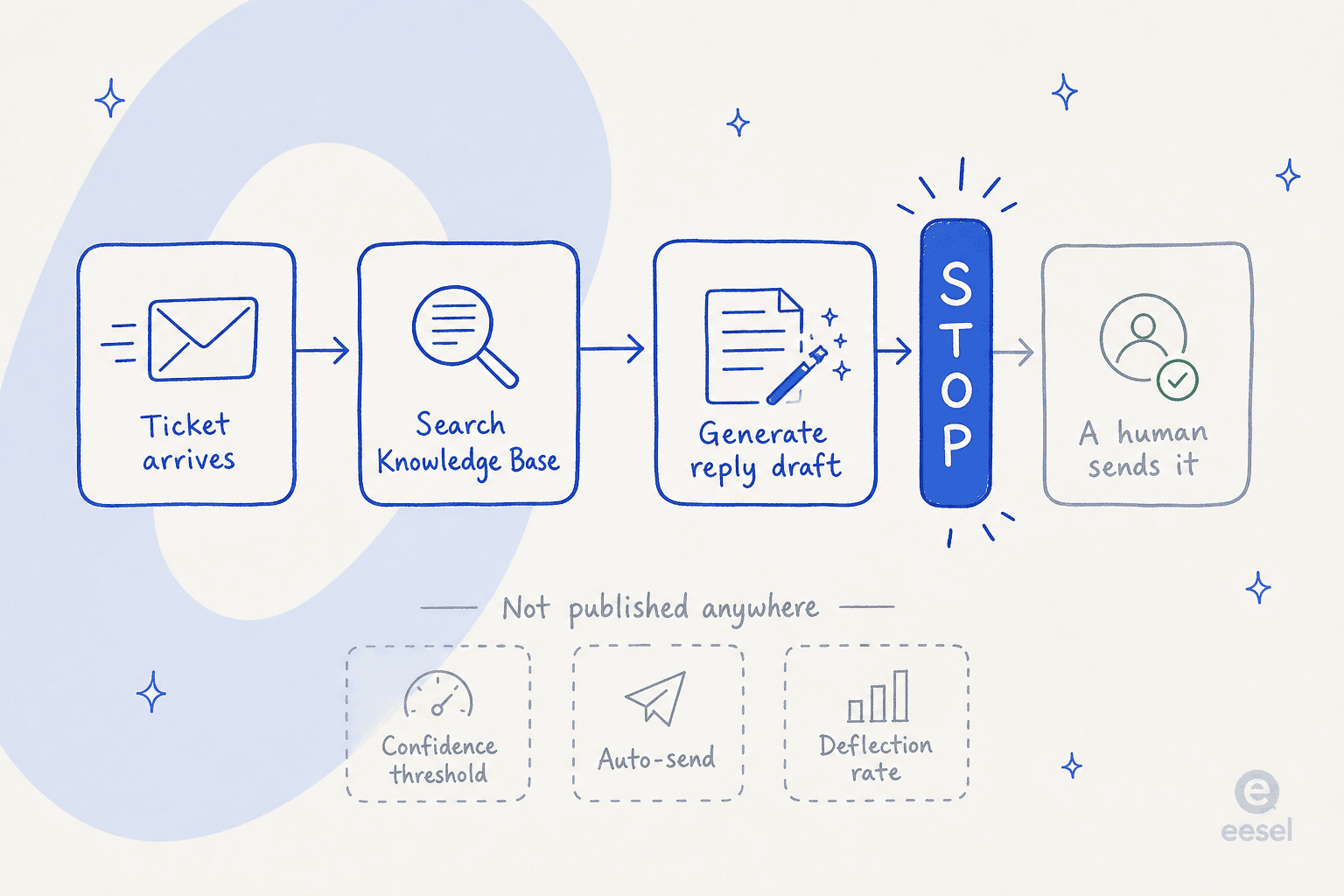
Cassidy publishes twelve customer support solutions, and I read every single one. The Customer Support Auto-Responder "pulls ticket and email details, searches a Knowledge Base, and generates on-brand reply drafts." The Ticket Context Enricher gives "agents concise, source-linked summaries" so "agents resolve issues faster." Cassidy's own cross-site FAQ sums up the whole category as "auto-draft replies to incoming tickets." Every published mechanic terminates at a human.
That is not a criticism of the engineering. It is a description of scope, and it has three consequences.
There is no resolution number anywhere. No AI resolution rate, no deflection rate, no cost per ticket - not on the marketing site, not in the docs, not in the case studies, not even in the CEO's own posts. The closest thing is a Series A line about a healthcare network that "generates policy-backed responses that reduce wait times," directional, not measurable. Every proof point Cassidy publishes is adoption-shaped, seats, workflow volume, headcount reached, rather than outcome-shaped.
There is no confidence threshold. I searched the support material for a tunable "answer only when confident" control and it does not exist. The one explicit human-in-the-loop rule I could find escalates on "sensitive topics" - a content category, not a confidence score. This is the exact gap that produced my opening story, and it is what one CX lead running around 7,000 tickets a month put better than I can:
"The AI will never be able to answer 100% of the questions, but if it tries and just answers 'sorry I don't know this,' I cannot go and check all my 7,000 tickets to see if the AI actually made a good answer - then the point is a little bit gone. I need an AI who is only handling the tickets that it's confident to handle and all the other ones, leave them alone."
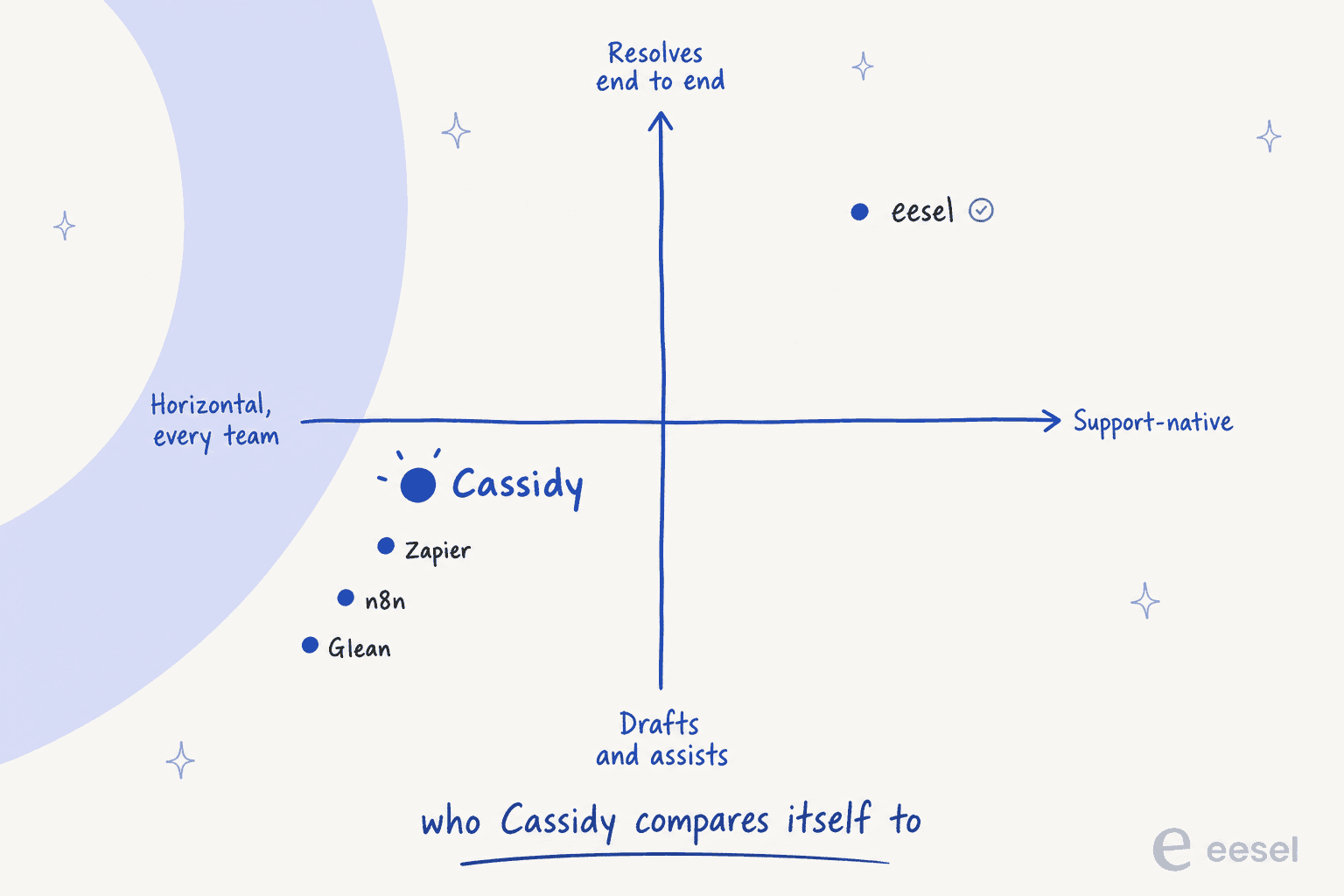
Cassidy does not think it competes with support AI. This is the clearest signal of all, straight from Cassidy itself. The company runs a "Cassidy vs." series on its own blog covering Zapier and n8n, Make.com, Glean, Microsoft Copilot, ChatGPT Enterprise, Claude, Codex, Loopio and Responsive. Not one helpdesk in that list. Not one customer-support AI, either.
Two more limits worth naming. The free plan cannot reach a helpdesk at all, since Zendesk, ServiceNow and Jira sit behind the paid "advanced integrations" gate along with Slack and Teams. And the 24-hour sync on Starter means a knowledge base that is always a day behind, which is the kind of thing that quietly produces wrong answers nobody traces back to a sync setting.
What real users say about Cassidy AI
This section is short, and the shortness is the finding.
Cassidy holds 5.0/5 on G2 from exactly five reviews. All five come from small businesses of 50 employees or fewer, four of them from North America, and the newest is dated 9 January 2025, roughly eighteen months stale as of this review. There are no G2 badges, no Grid placement, no category ranking, because five reviews falls below G2's threshold. For scale: G2's own alternatives page for Cassidy lists ClickUp at 4.6/5 from 13,335 reviews.
There is no Capterra listing. There is no Trustpilot profile. If you see a "4.9/5 on Trustpilot" figure for Cassidy circulating, it traces to AI-directory content mills rather than to Trustpilot, and Cassidy's own site carries no Trustpilot badge.
The single most useful negative in the whole review base is about limits, not quality:
"At this time, I'm using Cassidy at a basic level, and it has been fantastic. The only challenge I've encountered so far is the sheer amount of data I wanted to upload, which pushed into enterprise-level storage requirements."
Reddit has no dedicated Cassidy thread at all: no rollout story, no pricing complaint, no "we tried it and switched" post. What it does have is name-drops inside other people's tool lists, plus one actually useful build account from a marketer who wired Notion pages into Cassidy's knowledge base:
"I built an enterprise security assistant that is trained on our own company policies, added that assistant into a Cassidy Security questionnaire workflow template and can drop in an 80-question survey from a procurement team and have it auto-filled within 2 minutes. Then I take 20 minutes to review and approve and we are good to go. This would typically be several hours/a full day project to get through."

That is Cassidy at its best, and note what survives even in the most positive account in the corpus: a human still reviews before anything ships.
The sharpest negative-adjacent line anywhere is much quieter:
"I've been experimenting with Cassidy Ai, Dify and Langflow. Still not found the right tool though."
On LinkedIn, almost everything traces back to the founder's own feed. Hacker News has nine Cassidy posts, and every single one is the CTO recruiting. And across G2 and the Chrome Web Store, the loudest advocates are AI consultants and agencies reselling Cassidy builds to clients, not in-house teams running it themselves.
None of that means the product is bad. It means for a platform claiming 20,000 teams, there is almost no independent operator evidence to check any claim against - and the gap between that 20,000 figure on the pricing page and the "over 12,000 companies" its lead seed investor published is itself unexplained.
So who should actually buy Cassidy?
Buy it if you're an operations, insurance, RFP or professional-services team drowning in documents, you want non-technical people building their own automations, and there's budget for a sales conversation. Cassidy is well built for exactly that, and the services wrap around it - dedicated implementation experts, office hours, training - is real rather than a line item on a slide.
Skip it if your problem is ticket volume. Drafts do not reduce a queue; they redistribute the work inside it. And skip it if predictable cost is a hard requirement, because credits plus quote-only pricing plus a hard stop at zero is three sources of uncertainty stacked together.
Try before you commit either way. The Starter plan is free and it will tell you whether the knowledge base retrieves well on your documents, which is the one question no review can answer for you.
Try eesel if your problem is the queue
If a search for a Cassidy AI review is what brought you here while staring at a support backlog, the honest recommendation points to a different shape of tool entirely.

eesel is an AI teammate for the helpdesk rather than a canvas you build one on. It plugs into the helpdesk you already run, on the free plan, in a few minutes.
Zendesk and Freshdesk are first-class here, and so are Gorgias and Front. It reads the help centre and past tickets directly as sources instead of asking anyone to re-upload them somewhere new.
Then it does the three things this review kept finding missing. It answers with a confidence threshold, so it leaves alone the tickets it should leave alone. It hands off cleanly when it should. And it reports a resolution rate you can hold it to. One gig-economy analytics team, Gridwise, resolved 73% of tier-1 requests in its first month, after a seven-day trial.
Here's the part I'd flag as an engineer: before anything goes live, eesel simulates against historical tickets, so you see what the AI would have said on the real queue, before any customer ever does. That's the direct answer to the solar-cell story I opened with. And billing is one fixed monthly plan, 1 credit per ticket or chat, no seat fees, no token math to do in your head.
It is not the right tool if what you want is an RFP-shredding, spreadsheet-editing, meeting-transcribing internal automation canvas. That is Cassidy's job, and it does it well. But if the queue is the problem, start free and point it at your own tickets.