Why "Grok Bot for Document360" is even a search
When xAI launched Grok Bot on 2026-08-11, the product page shipped an example prompt aimed straight at support work: "Sign in to Zendesk so I can work the support queue." There's nothing Zendesk-specific about that mechanism. An agent that signs in and drives a browser doesn't care what's behind the login screen, so the same question lands on a knowledge base tool like Document360, where the two obvious jobs are "keep the docs written" and "answer people from them."
I build eesel's AI agents and the mechanism underneath them, so my instinct with any "just sign it in" pitch is to go find the seam between the demo and production. Here's the honest version up front: I've watched a confident-sounding bot quietly publish or answer with something wrong the moment the source content was thin, which is exactly why every eesel rollout gets rehearsed against real historical tickets before it touches a live customer. So when a brand-new agent tells me it'll run my Document360 knowledge base, my first question isn't "can it click." It's "what happens the first time it's confidently wrong, and does that mistake ship to my published docs before anyone sees it."
That's the lens for the rest of this piece. Grok Bot is a capable general-purpose worker. Let's look at how you'd actually point it at Document360, what it's good at, and where the seams show for a live help center specifically.
The two ways to connect Grok to Document360
There's no official Grok-to-Document360 integration and no marketplace listing. "Grok Bot for Document360" really means one of two very different setups.
Route A: Grok Bot drives the portal. This is the headline feature. Grok Bot spins up a managed cloud computer, you tell it to sign in to Document360, and you type your credentials in a screen handoff. From then on it works the portal like a logged-in editor: creating and editing articles in the WYSIWYG editor, setting slugs and metadata, moving pieces through categories, and publishing. Nothing on the Document360 side needs configuring, because as far as your workspace is concerned, a human is using the seat. That's the whole appeal, and I'll come back to why it's also the whole problem on a tool whose output is public.
One thing worth knowing before you try this: Document360 quotes by team accounts (editors and reviewers), among other factors, so a Grok Bot occupying an editor seat is occupying a real, billed account, not a free API caller.
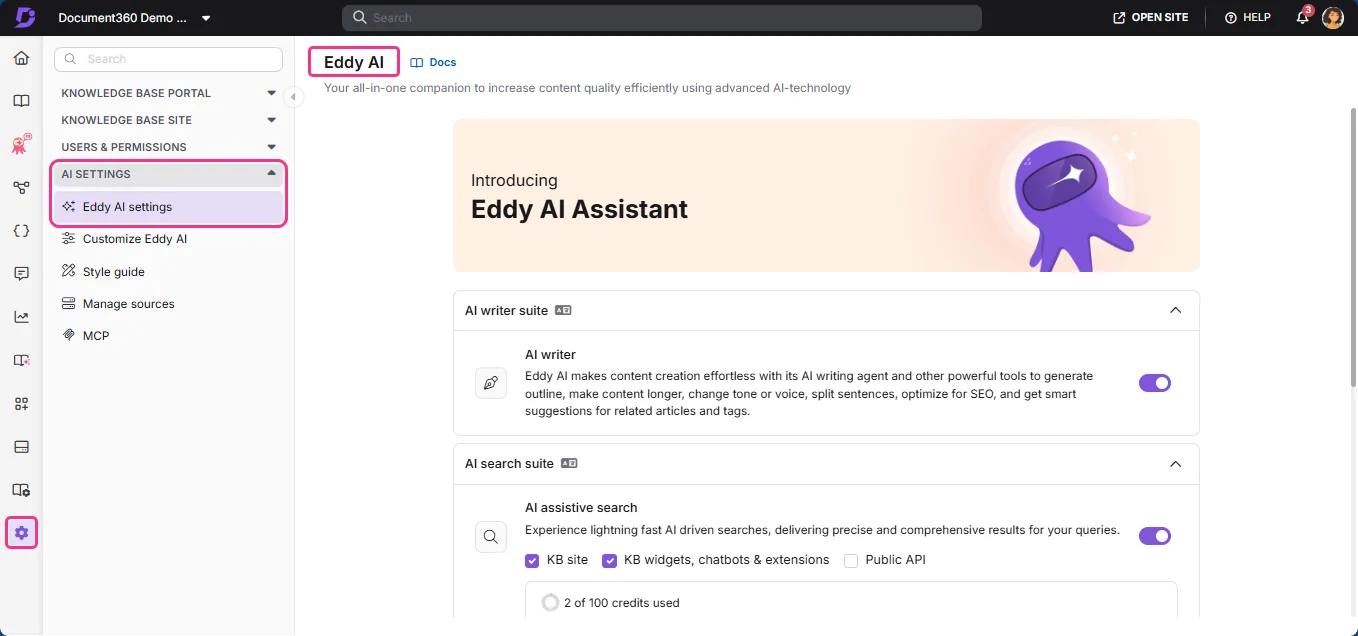
Route B: call the Grok API and wire it to Document360's own routes in. The more controllable path treats Grok as a model rather than a screen-driving worker. You call grok-4.6 from your own middleware and read or write through Document360's REST API, or, increasingly, its own MCP server. That MCP server is part of Document360's AI Premium Suite, the same premium bundle that carries Eddy AI, so it's a paid, gated surface rather than something on a bare plan. It's a real programmatic path, but you're now paying for the premium suite whether or not you use the rest of it.
For most teams evaluating this, Route A is what "Grok Bot for Document360" actually means in practice, so that's where I'll spend the most time.
What Grok Bot is good at
Credit where it's due, because the design is clever. Grok Bot reaches tools that have no clean API by driving the UI the way a person does, which is the honest descendant of RPA. If your documentation workflow lives in the Document360 portal and a pile of adjacent tools, an agent that just uses the screen sidesteps any integration project. There's nothing to scope.
It's also good at the long-tail, ad-hoc authoring task. "Go through every article in the Billing category, flag the ones that haven't been touched since last year, and draft a refreshed intro for each" is the kind of job it handles well as a research and drafting assistant for one power user, because it can move between Document360 and a source doc or a Slack thread in one session without you wiring anything together.
And the model underneath is strong. Grok 4.6 is a capable reasoning model, so the drafts and summaries it writes read well. The catch, as always, is that "reads well" and "is correct" are different tests, and a public help center only rewards the second one.
Where it gets risky for a live help center
Here's where "just use the screen" turns from a feature into a liability, and none of it is about Grok the model being weak. It's that a general-purpose worker with a shared browser session is the wrong shape for production content, and a documentation tool makes that mismatch bigger, not smaller, because its output is the thing customers read.
There is no dry run. xAI's own docs say it plainly: "A test run performs real work. It can navigate websites, change files, and call connected tools." So there's no way to point Grok Bot at a batch of your articles and see how it would have rewritten them before it touches the live ones. On a help center, an edit isn't a draft in a private queue, it's a change to your published site, and the rehearsal step that would catch a bad one simply isn't there.
One shared computer, one reused login. All of a user's bots share a single cloud computer, and once you've signed into Document360, that session persists and every other bot can reuse it. xAI says it twice in its docs: "Do not use separate Bots as a security boundary." Deleting a bot leaves its files and sign-ins behind.
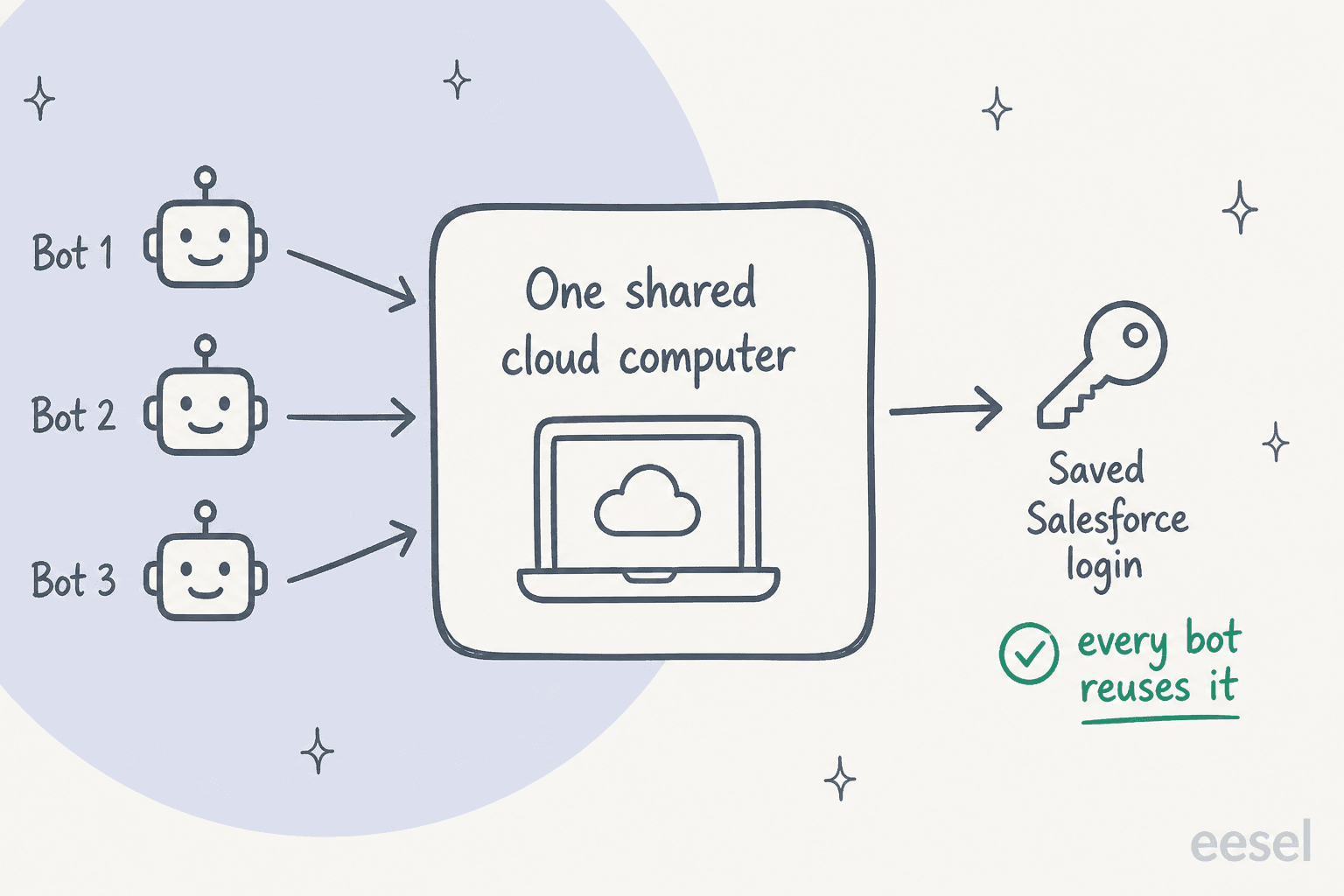
Now picture what a Document360 editor login actually holds: publish rights to every article your customers read, plus, on private projects, the reader accounts and access rules for internal docs. A persisted session to that portal is a standing key to your published brand voice. Document360 itself is SOC 2 Type II and ISO 27001 certified, so the certified thing here is the KB, and the uncertified thing is the worker you'd bolt on top of it.
No per-response audit, and no scoping. Grok Bot's docs say "An audit view of Bot actions is coming," in the future tense. So today there's no clean per-action record of why it edited an article the way it did, and because it's signed in as a human working the whole portal, there's no built-in way to say "only draft, never publish" or "only touch the FAQ category." A logged-in worker has one mode: it works. Approvals don't fully close that gap either, because xAI's docs note an approval "controls the proposed action. It does not reverse work already completed." Once an article is published, there's no calling it back short of a manual revert. One support lead I've heard from put the autonomy problem better than I can:
"The AI will never be able to answer 100% of the questions, but if it tries and just answers 'sorry I don't know this,' I cannot go and check all my 7,000 tickets to see if the AI actually made a good answer, then the point is a little bit gone. I need an AI who is only handling the tickets that it's confident to handle and all the other ones, leave them alone."
A CX lead at a DTC brand running ~7,000 tickets/month
No compliance certifications on the worker. Grok Bot claims no SOC 2, ISO 27001, GDPR, or HIPAA, publishes no retention period, and defers to Cursor's terms. If your Document360 projects include private, customer-specific, or regulated documentation, that gap is the layer you're adding, not the one you already vetted when you bought the KB.
The cost picture nobody screenshots
Route A looks cheap on the sticker: $200/month on Cursor Ultra or $120/seat/month on Cursor Premium Teams, per x.ai/bot. But that's a seat price. It buys access to a worker, not work done, and on top of it you pay a weekly AI-token allowance with overage billed at model and token cost. There's no Grok Bot-specific spend cap yet, which for an autonomous agent editing live content is its own risk.
Route B stacks meters that are both hard to pin down. You pay Grok's API directly, grok-4.6 lists at $2.00 in and $6.00 out per million tokens, and if you use Document360's own Eddy AI for the answering side, you also pay its credit-based billing, where each chatbot query consumes one AI credit and each chatbot has a 40 MB source cap, priced individually.
None of it comes with a public dollar figure on the Document360 side, because Document360 retired its published tiers and moved to quote-only pricing, calibrated on six factors including "AI Premium Suite usage." Seat price, plus an uncapped token allowance, plus a consumption meter you can only get on a sales call, is a hard number to forecast, which is the opposite of what you want when you're measuring support ROI.
The honest split: authoring vs answering
Before the alternative, one distinction that matters, because it changes what "AI for Document360" even means. Document360 has two jobs. One is authoring, keeping the docs written, versioned, and organized, and that's the job Document360 is built around, the same job it competes for in a Document360 vs Helpjuice comparison. The other is answering, turning that content into replies so fewer tickets reach a human.
Grok Bot, Route A, is aimed at the first job. Document360's own Eddy AI covers the second one natively, with assistive search and an embeddable chatbot trained on your KB.
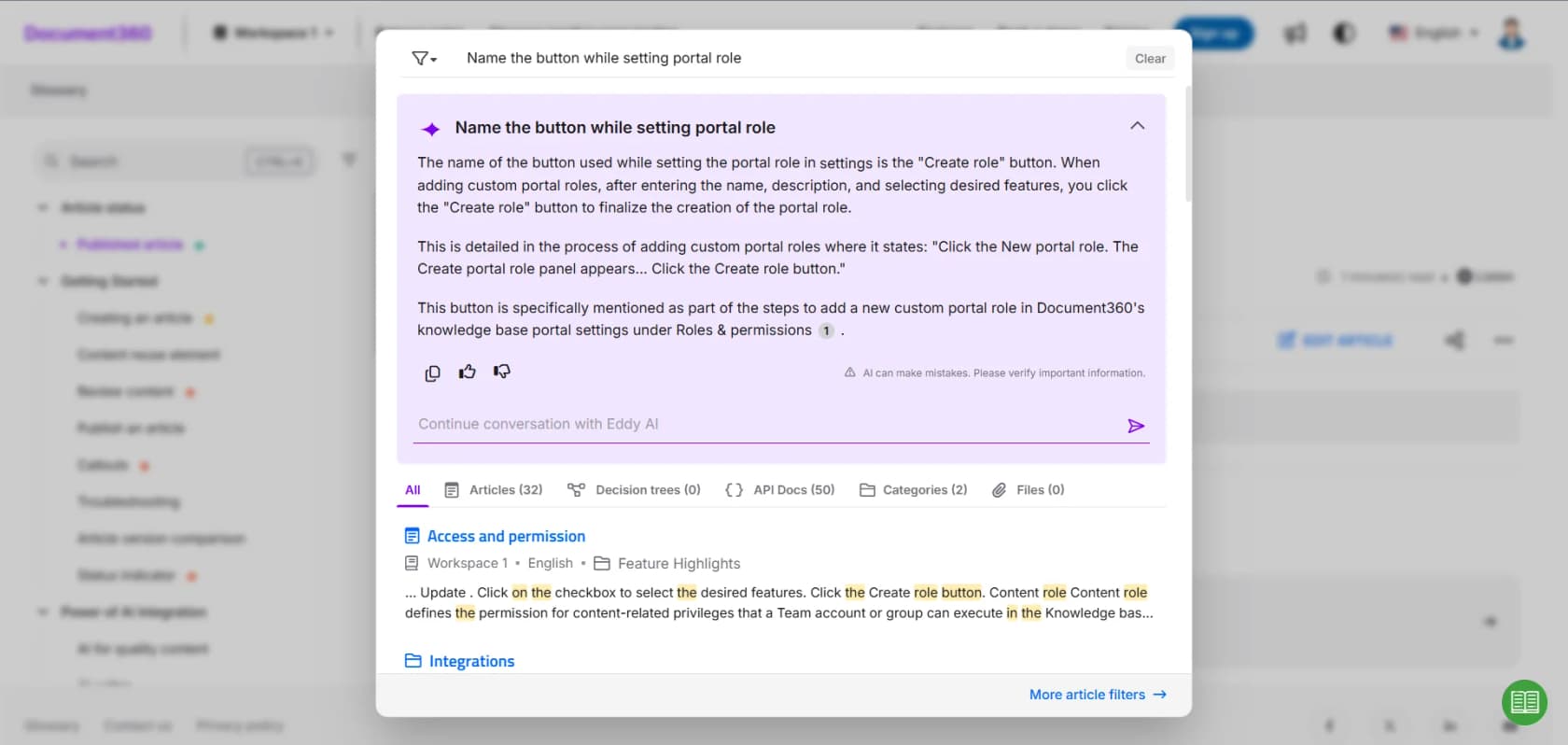
If your goal is fewer tickets, you're in the answering job, and that's where eesel fits, not as a replacement for Document360's authoring, but as the answer layer on top of the content you already keep there.
The alternative: an AI answer layer built for support
Here's what the two Grok routes have in common: both leave the safety layer to you, and neither gives you a way to rehearse first. That's the exact gap eesel exists to close.
eesel is an AI teammate platform, and for support you hire the AI helpdesk teammate. eesel doesn't try to be your documentation tool, and it doesn't have a native Document360 plugin, so instead of pretending otherwise, you point it at your Document360 knowledge base as a source it crawls, alongside your past ticket history, and run it as a customer-facing AI agent: a chat bubble, inline embed, or public chat link that sits in front of your support channels. Anything it can't resolve is handed off to a human cleanly, which is the shape most customer support automation actually needs.

The difference that matters most is the one neither Grok route has: you can simulate the agent against hundreds of your real historical tickets before it answers a live customer. It replays past conversations, scores its answers against what your team actually sent, and hands back the gaps plus suggested instruction changes, so you get a real accuracy read before a customer is involved, not after. You also get controls a live rollout actually needs: start in a mode that only drafts or tags, add public replies once you trust the numbers, and let it hand off to a human whenever confidence is low.
You also get the audit trail that's still "coming" on the Grok side. Every run shows up in an activity log with the reasoning and the sources it used, so ticket classification and every reply stay reviewable instead of a black box.

And if the reason you were drawn to the API or MCP route was programmability, you don't lose it. eesel ships a real terminal surface: a CLI (@eesel/cli) where the docs literally say "everything on this site can be done from the terminal," an MCP server so a coding agent like Claude Code or Cursor can drive the same workspace, plus webhooks and Network Access for calling your own systems. Every command prints JSON, and a dry-run flag previews a write before it runs, the exact rehearsal step that's missing from Grok Bot's own routes today.
On cost, it's a flat $0.40 per ticket handled, billed regardless of outcome, with no per-seat fee and an optional hard monthly spend cap, so there's no uncapped token allowance or unpublished credit rate to babysit. On security, eesel redacts PII at ingestion, never trains models on your data, is GDPR compliant with EU residency on request, has SOC 2 Type II underway, and offers HIPAA with a BAA on its Enterprise plan.
Try eesel on your Document360 content
If you came here wanting fewer tickets to reach your team, that's what eesel is for, and it goes live in a few minutes. It works like a new hire that already read your Document360 help center and your ticket history, and the first thing it does is show you how it would have handled your last few hundred conversations, so you're never flipping a switch and hoping.

Flat $0.40 per ticket, no per-seat cost, and a free trial with $50 of usage and two blog generations, no credit card required.
If you want to see the wider field first, our roundup of the best AI knowledge base tools is a good next read, alongside our closer look at Document360's own AI and how Document360 pricing works now.
Frequently Asked Questions
Can Grok Bot manage my Document360 knowledge base?
How much does Grok Bot cost for Document360 automation?
Is Grok Bot secure enough for my Document360 portal?
What's the difference between Grok Bot and Document360's own Eddy AI?
Can I connect Grok to Document360 through MCP?
How much does Document360 cost now?
What's the easiest way to add reliable AI answers on top of Document360?
Does Grok Bot replace Document360?


Article by
Alicia Kirana Utomo
Kira is a writer at eesel AI with a Computer Science background and over a year of hands-on experience evaluating AI-powered customer service tools. She focuses on breaking down how helpdesk platforms and AI agents actually work so that support teams can make better buying decisions.