Why "Grok Bot for Confluence" is even a search
When xAI launched Grok Bot on 2026-08-11, the whole pitch was an agent that signs into your real tools and works end to end, no API required. The product page even ships an example prompt aimed straight at support work: "Sign in to Zendesk so I can work the support queue." Swap Zendesk for Confluence and you have the exact question a lot of knowledge managers are now typing into search: can this thing read my wiki, keep it tidy, and answer questions from it?
I build AI agents for a living, so I'll give you the honest version up front: the gap between "an agent can edit a page in a demo" and "an agent I'd trust to touch our runbooks unsupervised" is enormous. A wiki is the one place where a confidently wrong edit doesn't just annoy one person, it quietly poisons the source everyone else reads next. I've watched bots improvise an answer when the knowledge came back empty, which is exactly why every rollout I've been near now gets rehearsed against real history before it touches anything live.
So when a brand-new autonomous agent tells me it'll manage my Confluence, my first question isn't "can it click." It's "what happens the first time it's confidently wrong, and who notices before the whole team has read it?" That's the lens for this piece. Grok Bot is a genuinely interesting general-purpose worker. Let's look at how you'd point it at Confluence, what it's good at, and where the seams show for a knowledge base specifically.
The two ways to connect Grok to Confluence
There are exactly two routes, and they're very different amounts of work.
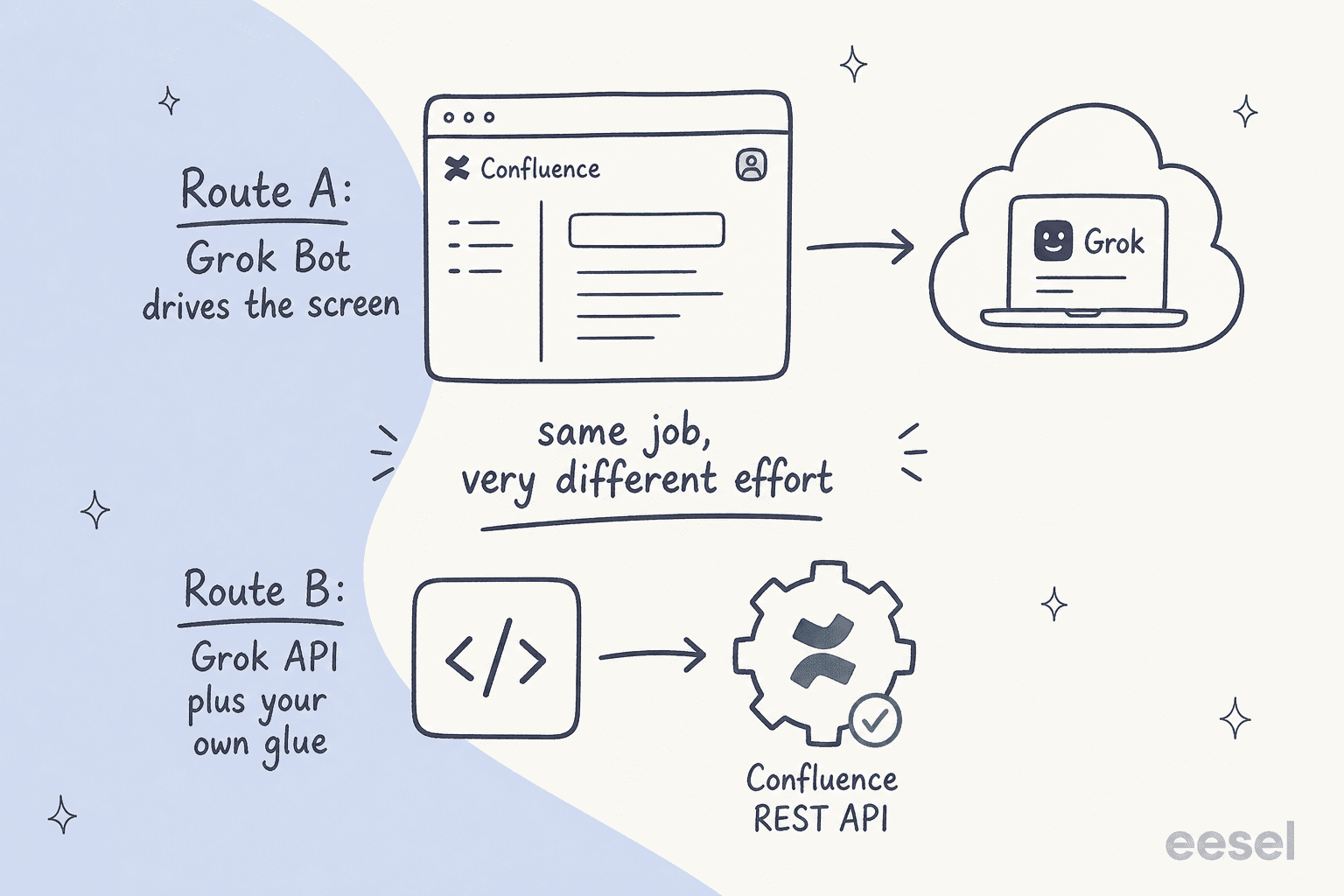
Route A: let Grok Bot drive the screen. This is the headline feature. Grok Bot spins up a managed cloud computer, you tell it "sign in to Confluence and help me with the wiki," it opens a browser, and you type your credentials in a screen handoff. From then on it clicks through Confluence like a logged-in user: opening spaces, reading pages, searching, drafting new content, editing existing pages. Nothing on the Confluence side needs configuring, because as far as your instance is concerned, a human is using the seat. That's the whole appeal, and the whole problem, and I'll come back to it.
Route B: call the Grok API and build your own glue. The other route treats Grok as a model, not a worker. You call grok-4.6 from your own middleware, then read and write Confluence content through the Confluence REST API. This is the auditable path, but it's a build, and it's the one where the write semantics can bite (more on that below). Worth knowing before you start: Confluence's own native AI is Rovo, and Grok isn't one of the models Atlassian exposes inside it, so the API route is glue you write and maintain yourself, not a model you pick from a menu.
For most teams, Route A is what "Grok Bot for Confluence" actually means, so that's where I'll spend the most time.
What Grok Bot is genuinely good at
Let me be fair before I'm critical, because the design is clever. Grok Bot reaches tools by driving the UI the way a person does, which is the honest descendant of RPA. If your Confluence is a decade-old maze of spaces, macros, and Marketplace apps nobody has documented, an agent that just uses the screen sidesteps all of it. There's no integration project.
It's also good at the long-tail, one-off knowledge task. "Pull every page tagged onboarding, find the three that contradict each other, and summarise the conflict in a new draft" is the kind of ad-hoc job it handles well, because it can move between Confluence, Slack, and a Google Doc in one session without you wiring anything together. As a research assistant for one power user, that flexibility is real.
And the model underneath is strong. Grok 4.6 is a capable reasoning model, so the prose it writes reads well. The catch is that "reads well" and "is correct" are different tests, and a knowledge base only rewards the second one. A plausible-sounding but wrong edit to a security runbook is worse than no edit at all, because now it looks authoritative.
What you'd actually be pointing it at
Before the risks, it helps to picture the surface. On the Confluence side, Route A means Grok is clicking around your spaces and page tree, the same view your team uses every day.
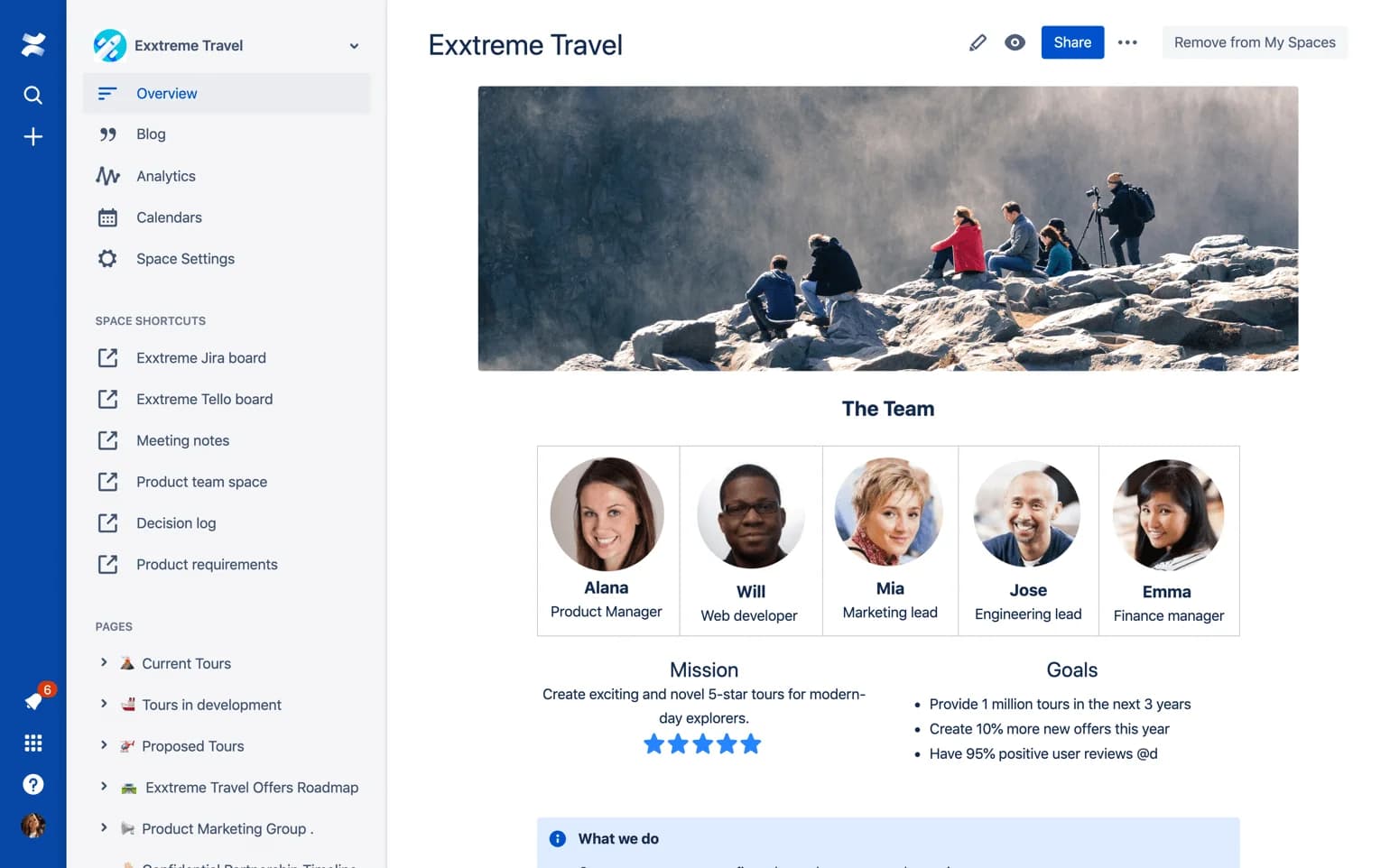
That's where teams keep meeting notes, decision logs, product specs, HR policies, and the runbooks on-call engineers open at 3am. A lot of it is genuinely automatable housekeeping, but it's also content where the wrong action has a blast radius: overwriting a page, deleting a section, or publishing a half-finished draft that someone then treats as truth. Keep that surface in mind for the next section.
Where it gets risky for a live knowledge base
Here's where the "just use the screen" design turns from a feature into a liability. This isn't about Grok the model being weak. It's that a general-purpose worker with a shared browser session is the wrong shape for a production knowledge base.
There is no dry run
xAI's own docs say it plainly: "A test run performs real work. It can navigate websites, change files, and call connected tools." So there's no way to point Grok Bot at your wiki and see how it would have reorganised or rewritten a set of pages before it actually does. For anything touching a shared source of truth, this is the single biggest gap. The whole discipline of a safe rollout is rehearsal, and this route skips straight to opening night, live, on the page your whole team reads next.
One shared computer, one reused login
All of a user's bots share a single cloud computer, and once you've signed into Confluence, that session persists and every other bot can reuse it. xAI says it twice in its docs: "Do not use separate Bots as a security boundary." Deleting a bot leaves its files and sign-ins behind.
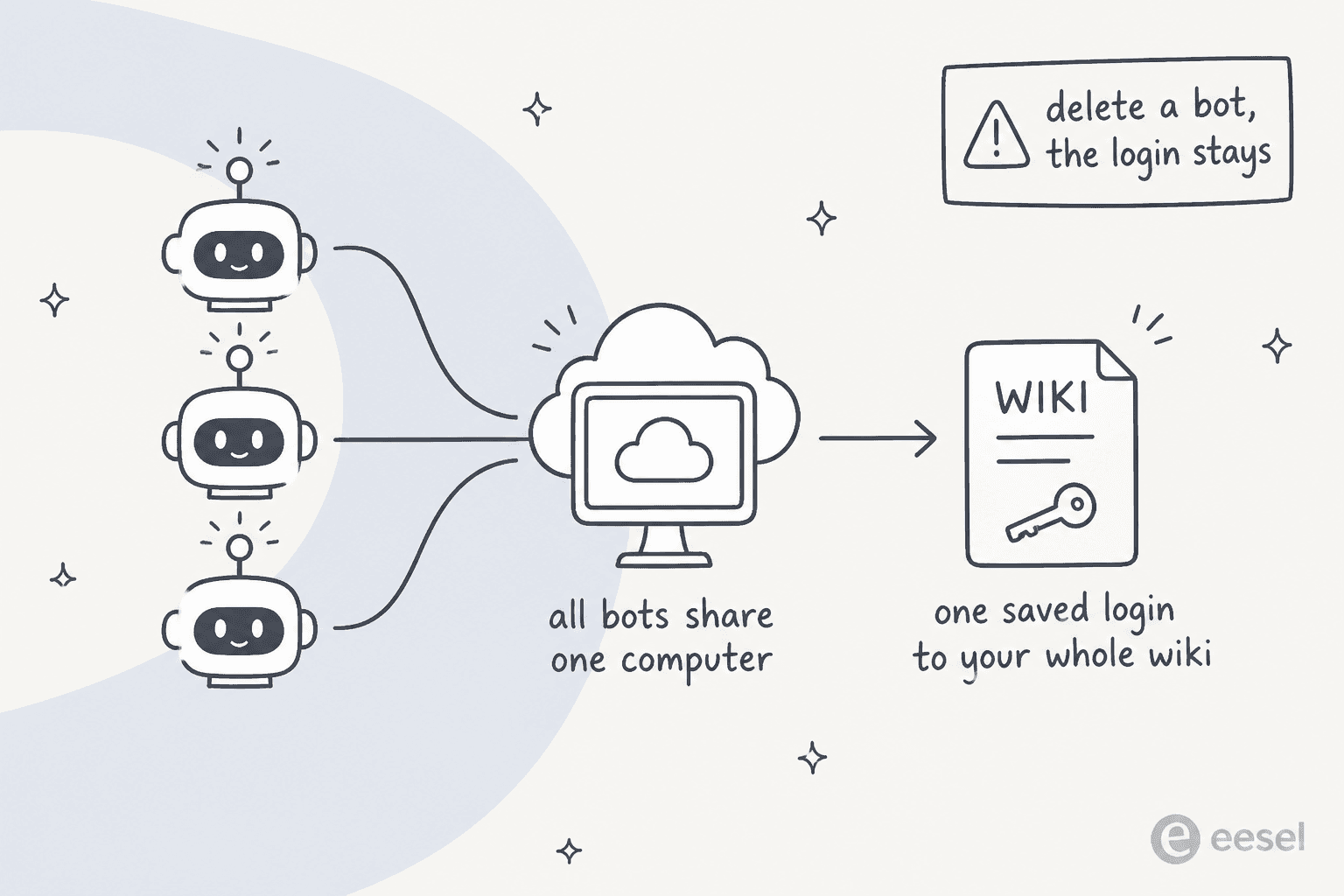
Now picture what a Confluence session actually holds. A wiki is where internal policies, security runbooks, customer lists, and unreleased plans all live, and a persisted login to it is a standing key to every space that seat can see. On a recent rollout, a buyer's security review wouldn't sign off until we could show that content containing PII stays inside their environment. A shared, always-signed-in browser session is exactly the surface that review is designed to catch. If you care about knowledge base data privacy, start here.
Letting an AI write to your wiki is where it gets scary
This one isn't hypothetical for Confluence specifically. Earlier in 2026, when teams first pointed AI assistants at Confluence through Atlassian's own Rovo MCP connector, a critical defect silently destroyed page content: the update call took the whole page body, and a title-only "rename" was read as "clear the body," so renamed pages had their content wiped. Atlassian confirmed it and shipped granular edits in a preview fix on 2026-07-01, so it's fixed now, but the lesson stands. An AI editing pages through a whole-body-replace API, with no dry run and no review step, is one confused instruction away from erasing a page. Route A driving the editor by hand has the same failure mode, just with a mouse instead of an API call.
The audit trail and the compliance page are both mostly blank
Grok Bot's docs say "An audit view of Bot actions is coming," in the future tense. So today there's no per-action record of why it edited a page the way it did, which is a hard requirement for anything under change control. And because it's signed in as a human using the whole seat, there's no clean way to say "only touch pages in this space" or "only act when I explicitly ask." Approvals don't fully close the gap either, because xAI's docs note an approval "controls the proposed action. It does not reverse work already completed."
That autonomy problem is the exact thing buyers push back on. One support lead put it better than I can:
"The AI will never be able to answer 100% of the questions, but if it tries and just answers 'sorry I don't know this,' I cannot go and check all my 7,000 tickets to see if the AI actually made a good answer, then the point is a little bit gone. I need an AI who is only handling the tickets that it's confident to handle and all the other ones, leave them alone."
A CX lead at a DTC brand running ~7,000 tickets/month
A logged-in worker has one mode: it works. This buyer's whole requirement was that the AI not touch most of it. On top of all that, Grok Bot claims no SOC 2, ISO 27001, GDPR, or HIPAA, publishes no retention period, and defers to Cursor's terms. If you're a regulated shop keeping compliance docs in Confluence, that alone ends the conversation.
What Confluence already ships natively (and where it stops)
It's worth naming the incumbent, because a lot of teams asking "can Grok manage my Confluence" haven't fully switched on what Atlassian already gives them. Confluence's native AI is now Rovo: Rovo Search across your wiki, Rovo Chat for asking questions of your knowledge, and Rovo Agents for specialised tasks.
The catch is the gate, and the meter. Rovo needs a Standard, Premium, or Enterprise plan, and it's metered in Rovo credits, 25, 70, and 150 per user per month on Standard, Premium, and Enterprise. That sounds generous until you see the burn rate: a chat quick answer is 10 credits and a Deep Research run is 100, so a Premium seat is roughly seven chat answers a month before you're out. Confluence Free has no Rovo at all. So the native path is real and well-integrated, but it's priced per seat, capped by credits, and lives inside the Atlassian ecosystem: great if you're all-in on Atlassian, tighter than it looks if your team leans on AI answers daily or your knowledge is spread across tools Rovo doesn't reach.
The cost picture nobody screenshots
Route A looks cheap on the sticker: Grok Bot is $200/month on Cursor Ultra and $120/seat/month on Cursor Premium Teams, per x.ai/bot. But that's a seat price, it buys access to a worker, not work done, and on top of it you pay a weekly AI-token allowance with overage billed at model and token cost. There's no Grok Bot-specific spend cap yet, which for an autonomous agent is its own risk.
Route B stacks two meters. You pay Grok's API (grok-4.6 lists at $2.00 in / $6.00 out per million tokens, plus separate per-call fees for search and tools), and you still pay for the Confluence seats your glue reads and writes through, which start around $6.70 per user per month on Standard. The point isn't that Grok is expensive. It's that "seat price plus uncapped usage plus your own build-and-maintain time" is a genuinely hard number to forecast, which is the opposite of what you want when you're measuring support ROI.
The alternative: treat Confluence as knowledge, not a screen to drive
Here's the reframe I'd push. If your real goal is "get reliable answers out of Confluence," the shape that works isn't a general-purpose worker driving a shared browser and hoping it doesn't overwrite a page. It's a knowledge-native layer that connects to Confluence over OAuth, reads it as a source, and answers from it, without a persisted login and without the write-back risk. That's the category eesel sits in, and it's the same "connect the knowledge, don't drive the UI" argument I've made for Claude on Confluence.
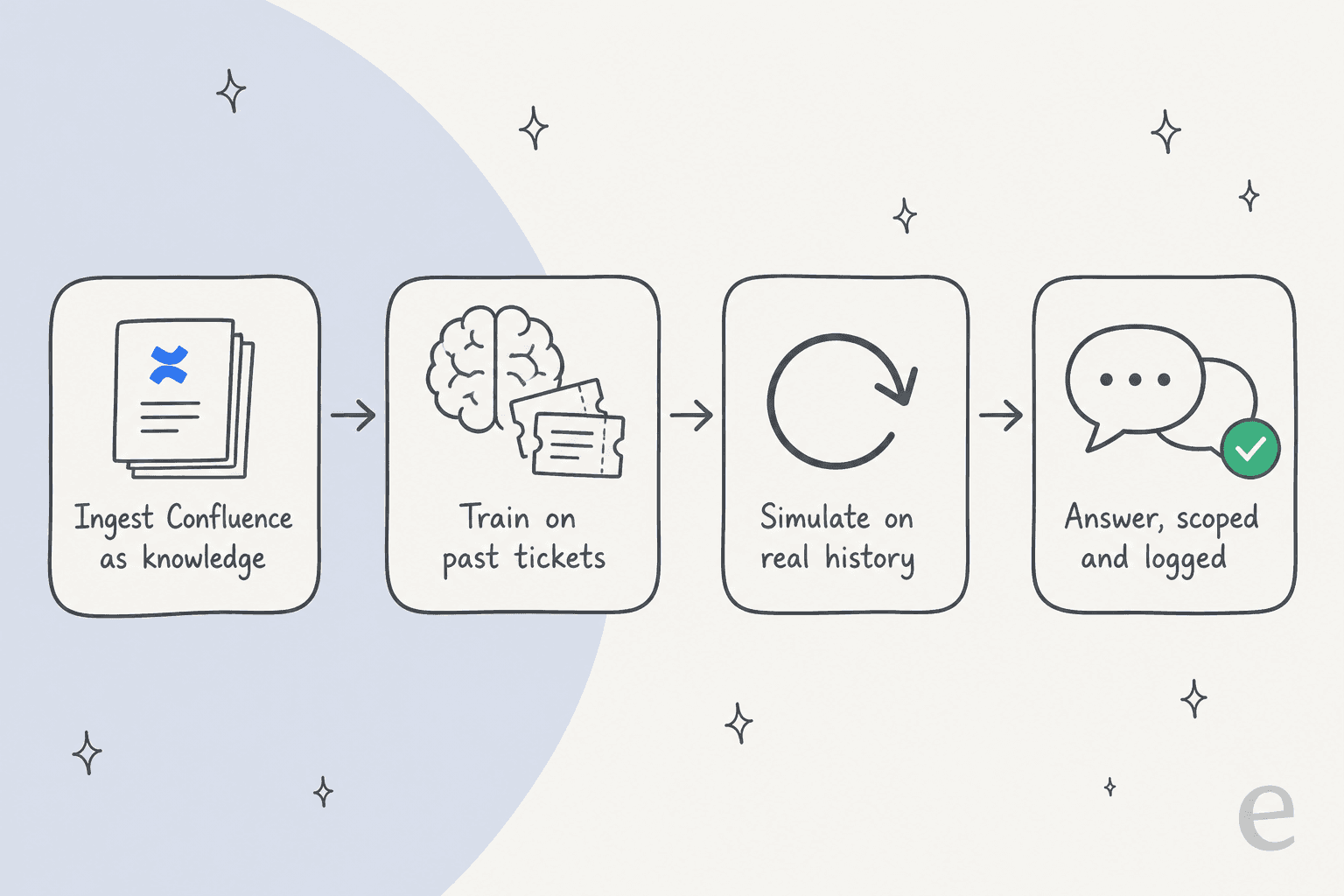
Concretely, that means four things Grok Bot's route can't express. You connect over OAuth, not by handing over a persisted logged-in seat.

You train on your own knowledge, your Confluence spaces plus past tickets, and optionally Notion, Google Docs, or your help center, so the agent grounds answers in your content instead of improvising from training data. You simulate on real history before go-live, which replays hundreds of your past tickets and scores the AI's answers against what your team actually sent, so you get a real accuracy read before a customer or a colleague is involved, not after. And you scope it: run it in draft or reply-only mode first, set which sources and topics it can act on, exclude what you don't want automated, and let it hand off to a human when confidence is low.
You also get the audit trail that's still "coming" on the other side. Every answer shows up in an activity log with the reasoning and the exact Confluence pages it used, so AI answers are reviewable, not a black box.

And if the reason you liked Route B was the programmability, you don't lose it. eesel exposes a real terminal surface: a CLI (@eesel/cli) where the docs literally say "everything on this site can be done from the terminal," an MCP server so coding agents like Claude Code or Cursor can drive the same workspace, plus webhooks and Network Access for calling out to your own APIs. So you can operate the agent from scripts and CI, get JSON out of every command, and preview a write with eesel --dry-run before anything runs, the exact rehearsal step Grok Bot doesn't have, without building and babysitting the Confluence glue yourself. It's the same agent whether you use the dashboard or the terminal.
The pricing is a different model on purpose, too. eesel is a flat $0.40 per ticket handled, with no per-agent seat fee and a hard monthly spend cap you set. A ticket is billed once whether it took one reply or five, and there's no "resolution" game, which is exactly the predictable, per-work-done number the Grok routes and Confluence's per-seat, credit-metered AI both make hard.
Try eesel for Confluence
If you came here wanting Grok to manage your Confluence, the honest read is: Grok Bot can poke at it in a demo, but it's an "Early beta" general worker without the dry run, scoping, audit, or compliance a live knowledge base needs, and the API route is a build with a real write-back risk. eesel for Confluence is the version built for the actual job, an AI helpdesk agent that connects your wiki over OAuth in minutes, trains on your content and past tickets, and lets you simulate on real history before it answers anyone.

You can start it in draft-only mode, watch it answer on your own questions, and only turn on live replies once the simulation numbers convince you. The free trial gives you $50 of usage with no credit card, which is enough to run a real simulation against your own Confluence and ticket history and see the numbers for yourself before you commit to anything.
Frequently Asked Questions
Can Grok Bot read and edit my Confluence wiki?
How much does Grok Bot cost for Confluence automation?
Is Grok Bot secure enough for a Confluence knowledge base?
What's the difference between Grok Bot and Confluence's own Rovo AI?
What's the safest way to get AI answers out of Confluence?



Article by
Alicia Kirana Utomo
Kira is a writer at eesel AI with a Computer Science background and over a year of hands-on experience evaluating AI-powered customer service tools. She focuses on breaking down how helpdesk platforms and AI agents actually work so that support teams can make better buying decisions.