Call center RPA: what it automates and where it breaks

Kira

Katelin Teen
Last edited July 6, 2026
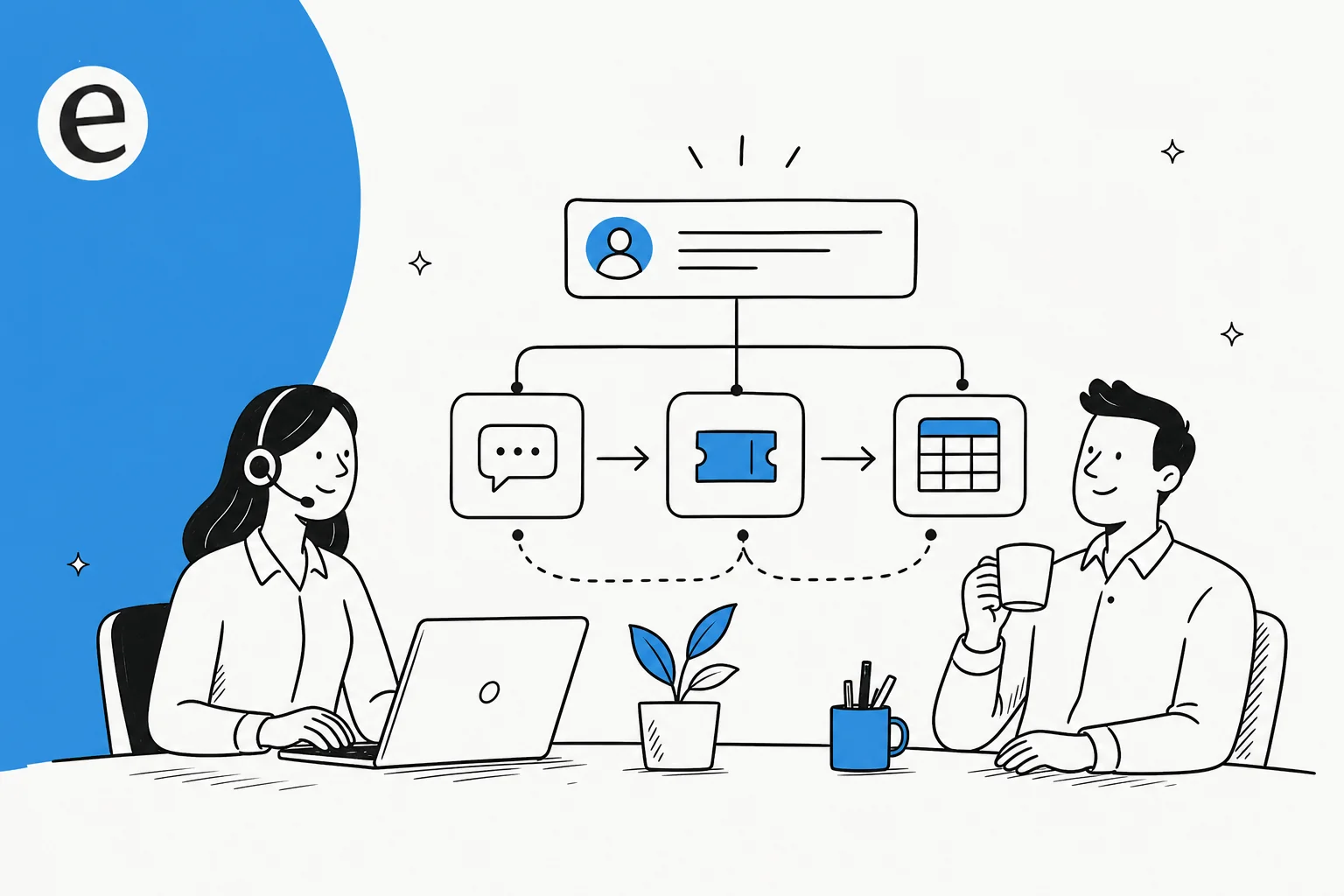
What call center RPA actually is
I've spent the last few years building AI agents that sit on live support queues, and the first thing I'll say is that RPA earned its reputation honestly. It does something real.
Robotic process automation is, in the vendors' own words, software robots that mimic human actions in digital systems to run "repetitive, rule-based tasks like entering data, moving files, or processing transactions." The bot literally does what an agent would do with a mouse and keyboard, clicking through the same screens, but faster and without getting bored. Automation Anywhere frames it the same way: RPA is the "arms and legs" of automation, reliable execution of structured, repeatable steps.
The reason it fits a call center at all is that a big share of contact-center work really is codifiable and repetitive. When a shift lead spends their morning copying ticket fields into a billing tool, that's a rule you can write down, and anything you can write down as a rule, a bot can run.
There are two flavors worth knowing, because they map to different jobs on the floor:
- Unattended RPA runs on its own, on a schedule or a trigger, with no human watching. Automation Anywhere points it at back-office processes like bulk data entry and system integrations. Think overnight batch work.
- Attended RPA rides along with a live agent, kicking in mid-call to fill a form or pull a record. The vendor explicitly names this the category for customer service and IT helpdesk work, with a human in the loop. This is the classic "agent desktop" bot.
Neither one understands anything. That's not a knock, it's the design. RPA is deterministic by nature, which is exactly why it's reliable and auditable, and exactly why it falls over the second the work stops being deterministic.
What call center RPA automates well
Here's where RPA really pulls its weight. Most of these are the unglamorous tasks that quietly eat an agent's day, and handing them to a bot is a real win.
| Task | What the bot does | Why RPA fits |
|---|---|---|
| Data entry between systems | Copies customer and ticket fields from the helpdesk into the CRM, billing, or an ERP | Fixed fields, fixed mapping, high volume |
| Ticket logging and routing | Logs a complaint, categorizes it, routes it to the right queue | Deterministic rules on structured metadata |
| Order and account lookups | Pulls order status or account details so an agent (or chatbot) can read them back | Same query, same screens, every time |
| After-call work | Keys wrap-up notes and disposition codes into multiple tools post-call | Repetitive, structured, no judgment |
| New-customer onboarding | Automates data entry and verification during account setup | Standardized, form-driven |
Automation Anywhere lists exactly these under its customer service use cases: automated inquiry handling, ticketing and routing, and onboarding data entry. And the results, when the process is stable, are real. Their City of Seattle case study is a good, concrete one: the city cleared a backlog of over 6,000 utility-program requests, automated 700 daily password-lockout requests, and saved over 30 hours a month, all on rule-based RPA before it ever layered AI on top.
If your call center has a stack of these repetitive back-office chores, RPA is a legitimate answer, and it slots in next to the rest of your customer service workflow without much drama. This is the part of the story RPA vendors tell well, and they're not wrong.
Where call center RPA breaks
Now the part the brochure skips. RPA's whole model, a bot pretending to be a human clicking a screen, is also its fault line. I've watched teams try to make it carry the actual support queue, and it tends to break in three predictable ways.
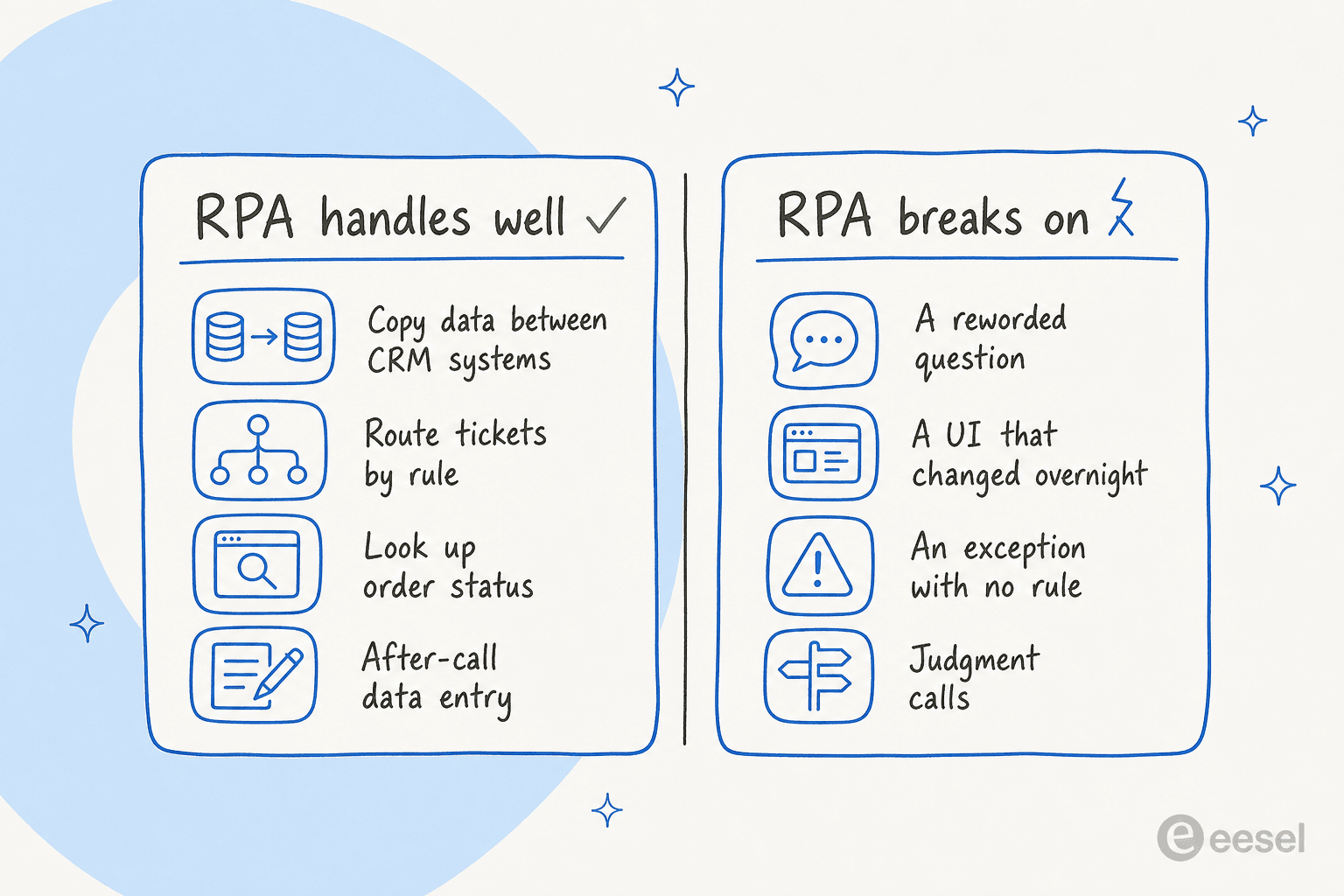
It's brittle. The bot targets specific buttons and fields on a page. Change the layout, rename a field, or ship a UI update, and the automation snaps. Practitioners in r/rpa say it plainly:
"UI automation is brittle, so we built an AI-based solution... that makes UI-based automation on websites extremely easy."

The maintenance eats you alive. Every brittle bot is a bot someone has to babysit. This is the hidden bill, and the numbers back it up: in Deloitte's global survey, only orgs with 51+ live automations count as "scalers," and most programs stall well short of that. A third of the teams using automation-as-a-service specifically outsource the management and maintenance of their bots, because keeping them alive is a job in itself. As one r/automation thread put it, without serious engineering behind it "the maintenance overhead will eat you alive in the medium to long term."
It can't handle language, exceptions, or judgment. This is the big one for a call center, because that's the actual work. The moment a customer rewords a question, attaches an unexpected document, or hits an edge case with no rule, the bot has nothing. Even RPA's own vendors admit it: without AI, RPA "can only operate effectively with structured data... this limits RPA effectiveness and pushes more exceptions to human workers." The community consensus is the same, and refreshingly fair about it:
"RPA thrives in rules based end to end process so it's more reliable for structured tasks, while agents thrive on processes having lots of nuances... Not everything needs an LLM to perform rules based decisions."
That last quote is the honest framing. RPA isn't bad, it's narrow. And a support queue is mostly the nuanced, conversational stuff that lives outside its lane, which is why bolting more RPA onto tickets rarely moves the needle on ticket automation.
RPA vs AI agents: who does what
The unhelpful version of this debate is "RPA vs AI, which wins." The useful version is: they do different jobs, and the good setups use both. Here's the division of labor I'd draw.
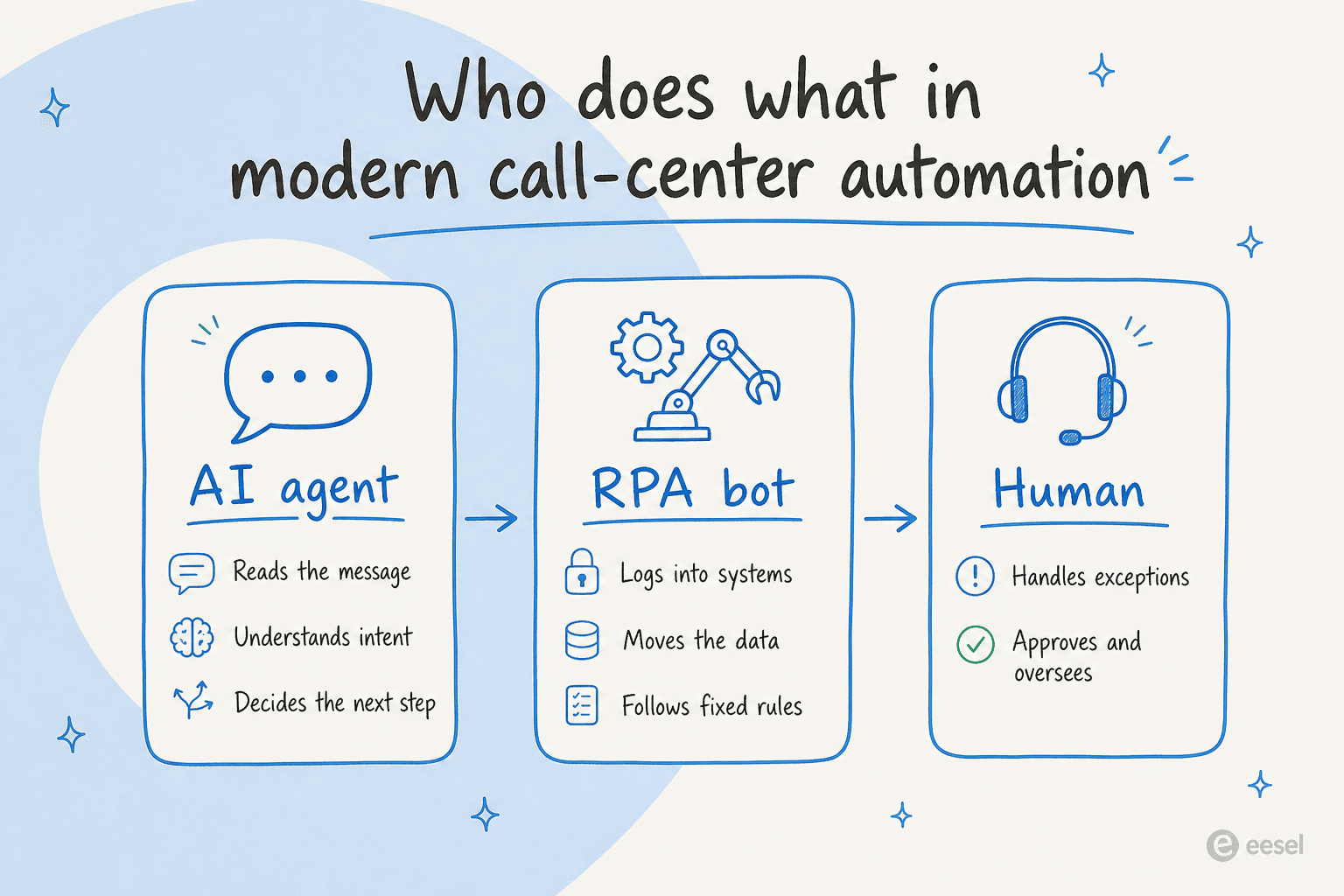
The AI agent reads the incoming message, works out what the customer actually wants, and decides the next step. The RPA bot, if you still need one, does the deterministic execution: logging into the ERP, moving the data, following the fixed rules. The human handles the genuine exceptions and keeps an eye on the whole thing. UiPath describes the same split: agents analyze and decide, RPA reliably acts on those decisions, and people provide oversight.
This is why the framing has quietly shifted from "will AI replace RPA" to "AI on top, RPA underneath," and why the AI-vs-human cost math increasingly favors putting the agent on the conversation. The category grew up in three steps.
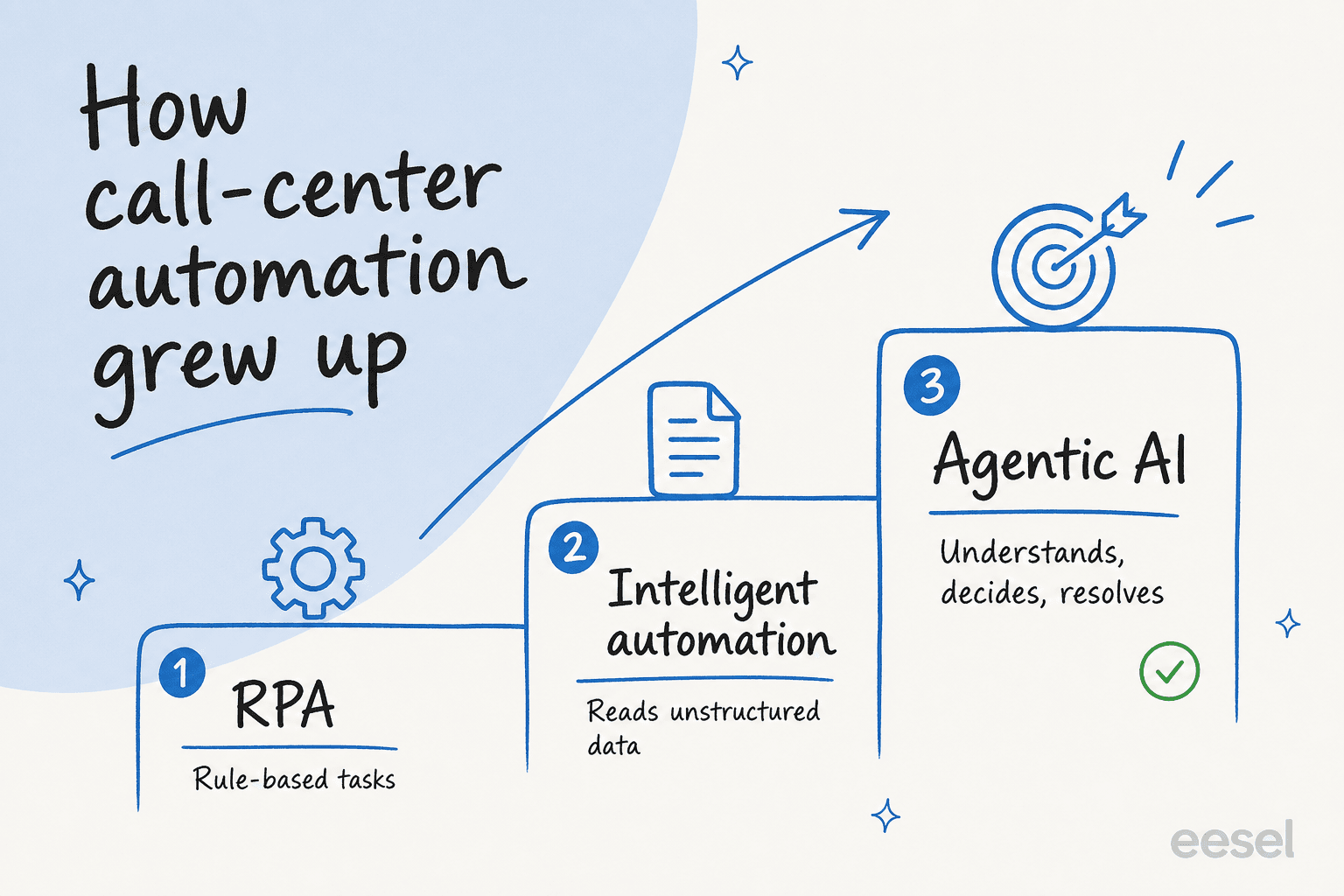
First came plain task automation (the 2010s RPA everyone pictures). Then intelligent automation, which paired RPA with machine learning and language models so it could read unstructured data like emails and documents. Now agentic AI, where the agent does the understanding and deciding and RPA becomes the execution layer it calls on. Gartner logged a 750% jump in client inquiries about agentic automation in just the back half of 2024, which tells you where the demand went.
For a support leader, the practical read is simple. If you're deciding how to automate a given task, ask what kind of task it is. Use the tool below to sanity-check it.
Where eesel fits
This is the tier I actually work on: the conversational one RPA was never built for. eesel AI is an AI agent for the helpdesk that reads the incoming ticket or chat, pulls the answer from your own knowledge, and resolves it, or drafts a reply for an agent to send. It's the "AI decides" half of the picture, and as a piece of AI in customer service it plugs into the helpdesk you already run rather than asking you to rebuild anything.

A few things make this different from pointing RPA at your tickets:
- It trains on your own history. eesel learns from your past tickets, help center, and macros, so it answers in your voice on day one instead of needing a rule written for every scenario. That's the opposite of the maintenance treadmill RPA scripts put you on.
- You can simulate before it goes live. This one comes from scar tissue. We've watched confident-sounding bots quietly give wrong answers, so eesel runs a simulation against your historical tickets and shows you the resolution rate and exact replies before it touches a real customer. You see how it'll behave, then dial it up.
- It knows when to stop. The single most common thing buyers tell us they want isn't full automation, it's control. As one DTC support lead put it to us, "I need an AI who is only handling the tickets that it's confident to handle, and all the other ones, leave them alone." eesel does confidence-based escalation and handover, so it resolves what it's sure of and cleanly passes the rest.
When the process really is deterministic, eesel doesn't fight it either, it fires the same kind of actions RPA would (tag, assign, update status, hit an API) as part of resolving a ticket. The Gridwise team, running on Zendesk, saw eesel resolve 73% of their tier-1 requests in the first month, and noted the platform "even includes automations for ticket tagging, assignment, and status updates." That's the whole idea: AI on the conversation, deterministic actions on the execution.
It also answers the "why not just build our own" question a lot of engineering-heavy call centers ask. The team at GENERAL BYTES summed up why they bought instead of built: "We could try to write our own LLM application but we didn't want to invest our time into that. We wanted something we would not have to maintain." That maintenance point is the same reason RPA scripts get expensive, just moved up a layer.
How to actually get started
If you're weighing call center RPA right now, here's the sequence I'd follow instead of automating everything at once.
- List your tasks and sort them. Split the queue into deterministic back-office work (data entry, report pulls, status updates) and conversational work (anything where a human reads and interprets). The first bucket is where rule-based automation belongs; the second is a job for AI customer service software.
- Automate the stable, boring stuff with rules. For truly fixed processes, a rule-based bot or your helpdesk's built-in workflow automation is fine, and cheaper than an AI agent. Just go in knowing you'll maintain it when screens change.
- Put an AI agent on the conversation. For the tickets and chats that need understanding, use an AI ticketing system that reads intent and resolves. This is the tier that actually moves your resolution and tier-1 deflection numbers, and where the real support cost savings show up.
- Simulate, then roll out gradually. Test against real historical tickets before going live, start the AI on the ticket types it's most confident on, and widen from there. Don't flip everything to auto on day one.
The mistake I see most is treating this as one big automation project. It isn't. It's two different jobs, and the teams that win use the right tool for each.
Try eesel for your call center
If your queue is mostly the conversational tier, that's exactly what eesel AI is for. It's an AI agent that plugs into your existing helpdesk in minutes, learns from your past tickets and knowledge base, and resolves the front line while cleanly handing the rest to your team. The part that tends to win people over: you can simulate it on past tickets and see the real resolution rate before a single customer talks to it, so there's no leap of faith.

It's free to try, and you can point it at your helpdesk without rebuilding a thing. That's the whole pitch: keep RPA for the plumbing if you have it, and let an AI agent take the conversations it was never designed for.
Frequently Asked Questions
What is call center RPA?
Is call center RPA the same as an AI agent?
What can call center RPA not do?
How much of a call center's work can RPA automate?
What's replacing RPA in call centers?


Article by
Kira
Kira is a writer at eesel AI with a Computer Science background and over a year of hands-on experience evaluating AI-powered customer service tools. She focuses on breaking down how helpdesk platforms and AI agents actually work so that support teams can make better buying decisions.