Why people go looking for AI on Kustomer
Kustomer is one of the more distinctive customer service platforms out there. Instead of organizing support around tickets, it organizes around the customer: every order, conversation, loyalty tier, and churn signal lives in one continuous timeline, so AI and human agents always know who they're talking to. That "context, not guesswork" model is why consumer brands like Turo, Skims, Rappi, sweetgreen, and Vuori run on it, and it's the thing reviewers consistently praise.
"What I like best about Kustomer is how simple and organized it is to use. It makes it easy to find conversations, stay on top of requests, and respond quickly."
Kustomer reviewer on G2

Kustomer holds a solid 4.4 out of 5 across 555 reviews on G2 and 4.6 across 79 on Capterra, so this isn't a story about a bad product. (Worth a small skeptical note: Kustomer's homepage advertises a "5.0 rating from 500+ G2 reviews," which doesn't match G2's actual 4.4 aggregate, so take the headline badge with a grain of salt.) It's a story about cost and control. A few things send teams looking for alternatives or add-ons:
- Pricing. Kustomer doesn't publish platform pricing, its model is per seat with an eight-seat minimum and annual billing, and its AI is metered separately on top rather than included.
- Channel gaps. Hands-on operators flag a buggy voice channel and missing social-comment management, which matters for a DTC brand running phone and social support.
- Product velocity. A technical reviewer described the product as "somewhat stagnant in terms of API updates," and new users find the interface complex.
So the real question isn't "is Kustomer good" (it is). It's "what's the best AI to actually do the resolving, and does it have to be Kustomer's?" Before the list, here's how to think about it.
What to look for in AI for Kustomer
Not every tool here plays the same role, so it helps to know what separates them before you start comparing logos.
- Autonomy. Does the AI actually resolve the issue end to end (including taking an action like a refund), or does it just draft a reply for a human to send? Both are useful, but they're different jobs. Our primer on AI agents vs rule-based chatbots is worth a read if that distinction is fuzzy.
- How it connects. Native add-ons (like Kustomer's own AI) live inside the platform. Standalone agents either sit on top of your helpdesk via API or replace it outright. If you love Kustomer's timeline model, native wins; if you're flexible, a layer-on tool opens up cheaper options.
- Pricing model. Per seat, per resolution, per engaged conversation, or outcome-based: the billable unit decides your bill far more than the sticker price. We'll come back to this.
- Setup and proof. Can you test it on your real data before committing, or do you discover the resolution rate in production? A simulation step is one of the most underrated features in this category.
The best AI for Kustomer at a glance
| Tool | Best for | Autonomous resolution | Channels | How it connects to Kustomer | Pricing model | Starting price | Setup | Free trial |
|---|---|---|---|---|---|---|---|---|
| eesel AI | Flexible, affordable AI you fully control | Yes (agent, copilot, or triage) | Chat, email, Slack, helpdesk | Layers on Zendesk / Freshdesk / Gorgias and 100+ tools (not native to Kustomer) | Usage-based, per resolution | ~$0.40 per resolution, no seat fee | Minutes, with simulation mode | Yes, $50 credit, no card |
| Kustomer Concierge + Envoy | Staying fully native on Kustomer | Yes | Chat, email, SMS, WhatsApp, voice | Native to the Kustomer platform | Per seat + metered AI | Quote-only; AI billed on top | Weeks | No self-serve trial |
| Decagon | High-volume enterprise omnichannel | Yes | Chat, voice, email, SMS, API | Standalone, integrates with your stack | Sales-led, volume-bracketed | Contact sales | Weeks | No |
| Sierra | Enterprise brands wanting outcome pricing | Yes | Chat, voice, SMS, WhatsApp, email | Standalone | Outcomes-based | Contact sales | Weeks (Ghostwriter) | No |
| Ada | Large enterprises, multi-LLM | Yes | Voice, chat, email, social, in-app | Standalone, on top of your helpdesk | Volume-based, no public price | Contact sales (300k+ convos/yr) | Weeks | No |
| Forethought | Keeping your helpdesk, adding agentic AI | Yes | Chat, email, voice, SMS, Slack | Standalone, helpdesk-agnostic | Platform fee + outcome | Contact sales | Proof-of-value pilot | No (POV) |
| Aisera | Cross-functional IT + CX enterprises | Yes | Chat, voice | Standalone, alongside your systems | Annual contract, no public price | Contact sales | Weeks | No |
Now the detail on each.
The 7 best AI tools for Kustomer in 2026
A quick note on method: we've worked hands-on with these products' interfaces, docs, and pricing pages, and we've leaned on real user reviews from G2, Capterra, and Reddit rather than vendor marketing. Where a tool is sales-gated, we say so plainly. Each entry follows the same shape: who it's best for, what it does, what we like, what to watch, pricing, and our take.
1. eesel AI: best for flexible, affordable AI you actually control
Best for: teams that want autonomous resolution with transparent pricing and a setup measured in minutes, not months.

eesel AI is an autonomous AI support agent that learns from your past tickets, help center, and macros, then drafts replies, resolves tickets, and takes actions on its own. The honest caveat first: eesel isn't a native Kustomer add-on. It connects to mainstream helpdesks like Zendesk, Freshdesk, and Gorgias, plus over 100 knowledge sources, so it's best thought of as a more flexible (and cheaper) AI layer for those stacks, or a working-alongside option via API. If you're firmly on Kustomer's platform, Concierge and Envoy will be the smoother fit. If you're open on the helpdesk question, eesel is where we'd start.
What makes it stand out is control and predictability. You deploy it in one of three modes: a fully autonomous AI agent, an AI copilot that drafts replies for a human to approve, or AI triage that tags and routes tickets. Before any of it touches a live customer, you can run a simulation over thousands of your past conversations to forecast exactly what resolution rate you'd get and where the gaps are. That "test before you trust" step is the thing most enterprise platforms make you discover in production.
What we like:
- Genuinely self-serve: sign up, connect your helpdesk, and go live without a sales call.
- Transparent, usage-based pricing with no per-seat fee, so a busy month doesn't trigger a surprise renewal conversation.
- Simulation mode to forecast performance before launch, plus a staged rollout from drafting to full autonomy.
What to watch:
- No native Kustomer integration; it works alongside or as an alternative via API, and runs best on a supported helpdesk.
- It's an AI layer, not a full CX suite with its own ticketing, voice, and CRM timeline the way Kustomer is.
Pricing: Free to start with a $50 usage credit and no credit card. After that it's pure usage, roughly $0.40 per resolved interaction, with a 25% discount for annual commits over $300/month and a $1,000/month enterprise tier that adds SSO, HIPAA, and a BAA. See the full pricing page.
Our take: For most teams who care more about resolving tickets affordably than about owning one branded platform end to end, eesel is the best value here, especially if you can build-versus-buy your way onto a standard helpdesk. Just go in clear-eyed that it complements Kustomer rather than embedding inside it.
2. Kustomer Concierge and Envoy: best for staying fully native on Kustomer
Best for: teams already committed to Kustomer's platform who want AI without leaving it.
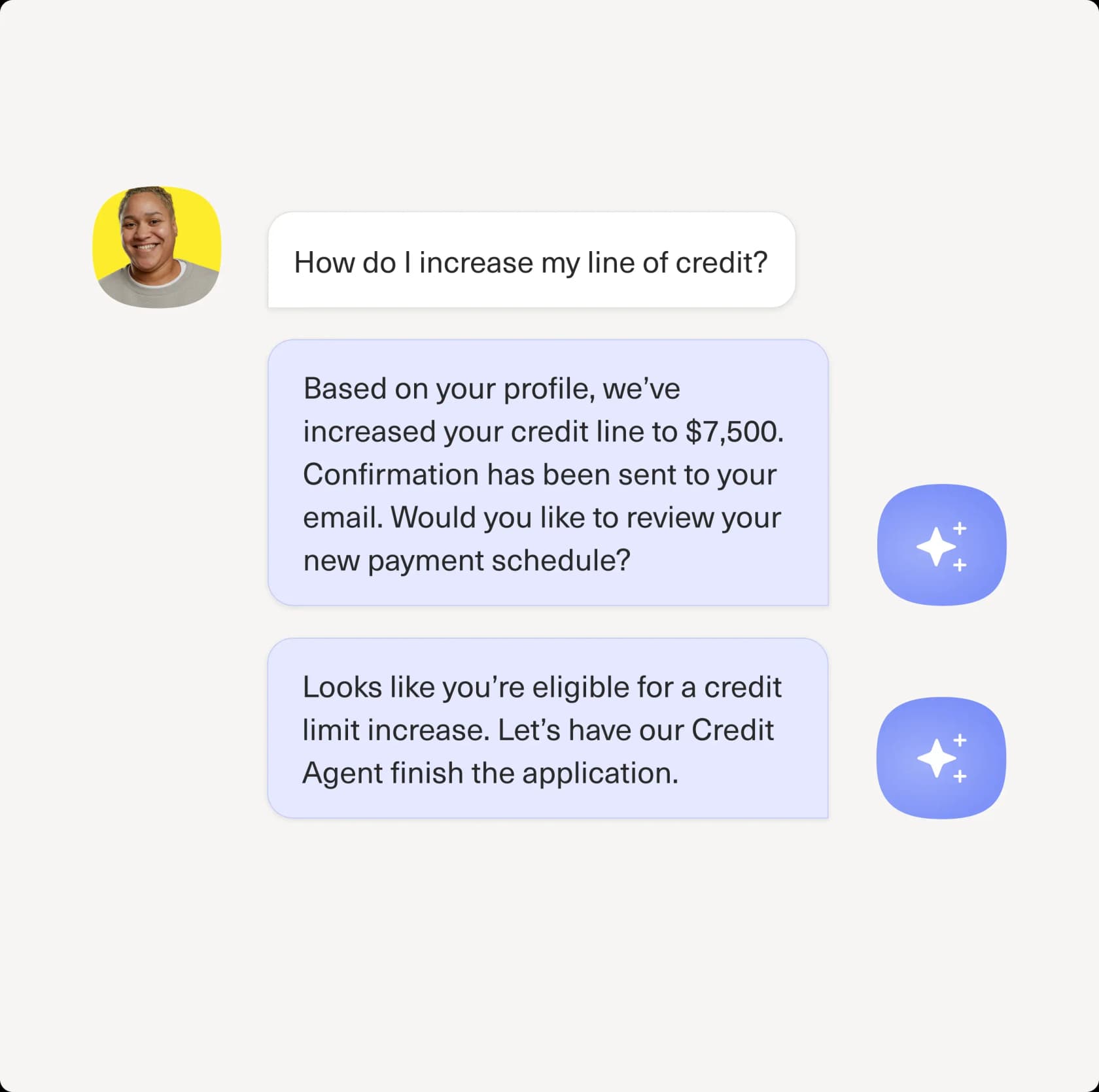
Kustomer rebranded its native AI in 2026 into a clean split. Concierge is the customer-facing agent that resolves and deflects, and Envoy is the copilot that supports human reps. Both inherit the platform's biggest advantage: they already have the full customer context. Because every order, preference, and past conversation lives in one timeline, Concierge can answer and act without making the customer repeat themselves, across chat, email, SMS, WhatsApp, and voice. Kustomer publishes some real proof points here, including 70% of chat conversations fully automated at Vuori and a 40% CSAT lift at Aplazo.
Envoy is the half most teams will feel day to day. It surfaces the full customer record before a rep types a word, suggests on-brand replies, recommends next best actions, and auto-writes the end-of-conversation summary. Kustomer cites a 97% increase in average speed to answer at Jerome's and a 25% productivity gain at UNTUCKit. It's explicitly framed as augmentation, not replacement, which is the right call for the complex DTC conversations Kustomer's customers handle.
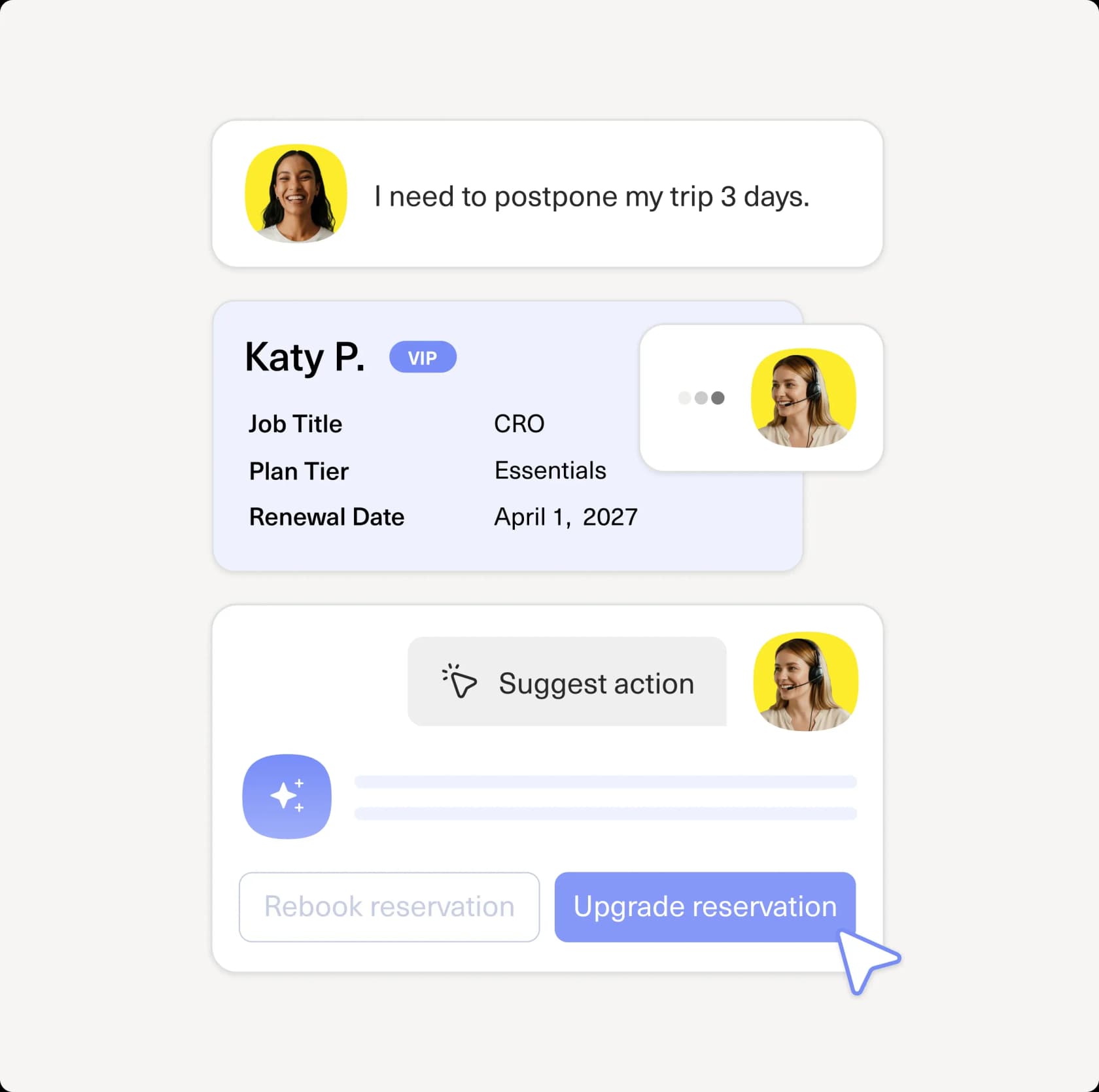
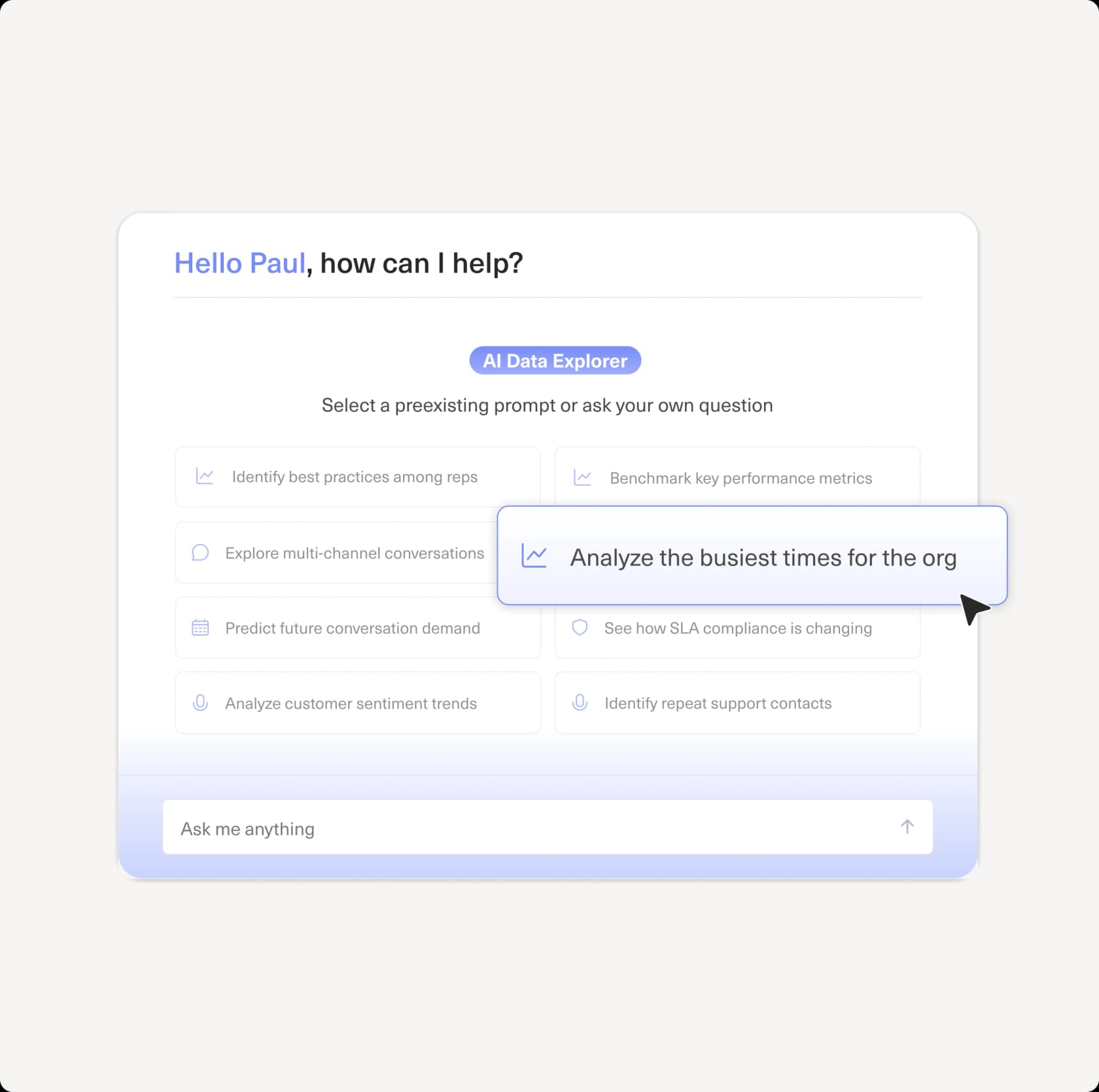
Behind both sits Architect, a no-code builder that turns AI setup into a conversation and ships native Model Context Protocol support so agents can act on live Kustomer data, and Data Explorer, a conversational analytics layer where you ask questions in plain language and get charts back. One nuance worth knowing: Kustomer markets a hybrid "deterministic plus probabilistic" architecture with guardrails and built-in evaluations, but it never names the underlying model.
The user voice is more mixed than the marketing. The AI praise is real but narrow, and the platform around it draws genuine complaints:
"I use Kustomer for solving tickets efficiently and fast. Macros save me time with generic replies, and the AI co-pilot assists with company policy explanations."
Kustomer reviewer on G2
"In my experience, the voice channel is incredibly buggy. My phone team is continually troubleshooting repeated issues like calls dropping, audio issues, calls not being routed."
u/_ok_anyway, operator running phone and social support on Kustomer, on Reddit

What we like:
- Full customer context out of the box, which makes resolutions feel personal rather than canned.
- True omnichannel including voice, all tied to one customer timeline.
- No-code Architect and a clear Concierge-plus-Envoy split mean a CX team can own it without engineering.
What to watch:
- AI is billed separately on top of an already per-seat platform, so it's an add-on cost, not a baseline capability.
- Real, repeated complaints about a buggy voice channel and missing social-comment management.
- One technical reviewer flagged the product as "somewhat stagnant in terms of API updates," and new users find the UI complex.
Pricing: Quote-only. Kustomer's pricing page routes everything to sales, with no per-seat or per-resolution figure published. Third-party teardowns (treat as directional) put seats at roughly $89 to $139 per month, annual billing, an eight-seat minimum, with AI metered on top at about $0.60 per engaged conversation plus around $40 per user per month for agent assist.
Our take: If you're on Kustomer and you value the unified-timeline model, Concierge and Envoy are the right default, and they're capable agents. Just budget carefully for AI as a separate line item, and pressure-test the voice channel against what your team actually needs before you lean on it.
3. Decagon: best for high-volume enterprise omnichannel
Best for: large support orgs resolving tens of thousands of conversations a month who want one agent across every channel.
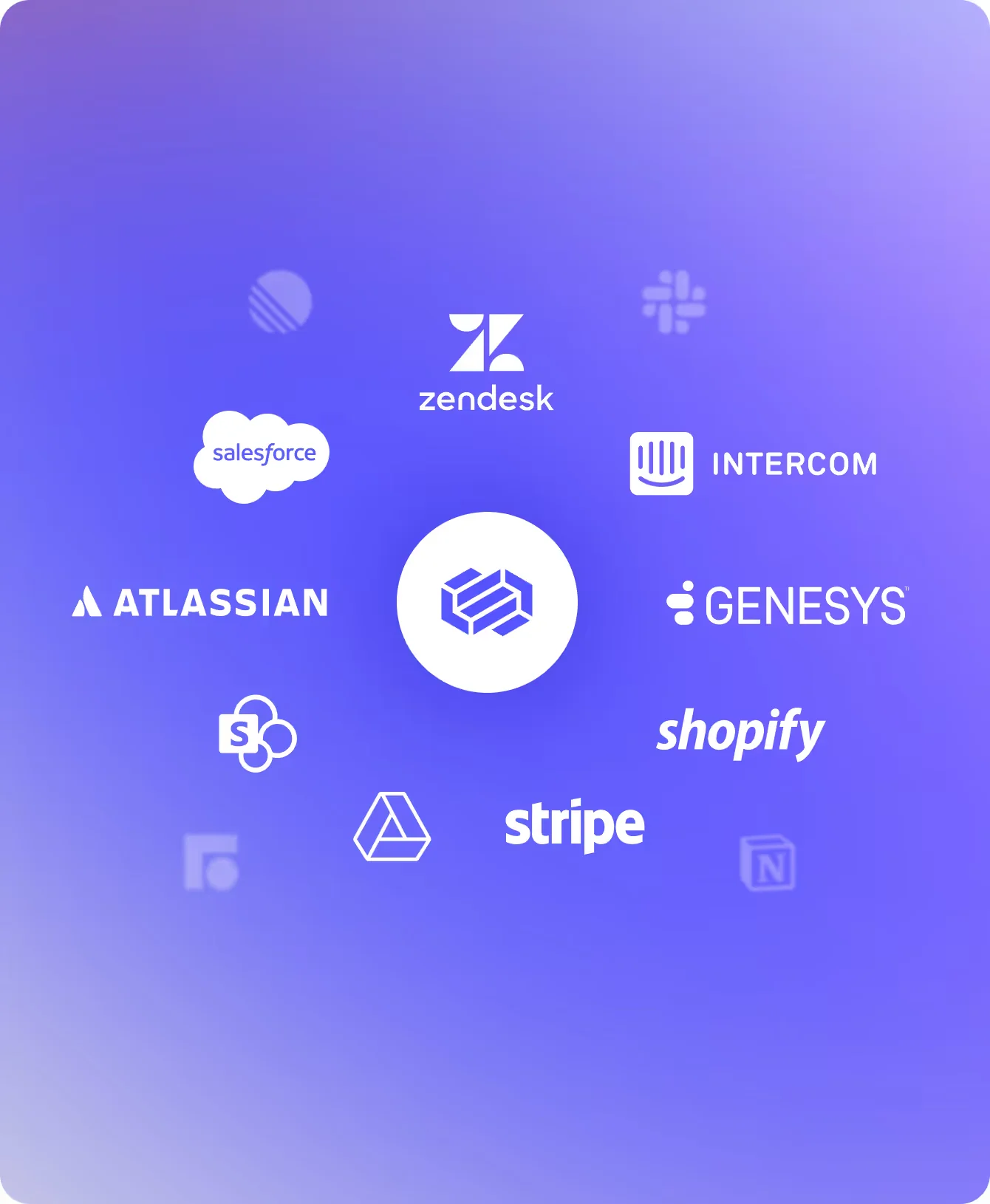
Decagon is an AI-native company (founded 2023, reportedly valued around $1.5B after its 2025 Series C, per Crunchbase) building what it calls "the AI concierge for every customer." Its technical wedge is Agent Operating Procedures, natural-language instructions that compile into executable code, so CX operators can author agent logic while engineers keep guardrails and versioning. One agent runs across chat, voice, email, SMS, and custom API surfaces.
The proof points are heavyweight: Decagon publishes a 70% chat and voice resolution rate at Chime and an 80% deflection rate at Duolingo, and its DTC and retail roster (Gopuff, Fanatics, Rituals, Hertz) overlaps neatly with Kustomer's target market.
What we like:
- Strong omnichannel parity, with voice and email treated as first-class, not afterthoughts.
- AOPs make iteration faster than the decision-tree tooling many incumbents ship.
- Serious observability: every model call and knowledge lookup is traceable.
What to watch:
- No public pricing and no self-serve trial; this is a sales-led, annual contract.
- Aimed squarely at mid-market and enterprise volumes, so it's overkill for a small team.
Pricing: Contact sales. The demo form brackets prospects by monthly ticket volume (under 10k up to 250k+), which tells you the model scales with conversations rather than seats.
Our take: If you're a high-volume consumer brand that wants the resolution numbers Decagon advertises and can support an enterprise rollout, it's a credible pick, and a natural one for a Kustomer-scale brand. Smaller teams will find the entry barrier (and the sales cycle) heavy.
4. Sierra: best for enterprise brands that want outcome-based pricing
Best for: large, often regulated brands that want to pay only when the AI actually resolves something.

Sierra is the high-profile entrant, co-founded by Bret Taylor (former co-CEO of Salesforce, now chair of OpenAI's board) and Clay Bavor (18 years at Google). That pedigree shows up in its customer list, which is unusually heavy on regulated and enterprise names: Rocket Mortgage, SoFi, Vanguard, ADT, Sonos, and Wayfair among them.
Sierra's defining commercial idea is outcomes-based pricing: you pay for resolved outcomes, not seats or messages, which shifts implementation risk onto Sierra. Its other standout is Ghostwriter, an agent that builds agents from your SOPs and transcripts, collapsing the usual multi-week build. It's also one of the few vendors leading with ISO 42001 (an AI-management certification) alongside SOC 2 and HIPAA.
What we like:
- Outcome-based pricing aligns the vendor's incentives with yours.
- Deep compliance footprint, which matters for finance, healthcare, and the like.
- Agents can be deployed through ChatGPT itself, a distribution angle no one else has.
What to watch:
- Enterprise-only, with no public pricing, no self-serve, and no trial.
- Outcomes pricing can be hard to model in advance until the contract defines the "outcome."
Pricing: Contact sales; outcomes are defined per use case.
Our take: For a large brand that wants the strongest enterprise story and likes the idea of paying for results, Sierra is compelling. For everyone below the enterprise line, it's out of reach, and the build-versus-buy math tilts toward something self-serve.
5. Ada: best for large enterprises that want multi-LLM flexibility
Best for: enterprises with 300,000+ annual conversations who want a standalone AI layer over their existing helpdesk.

Ada (Toronto-based, ~$190M raised, last valued at $1.2B in its 2021 Series C) brands its category as Agentic Customer Experience. The product is a standalone AI agent that sits on top of helpdesks like Zendesk, Salesforce, and Freshworks, built around a multi-LLM Reasoning Engine that orchestrates across models rather than betting on one. It's strongly omnichannel and multilingual, with Playbooks for multi-step workflows and a Coaching feature where you review past conversations and the agent applies the notes going forward.
Ada is openly enterprise-only: its pricing page states it's "a great fit for companies with at least 300,000 annual customer service conversations." Results it publishes include Cebu Pacific's 34%+ higher automated resolution rate and a Tilt 84% automated resolution rate on chat.
What we like:
- Multi-LLM orchestration, so you're not locked to a single model's strengths.
- Leads on AI-specific compliance and zero data retention with LLM providers.
- Genuinely omnichannel, with voice being pushed hard through 2026.
What to watch:
- Hard enterprise gate: the 300k-conversation floor rules out most SMB and mid-market teams.
- No public pricing and no trial.
Pricing: Contact sales, volume-based, with that 300k annual-conversation qualification floor.
Our take: Ada is a serious enterprise option, particularly if multi-model flexibility and AI compliance are on your checklist. Below enterprise scale, it isn't built for you, and that's by design.
6. Forethought: best for keeping your helpdesk and adding agentic AI
Best for: mid-market and enterprise teams committed to their current helpdesk who want agentic AI on top.
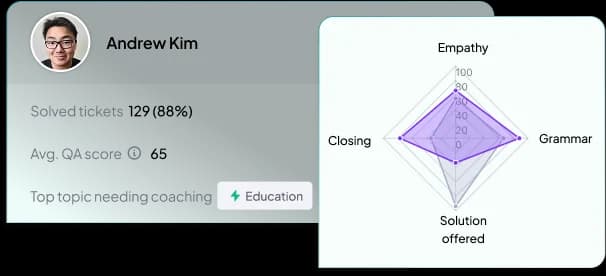
Forethought (a TechCrunch Disrupt 2018 Battlefield winner that has raised ~$92M) markets a multi-agent system: Solve resolves inquiries, Triage tags and routes them, Assist drafts for human agents, Discover finds knowledge gaps, and Agent QA scores interactions. Its strongest pitch for a Kustomer-adjacent buyer is that it's helpdesk-agnostic and sits on top of whatever you already run, so adopting it doesn't mean switching platforms. It also leans into action-taking, including a Browser Agent that can operate legacy tools without APIs.
Forethought publishes some big benchmark numbers (up to 98% resolution rate and 15x average ROI in its 2025 CX benchmark report), and customer results like Upwork's 50% reduction in time to resolution.
What we like:
- Helpdesk-agnostic; the only entry here whose whole pitch is "keep your stack."
- Clear multi-agent structure, so each job (resolve, triage, assist, QA) is named and scoped.
- Strong action-taking story, including non-API legacy systems.
What to watch:
- Quote-only pricing (a blend of platform fee and outcome-based cost) with no trial, just a proof-of-value pilot.
- The five-agent framing is powerful but can be more than a small team needs.
Pricing: Three tiers (Team, Professional, Enterprise), all "get a quote." Secondary sources peg it in the mid-five to low-six-figure annual range, but Forethought doesn't confirm figures publicly.
Our take: If you're staying on Kustomer (or any helpdesk) and want a mature, action-capable agentic layer that sits on top, Forethought is a strong, helpdesk-neutral choice. The lack of pricing transparency is the friction.
7. Aisera: best for cross-functional IT + CX enterprises
Best for: large enterprises consolidating customer service, IT, and HR support onto one agent platform.
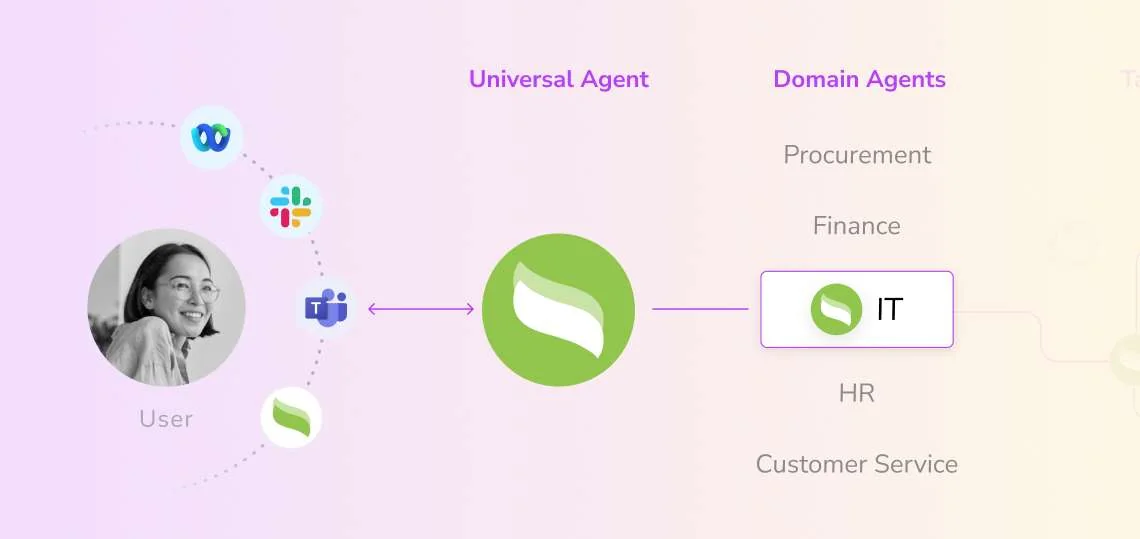
Aisera is the odd one out, and deliberately so. Where everyone else here is CX-focused, Aisera is cross-functional from day one: a Universal Agent orchestrates domain agents across IT, HR, finance, and customer service. It's heavily funded (~$171M raised, last valued at $1.6B) and was acquired by Automation Anywhere in late 2025. Its references are Fortune-500-scale (Adobe, Cisco, Workday, Zoom), and outcomes it publishes include LifeScan auto-resolving 65% of support requests.
For a pure DTC or retail support team in Kustomer's wheelhouse, Aisera is usually too heavy a buy. But if you're a big organization that wants one AI platform handling employee IT tickets and customer questions alike, it belongs on the shortlist next to ServiceNow and Moveworks rather than next to lighter CX tools.
What we like:
- One platform across IT, HR, and CX, which avoids buying (and integrating) three separate agents.
- LLM gateway with bring-your-own-model support and strong observability.
- Recognized in Gartner and IDC analyst evaluations for ITSM and conversational AI.
What to watch:
- Built for very large enterprises; overkill (and likely overpriced) for a 50-to-500-seat CX team.
- No public pricing, no trial, annual contracts only.
Pricing: Contact sales, annual contract scoped by volume.
Our take: Aisera is the right call only if your problem is bigger than customer service. For a CX-only team in Kustomer's wheelhouse, the other six options fit better.
How AI agents for Kustomer actually work
Whichever tool you pick, the underlying loop is the same, and it's worth understanding because it's also where the differences hide. A modern AI support agent doesn't just match a question to a canned answer. It reads the incoming message, pulls in context (order history, the help center, past conversations on the customer timeline), and then either resolves the issue directly (including taking an action like a refund) or hands off to a human with a full summary when the situation calls for it.
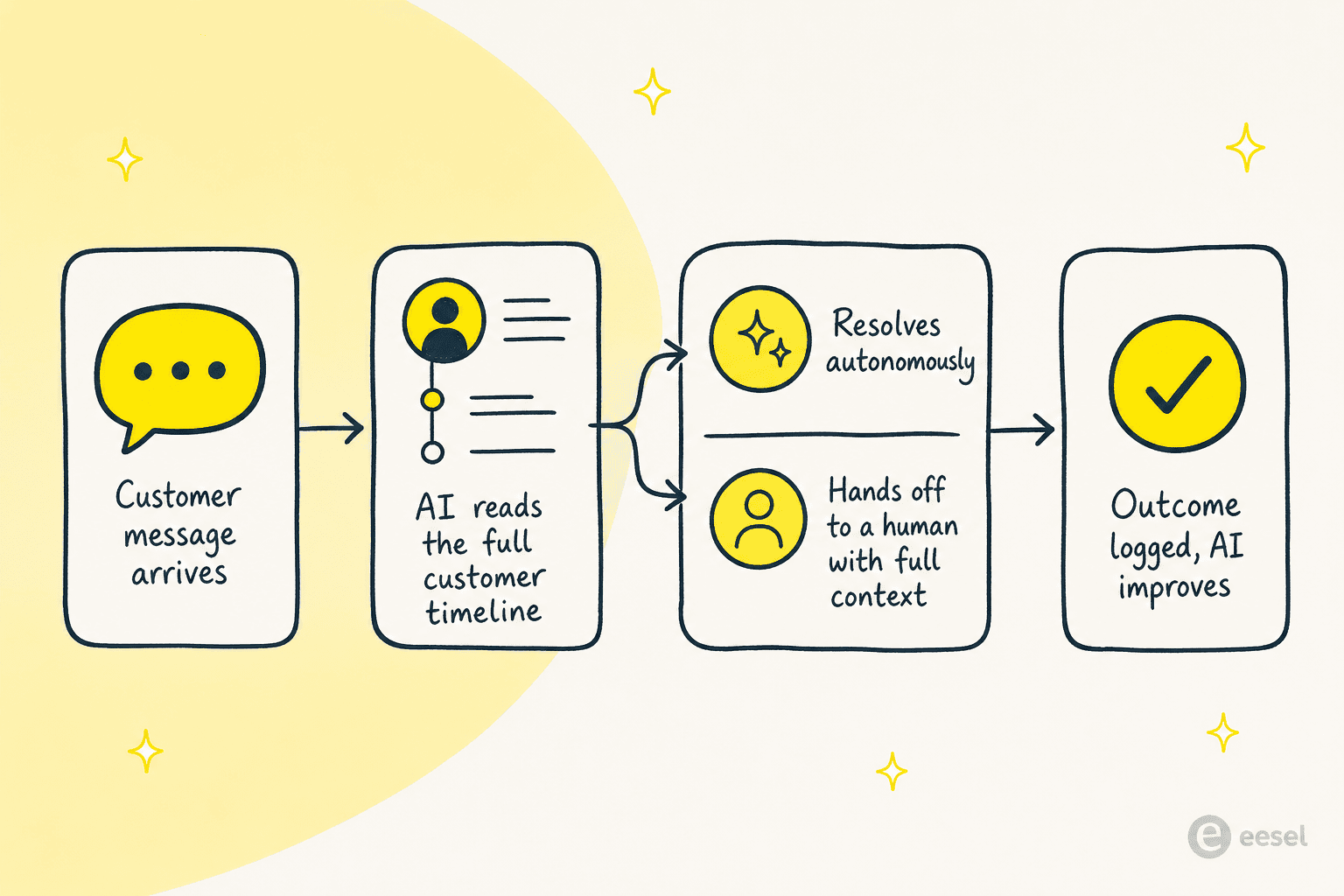
The quality of each step is what separates a good agent from a frustrating one. Does it actually take the action, or just describe it? Is the handoff clean, with the human getting the full thread and a summary, or does the customer have to start over? This is exactly why a simulation step before launch is so valuable: you get to see how the loop behaves on your real conversations before a single customer is affected. For a deeper primer, our guide to AI in customer service walks through the building blocks, and our ticket deflection guide covers how the resolve-or-route decision gets measured.
How much does AI for Kustomer cost?
This is where the choice gets real, because the pricing models in this list are not comparable on sticker alone. The billable unit is what decides your bill.
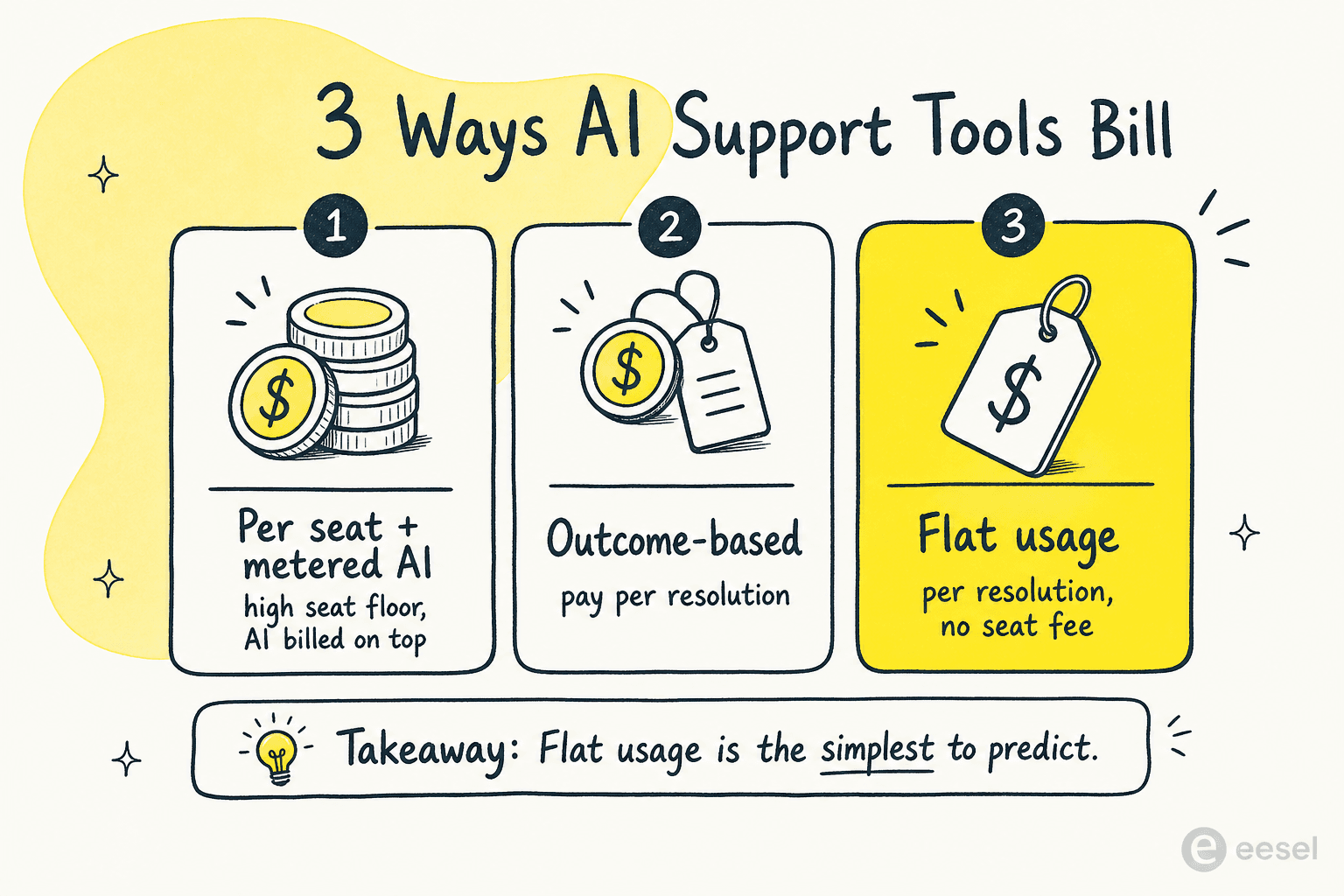
- Per seat plus metered AI (Kustomer): roughly $89 to $139 per seat per month (third-party estimate, annual, eight-seat minimum), with AI billed on top at about $0.60 per engaged conversation. You pay for seats whether or not they're resolving with AI, and the AI line scales with volume separately.
- Outcome-based (Sierra): you pay for results, which sounds ideal but is hard to budget until the contract pins down what an "outcome" is.
- Volume-bracketed, sales-led (Decagon, Ada, Forethought, Aisera): quote-only, scoped by annual conversation volume, usually with a meaningful floor.
- Flat usage (eesel AI): roughly $0.40 per resolved interaction with no seat fee, and a spend cap so the agent pauses rather than surprising you.
A worked example: say you handle 3,000 AI-resolved conversations a month. On Kustomer's roughly $0.60-per-engaged-conversation model that's about $1,800 in AI alone, before the per-seat platform cost underneath it. On a roughly $0.40-per-resolution usage model with no seat fee, it's about $1,200 all in. The exact numbers vary with your contract and what counts as a resolution, but the shape of the difference is the point, and it's why we'd always model your real volume rather than trust the headline. Our cost savings guide digs into the full total-cost-of-ownership picture.
How to choose the right AI for your team
Step back and the decision sorts itself surprisingly cleanly along two axes: how you want to pay and connect (self-serve and transparent versus enterprise and sales-led), and whether you want to add AI onto your existing helpdesk or stay inside a full platform like Kustomer.
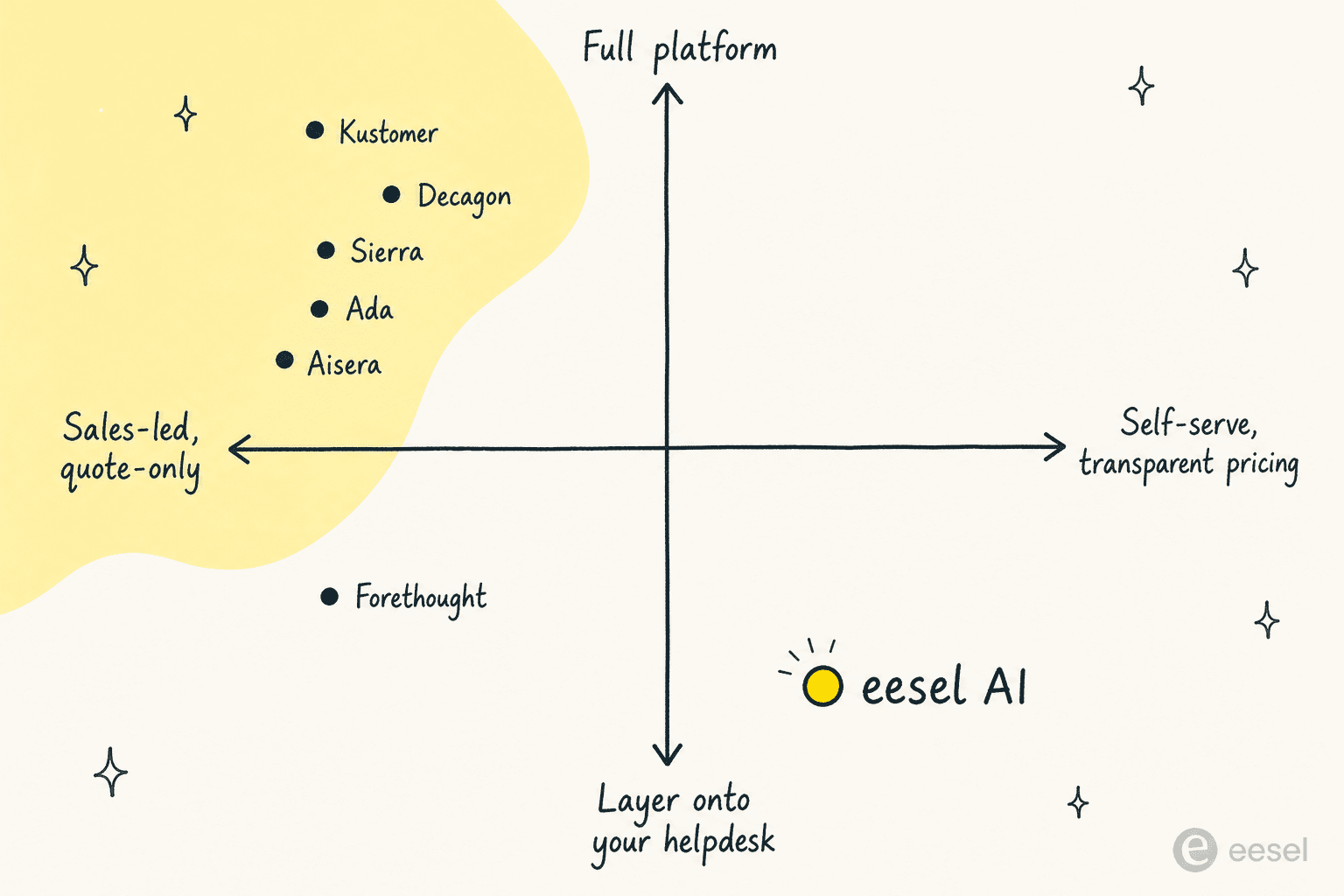
Here's the short version of who we'd point where:
- Stay on Kustomer and you love the platform? Concierge and Envoy. They're native, context-rich, and capable, just budget for AI as a separate line item.
- Want transparent pricing, fast setup, and you're on (or open to) a mainstream helpdesk? eesel AI. Self-serve, usage-based, and you can simulate it on past tickets before committing.
- High-volume enterprise that wants the biggest resolution numbers? Decagon or Sierra, depending on whether you prefer omnichannel depth or outcome-based pricing.
- Enterprise that wants multi-LLM flexibility and AI compliance? Ada.
- Committed to your helpdesk and want agentic AI on top? Forethought.
- Need IT and HR support solved alongside CX? Aisera.
If your real goal is to leave Kustomer rather than augment it, our best AI helpdesk software guide compares full platforms head to head, and our roundup of AI helpdesk tools for small teams covers the leaner end. Ecommerce teams in particular should look at AI helpdesks built for Shopify and our best AI for Shopify customer support breakdown.
Try eesel AI
If you want autonomous AI support without a sales cycle, a per-seat bill, or a multi-week implementation, eesel AI is the fastest way to find out whether AI can actually carry your frontline. It connects to your helpdesk and 100+ knowledge sources, learns from your past tickets and help center, and goes live in minutes.

The differentiator we'd point to is the simulation mode: before you trust it with a single customer, run it over thousands of your past conversations to see the exact resolution rate you'd get and where it needs coaching. Pricing is transparent and usage-based with no per-seat fees, and you can start free with a $50 credit and no credit card. Try eesel and see your numbers before you commit.
Frequently Asked Questions
What is the best AI for Kustomer?
Does Kustomer have its own AI?
How much does AI for Kustomer cost?
Can I add AI to Kustomer without switching platforms?
Is Kustomer AI worth it for small teams?
What's the difference between an AI agent and a rule-based chatbot for Kustomer?
Which AI is best for a Shopify brand on Kustomer?


Article by
Riellvriany Indriawan
Riell is a designer and writer at eesel AI with about two years of experience researching CX platforms, AI chatbots, and helpdesk software. She combines her design background with a sharp eye for how these tools actually look and feel in practice — making her comparisons unusually visual and user-focused.