What a call center organizational structure actually is
Strip away the job titles and an org structure answers three questions: who handles the work, who unblocks the people handling the work, and who owns the numbers. Everything else is detail.
The reason it matters is boring but real. When a customer's issue gets stuck, the structure decides how fast it reaches someone who can fix it. When an agent burns out, the structure decides whether their team lead notices before they quit. And when volume doubles overnight, the structure decides whether you scale smoothly or scramble. A good chart is mostly invisible; a bad one shows up as slow escalations, inconsistent answers, and a ticket backlog nobody owns.
Two forces pull the shape in opposite directions. More layers give you tighter coaching and cleaner escalation paths, but they slow decisions and add cost. Fewer layers keep you fast and cheap, but coaching thins out and quality drifts. The whole job of designing a structure is picking where you sit on that line for the work you actually do.
The core roles, from the floor up
Most call centers, whether they run phone, chat, email, or all three, land on some version of the same ladder. Here is what each rung actually does, not just what the title says.
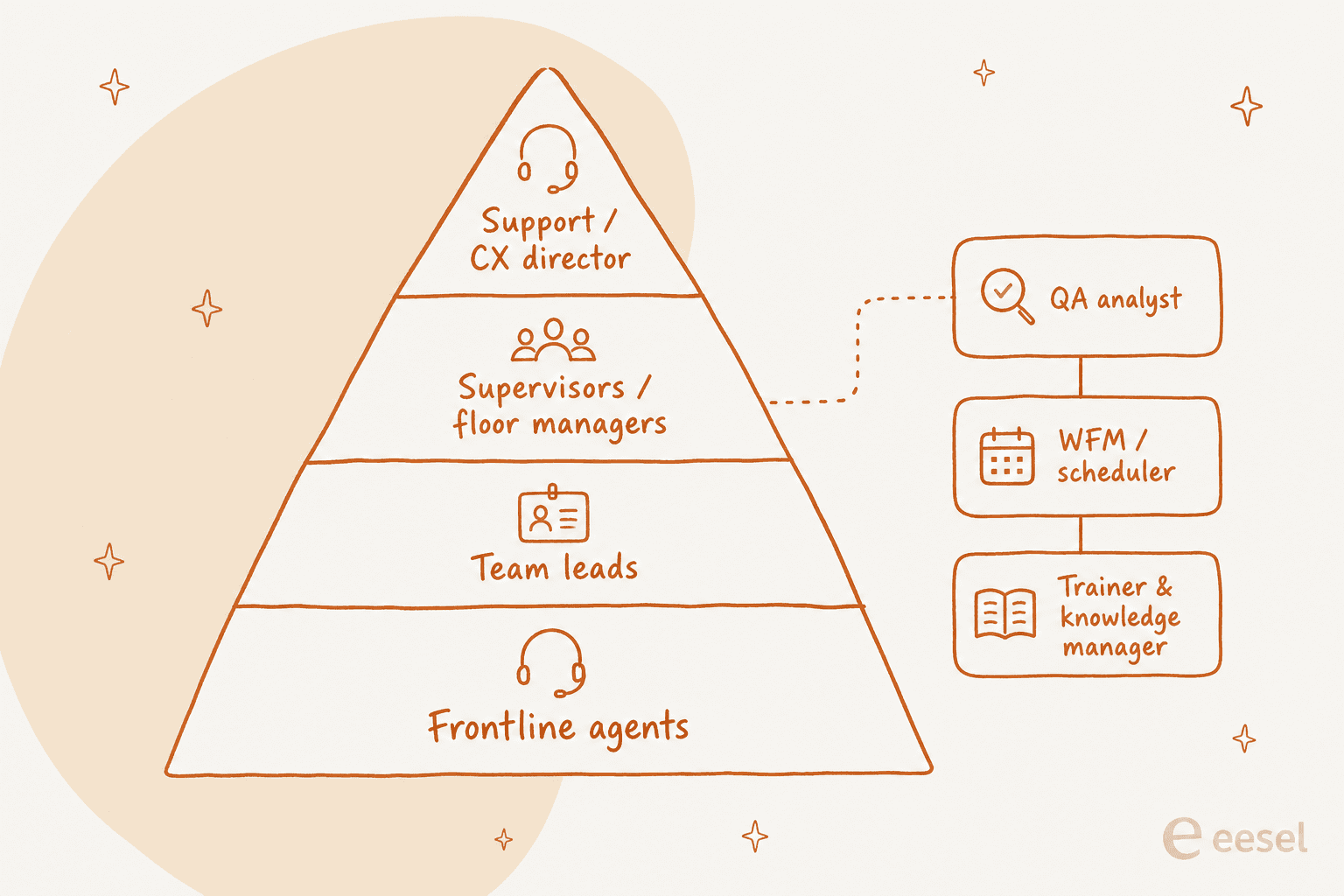
Frontline agents are the base of the pyramid and the people who actually talk to customers. In a tiered setup they split into tier 1 (common, scripted issues) and tier 2 or 3 (complex, technical, or account-sensitive cases). Everything above them exists to keep them effective.
Team leads are usually senior agents who coach a small pod, take the hairier escalations, and still handle live contacts themselves. They are the first person an agent turns to when a ticket goes sideways, which makes this the single most load-bearing role in the whole chart. A weak team-lead layer is where most quality problems actually start.
Supervisors or floor managers own a shift or a group of pods. They run scheduling, adherence, and day-to-day performance, and they rarely take frontline contacts. This is where the job shifts from "help the customer" to "keep the operation running."
Operations managers own a whole site or channel: hiring plans, budgets, and the metrics leadership actually asks about. Support or CX directors sit at the top, owning strategy, tooling, and how support connects to the rest of the business. In smaller teams these two roles collapse into one person, and that is completely fine.
Then there are the roles that don't sit neatly on the ladder but make or break the operation:
- Quality assurance (QA) analysts review contacts against a scorecard and feed coaching back to team leads. Skip this and consistency quietly erodes. Our guide to call center quality assurance covers how to run it without it feeling like surveillance.
- Workforce management (WFM) forecasts volume and builds schedules so you are neither drowning at 10am nor paying people to watch an empty queue at 3pm.
- Trainers and knowledge managers own onboarding and the knowledge base everyone else answers from. When this role is missing, "tribal knowledge" lives in two senior agents' heads, and you feel it the day they leave.
That last point isn't hypothetical. On a recent call, a support lead at a public-sector IT services firm told us two senior agents with deep product knowledge were leaving that year, and the whole reason they were shopping for AI was to capture that knowledge before it walked out the door. The role that should have owned that knowledge never existed on their chart.
The four common team models
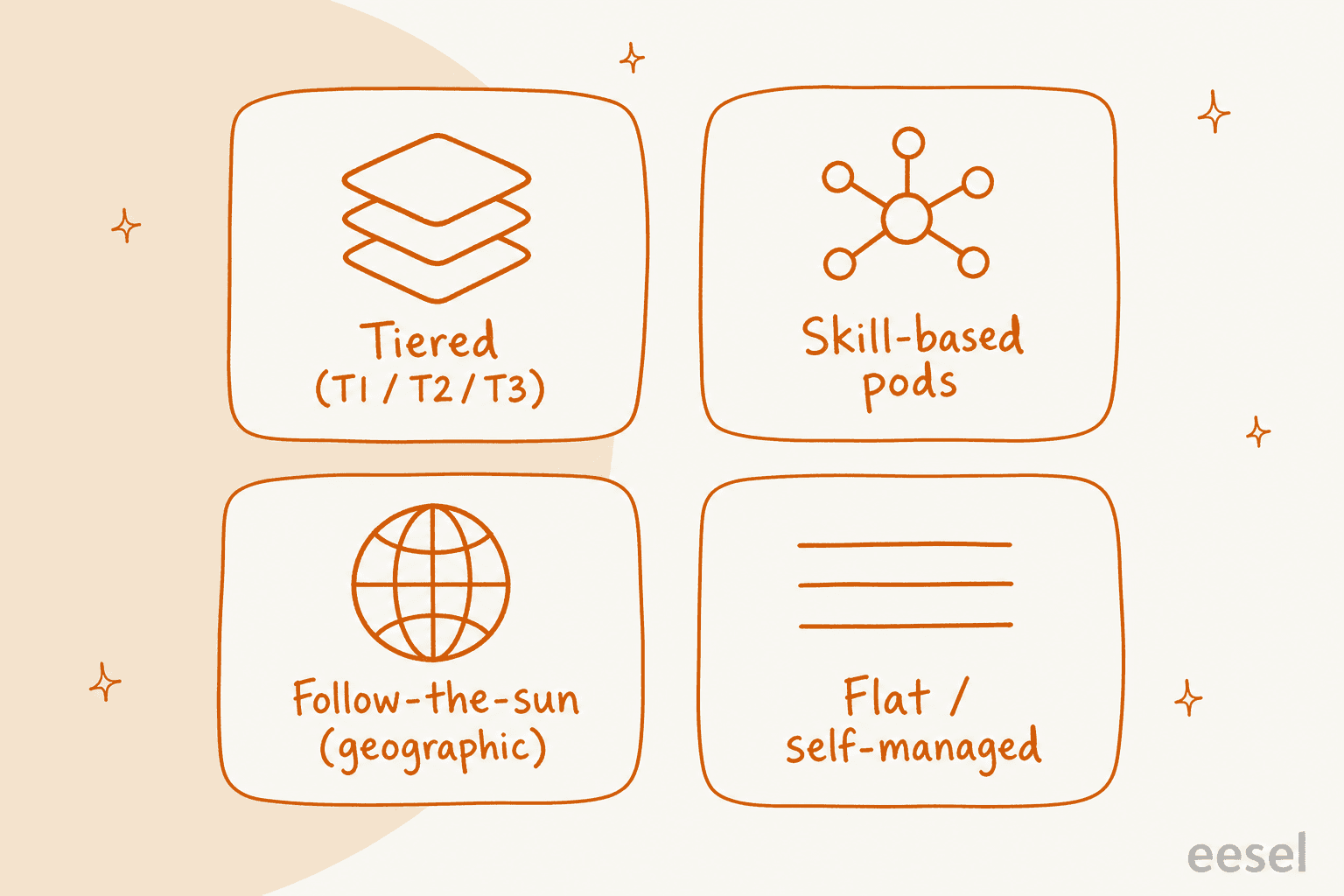
Once you know the roles, the next decision is how you group people. There are four models that keep showing up, and the right answer is usually a blend rather than a pure form.
| Model | How it works | Best for | Watch out for |
|---|---|---|---|
| Tiered (T1/T2/T3) | Issues escalate up levels of expertise | High volume with a clear easy-vs-hard split | Slow hand-offs and customers repeating themselves |
| Skill-based pods | Small cross-functional teams own a product, region, or segment | Complex products, high-value accounts | Uneven load between pods |
| Follow-the-sun | Regional teams hand off around the clock | Global, 24/7 coverage needs | Timezone hand-off gaps and inconsistent answers |
| Flat / self-managed | Few or no layers; agents self-organize | Small teams, startups, high-trust cultures | Coaching and escalation break down as you grow |
The tiered model is the default for a reason: it matches staffing cost to issue complexity, letting cheaper tier-1 capacity soak up the easy volume. The catch is the hand-off. Every escalation is a moment where the customer risks repeating their whole story, which is exactly the friction a good escalation process is meant to remove.
Skill-based pods trade some efficiency for ownership. When a pod owns a product line or a set of enterprise accounts end to end, customers get people who actually know their situation. It shines for complex products, and it's often how teams handle B2B SaaS support where accounts are few but deep.
Follow-the-sun is less a philosophy and more a fact of life once you support customers across timezones. It's the backbone of real multichannel support at global scale, and its weak point is always the hand-off seam between regions.
Flat structures work beautifully at ten people and start to hurt at forty. The moment you can't remember every open issue in your head, the missing coaching and escalation layers stop being a feature and start being a liability. Most teams outgrow flat without noticing, which is its own kind of problem.
Span of control: how many people per manager
This is the number that quietly decides whether your structure works, and it's the one most new managers get wrong.
The rough benchmarks I'd start from: one team lead for every 8 to 15 agents, and one supervisor for every 3 to 5 team leads. Those are starting points, not laws. Two things move them:
- Complexity. Scripted, high-volume work (order tracking, password resets) supports a wide span, sometimes 20+ agents to a lead. Complex technical or regulated work pulls it down to 5 or 6, because agents need more real-time help.
- Channel. Phone is synchronous and intense, so spans run tighter. Async email and chat let one lead support more people, especially when AI drafts replies and the lead is reviewing rather than firefighting.
Stretch the span too far and coaching evaporates, quality slides, and your best people leave because nobody is developing them. Keep it too tight and you're paying for management layers the work doesn't need. When a team feels chaotic despite being fully staffed, an out-of-whack span of control is usually the hidden cause, not the headcount.
Where org structures actually break
I've watched enough teams restructure to notice the same failure modes over and over. They're worth naming because they're all preventable.
The first is the overloaded tier 1. When the base of the pyramid is drowning in repetitive tickets, everything above it clogs: escalations pile up, team leads stop coaching to answer contacts themselves, and the whole structure grinds. This is the most common problem in support, and it's exactly the pain that sends teams looking for automation in the first place.
"As a fast-growing startup with a small team, our customers far outnumber our employees. It's crucial that we have robust self-service solutions as well as tools to supercharge the efficiency of our client-facing teams."
A director of support at a fast-growing EdTech startup
The second is the escalation dead-end, where a ticket climbs the ladder but nobody at the top is clearly accountable for closing it. A structure without a defined escalation management path just moves the customer's frustration up the org chart instead of resolving it.
The third is the missing specialist layer. Teams add agents and managers but skip QA, WFM, and training because they don't directly touch tickets. Then quality drifts, schedules misfire, and onboarding takes three months instead of three weeks. Those roles feel optional right up until the day they very obviously weren't.
How AI is redrawing the org chart
Here's the part that's genuinely changing. For decades, the widest part of the pyramid existed because someone had to answer thousands of repetitive, low-complexity contacts. AI is now very good at exactly that work, and it changes the shape of the chart, not just the size of it.
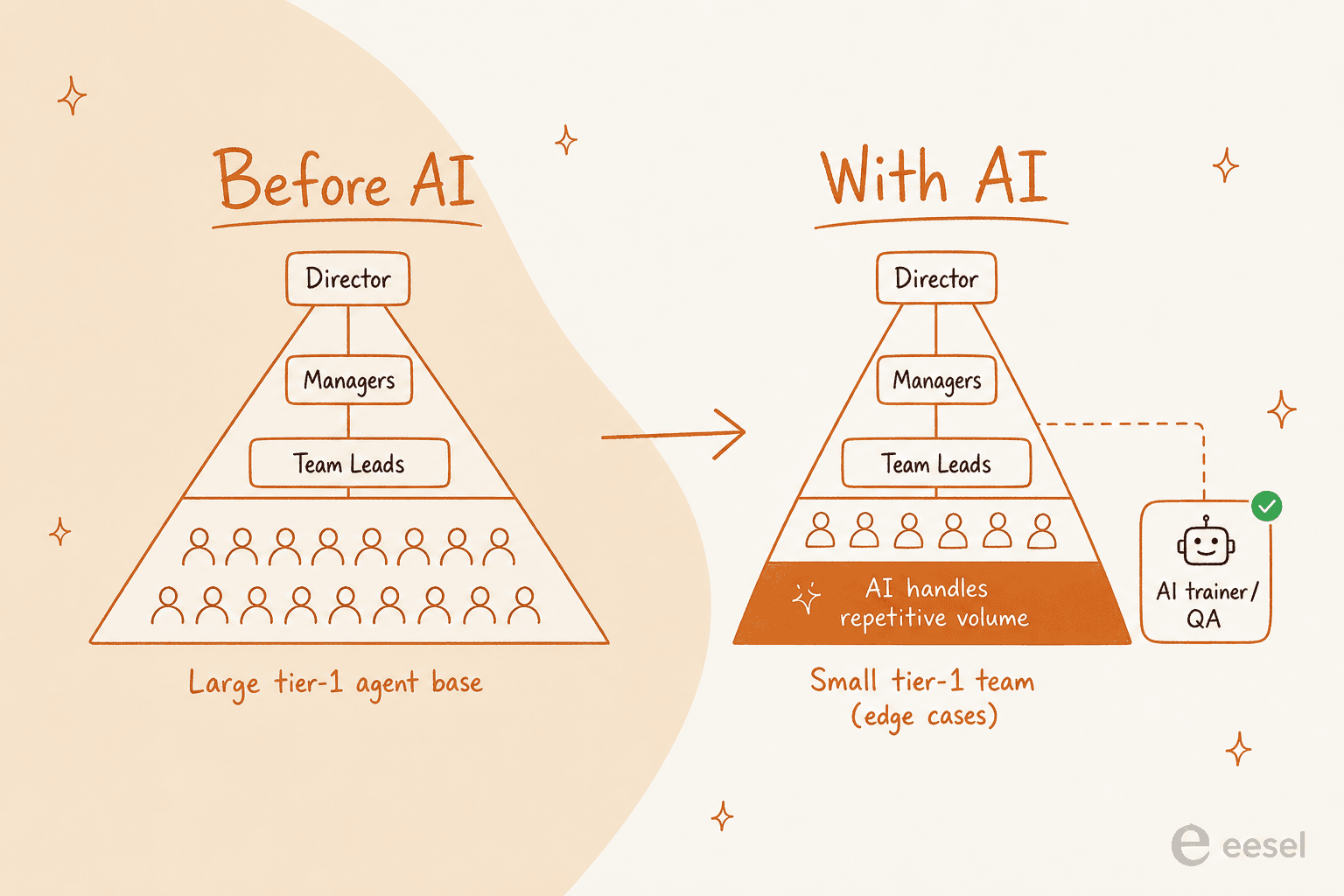
Three things happen when AI enters the org:
- The tier-1 base narrows. AI resolves the repetitive volume, so you need fewer people doing scripted work. One eesel customer, the CX lead at Gridwise, saw the AI resolving 73% of their tier-1 requests in the first month. That's a lot of the pyramid's base handled without a hire.
- Agents move up. The people who stay shift toward the work AI can't do well: judgment calls, upset customers, and messy edge cases. Your tier-1 role starts to look like the old tier-2 role, which is a genuinely better job.
- New roles appear. Someone has to train the AI, review what it sends, and own its quality. That's the AI trainer, conversation designer, and automation QA showing up on org charts that didn't have them two years ago.
CX leaders are already naming this shift out loud. As one put it:
"Leaders won't just manage people, queues, schedules, and quality scores. They'll also manage autonomous agents that resolve issues, escalate work, follow policies, and shape customer outcomes."

The honest version, though: this is a shift, not a switch. AI won't resolve 100% of contacts, and any vendor promising that is selling you a future outage. The teams that get this right keep a human tier for the hard stuff and route to it deliberately. As one DTC supplements CX lead put it to us, the goal isn't full automation, it's an AI "who is only handling the tickets that it's confident to handle" and leaving the rest for people. That confidence-based routing is what lets you shrink the base safely instead of recklessly, and it's a big part of whether AI can replace your support team (spoiler: it reshapes it, it doesn't delete it).
Practically, this also changes the math on hiring. Instead of adding tier-1 headcount to cover a volume spike, you automate the spike and add a smaller, more senior team on top. That's usually where the real reduction in support costs comes from, and it's a cleaner story to take to a CFO than "we cut the team."
How to design the structure that fits you
You don't design an org chart in the abstract; you design it around your volume, your complexity, and your budget. A quick way to get to a first draft:
- Start from the work, not the titles. Map your actual contact types and volumes first. The shape of your work tells you how many tiers you need and how wide the base should be.
- Set span of control deliberately. Pick a lead-to-agent ratio from the benchmarks above, adjusted for how complex your contacts are. Write it down so it doesn't drift as you grow.
- Don't skip the specialist roles. Even a part-time QA or WFM function beats none. If you can't hire for it, assign it as a hat someone wears.
- Automate before you layer. If tier 1 is overloaded, adding managers won't fix it. Handle the repetitive volume first, then build the structure around what's left. Our guide to scaling customer support walks through the order to do this in.
The teams that stay healthy revisit this every couple of quarters. Your structure should track your reality, and your reality changes faster than an org chart usually does.
Try eesel for the tier-1 volume
Most org-chart pain traces back to the same root: the base of the pyramid is doing too much repetitive work. That's the exact problem eesel's AI helpdesk agent is built for. It plugs into your existing helpdesk, trains on your past tickets and knowledge base, and resolves the repetitive tier-1 contacts on its own, so you can design a team around the work that actually needs a person.

The part that matters for structure: eesel uses confidence-based routing, so the AI only handles what it's sure about and hands everything else to your human tier with full context. You get to shrink the tier-1 base without gambling on quality, and you can simulate the whole thing against your historical tickets before it ever touches a live customer. You can see what eesel costs up front, and it works like a new hire that already knows your help center. It's free to try.
Frequently Asked Questions
What is a typical call center organizational structure?
What are the main roles in a call center hierarchy?
How many agents should report to one team lead or supervisor?
How does AI change the call center org chart?
What is the difference between a call center team lead and a supervisor?


Article by
Riellvriany Indriawan
Riell is a designer and writer at eesel AI with about two years of experience researching CX platforms, AI chatbots, and helpdesk software. She combines her design background with a sharp eye for how these tools actually look and feel in practice — making her comparisons unusually visual and user-focused.