How to build a customer service team (2026): a real plan

Riellvriany Indriawan

Katelin Teen
Last edited October 6, 2026

What a modern customer service team actually looks like
Before you hire anyone, it helps to know the shape you're building toward. A modern support team isn't a wall of tier-1 agents. It's a small set of clear roles, each owning something, with an AI layer underneath doing the repetitive work.
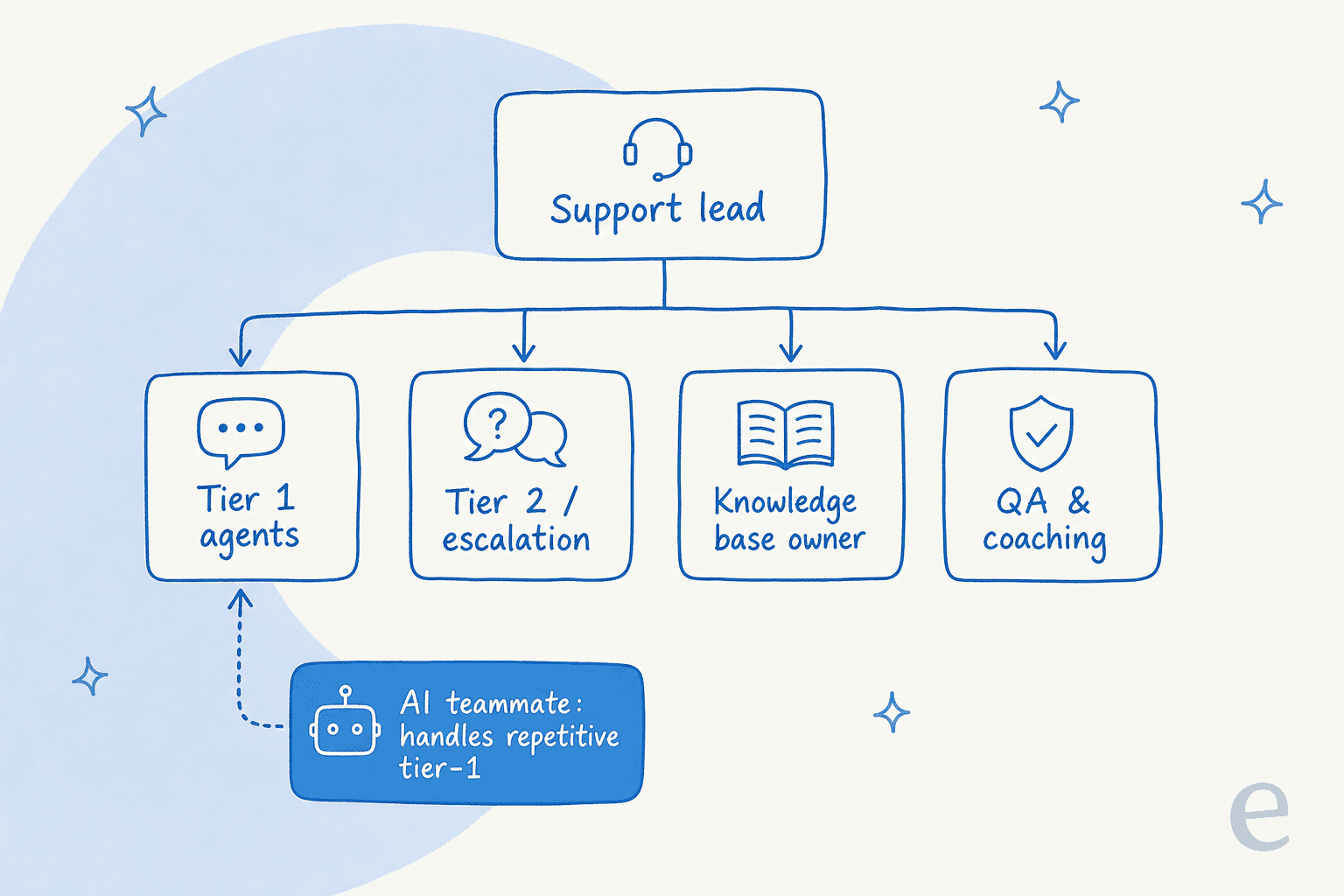
Here's how those roles break down, and roughly when each one earns its seat:
| Role | What they own | When to add them |
|---|---|---|
| Support lead / manager | Process, escalations, hiring, quality | From day one (can be player-coach) |
| Tier-1 agents | Frontline replies across channels | First hires |
| Knowledge base owner | Docs, macros, keeping answers current | Once you pass ~2 agents |
| Tier-2 / escalation | Technical or high-stakes cases | When tier-1 starts escalating a lot |
| QA & coaching lead | Review, feedback, consistency | Once you have 4+ agents |
| AI teammate | Repetitive tier-1, drafts, triage | Day one, alongside your first hires |
The last row is the one that's changed. A few years ago, the only way to handle more tickets was more people. Now the first "hire" for repetitive volume is often software. That doesn't shrink the human team's importance, it changes what the humans spend their day on. More on that below, but keep this structure in mind as we walk the build.
Step 1: Start with goals, channels, and volume
The most common mistake I see is teams starting with "how many agents should we hire?" That's the wrong first question. Start with three things instead.
Goals. What does good support mean for your business? For a DTC brand it might be fast first response time and quick refunds. For B2B SaaS it's accurate, technical answers and retention. Your goals decide everything downstream, from who you hire to which KPIs you track.
Channels. Email, live chat, social, phone, in-app. Each channel has a different rhythm and staffing need. A live chat queue needs people online in real time; email can be batched. Don't open a channel you can't staff, an ignored chat widget is worse than none.
Volume. Pull your real numbers. How many tickets per week, and what are they about? This is the single most useful thing you can do, because most support volume is a handful of repetitive questions. One multi-brand e-commerce operator I heard about was fielding 500+ tickets a day, and the bulk of it was refunds, unsubscribes, and order tracking. That mix tells you exactly what to document and what to automate first.
If you're not sure how to structure any of this, our guide to customer service management goes deeper on process design.
Step 2: Hire the core roles in the right order
Once you know your volume and goals, hire in sequence. Over-hiring specialists early is expensive and leaves people underused; under-hiring leaves everyone drowning.
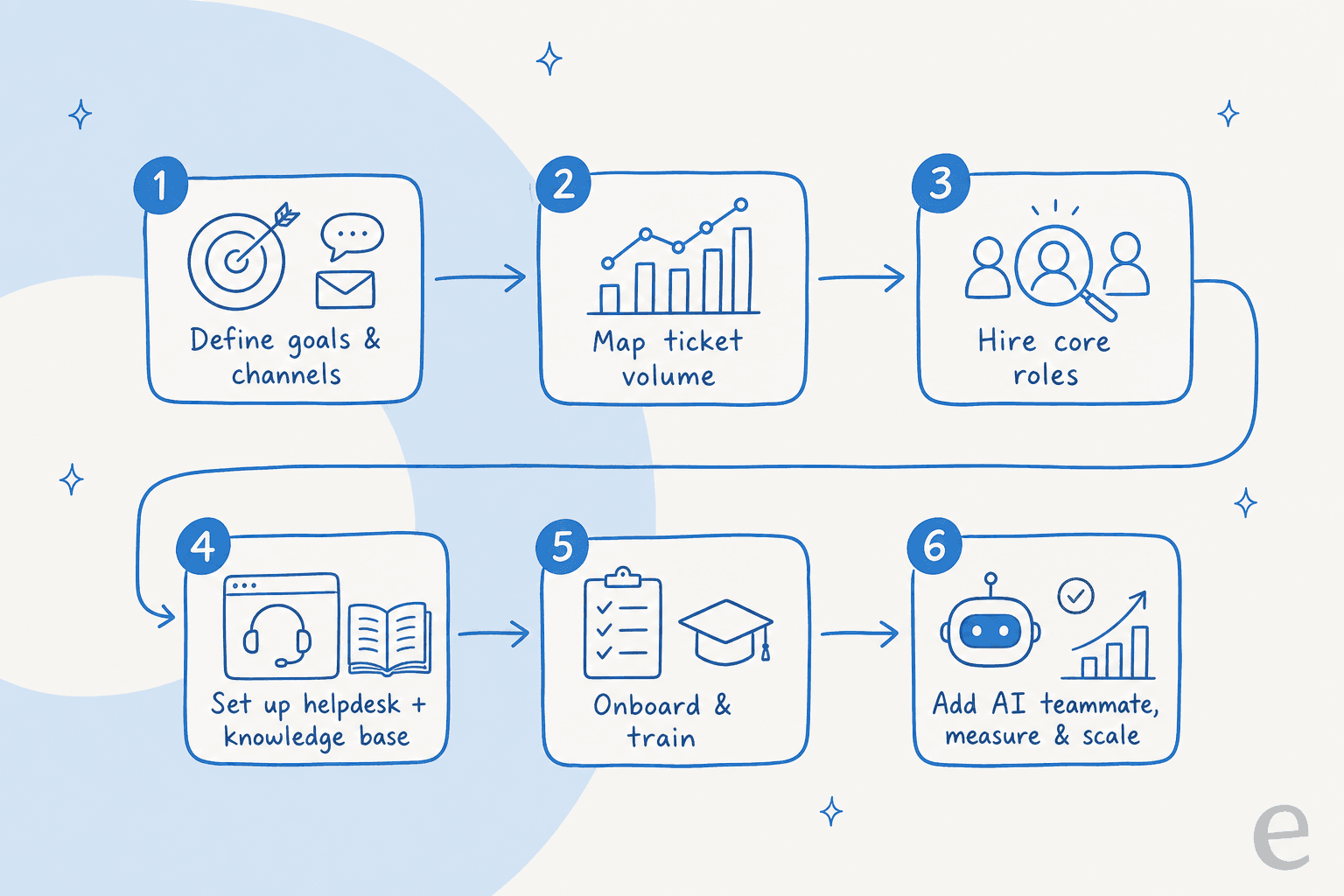
My rough order:
- A strong generalist agent. Someone who can handle almost anything and isn't precious about it. Early on, versatility beats specialisation.
- A lead (or player-coach). Someone owning process, quality, and the first escalations. In a small team this is often the founder or first senior hire wearing the manager hat part-time.
- A knowledge base owner. The moment you have two agents giving slightly different answers, you need one person owning the source of truth. This role quietly determines whether your AI later works well, because AI is only as good as the knowledge you feed it.
- Escalation and QA. Add tier-2 specialists when tier-1 is escalating a lot, and a QA and coaching lead once you have four or more agents and consistency starts slipping.
When you're hiring, weight for the traits that don't train well: empathy, clear writing, and calm under pressure. Product knowledge and tooling you can teach. A useful gut-check is our list of customer service standards, which doubles as an interview rubric.
One real note on why teams start looking at AI during hiring: knowledge walks out the door. I heard about a French IT services firm that was about to lose two senior agents with deep product knowledge, and their whole motivation for automation was capturing that tribal knowledge before it left. Documenting and training an AI on your best agents' answers is partly a hiring-risk hedge.
Step 3: Pick your stack, not a pile of tools
You need less software than vendors want you to buy. For most teams, the core stack is three layers:
- A helpdesk. This is your system of record for tickets. Zendesk, Freshdesk, Gorgias, Front, or Help Scout all work. Pick for your channel mix and budget, not for the longest feature list.
- A knowledge base. Public help center plus internal docs. This is the fuel for both your human onboarding and your AI. If it's scattered across Notion, Google Docs, and old tickets, that's fine, the right AI layer can read all of it.
- One AI layer. A single AI agent that sits on top of the helpdesk and knowledge base, drafts replies, deflects repetitive questions, and triages the rest.
A quick word on the AI layer, because it's where most stacks go wrong. Some native helpdesk AI is built mostly around your help-center articles. It helps to pick AI that also learns from your past resolved tickets, because that's where your real answers live. One support director on Zendesk put it well when they explained why native AI wasn't enough:
"As a fast-growing startup with a small team, our customers far outnumber our employees. It's crucial that we have robust self-service solutions as well as tools to supercharge the efficiency of our client-facing teams."
Jon Miron, Director of Support & Operations, Yellowdig
If you're weighing whether to buy a tool or build your own on top of an LLM API, we wrote a whole build vs buy guide for support. The short version: unless AI infrastructure is your core business, buy it and spend your engineering time elsewhere.
Step 4: Onboard and train, and make knowledge the job
A team is only as good as what it knows and how fast new people can learn it. This is where a strong knowledge base pays off twice: once for humans, once for the AI.
For human onboarding, the fastest ramp I've seen is pairing a new hire with an AI copilot that drafts answers from your docs and past tickets. Instead of interrupting a senior agent every ten minutes, the new hire gets an accurate draft with sources, edits it, and learns the product as they go. It's the "24/7 supervisor" effect that a lot of small teams describe.

A few onboarding habits worth building in early:
- Write the answer once, reuse it everywhere. Every good reply is a candidate macro or KB article. Make it a norm that agents turn repeat answers into docs.
- Coach with real tickets. Review actual conversations, not hypotheticals. Our problem-solving techniques post is a good source of scenarios.
- Keep tone consistent. Agree on a voice and put it in writing so a new hire (or an AI) sounds like the rest of the team, not a different company.
The payoff compounds. One logistics SaaS team described their AI as getting agents "to the right articles really quickly" while still "keeping that human touch", which is exactly the balance you want when onboarding.
Step 5: Measure the few things that matter
You can drown a team in metrics. Pick a small set that maps to your goals and review them weekly.
The honest short list for most teams:
- First response time and resolution time, tracked per channel.
- CSAT (or your satisfaction metric of choice) on resolved tickets.
- Deflection / automation rate, once AI is in the mix, so you know how much volume never reached a human.
- Backlog and reopen rate, the early-warning signs your team is underwater.
Our full breakdown of customer service KPIs covers how to set targets, but the meta-rule is simple: measure outcomes for customers, not activity for its own sake. Tickets-closed-per-hour looks productive and tells you almost nothing about whether customers left happy. A good reporting view should show volume, resolution, and where automation is helping in one place.

Step 6: Scale with AI before you scale headcount
Here's the part that changes the whole hiring math. In the old model, more tickets meant more agents, full stop. Small teams got buried, senior people burned out, and quality slipped right when volume was highest.
The modern move is to let an AI teammate absorb the repetitive tier-1 volume first, and only add humans for the work that genuinely needs judgement.
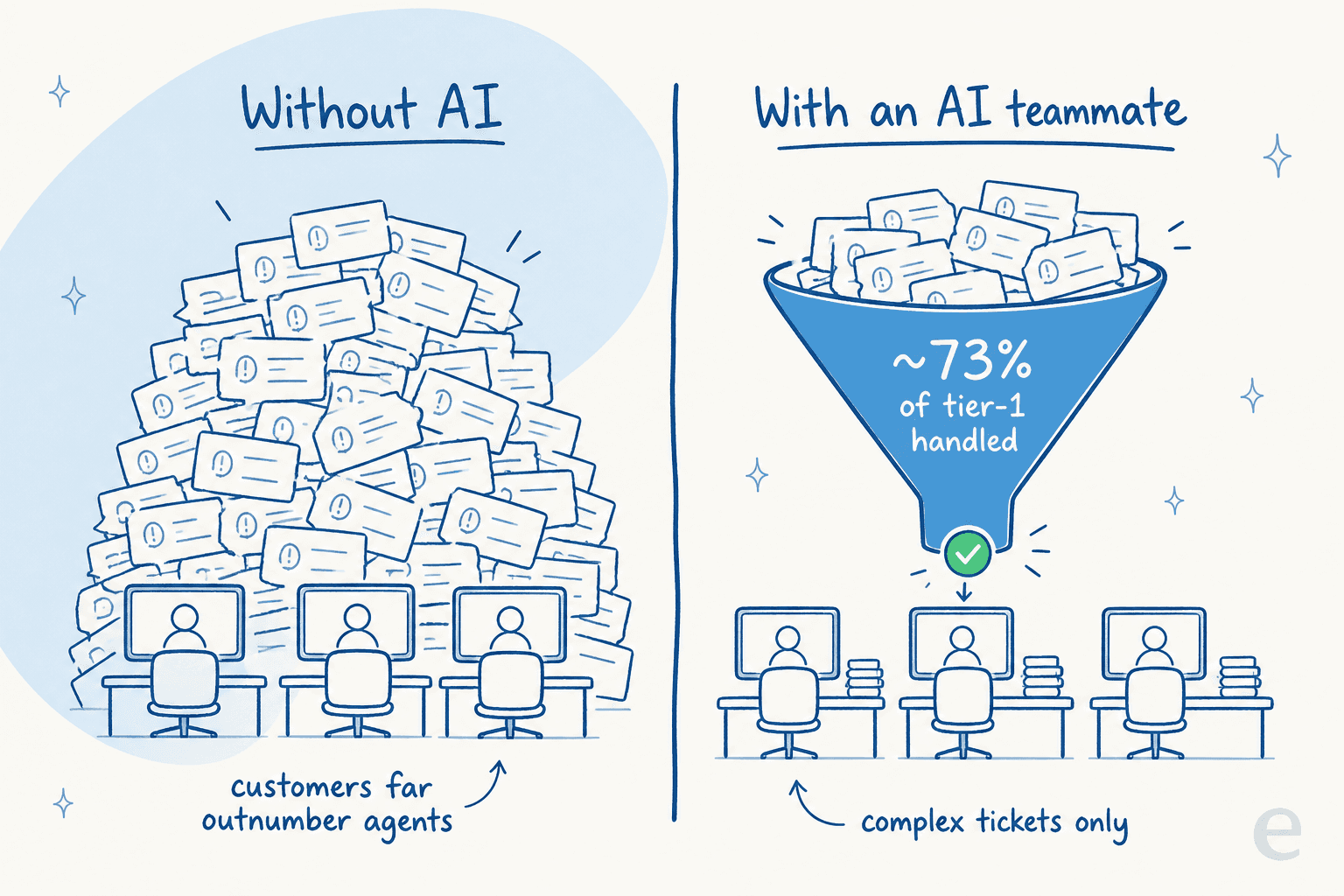
This isn't hypothetical. One gig-economy analytics company saw an AI agent resolve a big share of their frontline volume in the first month:
"In the first month, eesel is resolving 73% of our tier 1 requests. eesel offers easy Zendesk implementation and setup. Our team implemented and achieved results quickly during our 7-day trial."
Kim Simpson, Gridwise
The key is control. The reason most teams are (rightly) nervous about AI auto-replying is the fear of confident wrong answers. The fix isn't to avoid automation, it's to only automate what the AI is confident and correct on, and route the rest to a human. Good tooling lets you run the AI against your historical tickets first to see exactly what it would have answered, then start it in draft-only mode, then hand it the easy stuff once you trust it. Here's what that looks like running inside a helpdesk:
Done this way, a team of three can cover the volume that used to need eight, and the three people you do have spend their time on complex, high-value conversations instead of resetting passwords. That's the whole point: AI doesn't replace the team, it changes what the team is for.
Common mistakes when building a support team
A few traps I see over and over:
- Hiring before documenting. If your knowledge lives in three senior agents' heads, every new hire is slow to ramp and your AI has nothing to learn from. Document first.
- Opening every channel at once. Phone, chat, social, email, all on week one, none staffed properly. Pick the channels you can actually cover.
- Buying AI that only reads help articles. The valuable answers are in your resolved tickets. If the AI can't learn from those, it'll miss most of your real questions.
- Automating everything on day one. The fastest way to lose trust in AI is to let it auto-reply to things it shouldn't. Start supervised, expand as it earns it.
- Measuring activity, not outcomes. Closing lots of tickets fast isn't the same as solving customer problems. Watch CSAT and reopen rate alongside speed.
Avoid those five and you're ahead of most teams twice your size.
Building your team with eesel
If the plan above sounds right but you don't want to bolt on yet another disconnected bot, that's exactly the gap eesel fills. It works like a new support teammate that plugs into your existing helpdesk (Zendesk, Freshdesk, Gorgias, Front, Help Scout, and more) in minutes and learns from your past tickets and docs on day one, so it's useful from the start instead of after a month of setup.
What makes it a fit for a team you're actively building: you can simulate it against your historical tickets before it ever touches a live customer, keep it in draft-only mode while your new hires learn, and grant it autonomy only on the questions it handles well. It's one fixed monthly price, from $299/month for 500 credits (1 credit per ticket), with no per-seat fees, so a two-person team can automate tier-1 without a big platform contract, and it speaks 80+ languages out of the box if you support globally.

You can try eesel free (100 free credits, no card needed) and see how much of your current volume it would cover before you make your next hire.
Frequently Asked Questions
How do I build a customer service team from scratch?
What roles do you need on a customer service team?
How many customer service agents do I need?
What software does a small customer service team need?
How much does it cost to build a customer service team?
Can AI replace a customer service team?
How do you structure a small customer service team?


Article by
Riellvriany Indriawan
Riell is a designer and writer at eesel AI with about two years of experience researching CX platforms, AI chatbots, and helpdesk software. She combines her design background with a sharp eye for how these tools actually look and feel in practice — making her comparisons unusually visual and user-focused.