Claude for Confluence: how to connect it, and what it can't do

Rama Adi Nugraha

Katelin Teen
Last edited August 12, 2026

What actually connects Claude to Confluence
There's no Confluence-specific Claude integration. There's one Atlassian connector, and Confluence rides inside it.
The thing doing the work is the Atlassian Rovo MCP server, formerly the Atlassian Remote MCP Server. It's a cloud-hosted bridge at https://mcp.atlassian.com/v1/mcp/authv2 that speaks the Model Context Protocol, the open standard Anthropic created for wiring AI clients to outside systems. Atlassian describes it as a proxy rather than a product, and states plainly that it "does not store or cache your Jira or Confluence content."
Two facts about it surprise most people.
The first is the price. It's free on every Atlassian Cloud plan, Free tier included, and needs no Rovo subscription, because Atlassian's own framing is that it isn't an AI model at all, just an integration layer. What scales with your plan is throughput. Rate limits are 500 calls per hour on Free, 1,000 on Standard, and 1,000 plus 20 per user up to 10,000 on Premium and Enterprise. Those ceilings are site-level, not per-user, and they're shared with Jira, so one enthusiastic agent session can eat a small team's budget.
The second is that Confluence gets the friendly treatment. All three Confluence permission groups accept OAuth 2.1 and API token auth. That sounds like trivia until you compare it to its siblings.
| Atlassian product | Auth the tools accept |
|---|---|
| Confluence | OAuth 2.1 and API token |
| Jira | OAuth 2.1 and API token |
| Jira Service Management | API token only, org admin must enable it |
| Bitbucket Cloud | API token only, plus a linked workspace |
| Compass | OAuth 2.1 only |
When I wrote up Claude for Jira Service Management, the punchline was that a normal OAuth login surfaces zero JSM tools. Confluence is the opposite case. Click through the consent screen and you have the full set.
One catch that trips up custom clients: getAccessibleAtlassianResources is a required first call for any tool, because every call needs a cloudId. Atlassian's docs say so in those words. On a multi-site org it's also where the agent quietly decides which Confluence it's about to write to.
And it's Cloud only, with no Data Center path at all. That's structural rather than a roadmap gap, since a self-managed instance has no cloudId to hand over. The GitHub request for it has been open since November 2025.
The twelve Confluence tools, and what they cover
Atlassian publishes exactly twelve Confluence tools across three permission groups: seven read, four write, one search. Admins grant them in whole groups, never individually.
Rather than list them, here's what they mean for the nine things people actually ask Claude to do with a wiki.
The absences are worth reading twice. No attachments, no labels, no page history, no delete, no move or copy, no templates. Atlassian's supported tools reference is the only page that enumerates them, and there are open feature requests for most of the gaps. If a gap here is a blocker, the marketplace route is usually next: I've rounded up the better options in top Confluence apps and Confluence AI apps.
How to connect Claude to Confluence
Setup is quick. The order matters more than the commands, because the admin consent step is what stalls most first attempts.
1. Get a site admin ready. The Rovo MCP server isn't a Marketplace app you install ahead of time. It installs just-in-time the first time someone completes the OAuth consent flow, and a site admin has to approve that first consent. If you're not an admin, ask before you start rather than after you hit the wall.
2. Add the connector on your surface. In Claude Code it's one line:
claude mcp add --transport http atlassian https://mcp.atlassian.com/v1/mcp/authv2
Then run /mcp inside a session to authenticate. For a project-scoped setup, the repo's own .mcp.json is the equivalent:
{
  "mcpServers": {
    "atlassian": {
      "type": "http",
      "url": "https://mcp.atlassian.com/v1/mcp/authv2"
    }
  }
}
In Claude Desktop it's Settings, then Extensions, then Browse extensions, then search for Atlassian. On claude.ai there's no JSON at all: you add the Atlassian Rovo listing from the connectors directory, which is a first-party listing built by Atlassian rather than a community project.
3. Decide the permission groups before you consent, not after. Admins control access at the group level through the permissions tab, where each shows as Allowed, Blocked, or Partially allowed. If you only want reading, block write_confluence now. There's no undo tool if an agent mangles a page later.
4. Check the network path if Confluence sits behind anything. Claude reaches the MCP server from Anthropic's cloud, not from your laptop, on every client including Desktop. A firewalled setup needs Anthropic's IP ranges allowlisted. Atlassian's domain control is also all-or-nothing: you can allow or block the whole partner list, so you cannot permit Claude while refusing ChatGPT.
5. Name the connector in your prompts. This one only shows up in practice, and a Reddit user put it well.
"I have had quite a bit of luck using it with JIRA and Confluence to read docs/tickets as well as generate them. I am using it mostly through Claude Code and Claude Desktop on Mac. I find if I'm not super explicit that I want it to use the MCP it will go haywire."

What the connection is actually good at
Retrieval. That's the honest answer, and it's a bigger deal than it sounds, because native Confluence search has a reputation.
The strongest endorsement I found came from a developer comparing MCP search against Confluence's own:
"Considering how poor the Confluence search function is, the results from Confluence via an MCP-powered search are remarkably good. I was able to solve one or two obscure, company-specific issues purely by using the MCP search, and I'm convinced that finding these pages would have been almost impossible without it."

That maps to what the tools are shaped for. A model that can call searchConfluenceUsingCql, read the hits, then walk down a page tree with getConfluencePageDescendants is doing something Confluence's search box structurally cannot. If you'd rather build that loop yourself, the Confluence AI API guide covers the direct route.
The connector also ships six bundled agent skills, four of which touch Confluence: Search Company Knowledge runs parallel cited searches, Spec to Backlog turns a Confluence spec into Jira epics and tickets, Generate Status Reports pulls Jira issues into a published Confluence page, and Capture Tasks from Meeting Notes does what it says. If you already run Atlassian AI project management, Spec to Backlog is the one worth trying first, and the Jira half of it overlaps heavily with what a Jira copilot does. The status-report skill is the closest thing here to real Confluence workflow automation.
Worth knowing about the repo itself: atlassian/atlassian-mcp-server holds no server source at all. It's the README, a manifest, a Claude Code plugin, and those skills. The server is closed-source and cloud-hosted. It carries 952 stars, an Apache-2.0 licence, and 78 open issues, 34 of them Confluence-related.
Where it breaks: writing to Confluence
Reading is solid. Writing is where I'd slow down, and the evidence for that is unusually specific.
In May 2026, a user posted a data-loss report to the Atlassian Community that is the sharpest artefact in this whole topic:
"I used Claude via the Atlassian Rovo MCP connector to rename and reorganize pages in my Confluence workspace. Claude sent update calls that changed the title but did not include the body field. The Confluence API interpreted the missing body as an instruction to clear the page content. Every page that was renamed had its entire body silently deleted."
The same post notes that a call reducing a page from 15,000 characters to zero executes with no warning or confirmation prompt.
Credit where it's due: Atlassian did not stonewall this. A developer on the Confluence MCP team replied the next day saying the team would fix it, and by July 2026 followed up that "on the V2 MCP preview just released, we've completely rewritten how Confluence page edits work to use targeted granular edits." If you're reading this after V2 lands broadly, the specific defect is addressed.
The underlying design pressure is still there, though, and it explains a cluster of open issues. updateConfluencePage wants the complete page body on every edit, with no patch or range option. Issue #106 documents what that costs at scale: ADF bodies reach 50 to 70KB, the model has to hold the whole thing and re-emit it inside a tool call, and Claude Code persists tool outputs over roughly 20KB to disk, so the content never reaches working context. Related reports cover stripped inline comment anchors, removed images and tables of contents, and a roughly 5KB write ceiling on the Claude connector caused by a Cloudflare rule at the edge.
Then there's the friction that has nothing to do with Confluence and everything to do with staying signed in. The Atlassian Community thread on it has over 16,500 views.
"Atlassian MCP is unusable due to the longevity of their auth tokens. Needing to reauthenticate twice a working day is horrible. Why can;t I inject my personal access token into it; that is longlived and properly in control."
Another user in the same thread reports re-authenticating roughly every 30 minutes. It's the most-cited operational complaint about the server, and it's the reason a small cottage industry of hand-rolled Atlassian MCP servers exists.
The permission ceiling nobody checks first
Here's the reassuring part, followed by the part that costs people a week.
Access is scoped to the signed-in user's existing Confluence permissions. Atlassian states it in three separate places, including that the server operates "within the permissions of the signed-in user and only accessing data they are allowed to see." A restricted space stays invisible. getConfluenceSpaces returns only what that account can already open. The MCP server grants no elevation whatsoever.
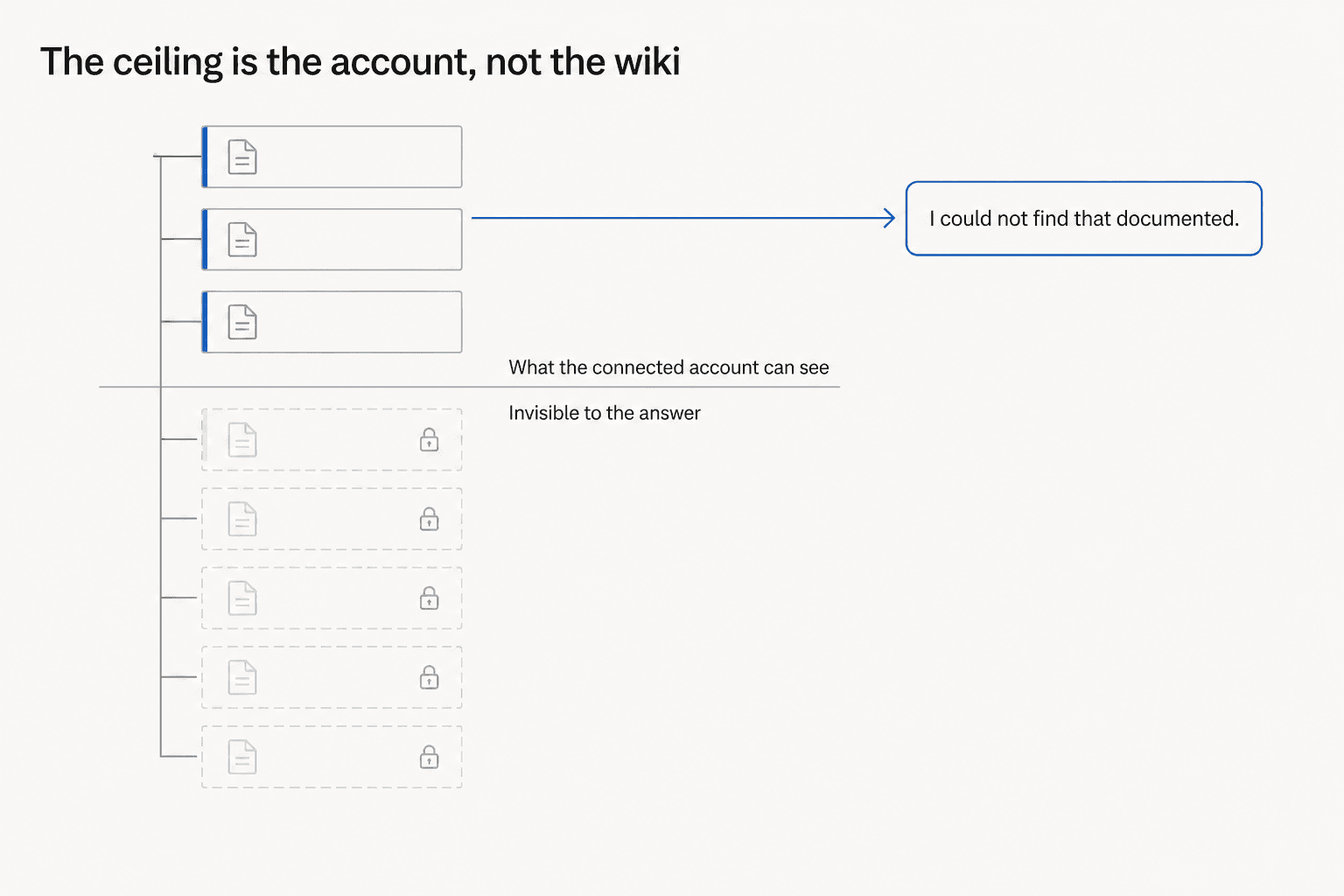
The cost of that guarantee is that your answer quality is capped by the account you connected, not by what's in Confluence. This is the single most common false alarm I see in the eesel support queue, and it looks nothing like a permissions problem from the outside. A customer connects Confluence, watches 92 documents index cleanly, then asks a question those documents obviously answer and gets nothing back. Every dashboard says the sync succeeded, because it did. The pages were scoped away by ACLs the whole time. I've watched eesel's own agent misdiagnose that exact state as a sync failure, which is worse than useless, because the customer then goes and re-authorises an integration that was never broken.
Three years of putting AI on live support queues has taught me to check this before anything else. When retrieval looks mysteriously empty, the question is never "is the index working." It's "what can the connected account actually see."
Two related gaps are worth flagging to whoever runs your security review. There's no way to scope the server to specific spaces, which is the most-discussed repo issue at 23 comments, so an admin who connects their own account hands the agent an admin's reach across every space they can edit. And Atlassian is explicit that Rovo MCP is excluded from its HIPAA coverage, along with the CLI, the Chrome extension, and the mobile and desktop apps, even though Rovo Chat, Agents, and Search are in scope. There's no FedRAMP support either.
Your Confluence is the bottleneck, not Claude
This is the part most guides skip, and it's the one that decides whether the rollout lands.
Across Hacker News, Reddit, and G2, the same finding keeps arriving independently from people who have no reason to agree with each other. The clearest single sentence came from a thread about AI and engineering work:
"How can AI search into documentation, if the documentation is a thousands of obsolete and contradicting Jira tickets, few outdated Confluence pages with mail attachments and handful of excel files on SharePoint?"
An engineering manager put a number on it that I keep coming back to:
"we had a confluence wiki with 400+ pages. nobody read it. nobody updated it. new hires were told 'the wiki has everything' and then spent a week being confused because the wiki was 60% outdated."
What makes this more than grumbling is where the same point shows up next. On G2's Rovo listing, which sits at 4.6 out of 5 across only seven reviews, the criticism comes from satisfied reviewers. An enterprise SDET who scored it 4 out of 5 wrote that "the biggest limitation is that Rovo can only be as effective as the underlying data. If documentation is outdated, inconsistent, or incomplete, the search results and AI-generated insights may not always be as accurate or useful as expected." A cloud BI engineer, different month and different industry, landed in the same place independently.
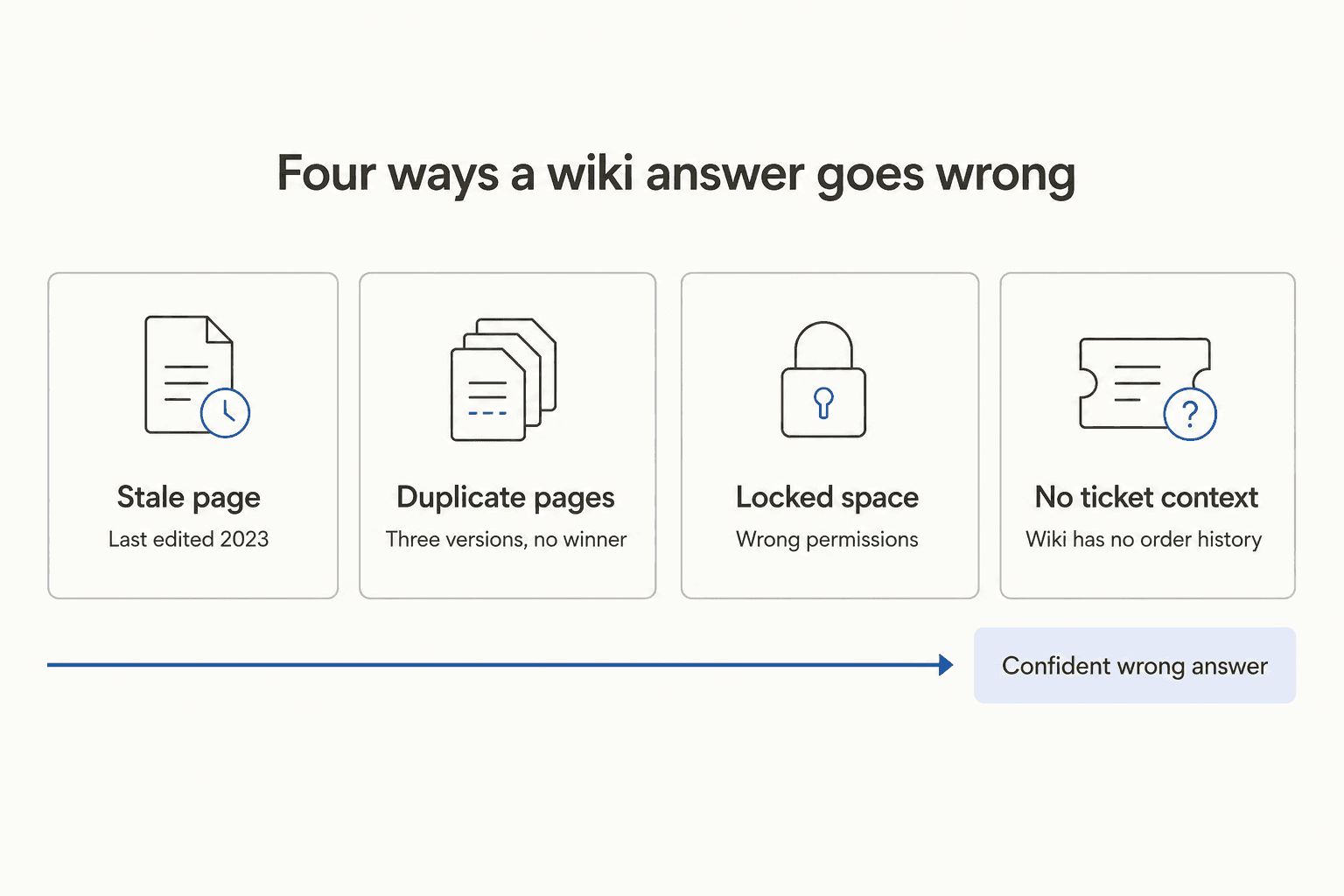
The failure mode that matters isn't "the AI couldn't find anything." It's the duplicate-page case, where three overlapping versions of a policy exist and the model confidently picks the wrong one. Someone on Hacker News caught Rovo doing the pure version of this on Confluence content, inventing an expansion for an acronym that was just a word someone had typed in capitals.
None of that is Claude's fault, and swapping models won't fix it. It's why my guide to Confluence knowledge integration spends more time on curation than on connectors, and why teams comparing Confluence alternatives often find the migration doesn't fix it either. The rot follows you. The same holds if you're weighing Confluence vs SharePoint or wiring pages through n8n.
Rovo or Claude: which should read your Confluence?
Atlassian's own AI lives inside Confluence and needs no setup, so it's the obvious comparison. The real difference is the meter.
| Rovo in Confluence | Claude via Rovo MCP | |
|---|---|---|
| Setup | None, auto-activated on Standard and above | One command or one directory click |
| Confluence plans | Standard, Premium, Enterprise. Nothing on Free | Every Cloud plan, Free included |
| Cost model | Rovo credits per user per month | No credit meter, you pay Claude |
| Credits included | 25 Standard, 70 Premium, 150 Enterprise | Not applicable |
| Indexed objects per user | 100 / 250 / 625 | Not applicable |
| Write capability | In-editor drafting and agents | Create and update pages, with caveats |
| Reasoning | Atlassian's models | Whichever Claude model you're on |
| Data Center | Sync connectors push content to Cloud | Not supported at all |
| HIPAA scope | Chat, Agents, Search in scope | Excluded |
The credit arithmetic is where this gets concrete. A Rovo Chat quick answer costs 10 credits, an agent run costs 10, and a Deep Research query costs 100. So a Confluence Premium seat with 70 credits a month buys seven chat answers, or two thirds of one Deep Research query. Search, summaries, and definitions are free and don't touch the meter, which is a real point in Rovo's favour for casual use.
Two fairness notes. Atlassian says it is not currently billing for overage, has committed to 90 days' notice before it does, and credit dashboards only reach Admin Hub in August 2026, so nobody is getting surprise invoices today. And Rovo's connector list is broad, covering Google Drive, Slack, SharePoint, GitHub, and around 40 other third-party sources.
My read: if you live in Confluence all day and ask it occasional questions, Rovo is fine and free enough. If you're doing sustained work over many pages, Claude through MCP is the better instrument, because there's no per-question meter making you hesitate. I go deeper in Confluence search AI and Confluence AI copilot, with the setup walkthrough in Confluence copilot.
What this actually costs
The connector is free. Everything under it isn't. Confluence Cloud prices on a progressive per-user ladder, so the per-seat number falls as you add people.
| Plan | 1 to 100 users | 101 to 250 | 251 to 1,000 | Rovo credits per user | Indexed objects per user |
|---|---|---|---|---|---|
| Free | $0, capped at 10 users | Not available | Not available | None | None |
| Standard | $6.70 / user / mo | $5.10 | $3.80 | 25 | 100 |
| Premium | $13.20 / user / mo | $9.55 | $7.60 | 70 | 250 |
| Enterprise | Annual contract, quote only | Quote | Quote | 150 | 625 |
Two things in that table catch people out. The Free plan has no space or page permissions at all, which makes it a poor place to test anything AI-related, since the permission scoping that makes MCP access safe simply doesn't exist. And Rovo needs a verified business domain, so an org on a consumer email domain cannot turn it on.
There's a deadline worth diarising too: Confluence Data Center goes read-only on 28 March 2029. For a fuller breakdown, see my write-ups on Confluence pricing and Confluence AI pricing, and the Jira pricing guide if you're buying both.
When a chat window is the wrong place for the answer
Everything above assumes the person who needs the answer is the person typing into Claude. That covers a lot of real work: an engineer reconstructing a decision, a PM turning a spec into tickets, a new hire trying to find the deployment runbook.
It does not cover the case I spend most of my time on, which is somebody outside your company asking a question your Confluence already answers.
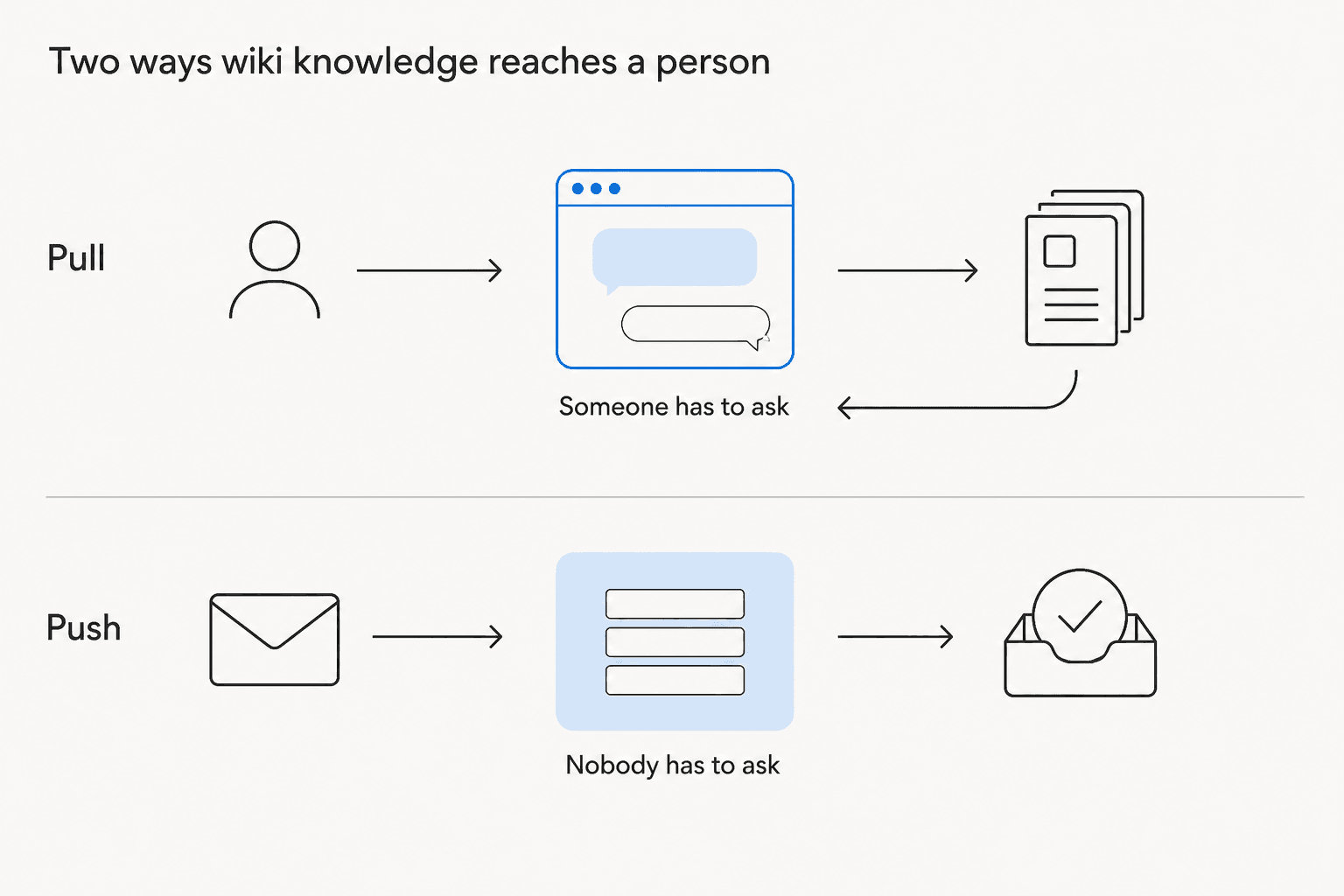
The twelve tools are all pull. A person prompts, Claude fetches, the answer lands in the chat. Nothing in the set watches an inbox, reads an incoming ticket, or sends a reply. That's not an oversight in Atlassian's design; it's what an MCP server is for.
The second problem is that a wiki only holds half the answer. A customer asking where their order is needs the shipping policy and the order record. A new starter asking about their leave balance needs the policy and their own accrual. Confluence has the first and none of the second, which is why a support answer assembled from documentation alone tends to be correct and useless at the same time. My post on Confluence agentic AI works through what closing that gap involves, and finding a Confluence agent covers the shortlist.
If the reader you're serving is internal and technical, stop here. The Rovo MCP server plus Claude is a good setup and I'd use it. If the reader is a customer or an employee raising a request, you need something on the other side of the queue.
eesel AI for Confluence
I have a longer history with this problem than most, and not a flattering one to start with. eesel's first real growth engine was an Atlassian Marketplace app called ChatGPT for Confluence, now AI for Confluence. People installed it from the marketplace with no credit card step and just kept paying, which taught me early that the demand isn't for a better wiki search box. It's for the wiki to stop being something you have to go and read.
So eesel works from the other end. It indexes Confluence the same way the Rovo MCP server reads it, then sits on your helpdesk, your Slack, or a chat widget and drafts the reply itself. Nobody has to open Claude. When it isn't confident, it hands over to a human with the sources attached rather than guessing.

Three things that follow directly from the limits above:
- It simulates against your real history before it goes live. I've watched a confident-sounding bot quietly hand out wrong answers from a stale page, which is exactly the duplicate-page failure this post describes. Running a rollout against past tickets first is the only way I know to catch it before a customer does.
- It isn't Cloud-only. The Rovo MCP server has no Data Center path and structurally can't have one. If your Confluence is self-managed, that's a hard stop for the official connector and not for eesel.
- Pricing is per task handled, at $0.40, whether that's a ticket or a chat session, with no per-seat fee and no credit meter to ration. There's $50 of free usage to try it, no card required.
A development director at an EU HR-compliance company, running exactly this setup on Confluence and Slack, put the requirement plainly:
"We needed a turnkey solution for Confluence that met our GDPR requirements and could serve different teams through dedicated Slack bots. eesel AI delivered exactly that, with EU data residency included."
A chief innovation officer at a payments company, also on Confluence, reported up to 80% time savings on finding answers and onboarding new staff. Those are the two shapes this usually takes: compliance-shaped, or speed-shaped.
If you want the Claude-side version of this comparison for other tools, I've written up Claude for Jira Service Management a broader look at Atlassian AI, and the Confluence roadmap assistant piece. And if you're weighing the wiki itself rather than the AI on top, Confluence vs Notion and my Confluence review are the places to start.
Frequently Asked Questions
How do I connect Claude to Confluence?
claude mcp add --transport http atlassian https://mcp.atlassian.com/v1/mcp/authv2, followed by /mcp to sign in. On claude.ai you add the Atlassian Rovo listing from the connectors directory instead. A site admin has to approve the app the first time anyone consents. There's a fuller walkthrough in my guide to setting up a Confluence copilot.Is Claude for Confluence free?
What can Claude actually do in Confluence?
Does the Rovo MCP server work with Confluence Data Center?
cloudId that a self-managed instance doesn't have. Data Center teams either use an unofficial community server or a platform that indexes their content separately, like eesel's Confluence integration. My Confluence knowledge integration guide covers the options.Can Claude answer customer tickets from Confluence?
Is it safe to connect Confluence to Claude?
Should I use Rovo or Claude to search Confluence?



Article by
Rama Adi Nugraha
Rama is a software engineer at eesel AI with two years of experience writing about B2B SaaS, AI tools, and customer support technology. Based in Bali, Indonesia, he brings a developer's perspective to product comparisons — cutting through marketing copy to what the integrations and APIs actually do.