
Confluence is the premier choice for a team's single source of truth. As your knowledge base grows into a massive library of information, the key to staying productive is keeping that content organized and easy to navigate. You know the answer is in there, and with the right setup, you can ensure your team finds what they need the moment they need it.
That’s where Confluence apps come in. These plugins add new powers to the platform, helping you create, manage, and optimize knowledge sharing. This guide will walk you through seven of the best Confluence apps that can turn your wiki into an even more powerful knowledge engine that works for everyone. We’ll cover everything from tools that make your pages look great to AI that brings answers directly to you.
What are Confluence apps?
Confluence apps, sometimes called add-ons or plugins, are tools you can grab from the Atlassian Marketplace. They’re built to add new features or enhance the ones you already have, right inside your Confluence setup. Think of them as power-ups for your knowledge base.
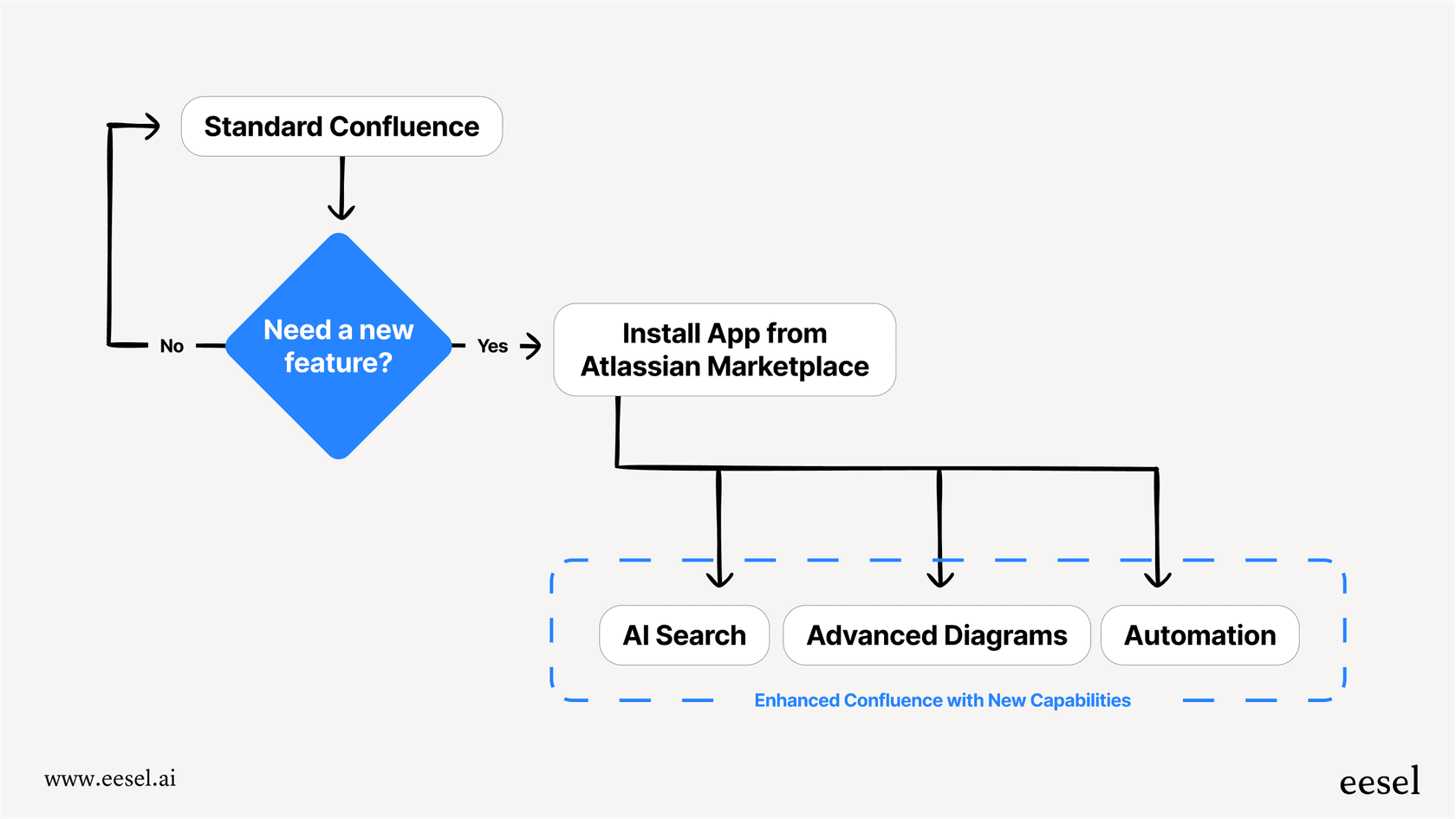
They do all sorts of things, like improving page design, automating workflows, creating diagrams, managing documents, and connecting with other software your team uses every day. The right mix of apps can support your team's specific workflows and make Confluence fit your needs perfectly.
How we chose the top Confluence apps for this list
To cut through the variety of apps on the Marketplace, we used a few simple criteria to find the ones that are actually worth your time. Here’s what we looked for:
- Real-world impact: Does the app genuinely improve a core part of Confluence? We focused on tools that make a noticeable difference in your day-to-day.
- User ratings and popularity: We leaned on apps with high ratings and many active users. If thousands of teams love it, it is likely a reliable choice.
- Ease of use: You shouldn't need an extensive manual to figure out a plugin. We prioritized tools that are intuitive and easy to adopt.
- AI and automation: The best tools help you work smarter. We looked for apps that streamline manual work and make knowledge easy to access.
- Good support and updates: An app is only as good as the team behind it. We chose vendors known for keeping their tools updated and being responsive when you need help.
A quick comparison of the top Confluence apps in 2026
This table gives you a quick overview to help you compare the apps at a glance based on what they do best and who they're for.
| App | Primary Function | Best For | Starting Price (Cloud) |
|---|---|---|---|
| eesel AI | AI-Powered Knowledge Access | Teams wanting instant answers from Confluence via Slack or Teams. | $239/month (annual) |
| draw.io Diagrams | Diagramming & Flowcharts | Technical and non-technical teams needing to visualize processes. | Free |
| ScriptRunner | Automation & Administration | Confluence administrators and technical users needing to automate tasks. | $165/year (10 users) |
| AURA Macros | Content Formatting & Design | Teams looking to create engaging, professionally designed Confluence pages. | $13.75/month (10 users) |
| Table Filter & Charts | Data Organization & Visualization | Teams working with data-heavy tables who need filtering and charting. | $13.75/month (10 users) |
| Comala Document Mgt. | Document Review & Approval | Regulated industries or teams needing formal approval workflows. | $13.75/month (10 users) |
| Scroll PDF Exporter | Content Exporting & Sharing | Teams that need to share Confluence content externally as PDFs. | $13.75/month (10 users) |
The definitive list of top Confluence apps
Now, let's get into the details of what makes each of these apps a solid addition for boosting your team's productivity and making your knowledge base genuinely useful.
1. eesel AI
While most apps on this list help you create better content, eesel AI is one option to help your team use it even more effectively. It connects to your Confluence spaces and acts as an AI assistant that can answer questions right in Slack or Microsoft Teams. Instead of having to browse through pages, they can just ask a question and get an immediate, accurate answer pulled from your documentation.
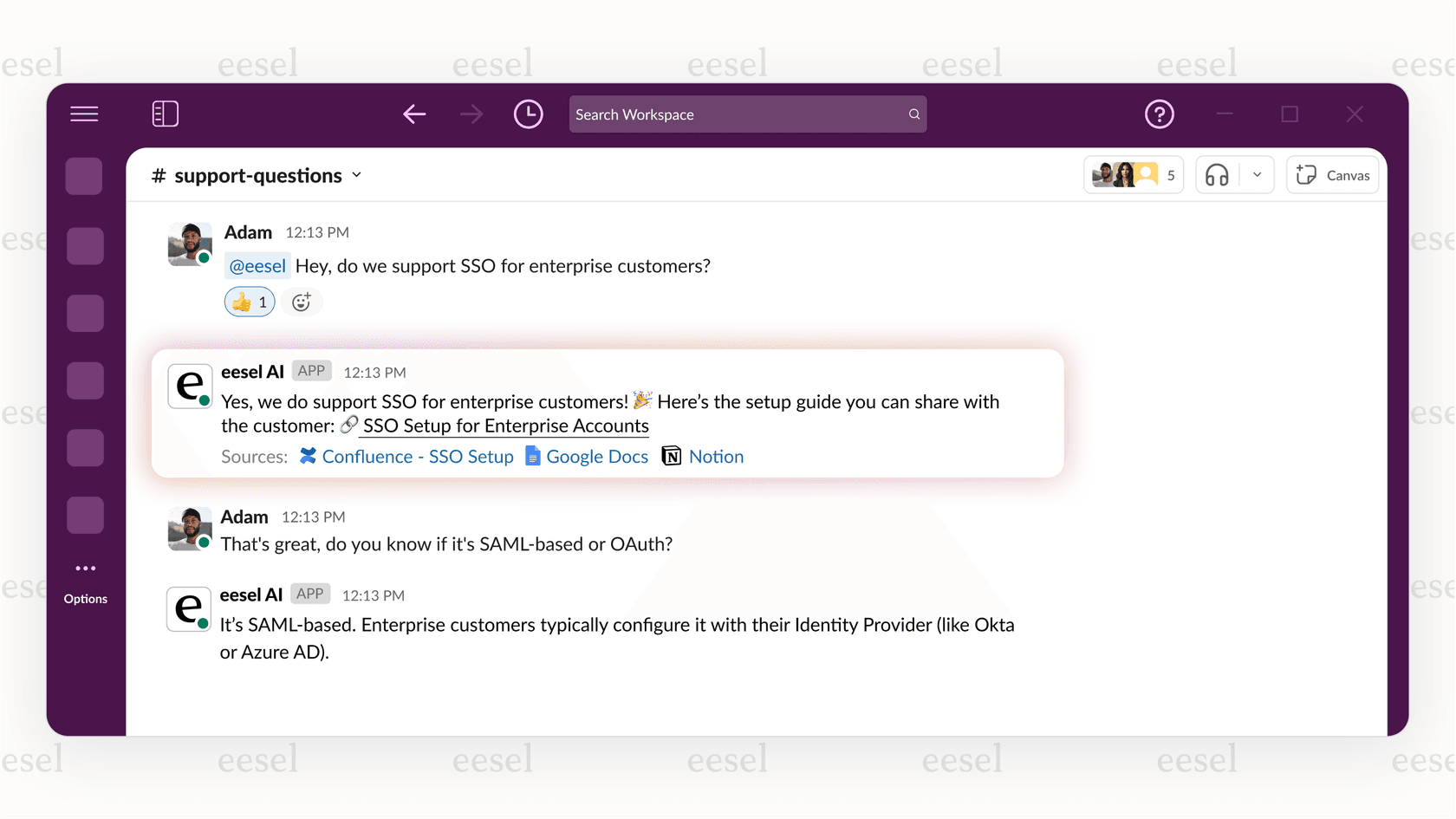
Why it's on the list: It complements the primary knowledge base by making information accessible in more places. A high-quality wiki provides the most value when information is instantly accessible. eesel AI makes your Confluence content even more accessible by making it available where your team already works. It helps unify your knowledge without requiring you to switch tools.
Pros:
- Go live in minutes: The setup is truly self-serve. A one-click integration gets you started quickly and easily.
- Answers where you work: By hooking into Slack and MS Teams, it brings knowledge directly to your team, supporting their focus.
- Unifies all your knowledge: It can learn from more than just Confluence. Connect it to Google Docs, past help desk tickets, and over 100 other sources.
- Scoped and accurate: You have full control over which Confluence spaces the AI learns from, so you can be sure its answers are always relevant.
Cons:
- It's a premium tool focused on giving you access to knowledge, rather than being a content creation tool.
- You get the most out of it when you integrate it with chat platforms like Slack or Teams.
Pricing: The Team plan starts at $239/month when billed annually.
2. draw.io Diagrams
draw.io is a popular choice for creating any kind of diagram, from simple flowcharts to complex network maps. It's well-integrated into the Confluence editor, letting you create and embed visuals without ever leaving your page.
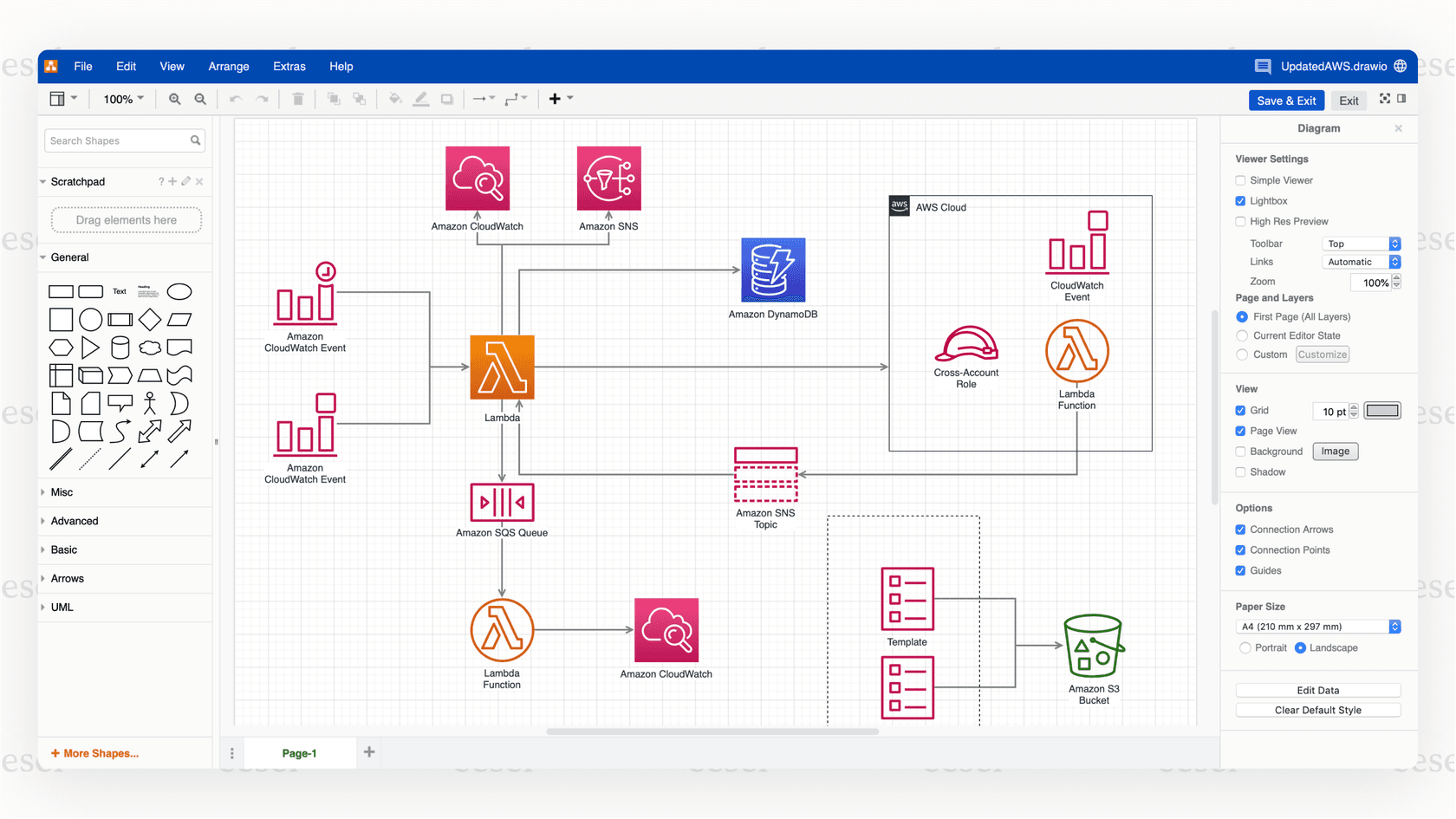
Why it's on the list: Visuals make complex ideas so much easier to understand, especially in technical docs or process guides. draw.io is powerful, flexible, and a widely used standard for diagramming in Confluence. It’s an excellent tool for any team that needs to explain things visually.
Pros:
- It's completely free for everyone, which is fantastic given its broad feature set.
- It has a massive library of shapes and templates for many different scenarios.
- The drag-and-drop interface is straightforward enough for anyone on the team to use.
Cons:
- The interface is functional and straightforward, though it may feel traditional compared to some newer standalone tools.
- It focuses on manual diagramming rather than automated AI generation.
Pricing: Free.
3. ScriptRunner for Confluence
Often called the "Swiss army knife" for Atlassian products, ScriptRunner lets administrators automate tasks and customize Confluence using Groovy scripts. With it, you can automate content management, manage spaces in bulk, and create custom macros to streamline your processes.
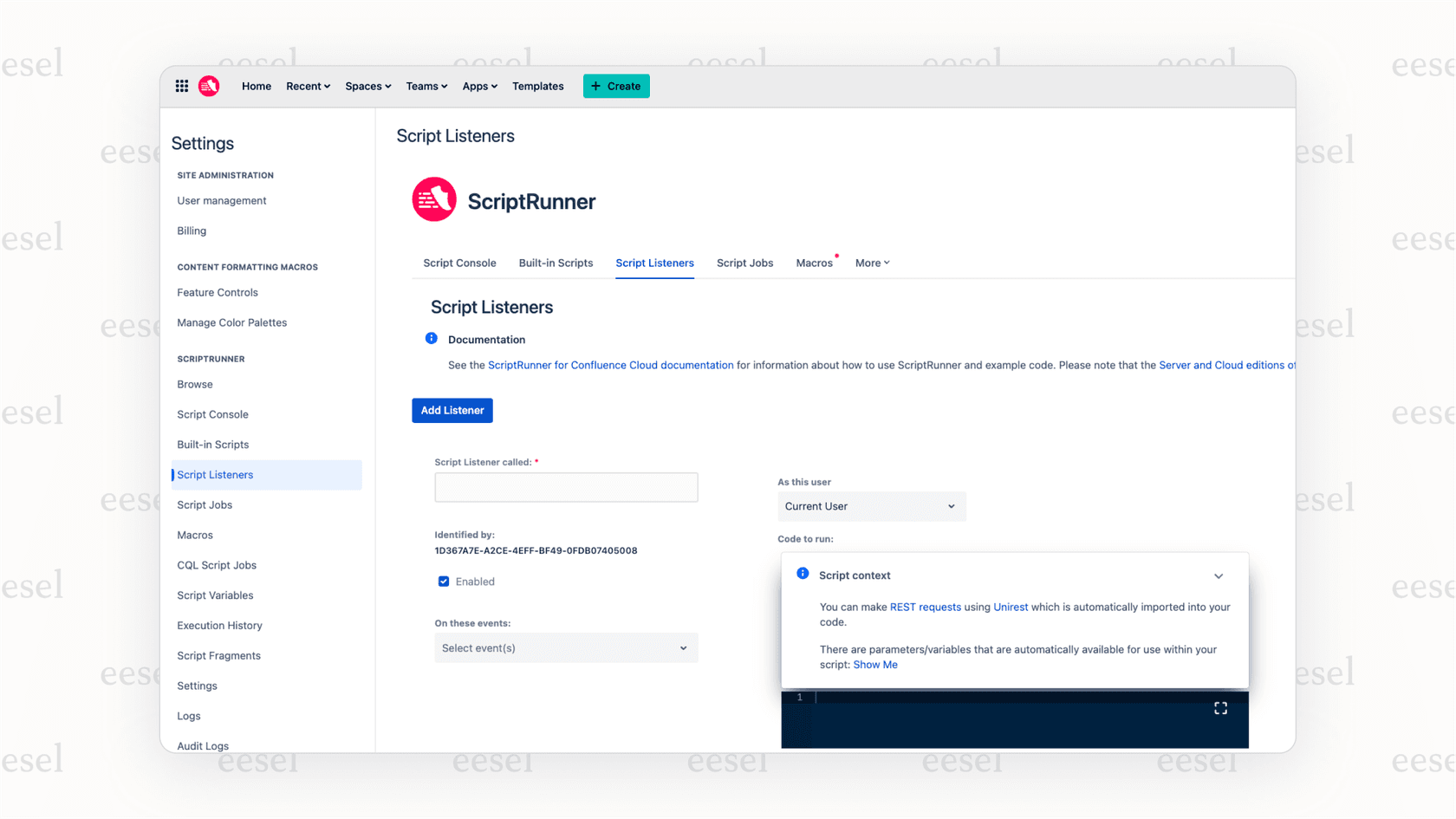
Why it's on the list: For anyone managing a large Confluence instance, ScriptRunner is a powerful ally. It automates repetitive tasks, allowing admins to focus on higher-value activities while keeping the knowledge base organized and in line with company standards.
Pros:
- Incredibly powerful and flexible, letting you automate a wide variety of tasks.
- It comes with a library of pre-built scripts for common tasks, so you can get started quickly.
- Great for enforcing content rules and performing efficient bulk actions.
Cons:
- It’s designed for technical users or admins; there is a learning curve for those unfamiliar with scripting.
- Basic knowledge of Groovy scripting is needed to unlock its full potential.
Pricing: Starts at $165/year for up to 10 users.
4. AURA Content Formatting Macros
AURA gives you a bunch of easy-to-use macros that can turn a standard, text-heavy Confluence page into a visually engaging experience. You can add tabs, cards, buttons, backgrounds, and expandable sections to structure information in a way that’s appealing and easy to follow.
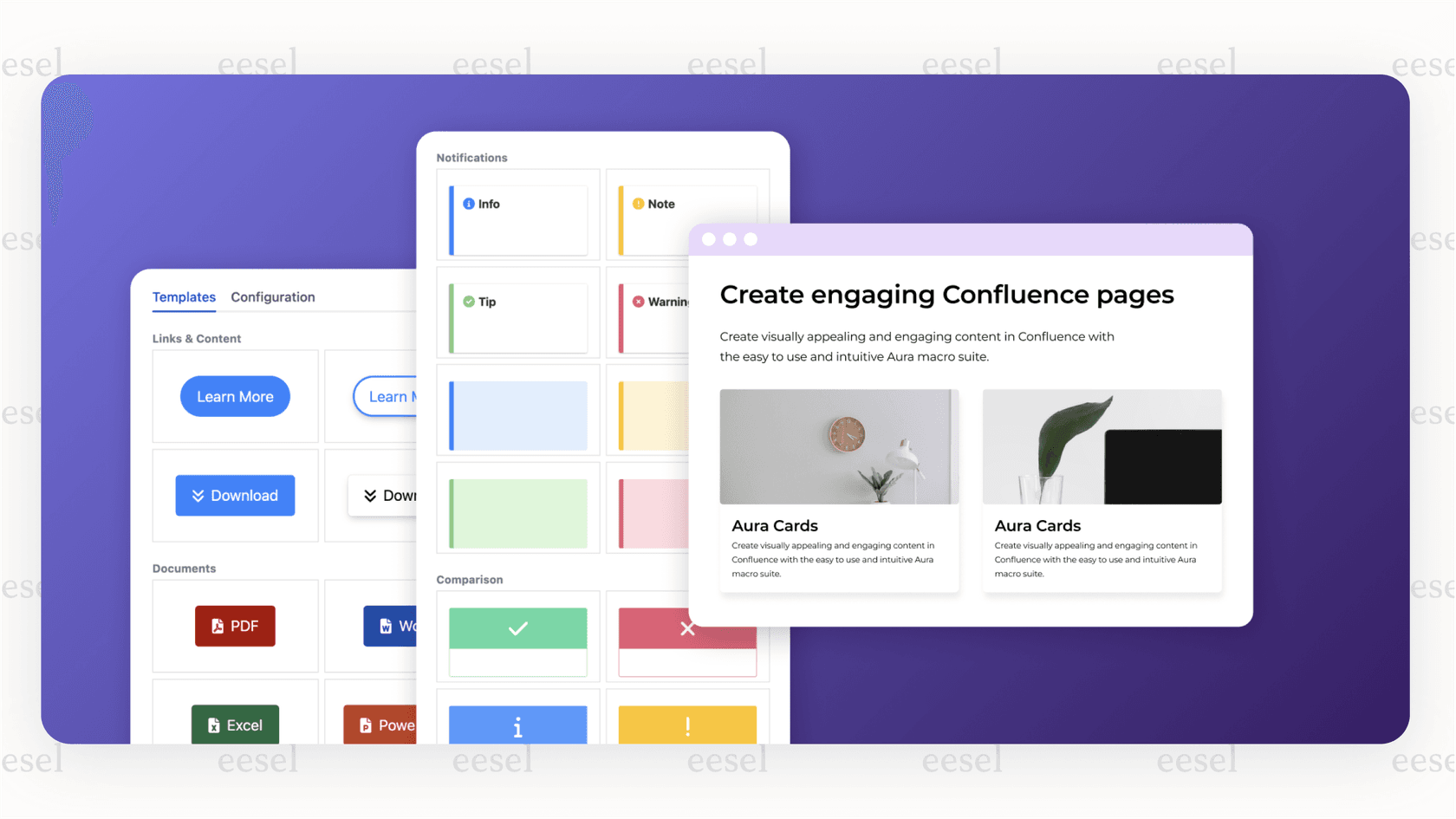
Why it's on the list: Engaging layouts help readers absorb information more effectively. AURA makes it simple for anyone on your team to create well-structured, professional-looking pages that encourage people to engage with the content.
Pros:
- Very intuitive and requires zero coding skills to use.
- Offers a wide range of macros for different formatting needs.
- Helps you maintain a consistent and professional look across your entire knowledge base.
Cons:
- Using an excessive number of macros on a single page can occasionally impact load times.
Pricing: Starts at $13.75/month for up to 10 users.
5. Table Filter, Charts & Spreadsheets
This app gives Confluence's native tables a significant upgrade, adding dynamic filtering, sorting, and the ability to create charts and pivot tables directly from your data. Table Filter, Charts & Spreadsheets for Confluence makes your data interactive and much easier to analyze.
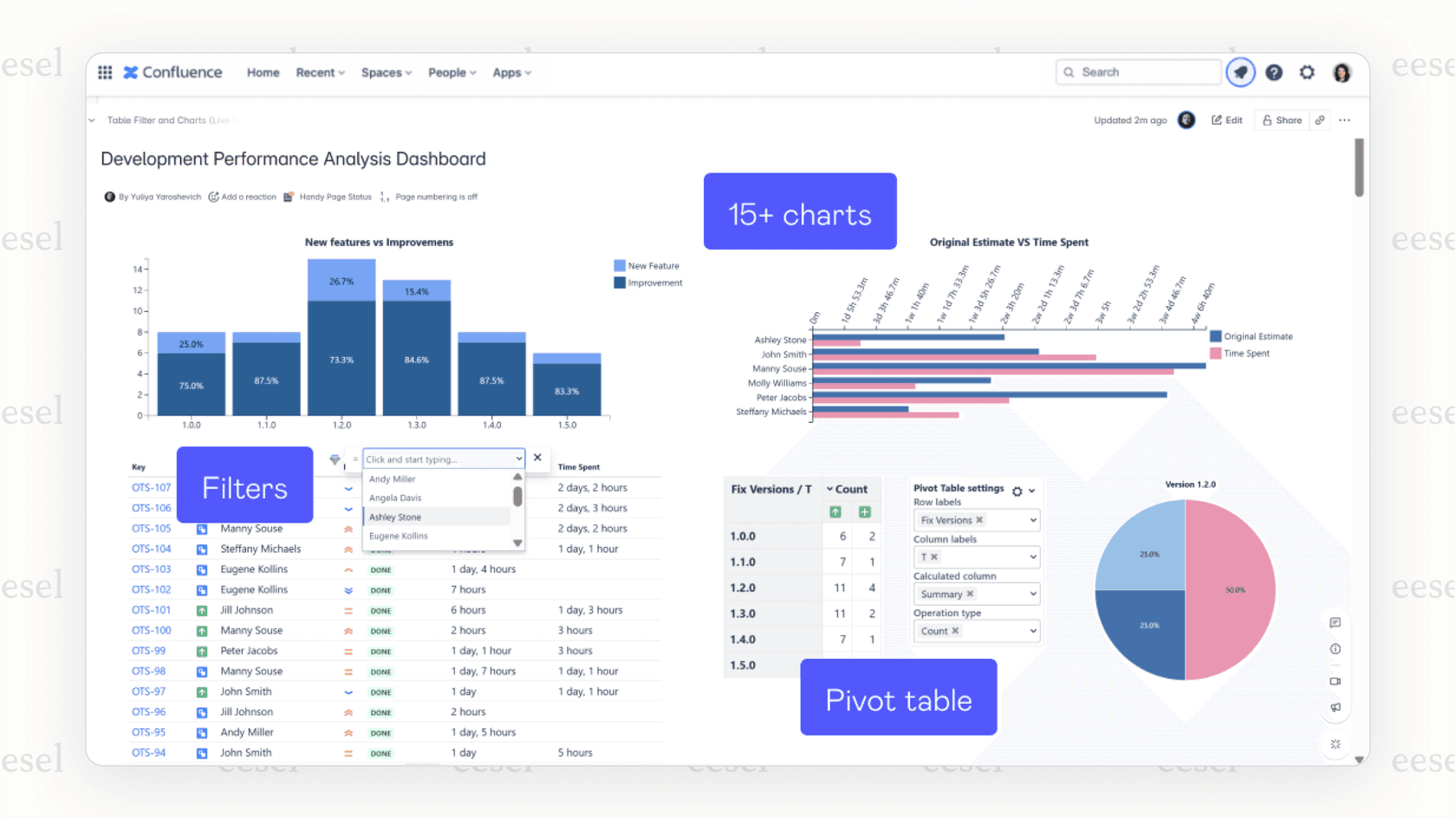
Why it's on the list: Many teams use Confluence to track project data and report on metrics. This app makes that data immediately useful without having to export it to other software. It keeps your data and your analysis all in one centralized location.
Pros:
- The filtering capabilities are extremely powerful, which is very helpful for large tables.
- Supports many different chart types (pie, bar, line, etc.) generated directly from your table data.
- Lets you perform calculations and summaries with pivot tables.
Cons:
- It may take some time to set up if you are trying to build highly advanced reports.
Pricing: Starts at $13.75/month for up to 10 users.
6. Comala Document Management
Comala Document Management adds a full document lifecycle system to Confluence. It lets you create custom review and approval workflows, ensuring that content is checked by the right people before it is finalized. It supports features like page states (Draft, In Review, Approved), scheduled reviews, and e-signatures.
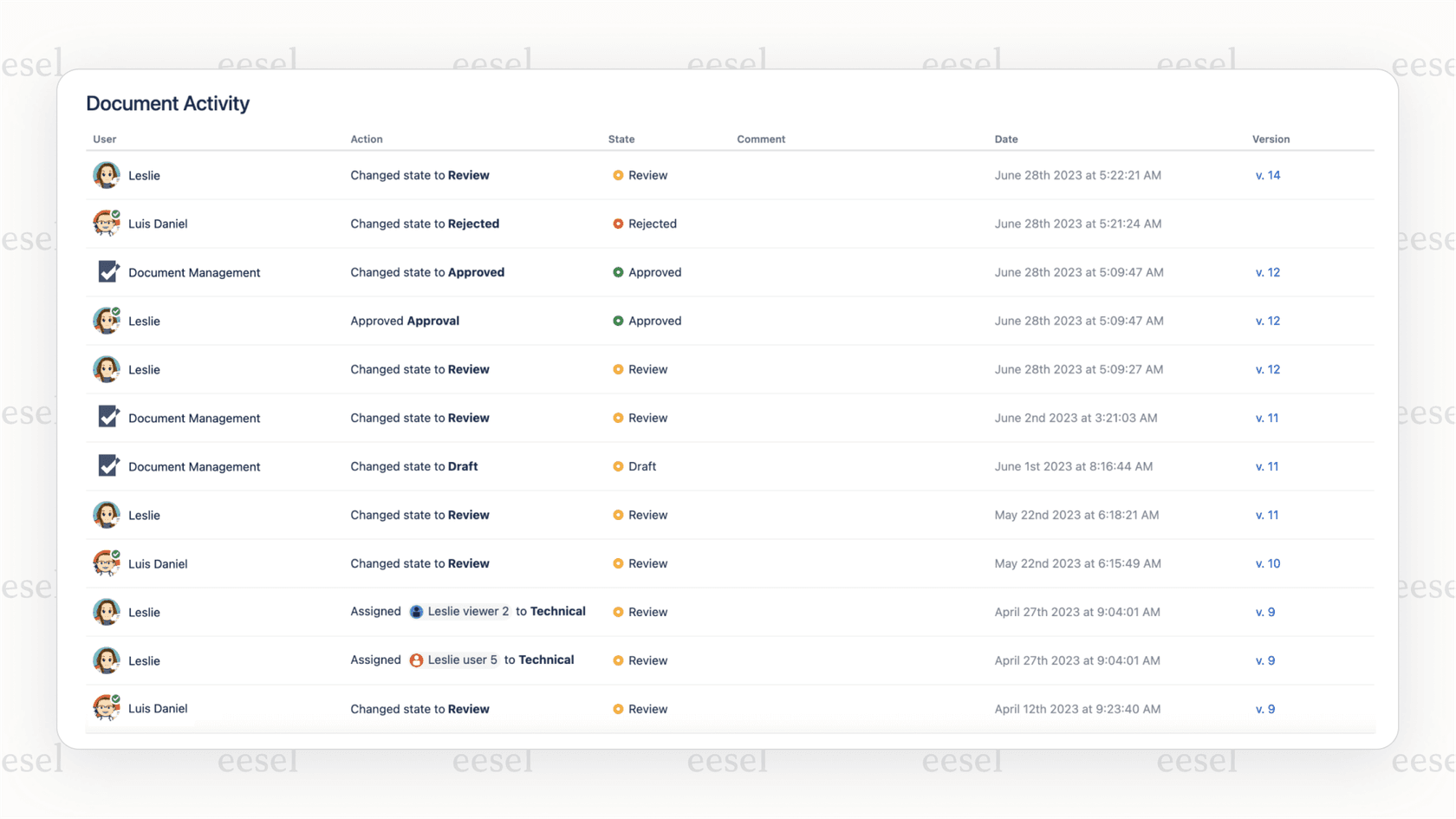
Why it's on the list: For teams in regulated fields or any group that requires a formal content approval process, this app is a valuable addition that complements Confluence's native versioning. It adds a sophisticated layer of governance and quality control.
Pros:
- Highly customizable workflows that you can tailor to match your specific business processes.
- Provides a clear audit trail of all reviews and approvals, so you always know the status of your documents.
- Works well with other apps for versioning and publishing.
Cons:
- Might be more than a small team with simpler documentation needs requires.
Pricing: Starts at $13.75/month for up to 10 users.
7. Scroll PDF Exporter
This app is a popular choice for exporting Confluence pages or entire spaces into slick, professionally branded PDF documents. Scroll PDF Exporter gives you a high degree of control over the final look, with customizable templates to match your company's branding.
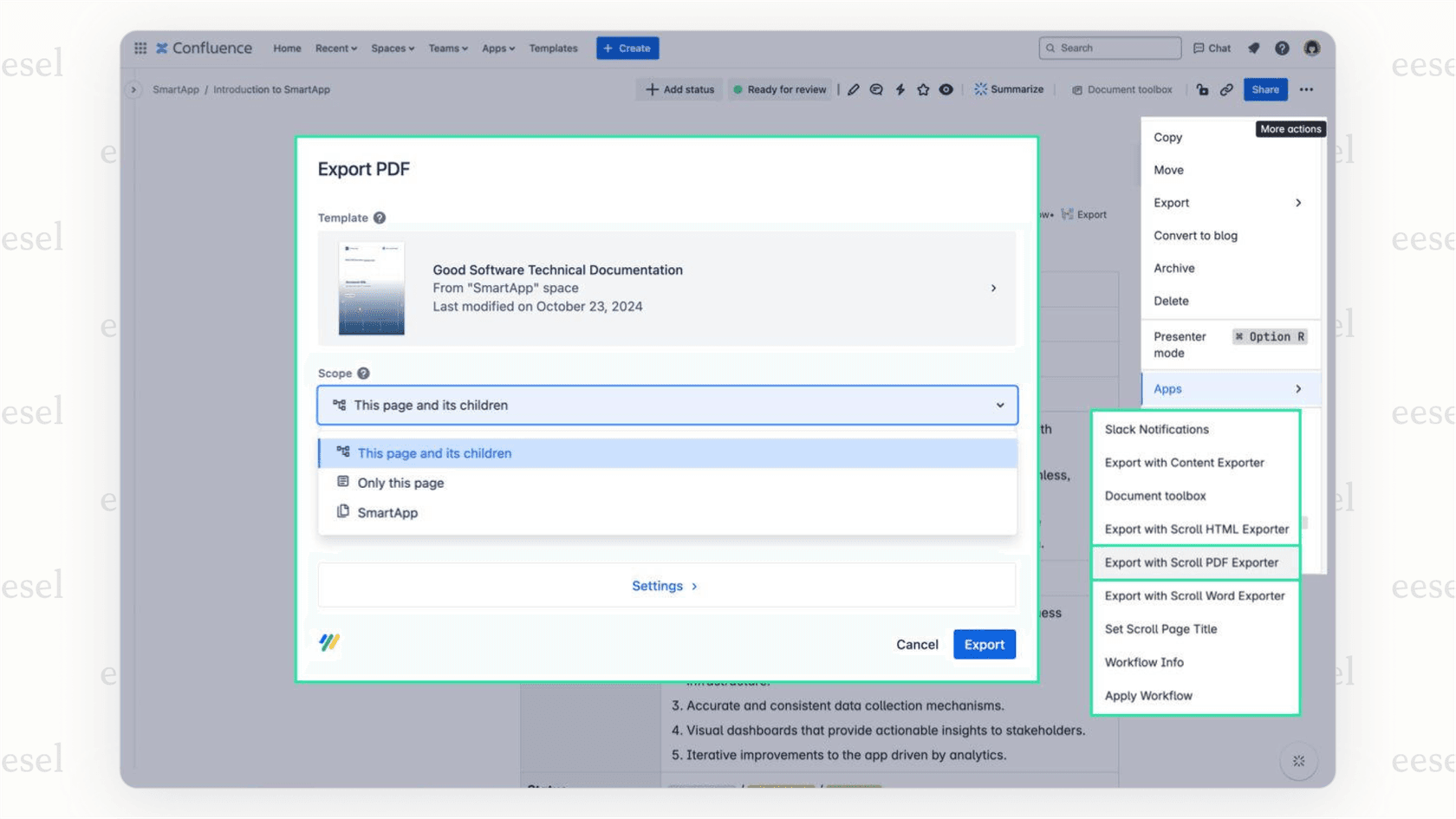
Why it's on the list: Sometimes, knowledge needs to be shared outside of Confluence, whether with clients or partners. Scroll PDF Exporter ensures that when it does, it looks polished and professional, reflecting the high quality of your work.
Pros:
- Detailed control over styling and layout with an easy-to-use template editor.
- Handles complex pages with tables, images, and macros effectively.
- It’s a reliable and trusted tool that has served the community for many years.
Cons:
- The template editor may take a little time to master for very complex custom designs.
Pricing: Starts at $13.75/month for up to 10 users.
Tips for choosing the right top Confluence apps
- Identify your team's specific goals first: Before you explore the marketplace, get clear on the actual objectives you're trying to achieve. Is it page design, accessing information, or managing data? Knowing your goal makes it much easier to pick the right tool.
- Try before you buy: Almost every paid app on the Atlassian Marketplace offers a free 30-day trial. Use it. Have your team test the app in a real-world scenario to see how it fits your workflow.
- Look for "Cloud Fortified" apps: This badge from Atlassian means an app meets high standards for security, reliability, and support. It's a good sign that you're getting a quality, business-ready tool.
- Think about the value: Consider how much time a tool will save your team. A tool that streamlines frustrating work and increases efficiency is an excellent investment.
- Be selective: Focus on the apps that provide the most significant benefit to your specific workflow to keep your workspace efficient.
Build your knowledge base, then make it accessible
Confluence is a solid platform on its own, and the top Confluence apps are what help you unlock its full potential. They help you build a knowledge base that’s organized, engaging, and highly reliable.
Use tools like AURA and draw.io to create clear, visually appealing content. Use ScriptRunner and Comala to keep it organized and compliant. But remember, creating great documentation is only part of the process. To get the most value out of it, you have to make it easy for people to find. eesel AI is a great option to close that final gap, delivering answers from your carefully curated Confluence knowledge base directly to your team, right where they are already working.
Ready to make your Confluence knowledge even more accessible? Try eesel AI for free or book a demo today.
Frequently asked questions
For a small team just starting out, which of these top Confluence apps would you recommend we focus on first?
For a small team, start with the highest-impact basics. draw.io is a must-have for creating diagrams and it’s completely free. After that, an app like AURA is a great, low-cost way to make your pages more engaging and easier for everyone to read.
If our biggest problem is just finding information, which of the top Confluence apps is the best one for solving that specific issue?
If discoverability is your main focus, an AI-powered tool like eesel AI is an excellent choice. It works alongside your existing content to deliver instant answers from your Confluence pages directly in Slack or Teams.
Are there any free top Confluence apps that are actually worth using, or do we always have to pay for the good ones?
Yes, absolutely! draw.io is one of the most popular and powerful apps on the entire Marketplace, and it's completely free. For more specialized functions like AI search or complex approval workflows, you'll find the most robust solutions are typically paid apps.
Will installing several of these top Confluence apps slow down our Confluence site's performance?
Well-made apps are optimized for performance by the developers. However, it is always a good practice to be selective, try apps during their trial period, and only keep the ones that solve a specific need for your team.
Do I need to be a Confluence admin to install these top Confluence apps, or can anyone on my team add them?
In most situations, you will need to be a Confluence administrator to install apps from the Atlassian Marketplace. This is a standard security and governance measure to ensure only approved and vetted tools are added to your company's Confluence site.