Documentation tools all promise to organize your team's knowledge, but Confluence and GitBook deliver completely different experiences. One is built for cross-functional collaboration at enterprise scale. The other is designed for developers who think in pull requests and want their docs to live alongside their code.
The right choice depends on your team structure, workflow preferences, and existing tools. This comparison breaks down what each platform actually delivers so you can make an informed decision. We'll also look at how eesel AI offers a different approach for teams wanting AI-powered knowledge management without the complexity of traditional wikis.
Let's break it down.
What is Confluence?
Confluence is Atlassian's enterprise wiki and team workspace. It has been on the market for over 20 years and serves as a central hub for organizational knowledge across engineering, product, marketing, and operations teams.
The platform is designed for internal collaboration. It offers real-time editing, commenting, and a structured page hierarchy that helps teams organize everything from meeting notes to project documentation. Confluence includes multiple content types: pages for documentation, whiteboards for brainstorming, databases for structured information, and video support via Loom integration.
What sets Confluence apart is its deep integration with the Atlassian ecosystem. If your team uses Jira for project management, Confluence creates powerful linkages between planning, execution, and knowledge capture. You can embed live Jira issues in documentation pages, create automatic project pages from Jira data, and maintain traceability between requirements and implementation.
In 2025, Atlassian introduced Rovo AI across all paid plans. This includes AI-powered search across connected tools, conversational chat for getting answers, and 20+ pre-built agents for common documentation tasks. Unlike many competitors, these AI capabilities are included in the base pricing rather than sold as expensive add-ons.
For teams already invested in Atlassian tools, Confluence integrates seamlessly with eesel AI to provide AI-powered answers from your Confluence knowledge base directly in Slack or Microsoft Teams.
What is GitBook?
GitBook is an AI-native documentation platform purpose-built for technical teams. Founded in 2014 as an open-source book publishing platform, it has evolved into a documentation tool that treats docs as code.
The platform is designed for developer-facing documentation: API docs, SDK guides, technical portals, and product documentation. Its core philosophy is that documentation should version, branch, and deploy exactly like code. GitBook offers bi-directional sync with GitHub and GitLab, meaning changes in either the repository or GitBook stay synchronized automatically.
GitBook's editing experience is Markdown-first, though it also offers a visual editor. Content changes happen through "change requests" (similar to pull requests) with branch previews for reviewing changes before merging. This workflow feels natural to developers but creates some friction for non-technical contributors who are not familiar with Git concepts.
The platform excels at external documentation delivery. It offers clean, customizable documentation sites with custom domain support, built-in SEO optimization, and a modern reading experience optimized for technical audiences. GitBook also includes OpenAPI/Swagger spec support for interactive API documentation.
On the AI front, GitBook offers GitBook Agent which proactively monitors documentation and suggests improvements, and GitBook Assistant for delivering personalized answers to users. The platform also includes built-in llms.txt and MCP support to ensure documentation appears in AI tools like ChatGPT and Claude.
Confluence vs GitBook: Head-to-head comparison
Target audience and use cases
Confluence is built for cross-functional collaboration. Product managers document feature requirements, engineering teams maintain technical runbooks, marketing creates campaign briefs, and operations builds process documentation, all in the same platform. It serves organizations where documentation needs extend beyond developer-facing content.
GitBook serves a narrower, deeper purpose: technical documentation for developer audiences. It is not trying to be a general-purpose wiki. Instead, it focuses exclusively on delivering beautiful API documentation, SDK guides, and developer portals. The Git-native workflow means developers manage documentation using the same tools and mental models they use for code.
Bottom line? If your documentation needs include project pages, meeting notes, HR policies, or marketing briefs, Confluence is the obvious choice. If you are building API docs and developer portals exclusively, GitBook's specialized focus delivers a superior experience for that specific use case.
Editing and collaboration experience
Confluence offers a WYSIWYG editor that feels familiar to anyone who has used Google Docs or Microsoft Word. Multiple users can edit simultaneously, with real-time cursors and conflict resolution. The platform includes hundreds of templates for everything from product requirement documents to marketing plans, making it easy to get started.
GitBook uses a block-based editor that supports both visual editing and Markdown. The real power comes from its Git sync capabilities: every change creates a Git commit, and documentation updates happen through change requests with branch previews. This is ideal for teams that want code review practices applied to documentation.
The learning curve differs significantly. Confluence is immediately accessible to non-technical users. GitBook requires familiarity with Git concepts to use effectively, which can be a barrier for teams that include non-technical contributors.
Integrations and workflow
Confluence's integration strength is the Atlassian ecosystem. It connects deeply with Jira, Jira Service Management, Trello, BitBucket, and Loom. The platform also integrates with Microsoft Teams, Google Drive, Figma, Miro, and thousands of other apps through the Atlassian Marketplace. Rovo AI extends this to 80+ enterprise applications for cross-platform knowledge discovery.
GitBook's integration focus is narrower but deeper for developer workflows. It offers bi-directional sync with GitHub and GitLab, ensuring documentation stays tightly coupled with code repositories. The platform supports authenticated access for private documentation and includes analytics to understand how users engage with your docs.
Which ecosystem fits depends on your existing tools. If you live in Jira and Atlassian products, Confluence is the natural choice. If your workflow centers on GitHub, GitBook's Git-native approach is architecturally superior.
AI capabilities
Confluence includes Rovo AI in all paid plans. This provides AI-powered search across connected tools, conversational chat for getting answers, and 20+ pre-built agents for tasks like summarizing pages, drafting content, and extracting action items. The AI connects to 80+ apps in the Atlassian ecosystem, making it valuable as an enterprise knowledge hub.
GitBook takes an AI-native approach. GitBook Agent monitors your docs and proactively suggests improvements based on support tickets, changelogs, and repository activity. GitBook Assistant delivers personalized answers to users directly in your documentation. The platform is also optimized for AI discovery with built-in llms.txt support.
Both platforms offer meaningful AI capabilities, but with different focuses. Confluence emphasizes enterprise knowledge management across multiple tools. GitBook focuses on making documentation more discoverable and maintainable for technical audiences.
Pricing comparison
Confluence pricing
| Plan | Monthly Price | Annual Price | Key Features |
|---|---|---|---|
| Free | $0 | $0 | Up to 10 users, 2 GB storage, 3 whiteboards per user, Community support |
| Standard | $6.05/user | $5.42/user | Unlimited users (up to 150,000), 250 GB storage, Rovo AI (25 credits/user), 9/5 support |
| Premium | $11.55/user | $10.44/user | Unlimited storage, unlimited whiteboards, 1,000 automations per user, 24/7 support, 99.9% SLA |
| Enterprise | Custom (annual only) | Custom | Up to 150 sites, Atlassian Guard included, 99.95% SLA, 24/7 Enterprise support |
Source: https://www.atlassian.com/software/confluence/pricing
GitBook pricing
| Plan | Monthly Price | Annual Price | Key Features |
|---|---|---|---|
| Free | $0 | $0 | 1 user, unlimited page views, gitbook.io domain, Git Sync |
| Premium | $65/site + $12/user | ~$54/site + $10/user | Custom domain, branded docs, AI instant answers, site insights, user feedback |
| Ultimate | $249/site + $12/user | ~$208/site + $10/user | Sections and groups, authenticated access, AI Assistant, adaptive content, custom fonts |
| Enterprise | Custom | Custom | SAML SSO, white-glove migration, custom integrations, dedicated support, unlimited adaptive content |
Source: https://www.gitbook.com/pricing
Cost analysis
The pricing models create different cost dynamics as you scale.
Confluence charges per user, which means costs scale linearly with team size. A 50-person team pays around $271 per month on Standard (annual). This works well when everyone needs to create and edit documentation, but can feel expensive if you have many readers who only need view access.
GitBook combines per-site and per-user pricing. A single site with 5 users costs approximately $125 per month on Premium. The advantage is that you only pay for creators and editors, not readers. However, if you need multiple documentation sites (for different products, API versions, or client portals), the $65 per site fee multiplies quickly.
For a 50-person team maintaining one documentation site, Confluence Standard ($271/month) and GitBook Premium ($125/month) represent different value propositions. Confluence includes more collaboration features and AI capabilities. GitBook offers a cleaner external documentation experience at lower cost for smaller teams.
Who should choose what
Choose Confluence if...
- You are already using Jira, BitBucket, or other Atlassian tools and want seamless integration
- You need cross-department collaboration (product, marketing, ops, engineering)
- You require enterprise governance, advanced permissions, and compliance features
- You want AI-powered knowledge management included without additional fees
- Your primary use case is internal wiki and team collaboration rather than external publishing
Choose GitBook if...
- You are building API documentation, SDK guides, or developer portals
- Your team thinks in Git workflows and wants docs-as-code
- You need clean, customizable documentation sites with custom domains
- Your documentation should version and deploy alongside your code
- External-facing documentation is your priority
When neither fits perfectly
Some teams find themselves in between these two options. You might be transitioning from internal to external documentation, or you might have budget constraints that make both platforms feel expensive at scale.
There are also use cases neither platform addresses well. If you need to convert video content (training recordings, screen captures) into searchable documentation, neither Confluence nor GitBook offers native capabilities. If you need multi-tenant client portals for delivering customized documentation to different customers, both platforms have limitations.
For teams wanting AI-powered knowledge management without the complexity of traditional wikis, alternatives like eesel AI offer a different approach. Instead of building documentation from scratch, eesel AI learns from your existing knowledge sources (help centers, past tickets, Confluence, Google Docs) and answers employee questions instantly with citations.
eesel AI: An alternative approach to knowledge management
While Confluence and GitBook require you to build and maintain documentation, eesel AI takes a different approach. It acts as an AI teammate that learns from your existing knowledge sources and answers employee questions directly in Slack or Microsoft Teams.
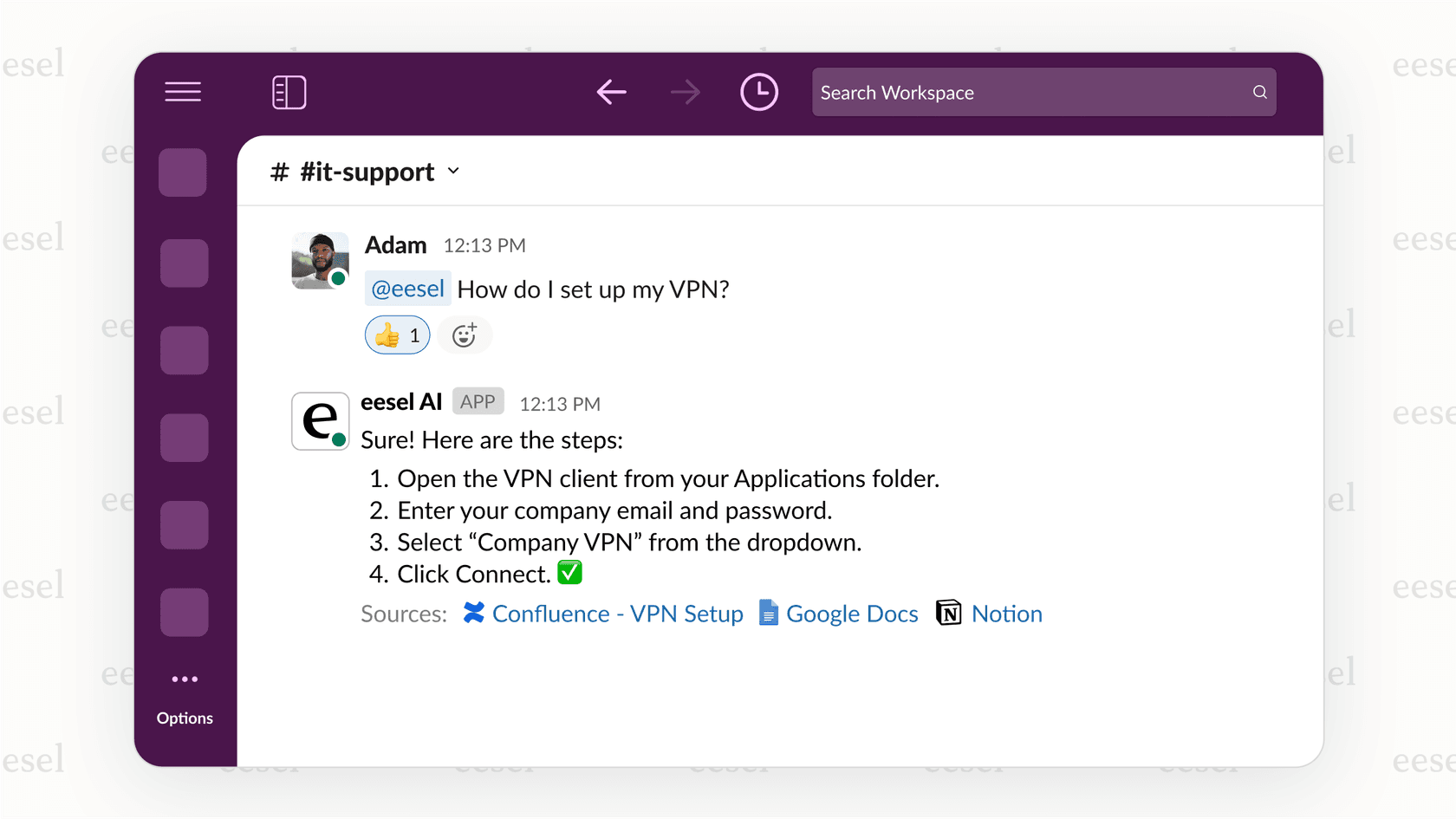
Here's how it works: you connect eesel AI to your help desk, knowledge bases, and documentation platforms (including Confluence, Google Docs, Notion, and others). It immediately learns from your existing content and understands your business context, tone, and common issues. Employees ask questions in natural language, and eesel AI provides answers with citations linking back to source documents.
Key differentiators include:
- No documentation migration required: Works with your existing knowledge sources without requiring you to move or reformat content
- Continuous learning: eesel AI improves through corrections and updates. Edit a response, and it learns from it. Message it with new information, and it incorporates the feedback
- Help desk integration: Unlike standalone documentation tools, eesel AI integrates directly with Zendesk, Freshdesk, and other help desks to learn from past tickets and resolved conversations
- Cited answers: Every response includes links to source documents, so employees can verify information and dive deeper when needed
For teams that want AI-powered internal knowledge access without the overhead of managing a traditional wiki, eesel AI offers a compelling alternative. It is particularly valuable for support teams, IT departments, and operations teams where employees need quick answers to recurring questions.
Making your documentation platform decision
The core distinction is simple: Confluence is built for internal collaboration, while GitBook is built for external publishing. But the right choice depends on your specific situation.
Ask yourself these questions:
- Who creates your documentation? If it is mostly developers, GitBook's Git-native workflow makes sense. If it is cross-functional teams, Confluence's WYSIWYG editor is more accessible.
- Who reads your documentation? Internal employees only, or external customers and partners? Confluence excels at internal wikis. GitBook excels at public documentation sites.
- What tools does your team already use? If you are invested in Atlassian, Confluence is the natural choice. If you live in GitHub, GitBook fits better.
- What is your budget model preference? Per-user pricing (Confluence) works when everyone contributes. Per-site pricing (GitBook) works better when you have many readers and few editors.
For enterprise teams already using Jira who need a central knowledge hub, Confluence is the safe choice. For developer-focused teams building API documentation who want docs-as-code, GitBook is purpose-built for that workflow.
And for teams wanting AI-powered knowledge management that integrates with existing tools rather than replacing them, eesel AI offers a modern alternative that learns from your existing documentation and delivers answers where your team already works.