Most teams don't have a documentation problem. They have a trust problem. Docs go stale. People stop checking them. What was once your "single source of truth" quietly becomes a "best guess."
So you start researching knowledge management platforms and quickly hit three names that keep coming up: Confluence, Guru, and Slite. Each promises to solve the knowledge problem, but they approach it from completely different angles.
Confluence is the established enterprise wiki, deeply woven into the Atlassian ecosystem. Guru focuses on verified, bite-sized knowledge cards delivered exactly where your team works. Slite offers a modern, intuitive approach with AI-powered features designed for fast adoption.
Here's a breakdown of what each platform actually does, how they compare on features and pricing, and which one fits your team's specific situation.
Feature comparison: Confluence vs Guru vs Slite
Knowledge organization
Each platform organizes information differently, and this shapes how your team will interact with it.
Confluence uses hierarchical spaces and pages. You create a space (say, "Engineering"), then build out pages and sub-pages in a tree structure. It's powerful for complex documentation with clear relationships, but you'll need discipline to maintain it. Without governance, spaces can become messy.
Guru organizes everything into cards within collections. Cards are smaller than Confluence pages (think "how to process a refund" rather than "support handbook"). The card structure encourages atomic, reusable knowledge. Collections group related cards together, and the verification system ensures each card stays current.
Slite uses channels (similar to Slack channels) with flexible collections. Documents live in channels, and you can create views that filter and sort content. It's less rigid than Confluence's hierarchy but more structured than a simple folder system.
AI capabilities
All three platforms have embraced AI, but with different emphases.
Confluence bundles Rovo AI with paid plans. Rovo includes search, chat, and 20+ pre-built agents for common workflows. Standard plans get 25 Rovo credits per user monthly, Premium gets 70, and Enterprise gets 150. The agents can automate tasks like summarizing pages or finding related content.
Guru offers AI Knowledge Agents that handle retrieval and research. The platform also supports MCP (Model Context Protocol) Server, letting you connect Guru to AI tools like ChatGPT, Claude, and Cursor. This means your AI assistants can pull from your verified Guru knowledge when answering questions.
Slite's AI centers on two things. Ask answers natural-language questions from your verified documentation with source citations and returns "no answer found" rather than inventing one. The Slite Agent goes further: it cross-references your docs against Slack, Linear, GitHub, Intercom, and 20+ connected tools, flags what has gone stale, and drafts the correction for a human to approve in a triage UI. Ask is included on every paid plan at no extra cost, with Basic plans getting 30 questions per user monthly and Pro plans getting 50 agent credits.
Search and discoverability
Finding information is where knowledge management platforms prove their value (or fail).
Confluence search is powerful when your content is well-structured. It supports advanced operators and filters, but the results depend on how consistently your team's tagged and organized pages. Without discipline, search returns too many results or misses relevant pages.
Guru's browser extension changes the discovery model. Instead of searching, relevant cards surface automatically based on the webpage you're viewing. For teams that work primarily in a few tools (Salesforce, Zendesk, etc.), this contextual delivery means you'll rarely need to search at all.
Slite focuses on natural language queries. Ask lets employees type questions in plain English and get answers pulled from documentation. The search is fast and accurate, with filters to narrow results by channel or verification status.
Integrations
Confluence integrates deeply with the Atlassian suite (Jira, Bitbucket, Trello) and offers 80+ connectors through Rovo. If you're already invested in Atlassian tools, this ecosystem is hard to beat.
Guru connects with 100+ platforms including Salesforce, Zendesk, Slack, Microsoft Teams, and major HRIS systems. The breadth matters for teams using diverse tools. Guru also syncs with HRIS platforms (40+ supported) to keep user data current automatically.
Slite has native integrations with 20+ tools, including Slack, Google Drive, Linear, GitHub, Jira, HubSpot, Attio, Intercom, and Confluence, with MCP and API access on every plan. On Pro, the Slite Agent searches across all of them.
Pricing breakdown
Confluence pricing
| Plan | Price | Best For |
|---|---|---|
| Free | $0 (up to 10 users, 2GB storage) | Small teams starting out |
| Standard | $5.42/user/month | Basic documentation needs, up to 150,000 users |
| Premium | $10.44/user/month | Advanced permissions, unlimited storage, 1,000 automations/user |
| Enterprise | Custom (annual billing) | Multiple sites, 99.95% SLA |
Source: https://www.atlassian.com/software/confluence/pricing
Guru pricing
| Plan | Price | Best For |
|---|---|---|
| Starter | $5/user/month (3 users free) | Very small teams testing the platform |
| Builder | $10/user/month | Growing teams needing more features |
| Enterprise | Custom | Large organizations with governance needs |
Guru's paid plans start at $25 per seat monthly when billed annually ($30 monthly). All plans include AI credits with usage limits.
Source: https://www.getguru.com/pricing
Slite pricing
| Plan | Price | Best For |
|---|---|---|
| Basic | $10/user/month (billed yearly) | Teams wanting a full knowledge base with AI search and doc verification |
| Pro | $20/user/month (billed yearly) | Teams that want the Slite Agent and search across connected tools |
| Enterprise | Custom | Organizations needing SSO, audit logs, SCIM, SLA |
No free plan; Basic and Pro both include a 14-day trial (no credit card). Basic includes 30 AI questions per user per month. Pro adds the Slite Agent, cross-tool search, agent workflows, and 50 agent credits per seat per month.
Source: https://slite.com/pricing
Who should choose which platform
Choose Confluence if...
Your team lives in Jira and the Atlassian ecosystem. The integration between Confluence and Jira is unmatched, and if you're already paying for Atlassian tools, adding Confluence feels like a natural extension.
You need enterprise-scale documentation. Confluence handles 150,000+ users and offers the governance controls large organizations need: granular permissions, data residency options, and compliance certifications.
You have dedicated administrators. Confluence's power comes with complexity. Without someone maintaining the structure, spaces become disorganized and adoption will suffer.
Choose Guru if...
Knowledge accuracy is critical to your business. Guru's verification workflows ensure information stays current, which matters for compliance-heavy industries or teams where wrong answers have real consequences for your business.
Your sales or support teams need answers without leaving their workflow. The browser extension delivers knowledge contextually, reducing friction and improving response times.
You can meet the minimum seat requirements. Guru's paid plans work best for teams of 10 or more where the per-seat pricing becomes competitive.
Choose Slite if...
You want fast adoption across the whole company. Slite's interface is intuitive enough that teams start using it productively within days instead of weeks.
You want a knowledge base that maintains itself. The Slite Agent surfaces stale content and drafts updates, so upkeep does not fall entirely on your team.
You want fast company-wide adoption. The interface is intuitive enough that teams are productive in hours, and Ask answers questions with cited sources.
You want your knowledge ready for AI agents. A verified single source of truth that both your team and your AI tools can trust. Basic starts at $10/user/mo with a 14-day trial.
eesel AI: an alternative approach to team knowledge
Here's something the three platforms above have in common: they all require you to write and maintain documentation. The knowledge base is only as good as the effort your team puts into keeping it current over time.
But what if your knowledge already exists scattered across tools? Past support tickets, help center articles, Slack conversations, Google Docs, Confluence spaces (yes, we integrate with Confluence too). This is where eesel AI takes a different approach.
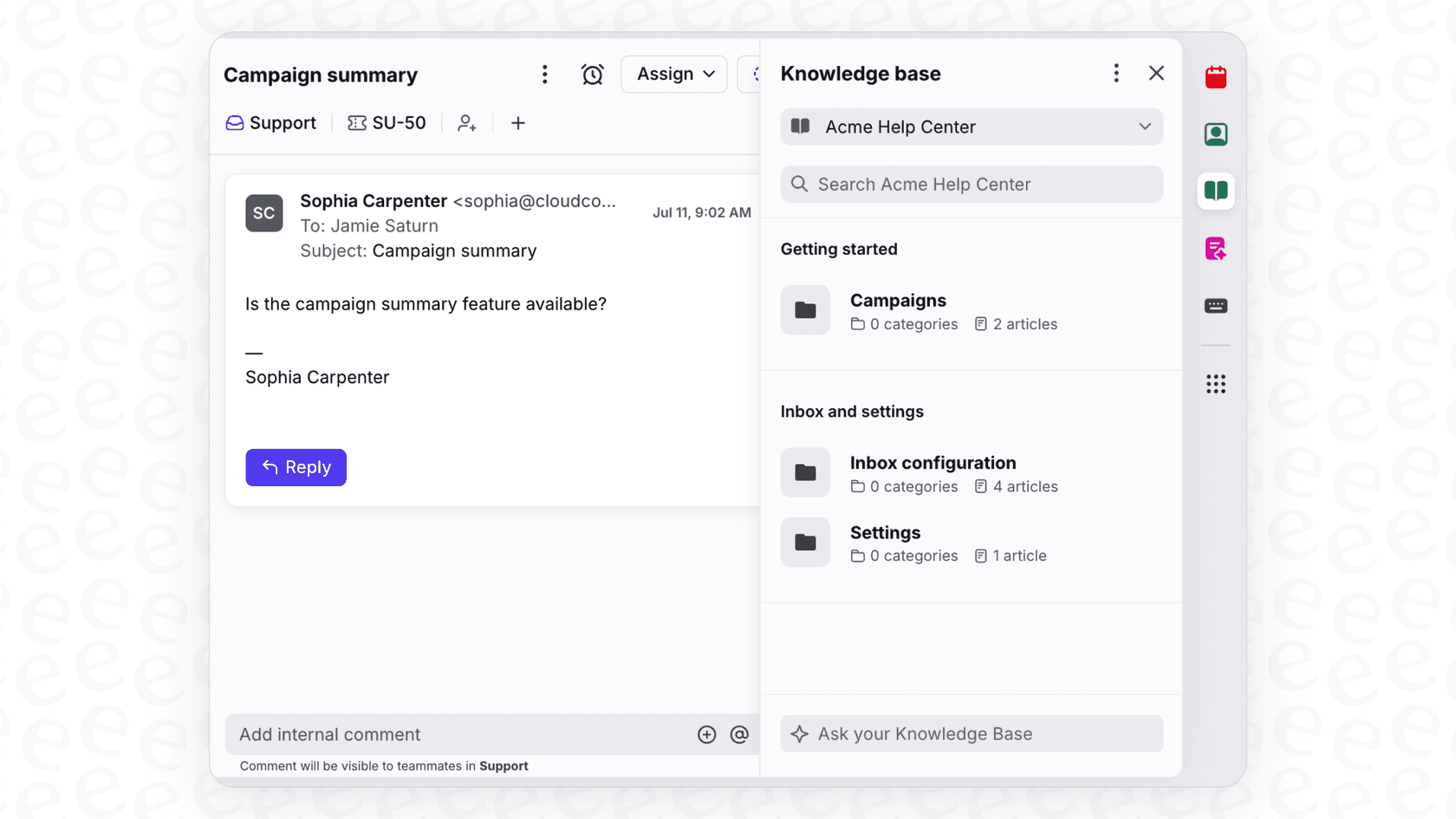
Instead of building another knowledge base you've got to fill, eesel AI learns from where work actually happens. Connect it to your existing tools (Zendesk, Freshdesk, Slack, Confluence, Notion, and 100+ others) and it absorbs your team's actual knowledge: how you've solved problems, what policies you've established, and how you handle edge cases.
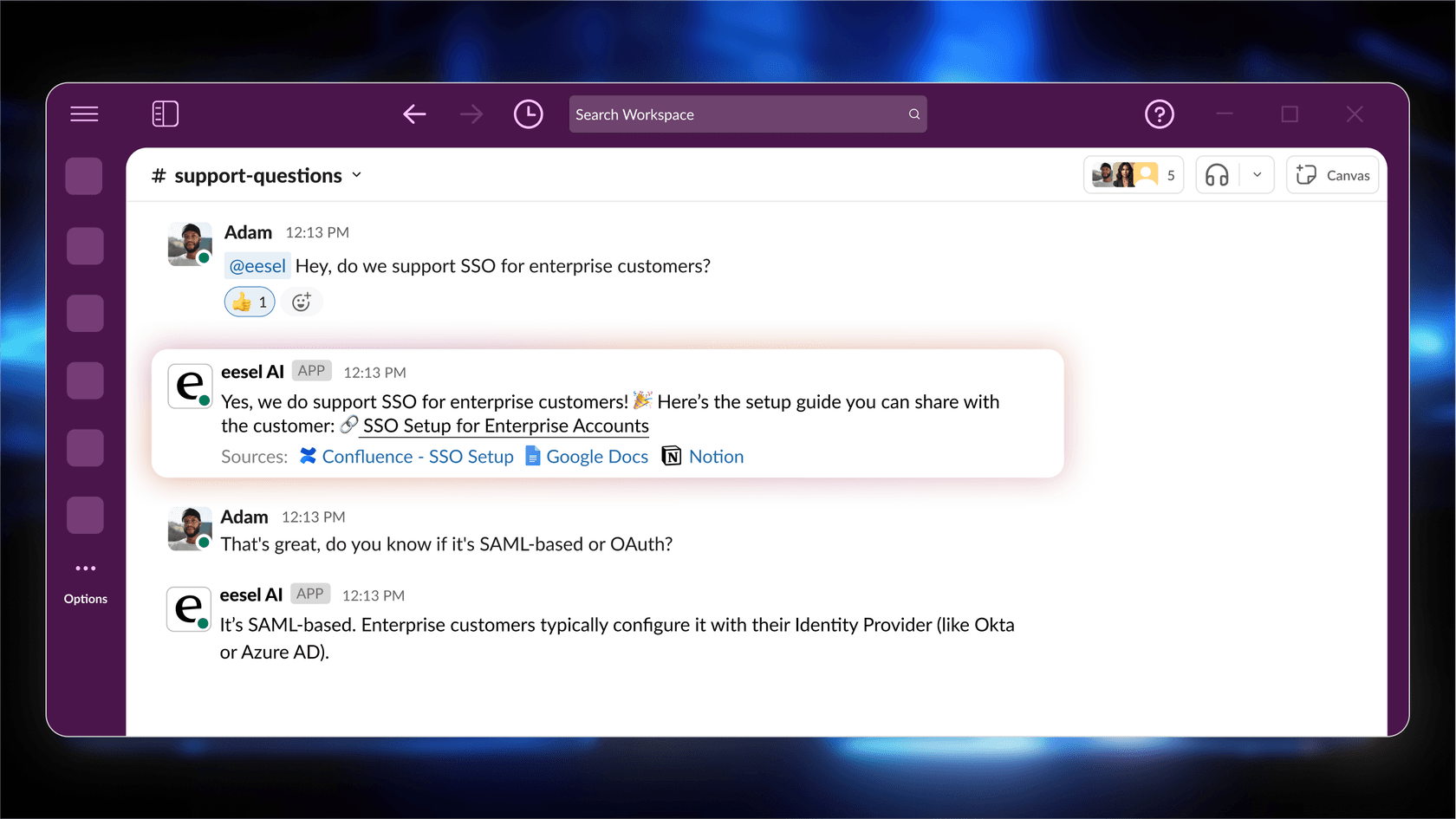
Then it delivers answers where your team's already working. Employees ask questions in Slack or Microsoft Teams and get cited answers pulled from your documentation. Support teams get AI-drafted responses in their help desk based on past tickets and help center articles.
The key difference? eesel AI doesn't replace your knowledge management platform. It makes it actionable. Use Confluence, Guru, or Slite for structured documentation your team references regularly. Add eesel AI to answer the repetitive questions that don't need a formal document, handle customer support tickets autonomously, and surface knowledge from the conversations and tickets where answers actually live day-to-day.
You control how autonomous eesel gets. Start with eesel drafting replies for your team to review. Once you're confident in its accuracy, let it send responses directly. Define escalation rules in plain English: "Always escalate billing disputes to a human" or "For VIP customers, CC the account manager."
Making your choice
Decision framework
Let's simplify this. The right platform depends on four key factors:
Team size: Under 10 users, Confluence's free tier or Slite's trial work well. At 10-50 users, all three are viable. Above 50, you'll likely need Confluence Premium or Guru/Slite Enterprise for governance features.
Existing tools: Already deep in Atlassian? Confluence is the obvious choice. Heavy Salesforce or Zendesk users should look closely at Guru. Mixed tool stack without a dominant platform? Slite's flexibility shines.
Documentation culture: Formal, structured documentation with dedicated owners favors Confluence. Workflow-embedded, just-in-time knowledge favors Guru. Lightweight, collaborative documentation favors Slite.
AI priorities: Need content generation and workflow automation? Confluence's Rovo agents are mature. Want verification workflows with AI assistance? Guru's Trust Score system is unique. Prefer instant answers and automated maintenance? Slite's Ask and Knowledge Management Panel lead here.
Final recommendations
Engineering teams in Jira: Confluence wins on integration depth and technical documentation features.
Sales and support needing verified answers: Guru's browser extension and verification workflows are purpose-built for this.
Fast, intuitive company-wide adoption: Slite's interface and AI features get teams productive quickly.
Making existing knowledge actionable: eesel AI learns from your current tools and delivers answers where work happens, complementing whichever knowledge platform you choose.
The best knowledge management platform is the one your team actually uses. Each of these three can work, but they fit different workflows and team cultures. Match the tool to how your team actually works, not how you wish they'd work.