Choosing the right knowledge management tool can feel like picking between a filing cabinet and a blank canvas. Both Confluence and Notion help teams organize information, but they approach the problem from completely different angles. One offers structured, enterprise-grade documentation. The other provides flexible, customizable workspaces that adapt to how your team actually works.
If you're trying to decide between these two, you're not alone. Thousands of teams face this choice every year. Let's break down what each tool does best, where they fall short, and how to pick the right one for your specific needs.
What is Confluence?
Confluence is Atlassian's connected workspace for knowledge management and team collaboration. Released in 2004, it has grown into one of the most established players in the space, serving more than 75,000 customers including 80% of Fortune 500 companies.
At its core, Confluence is built around structured documentation. Content lives in spaces (think of them as folders) organized into pages with clear hierarchies. This structure makes it easy to find information even as your knowledge base grows to thousands of pages.
The tool shines when integrated with other Atlassian products. If your team already uses Jira for project tracking, Confluence connects seamlessly. You can embed live Jira issues into documentation, link project specs to development tasks, and maintain a single source of truth across your workflow.
Key capabilities include organized content hierarchies through spaces and page trees, real-time editing with inline comments and @mentions, structured templates for product requirements and meeting notes, whiteboards for brainstorming with up to 3 active per user on the free plan, databases with real-time syncing, and Loom integration for embedded video messaging.
Confluence targets enterprise teams, technical documentation use cases, and organizations that need robust admin controls and compliance certifications.
What is Notion?
Notion takes a different approach. Launched in 2016 by Notion Labs, it positioned itself as an all-in-one workspace where notes, docs, databases, and project management live together in one flexible tool.
Instead of rigid hierarchies, Notion uses a block-based editor. Every element on a page (text, images, tables, embeds) is an independent block you can drag, drop, and rearrange. This gives teams incredible flexibility to build workspaces that match their specific workflows.
The tool gained rapid popularity among startups, creative agencies, and individual users who wanted something more adaptable than traditional documentation tools. Notion's customers include OpenAI, Figma, Volvo, and Ramp.
Key capabilities include flexible block-based pages with drag-and-drop editing, databases that function as tables, Kanban boards, calendars, or lists, wikis for connected knowledge bases, Notion Calendar for multi-calendar management, Notion Mail for AI-powered Gmail integration, and teamspaces for organizing work by department or project.
Notion excels when teams need an all-in-one solution that replaces multiple tools. You can manage projects, document processes, track inventory, and plan content calendars without switching between apps.
Confluence vs Notion: Feature comparison
Content organization
Confluence organizes information into spaces with structured page trees. This hierarchy enforces consistency. Every page has a clear location, making large knowledge bases navigable. The trade-off? Less flexibility. You're working within Atlassian's framework.
Notion uses pages with blocks that you arrange however you want. Create a database inside a document. Nest pages infinitely. Build custom workflows that don't fit traditional documentation structures. The trade-off? Without discipline, Notion workspaces can become chaotic as they grow.
Collaboration features
Both tools support real-time editing, comments, and @mentions. Confluence adds page versioning with detailed history and the ability to revert changes. This matters for teams that need audit trails or formal review processes.
Notion offers page history too, but retention varies by plan: 7 days on Free, 30 days on Plus, 90 days on Business, and unlimited on Enterprise. Notion's collaboration feels more fluid, less formal than Confluence's structured approach.
Search functionality
Confluence provides advanced full-text search with operators, labels, and content hierarchy. For organizations with thousands of pages, this robustness matters. You can find exactly what you need even in massive knowledge bases.
Notion's search works well for smaller workspaces but can struggle with partial matches and complex queries at scale. As one user noted in the Atlassian Community, finding information in large Notion setups becomes challenging as content grows.
Templates
Confluence offers structured templates with pre-built macros and industry-specific formats. These work great for technical documentation, PRDs, and standardized processes.
Notion's templates are more flexible and customizable. The community has created thousands of templates for everything from personal journals to startup operating systems. You can also build and share your own.
AI capabilities
Both platforms have invested heavily in AI, but their approaches differ.
Confluence integrates Atlassian Intelligence (Rovo), which includes:
- Rovo Search for AI-powered knowledge discovery
- Rovo Chat for conversational queries
- Rovo Agents for automation
- Content improvement and summarization
Rovo AI is included in Standard plans (25 credits per user monthly) and scales up to 150 credits on Enterprise.
Notion offers Notion AI, which includes:
- Notion Agent for complex multi-step tasks
- Custom Agents for recurring automation (Beta, requires credits after trial)
- Enterprise Search across connected apps like Slack and GitHub
- AI Meeting Notes for transcription and summaries
- Research Mode for detailed reports
Notion AI Core is included with Business and Enterprise plans. Custom Agents run on a credit system ($10 per 1,000 credits after the free trial period ends May 3, 2026).
Confluence vs Notion pricing comparison
Pricing often tips the decision one way or another. Here's the breakdown:
| Plan | Confluence | Notion |
|---|---|---|
| Free | Up to 10 users, 2GB storage, unlimited pages | Single user unlimited blocks, 10 guests, 7-day history |
| Standard/Plus | $5.42/user/month | $10/user/month ($8 annual) |
| Premium/Business | $10.44/user/month | $20/user/month ($15 annual) |
| Enterprise | Custom pricing | Custom pricing |
Key differences:
Confluence becomes more cost-effective as you scale. The free tier supports up to 10 users (compared to Notion's single-user free plan). At the Standard tier, Confluence costs roughly half of Notion's equivalent plan.
Notion charges more per seat but includes unlimited storage on paid plans. Confluence limits free users to 2GB and Standard to 250GB (Premium and Enterprise get unlimited).
AI costs add another variable. Confluence includes Rovo credits in Standard+. Notion includes AI Core in Business+ but charges for Custom Agents via credits.
Hidden costs to watch:
- Confluence's Atlassian Guard (SSO, SCIM) requires a separate subscription on lower tiers
- Notion's Custom Agents will cost $10 per 1,000 credits after the trial period
- Notion's free plan limits file uploads to 5MB
Integrations and ecosystem
Confluence's biggest strength is its Atlassian ecosystem integration. With 3,000+ apps in the Atlassian Marketplace, it connects deeply with Jira, Trello, Bitbucket, and Jira Service Management. Smart Links let you preview and edit content from other tools without switching contexts.
For development teams already using Atlassian products, this integration is hard to beat. 76% of Confluence customers ship projects faster when connected to Jira.
Notion offers 250+ integrations through Zapier and native connections. It works well with Slack, Google Drive, GitHub, and increasingly with enterprise tools like Asana and Jira (Beta). Notion's API lets teams build custom integrations.
The choice here depends on your existing stack. Deep Atlassian users should lean toward Confluence. Teams with diverse toolchains might prefer Notion's broader third-party connectivity.
Ease of use and learning curve
Confluence feels structured from the start. The interface can overwhelm new users with options, but the guardrails help prevent chaos. Atlassian University offers comprehensive training, and the structured approach means teams can standardize documentation practices.
Notion's blank canvas approach creates a different challenge. The first time you open it, you're staring at an empty page. This freedom is powerful but requires upfront decisions about how to organize your workspace. Teams that skip this planning phase often end up with disorganized, hard-to-navigate setups.
The mobile experience favors Notion. Its app closely mirrors the desktop experience with near feature parity. Confluence's mobile app works for viewing and basic edits but limits advanced functionality.
As one user in the Atlassian Community explained: "I'm between the bark and the tree with Notion and Confluence. I really prefer Confluence, but Notion's unlimited toggle-feature and the ability to reference any element independently are major pulls."
Who should choose Confluence?
Confluence fits best for:
- Large enterprises needing structured documentation with robust admin controls
- Technical teams already using Jira or other Atlassian products
- Organizations requiring compliance certifications like SOC 2, ISO 27001, GDPR, and HIPAA
- Teams prioritizing version control and formal publishing workflows
- Companies scaling knowledge bases to thousands of pages
If your organization needs enterprise-grade security, audit logs, and granular permissions, Confluence delivers. The structured approach prevents information chaos as you grow.
Who should choose Notion?
Notion works better for:
- Small to medium teams wanting flexibility over structure
- Startups and creative agencies with diverse, evolving workflows
- Users needing an all-in-one workspace that replaces multiple tools
- Teams prioritizing modern UI and customization
- Individual users and personal productivity
If your team values the ability to build custom workflows, databases, and project trackers without switching apps, Notion's flexibility wins. The modern interface and block-based editing feel more intuitive for many users.
An AI-powered alternative for knowledge management
While Confluence and Notion help you organize knowledge, they still require teams to search through documentation to find answers. There's another approach: AI that learns from your existing knowledge and delivers instant answers.
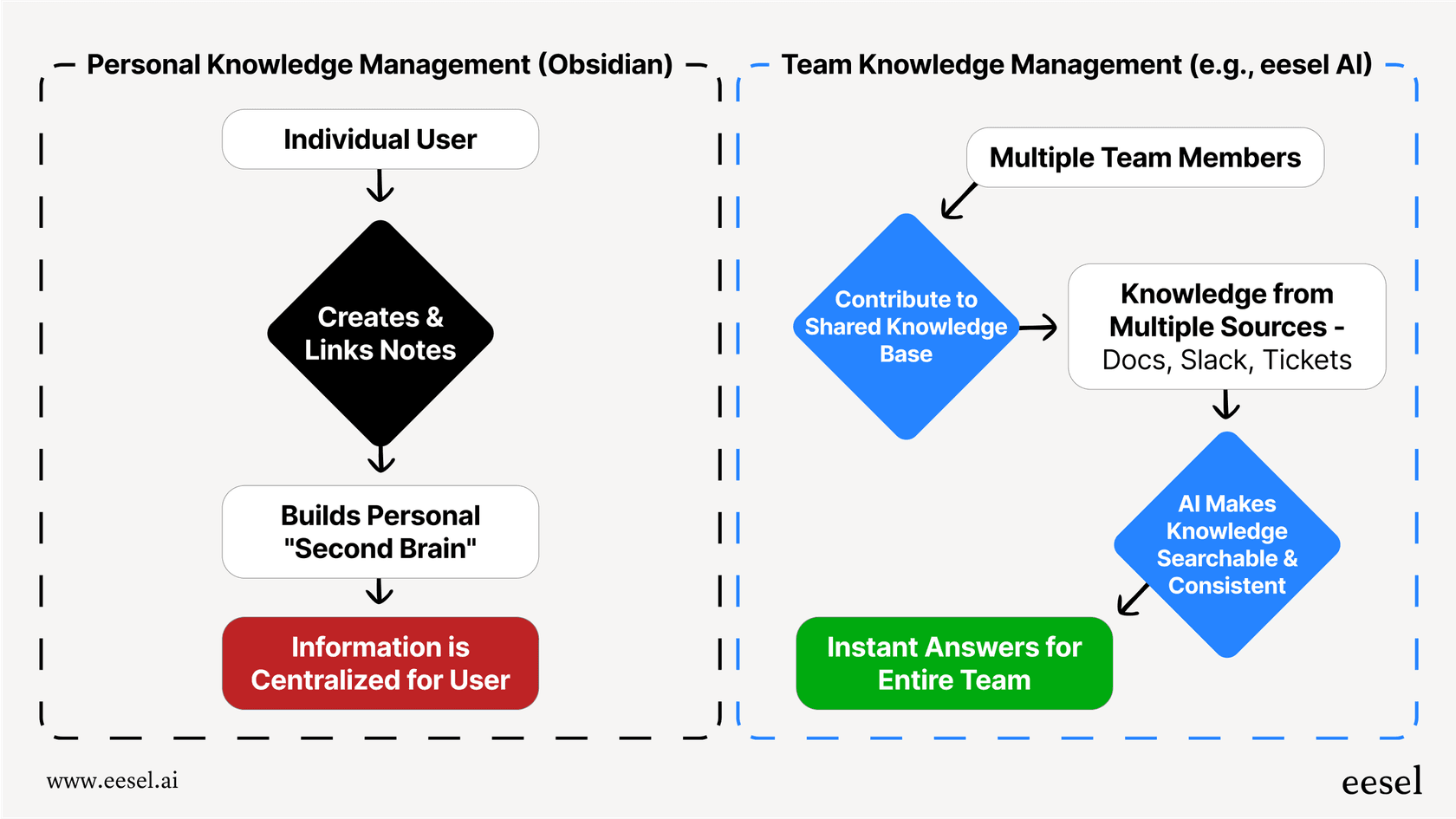
eesel AI works as an AI teammate that connects to your existing tools (including Confluence, Notion, Google Docs, help centers, and past tickets) and learns your business context. Instead of asking employees to search through documentation, eesel AI provides instant answers with citations to source materials.
For internal knowledge, our AI Internal Chat lives in Slack or Microsoft Teams and answers employee questions from your connected documentation. For customer-facing use cases, our AI Agent handles support tickets autonomously, escalating only what you define.
The key difference: traditional knowledge bases organize information for humans to find. AI-powered knowledge management delivers answers directly. Both approaches can work together. You might use Confluence or Notion as your source of truth while layering eesel AI on top to make that knowledge instantly accessible.
Making the right choice for your team
So which should you choose? Here's a simple framework:
Pick Confluence if: You're an enterprise team, use Atlassian products, need strict compliance, or are building a large-scale knowledge base that must stay organized.
Pick Notion if: You're a startup or small team, value flexibility, want an all-in-one workspace, or need modern UI and customization.
Both tools offer free tiers, so you can trial them with your actual workflows before committing. Consider migration paths too. Confluence offers a Notion importer. Notion can import from Confluence. You're not locked in forever.
The best knowledge management tool is the one your team actually uses. Structure and flexibility both have value. The question is which matches how your team works today and how you expect to grow tomorrow.