

Cassidy is a no-code platform for building AI agents and multi-step workflows on top of your own documents, aimed at document-heavy enterprises rather than at any one department. Four products stack together: a Knowledge Base, Agents, Workflows and Meetings. It connects to 73 apps I could count in the live directory, runs on models from OpenAI, Anthropic and Google, and carries SOC 2 Type II, GDPR, HIPAA and CASA.
Two things stood out once I got past the marketing pages. First, the pricing page contains no dollar figures at all, and billing runs on token-metered "AI credits" with no published rate, so you cannot forecast spend before you buy. Second, for support teams the ceiling is lower than it looks: every published support template stops at a reply draft, and there is no confidence threshold, no auto-send, and no deflection number anywhere in Cassidy's material.
So if you want an assistant that answers your employees' questions in Slack and automates RFP-shaped paperwork, Cassidy is a serious pick. If you came here because your ticket queue is drowning, that is a different product. I build support AI at eesel for a living, and the difference between "drafts a reply" and "closes the ticket" is most of the work.
What Cassidy AI actually is
Cassidy Inc. was founded in 2023, is based in New York, and is small. Co-founder and CTO Ian Woodfill described the team on Hacker News in April 2026 as "25 people, growing fast." It has raised $13.7M in total: a $3.7M seed led by The General Partnership, then a $10M Series A led by HOF Capital in September 2025.
CEO Justin Fineberg writes both funding announcements himself, and he brings an unusual distribution advantage: an AI-education audience he says has grown "to more than 500,000 people." That matters more than it sounds, because it is also why most of what you will read about Cassidy online traces back to him.
The homepage H1 is "Build AI Agents that handle your most complex work," and the thesis under it is a staffing argument rather than a technology one. Cassidy's own framing: "The people closest to the work should be the ones automating it." The pitch is that business teams stop queuing behind engineering to get an automation built.
That framing lines up with who Cassidy sells to. It names three verticals on the homepage: insurance, industrials and professional services, described as places "where workflows are manual, documents are dense, and accuracy is critical." The customer logos match, with Tokio Marine, NTT Data, Geodis, Quad and Frontier Behavioral Health among them.
One number is worth quoting carefully. The customers page says "20,000 companies & teams with 1,000+ employees trust Cassidy," while its own seed investor, The General Partnership, writes "over 12,000 companies." Those disagree, and the first reads oddly for a 25-person company. Take both as marketing scale claims, not audited counts.
The four products, and how they stack
Cassidy splits its own platform into a context layer and an automation layer. That is its wording, and it is the clearest mental model for the whole product.
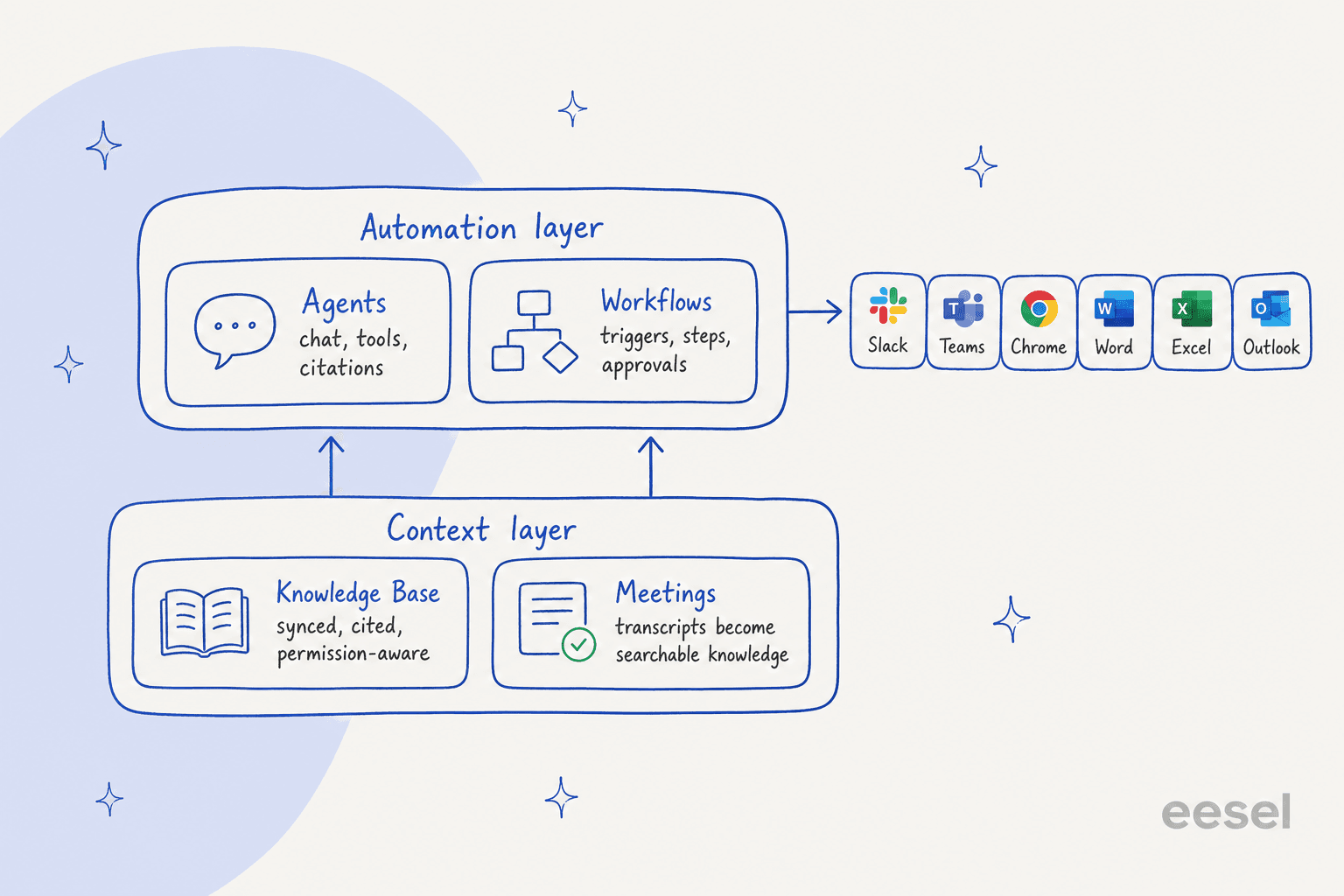
Knowledge Base
This is the foundation, and the piece the rest depends on. It ingests PDFs, Office files, CSVs, audio and video (transcribed automatically), source code, and whole websites via a crawler with domain, subdomain, page or glob-pattern modes. On the connector side it syncs Google Drive, SharePoint, OneDrive, Notion, Confluence, Slack, Box, Coda, Jira, Gong, Zendesk help center articles and ServiceNow knowledge articles. If you have shopped for AI knowledge base tools before, that connector list is at the strong end of the category.
Retrieval is semantic rather than keyword, which puts it in the same family as other knowledge retrieval tools rather than a search box. Every answer carries what Cassidy calls deep-linked citations, which open the exact source snippet. Permissions inherit from the source system, so per the docs an agent "only retrieve[s] information users are authorized to access." There is also a Document Verification menu with three states, verified, request manager verification, or flag as outdated. That is a smart control for anyone who has watched a bot confidently quote a policy from 2023, and it attacks the same root cause as most AI hallucinations: stale source material rather than a bad model.
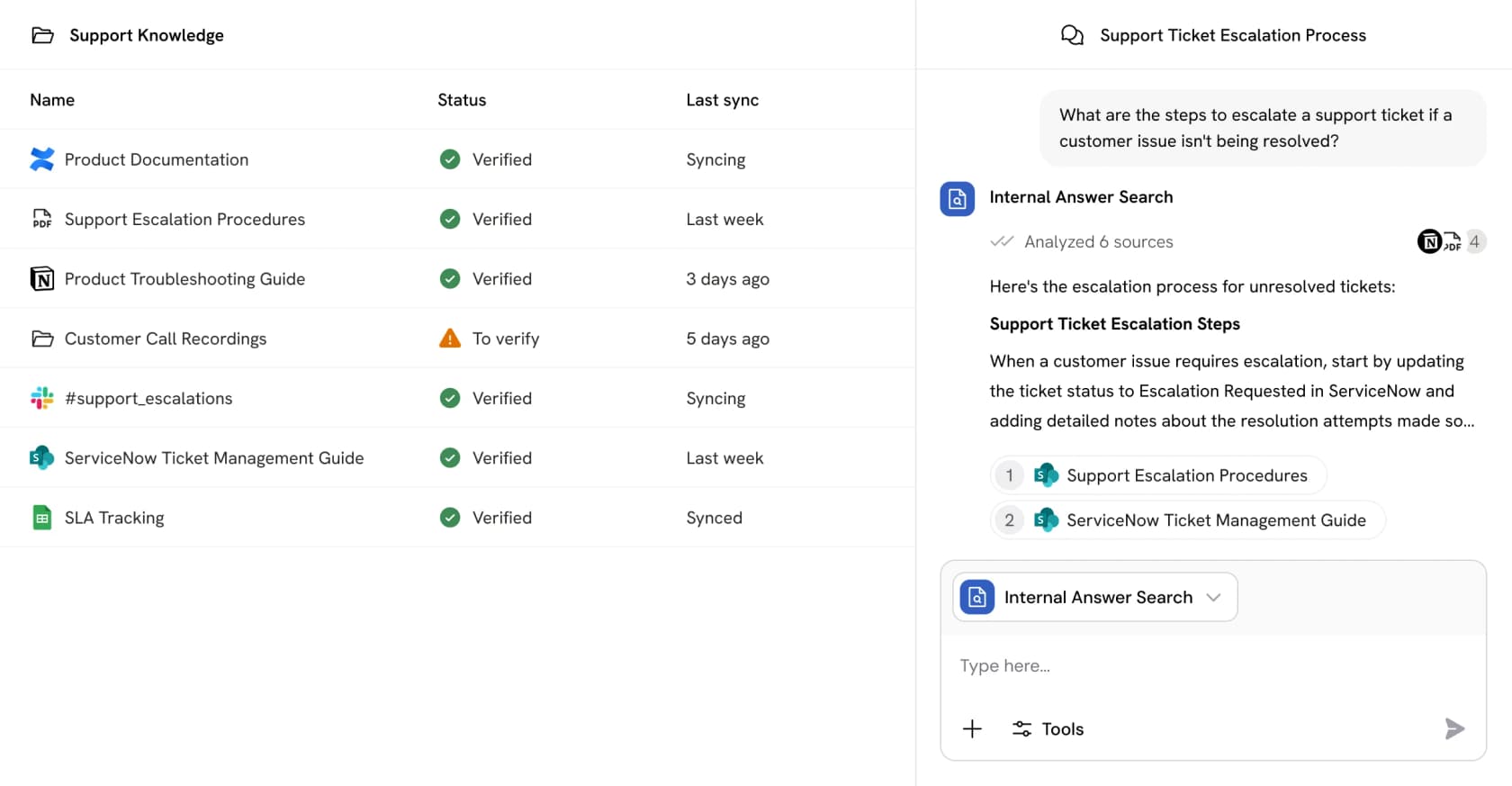
The sharp limit here: integration sources sync every 24 hours unless you are on Enterprise. For an RFP library that is fine. For a help center that changes weekly, a day-stale answer is a correctness problem, not an inconvenience.
Agents
An Agent is a saved configuration bundle rather than a runtime of its own. The docs list ten parts: a base model, plain-language instructions, knowledge base search, connectors, capabilities (web search, image generation, artifacts, browser use), code execution, skills, brand voice, the ability to call a workflow, and deployments.
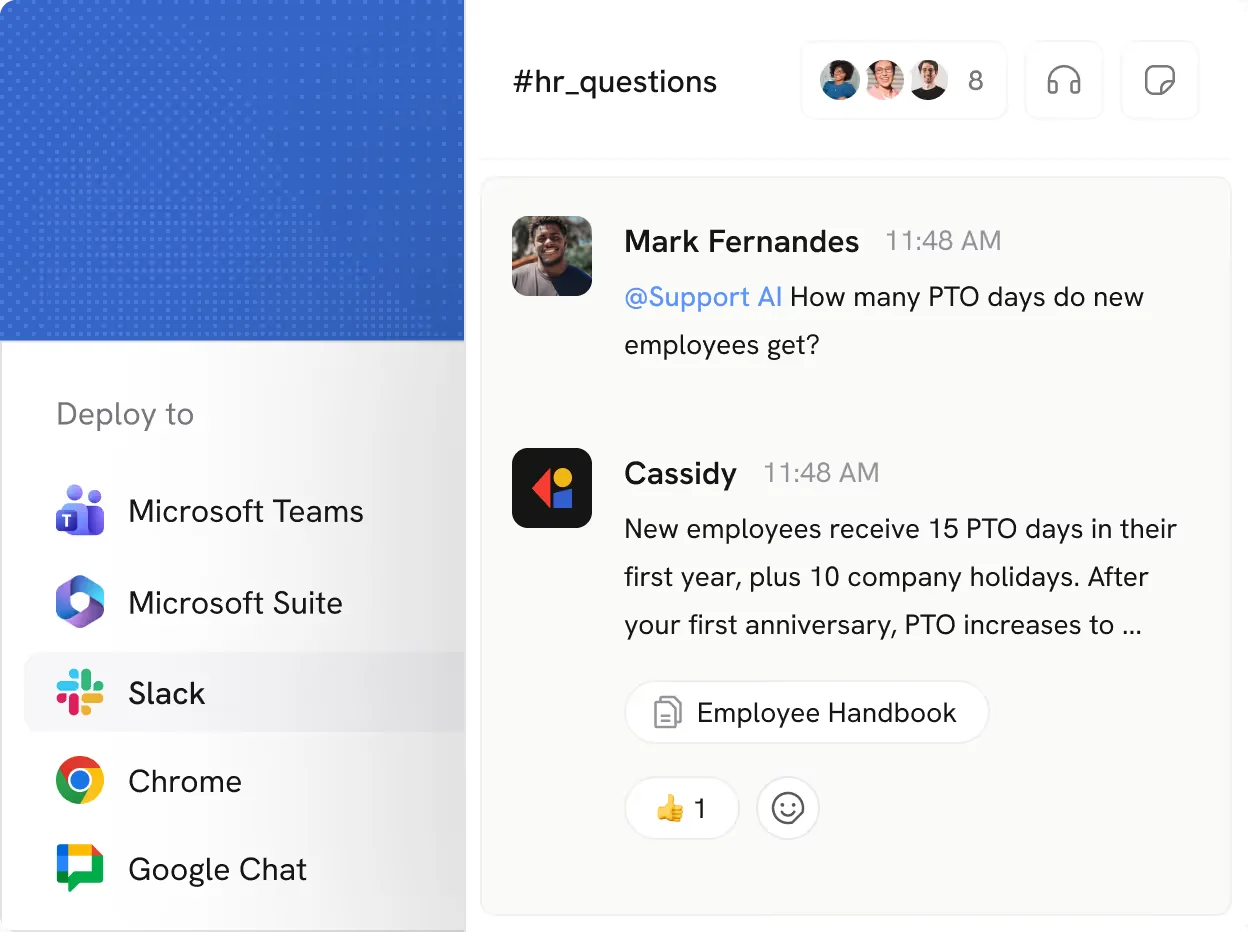
You get 80+ agent templates to start from, and agents deploy to Slack, Microsoft Teams, Google Chat, a website embed, an email address, the API, and Chrome or Edge extensions, plus inside Word, Excel and Outlook. That deployment spread is the real differentiator against a single-surface AI assistant.
One detail I liked: the default agents Cassidy ships are deliberately not trained on your knowledge base. They exist for generic tasks, so nobody accidentally believes a stock assistant knows the company's policies. If you have ever tried training AI on a knowledge base, you will recognise why that separation matters.
Workflows
Workflows are the deterministic half. A trigger plus an ordered chain of actions, with roughly 45 documented actions covering generation, knowledge search, research, document extraction, control flow, and two human-in-the-loop steps that pause a run until someone approves or supplies input.
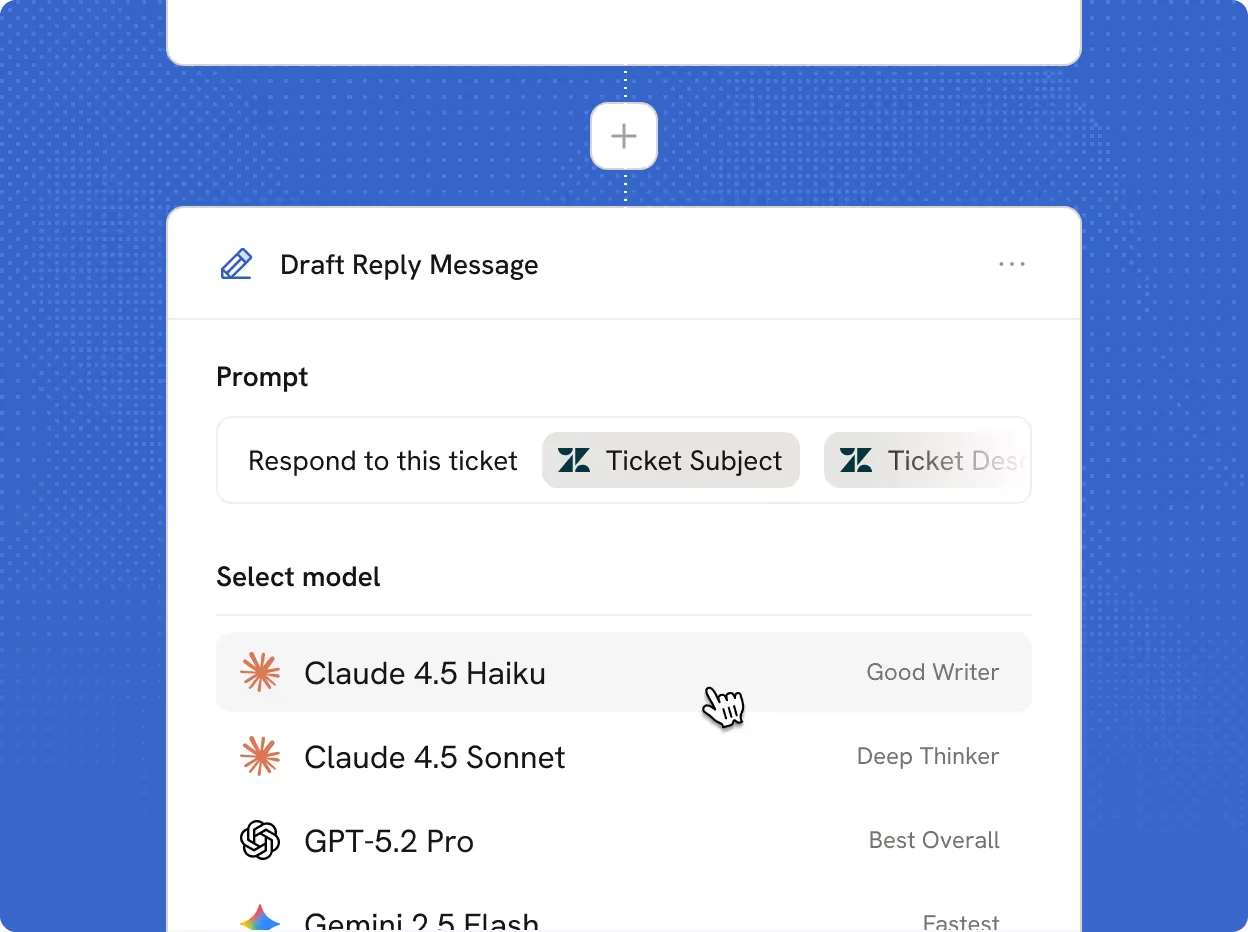
Cassidy's own docs draw the line between the two products more candidly than most vendor documentation. Per the workflows overview, you use a workflow "when you want a predictable, repeatable process" and an agent when "the path isn't predetermined." An agent can call a workflow mid-conversation, which is what makes them one system instead of two.
Meetings
A notetaker that joins Zoom, Teams and Google Meet calls, transcribes with speaker ID, and drops the transcript into the Knowledge Base so agents can cite exact timestamps. It is a neat idea, since meeting transcripts are usually the one body of company knowledge that never makes it into knowledge management at all. Cassidy names its competition here bluntly on the Meetings page: Fireflies, Otter and Fathom as standalone recorders, and Gong, Chorus and Clari as revenue intelligence.
How a workflow actually gets built
This is where a hands-on read beats the marketing copy. You start from a custom build (describe it in plain language and the Workflow Copilot generates the trigger, actions and config), a blank canvas, an imported JSON file, or one of 100+ templates.
Triggers come in five families: manual form, scheduled (hourly through monthly), webhook, a dedicated inbound email address, and integration events. That last one includes new or updated Zendesk tickets, HubSpot and Salesforce record changes, Slack messages, Gmail or Outlook mail, calendar events, Gong transcripts and Jira issues. The email trigger in particular makes it straightforward to build inbox triage without touching a helpdesk at all.
The load-bearing detail almost nobody mentions is in the build docs: steps are not implicitly chained. As Cassidy puts it, "By default, actions do not have access to the output of earlier steps." You wire each one explicitly by inserting a variable with #. That is a reasonable design, and it is also the thing that will quietly break a first workflow if you assume the output flows downhill on its own.
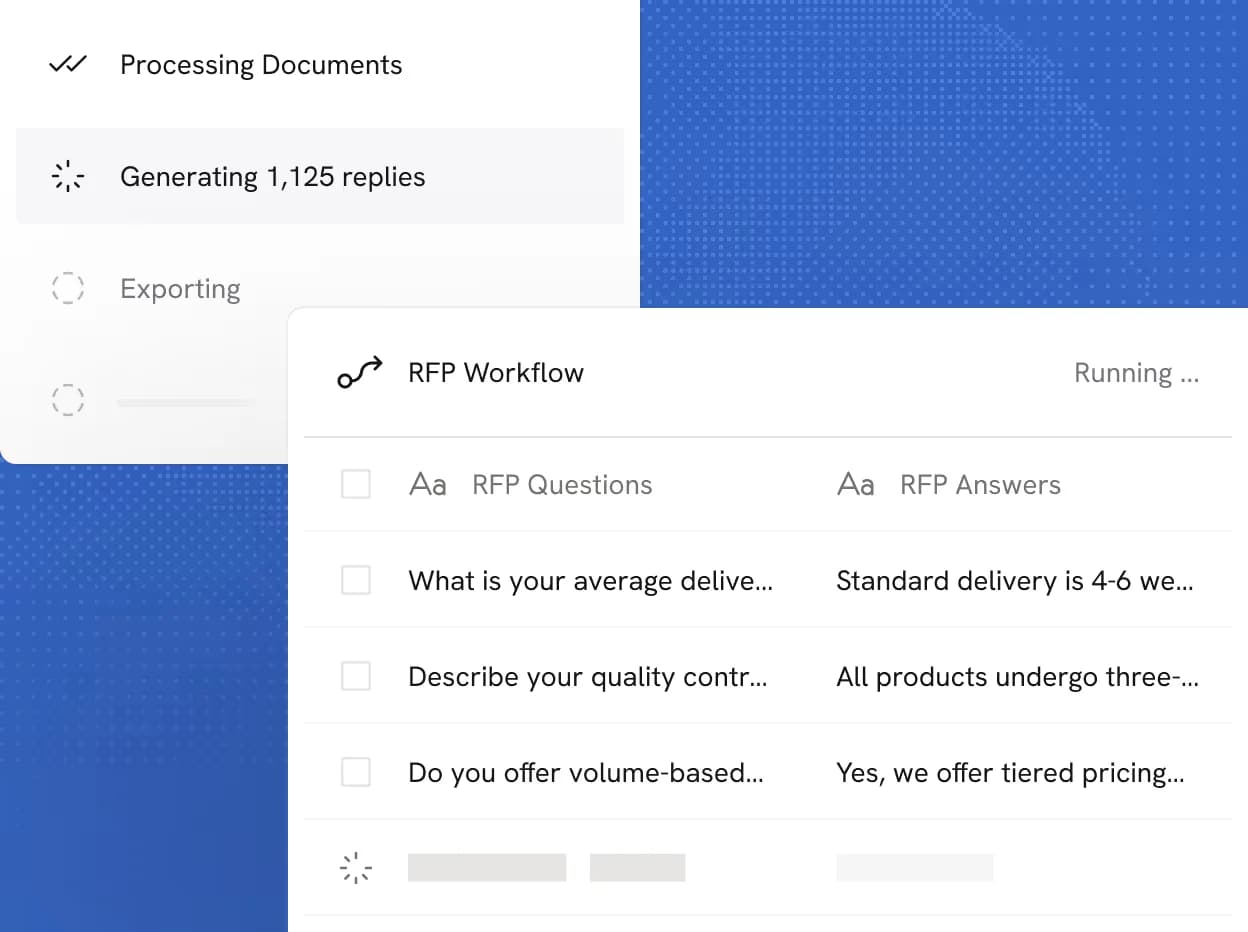
Bulk run is the mode that impressed me most. Upload a file, Cassidy extracts the rows, and the workflow runs against every one. The screenshot on the Workflows page shows an RFP job "generating 1,125 replies" behind a three-stage progress bar. For an RFP or proposal team, that single feature is probably the whole business case.
So is Cassidy the right shape for your problem?
Most of the confusion I see about tools in this category is a shape mismatch, not a quality judgement. Pick what you actually want the AI to do:
Where Cassidy fits for a support team
Cassidy lists 12 customer support solutions, including an Auto-Responder, Ticket Triage and Routing, Sentiment-Based SLA Prioritization, Multilingual Support Replies and a Ticket Context Enricher. On paper that reads like a support product. Read the descriptions and a pattern shows up fast.
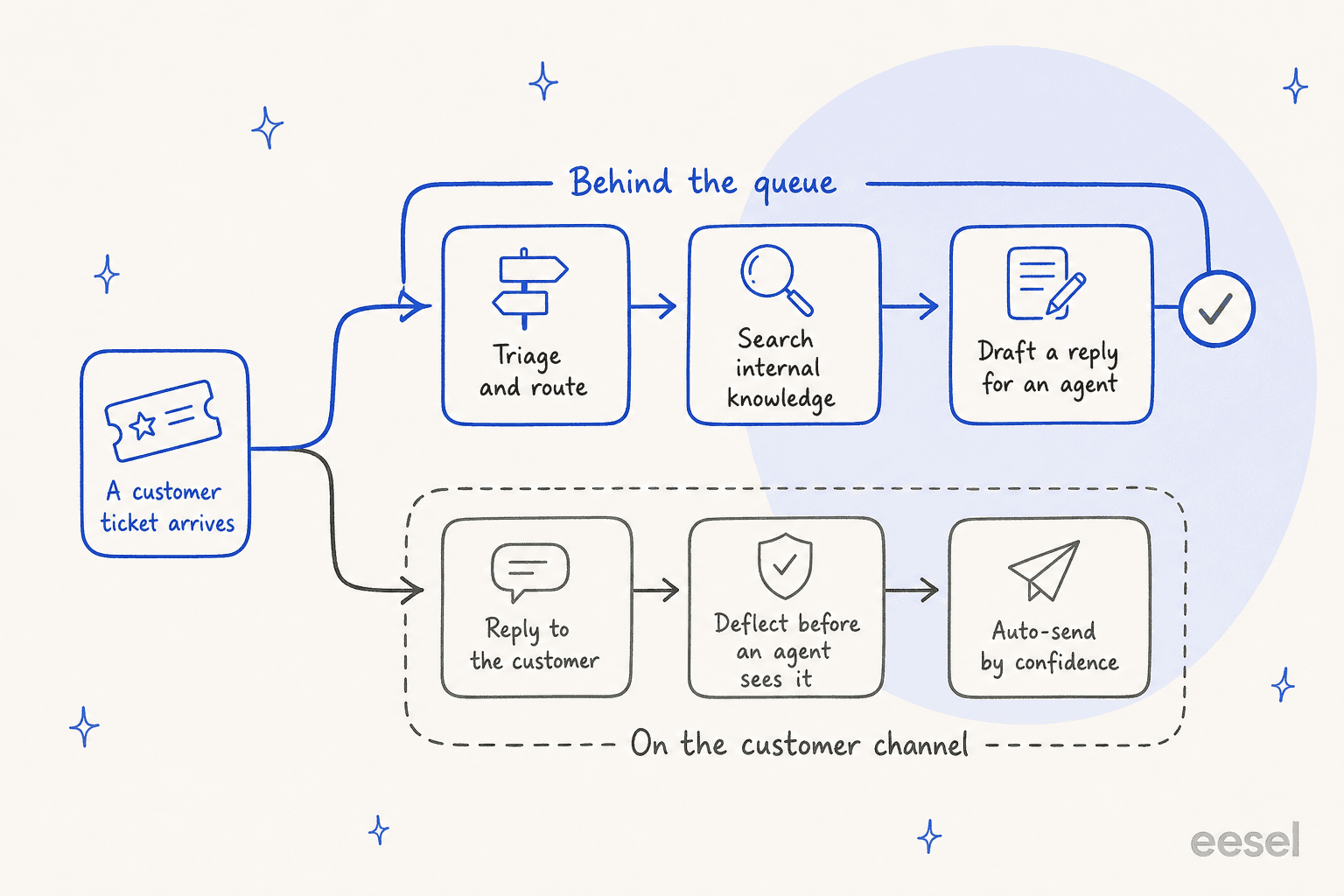
The Auto-Responder "pulls ticket and email details, searches a Knowledge Base, and generates on-brand reply drafts." The Ticket Context Enricher gives agents source-linked summaries. Cassidy's own FAQ describes the whole support use case as "auto-draft replies to incoming tickets." Every mechanic terminates at a human, which is a legitimate design choice and worth being upfront about when you are comparing tools.
Three gaps matter if support is your reason for looking:
- No confidence threshold. The word confidence never appears as a tunable setting. The only escalation rules published are content-category ("sensitive topics") and severity-based, which is a long way from real human handoff control.
- No named helpdesk in the support copy. Across every support page, Cassidy says "help desk" and "ticketing systems" generically. Its integration directory does carry Zendesk, Freshdesk, ServiceNow and Jira, but the Zendesk connection is help-center sync plus ticket triggers plus adding a comment. That is a data pipe, not an agent console.
- No outcome numbers. I read all three published case studies and there is not one hours-saved baseline, adoption percentage, deflection rate or CSAT figure between them. The only percentage in the whole customer library sits on a sales case study.
That last point is the one I would push hardest on in a demo. After years of putting AI agents on live support queues, the thing I have learned to distrust is a confident-sounding bot with no measured number attached. It is why every eesel rollout gets simulated against a company's own historical tickets before it touches a customer, so the resolution rate is something you saw on your data rather than something you hoped for.
Cassidy AI pricing: what is published and what is not
Here is the finding that surprised me most. The Cassidy pricing page contains zero dollar figures. Not a monthly price, not a per-seat rate, not a credit price. I checked twice, on both URL variants.
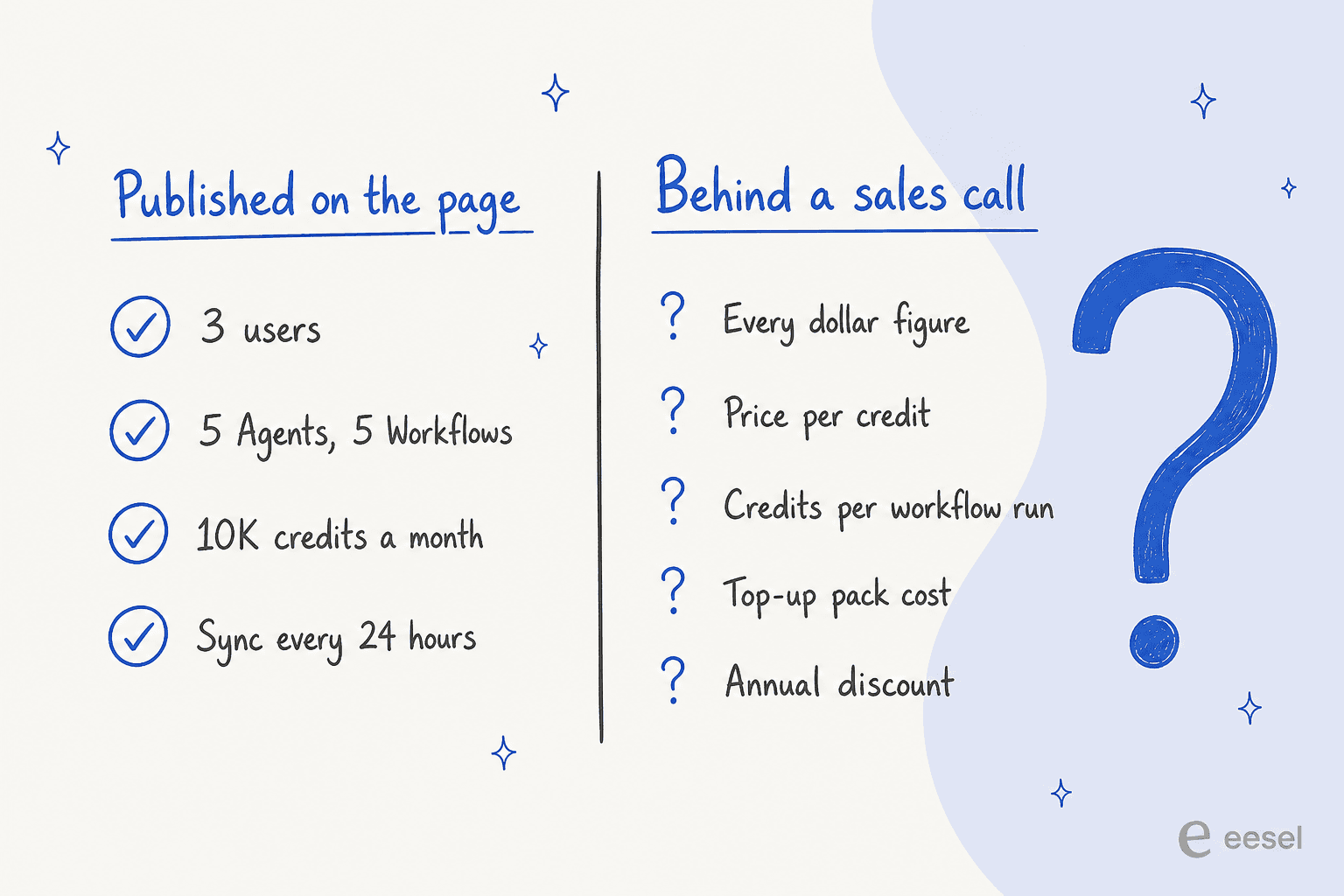
What the page does state, in words:
| What you get | Starter | Business |
|---|---|---|
| Price | "Start for free" | "Book demo", every cell reads Custom |
| Users | 3 | Custom |
| Agents | 5 | Custom |
| Workflows | 5 | Custom |
| AI credits | 10,000 included | Tailored to your team |
| Knowledge base storage | Up to 100,000 pages | Tailored to your team |
| External source syncing | Every 24 hours | Instant sync |
| Meeting recorder | "Limited hours" | Tailored to your team |
| LLM options | "Limited" | Full range |
| Free trial | 14 days | 14 days |
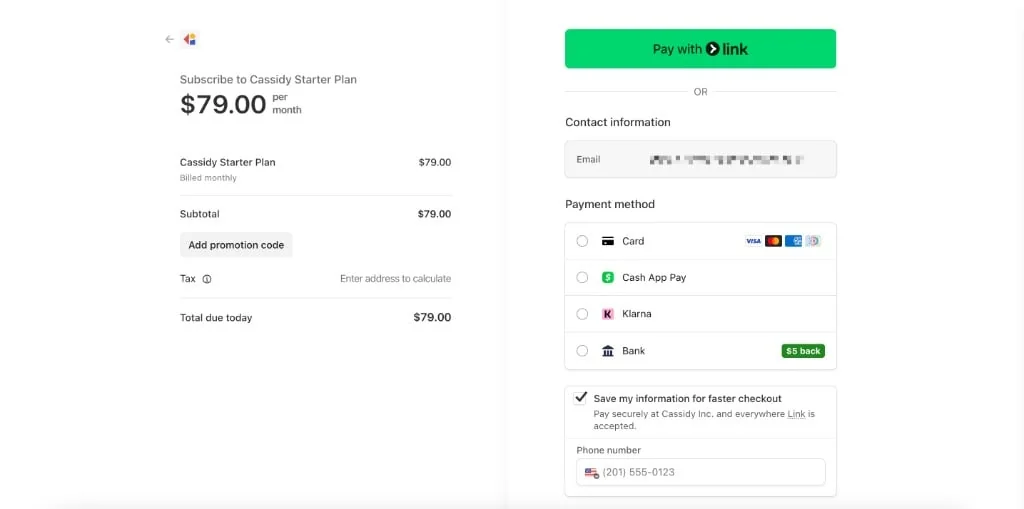
A third tier, Enterprise, appears in the page's own FAQ but not in the comparison table, which suggests the page is mid-rename. Paid self-serve tiers do exist behind login, with a monthly and annual toggle and Stripe checkout, but their prices are not published anywhere public.
How credits actually burn
A credit is not a task or a message. Per the docs, "Every AI interaction, from a chat message to a Workflow run, consumes credits based on the complexity of the request and the AI model used." Consumption is input tokens plus output tokens, scaled by model, with a published relative cost table: standard models at 1x, premium at roughly 3x, high-reasoning at roughly 5x.
Three consequences a buyer should price in:
- Credits do not roll over on any plan except Enterprise, "depending on your agreement."
- Running out is a hard stop. The docs say agent chats and workflow runs go "temporarily unavailable until credits are replenished." The marketing FAQ, on the same site, says "You'll never be interrupted." Both cannot be true.
- Grounding is the thing that costs you. Cassidy's own advice for spending less is to "limit the amount of Knowledge Base context pulled into each interaction." The context that makes answers accurate is the same context driving the bill, which is an uncomfortable trade to build a support workflow on.
To be fair, credits are a normal model for a horizontal platform where one run might be a haiku and the next might be 1,125 RFP replies. It is just a hard model to forecast, and it is why eesel prices in the unit a support lead already thinks in: 1 credit per ticket or chat session, used once no matter how many messages go back and forth, with plans published on the page from $299 a month for 500 credits and no platform fee or per-seat fees.
Security, governance and admin controls
This is a strong area, and the docs are specific rather than badge-shaped.
| Control | What Cassidy states |
|---|---|
| SOC 2 Type II | Completed audit, independently attested, renewed on a regular cycle |
| HIPAA | Compliant, BAAs available, docs advise signing before onboarding |
| GDPR and CCPA | DPAs on request, data subject rights supported, no sale of personal data |
| CASA | Validated, covering cloud API integrations including Google Drive |
| Model training | "Zero-training agreements with all providers" |
| Tenant isolation | Row-level security separating organizations at the database level |
| SSO | SAML 2.0, Okta and Entra ID guides, Enterprise plans only |
Two governance details are better than average. Global instructions apply org-wide to every agent and workflow regardless of individual configuration, which is how you enforce a tone or a compliance disclaimer without trusting each builder. And any connector action that modifies data requires explicit in-chat approval before it runs, which is the right default when non-technical staff are building the automations.
The catch for smaller teams is that SSO sits behind Enterprise, as do custom roles, weekly website re-crawls and retention policies. If you are evaluating this for IT service management, that gate is likely to land on the wrong side of your security review.
What customers actually say
The community footprint is thin, so treat the numbers accordingly. G2 shows Cassidy at 5.0 out of 5 across only five reviews, and every one of those reviewers is a small business of 50 people or fewer. There is no Capterra listing and no Trustpilot profile at all. So the enterprise positioning has zero independent enterprise review coverage behind it, which is the single biggest hole in the evidence base.
The five reviews that do exist are useful for texture. This one names the friction most likely to hit you as your document pile grows:
"The only challenge I've encountered so far is the sheer amount of data I wanted to upload, which pushed into enterprise-level storage requirements."

And this one is the clearest statement of who the product is not for:
"I would like it see more integrations and more granular control for developers but i am sure it's just a matter of time as the product matures more"
On Reddit, Cassidy mostly turns up inside no-code agent-builder shortlists, sitting alongside Dify and Langflow in threads like this one on r/AI_Agents, rather than in support-tooling discussions. Builders find Cassidy; support leads mostly do not.
The most useful independent take I found came from LinkedIn, where one practitioner ran Cassidy against n8n and landed on the trade-off cleanly:
"relatively easy to pick up... But many in our cohort are using n8n, for its functionality and technical options."

That is the honest summary of the category position. Cassidy is the one a non-engineer can actually drive; n8n is where you go when you want depth.
Beyond that, the substantive voices are in Cassidy's own case studies, and to its credit each names a real person with a real title.
"The documents were there, but finding anything was not a great use of time."
Paul Arguinchona, Chief Information Officer, Frontier Behavioral Health, Cassidy case study
FBH branded its assistant SPOT, for Single Point of Truth, and now runs it for 800+ clinicians daily inside Microsoft Teams. What made it work, per the study, was that answers came back "with links to the original source and no second guessing required." Citations as the trust mechanism, not a score.
At Crain Communications, the interesting signal is who ends up building:
"We were able to take an editor who started his journalism career on a typewriter, and he built an entire editing assistant that he now shares with other editors."
Marisa Marcinkowski, Strategist for Enterprise AI Enablement, Crain Communications, Cassidy case study
And at Rise, a Quad agency, the honest read is that the competition was not another platform:
"We used to spend countless hours just trying to locate the answers we'd already written that only needed minor rework. Now, Cassidy makes it easy to find, customize, and submit responses quickly."
Andrew Boylan, Group Director of Product Management, Rise (a Quad agency), Cassidy case study
Rise had trialled ChatGPT and Claude first and backed off over data-training concerns. That is the pattern across all three studies: Cassidy wins on governance and hand-holding, not on raw model capability. Every study credits the implementation team as a primary reason it stuck, which tells you this is sold with a services motion, not as a self-serve toggle.
Worth naming the same trade in our direction too. The build-it-ourselves option is real competition for any platform in this space, and it comes down to maintenance more than capability. One of our own customers, an engineering lead at GENERAL BYTES, put it plainly: "We could try to write our own LLM application but we didn't want to invest our time into that. We wanted something that we would not have to maintain."
Who Cassidy is for, and who should look elsewhere
Pick Cassidy if your bottleneck is document-shaped internal work: RFPs and proposals, policy and contract comparison, internal answer search across a messy Drive or SharePoint, meeting follow-ups landing in a CRM. The bulk-run mode, the 45-action library and the governance controls are real, and the no-code builder lets a non-engineer ship something.
If your evaluation set is Zapier, n8n, Glean or a general assistant like Copilot, that is exactly the comparison Cassidy has picked for itself, and it holds up. It is also a reasonable fit for an HR help desk where the "customer" is an employee.
Look elsewhere if you need customer-facing support automation. Not because Cassidy is weak, but because it is not aiming there: no auto-send, no confidence routing, no deflection metric, no support case study, and support sits as one of twelve solution categories. A helpdesk copilot that drafts is useful, and it is not the same product as an agent that resolves. If cutting ticket volume is the goal on the board, start your shortlist from tools built for support instead.
Push hard on pricing either way. Go into the demo with your own numbers: expected monthly runs, average document size, which model each step needs. That is the same discipline any chatbot ROI case needs, and it is easier to do before the contract than after. Ask for the credit rate in writing, ask what happens the month you exhaust the balance, and ask whether rollover applies to your contract. Those three answers determine your real cost, and none of them are on the website.
Trying eesel on the support queue instead
If you landed here because tickets are the problem, that is the job eesel is built for. It plugs into your helpdesk in a few minutes, whether that is Zendesk, Freshdesk or Gorgias, trains on your help center and your past tickets, and handles whole conversations rather than handing a draft back to an agent. You choose which tickets it touches and it leaves the rest alone, which is the control most support leads actually want before they let AI near a customer.

If you are still building a shortlist, our roundup of AI helpdesk software is a better starting point than a horizontal platform. The part worth borrowing regardless of what you buy: simulate first. Run the agent over your historical tickets, see the resolution rate on your own data, and only then decide what to automate. Try eesel free with 100 credits, no card, or book a demo if you want to walk through your queue with someone.