


Cassidy's pricing page contains zero dollar figures. Not one. But the company does publish a price, in a place almost nobody looks: a screenshot inside its own product docs shows the in-app billing screen with Starter at $79/month (10K credits, 5 meeting hours, 30K knowledge base pages, up to 3 seats) next to an Enterprise tier marked "Custom". That single screenshot is the most concrete number Cassidy has made public.
The bigger cost story is the unit. Cassidy bills in AI credits, which are derived from token volume, not from tasks completed. An agent chat runs 1 to 30 credits, a workflow run 1 to 100, and a Premium model burns roughly 5x the credits of a Standard one for identical work. There is no published dollar-per-credit rate, no top-up price, and no rollover. When the balance hits zero, agents stop.
If you are evaluating this for a support queue specifically, the comparison that matters is token-based credits versus a credit that equals one ticket. eesel's plans start at $299/month for 500 credits, where 1 credit is one ticket or chat, with no seat fees and no platform fee, and you can watch the number move in a dashboard before you commit a cent. That is a different kind of forecast than "reach out to our team." For what the product itself is like rather than what it costs, my Cassidy AI review covers that separately.
The one price Cassidy actually publishes
Start with the finding, because it took some digging and it is the single most useful thing in this post.
Cassidy's pricing page publishes nothing. I checked it three ways, including parsing the raw page HTML for currency strings, and there is no $ anywhere on it. Starter says "Start for free". Business says "Custom" on every quantitative row. Enterprise is not even shown as a column.
Now open Cassidy's docs page on managing plans. Step 2 of that walkthrough embeds a screenshot of the real in-app billing screen, and the screen has prices on it.
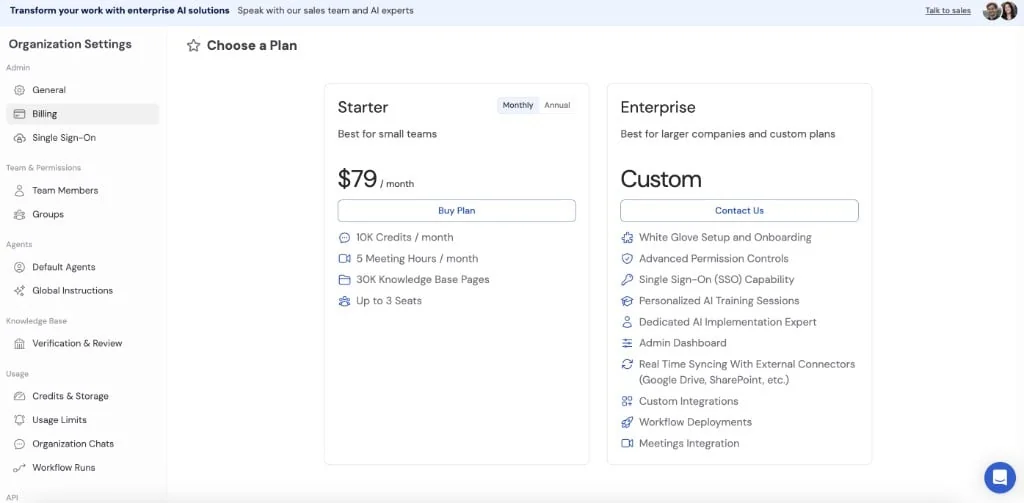
Two tiers, not three. Starter, $79/month, with a Monthly/Annual toggle and a Buy Plan button. Enterprise, Custom, Contact Us. And the Starter feature list is worth reading slowly:
- 10K Credits / month
- 5 Meeting Hours / month
- 30K Knowledge Base Pages
- Up to 3 Seats
Those are the same limits the marketing page attaches to the plan it calls free. Same name, same seat count, same credit allowance. The next step in the same docs walkthrough embeds the Stripe checkout, which removes any ambiguity about the figure.
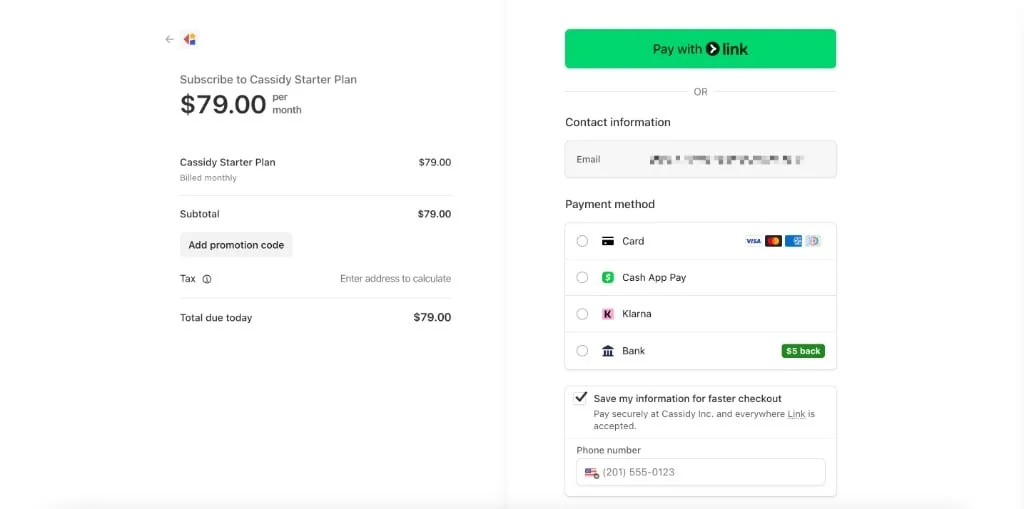
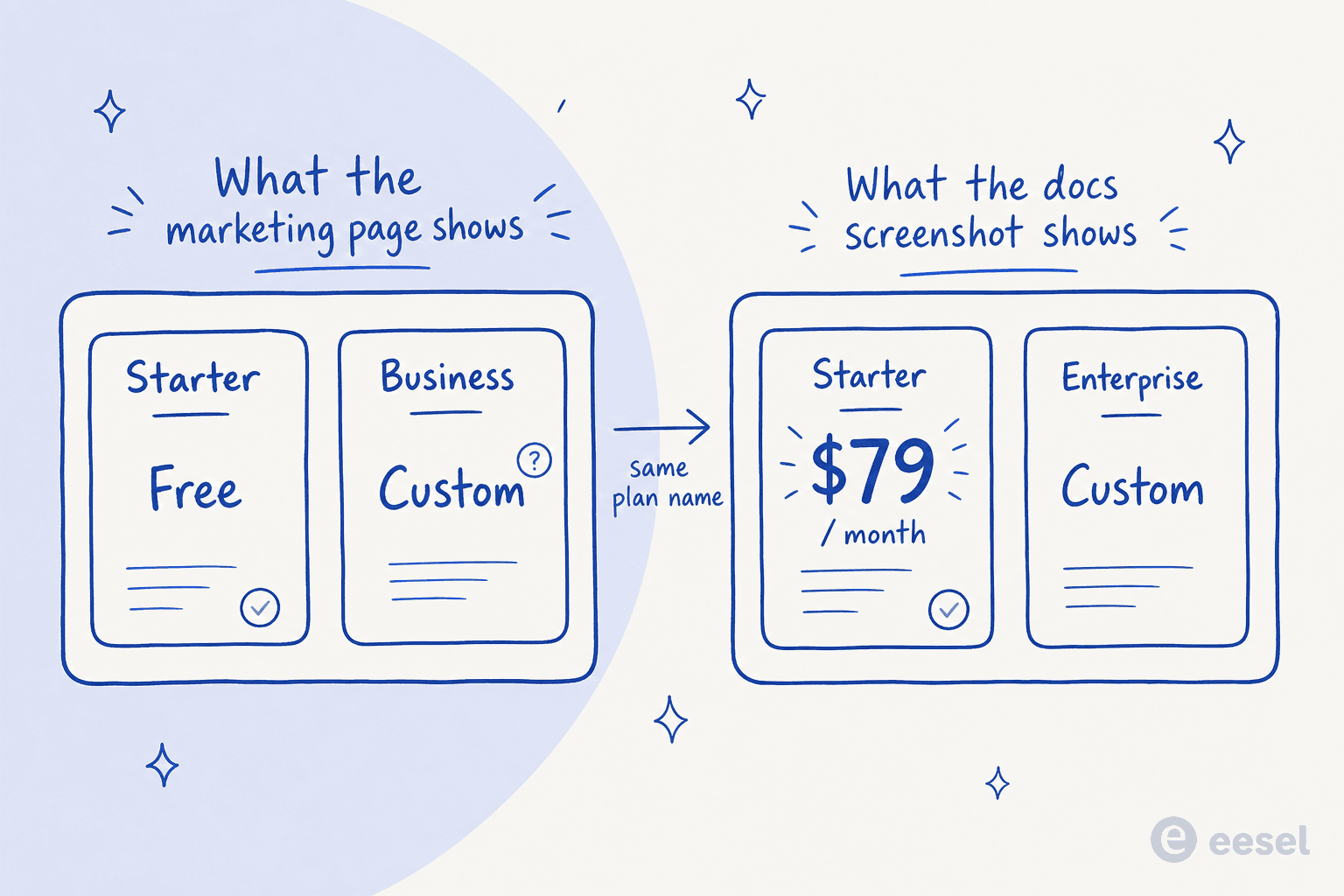
Be careful with what this proves. A docs screenshot is a screenshot, not a price list: it may be older than the current free Starter, and Cassidy may have re-cut its tiers since. What it does establish is that $79/month is the only Cassidy price that exists in public, and it comes from Cassidy. If a sales call quotes you something wildly different for a similar envelope, that gap is a fair question to ask out loud.
It also settles a contradiction the marketing page never resolves. The Starter card says "30,000 pages of storage" while the comparison table on the same page says "Up to 100K pages". The in-app screen says 30K. The plan card is right, the table is not.
What the pricing page shows instead
Here is the public tier structure, transcribed from the pricing page as it stands today.
| Tier | Published price | Seats | Agents | Workflows | Credits/mo | Sync | Buy path |
|---|---|---|---|---|---|---|---|
| Starter | None shown ("Start for free"); $79/mo in the docs screenshot | 3 | 5 | 5 | 10,000 | Every 24 hours | Self-serve signup |
| Business | "Custom" on every row | Custom | Custom | Custom | "Tailored to your team" | Instant sync | Book demo |
| Enterprise | Not shown as a column at all | Custom | Custom | Custom | Custom | Real time | Email sales |
A few things fall out of that table that a buyer should register before booking a call.
Every deployment surface you would actually use is above Starter. Slack, Microsoft Teams, Google Chat, the API and the browser embed are all Business-and-up. Starter deployment is the Chrome extension plus the Office and Gmail add-ons. If your plan was to automate Slack support or run agents inside Teams, you are on the quote-only track from day one.
Every security-review item is above Starter too. SSO, audit logs, data retention policies, advanced permission controls and GDPR tooling are all Business features. Any team with a procurement process, or anyone benchmarking HIPAA-compliant AI options, is buying a custom quote by definition. That is also true of the IT service desk crowd, where audit trails tend to be the first question asked.
Sync frequency is the sharpest split of all. Starter refreshes Google Drive and SharePoint every 24 hours; paid tiers get instant sync. For an internal answers use case that is an inconvenience. For anything customer-facing, a knowledge base that is a day stale is a correctness problem, not a convenience one, and it is exactly how AI hallucinations creep into confident-sounding answers.
AI credits are the real pricing model
The tier table is the surface. The credit system is where your bill actually lives, and it is the part worth understanding properly.
A Cassidy credit is not a task, a message, or a resolution. It is a measure of tokens, scaled by which model ran. The docs put it plainly: each call processes input tokens (your prompt, instructions, and knowledge base context) and generates output tokens, and the token count determines credits consumed. Cassidy's own credits article frames it as a pass-through of what the model providers charge them.
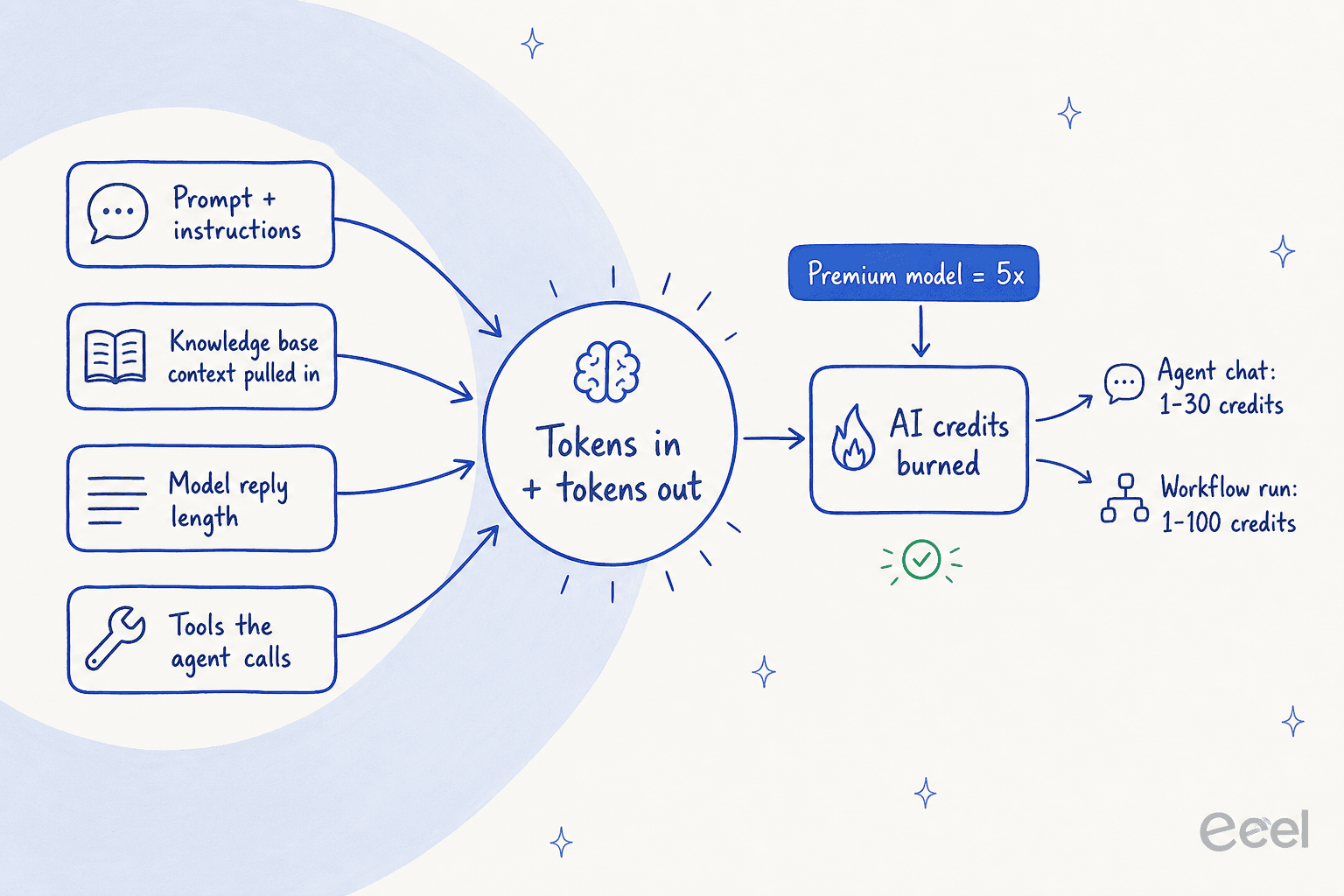
The published consumption ranges are the only hard numbers Cassidy gives:
| Action | Credit cost | What moves it |
|---|---|---|
| Agent chat | 1 to 30 credits | Message length, knowledge base context pulled in, model, capabilities used |
| Workflow run | 1 to 100 credits | Number of actions, input size, model chosen per action |
| Premium model | ~5x Standard | Model choice alone, on identical work |
That 5x multiplier is the number to sit with. Cassidy's Standard tier is GPT 5.2, Claude 4.6 Sonnet, Gemini 3 Flash and o4 Mini; Premium is o3, Claude 4.6 Opus and Gemini 3.1 Pro. A team that defaults every agent to a Premium model burns its allowance five times faster for the same work, and nothing at the moment of choosing a model tells you that. Cassidy's own advice is to stay on Standard unless you need the specialised capability, which is good advice and easy to ignore when a dropdown makes both look equivalent.
Run Starter's 10,000 credits through those ranges and the envelope is small: roughly 100 heavy workflow runs a month, or 333 heavy agent chats. That is a pilot, not a production workflow automation budget, and it is well short of what a real ticket-automation rollout consumes in its first week.
Credit metering is not unique to Cassidy, to be clear. HubSpot, Agentforce and ClickUp all meter AI work in some abstracted unit. What is unusual here is that the unit has no published exchange rate to money at all.
There is a fourth cost driver that catches support teams in particular. Knowledge base access is itself expensive: Cassidy says retrieval "tends to consume more credits", especially over large entries. The mechanism that makes an answer accurate, grounding it in your docs, is the mechanism that makes it cost more. Anyone who has trained an AI on company docs will recognise the tension, but here it lands directly on the invoice. It is the awkward part of every credit-metered retrieval tool: the richer your internal knowledge base, the more each grounded answer costs to produce.
Estimate your own credit burn
Cassidy's published ranges are wide enough that "10,000 credits" means very little until you put your own volumes against it. This does that arithmetic, using Cassidy's own numbers rather than any I invented.
Switch the model tier from Standard to Premium and watch the same workload blow through the allowance. That is the whole argument about credit pricing in one interaction: the cost of your month depends on a dropdown most people never think about.
What happens when you run out
This is where Cassidy's own material openly contradicts itself, and it matters more than it looks.
The marketing FAQ on the pricing page says:
"You'll never be interrupted. Cassidy notifies you as you approach limits and offers seamless credit top-ups or plan upgrades."
The product docs say the opposite:
"When your credit balance is exhausted, AI-powered features (Agent chats, Workflow runs) will be temporarily unavailable until credits are replenished, either at the start of your next billing period or by upgrading your plan."
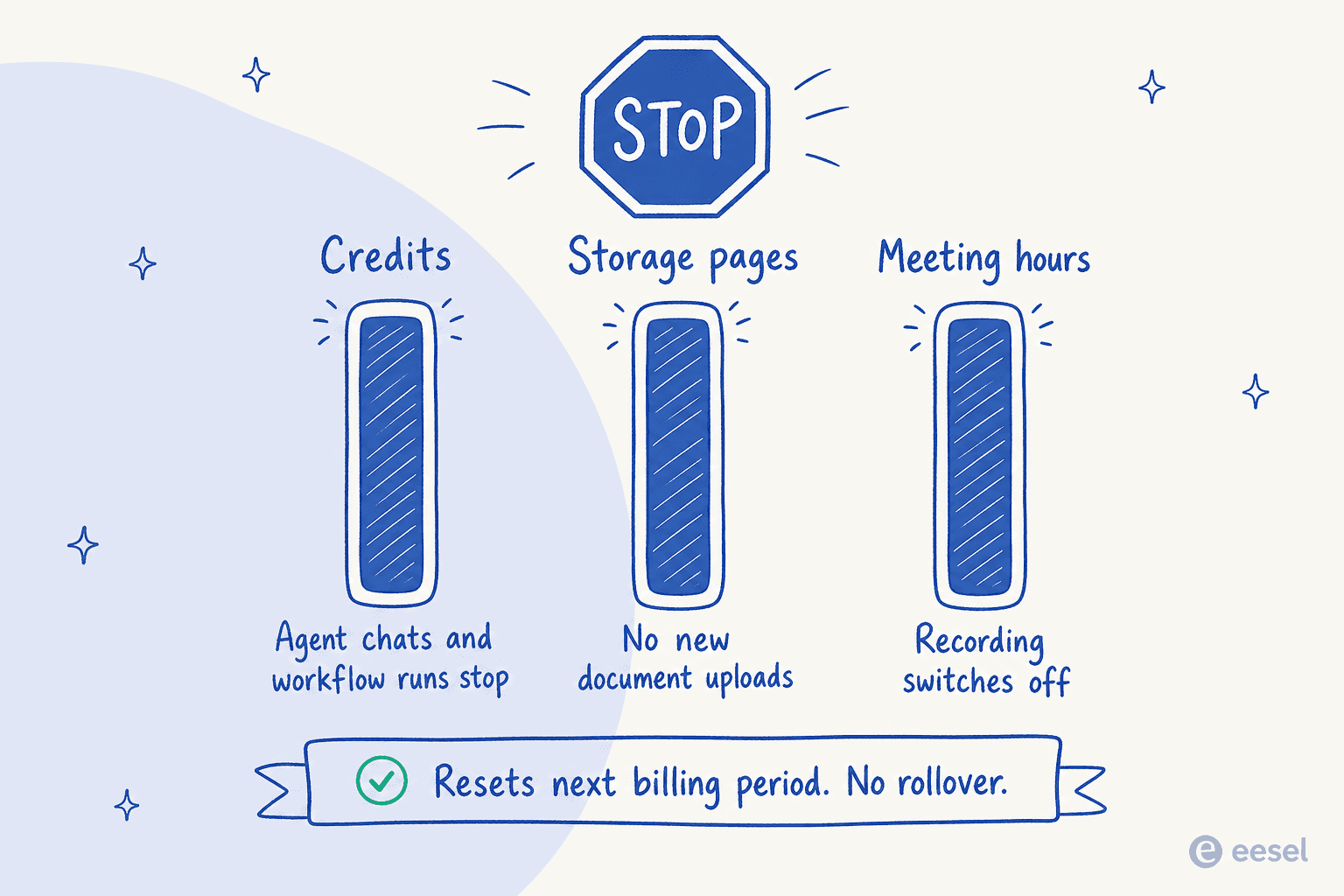
The usage docs confirm it across all three metered resources, and there is no "keep running, we will bill you" mode described anywhere.
| Limit hit | What stops |
|---|---|
| Credits | Agent chats and workflow runs become unavailable |
| Storage pages | No new document uploads until you free space or upgrade |
| Meeting hours | Meeting recording is disabled until hours reset |
For internal document work, a hard stop is annoying. For anything sitting in a live customer path, it is an outage with a billing cause, and it is the reason escalation rules and handoff design should never depend on a balance you cannot forecast. Your CSAT does not care why the agent went quiet on the 22nd.
Credits also do not roll over. Unused allowance is forfeited every billing period, unless rollover is negotiated into an Enterprise agreement.
The contradictions worth knowing before you budget
I do not think any of these are malicious. They look like the ordinary drift of a fast-moving Series A company whose marketing copy, docs and product have each been updated on different schedules. But if you are the one building the budget, you are the one who eats the drift.
- Free versus $79. The marketing page calls Starter free; the docs screenshot prices a plan with the same name and identical limits at $79/month.
- 30K versus 100K storage pages. Same page, two numbers. The in-app screen says 30K.
- "Unlimited agents and workflows." Cassidy's own credits article claims Starter includes unlimited agents, workflows and Slack. The pricing table caps Starter at 5 agents, 5 workflows, and marks Slack as not included. Anyone budgeting off that article is budgeting off a plan that no longer exists.
- Business versus Enterprise. The pricing FAQ describes Enterprise benefits (SSO, Slack and Teams deployment, API access, live syncing) that the comparison table now attributes to Business. The naming changed; the FAQ did not.
- The purchase flow that is not there. The docs index advertises the credits page as covering how to "purchase additional credits when needed". The page itself offers only "upgrade your plan" or "email support".
That last one is the tell. There is no dollar-per-credit rate, no credit pack, no auto-top-up price. Cassidy states the policy directly: rather than charging per credit, pricing "factors in seats, features, support, and other benefits". Every remedy when you run low is a conversation, not a button.
Cost controls: the one real lever you get
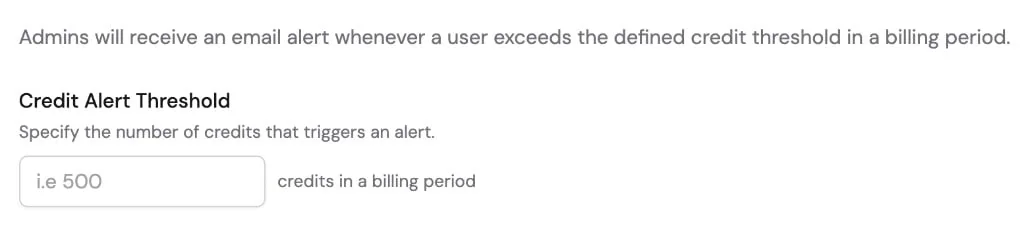
To Cassidy's credit, the admin tooling for containing burn is better than most credit-metered products ship, and it exists precisely because burn is unpredictable. It lives under Organization Settings, in Limits & Alerts.
| Control | Trigger | Does it actually stop spend? |
|---|---|---|
| Organization alerts | Total org usage crosses a percentage or absolute threshold | No, informational only, fires once per period |
| Per-user alerts | An individual crosses a threshold | No, informational only |
| Per-user credit limits | An individual hits their cap | Yes, blocks credit-consuming actions with an explanation |
Only the third one is a real brake, and it is per-user rather than per-org, which is a slightly odd shape: the way you stop your company overspending is by capping each person. There are sensible exclusions so that shared workflows and external agent deployments do not eat an individual's budget, plus a panel showing who blew their cap this period.
The usage dashboard itself is very good, updating in real time across credits, storage and meeting hours. It also gives a rare glimpse of what a large paid allowance looks like: this docs screenshot shows an org with 500,000 credits and 500,000 knowledge base pages a month, fifty times the Starter envelope.
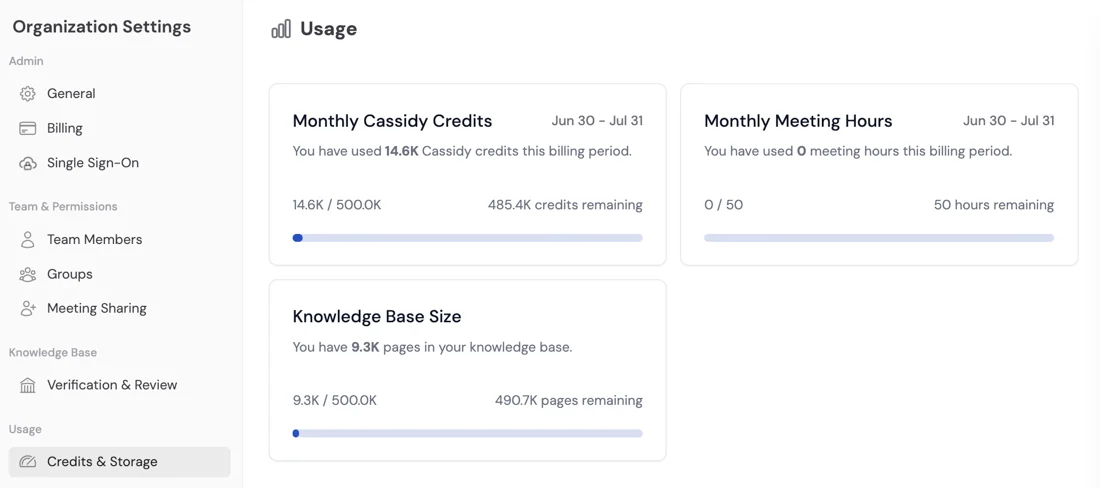
Good instrumentation is not the same as good forecasting, though. You can watch the meter beautifully. You still cannot answer "what will this cost next quarter" without a sales call.
What users actually say about the cost
Not much, and that itself is the finding.
Cassidy has 5.0/5 on G2, from exactly 5 reviews, all from small businesses, the newest dated January 2025, with no category badge of any kind. Not one of those reviews mentions credits, burn rate or pricing friction. The closest thing to a cost complaint in the whole set is about hitting storage limits:
"At this time, I'm using Cassidy at a basic level, and it has been fantastic. The only challenge I've encountered so far is the sheer amount of data I wanted to upload, which pushed into enterprise-level storage requirements."

Reddit is thinner still. Across three years there is no Cassidy pricing thread, no credit-burn complaint, no migration-away story. The most detailed first-hand account is a marketer describing a security-questionnaire agent, and their advice generalises well past Cassidy:
"Also before selecting a tool review UX and costs - not all of these are built and priced the same, some are much easier to use for non technical folks and some are much more expensive than others."

Read that absence carefully. It is not evidence that customers are happy with the pricing. It is evidence there are not enough posting customers to produce a pattern in either direction, which for an enterprise-positioned platform is its own kind of risk. Compare it to how loudly people debate Zendesk pricing, Gorgias AI costs or Freshdesk plan tiers.
Where Cassidy does come up on Reddit, it is almost always inside someone else's shortlist, named in the same breath as Zapier, Make, n8n, Lindy and Relay, and split on exactly the two axes that quote-gated pricing hides: ease of use and cost.
The sharpest pricing take in the whole corpus comes from Cassidy's own CEO, and it cuts both ways:
"Most companies are dramatically under-budgeting for AI, and I think the root cause is that leaders are still mentally filing it under 'software.' […] The right comparison isn't your CRM seat license, it's the loaded cost of the headcount or the agency retainer or the BPO contract that the AI is actually displacing."
I agree with the first half. Pricing AI against displaced work rather than against a seat license is the right frame, and it is why per-seat models age badly for support. But he continues that companies are tallying their AI spend and finding the number "much higher than anyone on the finance side expected", which is precisely what an opaque credit meter produces.
Cassidy pricing versus a per-ticket credit
I have spent the last few years putting AI agents on live support queues, and the pattern in those conversations is consistent: buyers are not afraid of paying, they are afraid of not being able to predict. On one call this year a budget-conscious buyer told us they had watched a previous vendor's price more than double, and asked to pay annually purely to lock the rate in. On another, a buyer who hit 200 interactions in a single test day spent the rest of the call working out what that meant at 9,000 interactions a month. Neither of those people wanted a cheaper tool. They wanted a number they could take to finance.
That is the honest gap between a credit meter and a per-unit price:
| Cassidy AI | eesel | |
|---|---|---|
| Billable unit | AI credit, derived from tokens | Credit: one ticket or chat session, however long |
| Published rate | None | From $299/mo for 500 credits, $4.00 per blog post |
| Seat fees | 3 seats on Starter, custom above | None |
| Platform fee | Not published | None, one fixed monthly price |
| Cost of the same job on a pricier model | Roughly 5x | Unchanged, model choice is not your billing lever |
| Unused allowance | Forfeited monthly, no rollover | Unused credits do not roll over, but the price is fixed and sized to your volume |
| Running out | Agents stop until reset or upgrade | Agents pause until reset, or turn on overage ($0.80 per extra credit) with a monthly cap you set |
| Forecast at 1,000 tickets/month | Requires a sales call | $499 (1,000 credits) |
To be fair to Cassidy, this comparison is slightly unfair on purpose, because the two tools are aimed at different jobs. Cassidy is built for document-heavy internal work: RFP responses, policy lookups, contract review, meeting follow-ups. It sits closer to a documentation assistant than to a helpdesk, and the few reviews that exist say so warmly. If that is your problem, the credit model is survivable, and the full Cassidy overview walks through what it does well.
The mismatch shows up when you point it at a ticket queue. You are paying for tokens consumed rather than for work finished, Cassidy's support templates stop at drafts rather than sent replies (a copilot, in other words), and there is no published resolution rate to price against.
That is a hard business case to write, whatever the underlying quality. It is also why teams comparing AI support tools on cost savings end up wanting an outcome-shaped price: you can tie one credit to a ticket that closed, and you cannot tie a Cassidy token-based credit to anything a manager recognises.
Try eesel for the support queue instead
If the queue is the thing you want automated, this is where I would point you. eesel connects to Zendesk, Freshdesk, Gorgias, HubSpot, Slack, Confluence and the rest, trains on your past tickets and help center, and handles whole tickets rather than drafting suggestions for someone else to send. It will also tag and route whatever it hands back, in your own brand voice.
Setup is minutes, not a procurement cycle, and you can simulate the agent against your historical tickets before a single customer sees it. That is how you find out what it will actually deflect, rather than guessing from a demo.
The pricing is the part that matters for this post: plans from $299 a month for 500 credits (1 credit per ticket or chat), no seat fees, no platform fee, with a free plan of 100 credits and no card required to start. If your team routes 200 of its 1,000 monthly tickets to the AI, only those 200 use credits, so the 500-credit plan covers it. If you run out, you can turn on overage with a monthly cap you set, so the meter can never surprise you.

You can see the full breakdown on the eesel pricing page, or try eesel free and watch the number move on your own volume before you commit to anything.