

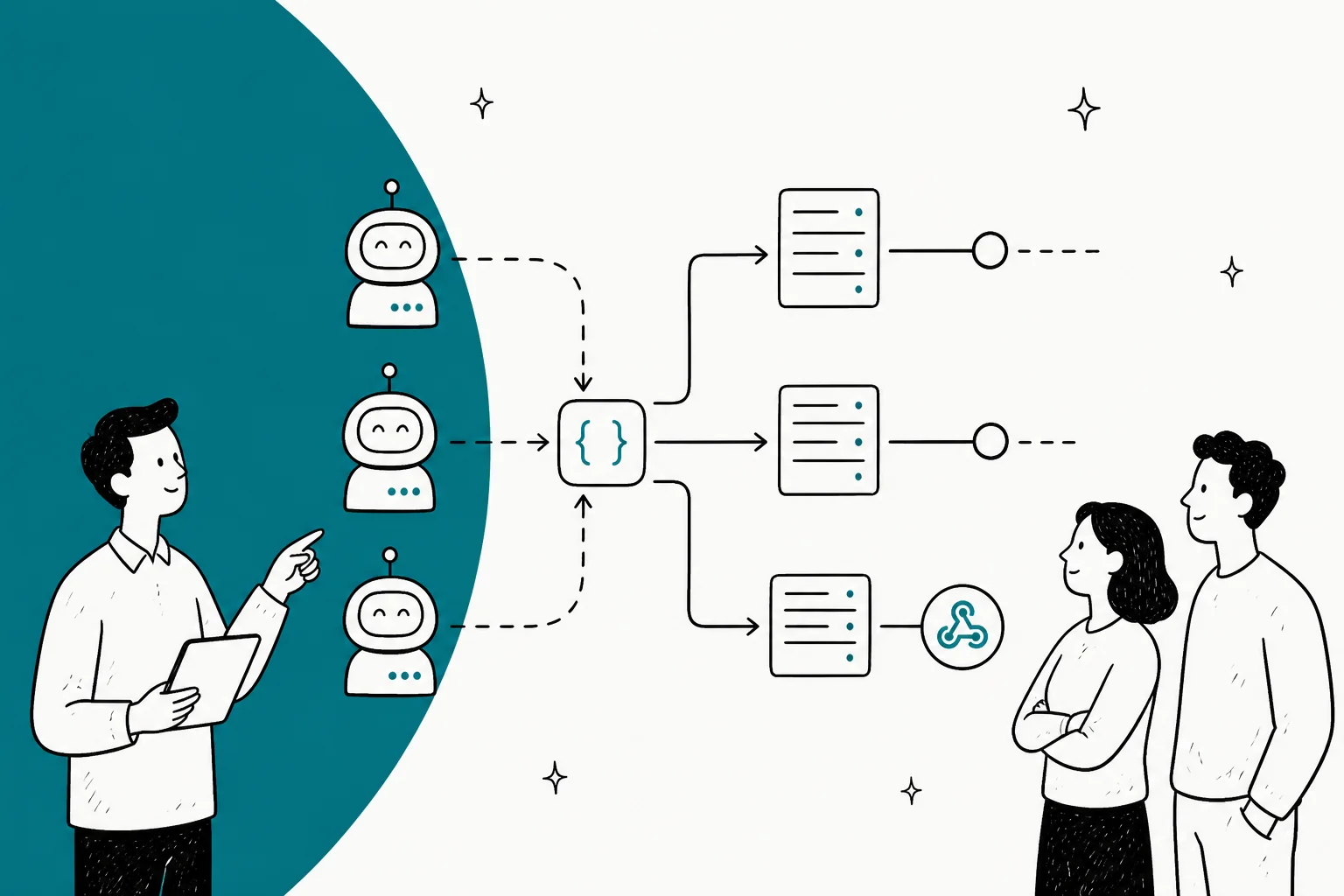
What a service-to-service AI agent actually is
Strip the buzzwords and the idea is old. "Service to service" just means one piece of software calling another over the network, with no human in between, the same server-to-server, machine-to-machine pattern that already runs your payment webhooks and your billing sync. An S2S AI agent is that pattern with an AI agent as one of the participants.
So the defining feature is the interface, not the intelligence. A chatbot has a UI and a person on the other side of it. A service-to-service agent has an API contract and another service on the other side of it. The reasoning inside can be word-for-word identical; what changes is who, or what, is talking to it.
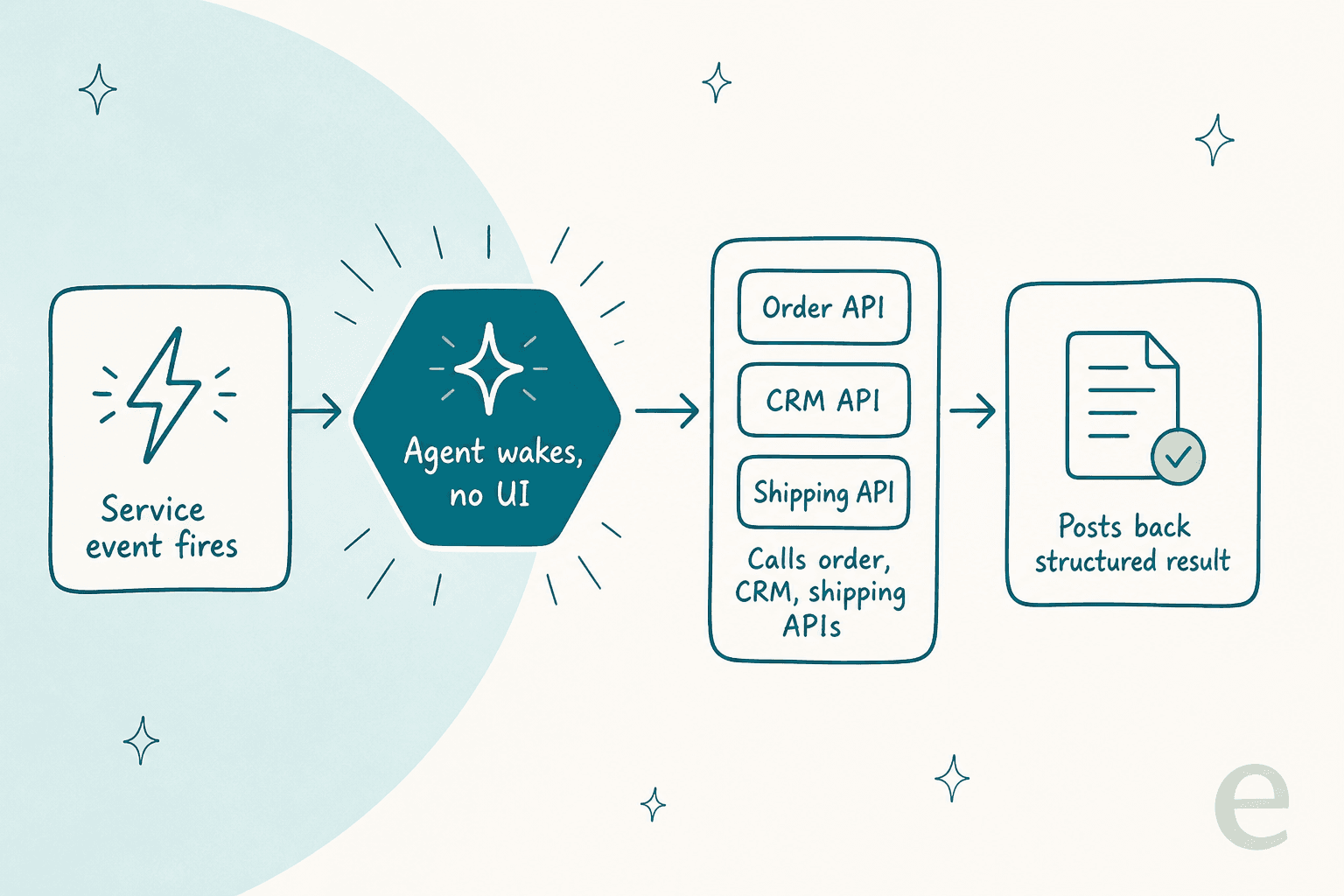
In practice the loop runs like the diagram above. A service event fires, usually a webhook: a ticket is created, an order status changes, a Slack message lands. The agent wakes with no screen and no session. It calls whatever APIs it needs, the order system, the CRM, the shipping provider, to gather context and take an action. Then it posts back a structured result: a drafted reply, a tag, a status change, a payload another service consumes.
That "posts back a structured result" step is worth sitting with. When a human agent finishes a ticket, the output is prose a person reads. When a service-to-service agent finishes, the output is often data another program acts on, so it has to be shaped and validated like an API response, not like a chat message. This is the shift that trips teams up: you are no longer building a better answer, you are building a reliable function call that happens to be powered by a language model.
If you want the deeper version of this pattern, we have written it up from a few angles: the customer support agent API view (the build routes), the AI helpdesk API view (the two jobs an API does), and the headless AI customer support view (running support with no dashboard at all). This post is the one about treating the agent as a service in your architecture.
Why service-to-service is a different problem than a chatbot
When there is a human in the chat, a lot of sins are forgiven. If the bot stalls, the person waits. If it gives a slightly off answer, the person rephrases. If it needs a login, the person logs in. The human is a live error-handler sitting inside every interaction.
Pull the human out and all of that becomes your job. There is nobody to retry the call, nobody to notice the timeout, nobody to spot that the agent used the wrong account. The agent is now a component other components depend on, and it has to behave like one: predictable interface, defined failure modes, credentials of its own.
This is also where the real value shows up, which is easy to lose in the hype. As one Hacker News commenter put it in a thread about connecting agents to tools:
"The 'system integration' benefits only matter when you have an LLM in the loop making decisions about which tools to use."

That is the honest framing. If your automation is a fixed sequence of API calls with no judgement in it, you do not need an agent, you need a script, and a plain script will be simpler and more reliable. The agent earns its place precisely when the next call depends on reasoning over messy input: reading a frustrated customer message, deciding whether this is a refund or a warranty case, choosing which of five internal systems to query. The service-to-service wrapper is only worth the complexity when there is a genuine decision in the middle.
The catch: a nondeterministic service in a deterministic mesh
Here is the thing I wish someone had told me before I wired my first agent into a service mesh. Every other service in your architecture is deterministic: same request in, same response out, every single time. You can cache it, you can replay it, you can write an exact-match test for it. The AI agent is the one box that breaks that contract.
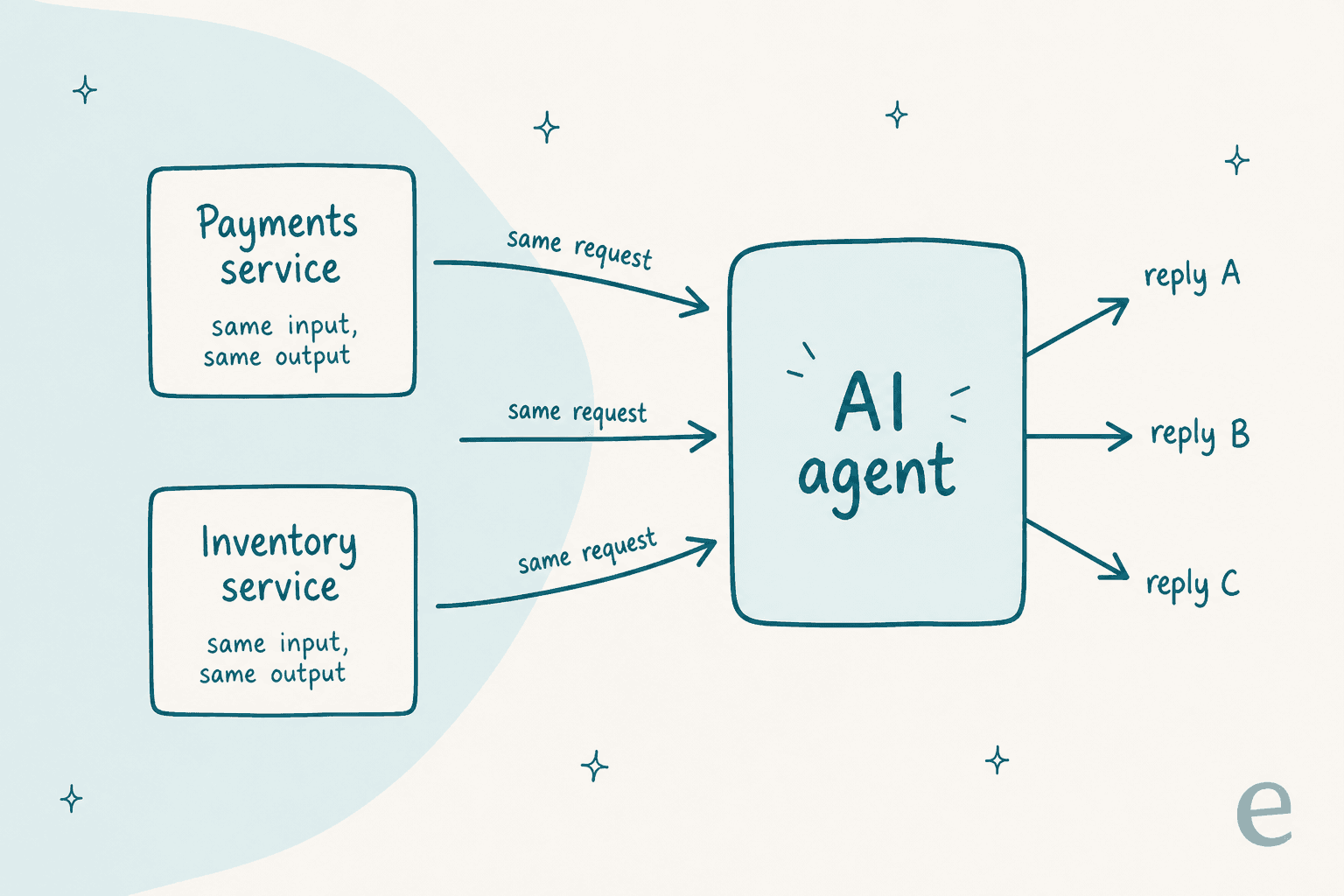
Send the same request to your payments service three times and you get the same answer three times. Send the same request to the agent three times and you can get reply A, reply B, and reply C. That is not a bug you can patch out, it is the nature of the model. And it inverts your usual instinct: because the agent is less predictable than the services around it, it needs more of the guardrails you would normally reserve for the flaky external dependency, not fewer.
Concretely, that means you cannot treat the agent's output as trusted just because the call succeeded. A 200 OK from a normal service means the answer is right. A 200 OK from an agent means it produced an answer. Whether that answer is correct is a separate question, and one you have to answer with validation, guardrails, and testing before the output flows downstream. We have watched confident-sounding agents give wrong answers on live queues, which is exactly why we now simulate every rollout against historical tickets first, but more on that below.
The service-to-service contract you actually own
Once you accept that the agent is a service, the checklist writes itself. It is the same checklist you would apply to any production service, plus one item that is unique to agents. This is the boring stuff, and the boring stuff is what separates a demo from something you can leave running overnight.
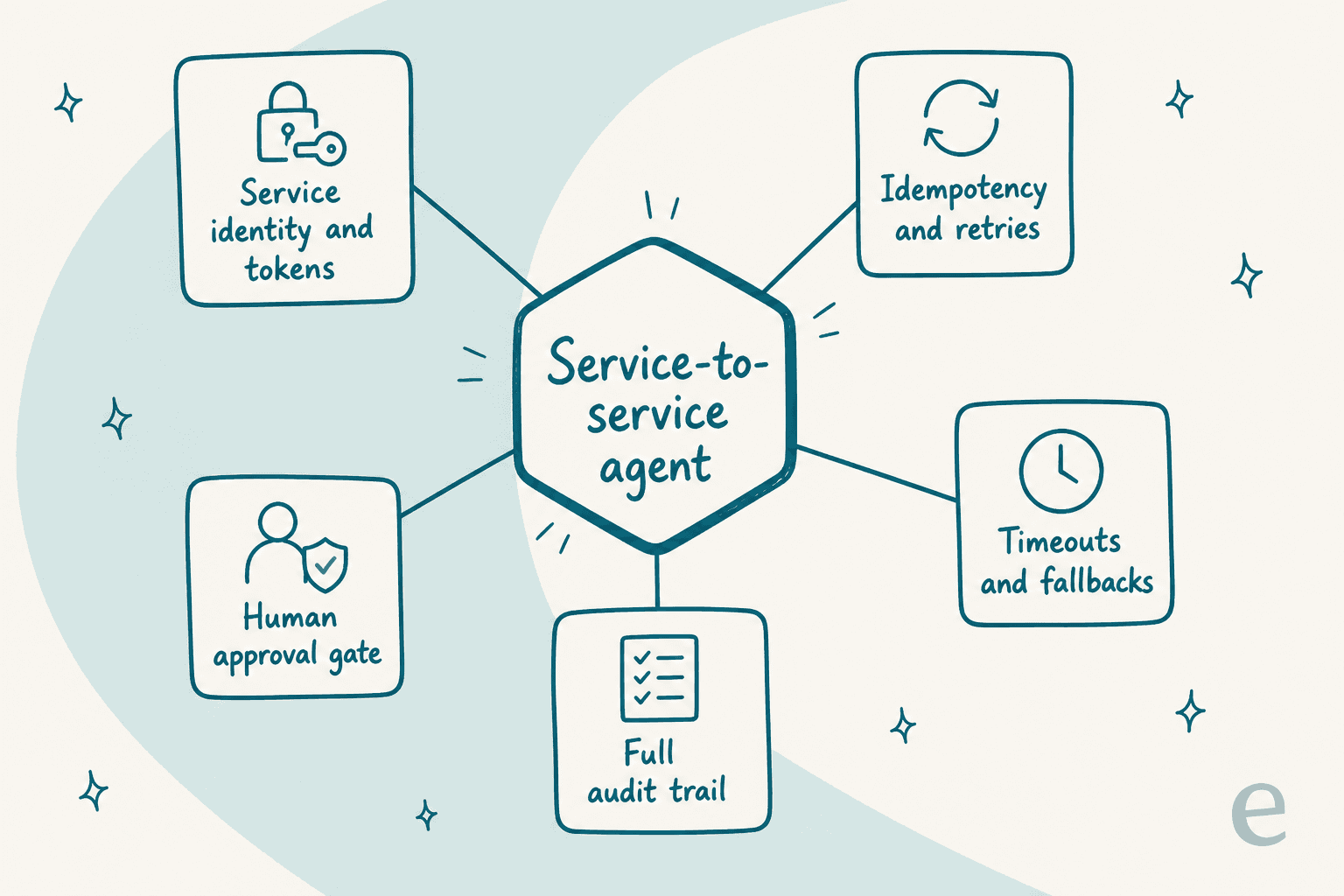
Service identity and tokens. The agent authenticates as itself, with scoped API tokens or a service account, not by borrowing a human's login. This matters for auth scope and for attribution: when the agent updates a ticket, the audit log should say the agent did it. A recurring gap in this whole space is auth on the connections an agent makes:
"Most providers don't support auth in their client implementations yet. Means it's only good for calling into public data. Private enterprise data is where there's huge value."
The value in support automation is almost all in the private data, the order, the account, the ticket history, so getting service auth right is not a nice-to-have.
Idempotency and retries. Because you will retry (networks fail), the agent's actions need idempotency keys so a retried "send this refund" does not send two refunds. This is standard payments-grade discipline, and it applies the moment an agent can take a real-world action.
Timeouts and fallbacks. Model calls are slow and occasionally hang. Every S2S agent call needs a timeout and a defined fallback: route to a human, queue for later, return a safe default. Silence is not an acceptable response when another service is waiting on you.
A full audit trail. Every run, every tool call, every decision, logged and replayable. When something goes wrong at 2am you need to see exactly what the agent saw and did, not guess.
A human approval gate. The item that is unique to agents. For high-stakes actions (issuing refunds, closing accounts, sending anything irreversible), you want a human-in-the-loop checkpoint the agent pauses on rather than a fully autonomous send. The best framing of the overall mindset came from another practitioner:
"MCP is just a small, boring protocol that lets agents call tools in a standard way, nothing more... Teams that already handle HTTP APIs safely can apply the same basics here: auth, logging, and isolation."
That is the whole game. If you already run services responsibly, you already know how to run an agent responsibly. You just have to remember to actually do it, because the demo works fine without any of it and that is the trap.
What service-to-service looks like in customer support
Support is one of the cleanest fits for this pattern, because a support ticket is already an event and the systems it touches already have APIs. Here is a concrete flow.
A customer emails "where is my order?". Your helpdesk fires a webhook. The agent wakes, reads the message, and works out it needs an order status. It calls your commerce platform's API for the order, calls the shipping provider's API for the tracking state, checks the customer record in your CRM for anything relevant (VIP, open complaint), and then either drafts a reply for a human to approve or, if you have let it, sends the answer and tags the ticket resolved. No dashboard was opened. Every step was one service talking to another.
That is the same WISMO ("where is my order") flow a human agent runs a hundred times a day, just expressed as machine-to-machine calls. The tools most support teams reach for, Gorgias, Front, Freshdesk, all expose the webhooks and APIs to make this possible, and increasingly ship their own agent-facing surfaces on top.
The reason to care about the S2S framing here is that it changes what you test. A chatbot you evaluate on answer quality. A service-to-service agent you also have to evaluate on the contract: does it retry cleanly, does it time out gracefully, does it log every action, does it stop before doing something irreversible. If you only test the answers, you have tested half the system.
Build it yourself, or hire a teammate that already speaks service-to-service
You have two honest options.
You can build the plumbing. Stand up a queue, wire the webhooks, write the integration code for each system the agent touches, handle the auth, the retries, the idempotency, the audit log, the eval harness. It is all well-trodden engineering, none of it is exotic, and for a team that wants full control it is a reasonable path. Our guides on the customer support agent API and running an agent from the command line walk through the build routes.
Or you can hire an agent that already exposes the service-to-service surface, so you wire into it instead of assembling it. That is the eesel approach, and because it is directly relevant to this post, here is the concrete surface rather than a pitch.
eesel's AI agent is programmable end to end. Every workspace is itself a Model Context Protocol server: run npx @eesel/cli mcp token and you get a URL and a token you can hand to any MCP client. It listens on webhooks, so any of your services can wake it with an HTTP call. And through Network Access it can call out to any REST API you allowlist, with the credentials stored as request headers the model itself never sees, which is exactly the service-identity-and-auth discipline from the contract above, handled for you.
The whole thing is also drivable from the terminal. The CLI authenticates headless with environment variables for CI, prints JSON from every command, and has a --dry-run flag that shows the exact server call a write would make without sending it, so you can wire it into a pipeline and manage it as code. If you want the day-two operations view of that, we wrote it up separately in managing AI agents from the terminal.
Try eesel
If you are weighing whether to assemble the service-to-service stack yourself or start from one that already exists, the fastest way to find out is to point eesel at your own tickets and watch it run. Before anything goes live, its simulation mode replays the agent against thousands of your real historical tickets, so you see the answers and the actions it would have taken, on your actual data, rather than trusting a demo. That is the honest version of "test a nondeterministic service": run it over real cases and read what it does.

Every run then lands in an activity log you can read from the dashboard or the CLI, which is the audit trail the contract asks for. Pricing is one fixed monthly price from $299/month for 500 credits (1 credit per ticket or chat) with 100 free credits to start, no per-seat fee and no platform fee, which is the billing shape that makes sense when a service, not a seat, is doing the work. You can start free, no credit card and no sales call, and see it working against your own data in minutes.