

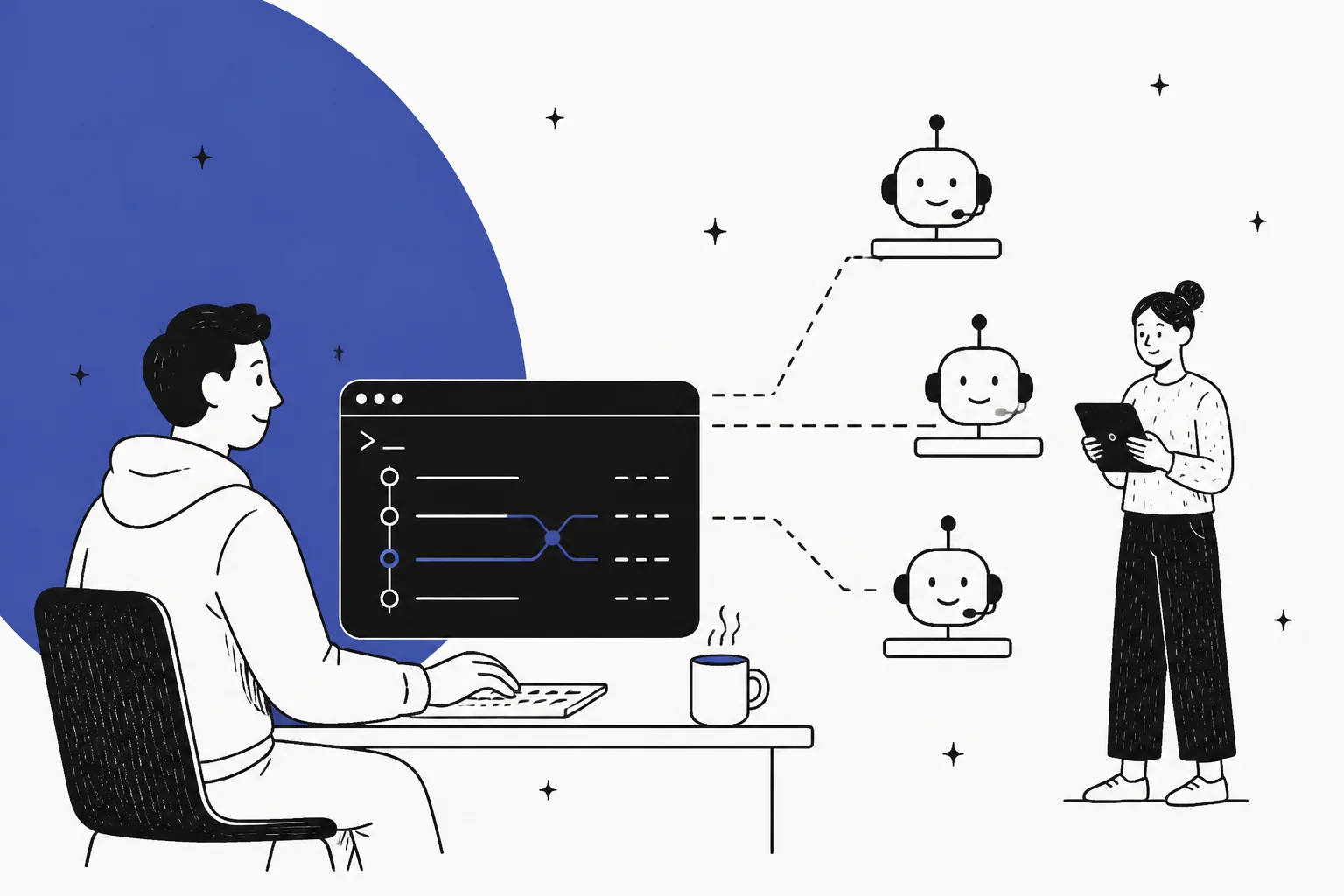
What people actually want when they say "manage AI agents from the terminal"
I ship the integrations and APIs at eesel, so this search phrase lands close to home. When someone types it, they're almost never asking for a chat prompt in their shell. They're a platform engineer, an ops lead, or a founding engineer who already runs everything else from the command line, and they've just been handed an AI support agent that lives entirely behind a web dashboard. It feels wrong, the way a server you can only configure by clicking buttons feels wrong.
The instinct is correct, and plenty of engineers have said so more sharply than I would:
"Devs spent decades building CI/CD, monitoring, rollbacks, and circuit breakers because deploying software and hoping it works was never acceptable. Then they built AI agents and somehow went back to hoping."

That's the itch behind the search. Everything else in a modern stack is code you can version, review, deploy, and roll back. Then the AI agent shows up as a settings page where someone toggles behavior in a browser with no audit trail and no way to test a change before real customers hit it. The terminal, here, is shorthand for a whole discipline: if it's a production system, it should be operable like one.
So the real question isn't "is there a CLI." It's "can I treat this agent the way I treat the rest of my infrastructure?" That reframes the whole thing, and it's the frame worth keeping for the rest of this post.
The shift: an agent is a service you operate, not a bot you set up
Most content about AI support agents stops at setup. Connect your help center, pick a tone, flip it on. But setup is day one. The work that actually matters is day two and every day after: the config drifts, a knowledge article goes stale, a new product launches and the agent starts confidently answering questions about it wrong. Managing an agent is a loop, not a launch.
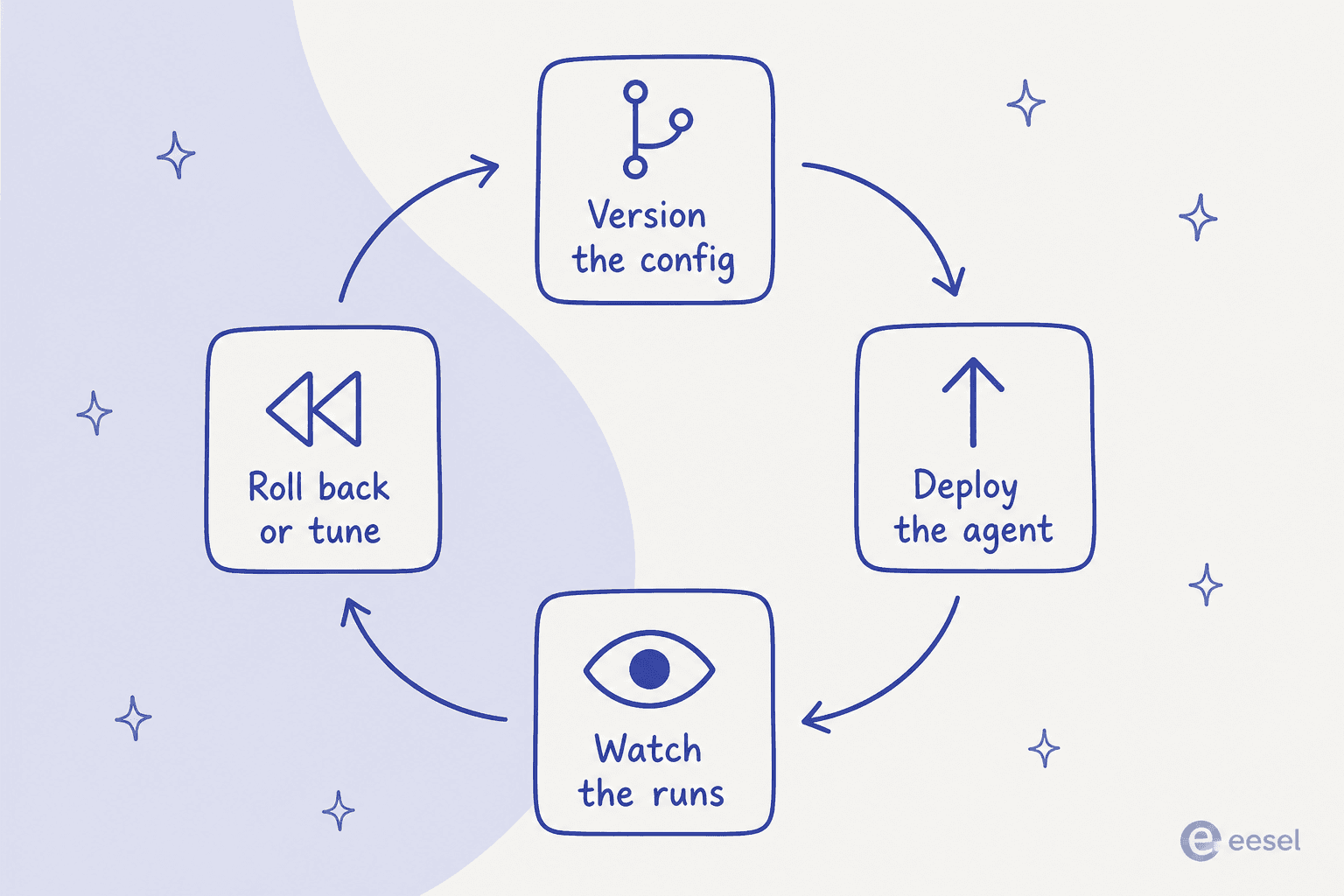
That loop is exactly what "ops-as-code" gives you a home for. Version the config so a change is a diff someone can review. Deploy through a pipeline so a rollout is repeatable. Watch the runs so you know what the agent actually did. Roll back or tune when something's off. None of that is exotic; it's how you'd run any service. The only reason it feels novel for an AI agent is that so many tools were built as dashboards first and never grew a programmable surface. One team building an agents-as-code framework put the goal plainly:
"Orloj treats agents the way infrastructure-as-code treats cloud resources. You write a manifest that declares an agent's model, tools, permissions, and execution limits."

Once you hold that frame, the terminal stops being the goal and becomes the interface to the goal. You want the agent's behavior to be a thing you can diff, not a thing you have to remember you changed last Tuesday.
What you can actually script today
Here's the practical part. If your tool exposes an API or a CLI, a surprising amount of agent management already works from a shell. The universal pattern, whatever the vendor, is the one you'd use for any service: the config file is the source of truth, the API is the deploy target, and version control is the audit log. In raw form it's just curl and jq, for example pulling the last day of runs and counting escalations:
curl -s https://api.yourtool.com/v1/agent/runs \
  -H "Authorization: Bearer $AGENT_TOKEN" \
  --data-urlencode "since=$(date -u -v-1d +%FT%TZ)" \
| jq '[.runs[] | select(.outcome == "escalated")] | length'
Some tools skip the raw REST step and give you a first-class CLI. eesel is one: its command-line tool is a real npm binary (@eesel/cli), and the docs are blunt that the terminal is the intended interface, not a side door: everything on the site "can be done from the terminal." A typical session looks like this:
eesel login                 # browser once, or set EESEL_API_TOKEN for CI
eesel status                # what's connected, is knowledge current, plan
eesel activity              # every run, newest first (JSON by default)
eesel instructions          # read or edit the agent's standing rules
eesel approvals list        # actions held, waiting on a human
Every command prints JSON, errors come back as one structured line on stderr, and setting EESEL_API_TOKEN (plus EESEL_AGENT_ID) lets the whole thing run headless in CI with no browser login. Drop any of it behind a cron job or a GitHub Action and you've got scheduled, reviewable, versioned agent management, no dashboard required.
The catch is the size of that "if." Plenty of support AI ships with no API worth the name, so the ceiling on what you can script is set entirely by the vendor. This is the single biggest thing to check before you buy: a tool without a programmable surface can never be managed from the terminal, no matter how much you want it to be. It's worth walking the manageability spectrum before you commit.
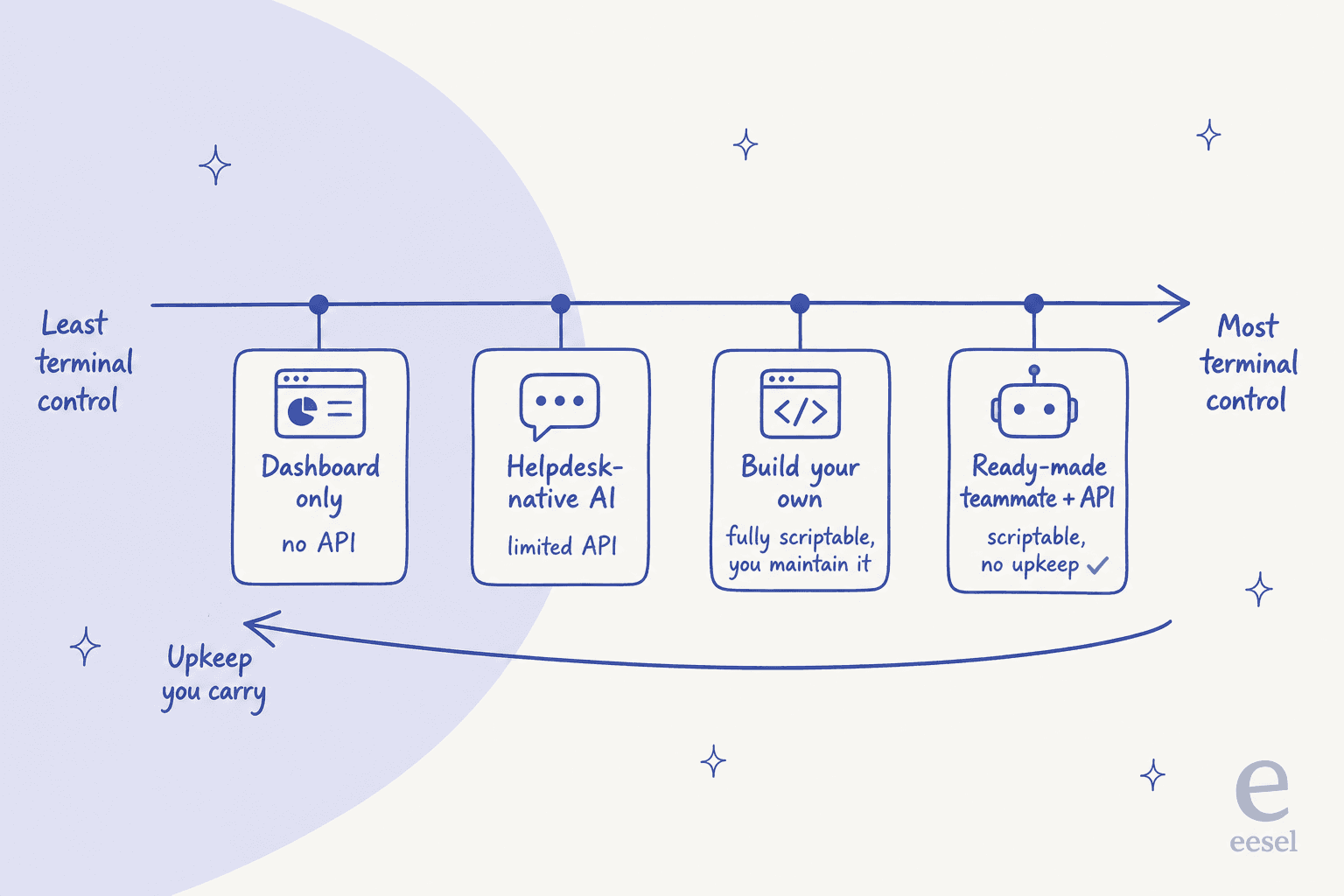
There's a real trade-off along that line. Building your own agent on a model API gets you total control and total upkeep: you own the retrieval, the guardrails, the eval harness, and every 2am page when a prompt regression ships. A ready-made agent with a proper API gets you most of the scriptability with none of the maintenance tail. Which end you want depends on whether managing the agent is your job or a tax on your actual job. (If you're weighing the build side, we go deep on it in our customer support agent API and AI helpdesk API breakdowns.)
The half the terminal can't hand you: seeing what the agent did
Here's the trap. Deploying from the command line is the easy half, and it lulls you into thinking you're in control. Your script runs, the API returns 200, your terminal prints exit 0, and you move on. But a clean exit code tells you the change shipped. It tells you nothing about whether the agent is doing the right thing.
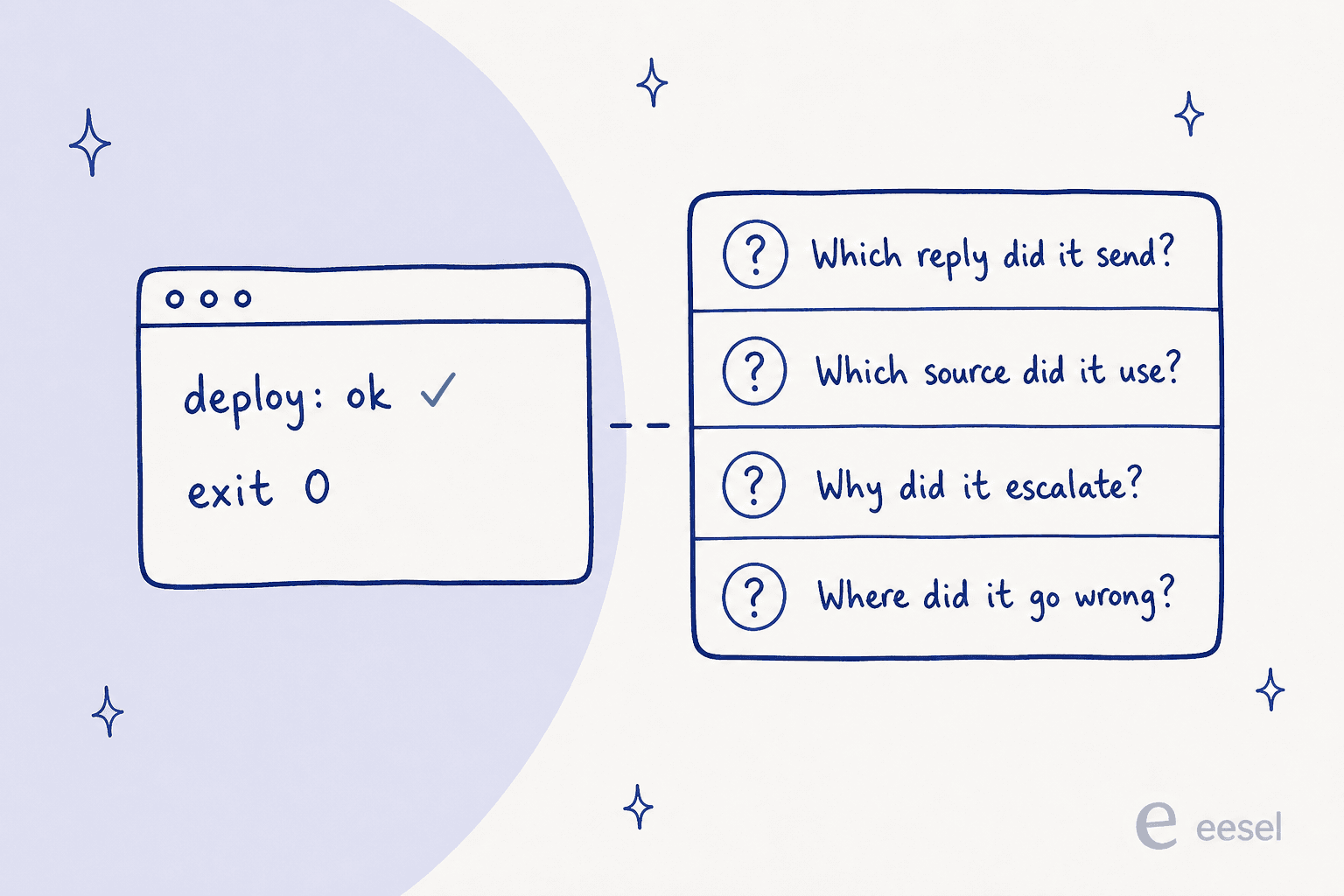
This is where a lot of DIY agent projects quietly fall over. You can automate the deploy in an afternoon; you cannot automate away the need to know which reply went to which customer, which knowledge source the agent leaned on, and why it decided to escalate one ticket and answer another. One engineer's write-up of six months of production failures nailed the failure mode:
"Agent works in testing. Works in the demo. Ships to production. Two weeks later - same input, different output. No error. No log that helps. Just a wrong answer delivered confidently."
That's observability, and it's the expensive part to build and the easy part to skip. It's also why sentiment on the developer forums has quietly shifted from "which model" to "can I see what it did":
"honestly I'm starting to think observability is becoming more important than the model itself"
The lesson we keep relearning: a terminal is only as useful as the run history behind the tool it's driving. If the agent can deploy but can't show you its work, you've automated the part that was never the problem. When you evaluate a tool, push on the read side as hard as the write side. Can you pull the full transcript of a run? Can you see the confidence and the sources behind an answer? Can you get alerted when something drifts? A dashboard that shows this beautifully but exposes none of it to a script is still a black box to your automation.
This is the part I'm proudest of on our side: eesel activity lists every run newest-first and lets you read one in full detail, and because it's the same JSON the dashboard shows, a reply is never a thing that just happened somewhere you can't see. Pair it with eesel approvals and a human can hold, approve, or deny a queued action without ever leaving the shell.

Test before you deploy: the staging environment for agents
If you take one habit from running services and apply it to agents, make it this one: never ship a config change straight to customers. In normal software you have a staging environment. For an AI agent, the equivalent is replaying your own past tickets against the new config and checking what would have happened, before a single real customer sees it. A developer who'd been through the cycle described the fix as snapshot testing:
"What finally fixed the cycle for me was treating agent behavior like snapshot tests. Record the trajectory when it's working, save it as baseline, diff after every change. If the tool path shifted or output drifted - block the deploy before it hits prod."
The reason this matters isn't theoretical. On τ-bench, the tool-agent benchmark from Sierra's research team, the best agent scored under 50% on realistic support tasks, and a GPT-4o agent that hit its pass^1 score dropped to roughly 25% on pass^8, a ~60% reliability collapse from just re-running the same task eight times. The headline accuracy isn't the scary number. The run-to-run inconsistency is, and the only way to catch it before your customers do is to run the new config against reality first.
We learned the same thing the hard way over three-plus years of putting AI on live support queues. We've watched a confident-sounding bot quietly hand out wrong answers, which is why every rollout now gets simulated against historical tickets first. That simulation is your regression suite. At the command level, a --dry-run flag does the small version of the same idea: it prints the exact call a write would make without sending it, so you can see what a change does before it does it.

This is also the honest limit of scripting. You can automate the replay. You can gate the deploy on the result. What you can't script is the judgment call about whether a 4-point drop in one ticket category is acceptable for the 10-point gain elsewhere. The terminal makes the test cheap and repeatable; a person still reads the result. As one way I've heard it put internally: you can script the ticket, but you can't script the answer.
What it costs to run, and where the bill hides
Running an agent has a meter, and the meter is where "manage from the terminal" quietly turns into a budget question. The unit matters more than the number, because the units aren't the same. Some tools bill per resolution, some per conversation, some per API token, and a script that fires thousands of API calls a day to poll for runs can run up a surprising bill if you're charged per call.
The honest version of a cost table for a support agent looks like this:
| Approach | What you script | Who maintains it | Rough cost model |
|---|---|---|---|
| Dashboard-only tool | Nothing, no API | Vendor | Per resolution or per seat |
| Helpdesk-native AI | Limited config via the helpdesk API | Vendor | Per resolution (often $1.50 to $2.00) |
| Build-your-own on a model API | Everything | You | Per token, on every message and retry |
| Ready-made agent with a CLI (eesel) | Config, runs, actions | Vendor | From $299/mo for 500 credits (1 credit per ticket) |
The two ends are the interesting ones. Build-your-own gives you a per-token bill that's charged whether the ticket resolves or not, plus the salary cost of the person maintaining the retrieval and guardrails. A credit model like eesel's counts one credit per handled ticket or chat no matter how many messages it takes, on a fixed monthly price with no per-seat or platform fee, which makes the spend predictable enough to actually put in a script and a budget. At 1,000 tickets a month that's the $499 plan, and only the tickets you route to the agent use credits, not the ones your humans still handle.
Try eesel for a support agent you can actually operate
If the whole reason you searched this is that you want to run a support agent like a service instead of babysitting a dashboard, that's the gap eesel was built for. It's an AI teammate that joins your existing helpdesk (Zendesk, Freshdesk, Front, Gorgias, Help Scout and others), trains on your past tickets and docs, and gives you a genuine programmable surface: a CLI, a per-workspace MCP server, webhooks, and outbound Network Access so the agent can call your own systems.
You can install it and drive it entirely from a shell:
npx @eesel/cli init chat-bubble --site https://your-site.com
eesel chat "what's our refund policy?"   # test an answer before go-live
eesel activity                            # watch what it actually did
The two habits from this post that matter most are built in: you simulate against your historical tickets before go-live, and you roll it out gradually, keeping every reply as a draft until it earns the right to send on its own. And because it's a fixed monthly plan from $299 with no per-seat fee, you can start on a few ticket types and scale from a script rather than a sales call.
You can start free with no credit card, wire it into your helpdesk in a few minutes, and see how it handles your real tickets before you commit to anything. That's the point: an agent you can test, watch, and operate, not one you have to take on faith.