Fleece AI alternatives: the 8 best options in 2026

Rama Adi

Katelin Teen
Last edited August 17, 2026
What Fleece AI is, and what it gets right
Fleece AI calls itself a delegative AI workspace. Its own definition is clearer than most, so here it is: "You delegate goals, and agents deliver results without ongoing supervision." You describe a job. It builds an agent, and that agent then runs on a schedule across whatever apps you connected. Agents can stack in a hierarchy up to three levels deep, a manager handing work down to specialists, which is the pattern covered in subagent orchestration. If the line between that and a scripted bot feels fuzzy, AI agent vs chatbot is the shorter read.
Plenty here is good, and the marketing buries it. So let me be straight about that part first.
The portable skills bet is the most interesting thing Fleece has built. The skills use Anthropic's open SKILL.md format. Fleece states it plainly: a skill authored in its workspace runs unchanged in Claude, and a skill built for Claude runs in Fleece as-is. That is a real answer to lock-in, and almost nobody else in this category offers one. Build up a library of agent skills and being able to walk out with them is worth something.
The pricing shape is fairer than it first looks too. Billing runs per workspace rather than per seat. The SMB page puts it as "ten people cost the same as two," and for a small team that is a real difference from Lindy's per-user model. On the free tier question, the same page answers: "No, and we would rather say it plainly." I would take that over a fake free plan with a card wall behind it.
Shipping speed is real. The changelog lists 10 releases in the 24 days from 15 July 2026, and it discloses that purchased credit packs granted no usable quota until 6 August. Admitting your own billing bug in a public changelog is not nothing.
The number on the box is a tier, not a total
This is the part that changes how you read every comparison Fleece publishes.
The "3,000+ apps" figure is Pipedream's catalogue count. Fleece says so itself on the integrations page: "3,000+ apps via Pipedream." And Pipedream's own directory paginates with the string "1 - 24 of 3,000+ apps." The number is inherited verbatim, not counted. The URL slugs give it away on their own, since they are Pipedream's rather than hand-written: airtable_oauth, linear_app, telegram_bot_api.
Which is a perfectly normal way to build a product. For a small team, buying the connector layer beats writing 3,000 OAuth flows by a mile. The issue is what happens to that number on its way to the pricing page.
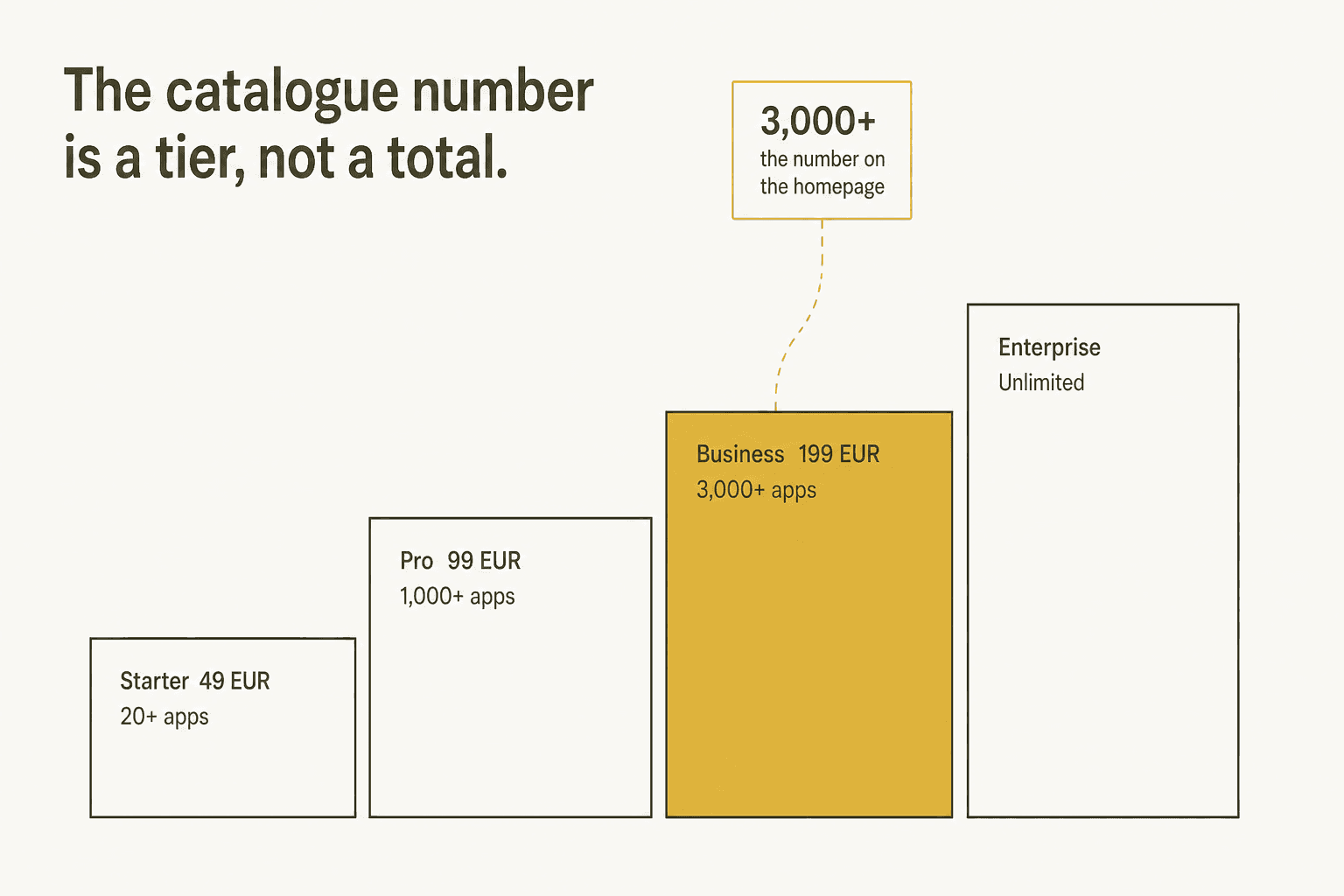
The 3,000+ is what the €199/month Business plan unlocks. Starter at €49 gets "20+ essential integrations." Pro at €99 gets "1,000+." If you sign up at the advertised entry price expecting three thousand apps, you get twenty. Zendesk and Freshdesk both sit on Pro, which means a support team on Starter cannot reach its own helpdesk.
Dig one layer further and the documented surface shrinks again. The catalogue renders around 95 cards. Only 67 of them have detail pages, matching the 67 /integrations/* URLs in the sitemap exactly. Three of those 67 are in the Support category. And of the 17 published agent templates, two are for support, both wired to Gmail, Notion and Slack rather than to a helpdesk.
Credit where it is due. Fleece's own comparison table concedes that Zapier and Make sit in the 1,800 to 7,000 range, so it is not claiming to win the catalogue race. Beneath that table it links out to ChatGPT, Perplexity, Claude and Grok with prefilled queries, inviting you to go check its claims on a neutral engine. I have not seen another vendor do that.
The evidence gap
This one is just a fact, and it is the biggest single reason to shop around.
Fleece AI has zero reviews on G2, zero on Capterra, zero on GetApp, zero on SourceForge, and zero threads on Hacker News. The Capterra listing has been live around five months and has held zero reviews the whole time. Reddit has exactly one mention: a link-drop from an account with no comment karma, and it scored zero. No independent user signal exists in either direction.
That does not mean the product is bad. It is a young company and every vendor starts at zero, and the honest comparison for any of these tools is against a human doing the same work anyway, which we costed out in AI agent cost. The register lists FLEECE AI as a French SASU incorporated on 26 August 2024 in Chamalières with €1,000 of capital, founded by Loïc Jané, no funding round on record. What it does mean is this: every claim you can currently check about Fleece AI traces back to Fleece AI. If you are signing off a budget, that matters.
One inconsistency worth catching before you buy. The terms elect Delaware law while the operating entity is French, pricing is charged in euros, and the subprocessor page invokes GDPR Article 28. No US entity shows up in public records. On security: SOC 2 Type II is listed as in progress rather than held, ISO 27001 as planned, HIPAA not mentioned anywhere at all. Data sits in AWS us-east-1.
How I picked these eight
I build integrations for a living. Shipping the connectors, APIs and actions that sit between eesel AI and helpdesks like Zendesk and Freshdesk is the day job, so I read integration marketing differently than most people do.
What I learned the hard way: estimating an integration by its REST surface misses where the time actually goes. The API calls are not the pain. Triggers are roughly half of it. Every platform fires events differently, per-customer webhooks have to not orphan, events need dedup windows, and every platform hides some behaviour from you. My favourite scar is Freshdesk, which silently never fires automation rules for agent-created tickets. Cost us hours of debugging. It is written nowhere in the docs.
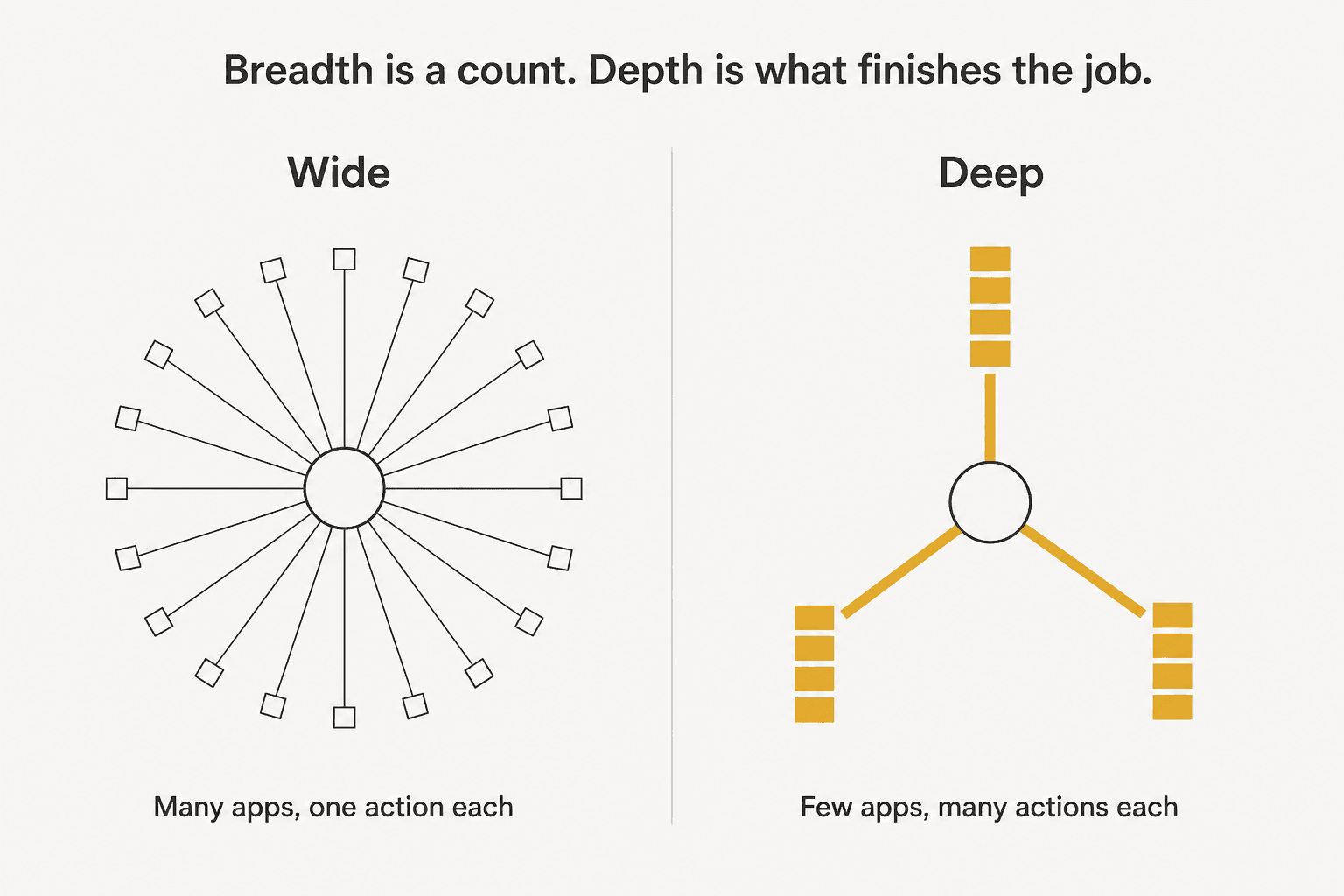
Before deciding how to build ours, we evaluated exactly the class of catalogue layer Fleece is built on: Pipedream and Composio. Where we landed was that vendor connector layers earn their keep on the long tail and not on the hot paths. For an app your agent touches once a quarter, a managed OAuth wrapper is great. For the app where the work actually lands, you end up writing the depth yourself, since the last 20% is where the job gets finished.
So I ranked these eight on four things: what the entry plan actually includes rather than what the homepage advertises, what the billing meter counts, how deep the agent can act inside a single app, and whether any independent user has said something verifiable about it. Want the wider field rather than only Fleece AI's neighbours? Our roundup of top AI agents covers more ground, and there is a separate list of AI agent examples for what people build with them.
One tool that would otherwise have made this list, I dropped. More on that further down.
The 8 best Fleece AI alternatives in 2026
| Tool | Best for | Entry price | Billable unit | Free tier | Integrations | G2 rating | Self-host | AI gated? |
|---|---|---|---|---|---|---|---|---|
| Fleece AI | Delegated agents on a workspace price | €49/mo | Execution | No, 4-day trial | 20+ at entry, 3,000+ at €199 | No reviews | No | By tier |
| Lindy | An AI teammate you @mention | $29.99/mo per user | Seat + credits | No, 7-day trial | 1,600+ | 4.9 (171) | No | No |
| Zapier | The biggest catalogue | From $19.99/mo | Task | Yes, 100 tasks/mo | 8,000+ | 4.5 (2,085) | No | Partly |
| n8n | Owning your infrastructure | 20€/mo annual | Workflow run | Community Edition | 500+ | 4.7 (294) | Yes | No |
| Make | Cheapest serious entry | $12/mo | Module action | Yes, 1,000 credits | 3,000+ | 4.7 (count unverified) | No | Mostly no |
| Gumloop | Transparent credit maths | $37/mo | Credit ($0.005) | No, removed | 100+ | 4.8 (7) | No | No |
| Cassidy AI | Internal knowledge work | Not published | Seats + credits | Ambiguous | 100+ | 5.0 (5) | No | Heavily |
| Sintra AI | Solo operators | $97/mo list | Flat + 250 credits | No, 3-day trial | Limited | Not listed | No | No |
| eesel AI | Work that ends in a helpdesk | $0.40 per ticket | Ticket handled | $50 free usage | 39 listed | Not listed | No | No |
Two notes on reading that table. Review counts matter more than ratings here: Cassidy's 5.0 comes from five reviews, Gumloop's 4.8 from seven, and six of those seven landed inside a two-week window. The integration figures are each vendor's own claim, and every one of them counts differently.
1. Lindy: the closest like-for-like teammate
Best for: teams who want Fleece AI's exact pitch from a vendor with a real review history.
Liked the Fleece AI idea but want the same thing with more evidence behind it? Lindy is the pick. It sells agents as teammates you summon rather than workflows you build. You @mention one in Slack and hand it a job.
Where it goes deep. The agent builder handles multi-step work with real branching, and the Slack presence is the most natural delegation surface of anything on this list. Lindy carries 1,600+ integrations and gates none of its AI behind higher tiers, which is unusual in this category. Everything AI-related sits on every plan.
Pricing. Plus is $29.99/month per user, and here is the change from earlier in the year: Lindy is now explicitly seat-priced on top of credits. Credits are a variable work unit: 2 to 250 for an everyday ask, 250 to 1,000 for deep work, 1,000 to 2,500 for a big build. Seats pool their credits. No free plan, and the 7-day trial only opens if you join through Slack. Enterprise gates HIPAA, BAA, SSO and audit logs.
What users say. Lindy holds 4.9 from 171 G2 reviews, the strongest review base of any tool here. G2's own tag rollup tells the rest of it. Top pros are Ease of Use (125) and Automation (57), while the top two cons are "Expensive" (42) and "High Subscription Cost" (35). That is a quantified pattern rather than one grumpy reviewer. Also worth knowing: G2 flags the profile as vendor-managed with a heavily prompted review flow, so the 4.9 skews high.
Verdict: the safest like-for-like swap. If Fleece AI's zero-review problem is the thing stopping you, Lindy solves exactly that, and the per-seat model is what you pay for it. Skip it once more than a handful of people need access, because seats stack fast. See how it compares in our Lindy alternatives roundup, or the platform breakdown in Lindy AI. Smaller teams should weigh the picks in AI agents for small business too.
2. Zapier: the biggest catalogue and a meter to match
Best for: anyone who really does need the widest possible connector coverage.
If the catalogue really is your buying criterion, stop reading comparison tables and take Zapier. 8,000+ apps is roughly twice Fleece AI's top tier. It has agents and chatbots of its own now, and it has been doing this longer than anyone.
Where it goes deep. Zapier recently pulled AI, code, MCP and SDK actions onto a single task meter, with a published multiplier table, and that transparency is useful. Standard AI steps cost 1 task, Advanced 3, Premium 5. An MCP tool call is 2 tasks. Agents and Chatbots run as separate products with their own free tiers.
Pricing. Professional starts from $19.99/month on annual billing. The free plan is permanent: 100 tasks a month, one seat, two-step Zaps, 15-minute polling. A task is one successful action step, so triggers, filters, formatter steps, Tables and Forms all cost nothing. AI fields and premium apps need Professional. Bring-your-own-model needs Enterprise.
What users say. 4.5 from 2,085 G2 reviews. The complaint that repeats is about structure, not quality:
"Just got my Zapier invoice. $847 for the month. For automations that run maybe 15,000 tasks. Here's the thing nobody talks about - task-based pricing punishes you for success. The more your business grows, the more you get charged. It's backwards. My lead capture workflow has 8 steps. One new lead = 8 tasks. Get 100 leads a day and you're at 24k tasks a month."

And on depth, a Capterra reviewer put the connector-quality point better than I could:
"Some of the deeper integrations are shallower than they appear - certain HubSpot and Salesforce actions don't expose every field, which forces workarounds with custom webhooks."

That is the whole thesis of this post, written by a Zapier user. The catalogue is enormous. Depth per app still varies.
Verdict: the default answer when breadth is what you want, and the free tier makes finding out risk-free. Budget for the multiplication though, and count your steps per run before committing. Our Zapier subscription breakdown has the full tier maths, while Zapier AI covers the agent features and AgentKit vs Zapier pits it against OpenAI's builder.
3. n8n: when you need to own the infrastructure
Best for: technical teams with data-residency requirements or a real appetite for control.
n8n is the one tool here you can run entirely on your own hardware. The free Community Edition is a real product, not a demo. For anyone who cannot send customer data to a US-hosted workspace, it is often the only option on this list that works at all.
Where it goes deep. The billing model is the standout. n8n bills per workflow execution, not per step, so a run with fifty nodes costs what a run with two costs. That inverts Zapier's economics on complex work. It is why people migrate.
"I just had an n8n workflow run for 46 minutes, pull over 40,000 rows of data, and sync it to an external source. This only counts as ONE execution for billing. We're talking pennies or less."

Pricing. Starter is 20€/month billed annually. No free cloud plan, but there is a no-card trial with 2,500 executions and 800 AI credits, and the self-hosted Community Edition stays free. The AI Assistant runs on its own credit meter that you cannot buy more of: 2,300 on Starter, up to 13,700 on Pro. SSO, Git and environments arrive at Business.
What users say. 4.7 from 294 G2 reviews, 87% of them five-star. The friction sits in one place, and it is loud:
"I really wanted to support the company but I just don't understand the self-hosted per execution model. They charge the same for self-hosted as they do cloud and we are the ones footing the infrastructure bill. They are completely pricing themselves out! For unlimited executions they said it was well over seven figures and 20k for 600k annual executions."
There is a real trap with event-driven work too, because chat and MCP triggers count every interaction as an execution. A once-a-minute polling workflow gets expensive fast.
Verdict: the strongest choice for control, and the best economics on heavy, complex workflows. The learning curve is steep, the paid self-hosted licensing is a sore point, so go in expecting to spend engineering time. Compare the two builders head to head in Make vs n8n, and the broader category sits in our IT automation software roundup.
4. Make: the cheapest serious entry point
Best for: visual thinkers who want to see the whole flow on one canvas.
Make is Zapier's closest competitor, and the canvas-style builder suits people who want to understand a workflow by looking at it. Roughly 3,000 apps, so it matches Fleece AI's top-tier catalogue for a fraction of the price.
Where it goes deep. Routers and error handlers cost zero credits. You build proper branching and failure handling without paying for the structure itself. Maia, AI Agents, the AI Toolkit and MCP support are on every plan, free one included.
Pricing. Core is $12/month at 10,000 credits. Make retired "operations" as its billing word in favour of credits as of 27 August, so any older comparison you read is running on stale terminology. One credit is one module action. The free plan is permanent: 1,000 credits a month, 15-minute intervals, capped at two active scenarios. Using your own AI provider key needs a paid plan and overage protection is Enterprise-only. Watch the Code App, which bills 2 credits per second.
What users say. Here is the one gap in my research. Make's homepage advertises 4.8 on Capterra and 4.7 on G2. Those are aggregates the vendor prints on its own site, and I could not verify an individual review count on G2 that I would stand behind. Better to tell you that than quote a number I did not check.
Verdict: the best value entry point here, and the permanent free tier lets you prove it out before spending anything. The two-scenario cap on free is what will eventually push you to pay. Full costs sit in our Make pricing breakdown, and Make vs Zapier covers the head-to-head.
5. Gumloop: the most honest credit maths
Best for: teams who want to know exactly what a credit costs before they spend one.
Gumloop sits between the no-code builders and the agent platforms. What sets it apart: it publishes the cost model in full. Almost nobody else here does.
Where it goes deep. A Gumloop credit is a flat $0.005, stated plainly. Agent chat costs the model price, plus one credit per tool call, plus five credits per session-minute of compute, plus an 8% orchestration fee. More arithmetic than most tools ask of you. Every term of it is published, though. Compare with Fleece AI, where credits are the billing unit and the docs never define what one costs to run.
Pricing. Pro is $37/month. The free plan has been removed entirely, replaced with a 14-day Pro trial that wants a card and auto-converts. Legacy free accounts keep their balance, it just never renews. Enterprise adds VPC, SSO, SCIM and audit logs. One thing to watch: Workflows now carry a "(Legacy)" label in the product, which matters if that is what you would build on.
What users say. 4.8 from seven G2 reviews. Hold that denominator in mind, especially since six of the seven arrived in the same two weeks in January 2026. Reddit is blunter:
"But Gumloop seems to freeze or have issues too frequently and then burns credits running faulty automation."
Paying for runs that failed is the sharpest version of the meter problem. It applies to most credit-based tools here, not only this one.
Verdict: pick it when predictable unit economics matter more to you than catalogue size, and when you can live without a free tier to trial on. In a category that mostly hides this, a published rate card is a real differentiator. If your end goal is a customer-facing bot rather than back-office runs, start from AI support chatbots instead.
6. Cassidy AI: internal knowledge work
Best for: internal teams whose bottleneck is knowledge, not connections.
Cassidy AI builds assistants grounded in your company's own documents. It does not reach into 3,000 apps. It goes deep on what your organisation already knows, which is a different job and often a more valuable one.
Where it goes deep. Knowledge grounding is the whole product. Connect Notion, Drive and sources like them, and the assistants answer out of those. The best account I found came from an actual user:
"I connect specific notion pages to Cassidy AI knowledge base and custom assistant to have specialized coaches/task completions. For instance, I built an enterprise security assistant that is trained on our own company policies, added that assistant into a Cassidy Security questionnaire workflow template and can drop in an 80-question survey from a procurement team and have it auto-filled within 2 minutes. Then I take 20 minutes to review and approve and we are good to go."
Note what survives in the most enthusiastic account on this whole page: two minutes of agent work, then twenty minutes of human review. That ratio is the honest state of autonomous agents in 2026. Any vendor implying otherwise is selling you the demo.
Pricing. Cassidy pulled all public pricing. The page is a two-column demo form now. Docs confirm the self-serve Stripe plans still exist behind the login, with seats (three on Starter) plus token-metered AI credits and 10,000 included, though the conversion rate is unpublished. Slack, Teams, API and embed deployment, instant sync, the full model roster and SSO all sit at Business.
What users say. 5.0 from exactly five G2 reviews, all of them from small businesses, the newest dating to January 2025. No Capterra listing, no Trustpilot listing. A "4.9 on Trustpilot" figure circulates online and it is aggregator filler, because Cassidy has no Trustpilot profile at all. On integration breadth, one reviewer was direct: "I would like it see more integrations and more granular control for developers."
Verdict: worth a demo when your problem is that nobody can find anything, rather than that nothing is connected. The hidden pricing is real friction, and an 18-month-stale review base is a fair thing to raise on the call. Our guide to AI knowledge base tools has the wider field. For the retrieval mechanics underneath, read knowledge retrieval tools, or take the platform view in knowledge management software.
7. Sintra AI: personas for solo operators
Best for: solo founders and very small teams who want named helpers rather than a builder.
Sintra AI sells twelve named helper personas, each pointed at a function. It is the closest thing here to Fleece AI's "digital employee" framing, built on purpose for people who will never open a workflow canvas.
Where it goes deep. Simplicity is the feature. All twelve helpers come on every plan, with no capability gating at all. For a one-person business that is a real advantage over tools that hide the useful half behind a Business tier.
Pricing. This one needs care, because the pricing page is misleading right now. A one-month plan lists at $97 with a $48.50 promo, and 12 months runs $624 upfront. Sintra discontinued its Individual and Solo Helper plans, but the pricing page still renders twelve stale $39/month per-helper cards, so do not budget against those. A 50 to 70% sale is running, which puts today's visible prices at roughly a third of list. The meter is a flat subscription plus 250 credits a month on a fractional rate card: a helper reply is 0.1 credits, an image 0.5 to 1.8, a scheduled task 1 to 20+, a 15-second video around 40. Then the catch: every plan gets the same 250 credits regardless of what you pay. The trial is 3 days with a one-time 50 credits that do not renew.
What users say. Nothing I could verify to the standard I would want to publish. Trustpilot returned a Cloudflare wall, Reddit was blocked, and G2 and Capterra surfaced no per-review content. Complaints about the switch from unlimited helpers to metered credits circulate widely, but I could not attach one of them to a named reviewer with a working permalink, so I will not quote them. Treat the community sentiment here as unverified in both directions, and do your own check before you commit to an annual prepay.
Verdict: reasonable for a solo operator who wants results without building anything, and the promo pricing makes a short test cheap enough. The flat 250-credit cap across every tier means it will not scale with you. A starting tool, not a destination.
8. eesel AI: when the work has to finish in the helpdesk

Best for: support teams where the job is not done until the ticket is closed.
I work on eesel AI, so read this section with that in mind. I have held it to the same standard as the seven above, including the part where it loses.
Where it goes deep. Look at the screenshot. One Zendesk connection, and the panel splits into sources the agent can read, triggers that make it run, and actions it can take. That shape is what decides whether an agent finishes a job. eesel's Zendesk connection carries a public reply action, a draft reply, an internal note, tag, create, assign, assign-to-group, close and update on status, priority and custom fields. Add lookups for tickets, users, organisations and ticket fields, and four triggers, one of which is an @eesel mention from a human agent asking for help.
It also trains on your resolved tickets, not just your help centre, filterable by status and date, with optional PII redaction before indexing. That is the gap between an agent that knows your documentation and one that knows how your team actually answers.
Before it goes live you can run a simulation over your own history. It pulls old conversations, generates responses, compares them with what your humans actually wrote, scores the accuracy and hands back a gap report by topic. We built that because we have watched confident-sounding bots quietly give wrong answers. Reading a coverage number per topic before go-live is much cheaper than finding out in production.
Pricing. $0.40 per ticket or chat session handled. No platform fee, no per-seat charge, no minimum. A task is the whole interaction, so one ticket is one task however many messages go back and forth. To be precise about the thing vendors usually blur: tasks are billed whether the outcome is perfect or not, so this is per ticket handled and not per ticket resolved. You start with $50 of free usage and no card, which is around 125 tickets. Dashboard questions and simple lookups stay free permanently. Annual commit takes 25% off. Enterprise is $1,000/month on top of usage, and that is what gates SSO, HIPAA and a BAA. The default spend cap is $250/month, with alerts at 50, 75 and 100%.
Where it loses. Want one agent reaching into three thousand apps? eesel is the wrong tool, and I would rather say so than sell you past it. Three specifics:
- We list 39 integrations on the live directory against our own "100+" marketing claim. So our number is inflated too. Fleece AI's catalogue beats ours by two orders of magnitude, and if breadth is your criterion, Fleece wins outright.
- Five common helpdesks have no support at all: Zoho Desk, Crisp, LiveAgent, Helpshift and Kustomer. If that is your stack, the honest route is the chat widget in front with an email handoff, rather than a native integration.
- SOC 2 Type II is underway rather than certified, same as Fleece. GDPR and CCPA are covered. ISO 27001 we do not claim, and HIPAA sits behind Enterprise.
Verdict: the right answer when your work has one obvious destination and a queue somebody has to clear. The wrong answer when the whole point is breadth. Read it against the field in best customer service AI, which covers the vendors it actually competes with.
The one I dropped, and why it matters to you
Relay.app would have been on this list. Best human-in-the-loop design in the category: approval steps and typed input forms that pause a run, with assignees, due dates, reminders and overdue escalation, and then a review loop where a human could approve the AI's output, kill the run, hand-edit it or re-prompt. It held 4.9 on G2 from 88 reviews, 87 of them five-star, with nothing below four.
Then it shut down. The announcement landed on 16 July 2026, free accounts and their data were permanently deleted on 15 August, and paid access ends on 14 September.
I am raising it for a specific reason. Fleece AI runs a Relay.app import page and a "best Relay.app alternatives" post, so it is courting those refugees actively, and that is fair game. The lesson those refugees just learned is the one worth carrying into your own decision: a beloved product with a near-perfect review score still disappeared, and everyone who had built on it had 30 days to move.
None of that is an argument against small vendors. It is an argument for asking two questions before you commit. Can you export what you build? And what happens to your automated workflows if this company stops? Fleece AI's portable SKILL.md format is a strong answer to the first, and it deserves credit for that. On the second, a French SASU with €1,000 of capital, no disclosed funding and no independent reviews is a different risk profile than n8n's self-hostable open core. Price that in rather than ignore it.
The question that actually decides this
Every tool here bills for something different. That is the part most comparisons skip.
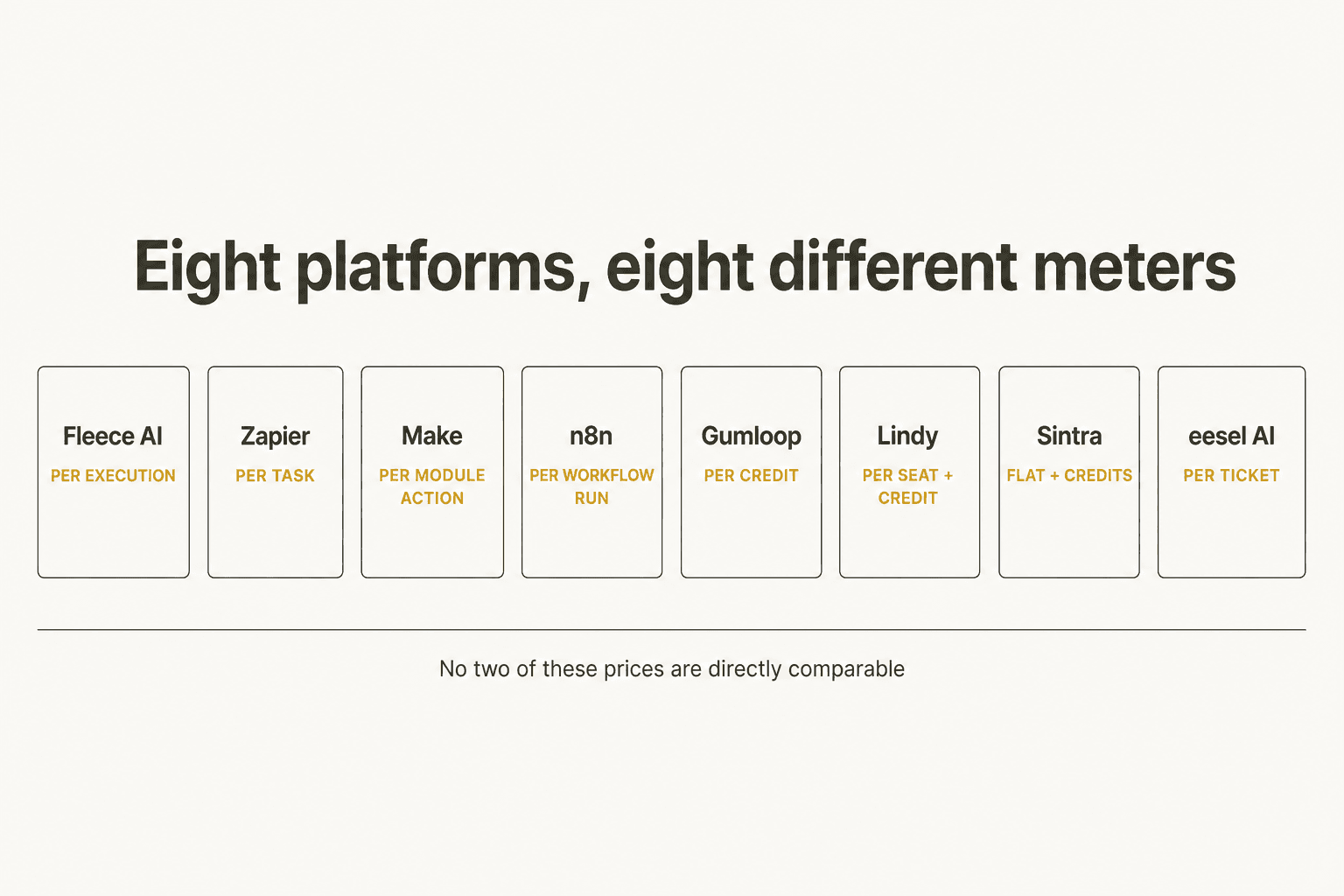
Fleece AI bills per execution. Zapier bills per successful action step, so an eight-step flow is eight units. Make bills per module action. n8n bills per whole workflow run regardless of node count. Gumloop bills a flat $0.005 credit with an 8% orchestration fee on top. Lindy bills a seat and then variable credits. eesel bills per ticket handled. No two of those monthly prices are directly comparable, and any table lining them up in one column, mine above included, is smoothing that over.
One useful thing I turned up while digging through Fleece AI's numbers, and it lands in your favour rather than theirs: its top-up credit packs are between two and eight times cheaper per credit than the credits bundled into its plans. A Starter plan's bundled credits work out to about €0.0245 each. The packs run from €0.005 down to €0.003. So if you use Fleece AI, buy the smaller plan and top up instead of upgrading for headroom. One caveat: the integration tier climbs with the plan, so if the app you need sits on Pro, topping up will not get you there.
Underneath the meters, the decision comes back to one question. How many of those apps does your agent need to actually finish a job in? Dozens? Buy breadth, and accept that each connector is a thin OAuth wrapper. One or two? Buy depth, because the last 20% of an integration is where the work gets done, and no catalogue count tells you whether it is there.
For support teams the answer is almost always one. Which is why AI ticket automation is its own tool category rather than a template on a horizontal platform, and the same goes for support ticket triage. It is also why MCP apps are worth watching without being the answer by themselves: a shared protocol lowers the cost of breadth, it does not create depth.
Try eesel AI for support work that has to land
If the job you were hoping to delegate to Fleece AI is the support queue, that is one worth doing properly rather than broadly.

eesel AI joins your helpdesk as a real agent, not a bolt-on widget. It learns from your solved tickets, then drafts and sends replies, tags, assigns and updates fields inside Zendesk, Freshdesk, Gorgias, Front and Help Scout, and it respects the triggers, SLA policies and business hours you already run. Setup for the most common case is walked through in integrate AI with Zendesk.
Before it answers a single live customer, you can rehearse it over your own ticket history and read a coverage report by topic. That step I would not skip on any vendor here, ours included. It is the only way to learn what your agent does not know before a customer does.
$0.40 per ticket handled, no seats, no platform fee, and you can start on $50 of free usage without a card. And if breadth turns out to be what you needed after all, one of the seven above is your answer. I would rather you got that right.
Try eesel and point it at your own tickets.
Frequently Asked Questions
What are the best Fleece AI alternatives in 2026?
How much does Fleece AI cost?
Does Fleece AI really have 3,000+ integrations?
Is there a free Fleece AI alternative?
What is the best Fleece AI alternative for customer support?
Is Fleece AI safe for enterprise data?
Why did Relay.app shut down and what should I use instead?


Article by
Rama Adi
Rama is a software engineer at eesel AI with two years of experience writing about B2B SaaS, AI tools, and customer support technology. Based in Bali, Indonesia, he brings a developer's perspective to product comparisons — cutting through marketing copy to what the integrations and APIs actually do.