Slack is where your team lives, but let's be honest, the constant pings and manual check-ins can really bog things down. Automation is supposed to fix this, and for a lot of tech teams, a tool like n8n seems like the answer. It’s a pretty handy way to connect different apps and build out custom workflows.
But is it the right tool for every team?
This guide gives you a straight-up look at Slack integrations with n8n. We'll walk through what you can do with it, get into the real-world limitations (especially for non-technical folks), and show you a more streamlined, intelligent option for teams running customer support or internal helpdesks.
What are Slack integrations with n8n?
Basically, connecting Slack and n8n lets you build bridges between your chat app and everything else your company uses. You can have something that happens in Slack (like a new message) trigger an action in another app. Or, you can have an action elsewhere (like a sale closing in your CRM) send a notification back into a Slack channel.
What is Slack?
You probably already know Slack, but it’s the collaboration tool that has replaced endless email threads for tons of companies. It organizes conversations into channels for chatting, sharing files, and getting updates from other apps. Since it’s the central hub for so many teams, it’s the perfect place to start automating things.
What is n8n?
n8n is a workflow automation tool built with technical users in mind. It gives you a visual, node-based editor to connect hundreds of apps. You can drag and drop to build automations, but if you want to do anything really specific, you'll likely need to write some custom JavaScript or Python code. This makes it a go-to for developers who want total control over their workflows.
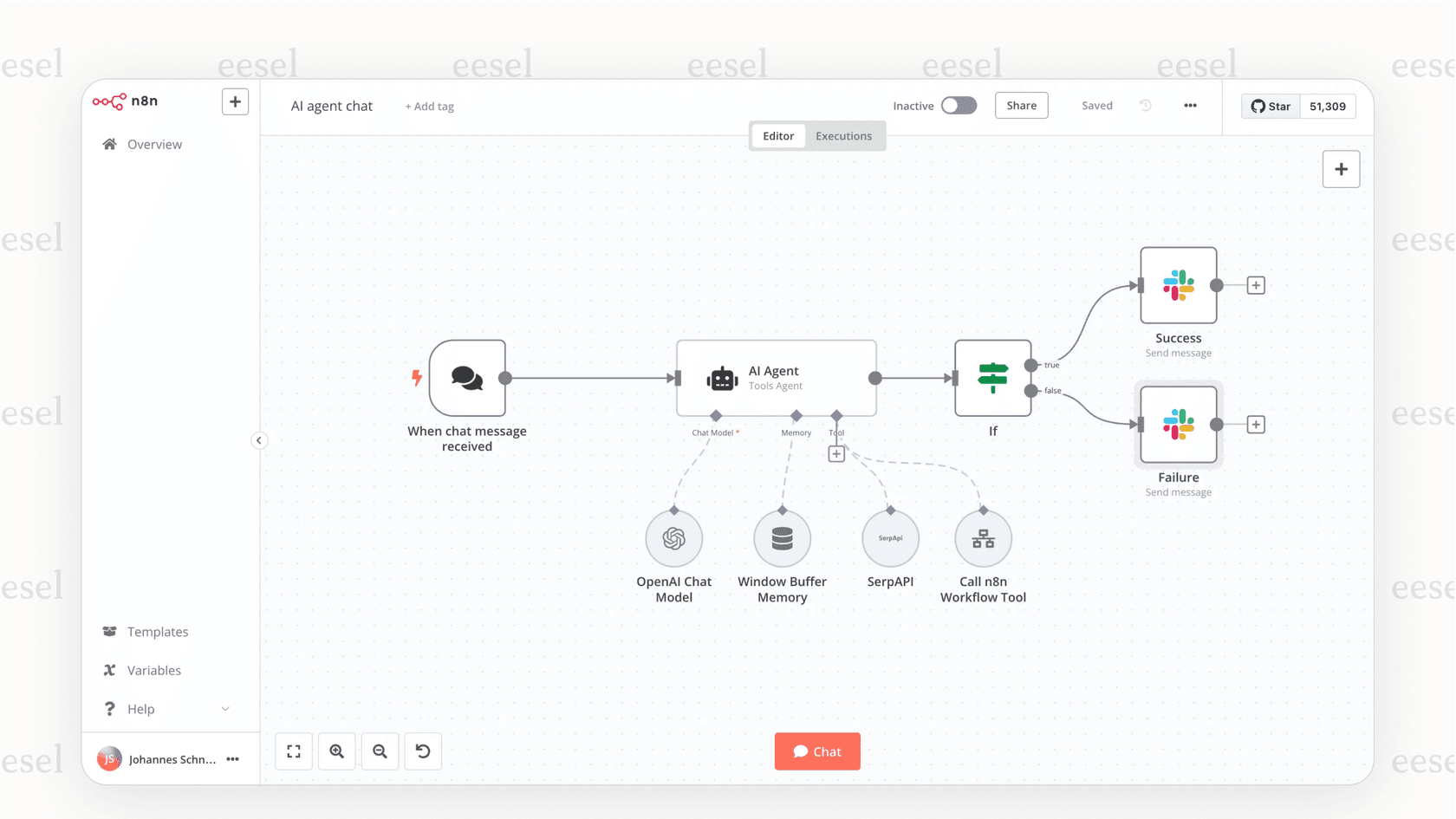
Common use cases for Slack integrations with n8n
Because n8n is so flexible, you can build all sorts of automations, from simple pings that keep everyone on the same page to more complicated interactive bots. Here are a few popular ways teams use Slack integrations with n8n.
Keeping all your notifications in one place
Probably the most common use is just turning a Slack channel into a live feed for important alerts. Instead of having to check ten different dashboards, your team can see everything pop up in one spot.
-
For DevOps: You could get instant alerts in a
#devops-feedchannel for new GitHub commits, failed builds from Jenkins, or performance spikes from Datadog. -
For Sales & Marketing: Imagine a celebratory message popping into
#sales-winsevery time a big deal closes in HubSpot or a new subscription comes through on Stripe. -
For Support: You can announce new high-priority tickets from Jira Service Management or Zendesk in a
#support-triagechannel to make sure they get picked up fast.
Creating simple, interactive bots
You can also use Slack's slash commands to let users kick off n8n workflows themselves. This lets you build little tools for your team without needing to spin up a whole new application.
For example, someone could type /get-report [date] into a channel. An n8n webhook would catch that command, run a quick query on a database to grab the data, format it nicely, and then post the report right back into Slack. It’s a nice way to give your team self-serve access to information without bothering anyone.
Basic data syncing
n8n can also help keep your information consistent across different tools. You can set up workflows that trigger an update in another system based on something that happens in Slack.
For instance, you could have any file uploaded to a specific #project-files channel automatically get copied over to a matching folder in Google Docs or SharePoint. Or you could have new Slack users automatically added to a Mailchimp list to keep your contacts in sync.
The hidden complexities of Slack integrations with n8n
While n8n is powerful, its technical focus creates some real roadblocks, especially for support and IT teams. They need solutions that are reliable and context-aware, without having to ask a developer for help with every little tweak.
Why Slack integrations with n8n are built for developers, not support agents
n8n calls itself a tool for "technical teams," and they mean it. Getting it set up isn't exactly a walk in the park. A quick look at their community forums shows you'll be creating a Slack app, managing different token types, setting up webhooks, and maybe even self-hosting the whole thing. That’s a lot to ask of a support manager with a full plate.
In contrast, a tool like eesel AI is made for the teams that will actually be using it. The setup is entirely self-serve and takes just a few minutes. With one-click integrations for help desks and tools like Slack, you can be up and running without needing any developer time.
Slack integrations with n8n don’t understand support context
n8n is a generic tool. It’s great at passing data from point A to point B, but it has no idea about the context of a support ticket, a customer's history, or the difference between a simple question and an urgent problem.
This means if you want to build any real intelligence into your n8n workflows, you have to create it all from scratch. You might end up stringing together a bunch of OpenAI nodes just to figure out what a user wants, then building dozens of "if-then" branches to handle every possible question. It gets messy, fast.
A platform like eesel AI is built specifically for support. It automatically unifies knowledge from your help center, past tickets, and internal docs in places like Confluence or Notion. It gets the world of support from day one, so it can give accurate answers without you having to build a mountain of custom logic.
Launching and testing Slack integrations with n8n can be risky
So, how do you safely test a customer-facing bot you built in n8n? The short answer is... you really can't, at least not easily. There's no sandbox environment for support conversations. A small mistake in your workflow could send completely wrong information to a real customer, turning your launch into a high-stakes "test in production."
This is where eesel AI’s simulation mode is a huge help. Before your AI agent ever talks to a customer, you can test it on thousands of your past tickets. You can see exactly how it would have answered, get solid forecasts on how many issues it will resolve, and tweak its behavior in a completely risk-free environment.
A smarter way: AI-powered internal support with eesel AI
Instead of trying to piece together a fragile, custom bot, support and IT teams can use a platform designed for what they actually do. This is where eesel AI really comes into its own.
Unify all your company knowledge instantly
eesel AI's AI Internal Chat connects to all of your company’s knowledge sources in minutes. You can easily link tools like Slack, Microsoft Teams, Confluence, and even your historical help desk tickets from platforms like Zendesk. The AI learns from all of it to give your team one reliable source of truth, right inside the apps they already use.
Get accurate, context-aware answers
eesel AI does more than just match keywords. It uses natural language understanding to figure out what someone is actually asking and delivers a precise answer pulled from your unified knowledge.
Set up in minutes, not months
This is really the biggest difference. With eesel AI, you can sign up, connect your sources, and have a fully working AI assistant in Slack in under five minutes. It’s a truly self-serve platform that puts the power of automation in the hands of support and IT teams, freeing up your engineers to work on other things.
Pricing comparison for Slack integrations with n8n vs. eesel AI
When you compare these two, you have to look beyond the monthly fee. The real cost of ownership includes the developer hours and ongoing maintenance needed to make n8n do what you want for support tasks.
| Feature | n8n (Cloud) | eesel AI |
|---|---|---|
| Pricing Model | Based on how many times your workflows run. | Based on AI interactions (replies/actions). No per-resolution fees. |
| Starter Plan | ~$20/month | Team Plan: $299/month |
| Pro Plan | ~$50/month | Business Plan: $799/month |
| Target User | Technical users, developers. | Support, IT, and Ops teams. |
| Hidden Costs | Hefty developer time for setup and maintenance. Costs can also spiral if your workflows get complex. | Predictable pricing. Includes all products (Agent, Copilot, Triage, Chat) in one plan. |
| Free Trial | Yes, a free tier is available. | Yes, you can start with a free trial. |
Choose the right tool for your Slack integrations with n8n
Slack integrations with n8n offer a ton of power and flexibility for technical users who love building custom automations from scratch. If you have developers available and a unique problem to solve that isn't related to support, it can be a great option.
However, for support and internal knowledge automation, the technical hurdles, lack of context, and deployment risks make n8n a tough and often expensive choice. A tool built for the job like eesel AI gives you a faster, safer, and smarter solution, letting your team launch helpful AI assistants in minutes, no coding required.
Ready to upgrade your Slack automation?
See how easy it is to put your internal support on autopilot. Start your free eesel AI trial today and launch your first AI assistant in minutes.
Frequently asked questions
What are the primary benefits of using Slack integrations with n8n for team operations?
Slack integrations with n8n allow teams to centralize notifications from various apps into Slack, create simple interactive bots using slash commands, and perform basic data syncing between Slack and other systems. This helps streamline communication and automate routine tasks across different platforms.
Are Slack integrations with n8n suitable for non-technical users to set up and manage?
Generally, Slack integrations with n8n are built for technical users. Setting them up often requires knowledge of creating Slack apps, managing tokens, setting up webhooks, and potentially writing custom code, which can be challenging for those without a technical background.
Can Slack integrations with n8n effectively understand and manage complex support contexts?
n8n is a generic automation tool, so it doesn't inherently understand support context like customer history or ticket urgency. You would need to build extensive custom logic and "if-then" branches from scratch to replicate true intelligence, which can be complex and time-consuming.
What types of common notifications can I set up using Slack integrations with n8n?
You can set up notifications for various events, such as new GitHub commits, failed builds, sales deal closures from CRMs, or new high-priority support tickets from platforms like Jira Service Management or Zendesk, all delivered directly to specific Slack channels.
How do Slack integrations with n8n differ in cost from specialized AI solutions for support?
While n8n has usage-based pricing, its "hidden costs" include significant developer time for setup and ongoing maintenance, especially for complex workflows. Specialized AI solutions like eesel AI offer more predictable pricing, often including all features, and require minimal developer involvement.
What are the risks involved when testing customer-facing workflows built with Slack integrations with n8n?
Testing customer-facing bots built with Slack integrations with n8n can be risky as there's no easy sandbox environment for support conversations. A small error could lead to incorrect information being sent to real customers, potentially turning deployment into a high-stakes live test.