

Herdr is a free, Apache-2.0 runtime for coding agents that keeps Claude Code, Codex, OpenCode and Pi alive when you close the window or your SSH drops. It runs your terminals in a background server, labels every agent as working, blocked, done or idle, and lets you reattach from any machine. It has two front ends, a terminal app and a native desktop app that reached Hacker News on 30 October, and the project has passed 47,000 GitHub stars.
If you only run one agent in one terminal tab, tmux or a plain terminal is enough. Herdr earns its place when you run four or more agents across projects and keep losing track of which one is waiting on you. The honest limits: running programs do not survive a machine reboot, the two front ends do not share agents, and the company behind it raised a $6M seed, which some users worry about.
Herdr is infrastructure for coding agents. If the job is answering customers, the teammate to hire is an AI helpdesk teammate, and the eesel CLI lets Claude Code set it up from a herdr pane.
I work on eesel's integrations and APIs, so I read tools like this the way I read an API: what does it own, what does it expose, and what breaks at 2am. I went through the README, the docs, the release notes and both Hacker News threads. This is what I found.
What is herdr?
Herdr describes itself as "the runtime your coding agents live on." In plain terms, it is a terminal workspace built for people who run several AI coding agents at once. Each agent stays in a real terminal pane with its own shell, logs and prompts. Herdr tracks which panes hold an agent, rolls their state up to tabs and workspaces, and gives you one place to see who needs you.
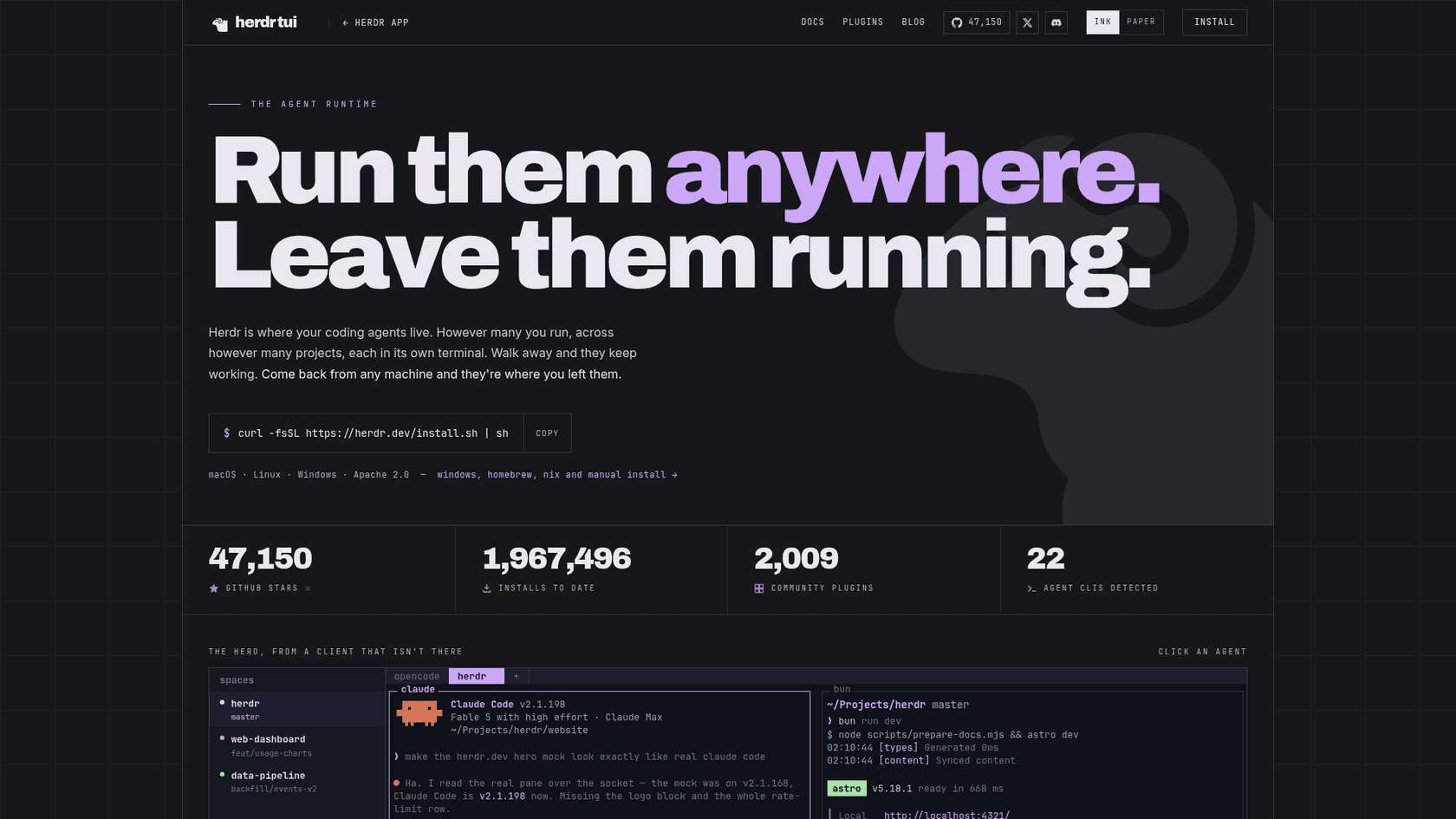
The numbers on its own site tell you how fast it grew. The repo was created on 27 March 2026, and the TUI page now shows 47,150 stars, 1,967,496 installs, 2,009 community plugins and 22 agent CLIs detected. The latest stable release is v0.9.5, from 14 October, and the project is written in Rust.
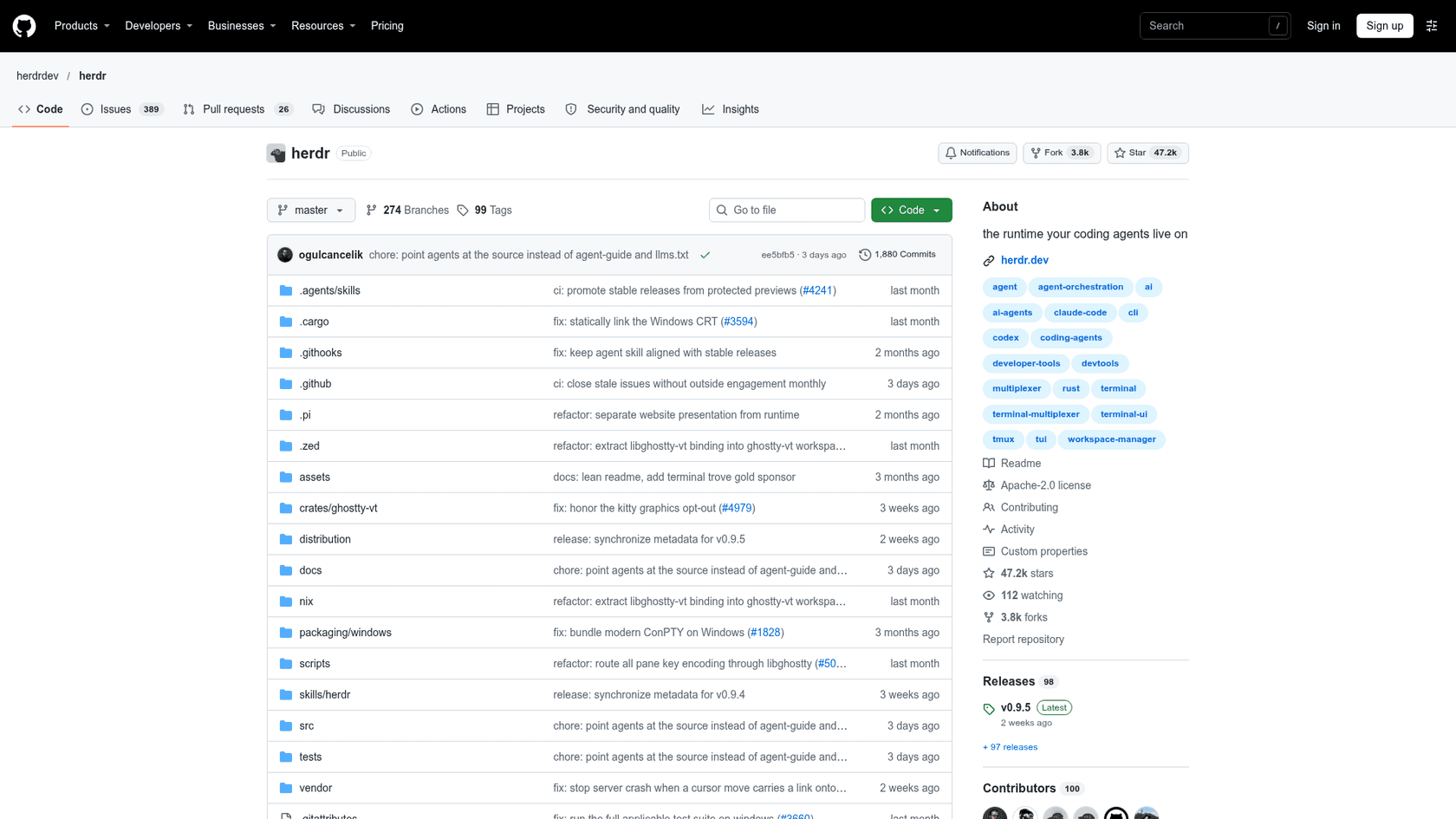
The launch thread on Hacker News, "Herdr: One terminal to rule them all," reached 404 points and 178 comments in July. The thread for the native app, on 30 October, passed 360 points and drew a long argument about tmux, which I get to below.
Herdr TUI, herdr app, herdr-core: which one is which?
The naming trips people up, so here is the map. There are three pieces, all open source, and per the app README and the site FAQ they relate like this:
| Piece | What it is | Where it runs |
|---|---|---|
| Herdr TUI | The original: a terminal app with its own background server | Inside any terminal, on macOS, Linux and Windows |
| Herdr app | A native desktop app built on herdr-core, released in October 2026 | macOS (Apple Silicon), Linux (x86-64 and ARM64), Windows (x64) |
| herdr-core | A small server that actually runs the terminals | Your machine, or a remote one over SSH |
One detail matters a lot: the FAQ says the app and the TUI are "a new, separate program" and that they do not share agents, so what runs in one does not show up in the other. Pick one front end per machine and stay with it.
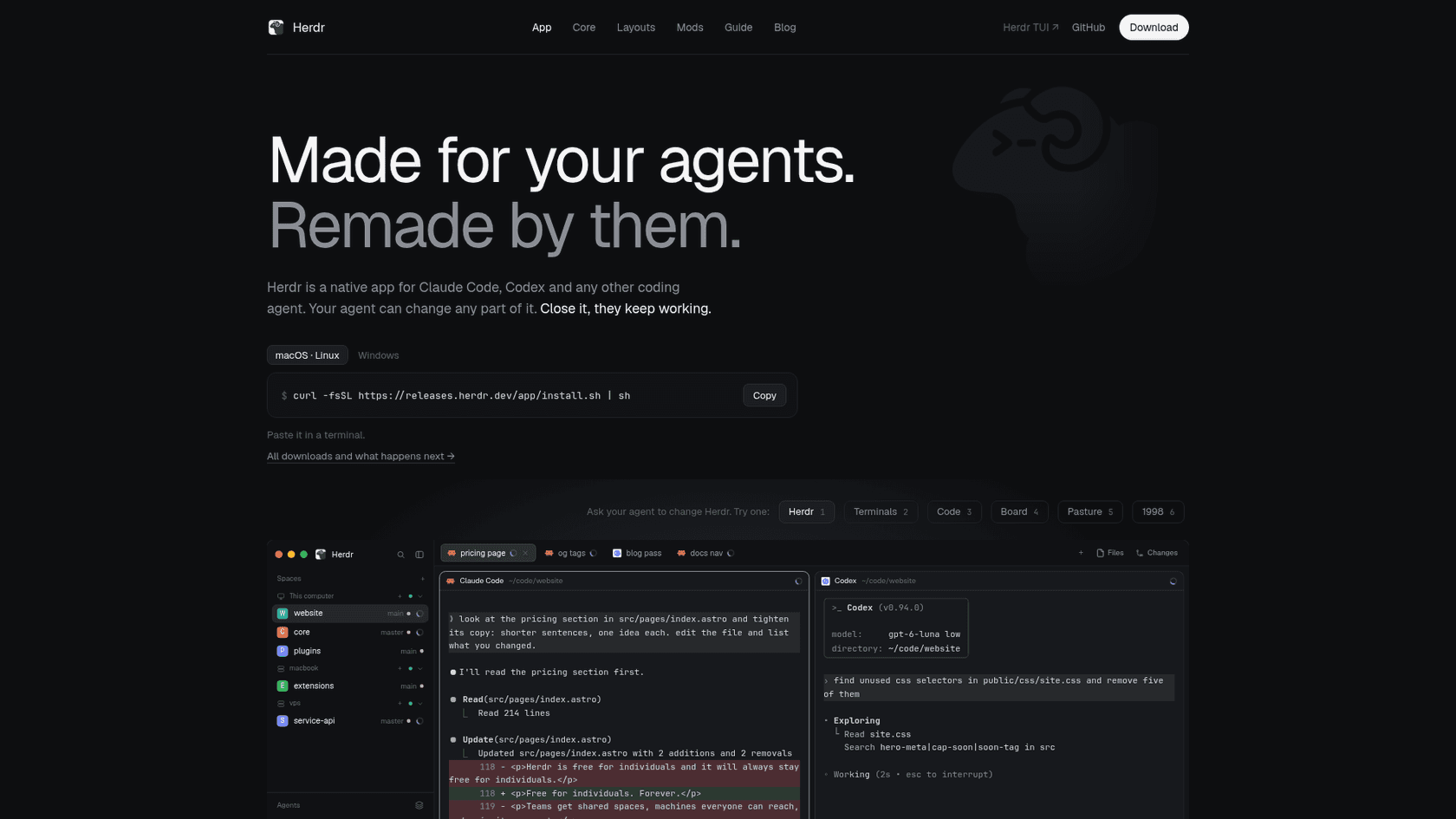
The app's pitch is that your agent can change any part of it. Layouts arrange the window, much as plugins extend Claude Code, and mods are small JavaScript programs that draw its panels, menus and dialogs. You ask your agent for a Linear panel or a git graph, and it edits the mod. The README is blunt that mods are trusted code, not sandboxed extensions, so read someone else's mod before you install it.
How does herdr keep agents running when I close the window?
In terms of design, herdr splits the screen from the work. A background server owns the terminals, and the window is just a client. Close the client, lose your SSH connection, or let your laptop sleep, and the server keeps going. The session-state docs are unusually clear about what that does and does not cover.
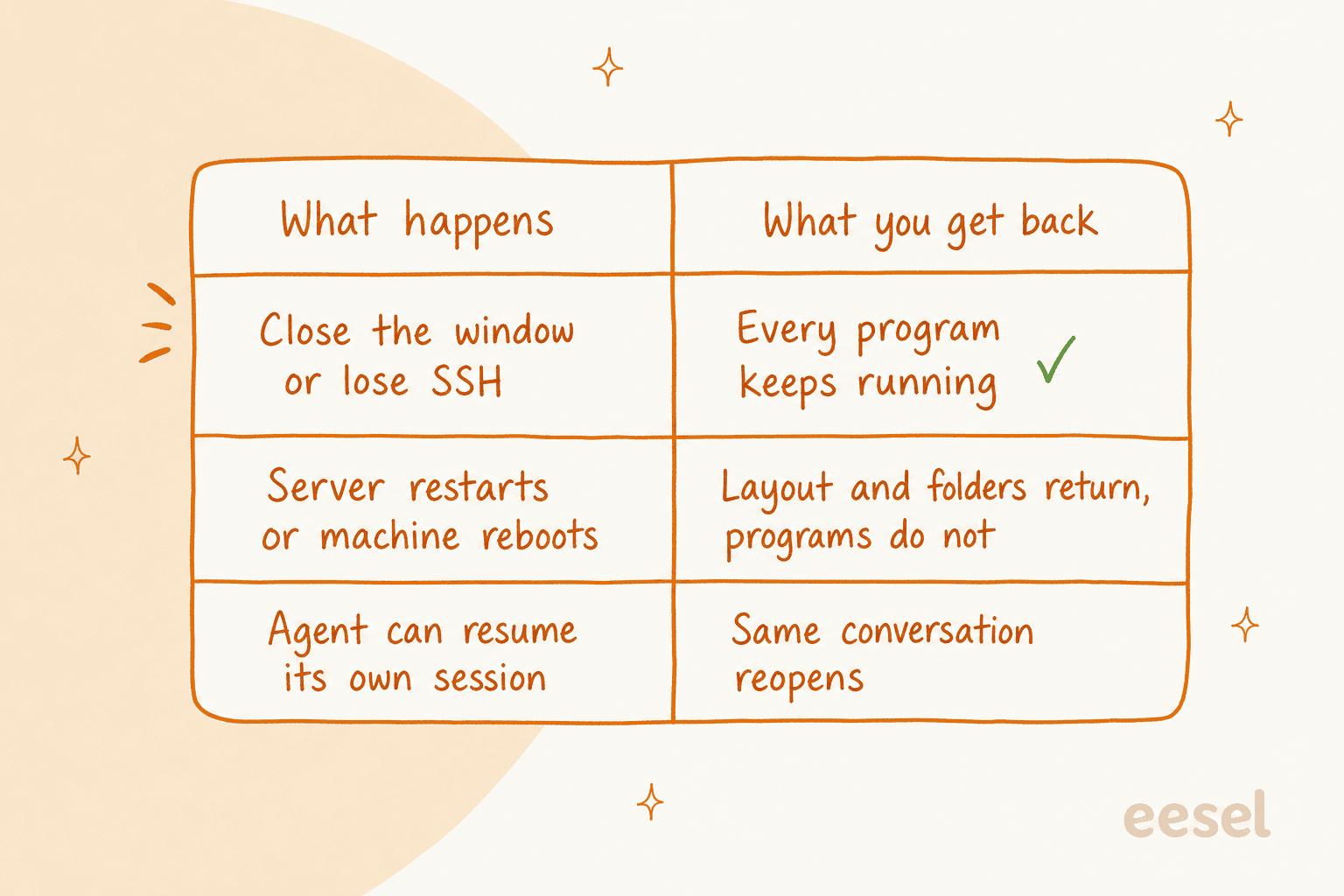
Here is the part I would print out. Detaching keeps your processes alive. A server restart does not. After a restart, herdr restores workspaces, tabs, panes, folders and focus, and panes come back as fresh shells in their saved directories. Whether an agent conversation comes back depends on the agent. Since v0.9.2, agents can report their own resume command, and herdr then reopens the exact session. For agents with a built-in integration, herdr integration install <name> sets up the same restore.
Under the hood, the repo contains a ghostty-vt crate, and commenters credit libghostty for the terminal emulation. One long-time tmux user put the upside this way:
"I switched to herdr this year after a decade of using tmux, and I haven't looked back since. Herdr is wonderful, not only because of the coding agent integrations, but also because it uses libghostty under the hood. So no terminal-emulator-inside-another-terminal-emulator shenanigans."

How do I install herdr and start using it?
Install takes one line. For the terminal app, the README gives these options:
curl -fsSL https://herdr.dev/install.sh | sh
# or
brew install herdr
mise use -g herdr
If you use Claude Code's own CLI flags, they pass straight through to the pane. Then start it where the work lives:
herdr
Herdr launches or attaches to your default background session, so you never manage sockets, much like the terminal integration Claude Code ships itself. When a session has no workspaces, it opens one for you. The desktop app installs separately with curl -fsSL https://releases.herdr.dev/app/install.sh | sh, or a Herdr.dmg on Apple Silicon. Both installers download and run code, so read the script first if you prefer.
The quick start is short. Start claude, codex, pi or opencode in a pane and herdr detects it. The mouse covers everything, and the keyboard is optional with a ctrl+b prefix:
| Action | Key |
|---|---|
| Split right | prefix+v |
| Split down | prefix+minus |
| New tab | prefix+c |
| New workspace | prefix+shift+n |
| Detach client | prefix+q |
A workspace is a project, so give each active repo its own. That keeps the sidebar readable. If you run a shell that auto-attaches to tmux, add a check for the HERDR_ENV variable, because the docs warn that tmux inside a herdr pane hides the agent from detection and can make the terminal flicker. That caveat, in fact, tripped up one Hacker News reader who launched herdr from inside tmux and gave up.
How does herdr know which agent needs me?
This is the core feature, and also the reason most people try it. Every agent pane is marked working, blocked, done, idle or unknown, and the sidebar rolls it up across workspaces. Per the docs, herdr reads state from what agents draw on screen, and some agents report it themselves.
The supported list is long: Claude Code, Codex, Copilot CLI, Cursor Agent, OpenCode, Pi, Droid, Devin, Kimi, Qwen, Grok and more, plus a few marked as state-only or less tested, like Gemini CLI and Cline. For your own scripts, the app site documents an open status protocol called OSC 7501, and it takes one line:
printf '\e]7501;state=blocked:app=my-agent\e\\'
A Hacker News user explained why this matters better than the marketing does:
"I will start a workspace for each different thing I'm working on, label it ... Then in each one I run a Claude Code. Then I can see the status of my Claude Codes just by glancing at the sidebar, rather than having to switch between screens to see what is waiting next."
If you already use Claude Code with hooks, you can approximate this in tmux, and one commenter does: a blue spinner when working, a red dot when it needs attention, a green tick when done. Herdr's argument is that you should not have to build that yourself for every agent.
Can agents drive herdr themselves?
Yes, and I think this is the most interesting design choice of the whole tool. The README calls herdr "agent-native": agents drive it through a CLI and a socket API, spawning panes, prompting each other and waiting until another agent is blocked. The agent automation docs split the surface into layout, pane and agent commands, and creation commands print JSON so scripts can capture IDs:
created=$(herdr workspace create --cwd ~/project --label api --no-focus)
pane_id=$(printf '%s\n' "$created" | jq -r '.result.root_pane.pane_id')
herdr agent start reviewer --kind codex --pane "$pane_id"
That unlocks patterns like cross-review, and it pairs with Git workflows and MCP tools, and MCP for support is the same idea on the helpdesk side. One developer described a hook where Claude opens a pull request, a small script starts Codex in the next pane, and Codex posts findings back for Claude to fix:
"Claude builds and opens a PR. A small hook starts Codex in the next Herdr pane. Codex posts its findings on the PR. Claude fixes them and replies, finding by finding."
This is the same shape as Claude Code subagents, except the helper can be a different vendor's agent in a separate terminal. A commenter on the app thread summed up the design well: if the multiplexer owns the terminal, it can read output, send input and drive the agent, which is orchestration across vendors through their command-line surfaces.
How do I run herdr on another machine?
This is where the server model of herdr pays off. Keep a workspace on a build box or a cheap VPS, SSH in from anywhere, and everything is where you left it. The connecting machines guide shows two paths:
herdr machine add workbox    # save an SSH host in your sidebar
herdr --remote workbox       # attach to its session directly
A saved machine keeps its own spaces and splits in its own core, and your local and remote work show up together in one combined agent list. The docs add two caveats worth reading: a machine profile targets one remote session, not every session on the host, and Git authentication inside remote panes needs ForwardAgent yes, which herdr does not enable for you.
Third parties are building on this too. The cloud sandbox company boxd announced a herdr integration in October where each agent runs on its own boxd machine inside herdr's sidebar. One Hacker News user pointed out the weak spot of SSH on a phone with bad signal, where tools built for reconnection do better.
Herdr vs tmux: what do you actually gain?
This was the loudest debate on both Hacker News threads, which is worth to answer straight. Tmux is a general-purpose multiplexer that has worked for decades. Herdr is a multiplexer that knows what a coding agent is. One commenter put it in one line:
"It's all about agentic work. Tmux doesn't know what an Agent is... But if you don't do any agentic work, Herdr has 0 value vs. tmux."
Here is how I would compare them, using the herdr docs for herdr and the community for the rest:
| Question | Herdr | Tmux |
|---|---|---|
| Knows an agent is working, blocked or done | Built in for 22 agent CLIs | Not built in. Possible with hooks you write |
| Sidebar of agents across projects | Yes | You build it |
| Mouse-first, click and drag splits | Yes, with prefix keys too | Prefix keys first |
| Agents can spawn and prompt other panes | CLI and socket API | Possible by scripting send-keys |
| Remote machines in one view | Built in with herdr machine add | SSH and attach per host |
| Maturity | Under a year old, 98 releases | Decades old, runs everywhere |
The tmux defenders make a fair point. A user who runs four tmux windows showed status indicators wired through Claude Code hooks, and asked why switch.
"In my current tmux session I have four windows each with a status indicator that shows up when that window is running a claude code session. It is a blue animated braille spinner when it is working, a red dot when it needs attention and a green tick when it is finished with its work."
That works, then if you enjoy owning that glue, keep it. Herdr's pitch is that the glue ships by default and covers agents you have not met yet. Another user said the real reasons for switching were the visual working-or-waiting indicator, native remote sessions in one view, and a touch-friendly layout on a small iOS screen. A third bounced after a week because Ghostty, notifications and harness extensions already gave him enough. Both camps are right for their setups.
Other open-source options are in my open-source agents roundup. Tools in this space also include Orca and several new multiplexers that came up in the threads, and one commenter says a multiplexer from Ghostty's creator is on the way. I did not test any of them, so I will not rank them. If you want the wider field, DeepSeek Harness is a close cousin and Cursor alternatives shows the paid side, then my list of terminal AI coding tools and agentic coding CLIs is the place to start.
What does herdr cost, and who pays for it?
Herdr costs nothing to use. The site FAQ says the app, herdr-core and Herdr TUI are all open source, and the GitHub license is Apache 2.0. You pay for the agents inside it, such as a Claude Code plan or Codex usage, plus a Cursor subscription if you use that.
The funding is the thing some users cares about. Herdr raised a $6M seed led by Bessemer Venture Partners on 8 September, with Y Combinator, e2vc and angels including Shopify's CEO. The founder wrote that the runtime stays open and the money goes to people. Not everyone is relaxed about it:
"I really enjoyed herdr at first but ever since they got VC funding I am avoiding it. Enshittification and cloud features due to vc/monetization pressure incoming."
Other commenters replied that Apache-licensed code can be forked, and one said they already keep personal changes on a fork. I think both views are reasonable. The license protects the code you can see today. It does not tell you what the hosted features, if any, will cost later, and herdr has not published a paid plan that I could find.
Where does herdr fall short?
There is a few limits, all from the docs or the threads:
- Programs do not survive a reboot. Layout returns, processes do not. If you need a job to outlive a machine restart, herdr is not the layer that does it.
- Two front ends, two worlds. Agents started in the TUI do not show up in the desktop app, and the reverse.
- Status needs help from some agents. The agents list shows agents that report through OSC 7501, and some, like Gemini CLI and Cline, are marked less tested.
- Telemetry and mods. Usage telemetry is on by default in app releases and can be switched off in Settings, Privacy. One commenter noted the payload excludes terminal content and file names, and the settings dialog shows an example. Mods are trusted code.
- A learning curve if you never used prefix keys. The mouse helps, but several commenters came from tmux, and one new user could not figure out how to leave it.
- Young software. Releases like v0.9.3 and v0.9.5 were hotfixes for input regressions, including shortcuts that stopped working in some terminals. Expect fast fixes and occasional breakage.
Who should use herdr?
I would reach for it if you match any of these (and if you keep project rules in an AGENTS.md, they travel with every pane):
- You run four or more coding agents at a time across several repos, and you keep losing the one that is blocked.
- You work on a remote box or VPS and want to reattach from a laptop, a phone, or another machine.
- You want your agents to coordinate each other, and you are happy scripting a CLI.
- You already live in a terminal and like Claude Code, Codex or OpenCode there.
I would skip it if you run one agent at a time, if tmux already does everything you need, or if you want a long job to survive a reboot. Then a proper scheduler or CI job is the right tool.
Where does eesel fit next to herdr?
Herdr is a layer where your agents lives. It does not decide what work they do, and it does not know your customers. That is a different job.
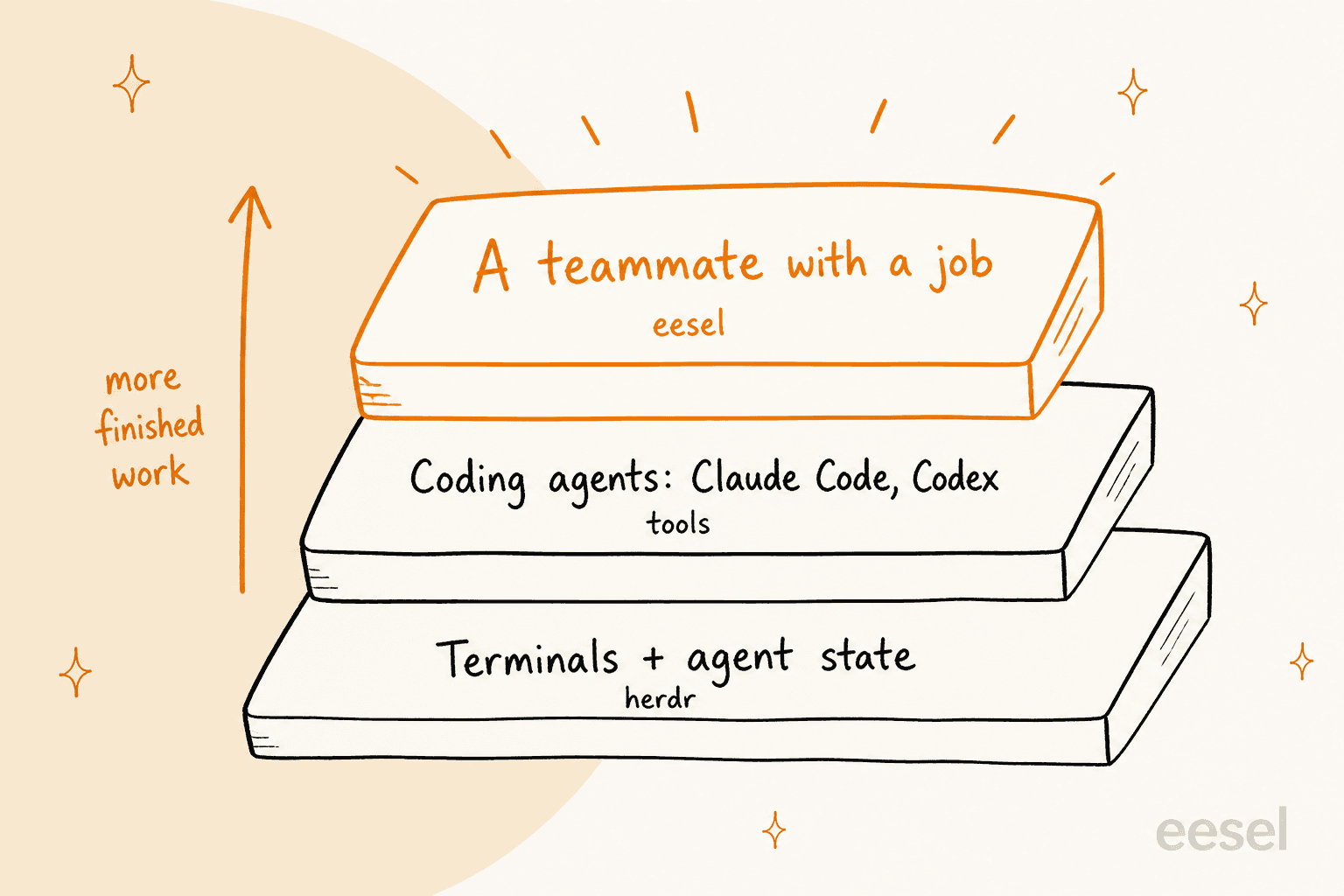
Here is the way I think about it. Herdr, Claude Code and Codex are infrastructure and tools. eesel is the employee: an AI teammate you hire for one job, with the integrations and company context already in place, the same idea as an AI employee. Of the best AI teammates, the one I work on is the AI helpdesk teammate, which joins your existing Zendesk, Freshdesk or Gorgias queue. eesel has put AI agents on live support queues for years, and the lesson we took from it is to simulate every rollout against historical tickets before a customer sees a reply.
Herdr's "which agent needs me" problem exists in support too, just with different agents. SE Ranking runs three eesel agents on Zendesk, one each for SE Ranking, Planable and SE Visible, and in a month eesel handled about 4,650 conversations across Zendesk tickets and live chats. Swiftreg runs two agents on Zendesk, one for support tickets and one for private sellers' replies, and handled about 2,100 tickets in the same month. In both stories the team keeps control through the rules they wrote and a hand-off to people, which is the same idea as herdr's blocked state.
What does the eesel CLI add?
The eesel CLI is the part that connects the two worlds. It puts the same eesel agent in your terminal: you chat with it, connect a helpdesk, upload knowledge, wire up automations and approve held actions without opening the dashboard. Anything you set up in the CLI shows up in the dashboard, and the other way round. Every command prints JSON, so an AI coding agent such as Claude Code, Cursor or Codex can run your whole setup.
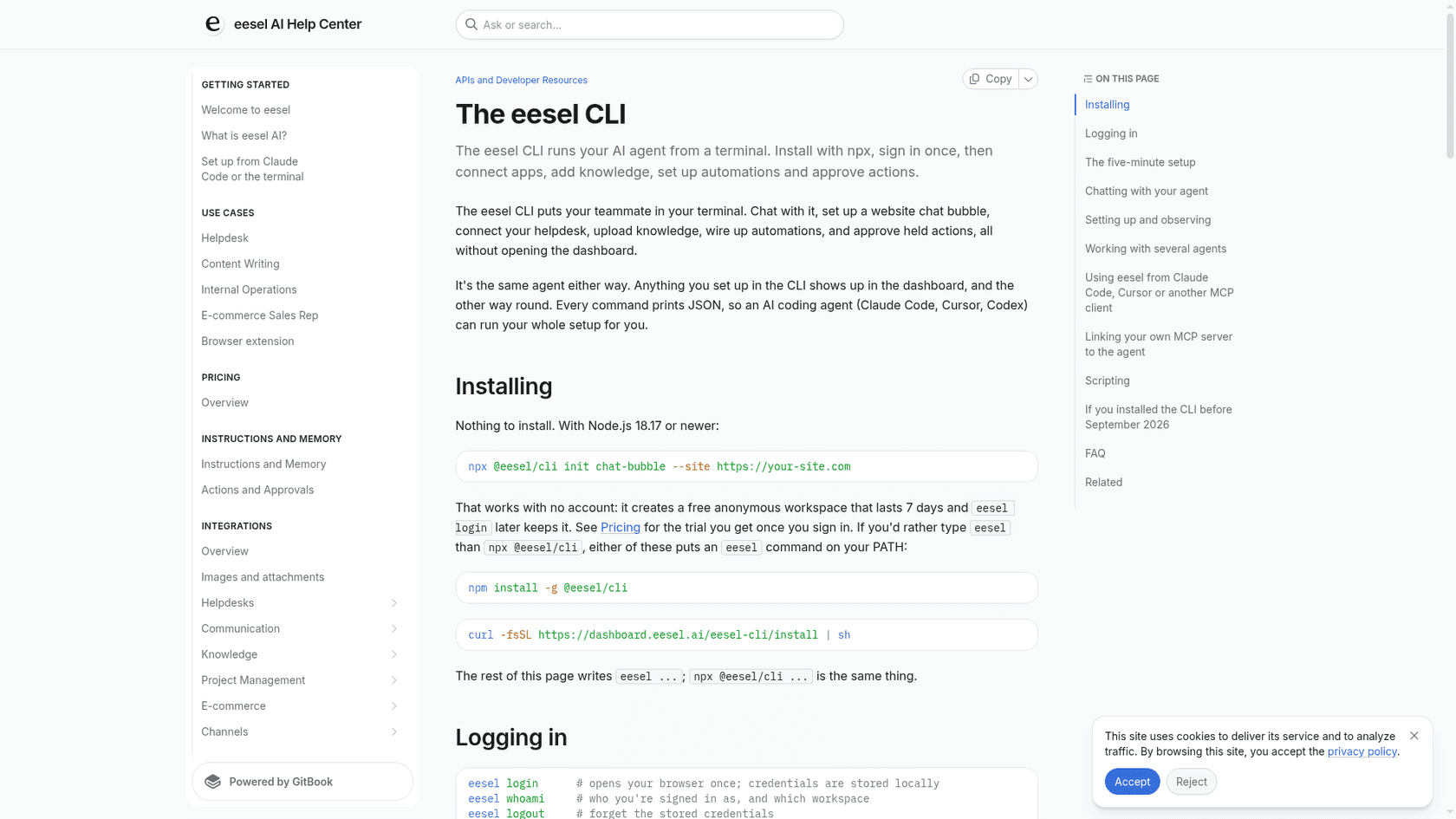
The five-minute setup from the docs looks like this, and it works with no account because it creates a free anonymous workspace that lasts 7 days:
npx @eesel/cli init chat-bubble --site https://your-site.com
eesel login
eesel chat "what's our refund policy?"
eesel files upload ./refund-policy.pdf
eesel approvals
A few commands are worth knowing: eesel integrations connect for helpdesks like Zendesk, Freshdesk and Gorgias, eesel automations for what the agent does on its own, eesel activity for what it has been doing, and eesel approvals for held actions waiting on a person. That last one is the support version of herdr's blocked state. A pane in herdr is just a terminal, so you can leave a Claude Code session in one pane doing the eesel setup while you watch the rest of the herd. I have not run that exact combination, but nothing in either tool prevents it. For more on the pattern, see my guides to the AI agent CLI, controlling AI agents from the CLI, the customer support CLI an API-first agent platform.
Try eesel
If your coding agents are the tools and customer questions are the work, eesel is the teammate that does the work. The AI helpdesk teammate plugs into your helpdesk in minutes, learns from your help center and past tickets, and hands anything risky to your team. Set it up from the dashboard, or let Claude Code drive the eesel CLI from a herdr pane. Try eesel free, or book a demo if your support volume is large.
Frequently Asked Questions
What is herdr?
Herdr is a free, Apache-2.0 runtime for coding agents. It runs your terminals in a background server, labels every agent as working, blocked, done or idle, and keeps everything alive when you close the window or lose SSH. It runs Claude Code, Codex, OpenCode and Pi without wrapping them.
Is herdr free?
Yes. The terminal app, the desktop app and herdr-core are all open source under Apache 2.0, and the official site answers "Is it free?" with a plain yes. You still pay for the agents you run inside it, such as a Claude Code subscription or Codex plan.
How do I install herdr?
For the terminal app, run curl -fsSL https://herdr.dev/install.sh | sh, or use brew install herdr or mise use -g herdr. Then type herdr in a project folder. The desktop app has its own installer at releases.herdr.dev/app/install.sh. If you script agents already, my guide to managing AI agents from the terminal covers the wider pattern.
What is the difference between herdr and tmux?
Tmux is a general terminal multiplexer that knows nothing about agents. Herdr adds agent-aware status, a sidebar across workspaces, a CLI that agents can call, and native support for remote machines. If you do not run coding agents, herdr gives you little over tmux. If you do, it saves you hunting for the pane that is waiting on you. See also my breakdown of terminal AI coding tools.
Does herdr work with Claude Code and Codex?
Yes. The docs list integrations for Claude Code, Codex, Cursor Agent, OpenCode, Pi, Copilot CLI and more, and the site says it detects 22 agent CLIs. Anything that runs in a terminal also works, it just shows up as a plain terminal without a status. For multi-agent setups inside Claude Code subagents, herdr is the screen you watch them on.
Do herdr agents survive a reboot?
The programs do not. Herdr restores your workspaces, tabs, panes and folders after a server restart, but running shells and agents are gone unless the agent can report its own resume command. Detaching or closing the window is different: everything keeps running. That is the line I would design around for long-running Claude Code jobs.
Is herdr safe to use with private code?
The runtime is open source, so you can read it. Two things to check: usage telemetry is on by default in the desktop app's releases (switch it off in Settings, Privacy), and layout mods are trusted code, not sandboxed extensions. Your agents' own permission rules still apply, as covered in Claude Code permissions.
Can herdr replace an AI agent for customer support?
No, they sit at different layers. Herdr runs coding agents on your machines. An AI helpdesk teammate like eesel answers customers inside Zendesk, Freshdesk or Gorgias. You can still run the eesel CLI from a herdr pane to set it up with Claude Code.