What is the Pi coding agent?
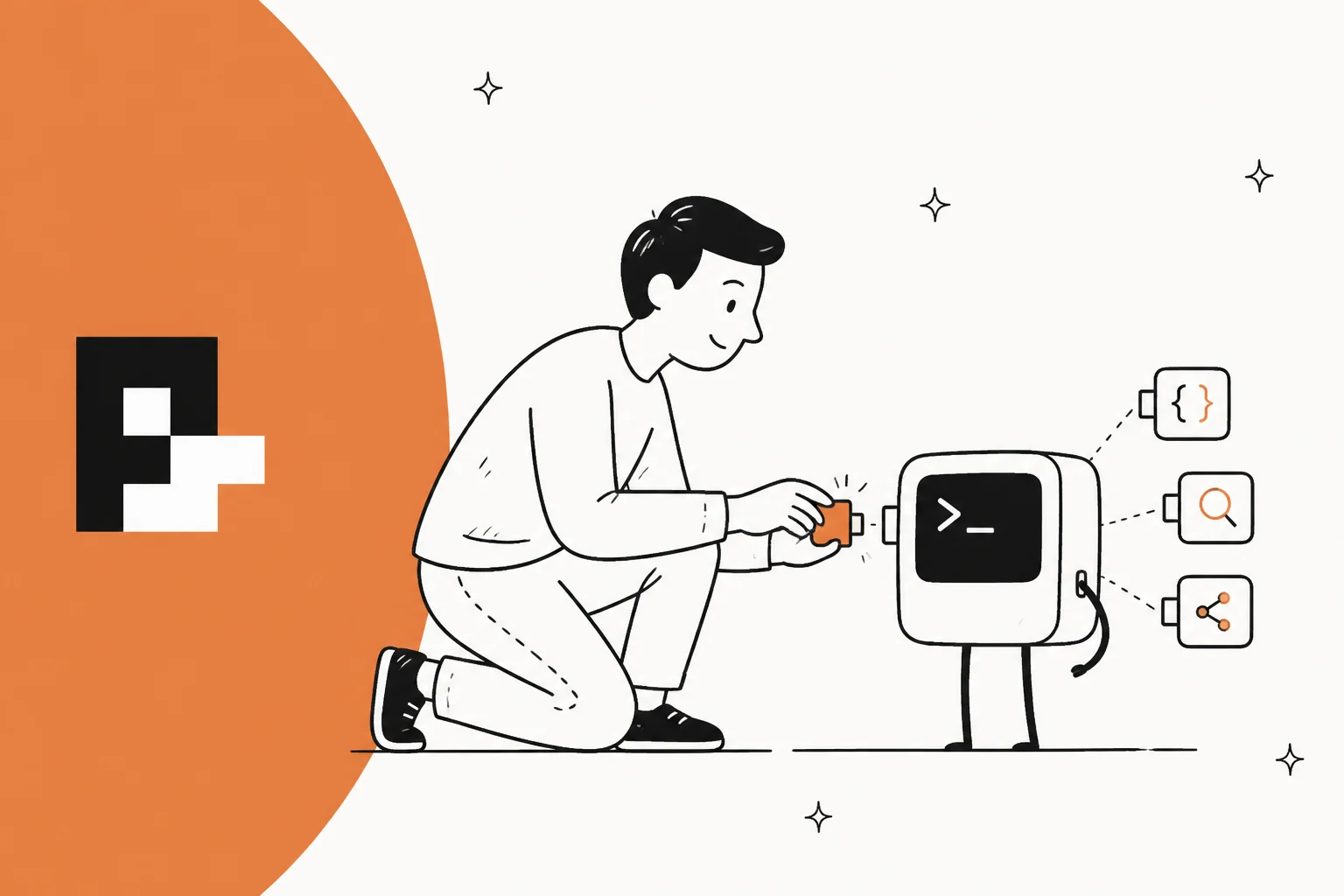
Pi describes itself in one line in its README: "a minimal, extensible agent harness that you can make your own." A harness is the program that wraps a language model with a loop, tools and a user interface, so the model can actually read files, run commands and edit code. Claude Code, OpenAI Codex and OpenCode are harnesses too, and together they make up the agentic coding CLI category. Pi's difference is how little it ships with, and how much it lets you change.
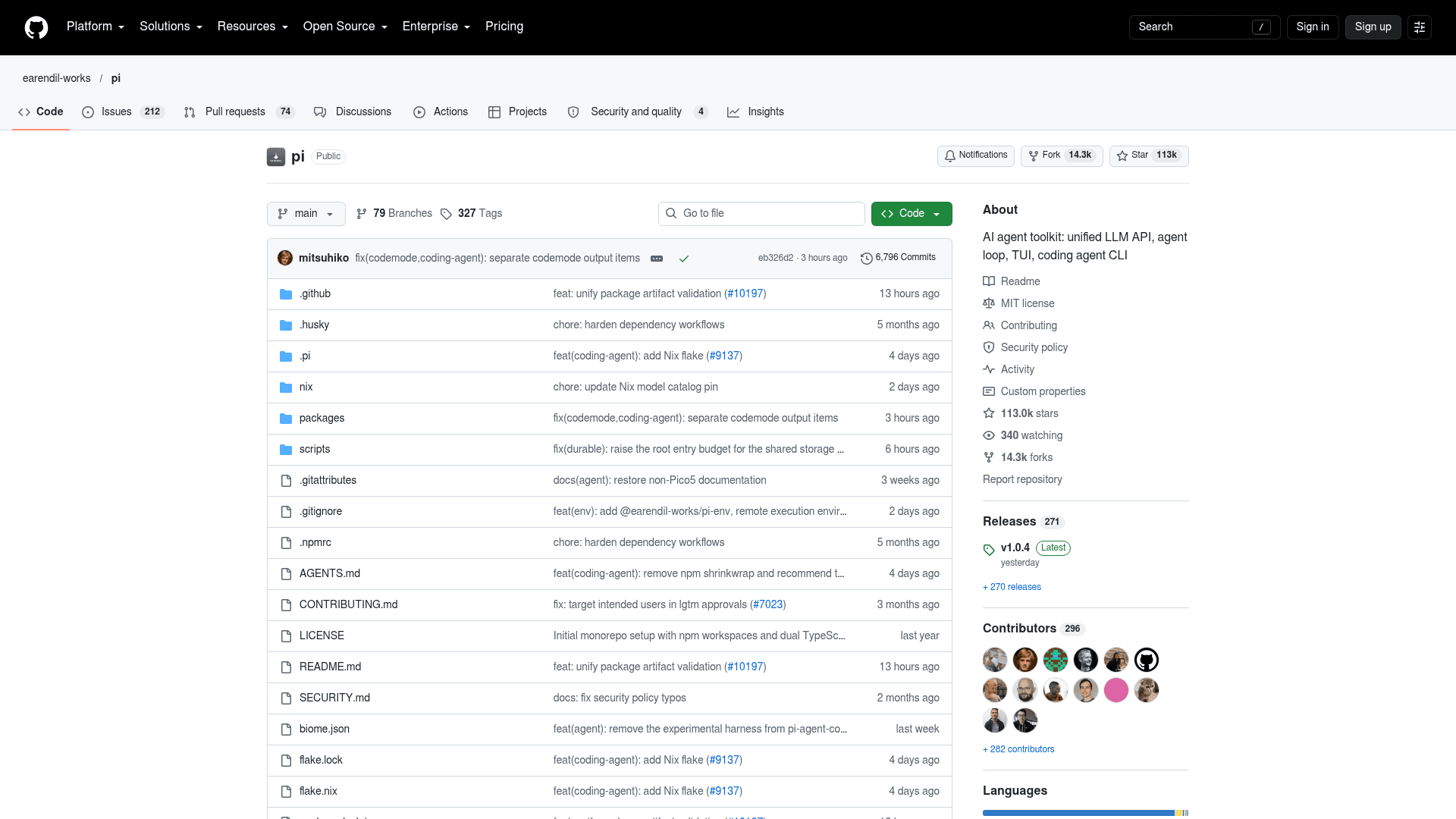
The numbers say it stopped being a niche tool a while ago:
| Metric | Value |
|---|---|
| GitHub stars | 112,973 |
| Forks | 14,339 |
| License | MIT |
| Latest version | 1.0.4 (October 5, 2026) |
| npm downloads, last week | 5,201,697 |
| npm downloads, last 30 days | 13,959,626 |
| Packages tagged for Pi on npm | 11,394 |
| Weekly users (Earendil's claim) | "Hundreds of thousands" (Pi 1.0 post) |
A caveat on that download count: npm numbers include CI runs and apps that embed Pi's SDK, so they are not a head count. Still, 5.2 million a week puts Pi in a different league from most open-source agents, including the much younger DeepSeek Harness.
Pi is also bigger than its own CLI. The OpenClaw personal agent, which has 391,521 stars of its own, is built on Pi's components. Armin Ronacher put it plainly in his Pi post: "what's under the hood of OpenClaw is a little coding agent called Pi."
Who builds Pi, and why did it move to Earendil?
Pi started as a side project by Mario Zechner, an Austrian developer best known for the libGDX game framework. His trigger was frustration with Claude Code, which he said in his design post had "turned into a spaceship with 80% of functionality I have no use for", with prompts and tools that changed on every release. He built a harness where nothing gets injected behind your back, and gave it, in his words, "a name that's entirely un-Google-able, so there will never be any users."
That plan did not survive OpenClaw. Once Peter Steinberger's agent went viral and people learned it ran on Pi, Mario wrote that "any VC or big corp you can think of in this space has knocked on my door." He didn't want to build a startup around it, so he picked a home instead.
| Date | What happened |
|---|---|
| 2025-08-09 | Repo created as badlogic/pi-mono |
| 2025-11-30 | Mario publishes his Pi design post |
| 2026-04-08 | Earendil acquires Pi; Mario joins as a stakeholder |
| 2026-05-07 | npm package moves to @earendil-works/pi-coding-agent |
| 2026-09-29 | MCP lands in version 0.99.0 |
| 2026-10-01 | Pi 1.0 and the experimental Pi Durable ship |
Earendil is a Vienna-based public benefit corporation founded in 2025 by Armin Ronacher (creator of Flask, about ten years at Sentry) and Colin Daymond Hanna. Its backers include Accel, Balderton and the founders of n8n, OpenClaw, Revolut, Sentry and Slack. The licensing promise is in Armin's RFC: "Pi remains MIT licensed and that will not change." Some future value-add features will be source-available and become open source after a delay, and some enterprise features will be proprietary.
Not everyone loved the move. One reply on r/LocalLLaMA mourned "the only decent harness that isn't sketchy af." Six months on, the commit log is the better answer: Mario still has 3,849 commits on the repo and Armin 849, and the core is still MIT.
How the Pi coding agent works
The whole design fits on a napkin. A model, a loop that "just loops until the agent says it's done", and four tools.
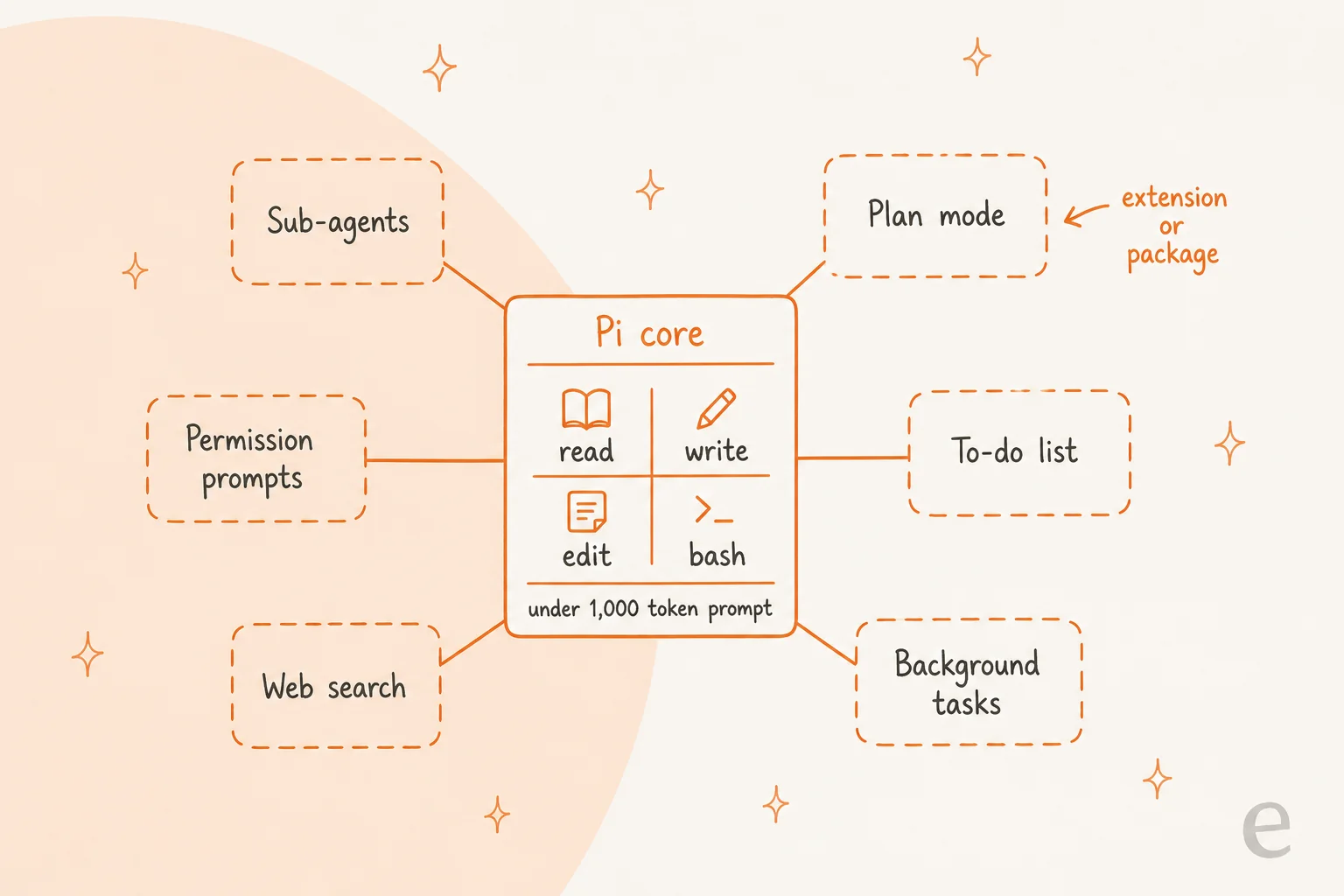
Mario's reasoning for the tiny core is that frontier models already know what a coding agent is. "There does not appear to be a need for 10,000 tokens of system prompt," he wrote, and "these four tools are all you need for an effective coding agent." Read-only helpers (grep, find, ls) exist but are off by default. Your project rules come from an AGENTS.md file (Pi also reads CLAUDE.md), much like the Claude Code AGENTS.md setup, and a SYSTEM.md can replace the default prompt entirely.
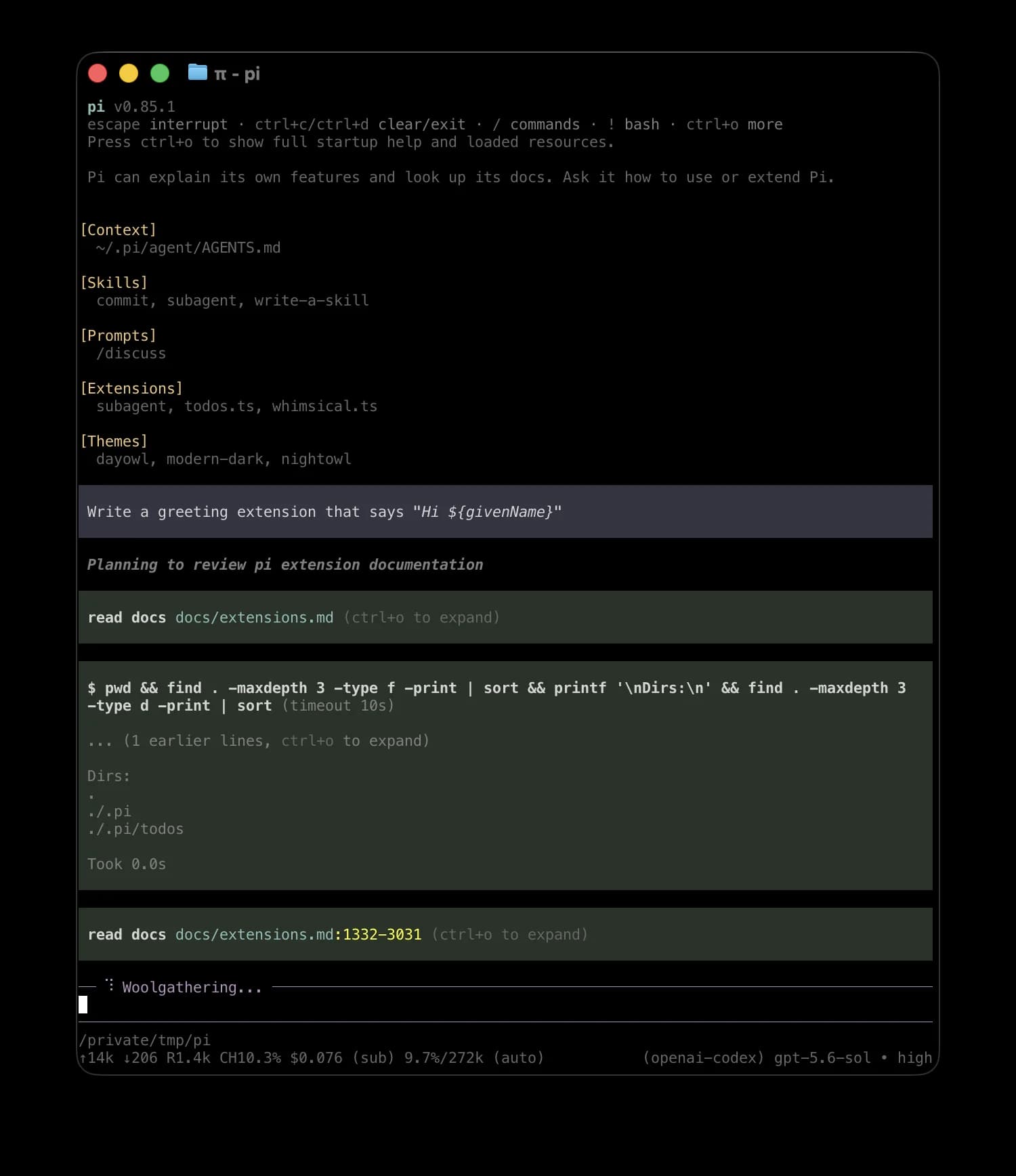
That screenshot shows the habit Pi users rave about. Ask Pi to add a feature to itself, and it reads its own docs, writes an extension into its config folder, and you run /reload. The footer also shows context used and cost in dollars on every turn, which is a small thing that changes how you work.
A few other mechanics are worth knowing before you install it:
- Sessions are trees. Every message is stored with a parent ID in a JSONL file, so
/treelets you jump back to any point and branch, and/forkor/clonestart a new session from there./shareturns a session into a shareable link. - Steering mid-run. Press
Enterwhile Pi works to send a steering message, orAlt+Enterto queue a follow-up for when it finishes. - Compaction. When context fills up (by default, within
16,384tokens of the limit), Pi summarizes older messages and keeps the latest20,000tokens intact. Earendil wrote up how compaction works if you want the internals. - 30+ providers. Anthropic, OpenAI, Google, Bedrock, Mistral, Groq, xAI, OpenRouter, Ollama and more, with
/modelto switch mid-session. Pi's model catalog lists1,541models across41providers.
What Pi leaves out on purpose
This is the part that trips up most first-time users, so here it is in one table. Each of these is a deliberate choice, and each has a documented workaround.
| Feature | Built into Pi? | How you get it |
|---|---|---|
| Sub-agents | No | pi-subagents package, the subagent/ example extension, or run pi --print from bash |
| Plan mode | No | plan-mode/ example extension, or a PLAN.md file |
| Permission prompts | No | permission-gate.ts example, or a package like @gotgenes/pi-permission-system |
| To-do list | No | A TODO.md file, or the rpiv-todo package |
| Web search | No | pi-web-access package |
| Background bash | No | Run long jobs in tmux |
| MCP | Yes, since 0.99.0 | Built in, through Codemode |
Mario's argument for leaving these out is about visibility. On subagents, from his design post: "You have zero visibility into what that sub-agent does. It's a black box within a black box." On plan mode, he'd rather have a PLAN.md file you can read, edit and commit. If you have used Claude Code subagents and liked them, you will want the package, and that is fine. Pi's pitch is that you choose.
The community has filled every slot. The package catalog shows 5,553 listed packages, and several of the most downloaded ones map straight onto the table above:
| Package | What it adds | Downloads/month |
|---|---|---|
| pi-mcp-adapter | MCP before it was built in | 1.5M |
| pi-web-access | Web search, URL fetch, PDF and YouTube | 603.4K |
| pi-subagents | Delegation and multi-agent workflows | 583.4K |
| @langfuse/pi-observability-plugin | Traces every turn and tool call | 293.3K |
| @juicesharp/rpiv-todo | A live to-do overlay | 207.6K |
| @gotgenes/pi-permission-system | Permission enforcement | 58K |
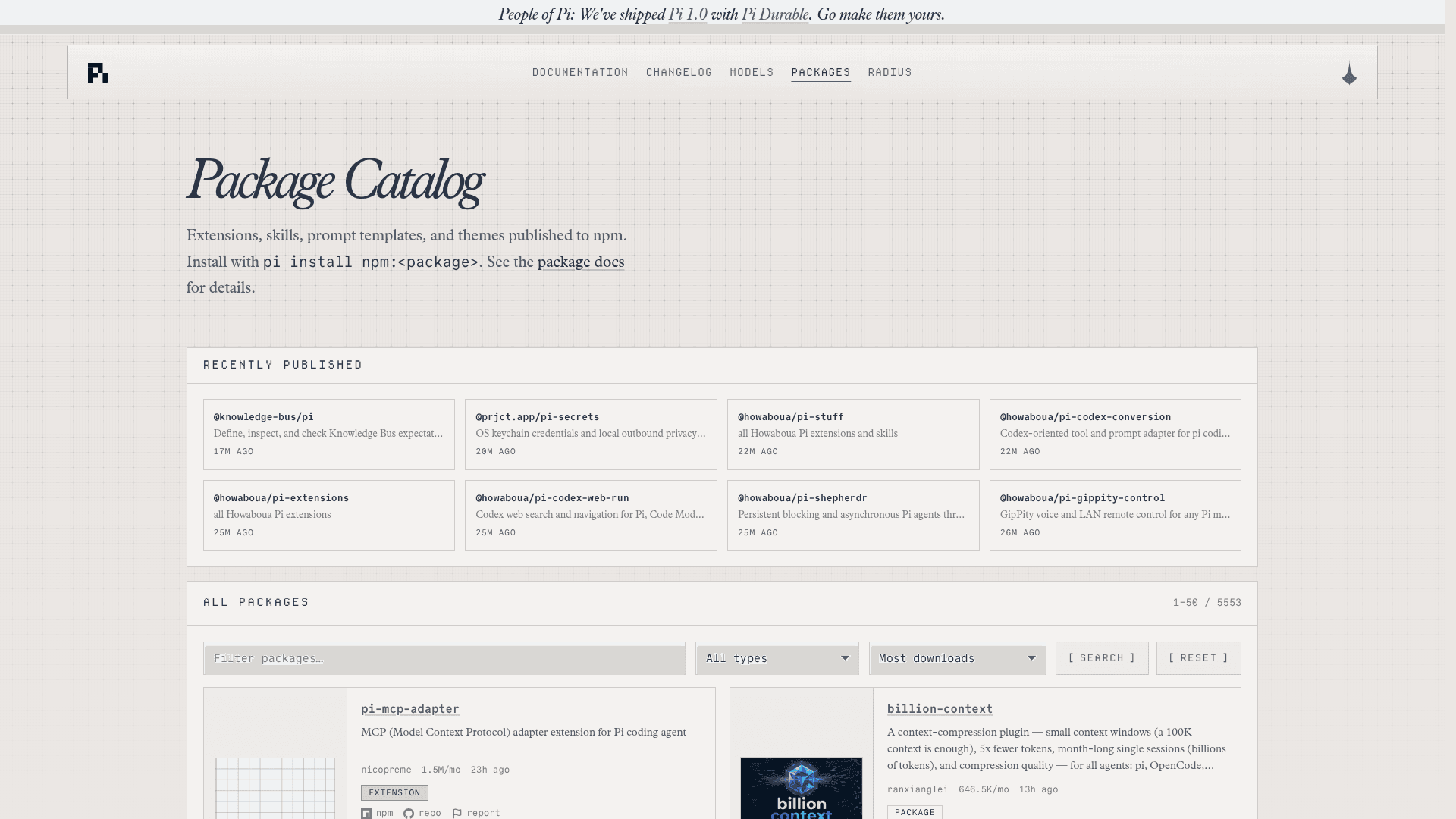
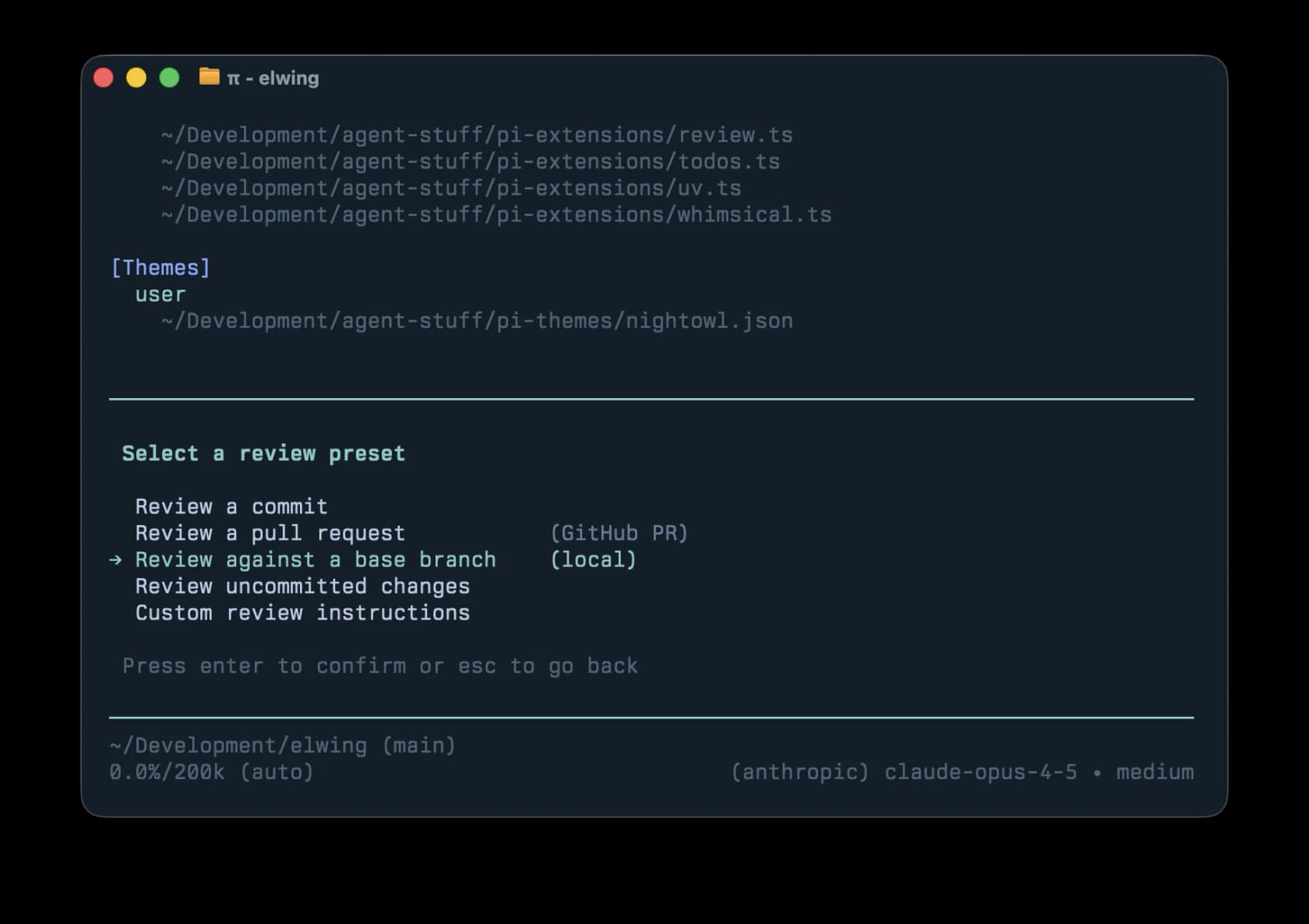
Extensions themselves are plain TypeScript files that can register tools, slash commands, keyboard shortcuts, model providers and full terminal UI. Armin's own review extension is a good example of how far that goes:
The trade-off is that you become the maintainer of your own setup. One long-time Pi user on Hacker News put it fairly: "Pi's plugins are its strength, but also its weakness, because most feel more like personal vibe-coding projects than seriously maintained tools." The docs say the same thing more soberly: packages can run code, so "review third-party package source before installing it."
Pi 1.0: the "no MCP" agent now has MCP
For most of its life, pi.dev carried a proud line saying Pi would never support MCP, the protocol that lets an agent plug into an outside MCP server. Mario's case was about context cost. He measured the Playwright MCP server at 21 tools and 13.7k tokens, and Chrome DevTools MCP at 26 tools and 18k tokens, which he called "7-9% of your context window gone before you even start working."
On September 29, 2026, Earendil reversed that in a post titled "You Said No MCP!" Their reasoning: "the MCP of today is not the MCP of yesteryear," and the changes MCP needed "were generally useful." Two days later Pi 1.0 shipped with it as a headline feature. The homepage now reads "No MCP Now with MCP+Codemode."
The trick that keeps the token promise is Codemode. Instead of handing the model every MCP tool's schema, Pi gives it one tool that runs short JavaScript scripts in a QuickJS sandbox with no file system, network or timers of its own.
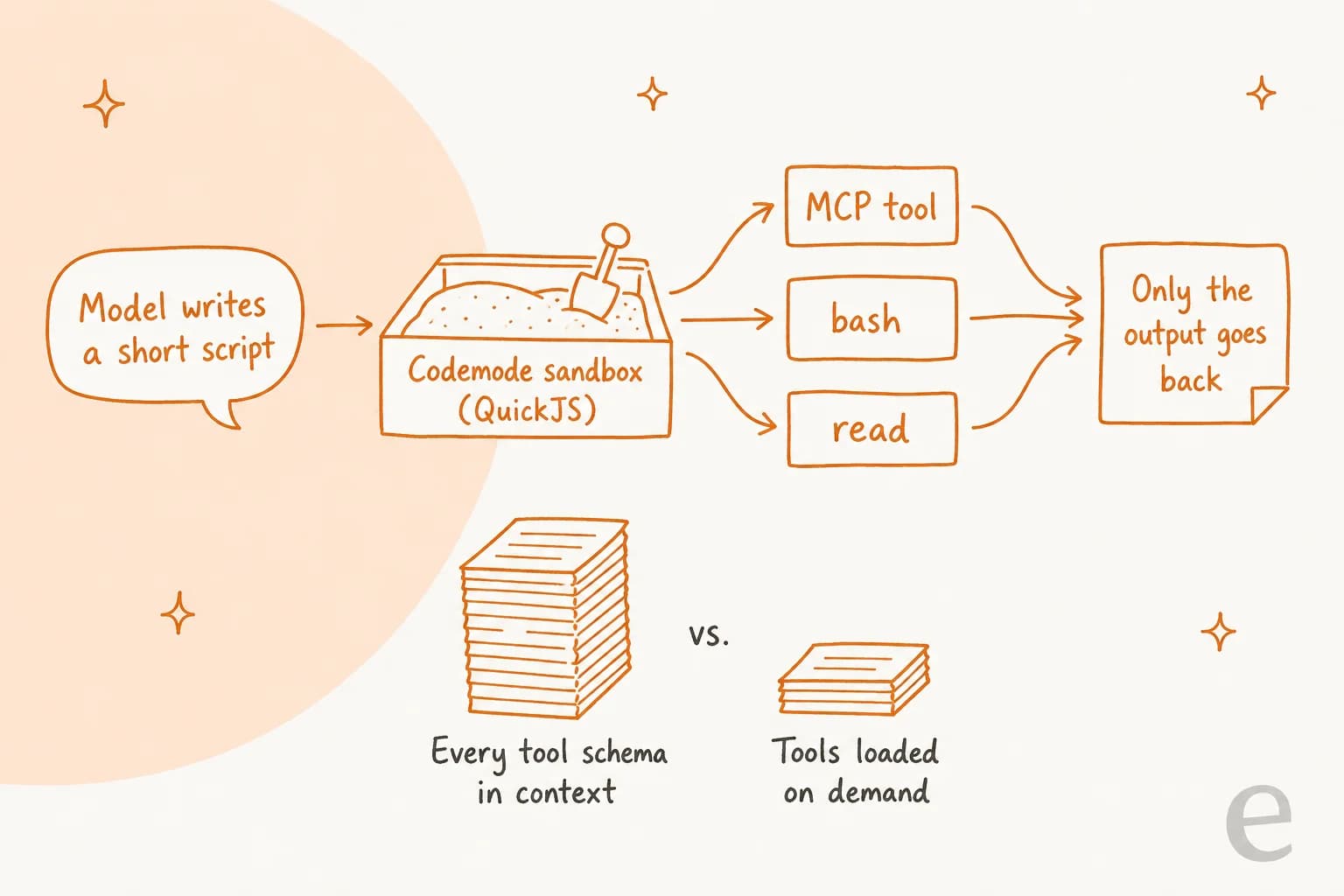
The Codemode docs put it simply: "Only the script's output reaches the model, so a script can run calls in parallel and filter large results before the model sees them." Pi 1.0's changelog claims Codemode now uses about 40% fewer prompt tokens, with one GPT-5.6 request dropping from about 5,300 to 3,300 tokens. Each MCP server gets an exposure setting:
codemode(default): tools are callable only from Codemode scripts.deferred: tools are declared only after atool_searchfinds them.direct: tools load like built-in tools, the way most harnesses do it.hidden: registered but unreachable, handy fordelete_*style tools.
Config lives in ~/.pi/agent/mcp.json or a project's .pi/mcp.json, in the same mcpServers format as Claude Desktop and Cursor, so you can paste existing entries. If you are coming from Claude Code's MCP tools, the main mental shift is that the model writes code to call tools rather than calling them one by one.
Was this a betrayal of the minimalists? Mario's reply on Hacker News: "All of these features are still entirely optional and the only thing I could think of that could be considered "bloat" is the additional few megabytes for the QuickJS WASM blob." Armin's explanation was more pragmatic:
"we look at what the models are doing. They are trained on their respective harnesses and we're not here to fight their behavior."

Pi 1.0 also added deferred tool loading, cache warming for Anthropic models, extension support for "virtual models" (one demo plans with Claude Opus and implements with GPT), and made full-screen mode the default. The Pi 1.0 thread hit 1,686 points on Hacker News, about three times any earlier Pi discussion.
Four ways to run it
Pi is not only a chat window in your terminal. The same agent and session engine runs in four modes:
| Mode | How | Good for |
|---|---|---|
| Interactive | pi | Day-to-day coding in the terminal |
| Print / JSON | pi -p "query" or --mode json | Scripts, CI, piping, e.g. git diff | pi --print "Review this change" |
| RPC | --mode rpc | Driving Pi from other languages or an IDE over stdin/stdout |
| SDK | createAgentSession() from the npm package | Embedding Pi inside your own Node or Bun app |
The SDK is how OpenClaw and other products build on Pi, and it is the same idea as the Claude Code SDK for custom coding agents. Print mode is the quiet star: it is how Pi users fake subagents (Pi calls pi --print through bash) and how they wire Pi into Claude Code-style automation.
On October 1, Earendil also shipped Pi Durable, an experimental, MIT-licensed library for "long-running, durable, and malleable agents that can run anywhere." It checkpoints every step so a run survives a crash, lets many people attach to one conversation, and stores app state like tickets or plans alongside the transcript. It "does not replace the Pi coding agent", and it is not a hosted product. Its example approval hook asks in Slack before a deploy tool runs, and Earendil says a Slack bot and a GitHub triage bot built on it are coming. Keep that in mind for the support section below.
Is the Pi coding agent safe to use?
Here is the line from Pi's own security docs, which I would read twice: Pi "can read, change, and execute files with the permissions of the account that started it, and it does not ask for approval before every tool call."
That is the famous YOLO default, and it is a stance, not an oversight. Mario called other agents' guardrails "mostly security theater" in his design post, arguing that once an agent can write and run code, a confirmation dialog doesn't buy much. The docs agree, adding that "watching the transcript, using project trust, and reviewing changes do not create a security boundary." Their recommendation is to run Pi inside a container, a VM or a sandbox, and they document recipes for Docker, Docker Sandboxes, NVIDIA OpenShell and the Gondolin micro-VM.
New users still get surprised:
"I love Pi, but minimal mean minimal. I realized it when it
rm -f /tmp/somefile.logwithout asking for permission."

And the DIY fix has gaps. Another commenter on the same thread pointed out that the example permission extension "blocks rm -rf, but not rm -fr which does the exact same thing" (u/GalladeGuyGBA). That is the honest truth about pattern-matching guardrails, and it is exactly why Pi's docs push you toward a real sandbox instead.
Three more defaults worth knowing:
- Project trust. Project-level config (
.pi/settings.json,.pi/mcp.json, project extensions and skills) only loads after you approve the folder.AGENTS.mdandCLAUDE.mdload regardless. - Telemetry. Anonymous install and update reporting is on by default (
enableInstallTelemetry: true); turn it off withPI_TELEMETRY=0. Analytics are opt-in.--offlinestops automatic network calls. - Supply chain. Pi installs through npm, and so do its packages. One Reddit user said their work VM got compromised when a transitive dependency was hijacked during a
npm i -gupdate window of about 30 minutes. The README now recommends the pinnedpi.dev/install.shinstaller, which pins all dependencies.
My take: run Pi in a container for anything unattended, install packages the way you'd install any npm code, and keep your permission expectations at zero. If your team needs approval prompts by default, Claude Code's permissions model will feel safer out of the box.
What does the Pi coding agent cost?
Pi itself is free. There is no seat price, no paid tier and no pricing page, because the MIT-licensed harness is the whole product. What you pay for is the model behind it, and Pi gives you three ways to bring one.
| Way to connect | What you pay | Notes |
|---|---|---|
| Subscription login | Your existing plan | Claude Pro/Max, ChatGPT (Plus/Pro or Sign in with ChatGPT), GitHub Copilot, Kimi Code, Meta Muse, xAI |
| API key | Provider's per-token price | 30+ providers, e.g. Claude Opus 5.5 at $4 / $20 per million tokens on pi.dev/models |
| Local model | $0 in API fees | llama.cpp via /llama, or Ollama, LM Studio and vLLM via models.json |
| Radius (Earendil) | Prepaid credits, usage-billed | Early-alpha gateway; per-token prices match the providers' list prices, no plan price published |
Two catches. First, the Pi changelog says Pi warns that "Anthropic third-party usage draws from extra usage and is billed per token" when you log in with a Claude subscription, so don't assume your Max plan covers Pi the way it covers Claude Code. My Claude Code pricing guide explains how those plans meter. Second, Google's Gemini CLI and Antigravity logins were removed in version 0.71.0 (April 30, 2026), so Gemini now needs an API key or Vertex AI.
Where Pi earns its keep is token efficiency. Because the system prompt is so small, prompt caching works well and each turn sends less. A Databricks benchmark on a multi-million-line codebase, written up by Earendil, found that "simple harnesses like Pi performed best" on its workloads, with Pi sending about three times less context per turn.
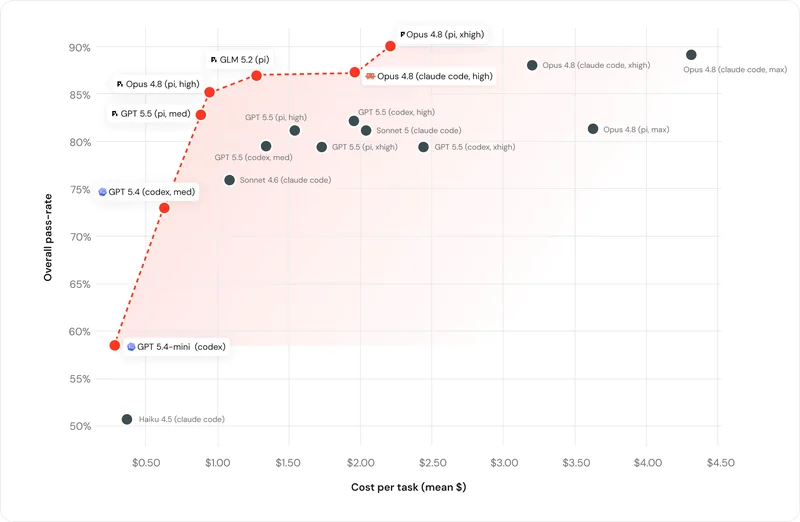
Treat that as a vendor-adjacent data point, not gospel; Earendil is quoting a study that favours its product. But individual users report the same direction. One Hacker News commenter ran token tests and found "both pi and my own 3code used 4x fewer tokens than Claude Code, while opencode used 2x fewer tokens than Claude Code." Another said whole profiling and refactoring sessions finish "in <20k tokens." On the older Terminal-Bench 2.0 leaderboard (December 2025), Pi with Claude Opus 4.5 ranked #7 at 49.8%, ahead of Claude Code with Sonnet 4.5 at #18 and 40.1%.
What developers say about Pi
The praise is consistent across platforms: a small prompt, low token use, transparency, and an agent you can bend. The strongest single endorsement comes from X:
"Pi is the best agent harness and more importantly framework we have right now. The stats are stunning: - highest cache hit rate - lowest latency - highest performance - smallest bundle - cleanest code - cheapest cache + tiny system prompt over months adds up. Try it"
Local-model users like it for a reason that's easy to miss. A huge system prompt takes minutes to prefill on a laptop, and Pi's doesn't:
"Love pi. I tried to run some local models and pi was the only one that actually worked decently because it didn't have a gargantuan system prompt that would take minutes to prefill on my scrawny ass laptop."
Others love that it stays out of the way while vendors keep changing their tools:
"The result is that the tool gradually morphs into the thing I need rather than me having to adapt myself to whatever new thing Anthropic or OpenAI comes up with."
The criticism is just as consistent, and it is fair. The most common complaint is that "everything is a plugin" means doing setup work other agents do for you:
"Need to set the reasoning effort? Install pi-reasoning. Need subagents? Install pi-subagents. Need permission gating? Install one of the permission extensions (otherwise the agent can do everything)."
The best one-line summary I found came from a thread comparing Pi to OpenCode: "Pi vs opencode for example is like gentoo vs macos." On Reddit, the advice to newcomers is to resist installing everything on day one. As one r/PiCodingAgent user put it: "Pi actually works pretty well out of the box." People who want batteries included tend to get pointed at the oh-my-pi fork or OpenCode instead.
Pi coding agent vs Claude Code
Since most people arrive at Pi from Claude Code, here is the side-by-side on the things that actually change your day.
| Pi | Claude Code | |
|---|---|---|
| License | MIT, open source | Proprietary, Anthropic |
| Models | 30+ providers, local models, subscriptions | Anthropic's Claude models |
| Default tools | 4 (read, write, edit, bash) | Larger built-in tool set |
| System prompt + tools | Under 1,000 tokens | Larger, and it changes between releases |
| Asks before risky actions | No, run it in a container | Yes, permission modes |
| Subagents and plan mode | Extensions or packages | Built in |
| MCP | Built in since 0.99.0, via Codemode | Built in |
| Extending it | TypeScript extensions, Pi packages | Plugins, skills, hooks |
| Price of the tool | $0 | Included with Claude plans, see pricing |
My read: if you mostly use Claude models and want guardrails, a stable feature set and one vendor to blame, stay on Claude Code. If you switch models often, care about tokens, run local models, or want to own every line of what the agent sees, Pi is the more interesting tool, and its 1.0 release made it a lot easier to adopt. For a wider field that includes Cursor and GitHub Copilot, my roundup of AI coding assistants is the place to start.
Should you build a support agent on Pi?
It is a reasonable thought. Pi has an SDK, an RPC mode and now Pi Durable, whose own examples talk about Slack bots, approval hooks and triage bots. The models are cheaper than ever. Why not wire Pi to your helpdesk and call it a support agent?
Because the harness is the smaller part of the job. Here is the split as I see it:
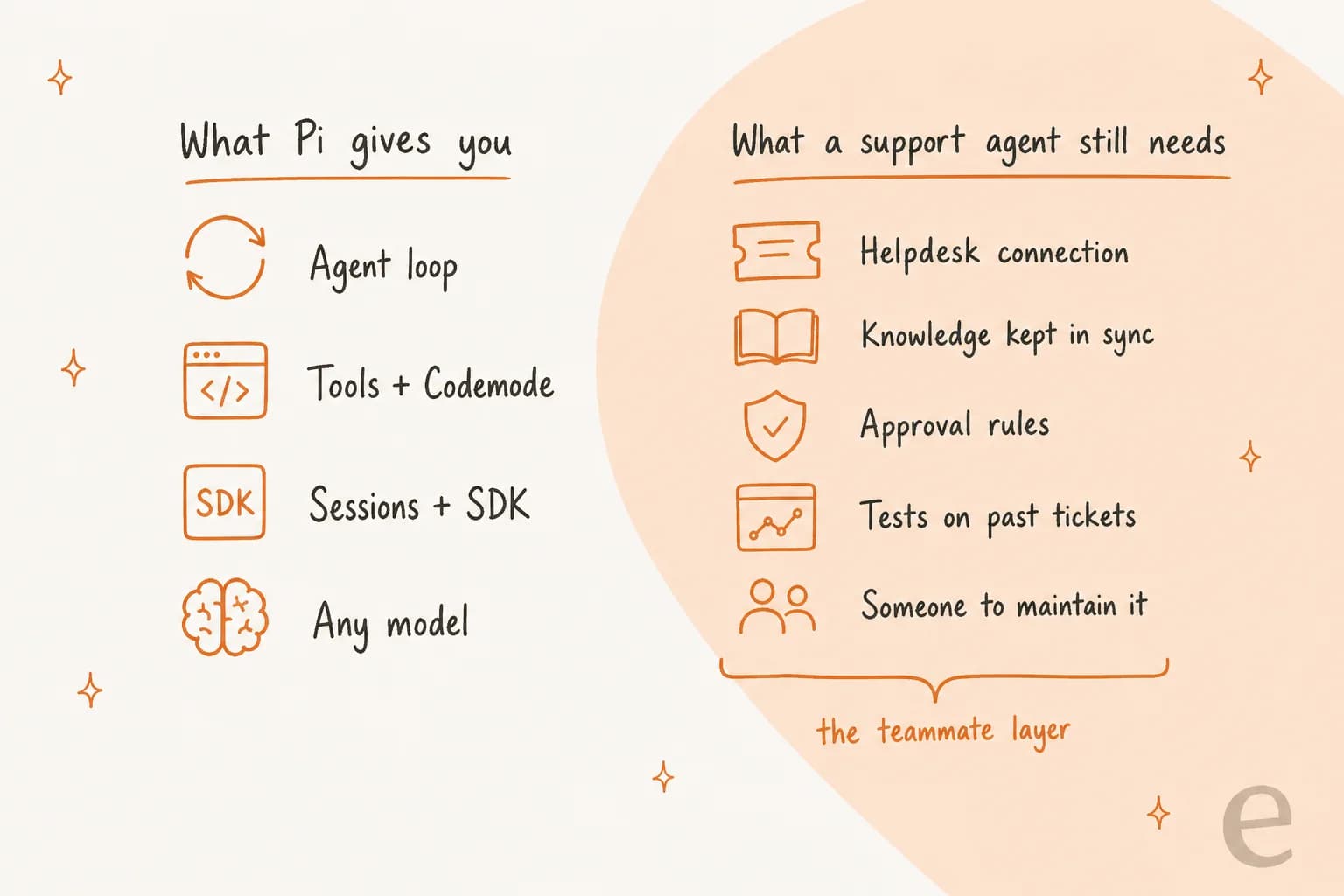
A support agent needs a two-way connection to your helpdesk (read the ticket, tag it, reply, escalate), a way to keep your help center, macros and past tickets in sync as they change, rules about what it can do without a human, and a way to test it on real past tickets before it talks to a customer. That last step is the one I would never skip. eesel learned it the hard way, by watching a confident-sounding bot give wrong answers for days before anyone noticed, which is why every eesel rollout is now simulated against historical tickets first.
I see the build-it-yourself pull from the other side too. Several eesel customers, including an AR and construction-tech firm and a DTC beauty brand, have left to build directly on the Claude API. And the teams who stay often say the same thing. An engineering lead at GENERAL BYTES, the Bitcoin ATM maker, explained why they chose to buy instead:
"We could try to write our own LLM application but we didn't want to invest our time into that. We wanted something that we would not have to maintain."
So my answer: build on Pi if your team enjoys owning the whole stack and has the time to keep up with a project that ships patch releases most days. If the goal is tickets answered rather than a framework to maintain, hire the teammate and let Pi do what it is great at, which is writing code.
Try eesel
Pi is the harness; eesel is the employee. eesel is an AI teammate platform where you hire ready-to-work teammates for specific jobs. For support, that is the AI helpdesk teammate: it plugs into Zendesk, Freshdesk, Gorgias and Slack in minutes, learns from your past tickets and help center, and you can simulate it on your own ticket history before it answers a single customer. If what you need is content rather than tickets, the same platform has an AI blog writer teammate.
The part Pi users will like: you don't have to leave the terminal. The eesel CLI operates the same teammate and workspace as the dashboard, "another way in, not a separate copy." npx @eesel/cli init sets up an agent with no account needed, eesel integrations connect zendesk hooks up your helpdesk (a person approves it inside Zendesk), eesel instructions edits the agent's standing rules in plain text, eesel approvals list shows actions waiting for a human, and eesel activity lets you read every run. Every command prints JSON and supports --dry-run, and errors come back with a hint field, which is exactly what a coding agent needs to drive a tool on its own.
eesel's docs name Claude Code, Cursor and Codex, but nothing stops Pi from doing the same job: it can run the CLI through its bash tool, or connect to the MCP server every eesel workspace exposes (eesel mcp token prints the URL and a 30-day token) now that Pi 1.0 speaks MCP. Headless setups use EESEL_API_URL, EESEL_API_TOKEN and EESEL_AGENT_ID. My guides to an AI agent CLI and a CLI for customer support go deeper.

You can start on the free plan with 100 credits and no card. Paid teammate plans start at $299 a month for 500 credits, and one ticket or chat is one credit however long it runs. The setup and observe commands in the CLI are free; only chat is billed. That is the shorter path if you want resolved tickets, and you can still let Pi do the typing.
Frequently Asked Questions
What is the Pi coding agent?
Pi is a minimal, open-source coding agent that runs in your terminal. It ships with four tools (read, write, edit and bash), a system prompt under 1,000 tokens, and an extension system for everything else. It was created by Mario Zechner and is now maintained by Earendil, the company behind it since April 2026. It sits in the same family as Claude Code and OpenAI Codex.
Is the Pi coding agent free?
Yes. Pi is MIT licensed and has no paid tier. You pay for the model you connect, either through an API key or a subscription login such as Claude Pro/Max, ChatGPT or GitHub Copilot. Pi warns that Claude subscription use through a third-party tool is billed per token as extra usage, so check my Claude Pro pricing breakdown before you rely on it.
How do I install Pi?
On macOS or Linux run curl -fsSL https://pi.dev/install.sh | sh, then cd into a project, run pi and use /login to connect a model. You can also install the npm package @earendil-works/pi-coding-agent, which needs Node.js 22.19 or newer. If you already live in the terminal, my guide to managing AI agents from the terminal covers the wider pattern.
Does the Pi coding agent support MCP?
It does now. Pi famously refused MCP at launch, but version 0.99.0 (September 29, 2026) added it, and Pi 1.0 made it a headline feature. By default, MCP tools are reached through Codemode, a sandboxed JavaScript tool, instead of being loaded into every request. See my explainer on the MCP server model if the protocol is new to you.
Is Pi safe to run on my machine?
Pi runs with your account's permissions and does not ask before each tool call. Its own docs recommend a container or sandbox for untrusted or unattended work, and say that watching the transcript is not a security boundary. Permission prompts exist only as extensions. Compare that with Claude Code permissions, which ask by default.
Pi coding agent vs Claude Code: which should I use?
Pick Pi if you want a small, model-agnostic harness you can reshape, and you are happy to add subagents, plan mode or permission prompts yourself. Pick Claude Code if you want those features built in and supported by Anthropic. Many Pi users report lower token use, so my Claude Code pricing guide is worth a read when you compare costs.
Can I build a customer support agent on the Pi coding agent?
You can, using the Pi SDK or the new Pi Durable library, but you would also need to build the helpdesk connection, knowledge sync, approval rules and testing yourself. If the goal is answered tickets rather than a framework to maintain, an AI teammate like eesel's helpdesk teammate arrives with those pieces, and Pi can still drive it through the eesel CLI.



Article by
Rama Adi
Rama is a software engineer at eesel AI with two years of experience writing about B2B SaaS, AI tools, and customer support technology. Based in Bali, Indonesia, he brings a developer's perspective to product comparisons — cutting through marketing copy to what the integrations and APIs actually do.