
Why I went looking at the API docs first
I build integrations for a living, which means I have read a lot of pricing pages that quietly leave out the number that matters. So when I opened Fleece AI and saw three plans denominated in "credits" with no definition of a credit anywhere on the page, I did what I always do: I went and read the API reference instead.
That is where the rate was. One line, on the execute endpoint, and nowhere else on the site.
I have been building AI agents for live support queues at eesel for years, and the thing I have watched go wrong most often is not the model. It is the meter. When eesel was naming its own billable unit, I watched three get tried and thrown away. "Interaction" was ambiguous. "Resolution" was unclear. And "credit" forced the customer to do maths, which is exactly the failure mode this post is about. The ticket won because a ticket is a thing a support manager can already count.
So this is not a hit piece on Fleece. It is the teardown I wish someone had handed me, from someone who has made the same pricing mistake and fixed it.
Fleece AI pricing at a glance
Fleece bills in euros. The site renders dollars by default with a footnote reading "Prices shown in USD are approximate. You will be charged in EUR." Quote the euro figure to your finance team, because the dollar one moves with the exchange rate.
| Starter | Pro | Business | Enterprise | |
|---|---|---|---|---|
| Monthly | €49 | €99 | €199 | Custom |
| Yearly (per month) | €39 | €79 | €159 | Custom |
| Credits / month | 2,000 | 8,000 | 20,000 | Unlimited |
| Active agents | 5 | 10 | 25 | Custom |
| Active flows | 10 | 25 | 50 | Custom |
| Integrations | 20+ | 1,000+ | 3,000+ | Unlimited |
| Models | Kimi K3, GPT-5.2, GPT-5.6 Luna, Mistral Medium 3.5 | Adds GPT-5.6 Terra | Adds GPT-5.6 Sol, Claude Opus 4.7 / 4.8 | Claude Fable 5, GPT-5.6 Sol |
| Execution history | 30 days | 60 days | 90 days | 365 days |
| API access | None | REST, 5 keys | REST, 10 keys | Inherits Business |
| Webhook triggers | None | 10 | 50 | Inherits Business |
| Scheduled agents | None | 10 | Inherits Pro | Inherits Pro |
| Self-improvement | None | Proposals to review | Auto-apply | Inherits Business |
| Support SLA | Priority, 4h | Dedicated, 1h | Custom SLA | |
| Setup Express (€89) | Paid add-on | Paid add-on | Included | Included |
| SSO and SAML | No | No | No | Yes |
| SOC 2 Type II | No | No | No | In progress |
| Seat charge | None | None | None | Bulk licensing |
| Trial | 4 days, 1,000 credits | None | None | n/a |
Every figure above comes from the Fleece AI subscribe page and its own limits table in the platform docs.
Two structural notes before the details. There is no per-seat charge below Enterprise, which is generous and unusual in this category. And Fleece's own page schema still describes the product as "Public beta", which is a fair thing to know before you put an autonomous agent on your invoicing.
What a Fleece AI credit actually is
The subscribe page says "2,000 credits/month" and stops there. No definition, no worked example, no per-model note.
The word "credit" is only what marketing calls it. Log in and the same number is labelled differently: the app's own interface strings render the meter as "Executions", with messages like "You've run out of executions" and "Executions remaining". The Enterprise plan lists its benefit as "Unlimited executions", and every retention row is denominated in "execution history".
So a credit is one run of one agent or flow. Not a token, not a message, not a resolved outcome. If you want the vocabulary for the alternatives, the eesel glossary covers outcome-based pricing and how it differs from a consumption pool.
The 10x multiplier nobody mentions
Here is the line that changes the arithmetic, from the POST /agents/{agentId}/execute endpoint in the Fleece API reference, repeated byte for byte in their OpenAPI spec:
"Consumes credits based on the model used (1 credit for GPT-5.2, 10 for Claude Opus 4.7)."
That is the entire published rate card for credit consumption. It appears on one endpoint, in the developer docs, and on no marketing page at all.
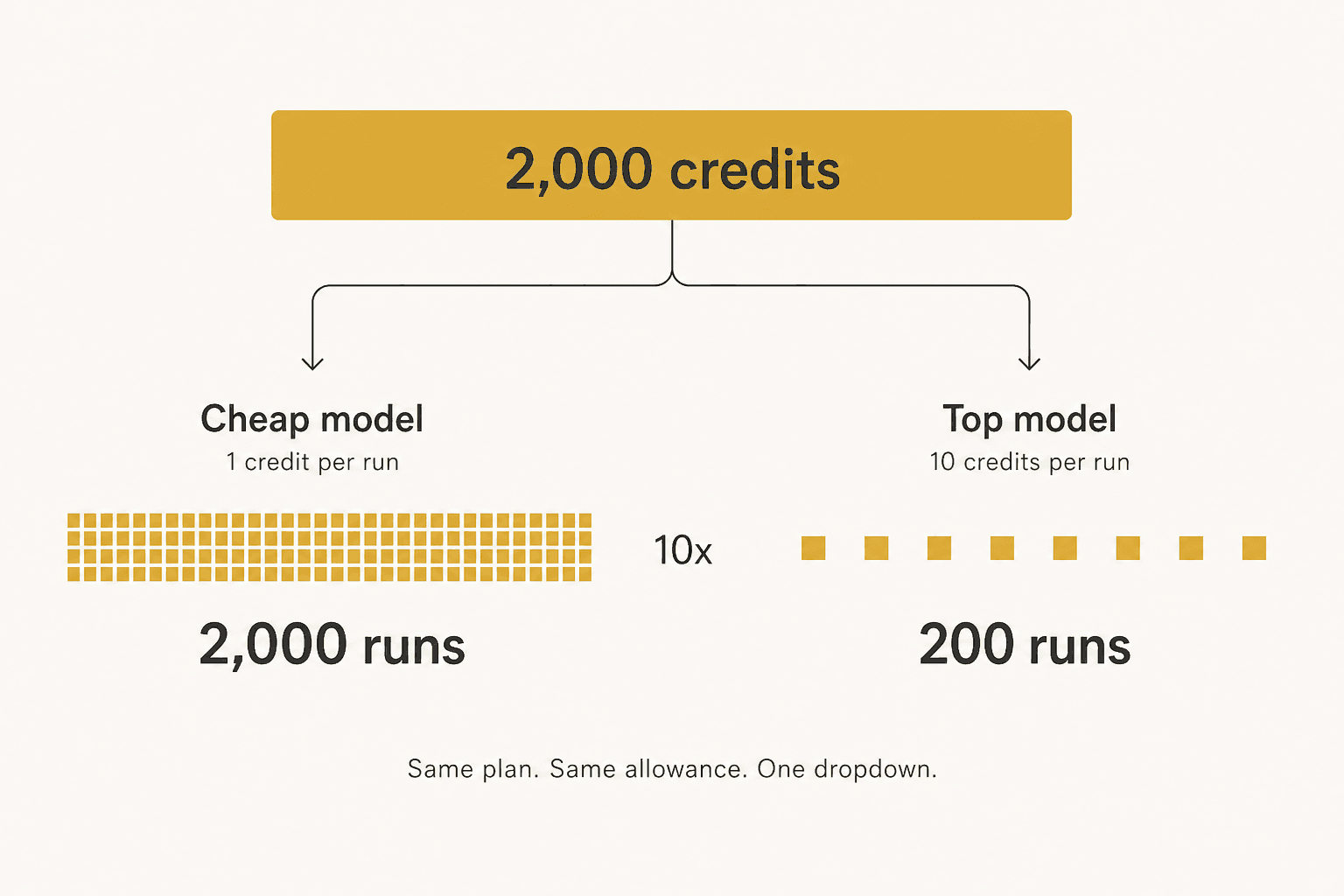
Fleece names nine models across its plans. Two of them have a published rate. The other seven, including both of the models a Starter customer is actually given (Kimi K3 and Mistral Medium 3.5), have none. A Starter buyer therefore cannot calculate what 2,000 credits buys them, even in principle, from anything Fleece publishes.
To be fair to Fleece, there is a logic here: the expensive model is gated to the expensive plan. Claude Opus 4.7, the 10-credit one, is Business-only. Starter users cannot accidentally spend at the top rate because they cannot reach it. That is a sensible guardrail. It just does not help the Business buyer at €199, whose 20,000 credits are 20,000 runs or 2,000 runs depending on which model each agent is set to, with no published way to tell in advance. My explainer on the LLM token covers why the underlying cost varies so much between models in the first place.
One more gap worth knowing if you plan to watch this closely: the Fleece API is read and execute only. There is no endpoint that returns your credit balance. You cannot programmatically monitor the meter that pauses your agents.
Work out what you would actually pay
Rather than make you do the arithmetic, here it is. Set your monthly run volume, pick which kind of model your agents will use, and say how many agents and flows you need running at once. The calculator picks the cheapest plan that clears all three ceilings and adds top-up packs if your volume overshoots.
Three meters, and the one you will actually hit
Most people read the Fleece plan cards top down and anchor on the credit number, because it is the biggest and it has a comma in it. In practice it is rarely the number that decides your bill.
Each plan caps three things independently: credits, active agents, active flows. Starter gives you 2,000 credits but only 5 agents and 10 flows. If you build the sort of thing Fleece is marketed for, a handful of small specialists each minding one job, you run out of agent slots at roughly the point you have automated your inbox, your invoices, your CRM hygiene, your weekly report and one more thing. That is five. You will not be anywhere near 2,000 executions.
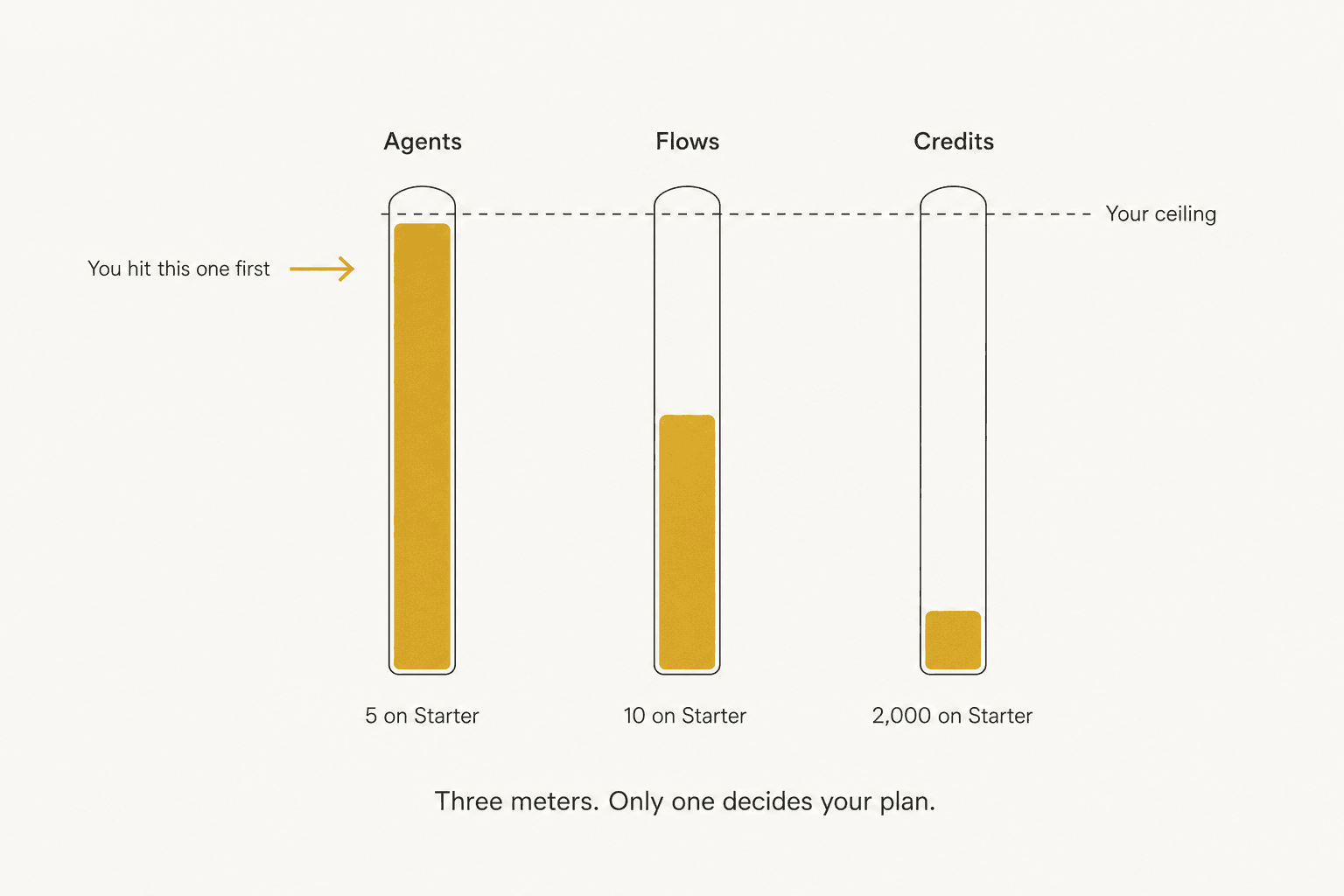
The €49 to €99 jump is therefore usually an agent-slot purchase dressed up as a credit purchase. Which is fine, as long as you size the plan on slots rather than on the comma-separated number. This pattern is not unique to Fleece, and I saw the same stacked-meter shape pulling apart Featurebase pricing and Relevance AI pricing, where two parallel meters run at once.
There is a fourth ceiling that is easy to miss: concurrency. A flow returns 409 Flow is already running if you trigger it while the previous run is still going, and API calls are capped at 10 agent executions a minute and 5 flow triggers a minute. Fine for scheduled back-office work. Awkward if you were planning to fan a queue at it.
The add-ons, and the strange thing about top-up packs
Three things sit outside the subscription.
Setup Express, €89 one-time. A 30-minute video call where the team configures your first agents with you. It is included on Business and Enterprise, and charged to Starter and Pro. Labelled optional, and it reads as optional rather than a disguised onboarding fee.
Top-up credit packs. €5 for 1,000, €20 for 5,000, €50 for 15,000, €150 for 50,000.
The skills marketplace. Paid skills at €2, €5 or €15 one-time with a 14-day money-back guarantee, creators keeping 80% of each sale. Worth noting that the marketplace's own listings show skills at €19 and €12, prices outside the three tiers the page describes, so the tier list looks like it has drifted from the shelf.
Now the strange bit. Divide each plan by its credits and you get what an included credit costs you: €0.0245 on Starter, €0.0124 on Pro, €0.00995 on Business. Then look at the top-up shelf, where the biggest pack works out at €0.003 a credit.
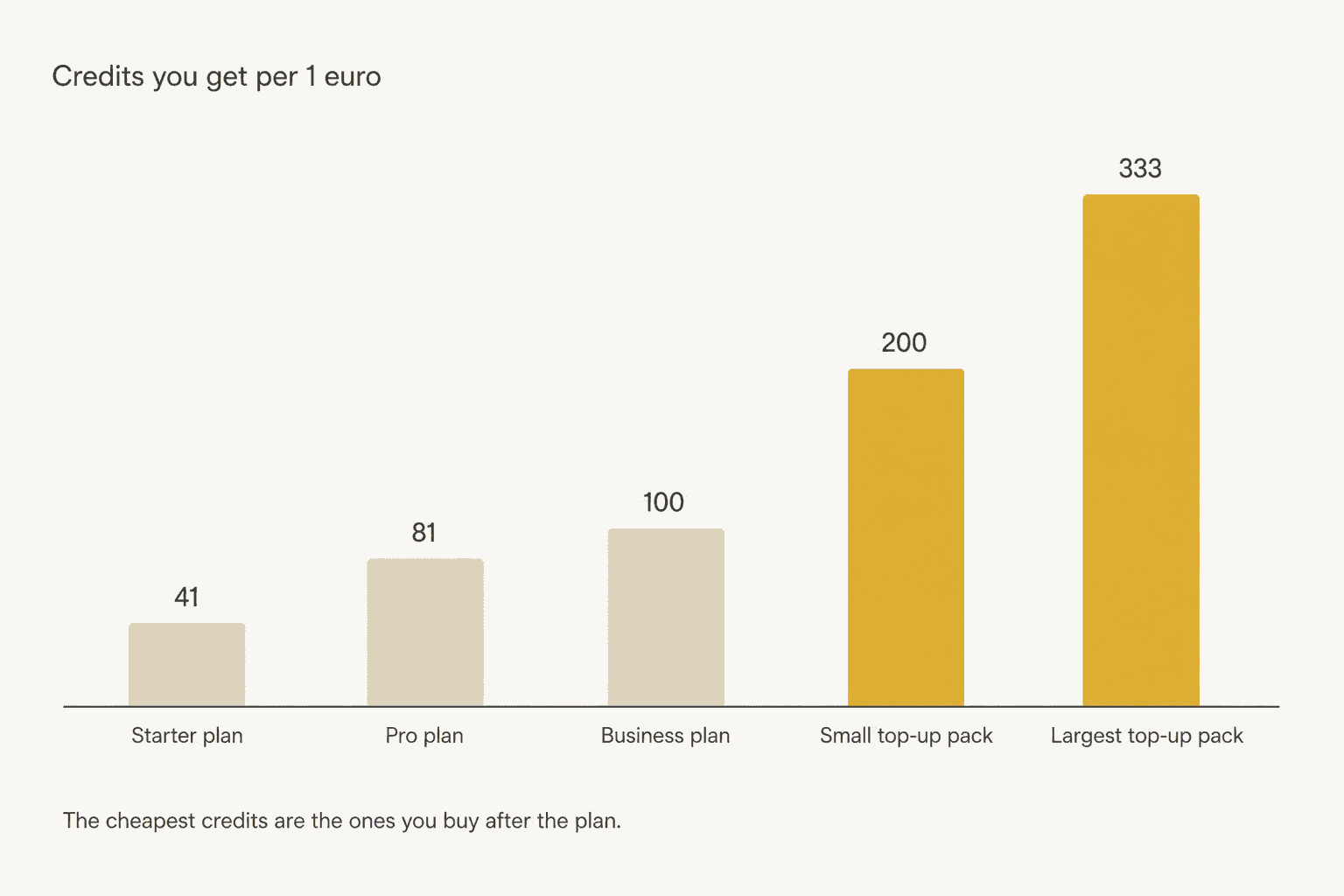
Credits bought à la carte are cheaper per credit than the credits in every plan, by roughly eight times at the Starter end. That is the opposite of how bundled allowances usually work, and it is the clearest evidence for the point above: the subscription is not selling you executions. It is selling you agent slots, flow slots, integration access, model access and an SLA, with a credit allowance attached that is almost incidental to the price.
That reframes the buying decision entirely. Buy the cheapest plan whose slots and integrations you need, and treat credits as a cheap consumable you top up. Fleece even supports automatic top-ups at the same pack price with no markup, and lets you set a monthly euro cap on them, which is a good piece of design.
The arithmetic in this section is mine, derived from Fleece's published numbers rather than printed by Fleece. It also lines up with their partner programme, which pays referral commission in credits at a conversion of 100 credits per €1, close to the Business plan's own rate.
What happens when you hit the ceiling
From the pricing FAQ:
"When you reach your monthly credit limit, your agents and flows will pause until the next billing cycle. You will not be charged overage fees."
Read that twice, because it cuts both ways. No surprise invoice is a real benefit, and a lot of buyers have been burned by the opposite. Anyone who has watched a credit meter empty faster than they modelled knows the feeling:
"A single complex agent request (stand up a Django project's boilerplate) seemed to consume all 24 credits allotted in the trial."

That thread is about a different vendor, but it is the exact failure mode a fixed credit pool creates, and it is why the no-overage promise sounds appealing.
The other side is that a paused agent is an outage. If the agent handling your refunds stops on the 24th of the month, nothing is charged and nothing is done either, and you find out from a customer. Plan credits do not roll over, so a light month buys you no cushion for a heavy one. Only purchased bonus credits persist, and they are spent last by design.
For internal work that can wait five days, pausing is the right default. For anything customer-facing it is the wrong one, and the mitigation is to set up automatic top-ups before you need them rather than after. If you want the wider argument about what to do when an autonomous run stops mid-flight, my piece on agent handoff covers it.
Five things the pricing page does not flag
1. Every helpdesk connector is a Pro feature. The Support category on the integrations page holds exactly three apps, Zendesk among them, and all three are gated to Pro. Freshdesk is a second. Starter's "20+ essential integrations" contains none of them. If a helpdesk is your reason for buying, your entry price is €99, not €49. Same for the CRM connectors, and for the API, which Starter does not get at all.
2. The 3,000+ integrations are Pipedream's. The page says so plainly, and every logo on it is served from Pipedream's asset host with Pipedream's own slugs. This is a sensible engineering decision rather than a knock, and it is worth knowing that new connectors "arrive weekly as the Pipedream catalog expands", so the roadmap belongs to the layer underneath. It also puts the headline number in context: Fleece's own comparison table concedes Zapier sits at 7,000+.
3. There is no way to rehearse an agent. No sandbox, no dry run, no replay against your own past work. Pro's "sandboxed code execution" is code isolation, not rehearsal. What Fleece offers instead is control at run time: an "Always Ask" approval mode that pauses before each execution, plus one-click rollback and a full audit trail. That is a real and well-built safety story, and for an agent tidying a spreadsheet it is enough. For an agent that emails customers, approving every run one at a time is not automation, it is a slower inbox. The human in the loop trade-off is the whole design question here.
4. Compliance is mostly self-asserted, and the data sits in the US. The Trust Center badges GDPR, CCPA and the EU AI Act as "Compliant", which are statements Fleece makes about itself with no auditor named. SOC 2 Type II reads "In Progress" and ISO 27001:2022 reads "Planned". There is no HIPAA, no published penetration test and no uptime SLA. Despite euro pricing and EU AI Act framing, the primary database is AWS us-east-1 under standard contractual clauses, and the terms are governed by Delaware law. The one genuine EU processor is Mistral, listed on the subprocessors page alongside OpenAI, Anthropic and Modal Labs, the last of which hosts their self-run Kimi K3 endpoint and is the only entry whose DPA is still marked pending.
5. Nobody independent has reviewed it. Fleece's G2 profile is live and reads "0/5 (0)" with the note that there are not enough reviews to provide buying insight. Capterra shows 0.0 from 0 reviews. There is no Trustpilot listing, no Product Hunt page, no Hacker News thread and no Reddit discussion of the product. The LinkedIn activity that does exist comes from the company page, the CEO and their own affiliate network, so it is not third-party either. That is not a criticism of the product, it is just where a young tool sits, and it means every claim in this post traces to Fleece's own pages because there is nothing else to check them against.
What three real teams would pay
Rough sizing, using the caps rather than the credit number, because that is what actually binds.
| Team | What they run | Plan | Monthly |
|---|---|---|---|
| Solo founder | 4 agents on email triage, invoices, CRM tidy-up and a weekly report; roughly 900 runs | Starter, plus €89 setup once | €49 |
| 6-person ops team | 9 agents including a Zendesk triage flow, 20 flows, roughly 5,000 runs | Pro (helpdesk connector forces it) | €99 |
| 25-person company | 22 agents, 40 flows, roughly 30,000 runs on a cheap model | Business, plus two 5,000-credit packs | €239 |
Three things to read out of that table. The solo founder pays the highest rate per run of the three and is still getting a fair deal at €49. The ops team is paying €99 for one connector, not for volume. And the 25-person company is at €239 for unlimited internal headcount, which compared against the seat maths in most tools is cheap, and compared against agent vs human cost is not even close.
None of these numbers hold if those agents run on Claude Opus 4.7, which multiplies every credit figure by ten and forces the Business tier regardless of volume.
How Fleece AI pricing compares
The temptation with a table like this is to compute a cost per equivalent action across vendors. Do not trust anyone who does, including me. The units are not the same shape: a Zapier task is one step, a Fleece credit is a whole run, an eesel task is an entire ticket including every message in it. Comparing them per unit compares nothing.
What is comparable is the shape of the meter, so that is what this table shows.
| Platform | Unit | What it counts | Do AI steps cost more? | Entry price | Overage |
|---|---|---|---|---|---|
| Fleece AI | Credit | One agent or flow run | Yes, 1 to 10 by model | €49/mo, 2,000 | None, agents pause |
| Zapier | Task | One step | Yes, 1 / 3 / 5 by model tier | $19.99/mo | Rate unpublished |
| Make | Credit | One operation | Yes, by token conversion | $12/mo, 10,000 | Rate unpublished |
| n8n | Execution | One workflow run, any length | No | €20/mo, 2,500 | €4,000 / 300,000 |
| Lindy | Credit | Per job, 2 to 2,500 each | Yes, by job weight | $29.99/user/mo | None, workspace pauses |
| Gumloop | Credit | Published at $0.005 | Yes, tokens plus 8% fee | $37/mo, 20,000 | $0.005/credit |
| eesel | Task | One whole ticket or chat | No, flat per ticket | $0.40, no plan | No ceiling |
The pattern across the whole category is that the headline unit is always the cheap unit. Zapier's included tasks are priced as if every step were a plain app action, then a premium AI step costs five of them. Make's credits are one-per-operation until an AI provider is involved, at which point a single long response can cost over a hundred. Fleece's credits are one-per-run until you switch to the good model, then ten. Every allowance in that table is denominated in the cheapest thing the platform does.
That is not villainy, it is just how consumption pricing markets itself, and it is exactly why eesel picked a unit that cannot be gamed by the model choice. My teardown of Manus AI pricing walks the same ground from another direction. If the automation layer is what you are really shopping for, start with Make vs Zapier instead.
One more Fleece, and a different price list
Search "Fleece AI pricing" and you can land on two different businesses. Alongside the SaaS there is Fleece AI Agency, which sells done-for-you builds. They are the same outfit: the agency site carries a landing page for the app, the two share a founder in Loïc Jané and the same social handles.
The agency does not publish a pricing page, but its own blog does put numbers on the work: €1,500 to €10,000 for an automation project, and €10,000 to €30,000 for a custom autonomous agent or agent team, delivered in two to six weeks. Worth knowing which of the two you are pricing before you get on a call, and worth noting that the agency's landing page for the app still quotes an older plan card than the live one, so take the subscribe page as the source of truth.
So is Fleece AI worth it?
Buy it if you are a solo operator or small ops team automating internal, tolerant, back-office work: inbox triage, invoice handling, CRM hygiene, recurring reports. At €49 with no seat charge and no overage risk, the downside is capped at the price of one lunch a month, and the agent-managing-agents design is a real idea rather than a rebadged flowchart. Size the plan on agent slots, not credits, and turn on automatic top-ups with a euro cap.
Skip it if the work touches customers. Not because Fleece is careless, they clearly are not, but because the pieces you need for that job are not there yet: no way to rehearse against your own history, a per-run approval gate that undoes the automation if you actually use it, one auditor-free compliance page, US data residency under euro pricing, and no independent review anywhere to check any of it against. A "Public beta" label on the vendor's own schema is a fair thing to take at face value.
The honest summary: Fleece is priced like a tool and marketed like an employee. At €49 the tool framing is a bargain. It is the employee framing, the one where it answers your customers while you sleep, that the pricing page has not yet earned. If that is the job you are hiring for, the shortlist in best AI agents is the better starting point. My AI teammates piece covers what changes when an agent holds a queue rather than a task.
Try eesel for the work Fleece prices in credits
If you got here because you want AI handling support, the meter matters more than the model. eesel bills $0.40 per resolved ticket, where a ticket is the whole conversation no matter how many messages it takes. No plan, no seats, no per-model multiplier, no credit arithmetic, and the first $50 is free without a card.
The part that matters most for the risk Fleece leaves open: before an eesel agent replies to anyone, you can run it against thousands of your own past tickets and see exactly what it would have said and what it would have cost. eesel built that because the team has watched a confident-sounding bot answer wrongly on a live queue, and rehearsal is the only thing that catches it before a customer does.
It plugs into Zendesk in a few minutes, along with Freshdesk, Gorgias, Slack and the rest of the integrations. On the way in it reads your knowledge base and your past tickets.

Try eesel and see what your last thousand tickets would have cost.
Frequently Asked Questions
How much does Fleece AI cost?
What is a Fleece AI credit?
Does Fleece AI have a free plan?
What happens if I run out of Fleece AI credits?
Is Fleece AI pricing good value for small teams?
Can Fleece AI connect to Zendesk or Freshdesk?


Article by
Rama Adi
Rama is a software engineer at eesel AI with two years of experience writing about B2B SaaS, AI tools, and customer support technology. Based in Bali, Indonesia, he brings a developer's perspective to product comparisons — cutting through marketing copy to what the integrations and APIs actually do.