
What Pazi actually is, before I price it
I build integrations for a living. So my first instinct with any credit-metered product, before I have read a word of the marketing, is to go find the exchange rate and work backwards from it. With Pazi that instinct turns out to be the whole story, which is a spoiler, so let me say what the thing actually is first. Still mapping the category? My explainer on AI agents versus chatbots draws the line Pazi sits on.
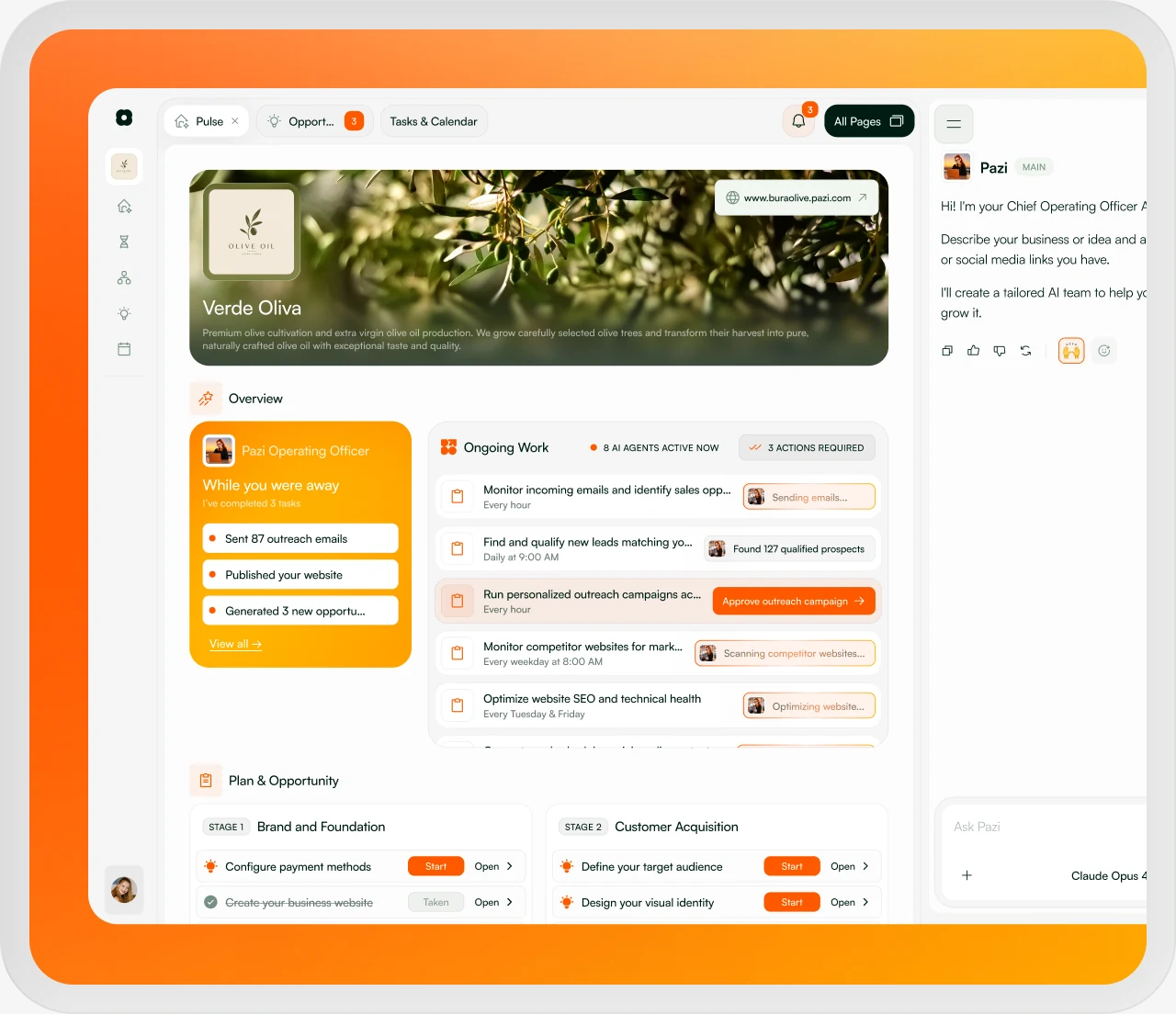
What you get is an AI operating officer plus a set of specialist agents, all of it running inside a browser session. Describe a business outcome and the operating officer builds a roadmap of opportunities, then hands chunks of that roadmap down to agents that can research, browse, write and test software, create files, run on a schedule, post in Slack, and send email from a per-business address. None of this is a first rodeo for the team. The YC profile lists Pazi in the Winter 2024 batch with a team of seven, and its Crunchbase and GitHub links both still point at Pythagora, the team's earlier open-source coding agent, GPT Pilot. Founder Zvonimir Sabljić previously co-founded AWW, the online whiteboard acquired by Miro in 2021.
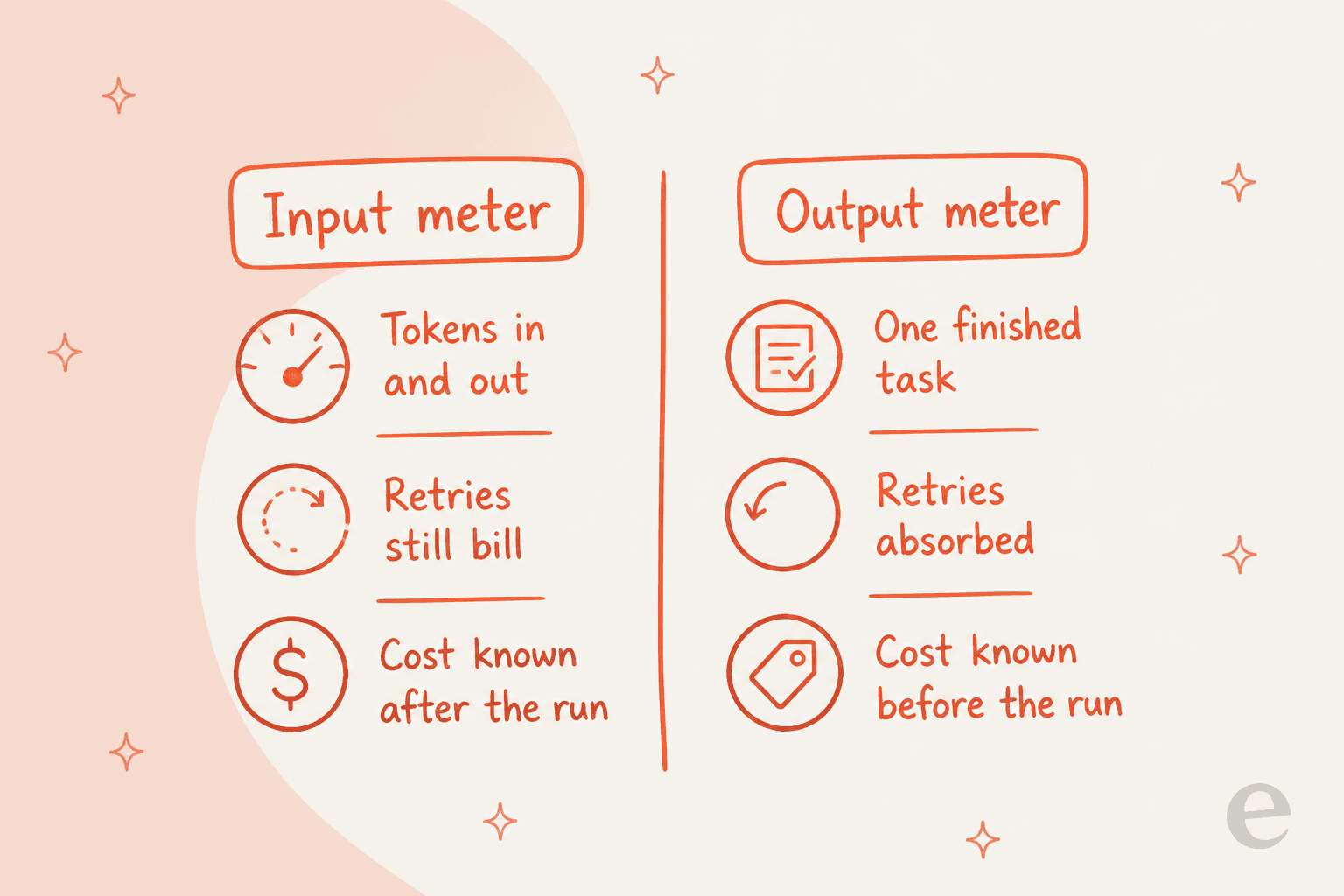
The lineage matters for the pricing. A coding-agent meter and a support-tool meter are different animals: one bills what the model consumed, the other bills what got finished, and Pazi ships the first kind.
Pazi AI pricing: the full table
Every plan, every published limit, one place. The credit amounts and the email allowances I pulled from Pazi's own plans and credits doc, which carries more detail than the pricing page does.
| Free | Pro $25 | Pro $50 | Pro $100 | Pro $200 | Pro $500 | |
|---|---|---|---|---|---|---|
| Monthly price | $0 | $25 | $50 | $100 | $200 | $500 |
| Credits | 5,000 one-time | 12,500/mo | 25,000/mo | 50,000/mo | 100,000/mo | 250,000/mo |
| Effective rate | n/a | $0.002/credit | $0.002/credit | $0.002/credit | $0.002/credit | $0.002/credit |
| Business email sends per period | 5 | 25 | 50 | 75 | 100 | 200 |
| Active businesses | 1 | Multiple | Multiple | Multiple | Multiple | Multiple |
| Team member invites | No | Yes | Yes | Yes | Yes | Yes |
| Agents | Unlimited | Unlimited | Unlimited | Unlimited | Unlimited | Unlimited |
| Pazi heartbeat | 4 occurrences, lifetime | Unlimited | Unlimited | Unlimited | Unlimited | Unlimited |
| Payment method required | No | Yes | Yes | Yes | Yes | Yes |
| Yearly discount | n/a | 20% | 20% | 20% | 20% | 20% |
| Credits roll over | No, one-time grant | Reset each period | Reset each period | Reset each period | Reset each period | Reset each period |
| One-time top-ups | Retired | Retired | Retired | Retired | Retired | Retired |
Two footnotes on that table. Yearly billing gets paid up front at 20% off, and the credits still land monthly, so a $25 subscription comes to $240 for the year where paying monthly would run $300, with the effective rate dropping to 625 credits per dollar. Then there is the leftover: a retired $20 / 10,000-credit tier still exists for anyone who subscribed before Pazi collapsed to a single plan, grandfathered at the same price until they move.
Worth flagging, if you are comparing rate cards elsewhere: Capterra still lists Pazi under the old four-plan structure. A $20 Starter, a $50 Advanced and a $200 Pro, each one carrying vCPU, RAM and disk specs, plus agent caps of 1, 3 and 10. All gone. Agents run unlimited on every tier these days, and the environment specs dropped out of the published offer entirely. So if a comparison table you are reading shows agent caps anywhere, what it is reading is a rate card that got retired.
What a Pazi credit actually is
The pricing page has no paragraph like this one, and it changes how you should read every number above.
Straight from the docs: "Pazi-billed model work converts underlying provider cost at 500 credits per US dollar." You buy in at 500 per dollar, Pazi spends at 500 per dollar, and the two rates never diverge. The credit is a currency peg to raw model spend, sold to you at face value.

Let me be fair about this, because the design is defensible and, honestly, generous. There is no markup on your tokens. You pay roughly what the model costs, and everything stacked around it comes free on top: the platform and the agents, the browser runtime and the scheduler, and the Slack and email plumbing too. Set that next to a vendor that quietly triples the API rate and calls the result a credit, and this is the honest version.
The trade is that the meter now moves for reasons that have nothing to do with what you were trying to do. Plainly said in the docs: "the exact number depends on the model, input, output, tools, and task length." Ask the same question inside a long browsing session with a lot of page content in context and it costs more than the short version does. A retry bills like a success. And switching an agent to a bigger model quietly reprices every run it will ever make.
Model calls are not the only drain. The operating officer's direct replies eat credits, so do image generation and voice transcription, and the web search helpers as well. Two fixed numbers do get published, and they are the only per-action prices Pazi puts in writing anywhere: a Brave search request costs a flat 5 credits, and an LLM request needs at least 5 credits available before it can start. Five credits is one US cent. Variable, all of it, past that point.
The tier ladder buys volume, never a discount
Run the arithmetic across all five amounts. Same number, every time.
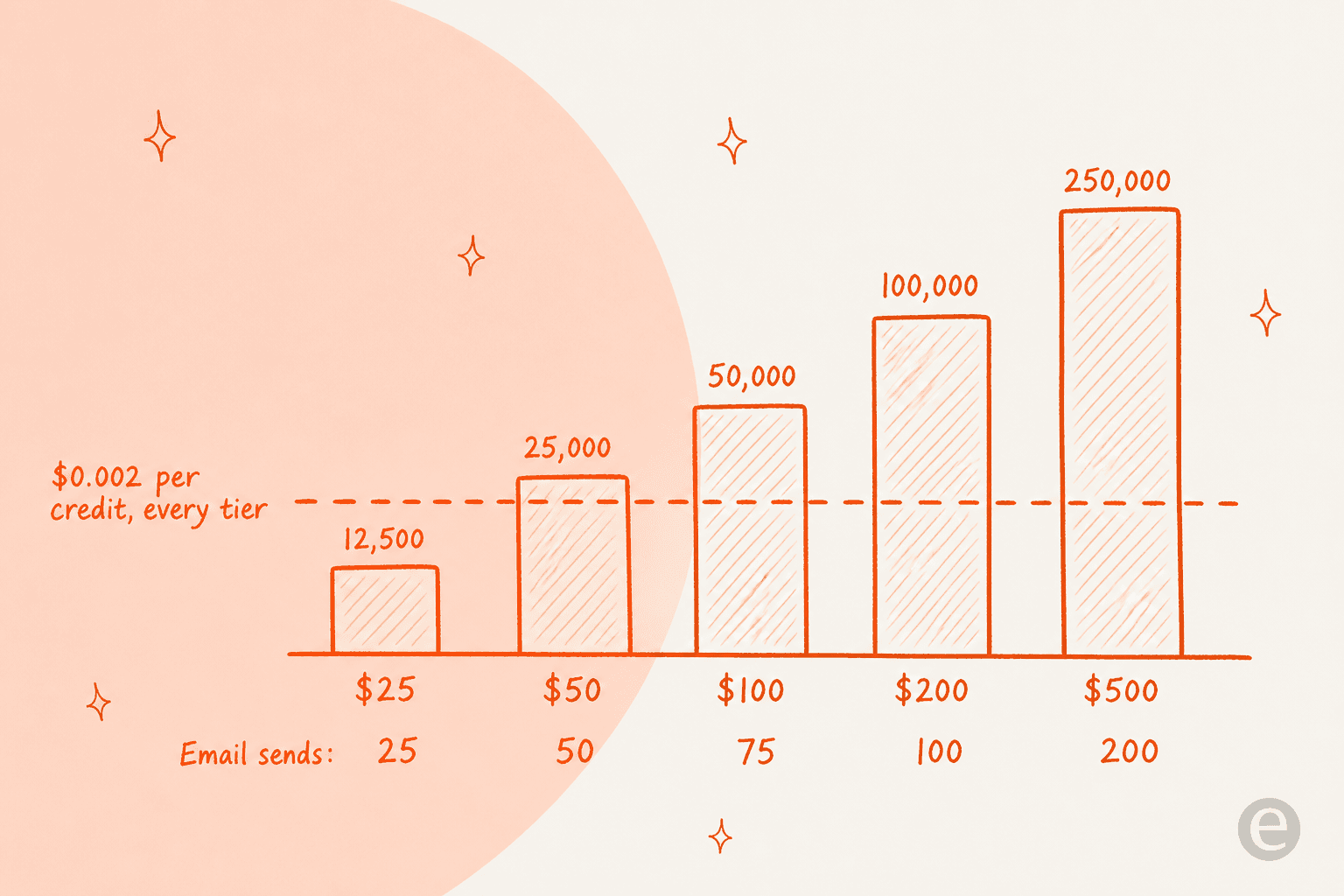
$25 buys 12,500 credits and $500 buys 250,000, which is twenty times the money for twenty times the credits, priced at $0.002 either way. No bulk rate. No annual-commit rate past the flat 20%, and no enterprise sheet sitting there to negotiate against. Consistent, certainly, and that consistency is the thing to notice: growth on Pazi never gets cheaper per unit. Most usage-based tools I have priced recently, from Gumloop to Fleece AI, bend the curve somewhere at least.
Business email sends are the one dimension that does move with the tier, and for anyone doing outreach at volume it moves the wrong way. Eight times the send allowance for twenty times the spend: 25 sends a period at $25, 200 at $500. Where sending mail is your agents' main job, the email cap binds long before the credit balance ever does, and Pazi publishes no way to buy more sends on their own, so you buy more credits you may not need.
What Pazi does not charge you for
The list of things that cost nothing here runs longer than most of the AI agent platforms I have priced this year, and it is noticeably more generous than what the small business tools in the same bracket bother to include.
- Agents. Unlimited on every plan, Free included. Making one costs you no slot and no creation fee; only the work it goes on to perform draws credits.
- Seats. Team member invites come included on Pro at every credit amount. No per-seat charge anywhere in there.
- Businesses. Run several on any Pro amount, all of them drawing on one shared credit balance.
- The runtime. Live View, durable runs that survive closing the tab, scheduled and recurring tasks, the Slack app, the per-business
me.pazi.aiinbox, file and report generation. Not one of them carries a separate line item. - Your own model quota. Connect a ChatGPT or Codex subscription under Account, point an agent at a Codex model, and those runs draw on your Codex quota rather than Pazi credits. Claude-selected messages go back onto the credit path. Price that quota against raw OpenAI API rates before you lean on it.
That last one is the most interesting lever on the whole rate card. If a large share of your workload is code-shaped, routing it through a connected Codex subscription takes it off the Pazi meter entirely. Vendors do not usually offer that. For the right workload it is a real discount.
The gotchas worth knowing before you subscribe
Hidden is the wrong word for these. They just each live on a different doc page, and each one has bitten somebody.
The business owner pays for everyone's runs. An agent attached to a business draws on the owner's balance, and it does that even when an admin or a member is the one who started it. Collaborators hold their own subscriptions, and the balances never merge. Invite three people into a business and you are funding all four of you.
Top-ups are gone. Pazi no longer sells one-time credit purchases at all. Run dry mid-month and your only move is a larger monthly amount; there is no small patch to buy. Web chat opens an out-of-credits dialog, and Slack replies with an upgrade link where the agent would have started.
Downgrading to Free is blocked while more than one business is active. Exactly one is what Free allows, so the extras have to be paused first. Should a scheduled cancellation drop your allowance later on, Pazi keeps the oldest allowed business and pauses whatever else is running.
Free's heartbeat is capped for the life of the account. Four heartbeat occurrences total on a Free account, which reads like four a month and is nothing of the sort. The fourth one still runs. After that heartbeats stop until the owner upgrades.
Opportunities need a desktop. On phone and tablet layouts, opportunity execution currently hands off to desktop, which means the mobile action does not start any work.
Nobody has reviewed this publicly yet. Pazi is young enough that there is no G2 page and no substantive Reddit thread, and no independent review body of any size either. The Capterra listing, meanwhile, carries a rate card that no longer matches the site. Take that as a statement about how much external evidence exists rather than a knock on the product: right now, almost none. Newer vendors I have priced, like Gobii AI and Ringly, sit in the same evidence gap.
So what will it actually cost you?
The honest answer: Pazi publishes no credits-per-task figure, and I could not derive one I would stand behind. The four case studies on the site are the best window you get into what a task even looks like, and not one of them lists a credit cost. Take the deep web research one. A single prompt that searched YouTube for 100 AI influencers in the 10k-100k subscriber band, pulled view, like and comment averages from each channel's last ten videos, then compiled the lot into a sortable report.
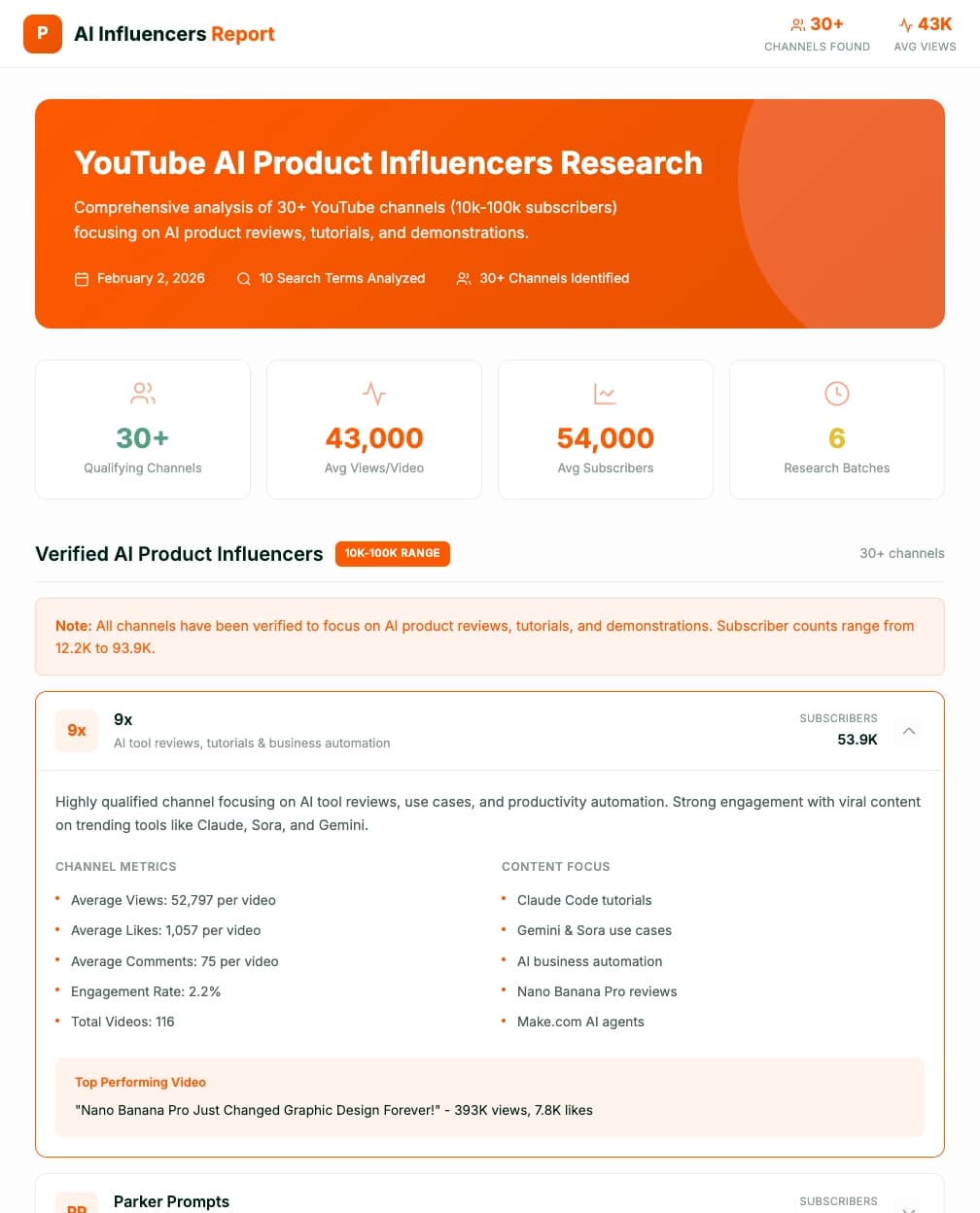
A real deliverable, that, and exactly the kind of thing the credit model is good at. In credit terms it is also a total unknown until the moment you run it. Which leaves one useful move: run a small batch, read your own number off the usage meter under Account, multiply from there. The estimator below handles the multiplying once you have the number.
Two things fall out of playing with that. The spare-credit line is where the real cost of the model shows up, since credits reset each period and top-ups are retired, so every month you are either buying headroom you will not use or risking a hard stop mid-run. Then the cost-per-task figure, which only exists once you have measured a task, and that is precisely the number a buyer wants before subscribing and cannot have. Same trap that makes chatbot cost comparisons so slippery: two vendors quote confidently and neither quote is countable.
Tightening the prompts helps more than it should, incidentally. The meter is tokens, so a sharper brief is a cheaper run, and prompt engineering quietly turns from a quality exercise into a cost control.
Where this model gets uncomfortable: a queue
For bursty work, everything above is fine. A founder validating an idea. A solo operator running a research batch, or a small team automating a weekly report. The bill stays small, the variance does not much matter, and the free tier is enough to find out.
Where it stops being fine is a queue, and this part I have watched go wrong more than once. eesel has spent years putting AI agents on live support queues, and the single most reliable predictor of whether a rollout survives contact with finance is a small one: can the buyer state next month's number in one sentence? An input meter cannot hand them that sentence. Which is why every serious AI customer service cost exercise starts by naming the unit.
In practice it looks like this. From eesel's own customer research: an email-security company on Freshdesk, scaling toward roughly 20,000 tickets a year and expecting around 9,000 interactions a month, burned 200 API calls in a single day of testing and then went quiet on cost at scale. Nothing had gone wrong, and the agent worked. The meter had simply told them a number they could not extrapolate from, and that alone was enough to stall the deal.
They ran a dozen successful test chats, the agent handled every one, and then they opened the billing page and filed two cancellation requests within the hour.
A paraphrase of a real churn record, that, from a US fashion brand running Gorgias, and it is the cleanest illustration of the point I have. The product was not the problem. The inability to forecast was.
None of this makes Pazi's design wrong. It makes it a fit for a different job, that is all. Running research batches, building a landing page, monitoring competitor sites and drafting outreach: the variance there is noise. Handle 500 tickets a day and the variance is your budget, and the savings case you built the business case on stops being checkable.
Pazi versus per-task pricing, side by side
| Pazi Pro | Volume-based AI support tools | |
|---|---|---|
| Billable unit | A credit, pegged to model provider cost | A ticket or chat handled (1 credit on eesel) |
| Rate | $0.002/credit, flat on all amounts | Published fixed monthly price per volume, e.g. $299/month for 500 credits on eesel |
| Forecastable before you buy? | No, depends on model, input, output, tools, task length | Yes, pick the plan that fits your volume |
| Who absorbs a retry | You do | The vendor does |
| Volume discount | None published | Often a cheaper annual rate (two months free on eesel) |
| Unused allowance | Resets each period | Credits reset monthly and do not roll over |
| Overage behaviour | Work blocked, must upgrade the monthly amount | Pauses, or continues with optional overage and a cap you set |
| Seats | Unlimited, included | Often unlimited on volume-based plans (unlimited on eesel) |
| Best fit | Bursty, exploratory, one-off business work | A repeating queue with a known monthly volume |
For how the per-unit side plays out across the category, my teardowns of Zendesk pricing and Crescendo AI pricing wrestle with the same question from opposite ends of the market. What exactly is the vendor charging you for, and can you count it in advance?
Start looking for the pattern and it repeats everywhere. Fini AI and Helply both publish a per-unit rate you can multiply. IrisAgent publishes a price with no unit attached to it at all.
Further down the transparency scale sits Workativ, metering one thing on the page and another in the contract, and Shelf, which leaves the AI meter unpriced entirely. A finance team signs off on the ones that publish a countable unit.
My verdict on Pazi AI pricing
Pazi's rate card is one of the more honest ones I have read this year. There is no pretence that a credit is some magic proprietary unit; the docs come out and say it is model spend at par. Agents, seats and businesses are given away, and code work can be routed onto your own Codex quota to dodge the meter entirely. For a founder or a two-person team doing exploratory work, the $25 tier is a cheap way to find out if agentic execution helps you, and the Free tier's 5,000 credits let you check before a card ever goes in.
Where I would hesitate is anywhere the work repeats. Scale never gets cheaper under a flat rate. The reset turns unused headroom into a monthly write-off. Running dry becomes a subscription change instead of a small purchase now that top-ups are retired, and with no published credits-per-task figure anywhere, the first month is always a guess. Four things, and I would want all four fixed before putting a recurring workload on it.
Who should buy it: solo founders and small teams doing varied, non-repeating business work who want unlimited agents and no seat bill. If that describes you, the wider AI employee and AI teammates categories deserve a look alongside it.
Who should look elsewhere: anyone who wants a teammate already prepared for a defined, repeating job. eesel currently packages that model for helpdesk and blog-writing work, with a fixed monthly price for support and $4 per blog post. The roundups of the best AI employee tools and the best AI agent roundup both sort options by exactly that question.
Try eesel for jobs, not model spend
Pazi gives you generalist agents and meters the model usage underneath them. eesel gives you ready-to-work teammates for defined jobs and meters the job instead. Today that is an AI helpdesk teammate on a fixed monthly plan from $299/month for 500 credits (1 credit per ticket or chat) and an AI blog writer at $4 per post. No platform fee and no per-seat fees, so next month's number is the plan you picked.

Getting the handoff right matters as much as the rate does, so here is the part I would weigh above price: before you go live, eesel replays your own past tickets and scores the answers against what your team actually sent, so you find out where the agent is wrong while the whole thing is still a simulation. Retries, long contexts, model swaps: eesel's problem, and never a line on your invoice.
It plugs into Zendesk and Freshdesk in a few minutes, and Gorgias too, and it trains on the help center you already have. Anything it should not answer goes to a human down a clean escalation path.
There are 100 free credits to test with, and no card needed to start. Try eesel.
Frequently Asked Questions
How much does Pazi AI cost per month?
Does Pazi AI have a free plan?
What is a Pazi credit worth?
Is Pazi AI pricing cheaper at higher volume?
What happens when you run out of Pazi credits?
Who pays when a team member uses a Pazi business agent?
Can you use Pazi AI for customer support tickets?


Article by
Rama Adi
Rama is a software engineer at eesel AI with two years of experience writing about B2B SaaS, AI tools, and customer support technology. Based in Bali, Indonesia, he brings a developer's perspective to product comparisons — cutting through marketing copy to what the integrations and APIs actually do.