
What Shelf costs today
Honest answer: nobody outside a sales call knows. Worth stating that plainly, I think, because a lot of the pages ranking for this question will quietly hand you a stale figure as though it were current. And a stale figure is how you end up walking into a renewal like the one I describe in Zendesk pricing too expensive.
I checked it the boring way instead of trusting somebody else's summary. https://shelf.io/pricing/ returns an HTTP 301, with a location header pointing at https://shelf.io/. That is a configured redirect. Not a broken link, not a soft 404. The Yoast-generated page sitemap lists 45 pages and a pricing page is not one of them. No /plans/. No /cost/. Shelf's second property, shelfos.ai, now redirects to its Agentic OS page, so it has no pricing page of its own either.
What you land on is a positioning page where every single button says the same thing: Talk to an Expert. No "Start free" anywhere. No trial link, and not one dollar sign in the rendered page.
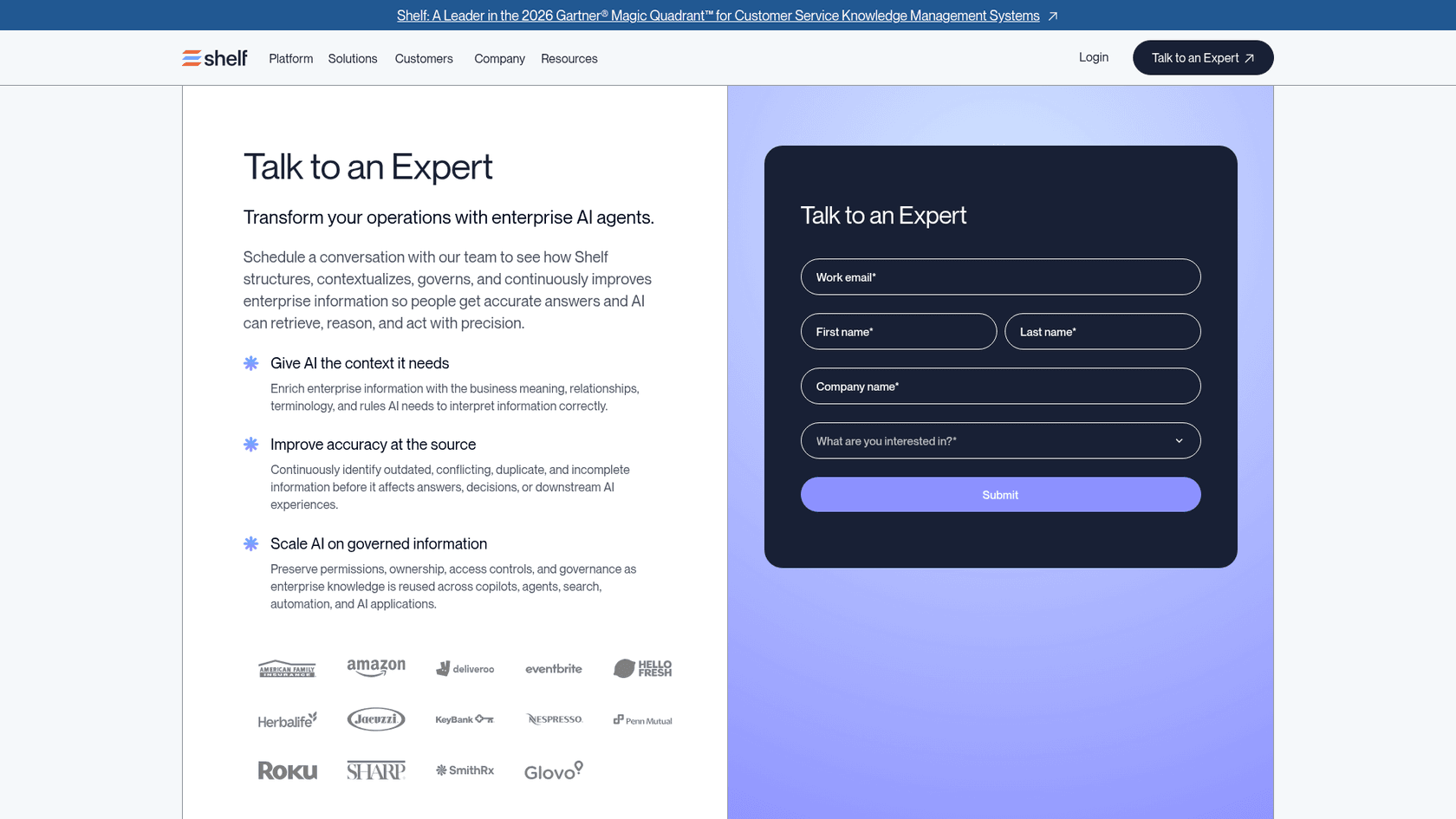
Shelf's own word for whatever happens next is a discovery call. Not a pricing conversation. The form carries one required qualifying field, "What are you interested in?", and it gives you four options: Shelf Cortex, AI Data Layer, AI Knowledge Management Platform and Customer Support Solutions. That little dropdown is a finding in itself. Shelf sells several product lines here, and it routes you by whichever one you pick, which in my experience usually means there is more than one rate card sitting behind the gate. If you are early enough to still be scoping, my overview of AI knowledge management is a better place to start off than a discovery call.
None of which makes Shelf a bad product. It rates 4.7 out of 5 across 141 G2 reviews, with no 1-star or 2-star ratings at all, and the banner across the top of that page is a 2026 Gartner Magic Quadrant Leader placement in knowledge management software for customer service. Serious tool, serious customers. It is just sold the way serious enterprise software gets sold, and that has consequences for the way you budget.
The two published numbers, and why both mislead
Search for Shelf pricing and two dollar figures come back at you. One of them is Shelf's own, sitting in the pricing block of a Salesforce listing. The other is just a directory field on a review site. Neither is the price of Shelf.
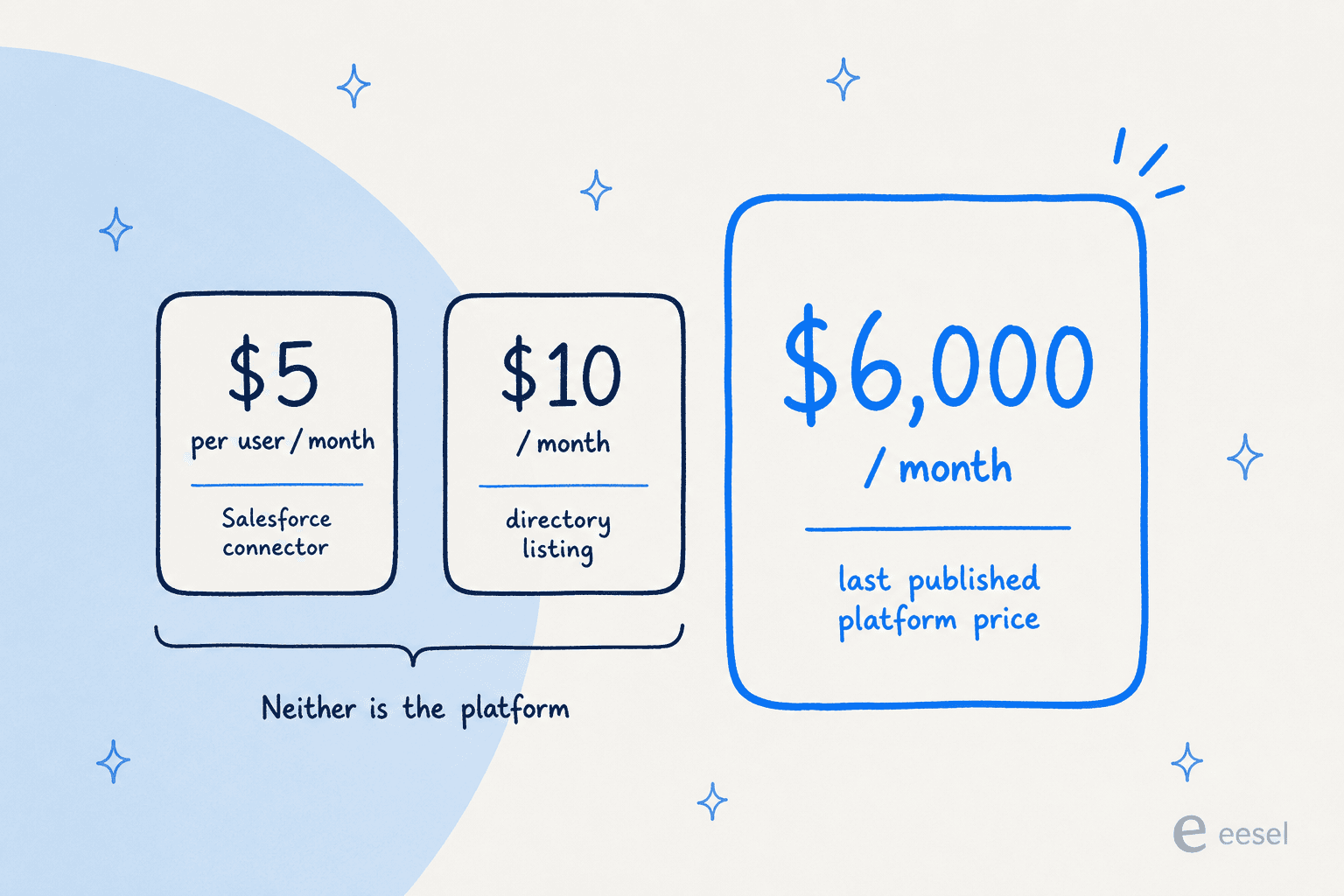
The first one lives on Salesforce's AppExchange listing, which prices a line item called "Salesforce Integration" at $5 USD per user per month and tags it as the lowest starting price. Read one block further down, though, and the listing says this, in Shelf's own words:
Paid Add-On Required. You must pay for a product or service that is external to Salesforce for this solution to work.
So the $5 buys the connector. The thing it connects to is a separate purchase, with no published price on it anywhere. Treating $5 per user as Shelf's entry price would put you out by a couple of orders of magnitude.
That same listing is quietly the most useful page Shelf has anywhere, for the reason that it publishes three contract terms which appear nowhere else:
| Term | What the listing says |
|---|---|
| Seat minimum | 25 users |
| Contract length | One year minimum |
| Payment schedule | Annual payments, not monthly |
| Line item priced | Salesforce Integration only, at $5 per user per month |
| Everything else | "Paid Add-On Required", price not stated |
At the published 25-seat floor, that connector line on its own comes to $125 a month, so $1,500 a year prepaid, and that is before the mandatory Shelf subscription which makes it work at all. The listing also carries a broken contact link, which tells you roughly how closely anyone is maintaining it. A 25-seat floor with annual prepay is a fairly normal enterprise shape, though. Same shape you meet in SharePoint pricing, or in a Guru and Bloomfire comparison.
Number two is over on Capterra, showing a $10 starting price billed "Per Feature, Per Month". Unusual unit. It is a Capterra taxonomy option rather than any phrase Shelf uses on its own site, so I would not build a budget around it. The bigger problem is that the figure has no plan name attached to it, which leaves you nothing to map it to.
The rest of the marketplaces come up empty. Shelf's four Zendesk apps install for free and say plainly that they need an active Shelf subscription bought separately. Both AWS Marketplace listings show custom pricing only, with support "structure, duration, and pricing" defined per engagement. No Azure listing at all. And G2's pricing page states the vendor has not listed pricing, with a footer noting the information was last updated on 18 August 2020.
That silence is not unique to Shelf. It is not universal either, though. Bloomfire pricing is a lot easier to pin down off public pages, and so is Document360 pricing.
Shelf's last real rate card
Shelf did publish full pricing for years, and then it stopped. The Wayback CDX index shows successful captures of that page running continuously from January 2018 through to 16 December 2023, and then nothing at all across 2024, 2025 or 2026. Put that together with the live redirect and the removal dates to sometime in 2024.
Here is that last card, captured six days before the page went dark:
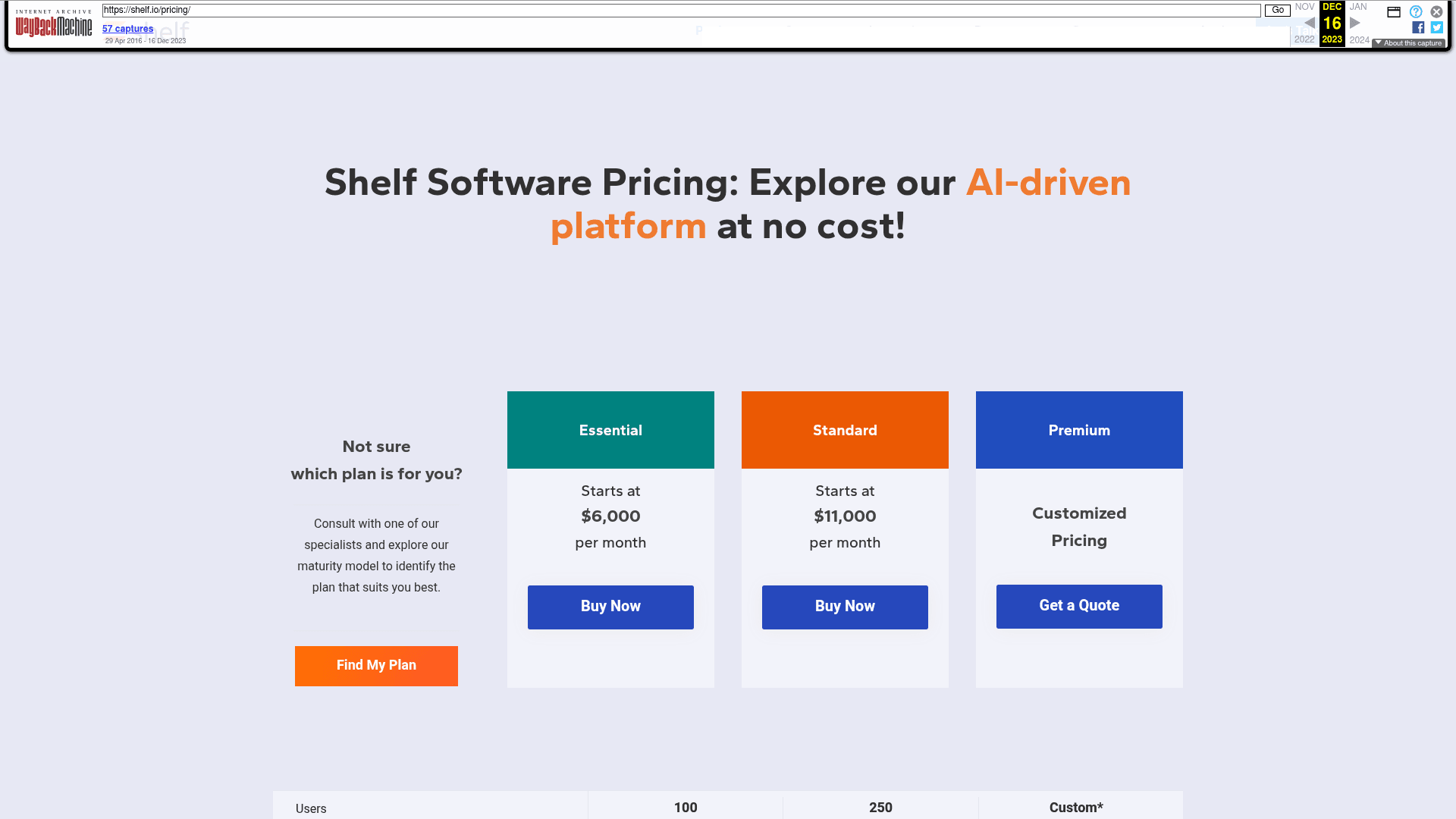
| Tier (Dec 2023) | Price | Users | Self-service portals | Content connectors |
|---|---|---|---|---|
| Essential | Starts at $6,000 per month | 100 | 1 | 2 |
| Standard | Starts at $11,000 per month | 250 | 3 | 5 |
| Premium | Customized pricing | Custom | 5 | Unlimited |
Two things stand out here. First one: all three tiers included the same core feature set, so what the tier gated was seat count, portal count and connector count, not capability. Portals in this context means customer-facing self-service sites, and being handed one of them at the entry tier is a real constraint if you happen to support more than a single brand. Second: Essential and Standard carried actual "Buy Now" buttons. On paper, then, there was a self-serve path to a $6,000 a month contract. That path is gone now.
Dividing that flat fee by the bundled seats is my own arithmetic, not a rate Shelf ever published, but it is the comparison worth having: $60 per user per month at Essential, $44 at Standard. Buying 2.5 times the seats bought you about a 27% discount per seat. For some context on what that rate buys elsewhere in the category, Guru pricing and Confluence pricing sit at very different points along the same scale.
The ladder that got there
That rate card did not appear out of nowhere. Shelf's published entry price travelled a long way over five years, and the direction of travel explains the decision to stop publishing it.
| Year | Published entry price | Meter |
|---|---|---|
| 2018 | $99 a month (Team, up to 10 users) | Flat monthly by seat cap |
| 2021 | None published | "Priced on a per user basis" |
| 2022 | $20 per user per month | Per seat |
| 2023 | $6,000 a month (100 users) | Flat monthly with bundled seats |
| 2024 to 2026 | None published | Quote |
The 2018 card reads like a different company. Team at $99, Group at $199, Workplace at $499, all of it on annual billing, with a published monthly premium of roughly 20% on each one. The free trial was capped at four users, and even then it was already only available after a demo. Back in 2018 Shelf was competing for the same buyer as any small-team AI knowledge base. By 2023 it was not.
By November 2022 the whole thing was a clean per-seat card, and you can still go and look at it:
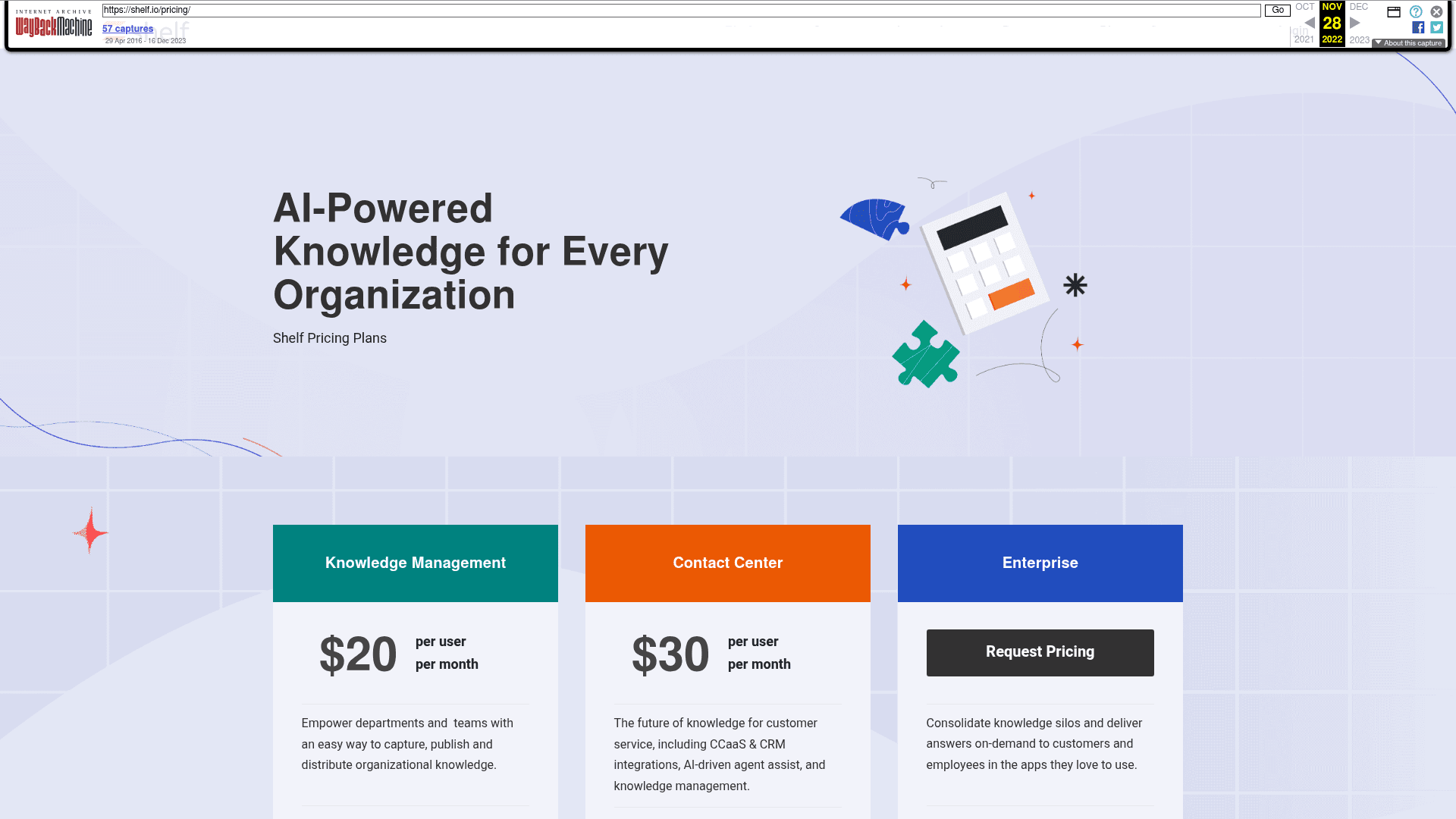
Between 2022 and 2023 the effective per-seat rate roughly tripled, from $20 to somewhere around $60, and the minimum cheque went from something a department could expense to $72,000 a year. Then the number came off the site altogether. Every step up that ladder took out a smaller buyer, and the last step took out the buyer's ability to check anything before booking a call.
I want to be fair here, because there is a legitimate reading of it. A tool that only pays off across a very large content library is simply not for a ten-person team, and publishing a price which scares off the wrong buyers carries a real cost for a sales team. Plenty of good vendors make exactly this call. The same opacity turns up across Guru alternatives and most of the enterprise end of the market. It just means the burden of working out what you will actually pay lands on you.
What a flat fee actually costs you
Here is the part a rate card never shows you, and it is the reason I keep coming back to that $6,000 figure even though it is stale. A flat platform fee does not move when your volume moves. Which leaves exactly one way to compare it against anything metered, and that is to divide it by the tickets you actually handle.
The crossover is the number to write down. A $6,000 monthly platform fee does not beat eesel's published plans at any volume up to 5,000 tickets a month, and above that you would be comparing it with a custom quote. Anywhere near those volumes you are paying for capacity you are not using. Same arithmetic I walk through for AI customer service cost in general, and it is the single most useful thing to model ahead of a call.
To be clear on what this is and what it is not. Shelf's $6,000 bought a knowledge platform for 100 users, not ticket resolution, so what I am comparing here is meter shapes, not features like for like. I went through that distinction properly over in my guide to Shelf AI alternatives. The point in this section is narrower and still useful anyway: if somebody is asking you for a fixed annual number, you ought to know what that number implies per unit of work.
The costs that are not in the licence
This is the part I care about most, because I work a support queue myself and I have watched first-hand what a long implementation does to a team that was already underwater.
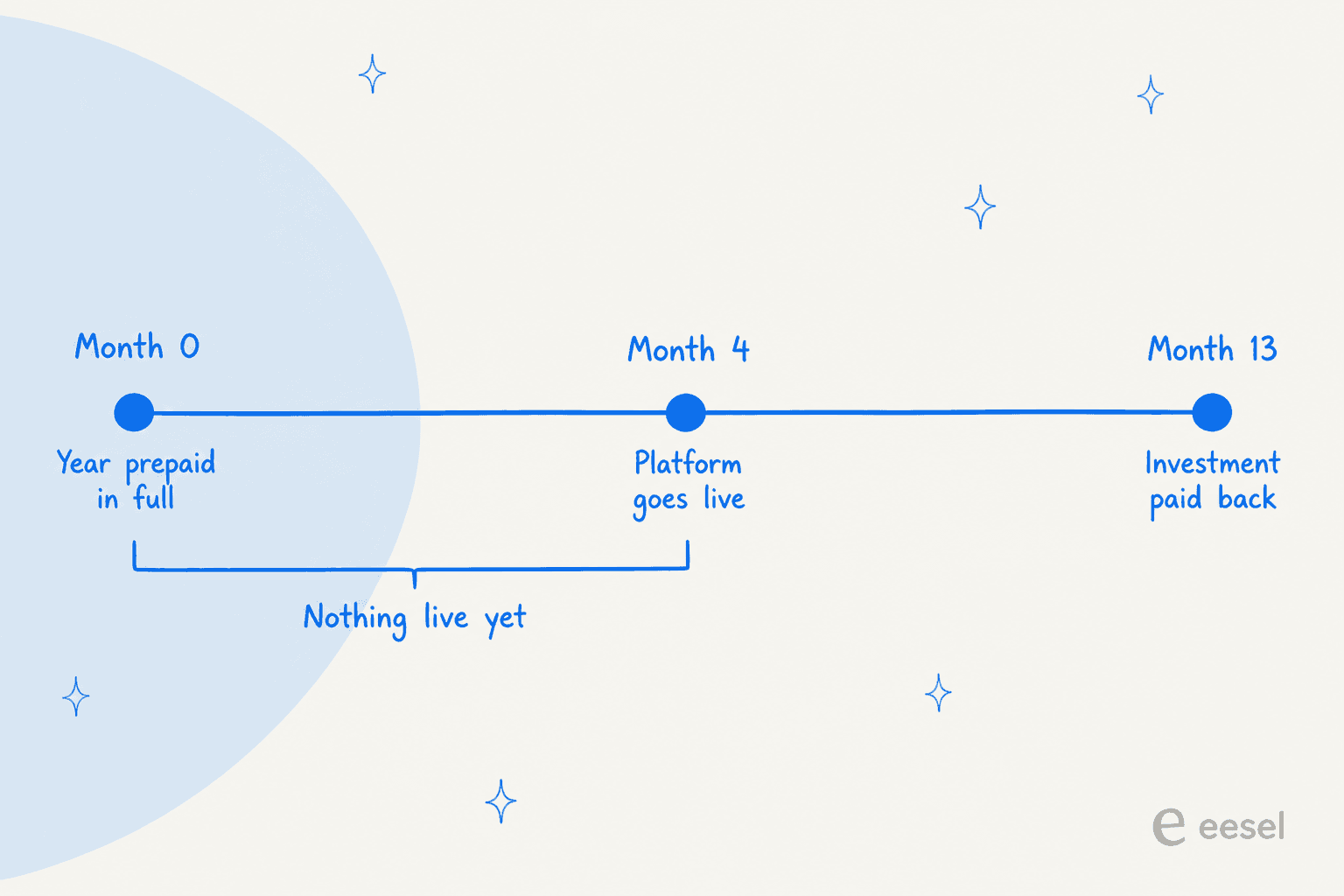
G2 aggregates two numbers out of real Shelf reviewers, and they matter more than any tier name does:
| G2 buyer metric | Shelf |
|---|---|
| Perceived cost | $$$$$, top of a five-point scale |
| Time to implement | 4 months |
| Return on investment | 13 months |
Set that against the Agentic OS page, where Shelf promises you can "go live and see measurable ROI in weeks." Buyers who actually went and did it report four months. I would not call that a bait and switch, because enterprise implementations slip for a hundred different reasons which have nothing to do with the vendor. But you should budget against the four-month number, not the marketing one, and you should go in knowing that you will have prepaid the full year before a single thing is live.
Where the four months actually goes
The Quality Assessment view explains where it goes better than any timeline can.
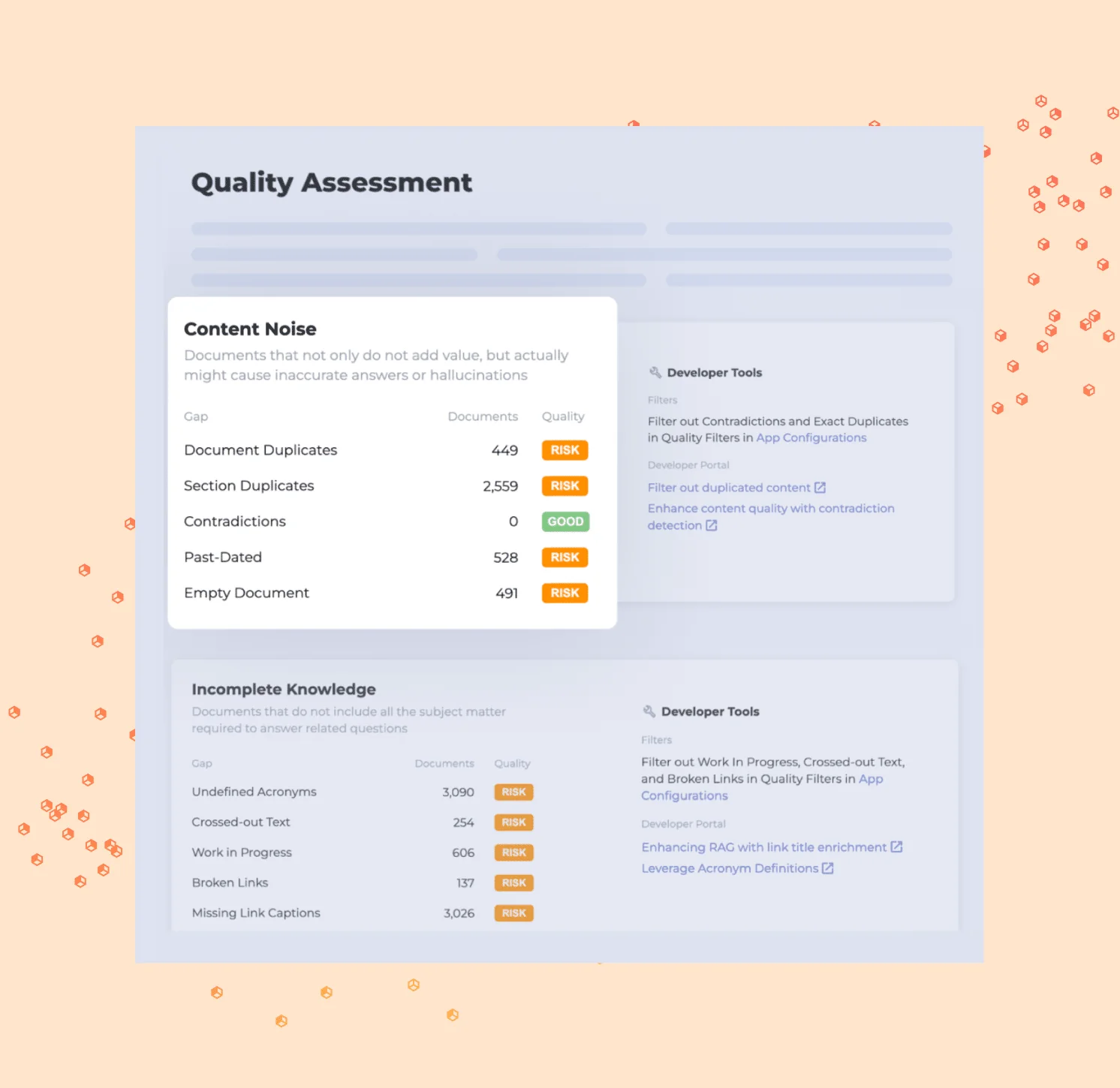
Shelf is very good at this bit. It will sit you down and tell you that you have 449 duplicate documents, 2,559 duplicate sections, 528 past-dated articles, 3,090 undefined acronyms and 3,026 missing link captions. Real, specific, and more than most teams know about their own library. A clean library is worth having, no argument, and it is the foundation under any AI knowledge base that has to answer without inventing things.
It is also a work order. Every single one of those counted items is a human decision about what to keep. A knowledge-management specialist at a credit union described exactly what that feels like at scale:
"The review process is something we as a credit union struggle with. Shelf does allow tracking of reviews in their insight analytics. However, any minor change on a document and it will move out of the outdated content reports. Since this is the case we created a review process outside of Shelf after exporting a list of all the content and sorting it into specific categories with specific owners. Additionally, when assigning content reviews it is only possible to assign them one at a time. We sometimes have 120-200 pieces of content to review, per quarter, so this can be a very time consuming process."

She rated Shelf 4 out of 5, which is really the point. That is a happy customer, describing the labour the licence does not cover. Reviews assigned one at a time, 120 to 200 of them a quarter, and on top of it a tracking process rebuilt in a spreadsheet outside the tool. Whatever the subscription ends up costing, add that on. It is the cost nobody models, and it is why I keep pushing teams toward AI for knowledge management that works off what they have already answered instead of a full library rebuild.
Add-ons with no published price
One more line to watch out for, this one flagged by a call-centre technology manager who also rated Shelf 5 out of 5:
"Lacks robust and in-depth reporting in GUI without the requirement of pulling APIs. Beta for additional reporting is available but when available to GA it will be a paid product. Believe all reporting capabilities should be a part of the tool and not a paid add-on."

The same pattern turns up in Shelf's advanced content-intelligence scoring, which gets switched on by a customer success manager rather than bought off a page, and carries no published price with it. None of this is unusual for enterprise software. What it does mean is that the number in your quote is a floor and not a ceiling, so the follow-up in the discovery call is worth asking straight out: which capabilities sit inside this figure, and which ones are separate? Worth asking the same of any enterprise knowledge management contract, honestly.
What to ask for before you sign
If you are heading into that discovery call regardless, these are the things I would want in writing, seeing as none of them are published anywhere:
- The all-in annual figure, implementation included, plus what happens to it come renewal.
- Which product line you are being quoted for, given that the form itself lists four separate options, from Cortex to Customer Support Solutions.
- What is excluded, and specifically reporting depth along with advanced content scoring.
- The overage behaviour if you go past your bundled seat count mid-term, which no public source anywhere states.
- How it will affect ticket deflection, assuming that is the outcome you are funding, because the platform itself does not answer customers.
- A price lock, which brings me around to the thing buyers ask me about the most.
One of the most common concerns I hear on calls has nothing to do with the sticker at all. A budget-conscious buyer on one of eesel's sales calls said they had watched a previous vendor's price more than double at renewal, and they came in asking for a contractual price lock, offering to pay annually just to get one. Right instinct. It is sharper than usual with a vendor whose published entry price moved from $99 a month to $6,000 a month inside five years and then stopped being published at all. Ask for the renewal cap in the first contract, rather than the second.
Where a volume-sized plan fits instead
Shelf's flat fee and a plan sized to your ticket volume are answering different questions, and choosing between them really comes down to who carries the risk of a quiet month.
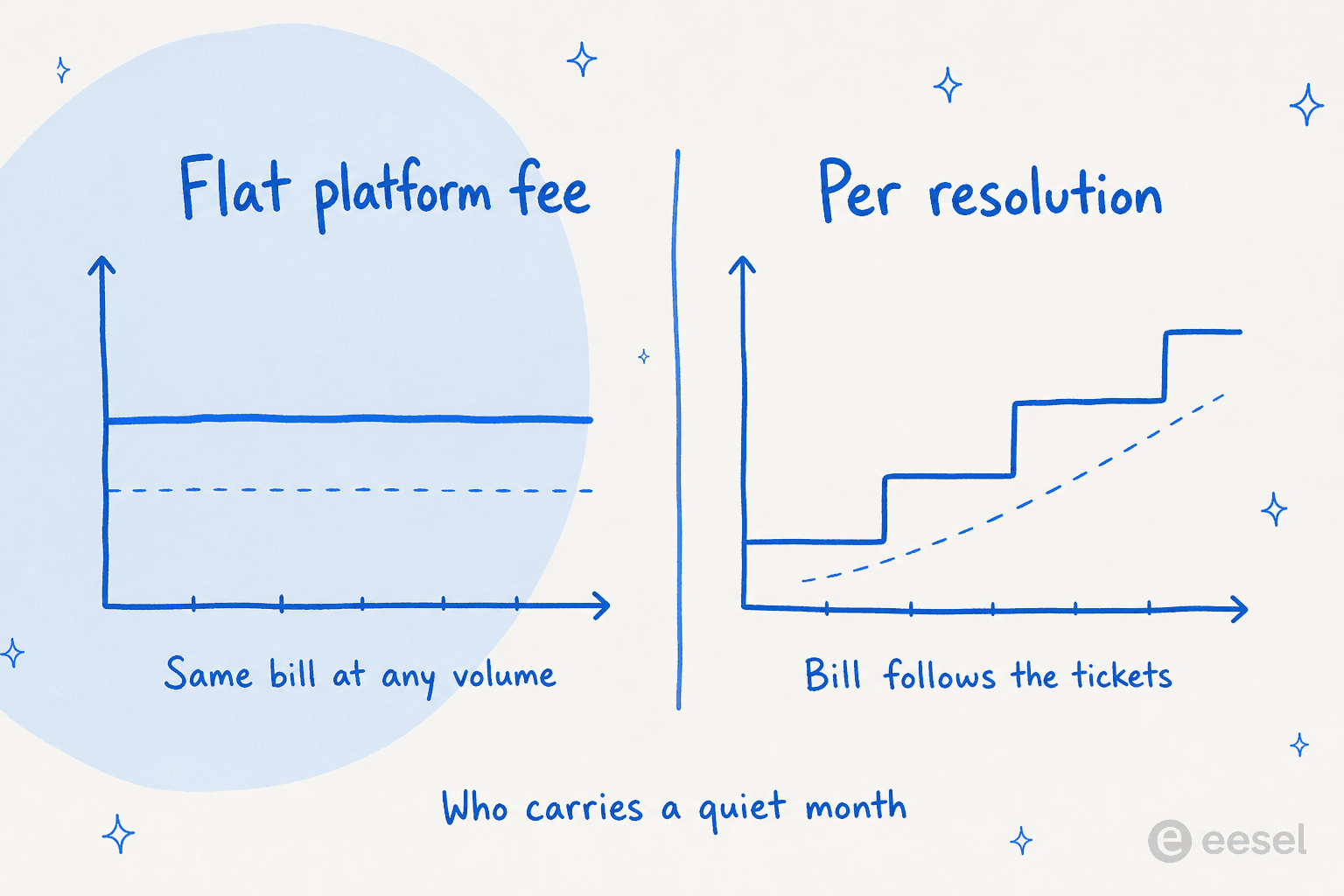
A flat annual platform fee is pricing your capacity. You commit up front, and the bill stays the same whether the AI handles ten thousand tickets in a month or two hundred. Perfectly fine trade if your volume is large and predictable, and it forecasts more simply too. A credit plan prices the work instead of the capacity. You pick a monthly batch sized to your volume, move up or down any time, and only tickets the agent actually works on use credits.
For most of the teams I speak to, that second shape matches the way support budgets actually behave, particularly where the goal is tier-1 deflection instead of a library rebuild. It also fails softer. Underperform on a flat contract and you have already paid for the year. Underperform on a monthly plan and you find out in the first month, and you can leave or resize. Same logic applies whether you are pricing an AI knowledge base chatbot or a full agent.
The other half of this is being able to check anything at all before you buy. Shelf has no dry run. No replay against your own past tickets, no accuracy score, and the historical-transcript training happens on Shelf's side by Shelf's engineers, out of Genesys Cloud or Kustomer only. So if you run Zendesk or Freshdesk, there is no pre-launch calibration on your own data, which is a real gap for anybody treating this as Zendesk knowledge management. Put that next to a prepaid year and a four-month implementation and it adds up to a lot of commitment ahead of the first real answer.
Try eesel for the part that closes tickets
If the thing you actually want out of this budget is fewer tickets landing on a person, that is the exact job eesel AI is metered on. 1 credit per ticket or chat handled, with plans from $299 a month for 500 credits, no per-seat charge and every integration included. If you pay a year upfront you get two months free, and SSO and MFA (from $199 a month) and HIPAA (talk to us) are available as add-ons.

The screen above shows where credits go. Every row is one task, showing the ticket it came from and whether it resolved, so the invoice becomes something you can actually audit instead of a fixed number you agreed to a year ago.
The bigger difference for a buyer who is comparing quotes is that you never have to take anyone's word for the outcome. eesel's simulation replays your own past tickets and scores its answers against what your team actually sent, then hands you back the gaps plus the instruction changes that would close them. You run all of that before it touches a live queue, on your own data, inside your own helpdesk. The first agent is usually live in about half an hour, rather than a quarter.
On the integration side it connects into Zendesk, Freshdesk, Gorgias and Front, and then Help Scout, Salesforce and Jira Service Management as well.
Coming from a Shopify or ecommerce stack, the Gorgias rate card is the other one worth putting beside this. For service-hub teams the comparison to reach for is HubSpot's agent pricing.
You can start on 100 free credits with no credit card at all, which covers 100 tickets or chats, to find out whether any of this holds up on your own queue. Try eesel.
Frequently Asked Questions
How much does Shelf AI cost?
Why is Shelf AI pricing not published anywhere?
What is the cheapest Shelf plan?
Does Shelf AI offer a free trial?
Is Shelf AI worth the price?
What is the total cost of ownership for Shelf AI?
How does Shelf AI pricing compare to per-ticket AI tools?


Article by
Riellvriany Indriawan
Riell is a designer and writer at eesel AI with about two years of experience researching CX platforms, AI chatbots, and helpdesk software. She combines her design background with a sharp eye for how these tools actually look and feel in practice — making her comparisons unusually visual and user-focused.