Shelf AI alternatives in 2026: 8 options, and which ones close tickets

Kurnia Kharisma

Katelin Teen
Last edited August 20, 2026

Why teams start looking for Shelf AI alternatives
I want to be fair to Shelf first, because it is very good at one thing and the roundups that skip this are useless.
Shelf's Content Intelligence is the most specific content-quality engine I read all week. It does not hand-wave about "AI-ready content". It scans your connected repositories and returns counted, named gaps against real thresholds: anything at 99% or above similarity is a near-duplicate, a document over 2,000 words needs a table of contents, more than 49 documents in a folder is a structural problem, nesting past four levels is another. Past-dated detection is semantic rather than a last-modified check, which is a smarter call than it sounds, because a document can be edited yesterday and still describe a 2023 refund window.
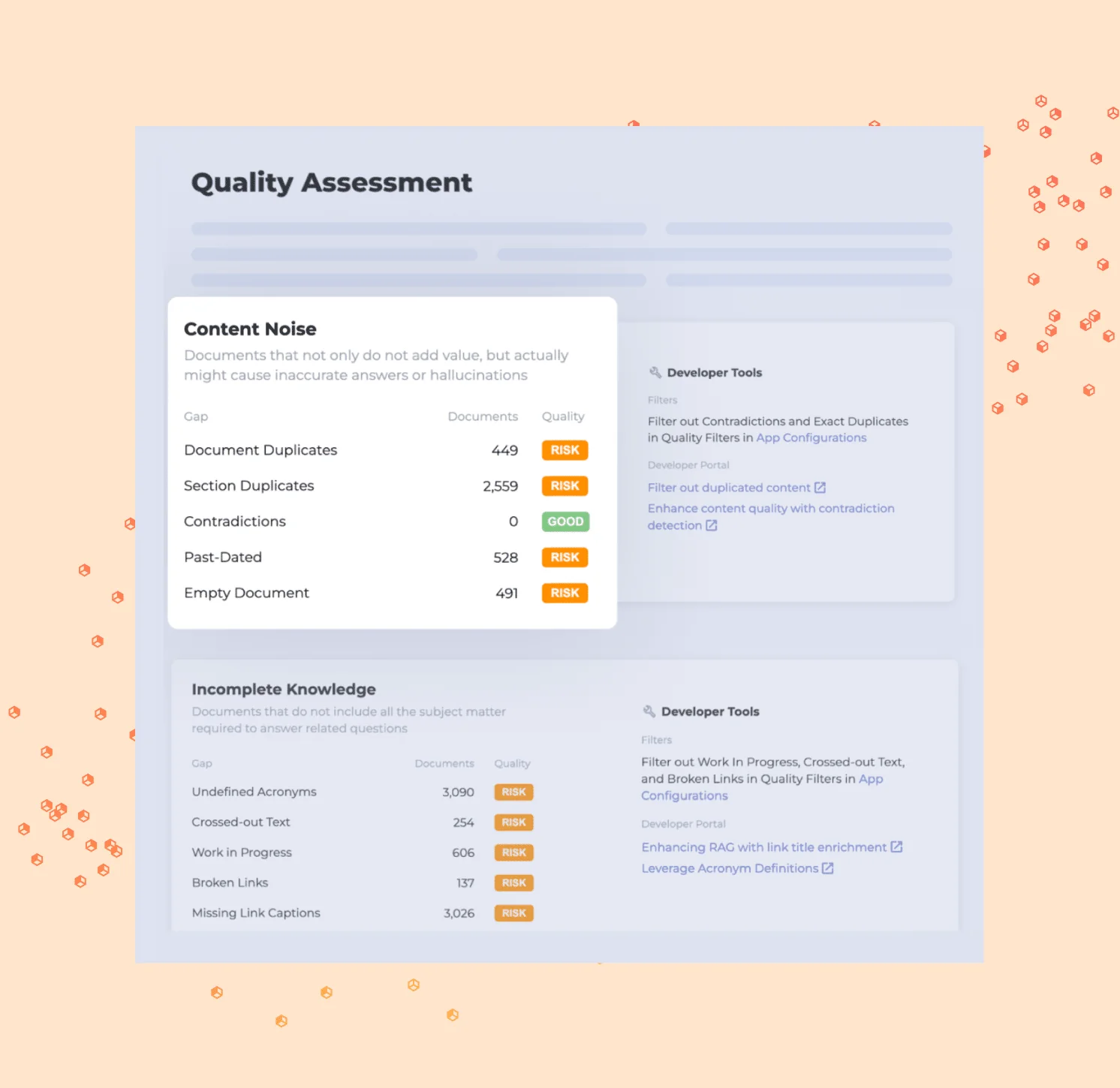
That screenshot is the honest version of the Shelf pitch. Not "we make your content AI-ready" but "you have 2,559 duplicated sections and 3,090 undefined acronyms, here they are". Customers back it up with real numbers. Intrum's quality manager Mark Comber reported a 25% reduction in average handle time in the first three months. Shelf holds 4.7 out of 5 across 141 G2 reviews and 4.8 across 106 on Capterra, and the logo wall runs from Roku and KeyBank to HelloFresh and Nespresso.
So why do people leave? Four reasons, in the order they usually bite.
The price is not published, and the last one that was is startling
Shelf's /pricing URL now returns a 301 redirect to the homepage, and there is no pricing page anywhere in Shelf's own sitemap. Every route in is a discovery call.
Archived captures fill in what used to be there, and the trajectory is worth seeing laid out.
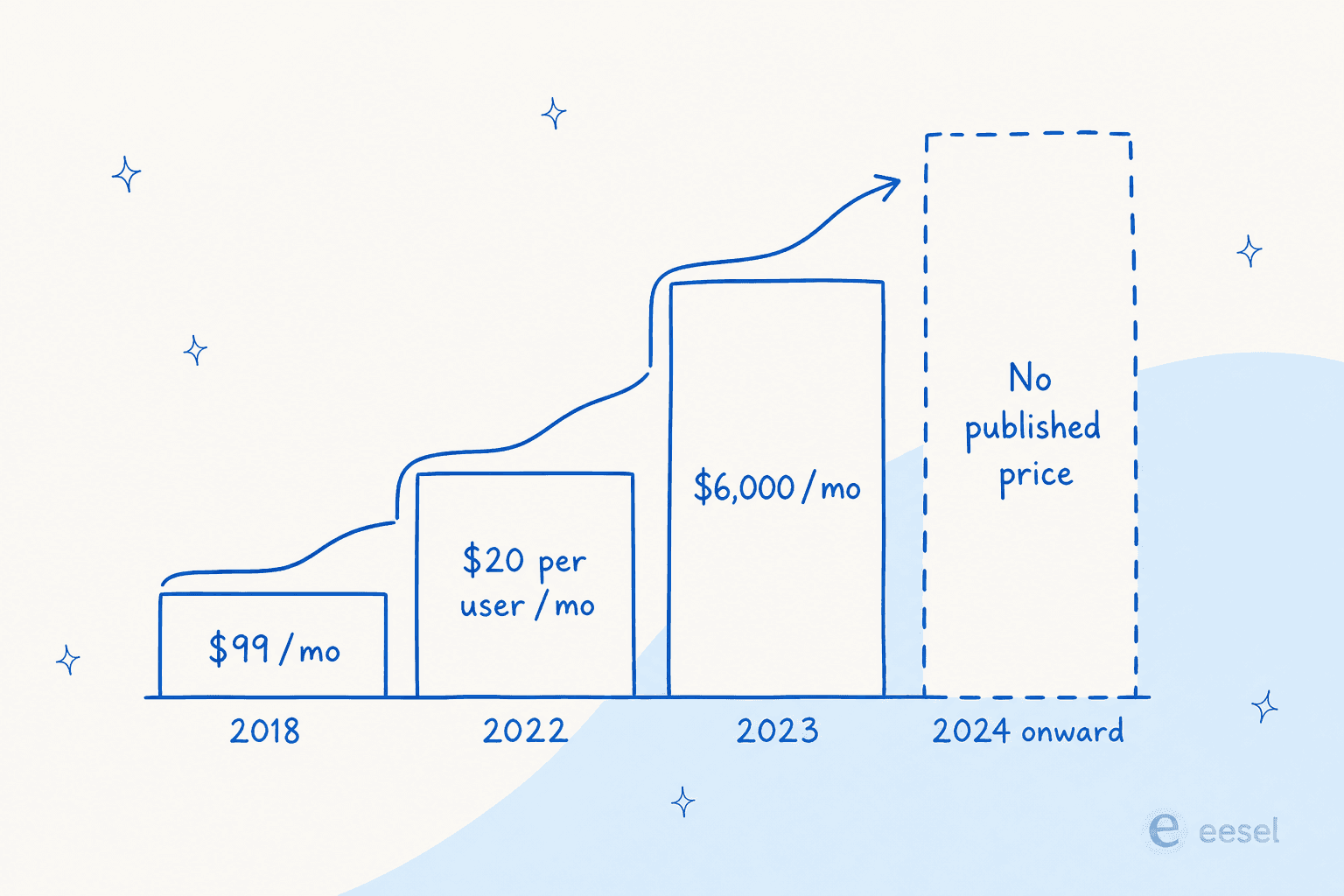
In 2018 Shelf published Team at $99 a month, Group at $199 and Workplace at $499, annual, with a stated 20% surcharge for monthly billing. By 2022 the page showed per-user rates of $20 and $30. By 2023 the entry tier was Essential at $6,000 per month for 100 users, with Standard at $11,000 for 250. Then the captures stop entirely, which dates the removal to 2024.
Nothing has replaced it. The Zendesk marketplace apps are free to install with the subscription sold separately, and G2 notes the vendor has never listed pricing on its profile.
What buyers do report lines up with an enterprise floor rather than a departmental one. G2's own aggregate profile puts Shelf's perceived cost at the maximum $$$$$, with four months to implement and 13 months to ROI. That is a real number to weigh, because thirteen months is longer than a lot of support leaders keep the same helpdesk.
It reads your knowledge base, not your tickets
Every prebuilt Shelf connector is pull-only. The docs define a pull flow as bringing content from an external platform into Shelf's content integration layer, and nothing writes back. The list covers Zendesk, Salesforce Knowledge, ServiceNow, Confluence, SharePoint, Google Drive, Notion and Contentful.
Two things follow. First, it ingests knowledge articles, not ticket history, so the corpus it governs is the one your team already wrote and not the one your team already answered. Second, the absentee list is long: no Freshdesk, no HubSpot, no Front, no Gorgias, no Help Scout, no Jira Service Management. If you are on any of those, Shelf's helpdesk story is a Salesforce or CCaaS story that does not apply to you.
Setup is also heavier than a marketplace install suggests. The Zendesk app arrives as three separate private zip files you request from support, and enabling Answer Assist on the account is a second support request. Ticket context is hand-mapped by field ID into a JSON array, and only drop-down, text, multi-line and regex Zendesk field types are supported.
There is no way to dry-run it on your own tickets
This is the one that would stop me. Across roughly 37 help-centre pages I found no replay mode, no accuracy score and no predicted resolution rate. The Configurator's Preview tab renders your current configuration live, which is not the same thing at all.
Shelf does train models on historical transcripts before a deployment, but that runs on Shelf's side, by Shelf's engineers, and only from Genesys Cloud or Kustomer. A Zendesk shop gets zero pre-launch calibration.
I care about this more than any feature on the grid, because I have watched the failure it prevents. eesel has had paying customers, including a Danish solar-energy provider, whose bot fabricated answers and sent them to real customers when its knowledge base had no match for the question. Nobody chose that. It happened because the retrieval came back empty and the model filled the silence. The fix is a confidence threshold and a dry run, not a two-quarter content cleanup.
The search ranking is the most common complaint from people who like it
The critical reviews are useful precisely because they come from happy customers. One G2 reviewer writes:
"lots of the agents that I write for cite difficulties with Shelf's search algorithm. They will search for something, and it will be the third result instead of the first."

And another, on a four-star review:
"when you search for specific documents, it doesn't always take you directly to them. Sometimes you have to dig around a bit"
Worth noting the context: a lot of Shelf's reviews carry a "Vendor Referred" or "Incentivized" label, and there are zero one-star or two-star reviews on G2. That makes the criticism above stronger rather than weaker. These are invited reviewers who still named the gap.
A few other published limits, stated plainly because they are checkable rather than damning: six of the Advanced Content Intelligence scores, including contradictions and past-dated detection, sit behind a premium activation you request from your CSM with no published price. Gem Copilot answers follow-ups in English only, caps at 4,000 words per Gem, and does not support decision tree, document, image or video Gems. Sync scheduling is in hours or days with no time-of-day control. And a sync job reports success even when every item inside it failed, with only the last 50 items visible afterwards, which is a monitoring gap worth knowing about before you rely on freshness.
The one question that sorts this whole list
Here is the reframe I would want if I were the one searching.
Shelf leads its pitch with its own research: 94% of company files carry at least one issue that can affect answer quality, 33% of content is duplicated, 26% is outdated, 12% creates a compliance risk.
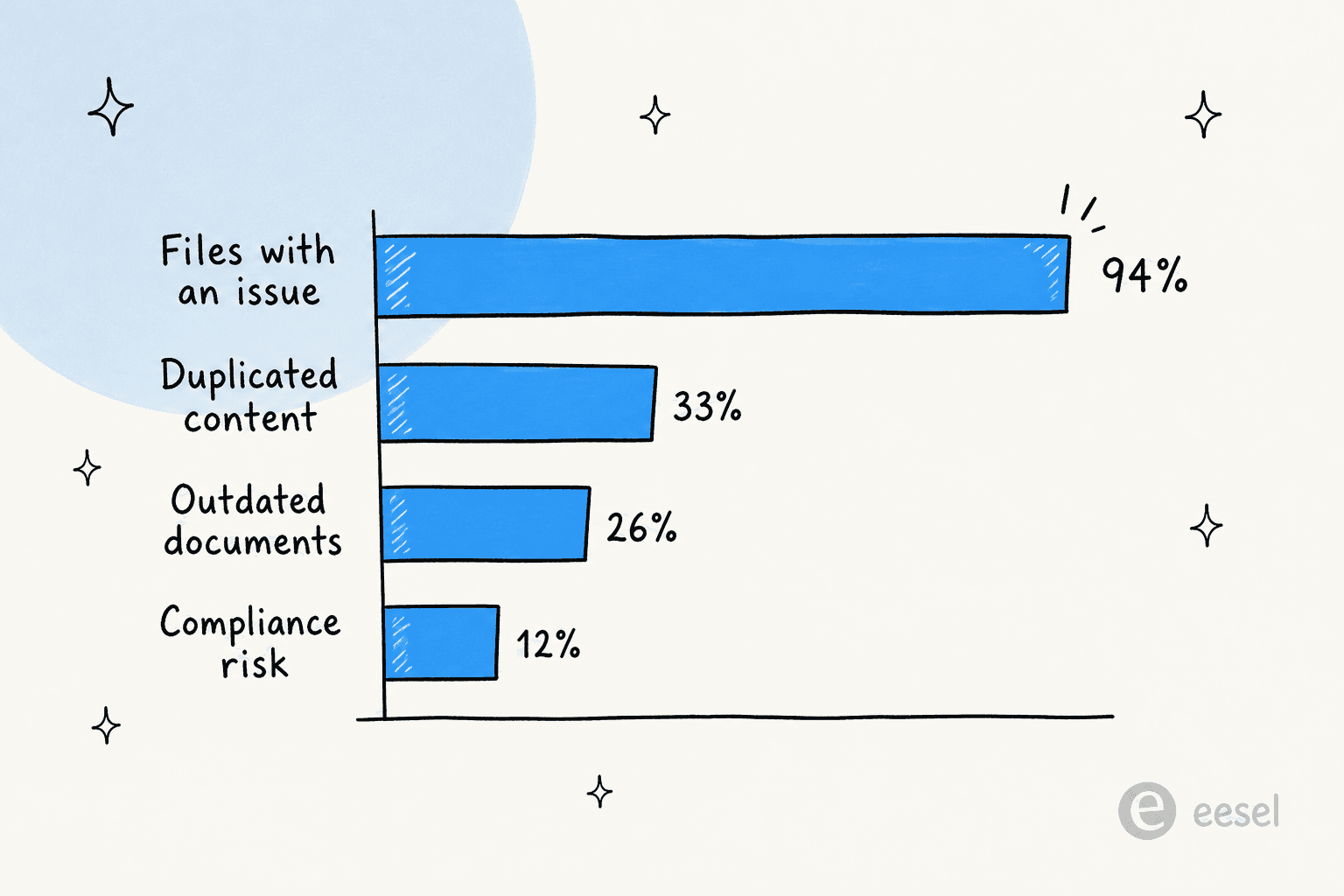
I believe those numbers. I have seen worse. A support manager at a bus-tracking service running 200 to 250 Zendesk tickets a month once told me his entire knowledge base was written for administrators while every ticket came from riders. Not one article was wrong. All of them were aimed at the wrong reader.
But look at the conclusion the category draws from that data, which is that you must clean the whole library before the AI can work. That is where I part company with it, and it is the most expensive assumption in this market.
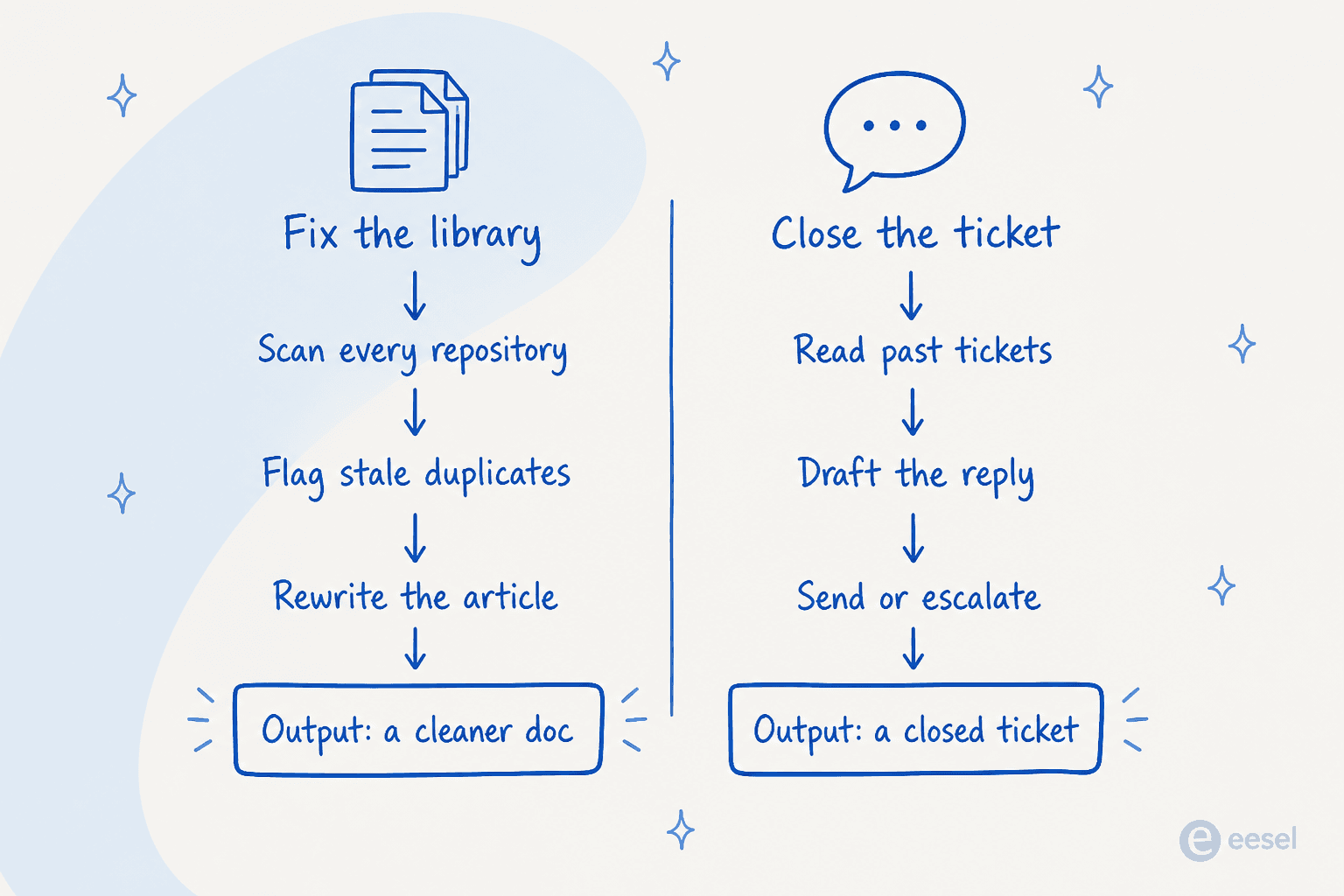
Two different jobs, two different outputs. A governance layer produces a better document. A resolution layer produces a closed ticket. They are complementary, but they are not substitutes, and a feature grid will happily let you buy the first one while believing you bought the second.
The reason the assumption is expensive is that a modern agent does not read only your help centre. It reads your past resolved tickets and your macros, where the answer to a repeat question already exists in the exact words your team already used. That bus-tracking team did not need 400 articles rewritten for riders. They needed the agent to learn from the replies their humans had already sent to riders for two years.
So the sequencing flips. Deploy the resolution layer, run it against your history, see which four or five themes it actually fails on, then fix those. In eesel's own simulation reports, a theme like refund policy can go from 28% coverage to 91% after a documentation fix, not a model change. That is a much smaller, much cheaper project than the whole library, and you can name it precisely because a scored replay told you where the holes were.
Pick the job first
Which job are you actually buying?
Four tools can look identical on a feature grid and stop at four different places. Choose the outcome you need and see who reaches it.
<div class="jobpick-labels">
  <label for="jp-1">Clean and govern my knowledge</label>
  <label for="jp-2">Surface answers to my agents</label>
  <label for="jp-3">Deflect before a ticket exists</label>
  <label for="jp-4">Close the ticket without an agent</label>
</div>

<div class="jobpick-panel jp-p1">
  <p class="jobpick-verdict">This is the aisle Shelf was built for, and it is a real aisle.</p>
  <ul>
    <li><b>Shelf</b><span>Scans connected repositories continuously and flags near-duplicates at 99%+ similarity, contradictions and past-dated docs. The LLM-based detectors sit in Advanced Scores, activated per account.</span></li>
    <li><b>Guru</b><span>Scheduled re-verification pushes each card back to a named owner. Guru says roughly 80 to 90% of verification runs without a human touching it.</span></li>
    <li><b>Bloomfire</b><span>Content reliability scoring across a company-wide library. Billed as an annual fixed cost plus migration and implementation fees, on a multi-year term.</span></li>
    <li><b>Document360</b><span>Authoring, workflows and versioning for a real documentation set, with AI writing help on every tier.</span></li>
  </ul>
</div>

<div class="jobpick-panel jp-p2">
  <p class="jobpick-verdict">Everyone claims this one. The difference is whether it reaches inside the ticket or sits in a side panel.</p>
  <ul>
    <li><b>Shelf</b><span>Answer Assist and Search Copilot inside Zendesk, Salesforce, Genesys, Five9, Kustomer and NICE. Capped at 20 Answer Assist configurations per account.</span></li>
    <li><b>Stonly</b><span>Decision trees that run inside the Zendesk, Salesforce, Freshworks and ServiceNow ticket, fill fields and fire macros. Helpdesk integrations are Enterprise-gated.</span></li>
    <li><b>eesel AI</b><span>Copilot drafts the reply in the agent's own helpdesk window, from past tickets and macros rather than the help centre alone.</span></li>
    <li><b>Guru</b><span>Browser extension, Slack and Teams. All twelve of its helpdesk connectors are tagged "sources you search", not places you answer from.</span></li>
    <li><b>Bloomfire</b><span>Surfaces to the agent, who then writes the reply. No ticket object and no reply action anywhere in the product.</span></li>
  </ul>
</div>

<div class="jobpick-panel jp-p3">
  <p class="jobpick-verdict">Deflection means the customer self-serves and no ticket is created. Watch the tier gate here.</p>
  <ul>
    <li><b>Document360</b><span>Eddy AI plus the Support Ticket Deflector and embedded help centre. All three are Business tier or above, and one Eddy credit equals one question asked.</span></li>
    <li><b>Stonly</b><span>Interactive guides and a self-serve knowledge base, billed per guide view. A re-open counts as a second view.</span></li>
    <li><b>Zendesk</b><span>Generative search is on by default from Suite Team up, with 100,000 eligible searches a month. A widget follow-up answered by the AI agent consumes an automated resolution.</span></li>
    <li><b>eesel AI</b><span>Chat widget and help-centre answers on the same credits as everything else (1 credit per chat), with no separate deflection SKU.</span></li>
  </ul>
</div>

<div class="jobpick-panel jp-p4">
  <p class="jobpick-verdict">The shortest list in the whole roundup, and the reason most of these comparisons are the wrong comparison.</p>
  <ul>
    <li><b>eesel AI</b><span>Holds the queue in Zendesk, Freshdesk, Gorgias, Front, Help Scout, HubSpot, Salesforce and Jira Service Management. Replies, tags, routes and escalates. 1 credit per ticket or chat handled.</span></li>
    <li><b>Zendesk AI agents</b><span>Resolves inside Zendesk at $1.50 per automated resolution committed, or $2.00 pay as you go, capped at 10,000 a year.</span></li>
    <li><b>Stonly</b><span>Business Process Agents handle email, chat and WhatsApp end to end, but only by walking a guide you authored, and only on Enterprise.</span></li>
    <li class="jobpick-out"><b>Shelf, Guru, Bloomfire, Document360</b><span>None of them close a ticket. Document360's only write action into a helpdesk is creating one.</span></li>
  </ul>
</div>
Prices are the vendors' own published rates as of August 2026. Shelf, Guru, Bloomfire, Document360 and Stonly publish no rate card at all.
The 8 best Shelf AI alternatives in 2026 at a glance
Every price below is the vendor's own published figure as of August 2026. Where a cell says "not published", I looked and it really is not there.
| Tool | Best for | Entry price (published) | Billable unit | Closes a ticket? | Dry run on your tickets? | Helpdesks it replies in | Free option | Security | Review score |
|---|---|---|---|---|---|---|---|---|---|
| eesel AI | Resolving tickets without a rebuild | From $299/mo (500 credits) | 1 credit per ticket or chat | Yes | Yes, scored replay | Zendesk, Freshdesk, Gorgias, Front, Help Scout, HubSpot, Salesforce, Jira SM | 100 free credits, no card | SOC 2 in progress, GDPR, HIPAA as add-on | 4.6/5, 18 on G2 |
| Zendesk AI agents | Teams already deep in Zendesk | $55 per agent/mo + $1.50 per resolution | Verified automated resolution | Yes | No, manual test widget only | Zendesk | Trial only | SOC 2, ISO 27001, HIPAA | 4.3/5, 7,044 on G2 |
| Guru | Verified knowledge in Slack and the browser | Not published | Not published | No | No | None, extension only | No | SOC 2 Type II, HIPAA named | 4.7/5, 2,322 on G2 |
| Bloomfire | One company-wide searchable library | Not published, multi-year only | Annual fixed cost + implementation | No | No | None | No | SOC 2, GDPR | 4.6/5, 515 on G2 |
| Document360 | A real documentation set with deflection | Not published | Team accounts + Eddy credits | No, creates only | No | None, opens tickets only | 14-day trial | SOC 2, GDPR | 4.7/5, 541 on G2 |
| Stonly | Step-by-step guided resolution | Free tier, paid not published | Guide views | Yes, on Enterprise | No, vendor-run only | Zendesk, Salesforce, Freshworks, ServiceNow | Yes, 400 views/mo | SOC 2 Type II, GDPR, HIPAA | 4.8/5, 132 on G2 |
| Capacity | Replacing the whole support stack | $25,000/yr per Capterra | Per response, per minute, per message | Yes, in its own channels | No | Its own desk, Zendesk API only | No | SOC 2 Type II, HIPAA, GDPR | 4.7/5, 106 on G2 |
| Korra | Air-gapped industrial documentation | $199 per user/mo per Capterra | Per user | No | No | None | Trial | On-prem and air-gapped | 4.8/5, 17 on Capterra |
A note on the review scores, because they are less comparable than they look. Shelf, Korra and several others carry a high share of vendor-referred or incentivized reviews. Korra has 15 of 17. Read the written cons rather than the star average.
1. eesel AI
Best for teams who want the ticket volume down this month without a knowledge-base rebuild first.

What it does
I work on eesel, so take the framing with that in mind, but the facts here are all on the public pages. It connects to your helpdesk, reads your past tickets, macros and knowledge sources together, then drafts or sends replies inside the queue. The AI helpdesk agent works in Zendesk, Freshdesk, Gorgias, Front, Help Scout, HubSpot, Salesforce and Jira Service Management.
Depth varies by platform, and the Zendesk integration is the most complete: it reads the queue, replies publicly or as an internal note, tags, routes and changes status. Every one of those actions has three states, full automation, approval only, or off, so you can start with drafting and hand the send button over later.
Knowledge is read-only and pooled rather than siloed. Connect Confluence, Notion, SharePoint, Google Drive, your website and file uploads, and an agent searches all of them at once. That is the part that makes the library-cleanup question smaller: the ticket history is a source in its own right.
The differentiator that matters against every tool on this page is simulation. It replays your past tickets in sandbox mode and scores each answer against what your team actually sent, then reports per-theme coverage gaps and suggests instruction changes. Not a synthetic benchmark. Your queue, your wording, your verdict.
Where it stops
If you run a CCaaS stack, this is not your tool. There is no Genesys, Five9 or NICE integration, and Shelf covers all three. There is no Zoho Desk, Crisp or LiveAgent connector either. SOC 2 Type II is in progress rather than certified, so if your procurement team needs the report today, Shelf, Guru and Capacity all have it and eesel does not. HIPAA is a talk-to-us add-on. And because each credit covers a ticket or chat handled rather than a resolution, a ticket that fails to resolve still uses a credit.
Pricing
| Monthly credits | Price | Unit |
|---|---|---|
| 100 | Free | No credit card |
| 500 | $299/mo | 1 credit = one ticket or one chat, any number of replies |
| 1,000 | $499/mo | Same, every integration and channel included |
| 2,500 | $999/mo | Same |
| 5,000 | $1,899/mo | Above 5,000, talk to us |
| Blog post | $4 each | One blog draft |
| Seats | $0 | No per-seat charge on any plan |
Pay a year upfront and get two months free. If you run out of credits, agents pause until they reset, or you can turn on overage with a monthly cap you set at $0.80 per extra credit. SSO and MFA (from $199/month), priority support (from $299/month) and EU or US data residency ($500/month) are add-ons. A gradual rollout prices honestly too, since routing 200 of 1,000 tickets uses 200 credits and fits inside the 500-credit plan.
My take
Pick eesel if the thing you want to change is the queue, and if you want proof before go-live rather than after. Real deployments back the scale claim: Smava handles 100,000+ tickets a month in German on Zendesk, Design.com runs 50,000+ on Freshdesk against 1,000+ help articles, and Gridwise's Kim Simpson reported 73% of tier-1 requests resolved in the first month after a seven-day trial. Skip it if you are buying a governance platform, or if your channel is voice.
2. Zendesk AI agents
Best for teams who are staying on Zendesk and would rather buy the native option than integrate another vendor.
What it does
Zendesk is the only vendor here that owns both the knowledge base and the resolution layer, and in 2026 it also owns Forethought, which now fronts its AI agent line. Generative search is on by default from Suite Team upward with an allowance of 100,000 eligible searches a month, and AI agents can resolve conversations end to end inside Zendesk.
Where it stops
The gating is where the cost hides. The old Advanced AI add-on is gone, replaced by Copilot at $50 per agent per month on annual billing, available on Professional and higher. Without it, Professional gets intelligent triage classifications only, plus five pooled writing-tool uses per agent per month capped at 500 per instance no matter how many agents you have. Knowledge approval workflows, scheduled publishing with verification and content blocks are all Enterprise-only, and Suite Enterprise no longer has a public price or even a column in the comparison table.
There is also no replay. Zendesk ships a "Test AI Agent" control, but the docs describe typing messages into a test widget one conversation at a time. You write the scenarios yourself, and there is no predicted resolution rate before launch. Reviewers name the same two things repeatedly:
"The biggest drawback is the complexity of initial setup. While Zendesk is highly customizable, configuring workflows, ticket routing, and automations to match business processes takes time and careful planning. The platform has a steep learning curve because of its extensive configuration and automation options. Pricing can become expensive as you add advanced features, AI capabilities, and additional agents."
Pricing
| Plan | Annual, per agent/mo | Monthly, per agent/mo | Included automated resolutions |
|---|---|---|---|
| Support Team | $19 | $25 | 5 per agent/mo |
| Suite Team | $55 | $69 | 5 per agent/mo |
| Suite Professional | $115 | $149 | 10 per agent/mo |
| Suite Enterprise + Copilot | Not published | Not published | 15 per agent/mo |
| Copilot add-on | $50 | Not published | Professional and above |
| Extra resolutions | $1.50 committed, $2.00 pay as you go | Same | Capped at 10,000 per year |
One thing that did improve in May 2026: Zendesk split resolutions into three tiers and only bills the verified kind, where the customer stays silent for 72 hours and an LLM then confirms the issue was resolved. Assisted escalations and unverified containments are free. No per-tier dollar figure is published, so the $1.50 and $2.00 pair remains the only published rate.
My take
The right call if Zendesk is non-negotiable and you have the budget for Copilot on top of Professional. Run the arithmetic first though. Twenty agents on Suite Professional with Copilot is $3,300 a month before a single extra resolution, and every resolution past your allowance is $1.50. Compare that to a per-ticket model at your actual volume, which is what my eesel vs Zendesk AI breakdown does in detail.
3. Guru
Best for knowledge that has to stay verified, with a named human on the hook for each card.
What it does
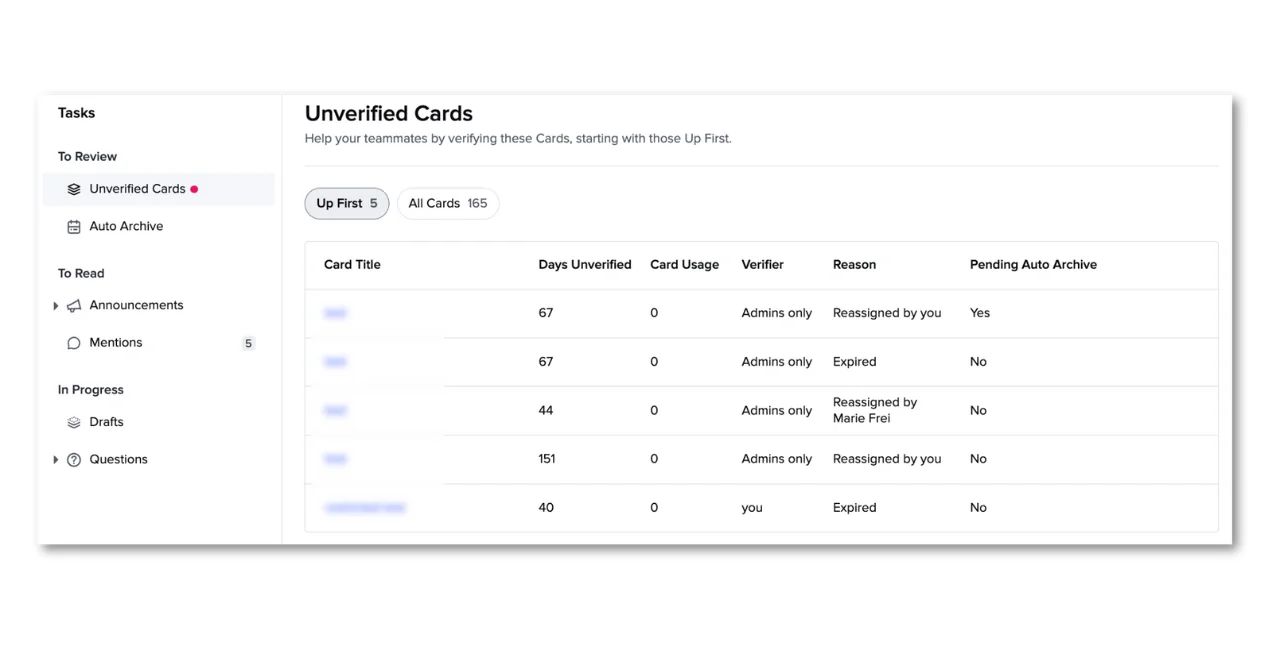
Guru is the closest like-for-like Shelf swap on this list, and its verification model is the best-designed thing in the category. Cards have owners, owners get prompted on a schedule, and stale cards land in an unverified queue with a day count and a reason. Guru says roughly 80 to 90% of verification runs without a human touching it. There are 132 integrations in the directory, the MCP server exposes knowledge to Claude and ChatGPT, and Guru claims more than 10,000 companies.
One reviewer captures the appeal precisely:
"What I like best is the automated verification workflows. Instead of the content becoming obsolete, the platform enforces ownership by prompting subject matter experts to re-verify knowledge on a set schedule. This maintains a highly trustworthy repository for our support specialists directly inside our communications tools."
Where it stops
The integration directory tags every app as either "sources you search" or "where you search from", and that tagging is the whole story. Zendesk, Zendesk Guide, Freshdesk, Front, Gorgias, Salesforce Service Cloud, Jira Service Management, ServiceNow, Kustomer, Dixa and HubSpot Service Hub are all in the first bucket. The second bucket is Slack, Teams, Chrome, Edge and MCP clients. So Guru reads your helpdesk and answers somewhere else.
Knowledge Agents answer in exactly five places, none of which is a customer channel or a ticket. Guru can create a ticket when a human asks it to in chat, with confirmation required for anything that writes, but it cannot hold a queue, draft a customer reply or close anything. Guru claims no deflection metric anywhere on its site, which is at least consistent. The same reviewer who praised verification also flagged the format cost:
"The card-based UI/UX is overly rigid for long-form technical documentation, causing fragmentation. Additionally, onboarding new users is difficult because the advanced search requires highly precise keywords, often leading to initial navigation frustration and steep adoption curves."
Pricing
There is none published. The pricing page has no dollar figures, no tier grid, no seat counts and no billing unit. Guru's own FAQ explains it as being a platform and expertise solution rather than a per-seat tool, scoped in the first conversation. The tier names survive in the help centre: a closed legacy Starter plan, All-in-One, and Enterprise. AI is not a separate SKU, it is bundled, and both Knowledge Agents and AI Assist require All-in-One or Enterprise. No free plan, no trial, no self-serve signup.
G2 buyers report perceived cost at $$$$$, a 12% average discount, two months to implement and 10 months to ROI.
My take
Take Guru if the problem you are solving is "our knowledge is wrong and nobody owns it", and if your team lives in Slack. Its verification loop will beat what you have. Do not take it expecting deflection, and go into the pricing call knowing there is no anchor. My Guru alternatives roundup goes deeper on the substitutes, and Guru review covers day-to-day use.
4. Bloomfire
Best for one company-wide library where search has to reach inside video and audio.
What it does
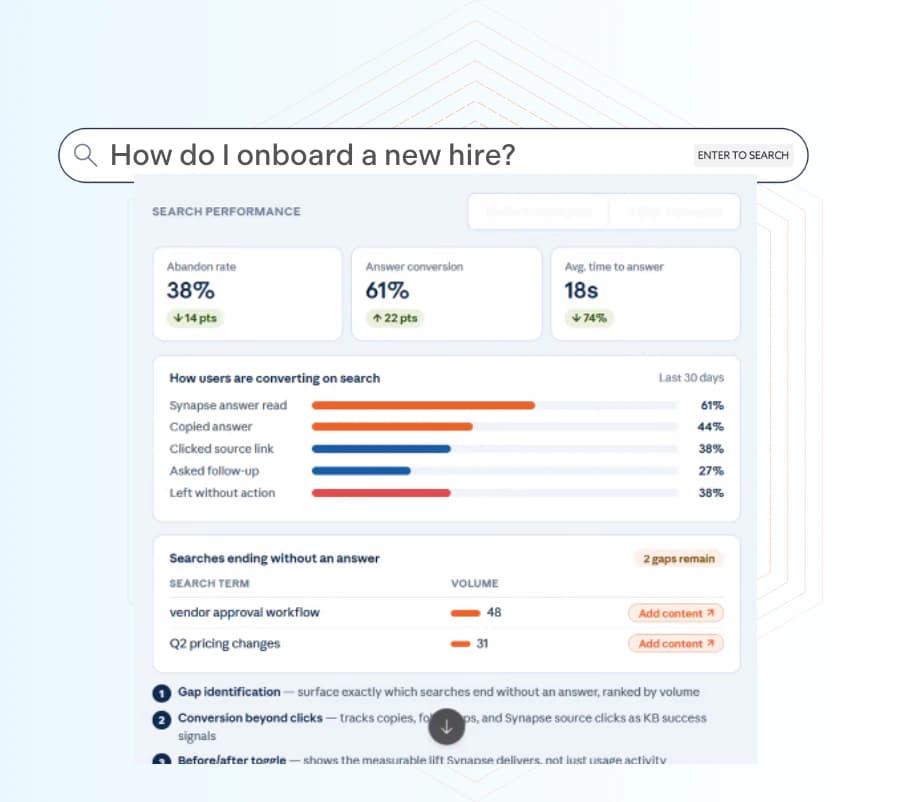
Bloomfire's real strength is depth of indexing and the analytics on top of it. That screenshot is the part I would actually use: abandon rate, answer conversion, average time to answer, and a ranked list of searches that ended without an answer with an "add content" button next to each. It is the closest anything here comes to telling you which article to write next. Synapse is the conversational layer over it, and connectors reach Zendesk, Salesforce, Genesys, Microsoft Dynamics and Gong, plus Workato for the long tail.
Where it stops
Bloomfire surfaces, consistently and by design. Its customer support page is written entirely about agents getting answers, the platform page's verb is literally "surfaces", and there is no ticket object, no reply action and no deflection claim anywhere on the site. Its "91% of questions resolved without escalation" figure is agents self-serving inside Bloomfire, not customers receiving bot replies, which is a meaningful difference when you are modelling headcount. The only autonomous path is do-it-yourself: Bloomfire supplies the answer over an API and you build the bot.
The absentee integration list is long too: no Freshdesk, Freshservice, Gorgias, HubSpot Service Hub, Help Scout, Front, Jira Service Management or ServiceNow.
Two reviewers, both on five-star reviews, name the sharp edges:
"The upgrades are great, but I wish they were built into the annual cost, vs having to pay extra for each one. Our budget is approved annually, so upgrades along the way are of no use until the next budget alignment."
"Some of our back office associates and CSRs have a hard time finding the data or answers needed. Synapse does better when asked a question vs. a CSR typing in a phrase. There are times when two different people will ask the same question, but for some reason a different answer is generated."
Pricing
Quote-only, with three tiers named Team, Department and Enterprise. The pricing page describes the unit as an annual fixed cost plus fees for data migration and implementation services, and deliberately not per seat. Its FAQ answers "are pricing plans delineated based on the number of users?" with a flat no. Then this line, which applies to every tier including entry: all plans are billed on a multi-year basis. There is no free trial.
One shape does leak. G2's pricing tab lists seat bands of 25, 100 and 500 users across the three tiers, which is a curious thing to publish alongside a flat "no" on user-based pricing. Base implementation also caps at 3,000 content uploads and one knowledge connector, with advanced migrations, extra integrations and custom design all sold as premium add-ons.
My take
A strong pick for a large, mixed-media internal library where search analytics drive a content roadmap, and the search-performance view earns its place on its own. The multi-year commitment is the thing to negotiate hardest, and the 25-member overage increment is worth catching before signature. Capterra's lowest sub-score for Bloomfire is value for money at 4.2, which tracks. More detail in Bloomfire pricing.
5. Document360
Best for teams whose real problem is that they do not have a proper documentation set yet.
What it does
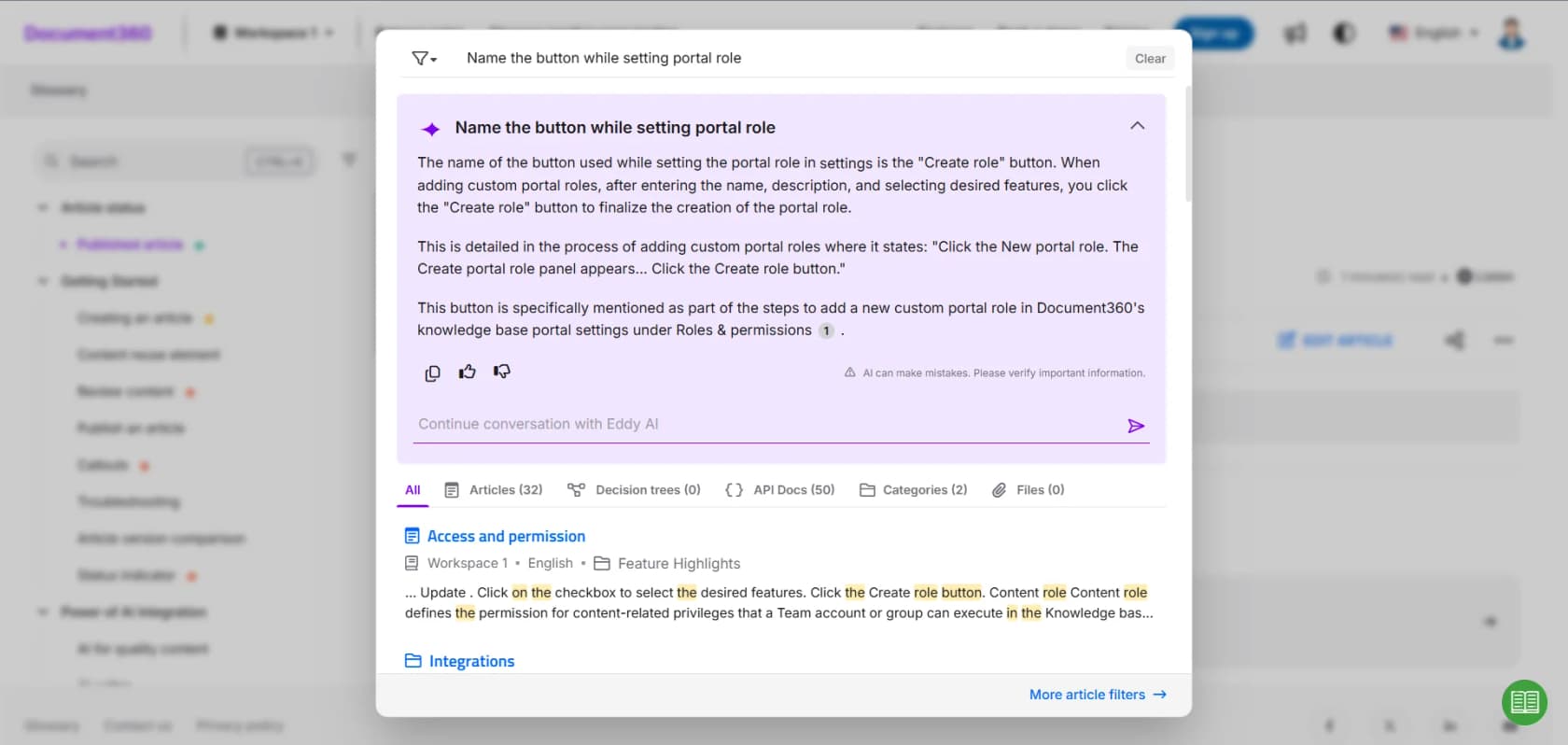
Of everything here, Document360 is the best actual authoring tool. Versioning, workflows, review reminders, localization, API docs, decision trees and a properly good editor. Eddy AI sits on top for search and answers, and the embedded help centre plus Support Ticket Deflector put self-service in front of a ticket.
Where it stops
Two things, and the second is the interesting one.
First, the AI gating. AI Search and Answer, the Support Ticket Deflector, the embedded help centre and the "30+ integrations" line are all Business tier or above, so none of the deflection story is available on Professional. The meter is unusual too: one Eddy credit equals one question asked by a user, on a monthly cap that renews, and there is no self-serve top-up. You email support for more. Credits also cannot be purchased during the trial, so you cannot test AI at volume in the 14 days. Hit the cap and the button greys out.
Second, and this is the single clearest illustration of the whole "where does the work stop" question, look at what Document360 can do to a helpdesk.
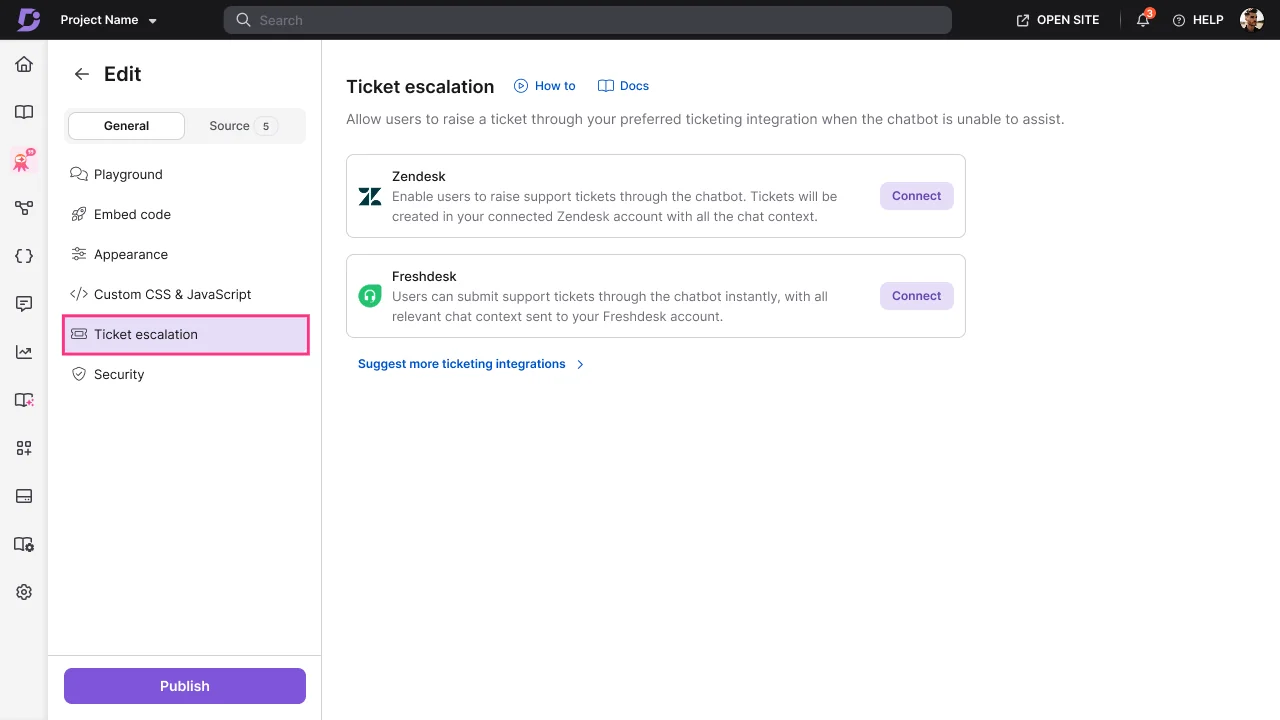
Exactly two ticketing integrations, Zendesk and Freshdesk, and a "suggest more ticketing integrations" link. That link is a voting widget, not a roadmap, so if you see Jira or HubSpot listed elsewhere as Document360 integrations, that is where the claim comes from. And the direction only runs one way. Per the escalation docs, the chatbot raises a ticket when it cannot assist, which appears in Zendesk or Freshdesk via API with an AI-generated subject and a description capped at 250 characters. There is no documented path to read a queue, draft a reply, tag, route or close. Existing tickets are a read-only training corpus synced daily. Deflection happens strictly before a ticket exists; once one does, Document360 is out of the loop.
Reviewers are consistent on the cost curve:
"Pricing is high as we are a startup company... Articles' wise pricing, small team discounts, as after 6 or 10 users it gets more costly."
That reviewer is independently describing the exact 5-and-10 team-account thresholds in Document360's tier structure, which is a good sign the gating is real rather than theoretical.
Pricing
The pricing page publishes no plan names and no prices. It is a three-step quote configurator, and the vendor explains why in its own FAQ: a flat tier would either overcharge small teams or undercharge enterprises, so it quotes what fits. The tier shape survives on G2's vendor-supplied profile: Professional includes five team accounts, Business includes ten, Enterprise is unstated, all billed annually, all "contact us". The billing unit is the team account, meaning editors and reviewers, not readers.
Hidden meters worth knowing: 40 MB of source data per chatbot with increases going through a CSM rather than an overage, two manual retrains a day, and daily-only Zendesk and Freshdesk sync. G2 buyers report two months to implement, 10 months to ROI and an 8% average discount.
My take
Buy Document360 to build documentation, and treat the AI as a bonus on Business rather than the reason. If you already have a decent help centre and the problem is ticket volume, this is the wrong shelf entirely. See Document360 pricing for the full tier picture and Document360 AI for what Eddy actually does.
6. Stonly
Best for resolution paths that must follow a fixed sequence, like troubleshooting or regulated processes.
What it does
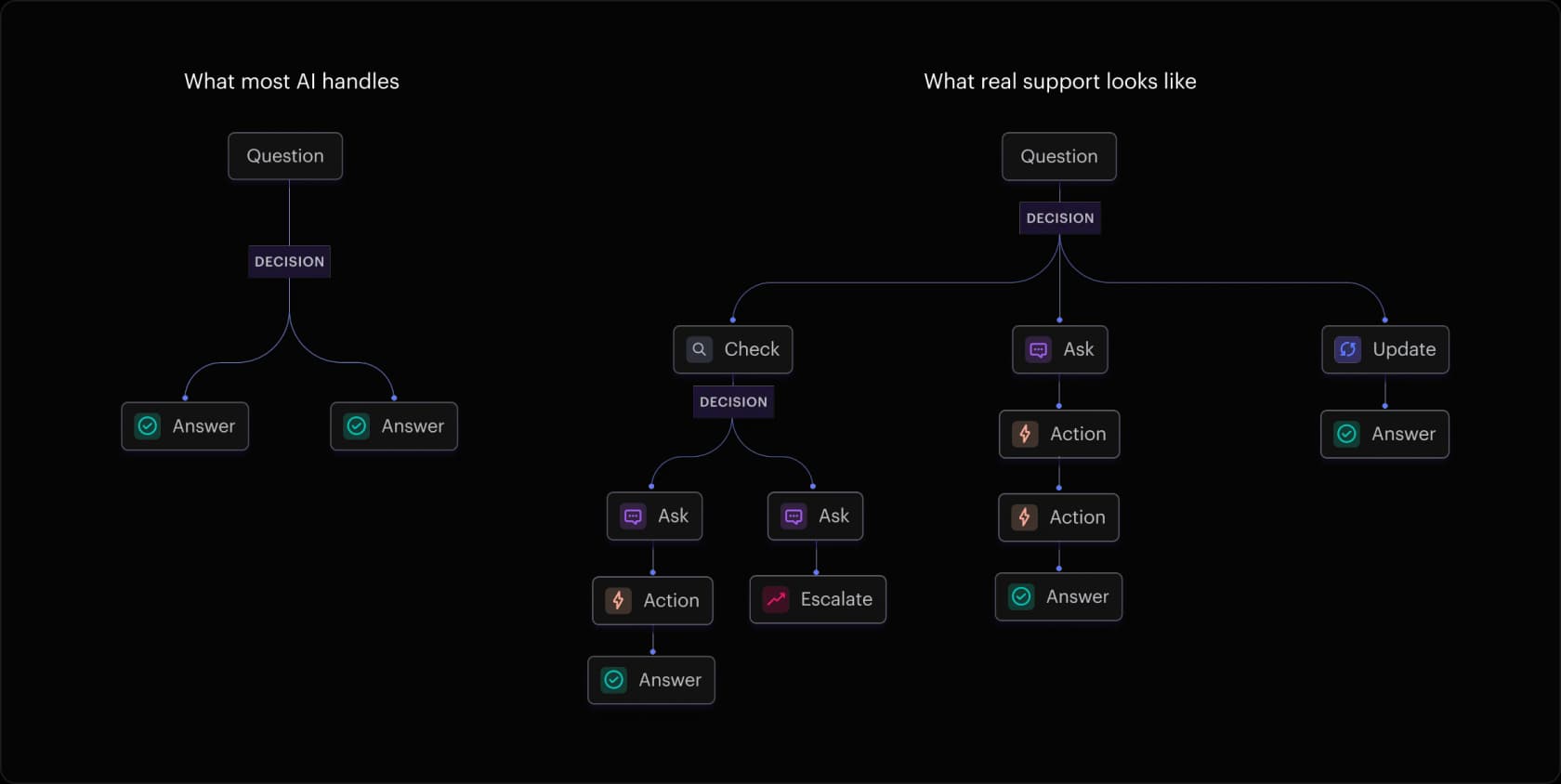
Stonly is the one real outlier on this list. Instead of retrieving text and hoping the model reasons well, it walks a tree you authored. That image is the whole product philosophy: question, decision, then check a record, ask the customer, update a field, escalate, or answer.
Its Business Process Agents take that further and handle conversations end to end across email, chat and WhatsApp, gathering information, taking action and driving to a resolution. Stonly's own description of the mechanism is that a BPA walks your guide step by step, with a deterministic structure keeping them on rails. Agent-side, humans review and approve and step in only when required. Integrations run deep in Zendesk, Salesforce, Freshworks and ServiceNow, where guides run inside the ticket, fill fields and fire macros.
Where it stops
The rails cut both ways. Coverage is bounded by what you authored, and nothing in Stonly's material describes past ticket history as an input to how a BPA resolves. So the build effort is front-loaded and real, and a question outside the tree is a question outside the product.
Then the gating. On the current pricing page, AI agents and every helpdesk integration sit in the Enterprise column. Small Business has neither, and it also carries an eligibility gate rather than just a cap: companies under 100 employees only. Evaluation is vendor-run too. There is no replay against your own tickets, just an offer to bring Stonly a scenario your team handles today so it can show you what a BPA would do with it.
The reliability note comes from a reviewer who was generous about it:
"I don't think it's fair to blame Stonly, but the Stonly / Zendesk integration isn't as reliable as I'd like it to be. Every few weeks it stops working but I just have to log out/in to Zendesk and refresh to get it going again. Not a big deal."
One caveat on Stonly's 4.8 out of 5 across 132 reviews: the captured reviews are from 2024 and discuss the guide and knowledge-base layer. No reviewer in that corpus discusses BPAs or AI resolution quality, so the score is not evidence about the AI either way.
Pricing
| Plan | Price | Guide views | Seats | AI agents | Helpdesk integrations |
|---|---|---|---|---|---|
| Basic | Free | 400/mo, 5 published guides, 1 language | 1 | No | No |
| Small Business | Not published | 4,000/mo | 5 | No | No |
| Enterprise | Not published | "As many as you need" | As needed | Yes | Yes |
The billable unit is the guide view, and the definition is specific: each time a guide is opened by an external user it counts as one billable view, and a re-open counts again. Internal team views are free, and five embedded guides count as one view. No overage rate is published; instead, exceeding the cap two months running auto-upgrades you to an unpriced plan. No AI meter is published anywhere, no per-resolution rate, no included volume.
Stonly's own G2 listing does carry prices, at $124 and $249 a month, but that data is stamped October 2024 and those tier names no longer exist on the site. Treat it as history.
My take
If your resolutions are procedural, Stonly's determinism is a feature and not a limitation, and the outcomes support it. Anderson America reports 80% fewer tickets and a 71% self-serve success rate. Just price the authoring time honestly, and know that the AI you are evaluating is an Enterprise line item you cannot self-serve into.
7. Capacity
Best for replacing the support stack outright rather than adding a layer to it.
What it does
Capacity is the most substantial company on this list by the numbers. It announced $92M in August 2025, has raised $155M+ across equity and debt, says it is profitable at $60 million of annual recurring revenue, runs about 250 staff, and has made 14 acquisitions since 2023. It rebranded from Jane.ai in 2019.
It is also the only vendor here that is a helpdesk in its own right, with an IVR, a shared inbox, live chat and an agent-assist layer. Its own FAQ is direct about capability: beyond retrieving information, its agents can create or update CRM records, open helpdesk tickets and trigger workflows. Autopilot reads and responds to incoming email before your team sees it, and can auto-send.
Where it stops
Read the integration capability tags rather than the logo wall. Salesforce and Slack carry an "interface" tag and are first-class. ServiceNow, Jira and SharePoint are indexed. Zendesk and Freshdesk are API-only, with no indexing and no interface. Front, Gorgias, Zoho Desk and Help Scout are absent entirely. Corroborating this, the only integrations G2 reviewers report actually using are Salesforce and Slack, exactly the two tagged as interfaces.
So Capacity resolves end to end when it owns the channel, and in your existing helpdesk it opens tickets over an API. That is a replace-the-stack decision, not a layer-on-top one, and it comes with a partner-led deployment where voice runs six to eight weeks.
The meter deserves a hard look too. Chat and email bill per response, not per resolution, so a six-turn conversation that ends in a human escalation bills six times and resolves nothing. Live chat and the shared inbox are on Pro rather than Core, and HIPAA is Enterprise-only.
On setup, G2's own auto-generated summary contradicts itself, listing "easy setup" in pros while "complex setup" and "difficult setup" are the top two cons. The reviews resolve the tie:
"I find the initial setup and customization time-consuming if there's a large knowledge base or complex workflows… I sometimes need to train it for company-specific terminology."
Pricing
The structure is published in full and the numbers are entirely absent, which is a combination I have not seen elsewhere.
| Meter | Unit | Rate |
|---|---|---|
| Platform fee | Annual subscription, Core / Pro / Enterprise | Not published |
| Chat agent | Per response | Not published |
| Voice agent | Per minute | Not published |
| Email agent | Per response | Not published |
| SMS agent | Per message | Not published |
| Agent Assist and QA | Per hour of agent time | Not published |
Capterra publishes $25,000 per year as the starting price for a plan called Basic, with no free trial or free version. G2 buyers report a 12% average discount, perceived cost at $$$$$, three months to implement and 14 months to ROI.
Its published outcome claims are big and unevidenced: "resolves 90%+ of customer inquiries automatically" and "deflect over 90% of tickets", with no methodology, cohort or window attached. Capacity hedges its own cost claim as more than 66% operational cost savings "in some use cases", which is the honest version.
My take
Worth a serious look if you are consolidating and willing to move channels onto Capacity, and the balance sheet means it will be around. Skip it if your helpdesk is Zendesk or Freshdesk and you intend to keep it, because API-only is a real ceiling. Model the per-response meter at your actual turn count before you sign. My Capacity AI alternatives piece covers the comparison set.
8. Korra
Best for air-gapped industrial and defence documentation, and almost nothing else.
I am including Korra because it still ranks in this comparison set, and because the most useful thing I can tell you is that it has moved.
What it does
Korra is alive and independent. Korra AI LTD. operates from Jerusalem with 1 to 10 employees and active status on Crunchbase. But the footer now reads "Standalone Industrial AI Platform", the positioning is air-gapped and on-premise on an Nvidia appliance, and the lead demo example on the site is a MiG-29 flight manual. Its LinkedIn describes it as an airgapped knowledge AI platform. If your requirement is truly a sealed network with no cloud egress, Korra is the only option on this page that meets it.
Where it stops
For a customer support team, comprehensively. Korra's full guide runs eleven sections and contains no ticket, queue, assignment, status, escalation or handover. "Integration" in Korra's vocabulary means a full-page, widget or SDK embed. Its documented connectors are three: SharePoint, Google Drive and Dropbox. Korra's Capterra listing claims Zendesk Suite, ServiceNow, SugarCRM and Confluence, none of which appear in Korra's own docs, so treat those as a vendor-supplied claim.
The headline 80% figure is worth tracing, because it is published three different ways. The homepage states it resolves 80%. The underlying Wedge case study says Korra "will be able to resolve 70% to 80%". The results box on that same page says "80-90% reduction". One forecast, three renderings. The reviewer behind that case study was on a free trial and wrote in the cons field: "We've just launched so cannot comment at this time."
The most useful review on Korra says the thing plainly:
"Korra is an AI tool looking to become a KM/KB tool, not an existing tool that added AI features. Missing are common KM workflows and processes to ensure information and documents are fresh."

Pricing
Korra's /pricing page has no prices on it. It is a heading, some logo tiles and a Calendly widget. Capterra publishes Business Plus at $199.00 per user per month as the starting price, with Enterprise as a custom quote and both a free version and free trial marked available. That is seat-metered rather than usage-metered, so ten seats is $1,990 a month, and the VPC, on-premise and appliance options carry no published SKU.
Reviews are thin and heavily incentivized: 4.8 on Capterra from 17 reviews, 15 of which are labelled "Vendor Referred - Incentive Offered". Its G2 profile is unclaimed with zero reviews.
My take
Take Korra if air-gapped is a hard requirement and your documents are manuals. Do not take it as a Shelf replacement for a support queue, because the workflow layer Jason B. describes as missing is exactly the layer Shelf is good at, and the resolution layer was never there. Buyers on Capterra compared it against KnowledgeOwl, Slite and Tettra, all wikis. Nobody weighed it against a helpdesk, which tells you where it actually sits.
How I would actually run this evaluation
Five steps, in this order, and the order is the point.
- Write down the outcome, not the feature. "Cut first response time" and "stop writing the same refund reply" are different products. Use the picker above if the wording is fuzzy.
- Ask every vendor for a replay against your own tickets, scored against what your team sent. Shelf, Guru, Bloomfire, Document360, Stonly, Capacity and Korra all document no such mode. The answer you get to this question tells you more than the demo will.
- Get the meter in writing, and get the definition of the unit. Per response, per conversation, per guide view, per verified resolution and per ticket handled produce wildly different bills at the same volume. Ask what happens at the cap, and whether a failed task bills.
- Check the tier gate on the feature you are buying for. Stonly's AI agents and Document360's deflector are both above the entry plan. Zendesk's Copilot is $50 per agent on top. This is where budgets break.
- Only then scope the content cleanup. Run it against the themes a scored replay flagged, not against the whole library. My ticket deflection guide covers what to measure once it is live.
One more piece of evidence for step two, from eesel's own numbers rather than a vendor page. On a cross-validated trial over real Zendesk traffic, a 284-chat run plus a 100-ticket cross-validation returned 93% triage accuracy, 100% spam detection with zero false positives on an inbox that was 22% spam, 88% draft directional accuracy, and a 7% factual error rate. That last figure is the one that matters. Seven percent is a number you can only find before launch by measuring, and it is a number you have to know before you let anything auto-send. Returns and refunds came out at 93.8% useful drafts, warranty claims at 96.4%.
Try eesel AI for the tickets, and keep the governance layer if you need it
If you have read this far, you probably arrived wanting a cheaper Shelf and are now weighing something different. That is the right instinct. Shelf will make your library measurably better and will not touch your queue; if your knowledge really is a mess and you have enterprise budget and a four-month runway, it is a defensible buy and a Gartner Leader for a reason.
But if what is actually hurting is ticket volume, eesel AI is the shorter path. It plugs into Zendesk, Freshdesk, Gorgias, Front, Help Scout, HubSpot, Salesforce or Jira Service Management, learns from the tickets your team has already answered rather than waiting for a content project, and then does the thing none of the knowledge platforms here will do: it replays your history in a sandbox and scores its answers against what your team actually sent, so you see the gaps by theme before a customer sees a reply. Most teams have a first agent live within 30 minutes, it speaks 80+ languages, and it starts at $299 a month for 500 credits (1 credit per ticket or chat) with no seats, no platform fee and an optional overage cap you set. The trial is 100 free credits with no credit card, which is 100 real tickets or chats, and it is the only number on this page you can verify yourself this afternoon.
Start with eesel's pricing if you want the arithmetic, or the security page if procurement is your gate.
And if you would rather read around the category before you shortlist anything, my guide to AI knowledge management is the one I would read next.
Frequently Asked Questions
What are the best Shelf AI alternatives in 2026?
How much does Shelf AI cost?
Is there a free Shelf AI alternative for a small support team?
Can Shelf AI resolve support tickets on its own?
Which Shelf AI alternatives integrate with Zendesk?
How do I test an AI support tool before it answers a real customer?
Is Guru or Bloomfire a better Shelf AI alternative?
Do I need to clean up my knowledge base before deploying AI support?


Article by
Kurnia Kharisma
Kurnia is a software engineer and writer at eesel AI with two years of SEO experience, writing about AI tools, helpdesk software, and customer support. He pairs a developer's understanding of how these products are built with search-driven research into what actually ranks and resonates with the people searching for them.