The 8 best KMS Lighthouse alternatives in 2026

Kurnia Kharisma

Katelin Teen
Last edited August 27, 2026

Why teams look for KMS Lighthouse alternatives
Let me be fair to the incumbent first, because a hit piece helps nobody. KMS Lighthouse is a capable enterprise knowledge management system. Its patented GetAnswer search is fast and precise, its decision trees (or "answer trees") are the feature reviewers single out most, and its support team gets praised repeatedly. On Capterra it holds 4.5/5 across 20 reviews, with ease-of-use scoring 4.7.
So why do people search for a way out? After three-plus years putting AI on live support queues, I hear the same three reasons, and the reviews back them up.
The first is the admin burden. The power that makes Lighthouse flexible also makes it heavy to run. One reviewer put the setup cost plainly:
"From an administration perspective, there is a significant learning curve in regards to setting up permissions... this flexibility also makes it complex. I recommend assigning two or three people within a company to become the experts and administrators of the permissions."

The second is rigidity. Another reviewer described the product as an "empty slate" that only pays off after heavy design work, and flagged missing authoring niceties like spell check:
"Very much an empty slate that you can design to fit the needs of your company. With enough prep, you can use this for your entire knowledge base needs... The platform is a bit more rigid than other products we've used in the past."
The third is cost that scales with headcount. Lighthouse is quote-led, but its own AWS Marketplace listing prices a 100-user bundle at $40,000 a year (about $33/user/month), sold in blocks of 100 seats. When knowledge is something your whole floor needs, per-seat pricing is the meter that hurts.
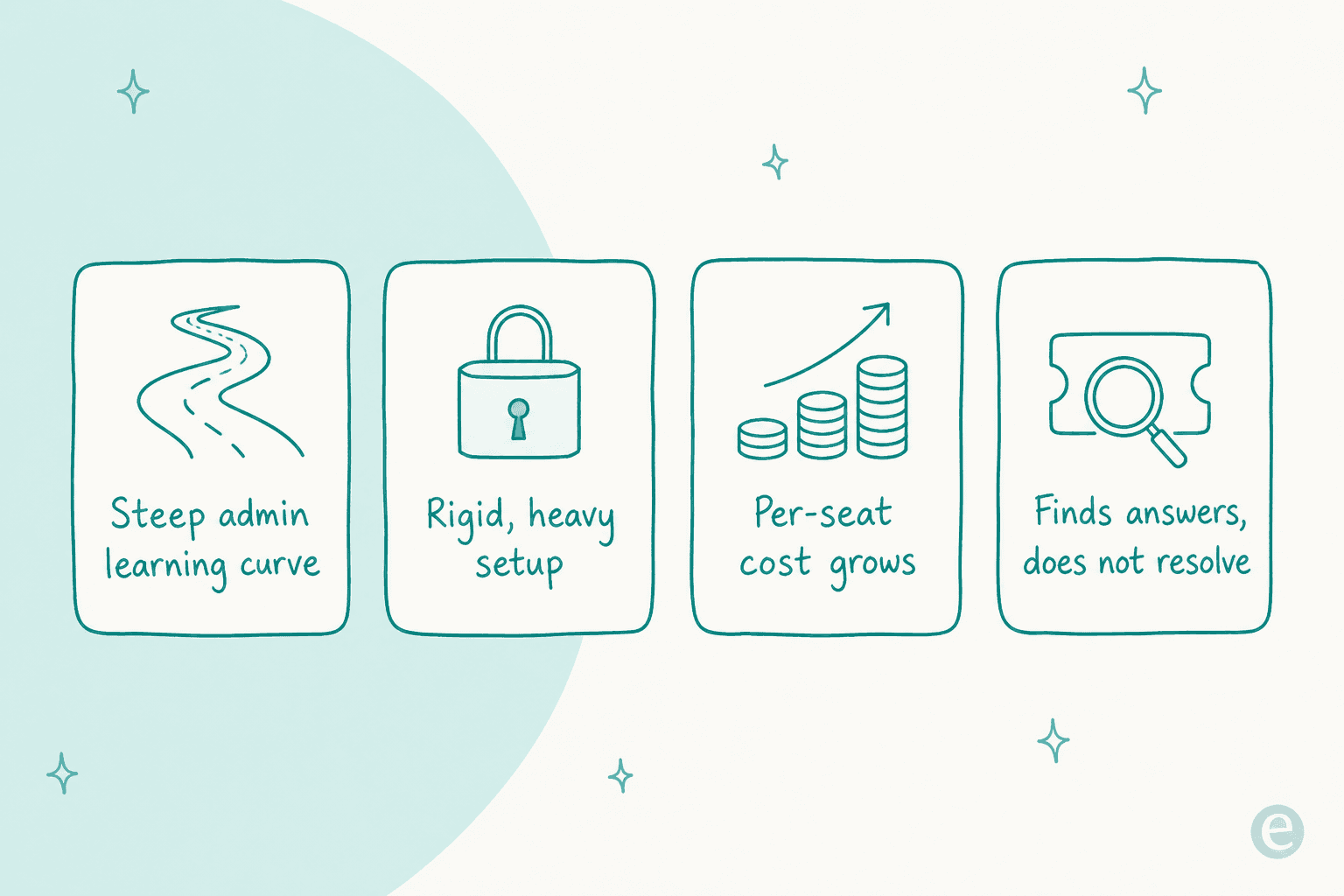
There is a fourth reason that most roundups miss, and it is the one that actually shapes your shortlist: KMS Lighthouse finds the answer, but it does not resolve the ticket. It is a knowledge layer. It surfaces an approved answer to an agent or a customer, and then a human does the work of writing and sending the reply. That is true of most tools on this list too, so before you compare features, decide which job you are actually buying for.
Knowledge layer or ticket-resolver? Decide this first
This is the distinction I would put at the top of your evaluation. A knowledge management tool cleans, governs, and surfaces answers. An AI helpdesk agent does that and takes the next step: it drafts the reply, tags and routes the ticket, looks up the order, and closes it when it can.
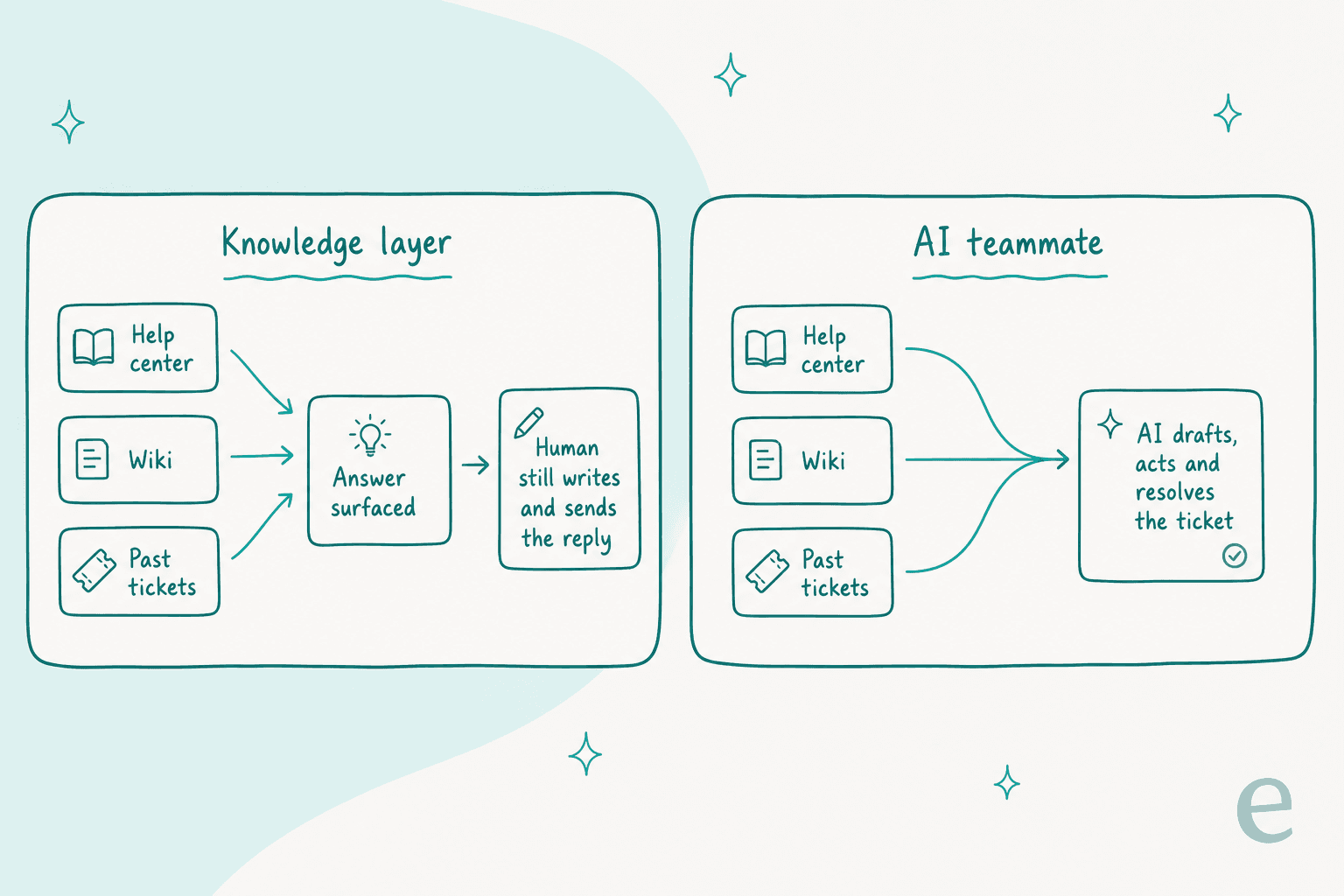
Both are legitimate purchases. If you have a large agent floor and your problem is "our people can't find the right answer fast enough," a knowledge layer is the right buy, and several tools below are excellent at it. But if your problem is "we have too many tickets and not enough agents," a knowledge layer alone won't move your resolution numbers, because a person is still doing every reply. Knowing which sentence describes you saves a lot of wasted demos.
How I picked these alternatives
I kept the shortlist to tools a contact center or support team would realistically put next to KMS Lighthouse, and judged each on:
- What it does with a ticket - does it only surface knowledge, or actually resolve?
- Pricing honesty - is there a real number, and what is the billable unit (seat, resolution, or credit)?
- Setup and testing - how long to value, and can you trial it against your own data before go-live?
- Enterprise fit - integrations, security, and whether it holds up in regulated verticals.
- What real users say - pulled from G2, Capterra, and Gartner Peer Insights, not marketing pages.
The best KMS Lighthouse alternatives at a glance
| Tool | Best for | Resolves tickets? | Pricing model | Starting price | Free trial |
|---|---|---|---|---|---|
| eesel AI | Knowledge that closes tickets | Yes, drafts and resolves | Flat monthly, credits | From $299/mo (500 credits), no seats | 100 free credits |
| eGain | Regulated enterprise KM | Adds an AI agent option | Per user / per resolution | $25/user/mo | Demo only |
| Guru | Governed internal knowledge | No, surfaces answers | Quote-only | Undisclosed | Demo only |
| Shelf | Knowledge + data governance | No, feeds other agents | Quote-only | Undisclosed | Demo only |
| Document360 | Documentation platform | No, opens tickets only | Quote (configurator) | Undisclosed | Free tier |
| Helpjuice | Flat-priced knowledge base | No, surfaces answers | Flat monthly | $249/mo | 14 days |
| Stonly | Interactive guides / decision trees | Partly, guided self-service | Tiered by views | ~$249/mo (per G2) | 14 days |
| Starmind | Expert-finding knowledge network | No, routes to experts | Quote-only | Undisclosed | Demo only |
The rest of the post walks each one, with the same shape every time: what it is, where it shines, where it falls short, what it costs, and my verdict.
1. eesel AI - best for knowledge that actually closes the ticket
Best for: support teams who want their knowledge to resolve tickets, not just be searchable.
I build eesel, so read this as the informed-but-biased section it is. I am including it because it answers the fourth reason above, the one KMS Lighthouse and most of this list don't: eesel AI is an AI helpdesk teammate, not a knowledge base you search. It plugs into your existing helpdesk, learns from your help center, internal wikis, and past tickets, and then drafts and resolves tickets inside the tool your agents already use.
The knowledge part works the way Lighthouse buyers want, but without walling sources off by integration. Connect Zendesk, Confluence, and your website, and a single reply can draw on all of them at once. The difference is what happens next: eesel writes the reply and can act (tag, route, look up an order, escalate), so ticket deflection shows up in your resolution numbers instead of your agents' search bar.

The thing I would actually flex against an "empty slate" tool is testing. We learned the hard way, years ago, that confident-sounding bots quietly give wrong answers, which is why every eesel rollout is simulated against your historical tickets first, so you see the resolution rate and the exact replies before a customer ever does. Global Pay's team put the knowledge-retrieval payoff simply:
"With eesel, we can find specific answers to questions extremely fast. We have seen up to 80% time savings."
Alex Capurro, Chief Innovation Officer, Global Pay, via the eesel pricing page
Where it falls short: eesel is built around the support and helpdesk workflow, so if you want a pure authoring-and-publishing system for a large public documentation site, a dedicated knowledge base tool will give you more editorial features. It is also newer than the enterprise incumbents, so it doesn't carry a decade of contact-center brand logos.
Pricing: one fixed monthly price from $299/month for 500 credits (1 credit per ticket or chat, however long), with no per-seat fee and no platform fee. You start with 100 free credits and no credit card. SSO and MFA are an add-on from $199/month, and data residency is $500/month.
| Monthly credits | Price |
|---|---|
| 500 | $299/mo |
| 1,000 | $499/mo |
| 2,500 | $999/mo |
| 5,000 | $1,899/mo |
Our take: if your problem is ticket volume rather than search speed, eesel is the alternative that changes the number you care about. Named customers like Gridwise resolved 73% of tier-1 tickets in the first month. If you only need an internal wiki, one of the tools below is a cleaner fit.
2. eGain - best for regulated enterprise knowledge management
Best for: large, compliance-heavy contact centers (banking, insurance, healthcare, telco).
eGain is the closest like-for-like swap for KMS Lighthouse, and arguably the strongest pure knowledge play here. It positions itself as the "trusted, governed, compliant" knowledge foundation that feeds GenAI, and it has the analyst recognition to match: eGain calls itself a Leader in the 2026 Gartner Magic Quadrant for Customer Service Knowledge Management Systems, the first ever in that category.
Its AI Knowledge Hub, conversational guides, and self-service all run off one governed source of truth, which is exactly the pitch regulated buyers want to hear. Where eGain goes a step past Lighthouse is the optional AI Agent, which can resolve rather than just surface, priced per resolution.
Where it falls short: it is enterprise-heavy in every sense, including sales motion and implementation. There is no self-serve trial, and the platform's breadth means the same design-and-governance overhead you were trying to escape at Lighthouse.
Pricing: more transparent than most enterprise KM. eGain publishes list prices: $25/user/month for AI Knowledge Hub, an AI Agent at either $0.50 per resolution or $25/user, and $249/month for Connectors. Bigger deals still go through sales.
Our take: if you need a Gartner-grade knowledge system for a regulated floor and "does it resolve" is secondary to "is it governed and compliant," eGain is the safest swap. For most teams it will feel as heavy as what they left, just with better analyst pedigree.
3. Guru - best governed internal knowledge layer
Best for: teams whose real problem is stale, untrustworthy internal knowledge.
Guru has sharpened its story: it is now a "governed knowledge layer" that structures, verifies, and continuously re-verifies your company's knowledge, then delivers it to people and to other AI tools through Slack, Teams, and a browser extension. Its verification workflows are the standout, and a real user described why they matter:
"What I like best is the automated verification workflows. Instead of the content becoming obsolete, the platform enforces ownership by prompting subject matter experts to re-verify knowledge on a set schedule. This maintains a highly trustworthy repository for our support specialists directly inside our communications tools."

Where it falls short: two things. First, by Guru's own integration model, every helpdesk connection is one-directional, it reads from Zendesk or Freshdesk and answers inside Slack or the extension, so it doesn't resolve tickets in the queue. Second, the same reviewer flagged a rigid card-based UI and a steep search-adoption curve, the same friction that pushes people off Lighthouse. Pricing also went fully quote-only in 2026, with no public number at all.
Pricing: undisclosed. Guru moved to a bundled "platform + expertise" model scoped on a sales call. If you want numbers, its pricing page no longer has them.
Our take: the best of the internal-knowledge crowd, and a genuine upgrade if your pain is trust and freshness rather than ticket volume. Just go in knowing it surfaces answers for humans; it doesn't work the queue. If Guru interests you, my full list of Guru alternatives goes deeper.
4. Shelf - best for knowledge and data governance feeding other agents
Best for: enterprises whose GenAI answers are stalling because the underlying data is messy.
Shelf reframed itself in 2026 as an "agentic operating system" that builds an AI data model of your business, but the engine underneath is still an enterprise knowledge-management and content-governance platform. Its honest positioning is that it is agnostic to whatever agent or copilot you run, it cleans and governs the knowledge those agents read from. That makes it a data-quality layer more than a resolver.
The recurring user gripe is, ironically, search, the exact thing a KM tool has to nail:
"I haven't found this, but lots of the agents that I write for cite difficulties with Shelf's search algorithm. They will search for something, and it will be the third result instead of the first."
Where it falls short: it is fully quote-only (Shelf removed its pricing page entirely), enterprise-only, and it explicitly doesn't resolve tickets, it feeds whatever agent does. Reporting also draws criticism as a paid add-on.
Pricing: undisclosed. Every path on the site is "Talk to an Expert"; there is no trial, no tier, no published rate.
Our take: compelling if you are a Microsoft Copilot or RAG team drowning in bad SharePoint data. As a KMS Lighthouse swap for a support floor that just wants faster answers, it is heavier and more abstract than you probably need. See my broader Shelf alternatives coverage if data governance is the core need.
5. Document360 - best if you mainly need a documentation platform
Best for: teams whose center of gravity is authoring and publishing docs.
Document360 is a strong knowledge base and documentation platform, with a polished editor, versioning, translation, and an AI layer (Eddy AI) that helps writers produce articles and helps readers find answers. If your job is running a large public help center or product docs, this is a serious tool.
The honest framing for a support comparison: it opens tickets, it doesn't close them. Its one write-action into a helpdesk is creating a new ticket via the chatbot's escalation; once a ticket exists, Document360 is out of the loop. Existing tickets are used only as a read-only training corpus. Users also flag reporting and usage-cap friction:
"One challenge is the lack of consolidated analytics across workspaces. Reporting is currently available only at the individual workspace level, which makes it difficult to get an overall view of documentation performance."
Where it falls short: it is a publishing system with an answer layer, not a ticket-resolver, and its AI Chatbot is a paid add-on. Pricing is a quote configurator with no public number.
Pricing: quote-based via a three-step configurator; the six things that move the price are team accounts, workspaces, languages, SSO, privacy model, and AI usage. There is a free tier to start. My Document360 vs Helpjuice breakdown compares it head-to-head with the next pick.
Our take: the best choice on this list if you truly need a documentation platform first and answers second. If you need tickets resolved, it is the wrong layer.
6. Helpjuice - best flat-priced knowledge base
Best for: teams who want a capable knowledge base with a predictable, published price.
Helpjuice is dedicated knowledge base software, running since 2011, with a headline strength most enterprise KM tools hide from: it publishes flat pricing. Powerful search, a branded AI assistant (Swifty AI), AI authoring, and a fully handcrafted, on-brand help center design are the selling points, and it serves both public help centers and internal wikis from one product. It names heavy logos too, WHO, Hertz, and Amazon among 7,000+ companies.
Where it falls short: like the rest of this middle tier, it surfaces answers rather than resolving tickets, and the full AI Suite is gated behind the higher tiers. If you are a very small team, the entry price is a real jump from a per-seat tool.
Pricing: flat monthly, $249/mo (30 users), $449/mo (100 users, AI Suite included), and $799/mo (unlimited users). A 14-day trial needs no card. For a small team that would otherwise pay per seat, the flat model can undercut Lighthouse quickly.
Our take: the cleanest pick if your priority is a good, predictably-priced knowledge base and you don't need ticket automation. Its flat pricing is the most refreshing thing on this list after a run of quote-only vendors.
7. Stonly - best for interactive guides and decision trees
Best for: teams who loved Lighthouse's decision trees and want that as the whole product.
If "answer trees" were the KMS Lighthouse feature you actually used, Stonly is built entirely around that idea: interactive step-by-step guides, guided troubleshooting, and AI answers that walk a customer or agent to a resolution rather than dumping an article on them. It is a different shape of knowledge, and its users are unusually enthusiastic:
"The support of the team at Stonly (top to bottom) is second to none, the product is powerful and easy to set up and use... it works with the systems we already have in place."
Where it falls short: it is guided self-service, not full ticket resolution, and integrations can be fiddly (one reviewer flagged the Zendesk connection dropping periodically). It also doesn't publish a dollar figure on its own site.
Pricing: tiered by guide views (Basic free, Small Business, Enterprise), with a 14-day trial. Stonly's site shows plans and limits but no price; G2 pegs Small Business at roughly $249/month.
Our take: the best pick if guided, step-by-step resolution is your model. For broad knowledge management it is narrower than Lighthouse, but for what it does, it does it very well.
8. Starmind by Capacity - best expert-finding knowledge network
Best for: large enterprises where the answer lives in a person's head, not a document.
Starmind (now Starmind by Capacity, after its acquisition in early 2026) solves a different slice of the problem. Instead of a static knowledge base, it builds an AI-powered expertise network, a Topics Graph and an Experts Graph, that routes a question to the person most likely to know the answer. For big, distributed organisations (its customers include PepsiCo, Roche, and Swiss Re), that tacit-knowledge angle is something a pure article repository can't do.
Where it falls short: it is the least "support ticketing" tool here. It routes questions to experts rather than resolving customer tickets, so it is an internal-knowledge play, not a contact-center resolver. Pricing is strictly quote-only, and the recent Capacity acquisition means the product is mid-integration.
Pricing: undisclosed. starmind.com/pricing returns nothing; it is a tailored, quote-only subscription.
Our take: a smart pick if your knowledge problem is "the answer is in someone's head and nobody can find who." For customer-facing support resolution, it is the wrong tool on this list, and I would only shortlist it for internal expertise-finding.
What KMS Lighthouse alternatives actually cost
Pricing on this list splits into three camps, and the split matters more than any single number.
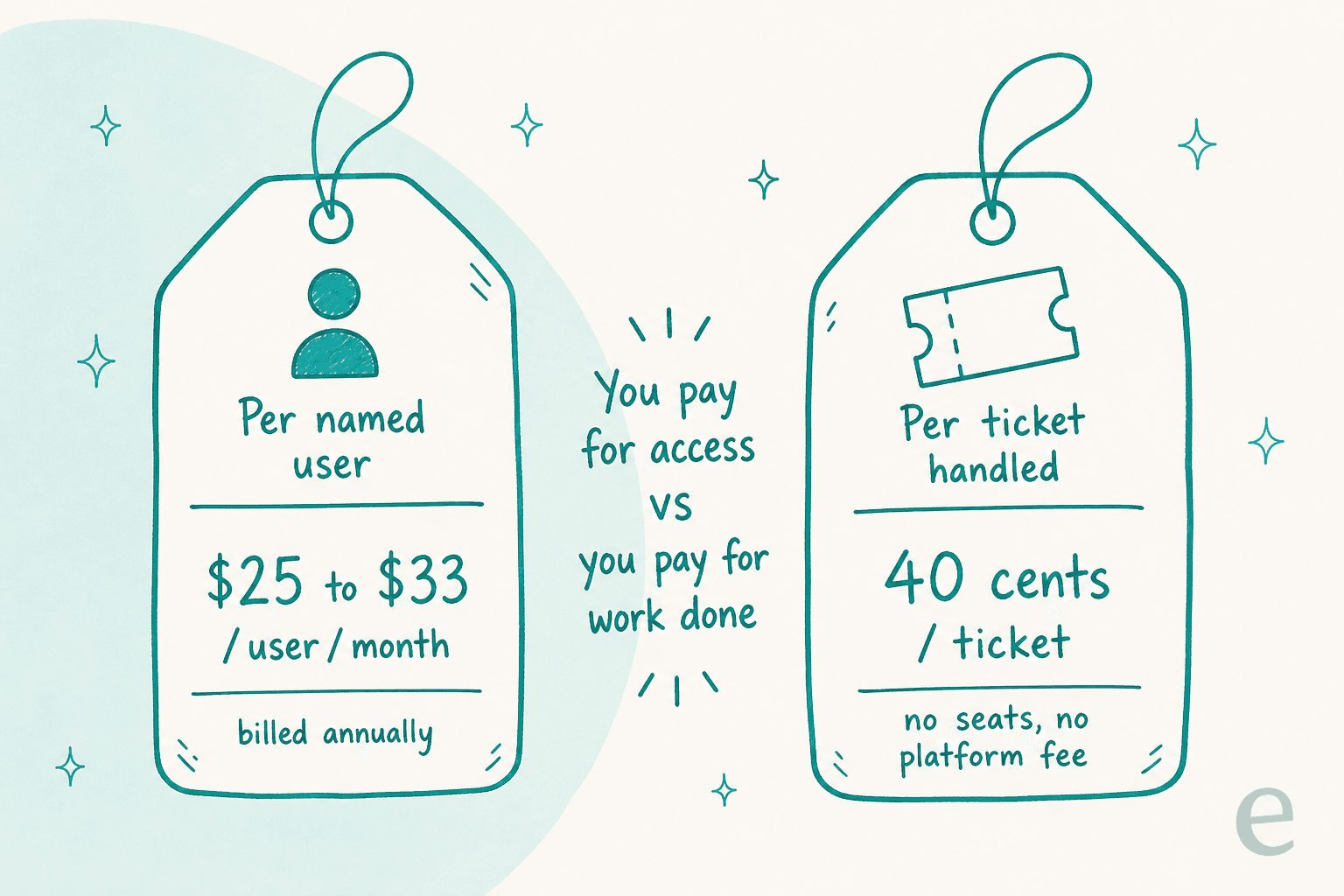
- Per seat: KMS Lighthouse (~$25-$33/user/mo) and eGain ($25/user/mo). You pay for access, so the bill grows with every agent you add, whether or not they use it that month.
- Flat monthly: Helpjuice ($249-$799/mo) and eesel (from $299/mo for 500 credits). Predictable, with no seats to add.
- Usage / per outcome: eGain's AI Agent ($0.50/resolution). You pay for work done, which tracks your actual volume.
| Tool | Model | Real number | Free entry |
|---|---|---|---|
| KMS Lighthouse | Per named user, annual | ~$25-$33/user/mo (AWS, AppExchange) | 15-day trial |
| eesel AI | Flat monthly, credits | From $299/mo (500 credits), no seats | 100 free credits |
| eGain | Per user / per resolution | $25/user/mo or $0.50/resolution | Demo only |
| Guru | Quote-only | Undisclosed | Demo only |
| Shelf | Quote-only | Undisclosed | Demo only |
| Document360 | Quote (configurator) | Undisclosed | Free tier |
| Helpjuice | Flat monthly | $249 / $449 / $799 per mo | 14 days |
| Stonly | Tiered by views | ~$249/mo (per G2) | 14 days |
| Starmind | Quote-only | Undisclosed | Demo only |
A worked example makes the seat-vs-usage difference concrete. A 60-agent contact center on KMS Lighthouse's marketplace rate pays roughly $18,000-$24,000 a year for access, before anyone resolves a single ticket. The same team on a credit plan pays for a batch sized to its ticket volume (1 credit per ticket), with no seat that sits idle. Neither is automatically cheaper, it depends on whether your cost should follow headcount or volume. For support teams, volume is usually the honest meter.
Try eesel for support that resolves, not just searches
If you have read this far, you have probably noticed the thread running through every tool: they are excellent at finding answers, and mostly silent on resolving tickets. That is the gap eesel AI was built to close.

Point it at your help center, your wikis, and your past tickets, and it drafts and resolves tickets right inside Zendesk, Freshdesk, or Salesforce Service Cloud, searching every source at once. Unlike an "empty slate" you spend months configuring, most teams are live within 30 minutes, and you can simulate it on your historical tickets to see the exact resolution rate before it touches a customer. It is free to try with 100 credits, then from $299/month for 500 credits, with no seats and no platform fee. Try eesel and see what your own knowledge can do once it can actually act.