The 10 best Featurebase alternatives in 2026

Kira

Katelin Teen
Last edited August 16, 2026

Which half are you actually replacing?
What Featurebase actually is now
I build AI agents for a living, which means I spend an unreasonable amount of time reading other vendors' help docs to work out what their AI actually does under the marketing copy. Featurebase was a pleasant surprise, and also not the product most people think they're comparing against.
The old story is easy: Featurebase is a feedback board with a roadmap and a changelog, cheaper and better-designed than Canny. That story was true. It's now about half the product.
The footer's own product list reads: support platform, workflows, help center, feedback, roadmaps, changelog. The homepage calls it a "modern customer support and feedback platform." And the "compare" links at the bottom point at Zendesk, Canny, Productboard, GitBook and Chatbase, which is four different categories at once.
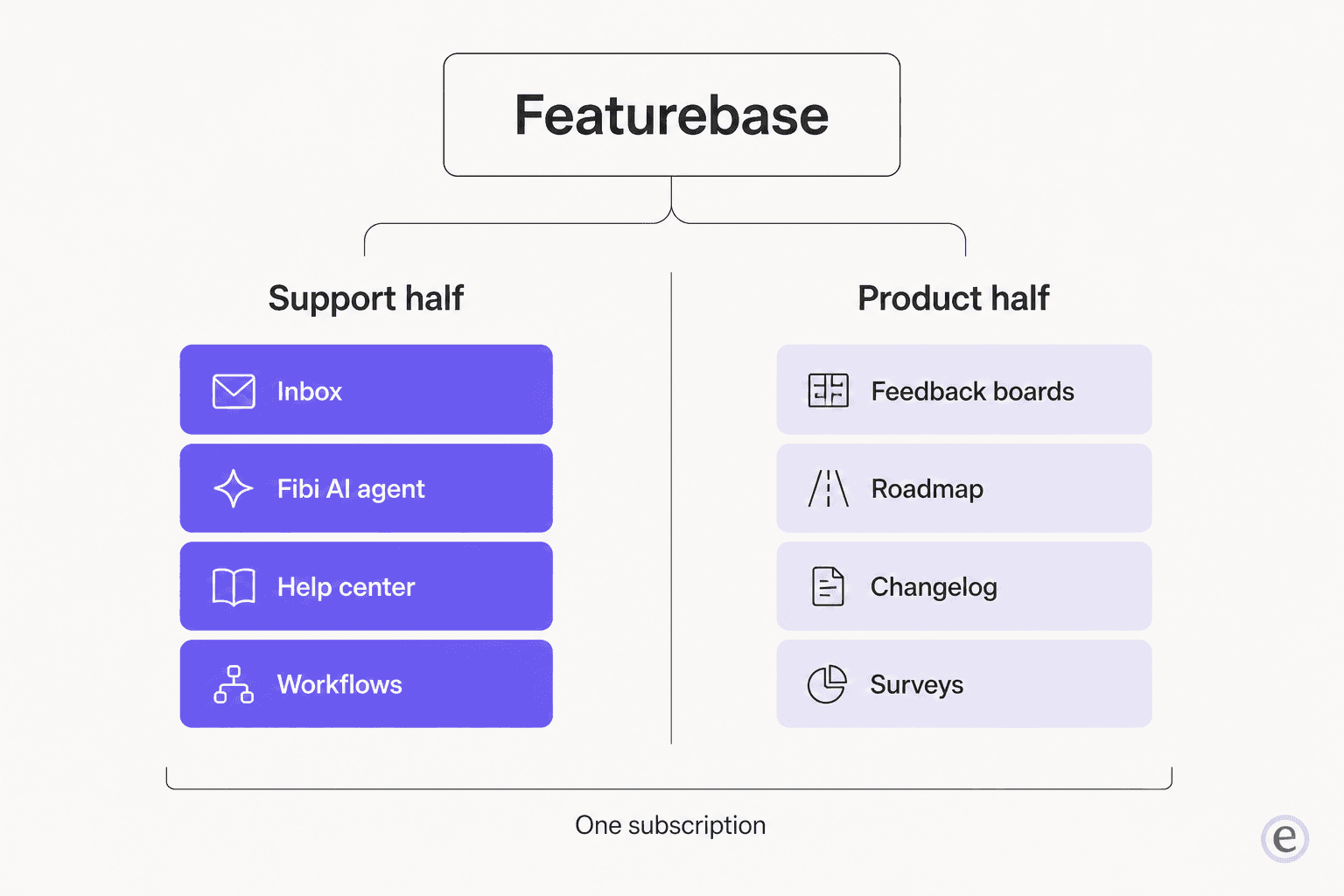
This matters for a boring, practical reason. The two halves have completely different switching costs. Moving a feedback board is a CSV export and a weekend of redirects. Moving a help center plus an AI agent plus a shared inbox is a quarter of somebody's life, and the AI part carries risk that a roadmap never does. Anyone who has run a help center export knows which of those two jobs eats the month.
So the rest of this post is split the same way. Support half first, because it's the hard one.
How I picked these
I looked at every tool against the same six questions, all answered from the vendors' own pricing pages and docs rather than from review-site summaries:
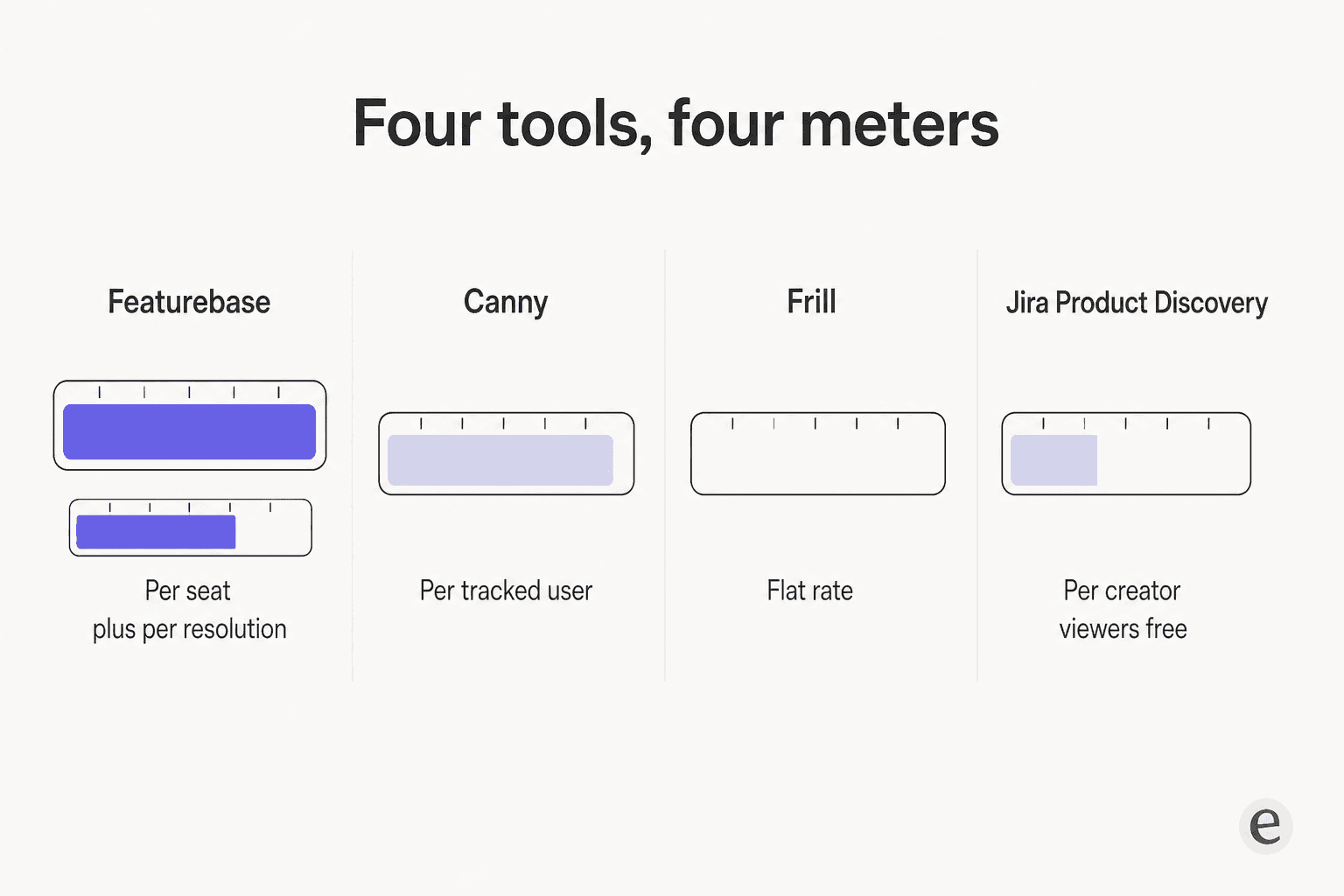
- What's the billable unit? Seats, tracked users, resolutions, credits and creators are five different meters, and they bite at different volumes.
- What does the AI read? A help center only, or the places your knowledge base actually lives.
- Can you test before going live? A real dry run, a scenario runner, or nothing.
- Where does the free tier stop? Almost every "free plan" in this category is a trial with extra steps.
- Does it cover one half or both? Bundles look cheaper until you want to leave half of one.
- What's missing? Named plainly, because every tool here is missing something.
Prices are as published on 2026-08-17. Where a vendor hides the monthly rate behind an annual toggle, which several do, both numbers are in the table.
The 10 best Featurebase alternatives at a glance
| Tool | Replaces | Entry price | Billable unit | Free tier | AI agent | Test before live | Feedback board | Help center | SSO |
|---|---|---|---|---|---|---|---|---|---|
| eesel | Support half | $0.40 per ticket | Ticket handled | $50 credit | Yes | Simulation on past tickets | No | Reads yours | Yes |
| Help Scout | Support half | $25/user/mo | Seat + $0.75/resolution | Yes | AI Answers | Scenario testing | No | Docs, bundled | Paid add-on |
| Chatbase | Support half | $40/mo | Message credits | 50 credits | Yes | Playground only | No | No | Paid plans |
| Canny | Product half | $79/mo yearly | Tracked users | 25 users | Autopilot | n/a | Yes | No | Free, own domain |
| Productboard | Product half | $19/maker/mo | Maker seat | Yes, 1 maker | Spark | n/a | Yes, portal | No | Business+ |
| Frill | Product half | $25/mo | Flat, unlimited seats | No | Browser extension | n/a | Yes | No | All plans |
| Nolt | Product half | $39/mo | Flat, per board tier | No | Moderation, Enterprise | n/a | Yes | No | JWT on entry |
| UserJot | Product half | Free, then $29/mo | Flat | Yes, 2 boards | Dedupe, drafts | n/a | Yes | No | $59 tier |
| Sleekplan | Both, partly | Free, then $15/mo | Flat, per workspace | Yes | Sleek Intelligence | n/a | Yes | No | Business |
| Jira Product Discovery | Product half | $10/creator/mo | Creator seat | 3 creators | Premium only | n/a | Internal only | No | Atlassian |
| Featurebase | Both | $29/seat/mo | Seat + $0.49/resolution | 1 seat, no AI | Fibi | No sandbox | Yes | Yes | Professional+ |
Replacing the support half
This is the half that costs real money and carries real risk. Three options, in the order I'd actually consider them.
1. eesel
Best for: teams who like their helpdesk and only want the AI part replaced, without moving a single ticket.

I work on eesel, so treat the enthusiasm accordingly, but I'll be specific about where it fits and where it doesn't. eesel is an AI teammate that plugs into the helpdesk you already run and starts handling tickets. It doesn't try to be your inbox, and it very deliberately doesn't try to be your roadmap.
The reason it's first on this half is the thing I got wrong early and had to fix the hard way. I have watched a confident-sounding bot quietly invent answers when its knowledge base returned nothing, and send them to real paying customers, including a Danish solar-energy provider whose bot fabricated claims about subscriptions that didn't exist. Nobody catches that in a demo. You catch it in week three, from an angry customer. That scar is why every rollout now starts with a simulation over historical tickets instead of a switch you flip and hope.
A CX lead running about 7,000 tickets a month put the same worry more sharply than I ever have:
"The AI will never be able to answer 100% of the questions, but if it tries and just answers 'sorry I don't know this,' I cannot go and check all my 7,000 tickets to see if the AI actually made a good answer, then the point is a little bit gone. I need an AI who is only handling the tickets that it's confident to handle and all the other ones, leave them alone."
Features
- Reads where knowledge actually lives. Past tickets, macros, help center articles, Notion, Confluence, Google Docs and Slack are all sources, not just whichever articles happen to sit inside one vendor's CMS. A support team at a meeting-productivity SaaS described the before-and-after as "we don't have to look through all our documentation on Notion, Google Docs or our help center anymore."
- Simulation before launch. It replays your own historical tickets against the configuration you're about to ship, so you see the answers and the deflection rate before a customer does.
- Acts inside the helpdesk. Drafts, tags, escalates, and hands over on low confidence rather than guessing, which is the whole point of tier-1 deflection.
- Self-serve. No SDR, no demo required to get started.
Pros
- Nothing migrates. Your help desk, your articles and your ticket history stay where they are.
- Usage-based at $0.40 per ticket handled, with no per-seat fee, no platform fee and no minimum, per the pricing page.
- Gradual rollout is priced honestly. Route 200 of your 1,000 monthly tickets and you pay for 200.
- Spend caps are built in, defaulting to $250 a month with alerts at 50%, 75% and 100%.
Cons
- It is not a feedback board. No voting, no public roadmap, no changelog. If that's what you came for, skip to the product half below.
- It's a layer, not a helpdesk. If you don't have an inbox already, you need one.
- The multilingual and structural-context work is stronger than the marketing suggests, which is a strange complaint but a real one.
Pricing
| Item | Price |
|---|---|
| Support ticket or chat session | $0.40 each |
| Blog post draft | $4.00 each |
| Free trial | $50 of usage, no card |
| Enterprise | $1,000/month |
| Platform fee, seat fee, minimum | None |
Verdict
Pick eesel if the sentence "I want AI on my tickets" is true and "I want to change helpdesks" is not. A support lead at Gridwise reported eesel resolving 73% of tier-1 requests in the first month, with the decision made off a 7-day trial. Skip it if you need the feedback boards, because it doesn't have them and won't pretend to.
2. Help Scout
Best for: teams who want to replace the whole support half with one mature product, help center included.
Help Scout is the closest like-for-like swap for Featurebase's support half, and it's been doing this a lot longer. Eight modules, 12,000+ companies, and a knowledge base product called Docs that is a first-class thing rather than a bolt-on.
Features
- Docs, a real branded help center with unlimited articles on every paid plan, plus a Docs Report that surfaces content gaps from failed searches. That last bit is what outdated help center content tools usually forget to ship, and it pairs with mapping search gaps.
- AI Answers, the customer-facing agent, trained on your knowledge base plus external web sources.
- Beacon, the embeddable widget carrying AI answers, chat, contact form and articles in one surface, which is the AI chat bubble pattern done well.
- Channels across email, live chat, Instagram, WhatsApp and SMS.
Pros
- Test in private before you launch. You write support scenarios and watch how AI Answers handles them, which is not a historical-ticket dry run but is a great deal better than nothing.
- Help Scout publishes an average resolution rate of 73.19%, which is unusually transparent for this category.
- New accounts get three months of free unlimited AI Answers resolutions.
- SOC 2 Type 2 and HIPAA compliant, and it states it never trains AI on your data.
Cons
- No feedback board, no voting, no public roadmap, no changelog. Confirmed against the full pricing matrix. Surveys and CSAT in the Messages module are a different thing.
- Docs sites are metered: 1 on Free, then 2, 3 and 5, with extra sites at $20/month annually.
- SSO/SAML, HIPAA and IP restrictions are all unpriced add-ons, so the quoted seat price isn't the landed price for a regulated team.
Pricing
| Plan | Annual, per user/mo | Monthly, per user/mo | Docs sites |
|---|---|---|---|
| Free | $0 | $0 | 1 site, 10 articles |
| Standard | $25 | $30 | 2 |
| Plus | $45 | $54 | 3 |
| Pro | $75 | $90 | 5 |
| AI Answers | $0.75 per resolution | $0.75 per resolution | n/a |
Verdict
If you want to leave Featurebase's support half entirely and land somewhere established, this is the pick. The deciding factor is whether $0.75 per resolution on top of seats beats $0.49 per resolution on top of seats at your volume, and whether Help Scout's Docs analytics are worth the gap. Skip it if a public feedback board was ever part of why you bought Featurebase. My Help Scout alternatives piece covers the rest of that decision.
3. Chatbase
Best for: teams who only want the answer bot, already have somewhere to publish docs, and want to choose the underlying model.
Chatbase is the narrowest tool on this list and knows it. Featurebase names it on its own comparison page, which tells you these two get shortlisted together.
Features
- Agent builder, actions, procedures, a backstage debugging workspace, and a testing surface, framed as build, test, deploy, optimize.
- Model choice is the differentiator. The playground names Claude Fable 5, Gemini 3.5 Flash, the GPT-5.6 family, DeepSeek V4-Pro, Grok 4.5 and Kimi K2.7. If you care which LLM handles support, that's rare control.
- Data sources cover files, website crawl, plain text, Q&A pairs, Notion pages and tickets.
- Channels across web, email, voice, WhatsApp, Slack, Messenger and Instagram.
Pros
- Real actions: refunds, order lookups and API calls, with a debugging workspace to see why the agent did what it did.
- Notion is a native source, which Featurebase does not offer.
- Credit-based billing is predictable in a way per-resolution billing isn't.
Cons
- No help center product at all. No article authoring, no branded docs site, no search analytics. Knowledge is a training panel, not a published surface, so you still need something from the AI documentation tools shelf, or a GitBook alternative, alongside it.
- Training content is capped by size, from 1 MB on Free to 40 MB on Pro. That's extracted text, and 40 MB is not a lot for a mature documentation set.
- Training on your own ticket history is gated to the $500/month Pro plan and requires an active Salesforce or Zendesk connection.
- The Playground is a manual preview you type into, not a bulk dry run, despite framing that suggests otherwise.
Pricing
| Plan | Monthly | Annual | Credits/mo | Seats | Training size |
|---|---|---|---|---|---|
| Free | $0 | $0 | 50 | 1 | 1 MB |
| Hobby | $40 | $384/yr | 700 | 2 | 10 MB |
| Standard | $150 | $1,440/yr | 4,000 | 3 | 20 MB |
| Pro | $500 | $4,800/yr | 15,000 | 5 | 40 MB |
Extra credits are $40 per 1,000, an extra agent is $300/year, and removing branding is $1,188/year.
Verdict
Take Chatbase if you want a configurable agent and you publish docs somewhere else already. The model picker and the actions builder are the reasons to choose it. Skip it if the help center was half the point of Featurebase, because replacing that is then a second purchase.
Replacing the product half
Feedback boards are a mature category and the tools are more alike than their marketing suggests. What actually separates them is the billing meter, so that's what I've led with in each one.
4. Canny
Best for: teams with low feedback volume, or teams who want the most mature integrations in the category.
Canny is the incumbent Featurebase was built to unseat, with 100K+ registered companies and 15M+ feedback items captured. It's also the tool most people in this search are leaving from, not to, so it deserves a fair hearing.
Features
- Feedback boards, roadmap, changelog, and Autopilot, which pulls feedback out of support tickets and review sites automatically. Typeform reported 93% Autopilot accuracy across 1,725 support tickets, which is the sort of number the rest of this category doesn't publish.
- Autopilot sources include G2, Capterra, Trustpilot, the App Store and Google Play.
- Unlimited contributors on every plan, including free.
Pros
- Autopilot is on every plan, free tier included, which is unusually generous for the marquee AI feature.
- The integration catalogue is the deepest in the category.
- Free SSO, which Featurebase gates to Professional. The catch, per one user, is that Canny's redirect URL has to sit on canny.io.
Cons
- The tracked-user meter is the whole story. A tracked user is anyone associated with feedback, including users Autopilot discovers on your behalf. So the free AI feature feeds the paid meter.
- The free plan caps at 25 tracked users, down from unlimited, and that change is why a lot of teams are reading this post at all.
- Canny's own users have been blunt about the cancellation flow.
Here's the post that did more to move this market than any feature release:
"Not often have I dealt with a company less responsive to feedback than Canny, which is ironic for a company that literally builds feedback boards!"
And the more common, quieter version, from a team three years into the free plan:
"today we received an update from Canny.io and they're essentially discontinuing the free plan, limiting it to only 25 users. In our case, we have 110 tracked users (3+ years of usage), which moves us from the free tier to $75/month (or $60/month billed yearly). Unfortunately, that pricing just doesn't feel reasonable for our level of usage."

Pricing
| Tracked users | Pro, billed yearly | Pro, monthly |
|---|---|---|
| Free plan | $0 up to 25 users | $0 |
| 100 | $79/mo | $99/mo |
| 500 | $279/mo | $349/mo |
| 1,000 | $529/mo | $661/mo |
| 2,500 | $829/mo | $1,036/mo |
| 5,000 | $1,079/mo | $1,349/mo |
| 5,000+ | Business, custom | Business, custom |
Verdict
Canny is still the most capable feedback tool here, and Autopilot is a real feature rather than an AI sticker. Pick it if your tracked-user count is small or your budget is large. Skip it if you're in the middle, because the middle of that ladder is where the bills get uncomfortable. It scores 4.5/5 from 108 reviews on G2, against Featurebase's 4.7 from 50.
5. Productboard
Best for: product teams where feedback has to feed an actual prioritisation process, not just a public list.
Productboard is the heaviest tool on the product half, and the only one where the public board is a feature of a larger system rather than the system itself.
Features
- Product Portal, a real public voting board on every plan including Free, where end users can submit ideas and vote without creating an account.
- Insights, a features board, and roadmaps that the portal feeds into.
- Spark, the AI layer, now generally available on every plan with an MCP server and connectors.
Pros
- Contributors are free and don't count toward the maker limit: 25 on Free, Plus and Business, unlimited on Enterprise.
- The portal really does need no end-user account, just an email validation per browsing session.
- Free tier includes one maker and one portal, which is enough to run a real board.
Cons
- Portal moderation, custom voting questions, the embedded portal and portal SSO all start at Business ($59 per maker per month). Whitelabel is Enterprise only.
- The changelog isn't a product. It's a monthly-sectioned help center article, and
/changelog,/release-notesand/whats-newall 404. The customer-facing "shipped" surface is the portal's Launched tab. - AI credits are metered and the Enterprise allocation contradicts itself between the pricing card and the FAQ.
Pricing
| Plan | Annual, per maker/mo | Monthly, per maker/mo | Min makers | AI credits |
|---|---|---|---|---|
| Free | $0 | $0 | 1 | 50/mo, workspace-wide |
| Plus | $19 | $25 | 1 | 250 per maker |
| Business | $59 | $75 | 2 | 500 per maker |
| Enterprise | Custom | Custom | 5 | Card and FAQ disagree |
Verdict
Choose Productboard when the feedback is an input to a prioritisation ritual you already run, and when only two or three people need to edit. Skip it if you mainly wanted a nice public board with a changelog, because you'd be paying for a planning system and getting the weaker changelog.
6. Frill
Best for: teams who want flat, predictable billing with unlimited seats, and no meter to think about.
Frill is the tool I'd hand to a team that has been burned by a usage meter. It charges a flat rate per month and stops there.
Features
- Ideas board, roadmap, announcements and surveys, plus an embeddable widget.
- An AI browser extension that turns a Zendesk, Gorgias or Help Scout ticket into a drafted idea, which is the closest thing on the product half to Canny's Autopilot.
- A Frill MCP server with 10 tools, included on every plan.
Pros
- SSO, webhooks, developer API and custom domain are on all four plans, including the $25 entry tier. That's the most generous entry plan in this roundup by a wide margin.
- Unlimited seats. The price doesn't move when the team grows.
- Growth and Enterprise bundle the privacy, surveys and whitelabel add-ons rather than charging separately.
Cons
- No free plan, only a 14-day trial without a card.
- Startup caps at 50 Active Ideas, which a busy board clears in a month.
- The add-ons on lower plans are unpriced on the page, so the real cost of Startup plus whitelabel is a support conversation.
- The pricing matrix and the changelog disagree about which plan gets multi-language.
Pricing
| Plan | Monthly | Billed yearly | Key cap |
|---|---|---|---|
| Startup | $25 | $22/mo | 50 Active Ideas |
| Business | $49 | $44/mo | Unlimited ideas |
| Growth | $149 | $136/mo | Add-ons included |
| Enterprise | $349 | $319/mo | SOC 2, EU hosting, audit logs |
Verdict
Frill is my pick for the product half if you want the bill to be boring. The deciding factor is the 50-idea cap on Startup: if you'll blow through it, budget for Business at $49 and it's still flat. Skip it if you need a free tier to prove the concept internally first.
7. Nolt
Best for: EU-hosted teams and anyone who wants the simplest possible public board.
Nolt does one thing. It's a board, it's fast, and it charges by how many boards you need rather than by how many people touch them.
Features
- Public feedback boards with voting, unlimited users, unlimited admins and unlimited content.
- A separate EU air-gapped deployment with its own euro price list, which is rare at this size.
- A GraphQL API and an MCP server.
Pros
- Unlimited admins on every plan. Most competitors meter exactly this.
- Board privacy options cover private, password-protected and domain-restricted, which covers most of what people want custom domains for.
- JWT SSO is on the entry plan, not gated to enterprise.
Cons
- No free plan, only a 10-day Pro trial.
- Essential is one board. If you run separate boards per product line, you're on Pro at $89/month monthly.
- No custom domain and no white-label option published anywhere, which is a real gap against Frill and UserJot.
- SAML 2.0, OIDC, Okta, Entra ID and SCIM are all Enterprise-only.
Pricing
| Plan | Monthly | Billed yearly | Annual total | Boards |
|---|---|---|---|---|
| Essential | $39 | $29/mo | $348 | 1 |
| Pro | $89 | $69/mo | $828 | 5 |
| Enterprise | Custom | Custom | Custom | Unlimited |
The EU air-gapped list runs €49/€39 and €99/€79 for the same two tiers.
Verdict
Nolt is the right answer for one board, run properly, ideally in the EU. Skip it if you need multiple boards on a small budget or a custom domain, because both push you up a tier or off the product entirely.
8. UserJot
Best for: the cheapest credible replacement with a free tier that isn't a trial in disguise.
UserJot is the newest tool here and the one whose free plan is actually usable. Unlimited posts, unlimited users, two boards, a public roadmap and a public changelog, at $0.
Features
- Feedback board, roadmap and changelog, with AI duplicate detection, AI auto-tagging and AI-drafted changelog entries.
- A public REST API and an MCP server, which is unusual at this price.
- AI-assisted import mapping, which matters when you're migrating off something else.
Pros
- The free tier has no post cap and no user cap, only a board cap. That's the opposite of how Canny's free plan works.
- Flat $29 and $59 tiers with no usage meter anywhere.
- Custom domain and API arrive at $29, well below where most competitors gate them.
Cons
- There is no pricing page.
userjot.com/pricing404s with a message saying the route hasn't been migrated yet, and pricing lives as a section on the homepage. That's a small thing that tells you something about maturity. - No annual price is published anywhere, despite the site saying billing can be annual.
- SSO and unlimited boards both sit on the $59 tier.
- It's young, so there's no meaningful review corpus to check it against.
Pricing
| Plan | Monthly | Boards | Notable |
|---|---|---|---|
| Free | $0 | 2 | Unlimited posts and users, 3 admin roles |
| Starter | $29 | 5 | Custom domain, API, guest posting |
| Professional | $59 | Unlimited | SSO, unlimited integrations, white-label |
Verdict
UserJot is where I'd send a small team that just got a price increase email from Canny. The free tier is real, the paid tiers are flat, and the AI features are the right ones. Skip it if you need a vendor with a long track record or a published annual contract.
9. Sleekplan
Best for: the closest thing to Featurebase's bundle on the product half, at a fraction of the price.
Sleekplan headlines itself as "four products, one tab": feedback, roadmap, changelog, and NPS and surveys. That's Featurebase's product half almost exactly.
One correction worth making, because a lot of older roundups still repeat it: Sleekplan no longer bundles a knowledge base. Its own docs list four modules and none is a help center, /knowledge-base and /help-center both 404, and the site index has zero matches for the term. If you found Sleekplan on a list promising feedback plus docs, that list is out of date.
Features
- Feedback, roadmap, changelog and surveys, with CSAT and NPS from the Starter plan.
- Sleek Intelligence, a five-layer AI analysis layer pulling from 30+ review and ticket sources, metered by credits at 1,000 or 5,000 a month depending on plan.
- Sleekmate, an in-app copilot, plus an MCP server with 14 tools.
Pros
- The free Indie tier is usable rather than decorative: unlimited feedback, users and subscribers, with all three core modules.
- $15 a month for Starter is the cheapest paid entry in this roundup.
- Per-workspace billing, so team size doesn't move the price.
Cons
- Custom domain is gated to Business at $38 to $45 a month, where Upvoty ships it at $15.
- Indie is single-admin with zero team seats, and caps at 1,000 announcement views, 500 popup views and 500 emails per month.
- Full surveys need Business, so the "four products" pitch is really "four products, at the third tier."
- Add-on prices for seats, credits and views aren't published.
Pricing
| Plan | Monthly | Billed yearly | Notable |
|---|---|---|---|
| Indie | $0 | $0 | Single admin, view caps |
| Starter | $15 | $13/mo | CSAT and NPS |
| Business | $45 | $38/mo | Custom domain, full surveys |
| Enterprise | Custom | Custom | Contact sales |
Verdict
Sleekplan is the best value on this list if you want the module spread without the module price. Pick it when four cheap products beat two good ones. Skip it if a custom domain is non-negotiable at the entry tier, and don't buy it expecting a help center.
10. Jira Product Discovery
Best for: teams already living in Jira, where the feedback needs to become a ticket without a handoff.
Jira Product Discovery is the odd one out, and I've included it because a lot of teams pick it for the wrong reason. Read the con below before the pros.
Features
- Idea capture, prioritisation views, insights, and a Chrome extension for grabbing feedback from anywhere.
- Contributors are free and unlimited on every plan, including Free, and anyone with Jira or Jira Service Management access is a contributor by default.
- Native connection into the Jira work items your engineers already use.
Pros
- The contributor model is the most generous seat structure in this roundup. You pay for creators only.
- Free plan covers three creators, which is a whole small product team.
- Storage, automation and SLA scale properly at the Premium and Enterprise tiers, with 99.9% and 99.95% uptime respectively.
Cons
- There is no public voting portal. No customer submission form, no customer accounts. The nearest thing is a published view, which is read-only, off by default, requires a site-admin to enable, isn't available on Free, and cannot even render vote counts, since votes and reactions are unsupported fields in published views.
- Voting is internal stakeholder voting. Customer feedback arrives indirectly via insights, the Chrome extension, CSV import or JSM requests.
- Atlassian Intelligence is Premium and Enterprise only, absent on Free and Standard.
Pricing
| Plan | Monthly, per creator | Annual, 1-5 creators | Creators |
|---|---|---|---|
| Free | $0 | $0 | 3 max |
| Standard | $10 | USD 500 | Unlimited |
| Premium | $25 | USD 1,250 | Unlimited |
| Enterprise | Annual only, quote | Contact sales | Unlimited |
Above 1,001 creators the rates drop to $7 and $18 per creator per month.
Verdict
Take Jira Product Discovery when the feedback's real destination is a Jira work item and your customers were never going to visit a public board anyway. Skip it if a customer-facing voting portal is the feature you're shopping for, because this is a prioritisation tool wearing a feedback tool's hat.
Also worth a look
Three more that didn't make the ten but might fit a narrow case:
- Aha! Ideas at $39 per user per month annually, $49 monthly, minimum three paid users. Unlimited free portal users and the deepest idea-management feature set here, but every internal role needs a paid seat, including view-only reviewers, and Aha! discloses a standing 3% annual price increase.
- Upvoty at $13.50 to $44.10 per month annually. Ships a custom domain on the $15 entry plan, which nobody else does, but has no free tier and no survey module.
- Rapidr at $49 and $199 a month. Solid board, but no free tier, no named AI features anywhere on the site, no documented REST API, and a long list of integrations still marked coming soon.
What Featurebase actually costs
Since most people arrive here from a pricing shock, here's the real number rather than the sticker.
| Meter | Price | Notes |
|---|---|---|
| Growth seat | $29/mo yearly, $37 monthly | 5 boards, 5 roadmaps, chat and email |
| Professional seat | $59/mo yearly, $75 monthly | Workflows, SLAs, Slack, 20 Lite seats |
| Enterprise seat | $99/mo yearly, $129 monthly | Demo-gated but list-priced, 50 Lite seats |
| Fibi AI resolution | $0.49 each | Charged once per conversation |
| AI Copilot | $19/seat/mo | After 10 free conversations per seat per month |
| Outbound emails | 5,000 free, then usage-based | Per-email rate not published |
| Remove branding | $69/mo | Professional and Enterprise only |
That's five separately billable meters, and only one of them is the seat price you see first. The free plan, for completeness, is one seat, one board, one roadmap, 50 help center articles, live chat only, no integrations, and the pricing card labels it "AI not supported."
Two clauses worth reading closely before you budget:
"Assumed resolution." Featurebase counts a resolution when the customer confirms the answer helped, or when they leave without asking for more help, which auto-closes after three minutes of inactivity. Its docs state the approach isn't directly configurable. So silence bills you at $0.49, and you can't change the definition. In fairness, resolutions get clawed back if the customer returns to the same thread, even across billing periods, and a greeting-only reply doesn't count.
The hard cap ceiling. You can set a spend cap, but per the AI usage docs it can't go above 2,000 resolutions without contacting support, and the cap is described as approximate. Above roughly $980 a month in AI spend, the guardrail becomes a conversation. If you're modelling this against headcount, my breakdown of AI versus human cost has the arithmetic.
To be fair on the other side: the startup program is 86% off plus a year of Fibi free for companies under two years old with fewer than six employees, which is one of the better startup offers in this space. Data sits in the Netherlands and Germany, and SOC 2 Type II and GDPR are on every plan, free included.
The question nobody asks until week three
Every tool in the support half of this list has an AI agent. What separates them isn't answer quality, which you can't evaluate from a marketing page anyway. It's two things: what the agent is allowed to read, and whether you can watch it work before a customer does.
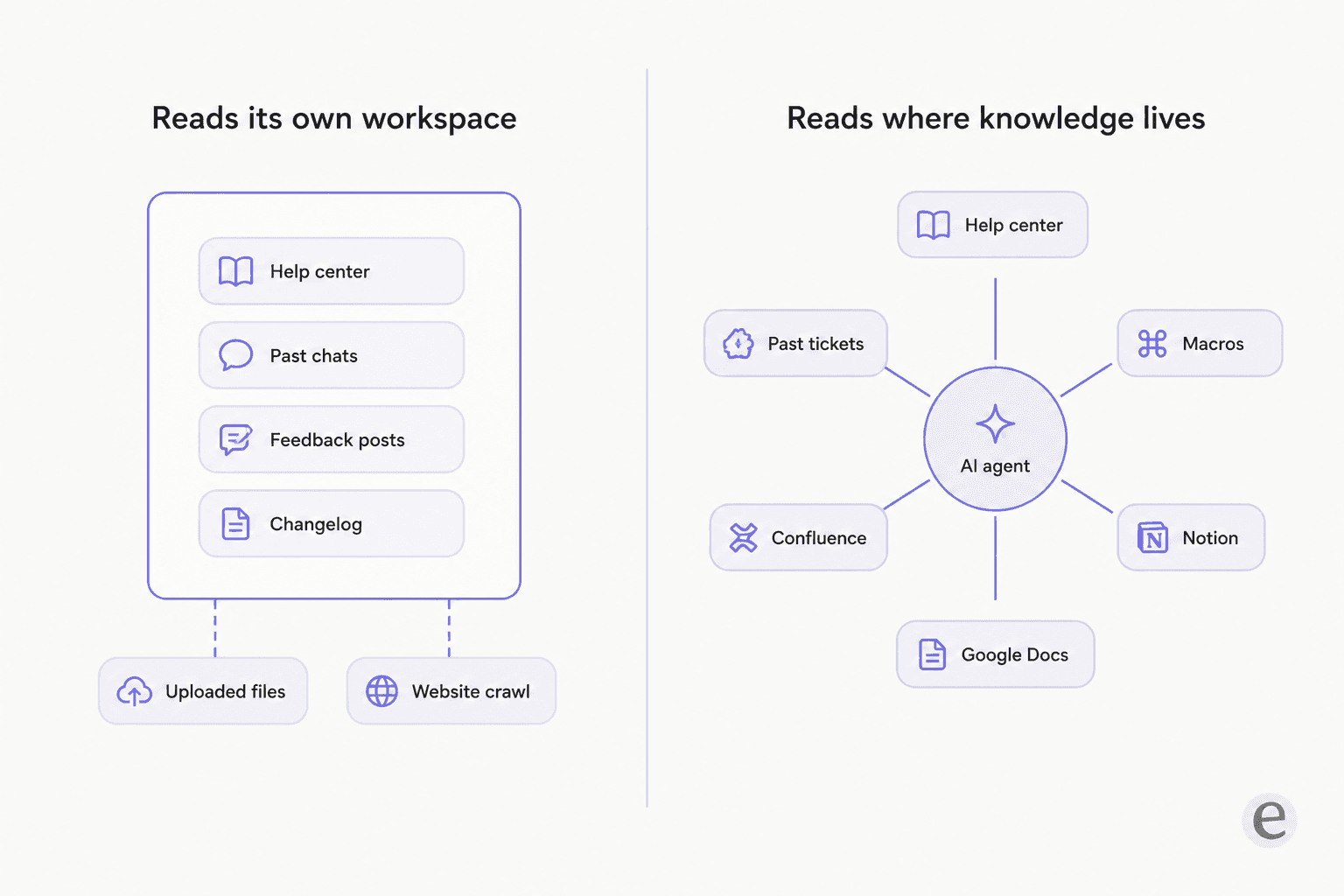
Fibi reads Featurebase's own surfaces automatically: help center articles, past conversations, feedback posts, changelogs and roadmaps. You can add files, crawled websites and Q&A snippets manually. What you can't add natively is Notion or Confluence. Featurebase's own answer is to export them as PDFs or publish them as web pages. And crawled sites don't refresh: there's no automatic recrawler yet, so that content goes stale until someone re-adds it.
That's a real constraint, and it isn't unique to Featurebase. It's the shape of every single-vendor knowledge base. Your actual answers live in a help center, in a Notion workspace, in a Confluence space, in someone's macros, and in ten thousand past tickets where a human already worked out the right reply. A tool that can only read one of those is answering with one hand.
It's also why internal knowledge bases and public help centers keep drifting apart, and why the Notion alternatives question keeps landing on support teams who never asked for it.
The testing gap is the sharper one. Featurebase's docs are refreshingly direct about it: "Currently, there's no separate sandbox environment. The best way to test it is directly from your live website." What it offers instead is an "improve answer" panel that turns a bad live reply into a suggested article edit. That's a good feature. It's also correct-after-live, not simulate-before-live, and those are different risk profiles. Help Scout at least lets you run scenarios you've written. Nobody in this category except eesel replays your own ticket history.
The thing I keep coming back to, from a support manager whose entire knowledge base had been written for administrators while every ticket came from end users, is that the docs weren't missing. They were written for the wrong reader. No amount of AI knowledge base search fixes that, and no vendor's article count tells you it's happening. Only a dry run over your own tickets does. That's the same reason a raw self-service deflection number rarely survives contact with a real queue.
Try eesel
If the half you're replacing is the support half, eesel is built for exactly this move: keep the helpdesk, the tickets and the articles where they are, and swap the AI layer.

It reads your help center, your past tickets, your macros, and your Notion, Confluence, Google Docs and Slack, then simulates against your real ticket history so you see the answers before your customers do. Billing is $0.40 per ticket handled, with no seat fee and no minimum, and there's $50 of free usage without a card. Start with a free trial and route a slice of your queue at it before you decide anything, the same gradual rollout I recommend for any support automation rollout.
Where I'd land
If you only take one thing from this: decide which half first, then shop. The people who end up unhappy are the ones who replace a bundle with a bundle and discover in month two that the new tool is worse at the half they actually cared about.
- Replacing the product half and want the bill to be flat: Frill at $25, or UserJot if you need a free tier.
- Replacing the product half with a real prioritisation process behind it: Productboard.
- Replacing the support half and happy to move helpdesks: Help Scout.
- Replacing the support half without moving anything: eesel, and simulate it on your own tickets before you let it near a customer.
- Really do need both halves in one tool on a small budget: Sleekplan, knowing the help center isn't part of it.
And if you're staying on Featurebase, which is a perfectly reasonable choice for a small team who like it, at least set the Fibi hard cap and read the resolution definition before your first busy month.
Then go look at what your knowledge base is actually feeding it. On a small team the helpdesk tools matter far less than whether the articles are any good, and my support chatbot roundup is the next stop if the answer is no.
Frequently Asked Questions
What are the best Featurebase alternatives in 2026?
How much does Featurebase cost?
Is there a free Featurebase alternative?
Does Featurebase replace a helpdesk like Zendesk?
What is the best Featurebase alternative for a small team on a budget?
Can I test an AI support agent before it talks to real customers?
What happens to my data if I migrate off Featurebase?
Do I need one tool for both feedback and support?


Article by
Kira
Kira is a writer at eesel AI with a Computer Science background and over a year of hands-on experience evaluating AI-powered customer service tools. She focuses on breaking down how helpdesk platforms and AI agents actually work so that support teams can make better buying decisions.