

What Notion AI agents are: Notion Agent vs Custom Agents
I build AI agents at eesel, where the team has spent years putting them on live support queues. The first question support leads ask me about Notion AI is a fair one: "we already pay for Notion and our help docs live there, so why not just use its agents?" To answer it properly you have to separate the two things Notion is calling an agent, because they behaves quite different in practice.
Notion Agent is the chat that lives in the bottom corner of Notion. Notion calls it "your AI teammate inside Notion." It works on demand, it has the same permissions you do, and it can search your workspace, your connected apps and the web, then create or edit pages and databases. On Business and Enterprise plans it runs inside a usage allowance measured over a six-hour window and a monthly window. I covered it in more depth in my Notion Agent guide.
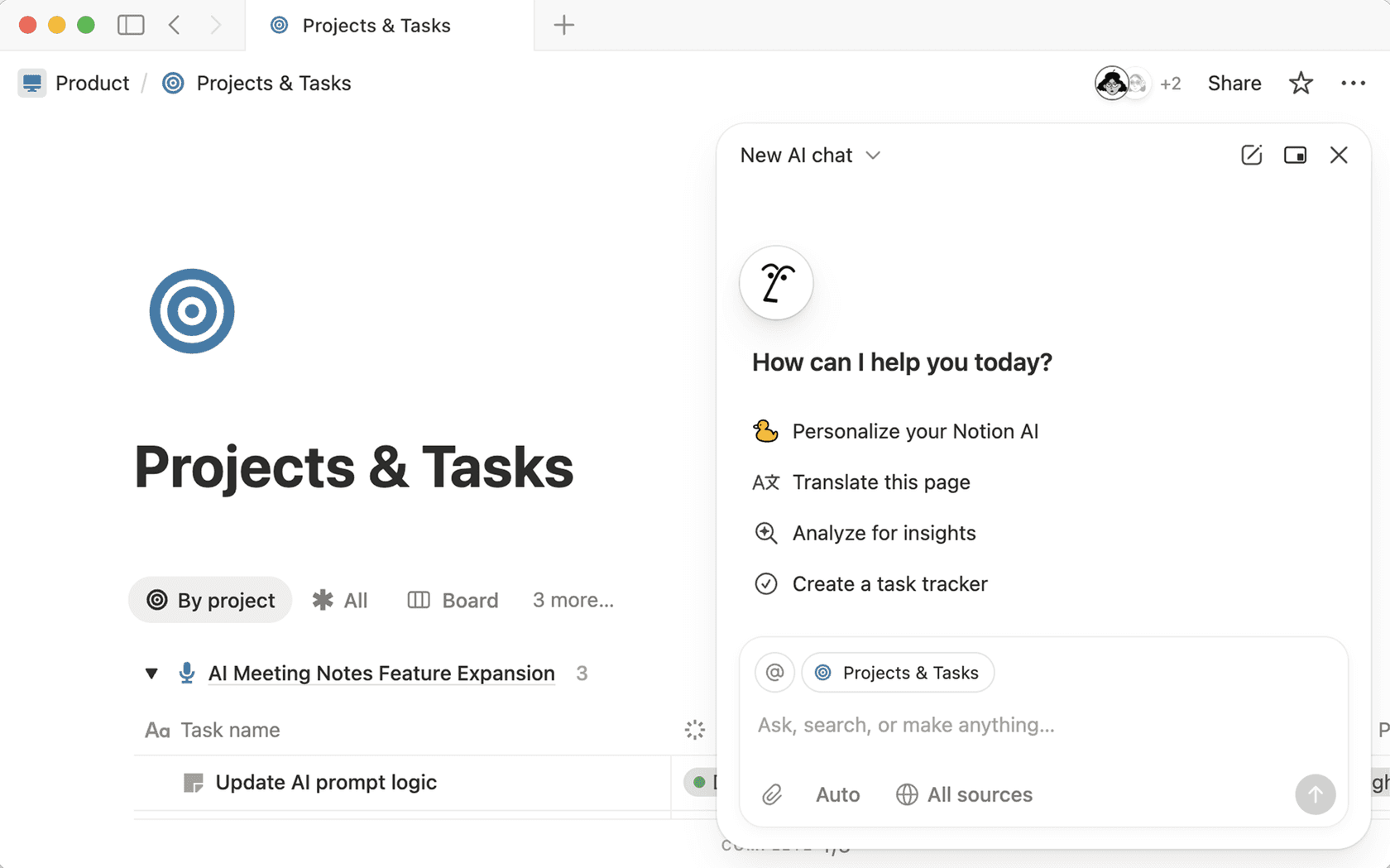
Custom Agents are the ones that matter for support automation. Notion's help center puts the difference plainly: "Notion Agent is on-demand, whereas Custom Agents are autonomous." You write instructions, pick a model, give the agent access to specific pages, databases and apps, and set triggers. From then on it runs without anyone opening a chat. Each run shows up in an Activity log with what triggered it, what it did and any errors.
| Notion Agent | Custom Agents | |
|---|---|---|
| How it runs | On demand, when you chat with it | In the background, on triggers and schedules |
| Permissions | Inherits yours: sees what you see | Only the pages, databases and apps you grant |
| Who uses it | One person | Shared with a team, with Full access, Can edit or Can view and interact levels |
| Plans | Business and Enterprise (Free and Plus get a limited trial) | Business and Enterprise only |
| What it costs | Included, within the usage allowance | Notion credits, $10 per 1,000 monthly |
| Audit trail | Chat history | Activity log, version history, Insights CSV export |
Sources: Notion Agent help, Custom Agents help, Notion pricing.
The permissions row is the one worth to pay attention to. Custom Agents "never have full workspace access by default", per Notion, and that is a sensible design for anything that touches customer data.
What can start a Custom Agent (and what can't)
Here is the mechanic which decide most of what a Notion agent can do for support: a Custom Agent only does work when one of its triggers fires. Notion's help center lists these trigger types:
- Recurring: daily, weekly, monthly or yearly, at a set time and timezone.
- Notion: a comment added to a page, a page added to or removed from a database, a property updated, or an AI Meeting Note finished.
- Slack: a message posted in a channel, an emoji reaction, or the agent being mentioned. A Slack workspace admin has to connect Slack to Notion first.
- Mail: a new email received, a new email sent, or a label applied, with filters on From, To, Subject, Body or Domain (Mail for Custom Agents).
- Calendar: an event created, updated or cancelled.
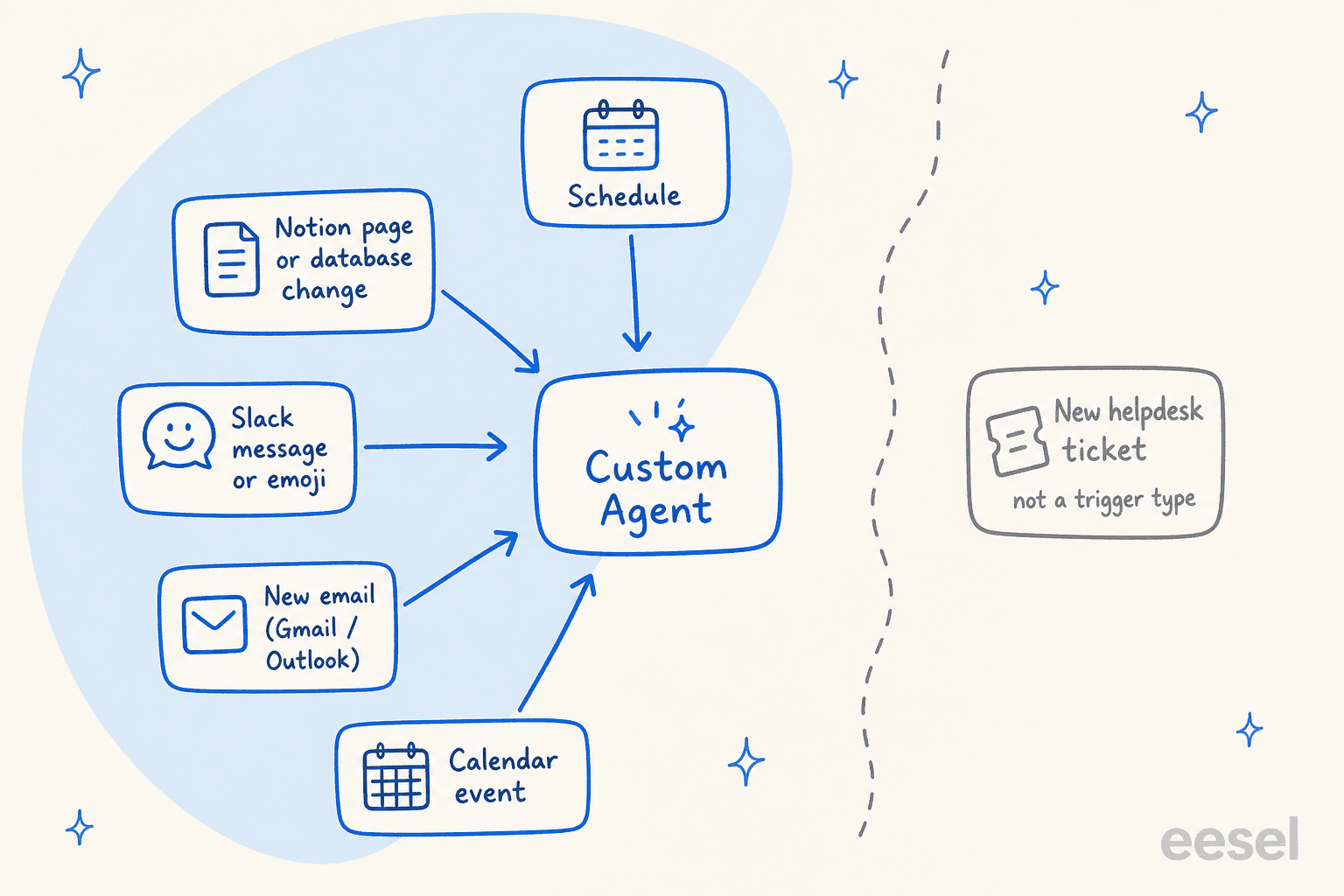
Notice what isn't on the list. There is no "new ticket" trigger for any helpdesk. Notion's pre-configured MCP connections cover tools like Linear, HubSpot, Stripe, GitHub, Amplitude and Sentry, and those give an agent extra tools to call once it is running. They don't add new ways to start it. Zendesk, Freshdesk and Gorgias aren't in that pre-configured list either, so reaching them means a custom MCP server that a workspace admin has to enable first, and that someone on your side builds or hosts.
The trigger that does reach customers is Mail. Connect a Gmail, Notion Mail or Outlook inbox and a Custom Agent can search, label, archive, draft and send. You choose its permissions (Modify inbox, Draft, Send) and whether it needs a person to confirm each action.
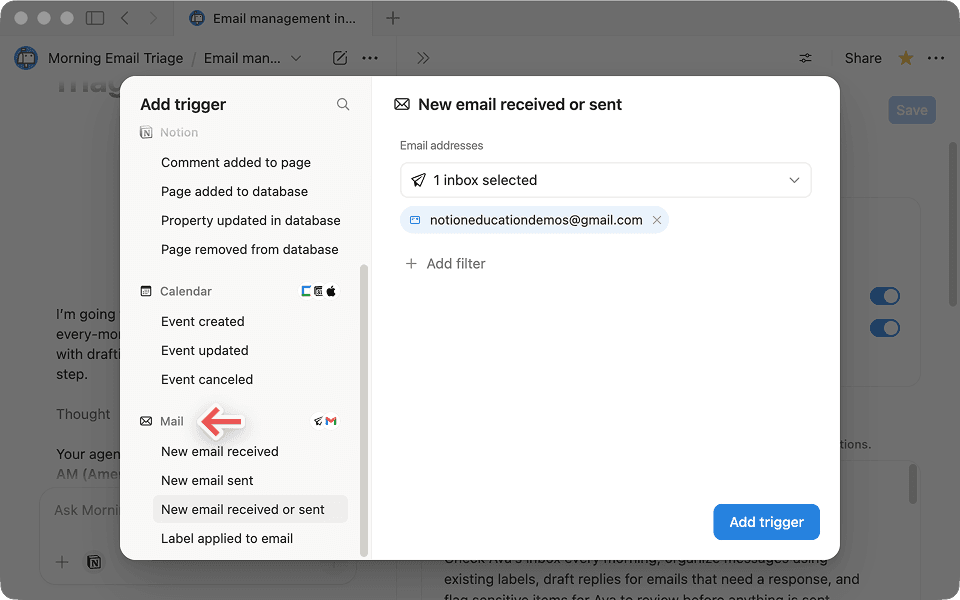
Notion is direct about what happens without that confirmation step. Its own FAQ asks "Can my agent send emails without my approval?" and answers "Yes, if you give it the send permission and include sending in your instructions." For a support inbox, I would keep every send behind a draft for at least the first few weeks.
What Notion agents can do for a support team today
Inside of those triggers there is real support work that a Custom Agent handles well, and most of it is the work around the queue, not the queue itself.
1. Answer your agents' questions in Slack. Notion ships a Slack Q&A assistant template that "answers repeat questions directly in Slack." Point it at your refund policy, escalation playbook and product notes, set a mention trigger in your support channel, and new hires get answers without pinging a senior agent. This is the job I'd start with, because the audience is your own team and a wrong answer gets caught before it reaches a customer. It also beats the classic internal knowledge base search box, since the answer arrives where the question was asked.
2. Triage a bug or feedback database. Notion triggers fire when a page lands in a database or a property changes, so an agent can read each new entry, set severity, tag the product area and route it, much like the Task triager template. Basic database Autofill is included on Business and Enterprise, while the Custom Agent version of Autofill spends credits. If your ticket triage ends with a "send to product" step, this is where a Notion agent earns its keep.
3. Draft help docs and macros. Give an agent access to your resolved-issue notes and it can draft a help-center article or a saved reply in a Notion page. A person still has to copy it into the help center, since Notion doesn't document a publishing connector to Zendesk Guide or similar tools.
4. Write the weekly support report. A recurring trigger plus the Weekly status reporter template pattern can pull from your Notion databases and Slack channels and post a summary every Friday. With a HubSpot or Stripe MCP connection, it can pull account context into that report too.
5. Work a small shared inbox. For a team that runs support out of Gmail or Outlook rather than a ticketing system, a Mail-triggered agent can label incoming email, answer from your Notion docs, and leave drafts for review. Notion's own inbox guide suggests exactly that: "draft replies for anything that needs a response, and flag anything sensitive for my review."
That routing judgment is where people running these agents say the value is. Asked where Custom Agents beat a plain automation, one r/Notion user picked exactly the support-shaped job:
"The one I'd miss is feedback triage: Zapier can copy a row into a database, it can't read a rambling comment and work out which team owns it, and that judgment is the whole job. If you can already write your rules down in advance, keep the automation."

Where Notion agents stop for customer-facing support
None of the limits below is a bug. They follow from Notion being a workspace tool and not a helpdesk, which is worth knowing before you plan the rollout around it. My Notion AI limitations post covers the wider list outside support.
It doesn't sit inside your helpdesk. No helpdesk event can start a Custom Agent, and reaching a ticket means a custom MCP server. If your team lives in Zendesk or Freshdesk, a Notion agent can't see a new ticket arrive, read its fields, or post a reply into the thread. I wrote up the integration options separately in Notion and Zendesk.
Email works, but as your mailbox. The Mail connector acts from the connected account. You get labels and drafts, but no ticket status, assignee, priority, SLA timer or CSAT survey. Notion also warns that if you share a Custom Agent connected to Mail, "anyone who has access to that Agent can view emails in the connected inbox." On a support inbox with customer details, that sharing setting deserves a second look.
There's no customer-facing chat surface. You can embed a Custom Agent in a Notion page, but Notion is clear that "anyone who has access to the agent can chat with it right there", so it's for people you've shared the agent with. Notion's docs don't describe a widget for anonymous website visitors, WhatsApp or SMS.
Testing happens on live runs, not on your history. You test a Custom Agent in its Chat tab, then watch the Activity tab once it's live. There is no documented way to replay last month's tickets through it and score the answers. This matters more than it sounds, and here's why. A CX lead handling about 7,000 tickets a month put it to the eesel team like this:
"I need an AI who is only handling the tickets that it's confident to handle and all the other ones, leave them alone."
A CX lead handling 7K tickets a month, on a sales call with eesel
The only way to know which tickets an agent is confident on is to run it against the tickets you already answered. Notion's best-practice guide asks you to iterate in chat; it doesn't give you that replay.
It can go quiet. When a Slack trigger fires, the agent shows "Working on it…", and Notion notes that "Sometime the Agent will decide not to reply (based on instructions), or may time out before it can send a message." For an internal channel that is fine, for a customer it isn't. And if the workspace runs out of credits, "Custom Agents will pause automatically until credits reset or an admin adds more credits."
Teams running Custom Agents in production describe the same pattern. In a long r/Notion thread from someone running 16 of them, a reply about scheduled reporting agents listed what broke:
"The first version exposed the harder problem: not generating reports, but enforcing data contracts and understanding why scheduled runs fail, skip, or produce incomplete results. [...] I've already encountered: Silent result truncation Scope inconsistencies Runs marked "completed" despite an incomplete or blocked outcome"
A silent skip on an internal report is an annoyance. On a customer inbox, it's an unanswered email nobody knows about.
Which support jobs fit a Notion agent?
Pick the job you're thinking of handing to a Notion agent. Each answer comes from Notion's own help center as of October 2026.
Pick a support job to see whether a Notion Custom Agent can do it, what it needs, and what I'd use instead.
What Notion AI agents cost
Notion's AI is now split across two meters, and support teams tend to get caught in between of them. The plan price buys seats and Notion Agent. Custom Agents run on credits.
| Plan | Price per member/month | Notion Agent | Custom Agents |
|---|---|---|---|
| Free | $0 | Limited trial | No |
| Plus | $10 | Limited trial | No |
| Business | $20 | Included, within usage allowance | Yes, on Notion credits |
| Enterprise | Custom pricing | Included, plus zero data retention with LLM providers | Yes, on Notion credits |
Source: Notion pricing. For the full plan breakdown, see my Notion pricing guide.
How Notion credits work:
- Monthly credits cost $10 per 1,000, reset each month, and don't roll over.
- Annual credits cost $13 per 1,000 and expire at renewal. They cost more because you can spend them any time in the year.
- Credits are shared across the workspace. Admins get alerts at 80% and 100% of usage, and Custom Agents pause when credits run out.
- Custom Agents moved onto credits on May 4, 2026. Downgrading to Free or Plus switches every Custom Agent off, though they aren't deleted.
- Premium models such as Claude Fable 5 spend credits even inside Notion Agent, and an admin has to turn each one on.
- Notion Agent itself doesn't spend credits. It runs inside a usage allowance that resets within six hours, with a monthly cap on top.
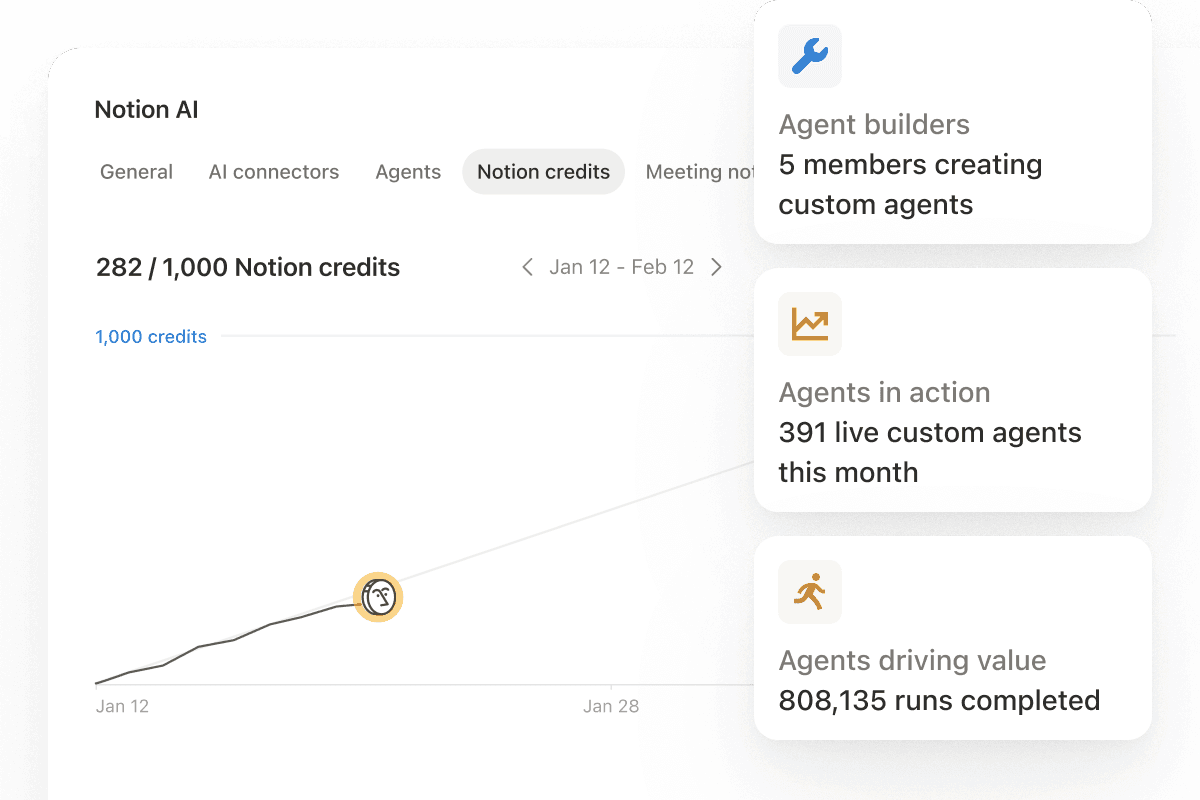
The part I can't give you is a cost per run, because Notion doesn't publish one. Its credits FAQ only says "Simple tasks use fewer credits, while more complex, multi-step workflows use more." So a 10-person support team on Business pays $200 a month in seats (at the $20 list price) before the first credit, and the credit bill depends on how many emails and Slack messages your agents process and how many steps each takes. If you go down this road, run a two-week pilot and read the credits dashboard before you commit to a monthly amount.
Users have started publishing their own numbers. One compared a full agent with Notion's code-based Workers:
"I have workers that replace full Make.com scenarios and run for 0.2 to 0.6 credits, compared to an agent (testing) that just changes a property's status, which takes 2.5 credits."
The author of that 16-agent thread put his own bill at "around $120" a month, having used 12.6k credits in a month. The lesson for support: route the simple, rule-shaped steps with plain automation, and save agent runs for the messages that need reading.
Notion agents vs helpdesk AI agents
The cleanest way I found for framing this: both of them can read your Notion docs, the difference is where the answer lands.
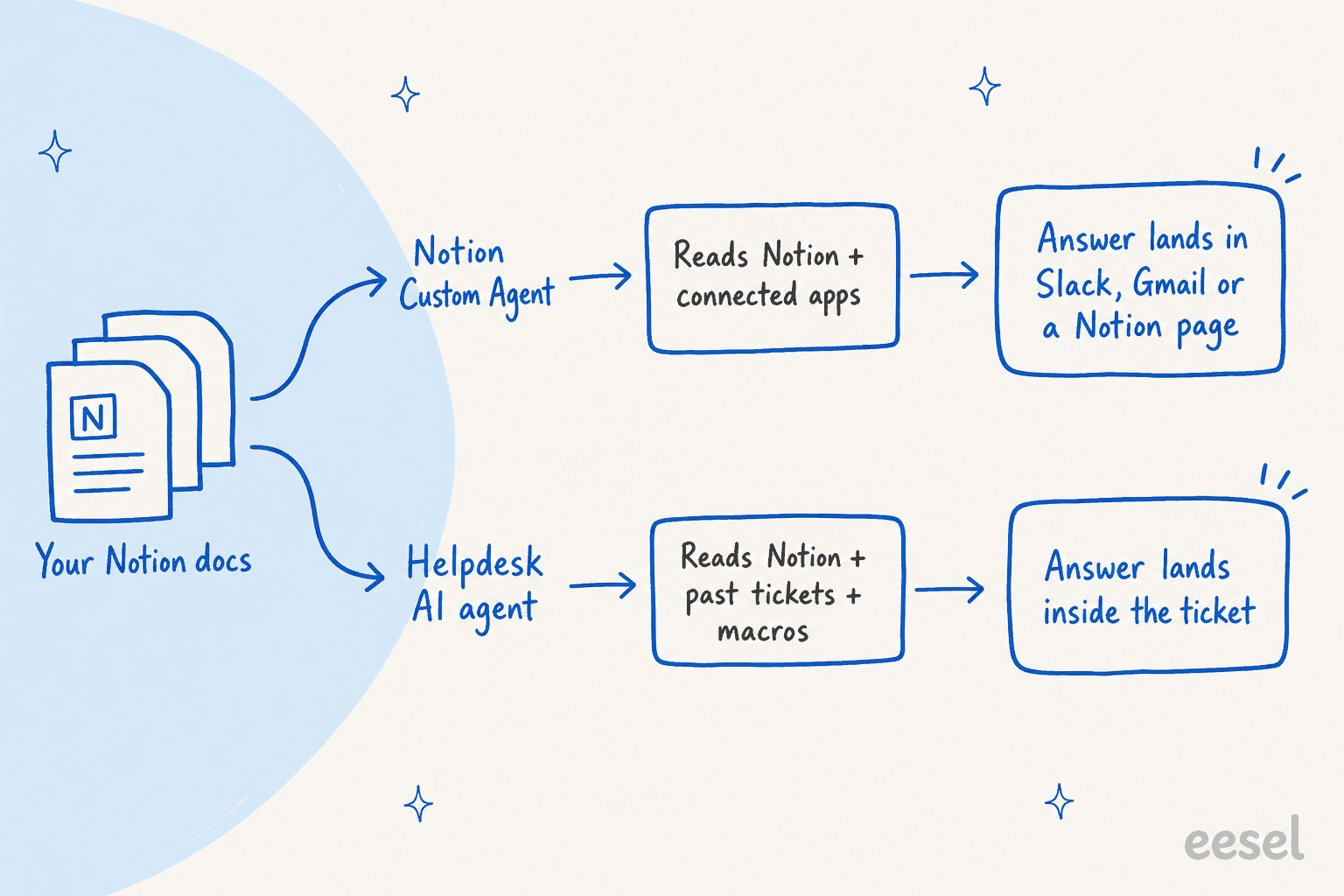
| Notion Custom Agent | eesel AI helpdesk teammate | Zendesk AI agents | Freddy AI Agent (Freshdesk) | |
|---|---|---|---|---|
| Where it works | Notion, Slack, Gmail/Outlook, MCP tools | Inside Zendesk, Freshdesk, Gorgias, HubSpot, Help Scout, Front, Salesforce and more, plus Slack and website chat | Zendesk messaging, email and voice | Freshdesk chat and email |
| Started by a new ticket | No | Yes | Yes | Yes |
| Learns from past tickets | No | Yes, on a full connection | Not listed as a knowledge source | Not as knowledge |
| Testing before go-live | Chat tab, then live Activity log | Replays your past tickets and scores answers against what your team sent | Simulator on written scenarios (early access, messaging only) | Test queries, plus imported solved email tickets (up to 50 a run) |
| Billing unit | Notion credits per run, cost per run not published | 1 credit per ticket or chat | Per automated resolution | Per session (24h chat, 72h email) |
| Price | $20/member/month Business + $10 per 1,000 credits | From $299/month for 500 credits, no seat fee | $1.50 committed or $2.00 pay-as-you-go per resolution, plus a Zendesk plan from $19 per agent | $49 per 100 sessions after 500 free, plus Freshdesk plan |
Sources: eesel helpdesk docs, Zendesk pricing and Freshdesk Omni pricing, plus the Notion pages linked above.
The table make the trade-off look tidy, but the row I'd weigh the most is "learns from past tickets." Your Notion wiki holds the policy. It rarely holds how your team phrases an answer, which order they do things in, or the workaround everyone knows and nobody wrote down. In one real-traffic trial on an e-commerce inbox, eesel hit 93% triage accuracy, yet agents sent only 12% of AI drafts as-is, and about 65% of their edits were tone and length, not facts. That gap closes by learning from the replies your team already sent, and that history lives in the helpdesk, not in Notion.
If you're comparing helpdesk-native options more broadly, my notes on Zendesk AI agents, Zendesk automated resolutions and Freddy AI Agent sessions go into each billing model.
For the full buying checklist, see my guide to choosing an AI agent. The short version: test on your own past tickets, and read the billing unit before you fall for the demo.
How I'd set it up if your support docs live in Notion
Here's the split I would recommend to a support lead who ask me this over a coffee:
- Keep Notion as the source of truth. Policies, playbooks, product notes and macros stay in Notion, where your team already edits them. Nothing about adding AI should move them. If they're scattered, a pass with Notion's knowledge hub features or a knowledge management cleanup pays off for every tool downstream.
- Use Custom Agents for the internal jobs. Slack Q&A for your agents, triage of the bug and feedback database, the weekly report. These are the jobs Notion's triggers were built for, and a wrong answer stays inside your team.
- Put a helpdesk AI agent on the tickets, reading the same Notion pages. That agent should start from a new ticket, learn from your past replies, and let you test on your own history before it talks to a customer. Start it on drafts, then let it answer the easy topics on its own once the scores hold up. My guide to AI agent handoffs covers the escalation side.
- Watch both meters. Notion credits for the internal agents, the helpdesk agent's billing unit for tickets. Two small bills you understand beat one large bill you can't predict.
If you're still deciding on the helpdesk side, my roundups of AI customer support agents and AI helpdesk software are a good place to start, and AI for ticket triage covers the routing piece.
Try eesel with your Notion docs
If your support knowledge lives in Notion and your tickets live in a helpdesk, eesel's AI helpdesk teammate is built for that gap. You share one parent page in Notion and eesel's Notion integration brings in every page nested under it, then answers inside Zendesk, Freshdesk, Gorgias and the rest, citing the Notion page it used. On a full helpdesk connection it also learns from your macros and past tickets, and its simulation replays resolved tickets so you can see how it would have answered before anything goes live. The same Notion pages can answer your team in Slack too.
"Our agents can instantly draft replies to customers. We don't have to look through all our documentation on Notion, Google Docs or our help center anymore because eesel AI does it for us."
A support team at a meeting-productivity SaaS, answering tickets from Notion and Google Docs
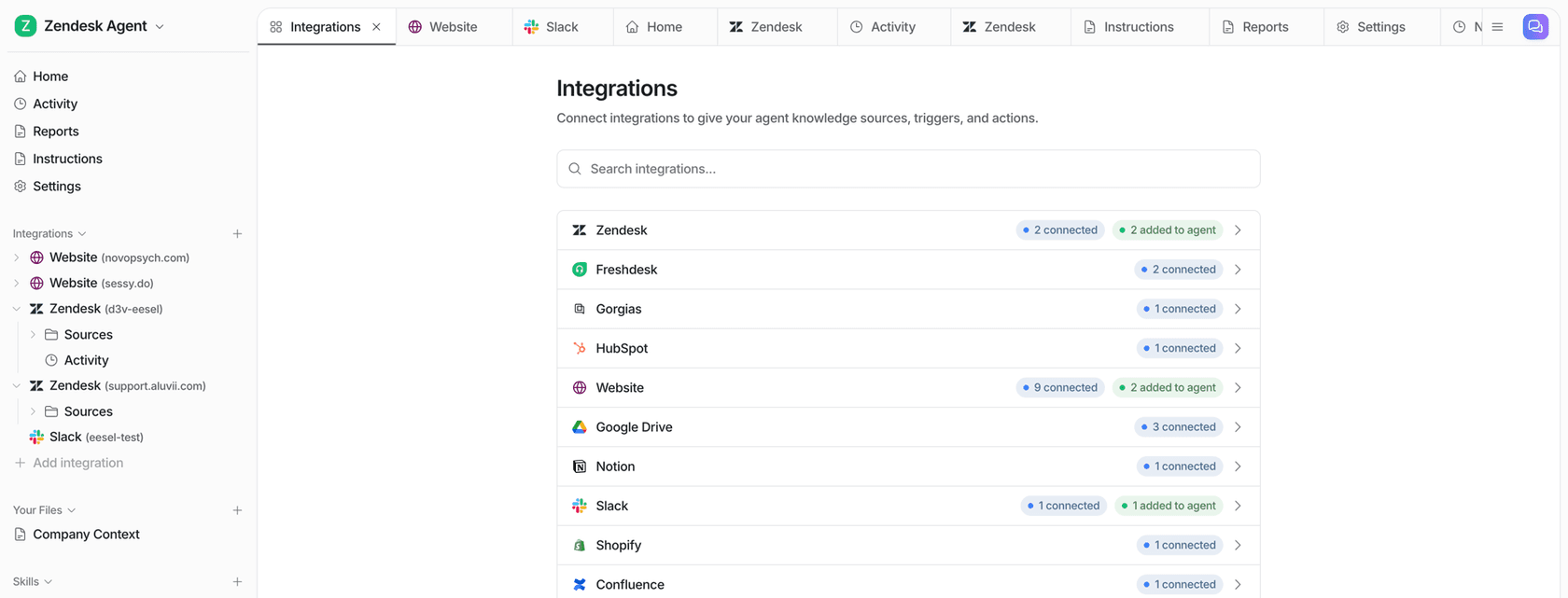
Pricing is one fixed plan where a ticket or chat is 1 credit, from $299 a month for 500 credits, with no seat fees. The free plan includes 100 credits, so you can connect Notion and your helpdesk and read real drafts on your own tickets first. Try eesel for free, or book a demo and bring your messiest Notion wiki.