

Why the demo is the worst place to judge an AI support agent
I work the support queue at eesel every day, and the thing I've learned from watching teams evaluate AI agents is that the demo almost never predicts what happens on your tickets. The demo runs on tidy questions the vendor picked. Your queue has the half-written email, the customer who asks three things at once, and the policy that changed last Tuesday.
Here's a real example. When eesel trialed its agent on a jewelry ecommerce store doing about 1,000 tickets a month, the headline numbers looked great: 93% triage accuracy and 88% of drafts heading in the right direction. But agents sent only 12% of drafts as-is. About 65% of their rewrites were for length and tone, not facts, and only around 5% were the AI being plainly wrong. A single "accuracy" number would have hidden every one of those findings.
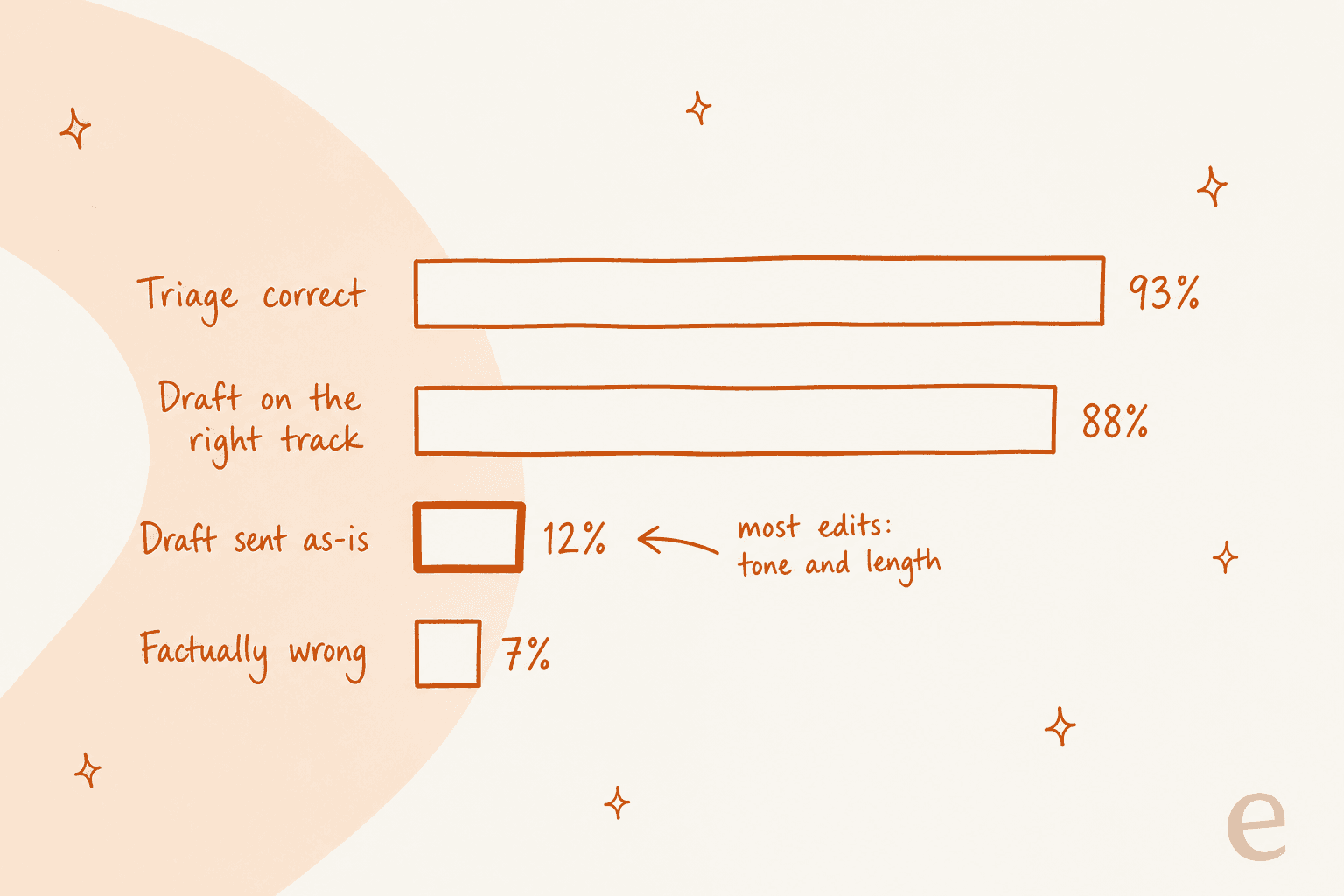
That gap is why AI support metrics matter more than the pitch deck. One practitioner with ten years in contact-center AI put the honest baseline bluntly:
"The problem is that vendors are telling companies they can eliminate 80-90% (maybe even 100% if they can keep a straight face) of their customer service agent jobs with AI, and that is nonsense."

The same commenter's rough baseline was about 30% of inbound contacts deflected. Your number might be much higher, and plenty of teams beat that, but you only find out by testing on your queue. So the seven checks below are built around one idea: make every vendor prove it on your tickets before you sign.
Step 1: Write a one-paragraph brief before any demo
Before you book a single call, write down what "good" means for you. Not "automate support," but a target and a handoff rule. One support manager on an eesel sales call put their brief in one sentence: they wanted something that could "handle 60% of the incoming zendesk tickets and know when to pull a real person in for better analysis and resolution."
That's a great brief, because it has the two halves every evaluation needs. A coverage target tells you what to measure. A handoff rule tells you what failure looks like. Another CX lead handling 7,000 tickets a month told eesel the second half mattered more than the first:
"I need an AI who is only handling the tickets that it's confident to handle and all the other ones, leave them alone."
Your brief should answer:
- Which topics should the agent own? Order status, password resets and billing questions are usually first. Pull a month of tickets and tag the repeat questions; my ticket triage guide shows how.
- Which channels: email, chat, social, voice?
- What it may do, not only say: look up orders, issue refunds, change addresses?
- When it must stop and pass to a human, and what the human should receive.
- What you'll pay per month, worst case, in your busiest season.
Bring this brief to every demo and make the vendor answer it on your terms. It also stops the conversation from drifting into features you'll never use.
Step 2: Decide where the agent should live
The first fork in the road is whether you buy the AI agent your helpdesk already sells, a standalone platform, or a layer that plugs into the helpdesk you have. This decision quietly sets your ceiling on everything else: what the agent learns from, how you test it, and whether you can leave.
| Option | Examples | Lives where | Learns from past tickets? | Setup |
|---|---|---|---|---|
| Built into your helpdesk | Zendesk AI agents, Gorgias AI Agent, Freddy AI | Only that helpdesk | No, mostly help center and documents | Self-serve, in the helpdesk admin |
| Standalone enterprise platform | Ada, Decagon, Sierra | In front of your helpdesk, hands off to it | Partly, past conversations seed tests or draft articles | Vendor-led, demo first |
| Layer on your existing helpdesk | eesel | Inside Zendesk, Freshdesk, Gorgias, Front, HubSpot and more | Yes, on a full connection | Self-serve |
Built-in agents are the path of least resistance, and that's a real strength. If you live in Gorgias and sell on Shopify, the Gorgias AI Agent can cancel orders, edit shipping addresses and reship without any extra setup. The trade-off is that it only works there: Gorgias's docs say it "can be used with Shopify stores connected to Gorgias," and one Capterra reviewer who rated it 5/5 still flagged it as "offering full functionality only for Shopify" (Frank A., Capterra).
Standalone platforms like Decagon vs Sierra suit large teams that want a vendor team building with them. Sierra's own product page sells working with "an expert agent development team" and says "Deploy in weeks" (Sierra). That's a good fit at enterprise scale, and a lot of process if you have three agents and a Zendesk account.
One more data point worth hearing before you default to the built-in option. A CX lead at a US healthcare platform came to eesel after trying Zendesk's built-in AI and deciding it was too expensive for what it did for them. That's one team, and plenty of others are happy with it, but it's why I'd put the built-in agent through the same tests as everyone else instead of treating it as the safe default. My Zendesk AI alternatives and Freddy alternatives roundups go deeper.
Step 3: Check what it learns from
An AI agent is only as good as what it reads. Most agents learn from your help center, a website crawl and uploaded files. Far fewer learn from the thing that actually encodes how your team answers: your resolved tickets.
That difference shows up in the docs. Gorgias answers the question directly in its FAQ: "Does AI Agent use my macros? No" (Gorgias). Zendesk's knowledge sources page lists help centers and external sources, but not past tickets (Zendesk). Freshdesk's Freddy learns from "URLs, files, solution articles, custom Q&As, and external apps" (Freshdesk), and solved tickets only appear as test inputs.
Why it matters: remember that trial where 65% of edits were tone and length? That's exactly what an agent fixes by reading your team's sent replies. eesel co-founder Amogh hears it on almost every sales call:
"Also - past ticket training strikes again. Classic. People really, really, really want to train on past tickets."
Whatever the agent reads, the content has to be current. This Reddit comment is the clearest warning I've seen:
"I've seen a bot confidently give wrong answers because the knowledge base hadn't been updated in 8 months. Customers didn't just get bad answers. They got bad answers instantly."

Ask every vendor two things: can it read our past tickets and macros, and can it read the internal docs where our real policies live (Confluence, Notion, Google Docs)? Then audit the knowledge base before the trial, not after. Stale articles are the most common cause of AI hallucinations I see.
Step 4: Test it on your own past tickets
This is the check that separates the tools most, and the one most buyers skip. Every vendor lets you test before going live, but "test" means three very different things.
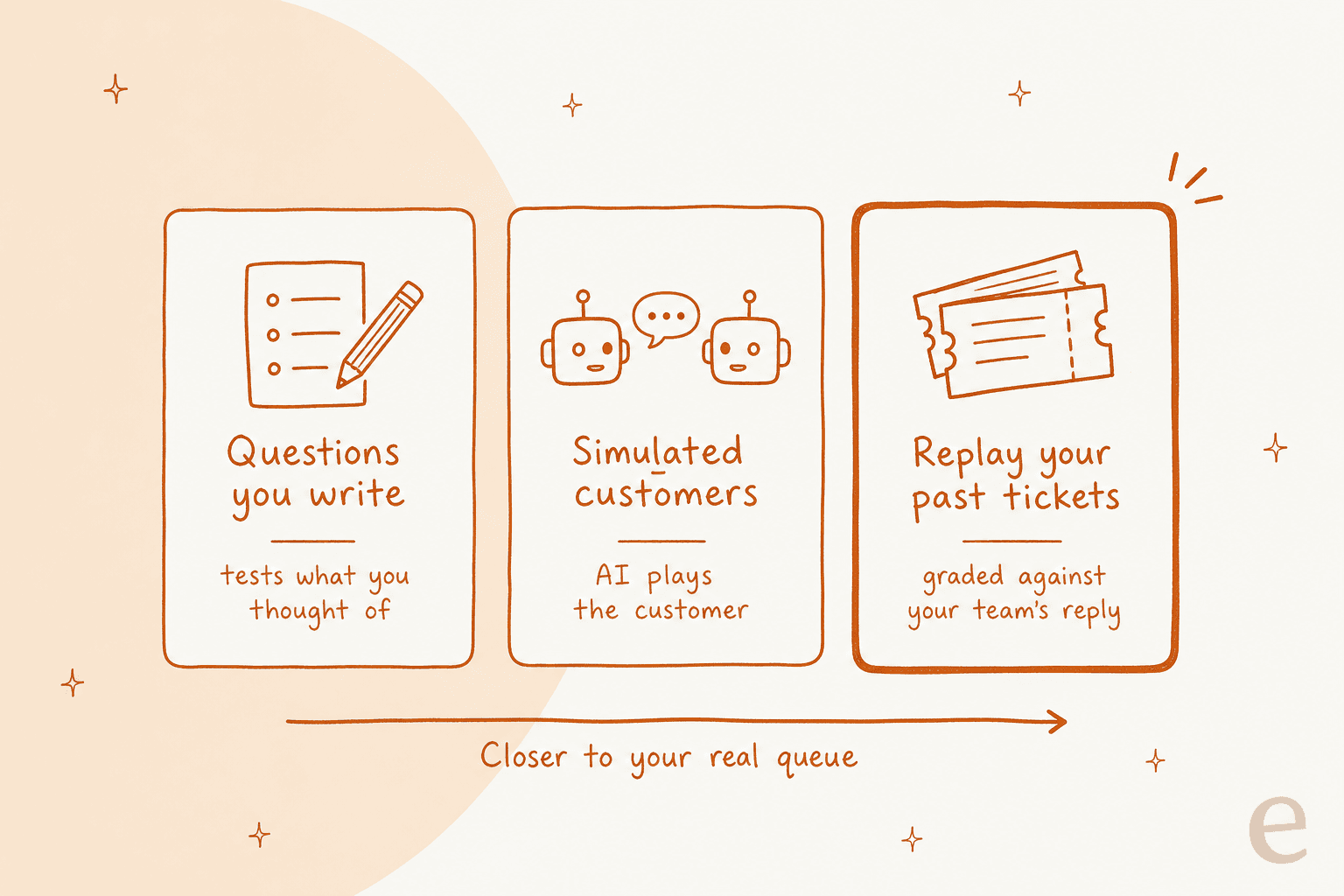
The problem with questions you write is that they only test what you thought of. The problem with simulated customers is that an AI invents the customer, so the test is only as realistic as the generator. Replaying your actual tickets is the only method where the "correct answer" is something your team already sent.
Here's how each vendor's own docs describe testing:
| Vendor | How you test before launch | Scored against |
|---|---|---|
| Zendesk | Preview chat, plus a conversation simulator (early access, messaging only) that runs scenarios you write with fictional data | Its own estimate of resolution rate |
| Gorgias | Playground preview chat; you can re-run one existing ticket at a time | Your judgment, per conversation |
| Freshdesk Freddy | Up to 100 written or AI-generated queries per run on chat; on email, import up to 50 solved tickets per run | Answered, unanswered or error |
| Ada | Written test cases, up to 3,000 simulations a day | Pass or fail per test |
| Decagon | AI-generated mock customers, which can be seeded from uploaded transcripts | Pass or fail per test |
| Sierra | AI-generated mock users, graded by a second AI | AI judge |
| eesel | Replays your resolved tickets in batches | What your team actually replied |
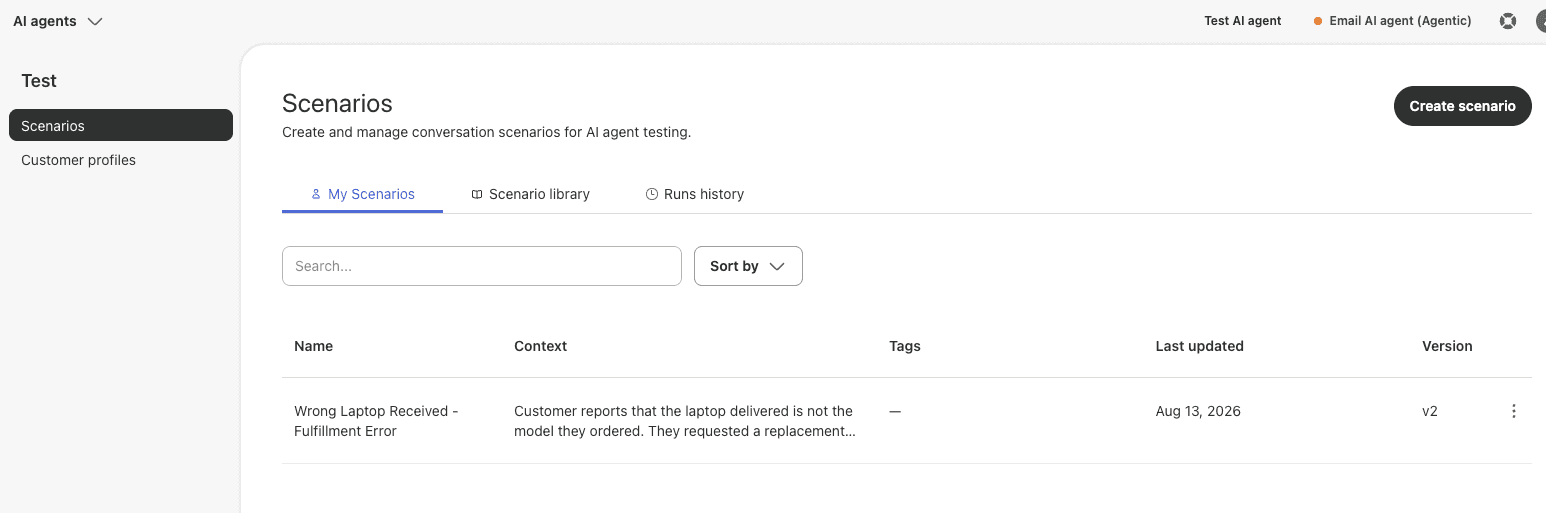
Zendesk's simulator is a good example of the written-scenario approach. Its help article says it "generates realistic conversations based on scenarios you create" and adds that it's "designed for testing with fictional data" (Zendesk). That's useful for regression testing a flow, but the resolution rate it estimates comes from scenarios you imagined.
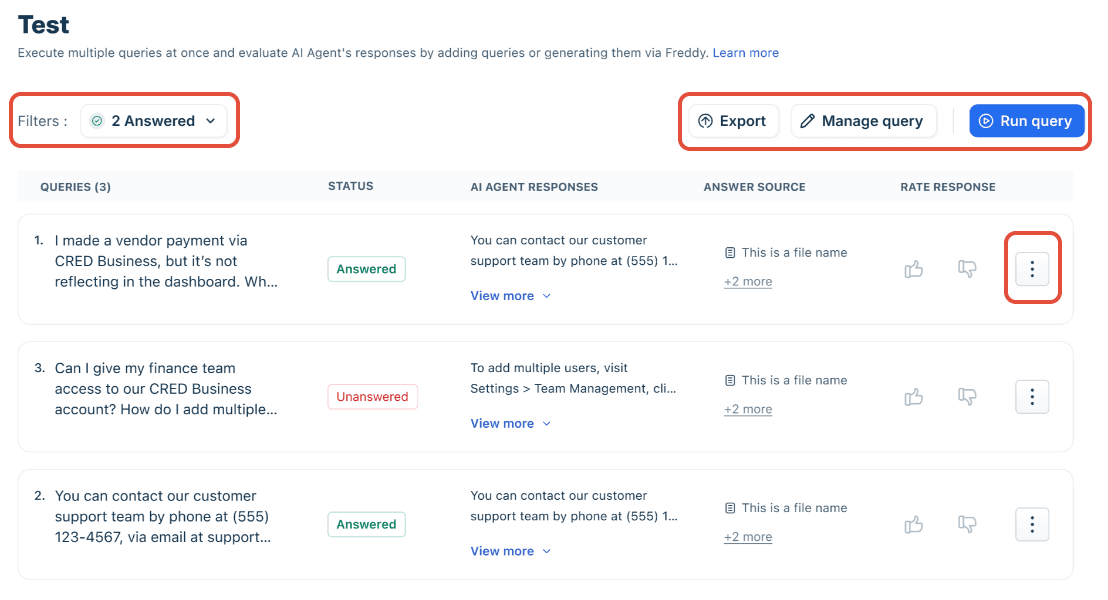
Freddy's bulk test is quick to run, and the email agent's option to import solved tickets gets you closer to reality. The catch is the scoring: each query comes back "Answered", "Unanswered" or "Error" (Freshdesk). An answered ticket can still be wrong.
One more trap to watch for: some tests run real actions. Ada's docs say simulation "Actions are not mocked" and that they "execute against live systems" (Ada), and Gorgias warns a test action "can affect real customer and order data (like cancelling an order)" (Gorgias). Use a fake customer profile before you switch actions on in a test.
What a past-ticket replay looks like
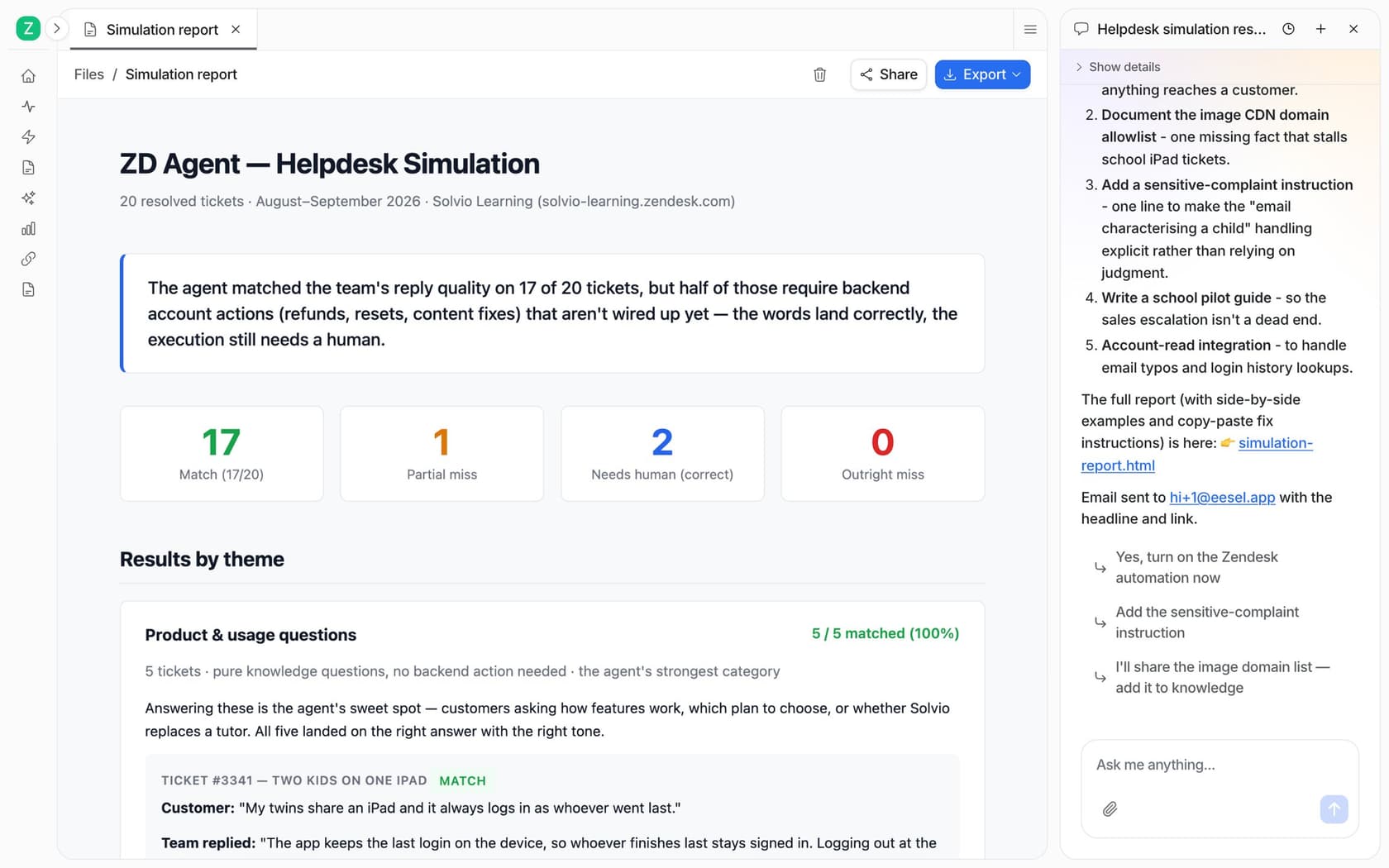
This is the method I'd push every vendor to support, so here's what it looks like in eesel. You ask the agent for a simulation in chat, it pulls your resolved tickets and works through them in batches, then tells you how many replies matched what your team actually sent, topic by topic (eesel docs).
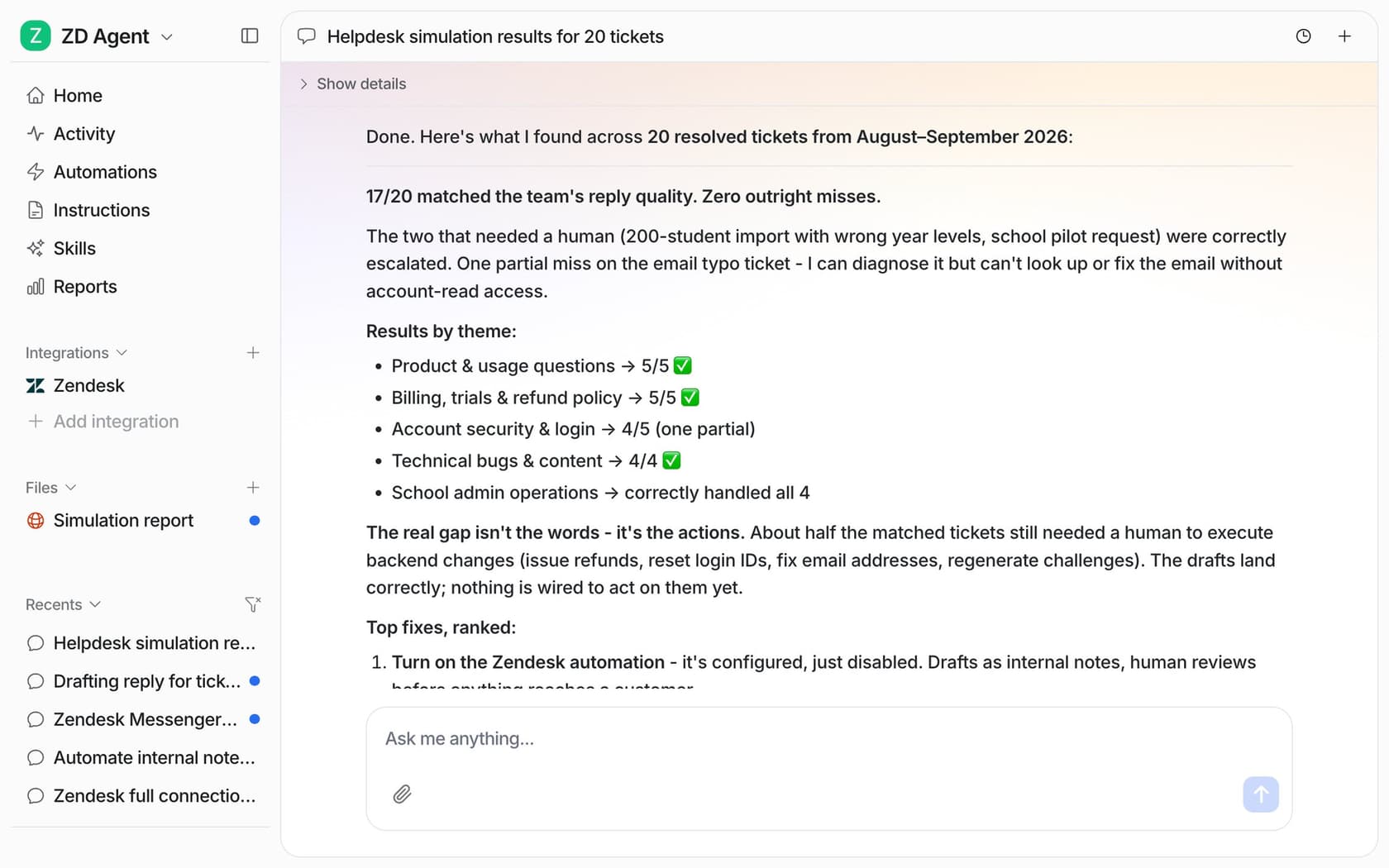
In the docs example, 17 of 20 tickets matched. The more useful part is the finding underneath: the drafts were right, but half the matched tickets still needed a human to run a backend action nobody had wired up yet. That's a buying insight you'd never get from a demo.
Whichever tool you pick, score at least four things in the trial: triage accuracy, drafts sent as-is, factual errors, and correct escalations. Also time the responses. One buyer eesel spoke with ran a methodical 67-test evaluation, found the answers solid, and still walked away because the chat widget was slow and kept getting stuck.
Step 5: Read the billing unit before you fall in love
This is where I see the most regret. Teams pick the agent they liked best, then discover what "resolution" means on their first invoice.
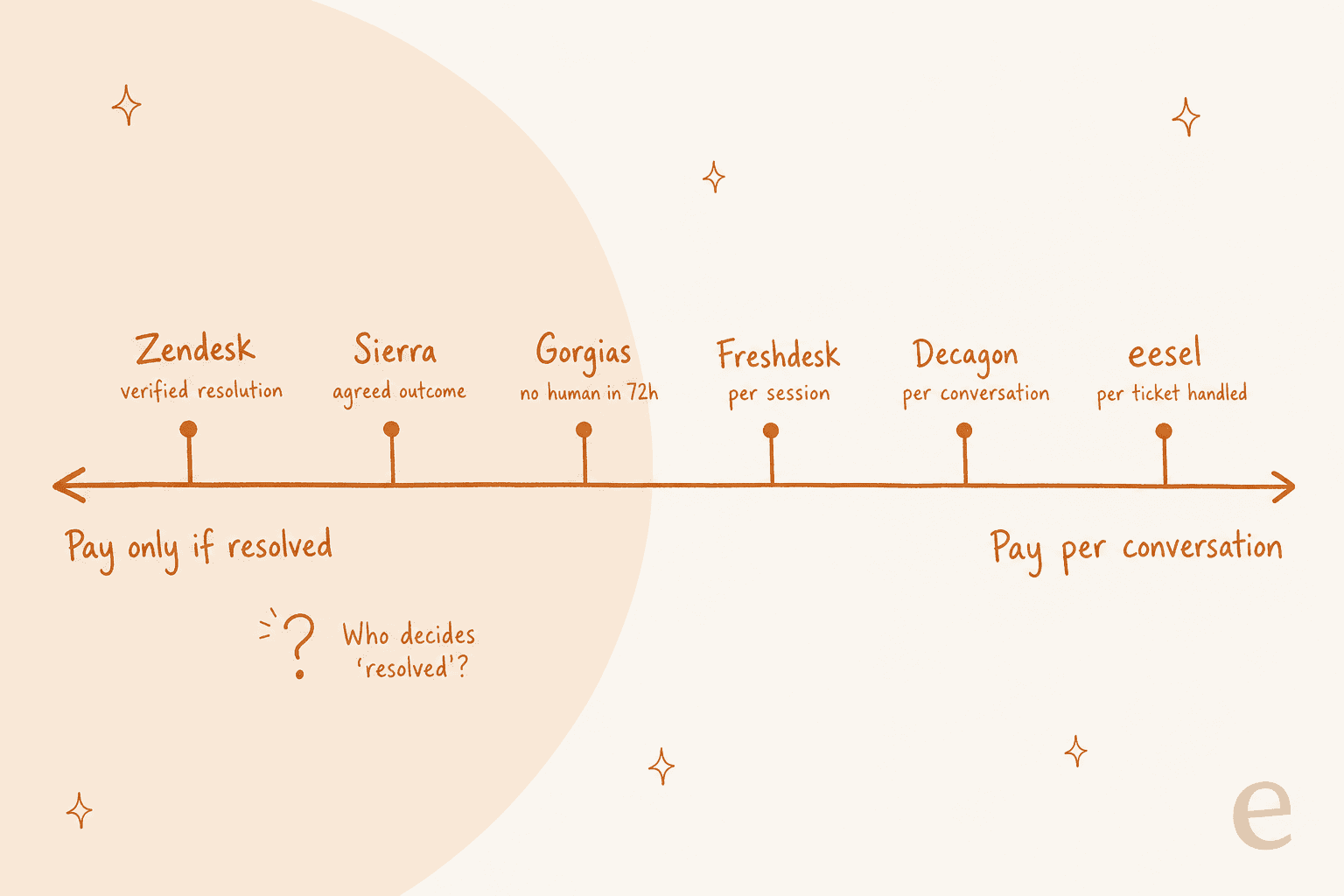
Here's what each vendor actually bills for, in their own words:
| Vendor | Billable unit | The definition | List price | Billed if not resolved? |
|---|---|---|---|---|
| Zendesk | Verified automated resolution | An LLM "evaluates the text of the conversation to confirm that the customer's request was satisfactorily resolved" | $1.50 committed, $2.00 pay-as-you-go (pricing), after a per-agent allowance | No |
| Gorgias | Automated interaction, plus the ticket fee | The customer "does not require the involvement of a human agent within 72 hours" | $0.85 to $1.00 each by plan | Ticket fee yes, automation fee no |
| Freshdesk | Session | Chat: everything within 24 hours. Email: a 72-hour window | $49 per 100 sessions, 500 free once | Yes |
| Ada | Not published | Ada argues for per-conversation pricing "regardless of outcome" | Demo only | Unclear |
| Decagon | Per conversation (most customers) or per resolution | "A fixed rate for every incoming conversation" | Demo only | Yes, on per-conversation |
| Sierra | Agreed outcome | "If the conversation is unresolved, in most cases, there's no charge" | Demo only | Mostly no |
| eesel | Ticket or chat worked | "A ticket or chat is 1 credit, however long" | $299/month for 500, up to $1,749 for 5,000 | Yes, but spam and skipped tickets don't count |
Credit where it's due: Zendesk changed its model on May 18, 2026. Under resolution tiers, "Assisted escalation" and "Contained resolution" don't count against your allowance, and a resolution only reaches the "Verified" tier after an LLM check. That addresses the complaint Zendesk users raised when per-resolution billing first launched:
"Complete trash lol, stuff I used to get free now counts as an AR. Most of the ARs are abandoned chats. There's no dispute resolution process."
That comment is from 2024, and older accounts may still be on the prior scheme until they're moved, so check which one you're on. Even vendors who sell per-resolution pricing admit the definition is slippery. Decagon's own product director wrote: "You never want to be in a situation where you're arguing over what a 'resolution' is" (Decagon).
The bigger issue is how each model scales. Play with the calculator below: set the volume to your queue, then slide the resolution rate up.
At 2,000 AI-worked conversations a month, the picture flips as the agent improves:
| Resolution rate | Zendesk ($1.50/res) | Gorgias ($0.90/interaction) | Freshdesk ($0.49/session) | eesel (2,000-credit plan) |
|---|---|---|---|---|
| 20% (early pilot) | $600 | $360 | $980 | $849 |
| 50% | $1,500 | $900 | $980 | $849 |
| 70% (mature) | $2,100 | $1,260 | $980 | $849 |
The pay-per-resolution model is the cheapest option exactly when the agent is worst. That's not a reason to rule those tools out, since you're also paying for a working agent. It's a reason to model your peak month before you sign, and to ask whether the vendor's resolution count includes spam and abandoned chats. For more on the maths, see my cost per resolution breakdown, Zendesk AI pricing and Freddy AI pricing guides.
A Gorgias reviewer on G2 named the peak-season problem directly:
"As our order volume grows and customer inquiries increase, the cost scales up quickly in ways that can be difficult to predict and budget for. During peak seasons like the holidays when support volume spikes, the costs can increase significantly in a short period."

Step 6: Check what it can do, and what stops it
Answering questions is half the job. The other half is doing things: looking up an order, refunding an item, updating a ticket field. And for every action it can take, you want a matching brake.
On actions, check three things for each vendor:
- Does it work on your stack, out of the box? Gorgias's Shopify actions need no extra steps if Shopify is already connected. Zendesk's order lookups and refunds mean building an API integration or action flow against your own system (Zendesk).
- Is it gated? Ada caps you at "five active, customer-facing API tools per AI Agent" by default and notes the feature "may not be included with your organization's subscription package" (Ada).
- Who builds it? Sierra says complex workflows and integrations "still require code" (Sierra). Fine if you have engineers to spare, a blocker if you don't.
The test here is simple: in the trial, make it do the action on a test order and check the result in the source system, not just the reply. One builder on Reddit described an agent whose "text responses looked perfect" while it pulled data from the wrong user's account (u/properwomanhood_292, Reddit).
On guardrails, look for three things. First, per-action approval: eesel lets you set every action to run on its own, ask first, or stay off, and its docs recommend keeping "refunds, cancellations and anything that costs money behind an approval" (eesel docs). Second, topic-level control: Gorgias's AI coverage page lets you set each intent to "AI allowed" or "Handover" (Gorgias). Third, a human handoff that passes context, not a transcript dump.
That last one matters more than it sounds:
"fixed by forcing a structured handoff summary instead of raw transcript dump (saved more time than the automation itself). CSAT fine on deflected stuff, tanked on anything that bounced back after a failed bot attempt"

Also check escalation triggers on your own tickets. One support lead on Reddit said their first rules, "escalate if it's billing or if they use certain keywords," missed "like half the situations where a human was actually needed" (u/Salt-Question8632, Reddit). My guide to escalation triggers covers the patterns that work.
Step 7: Roll out in stages, and pick a tool that lets you
The last check is about the rollout, not the product, but it should shape which product you buy. You want a tool that can start supervised and earn its way to autonomy, one topic at a time.
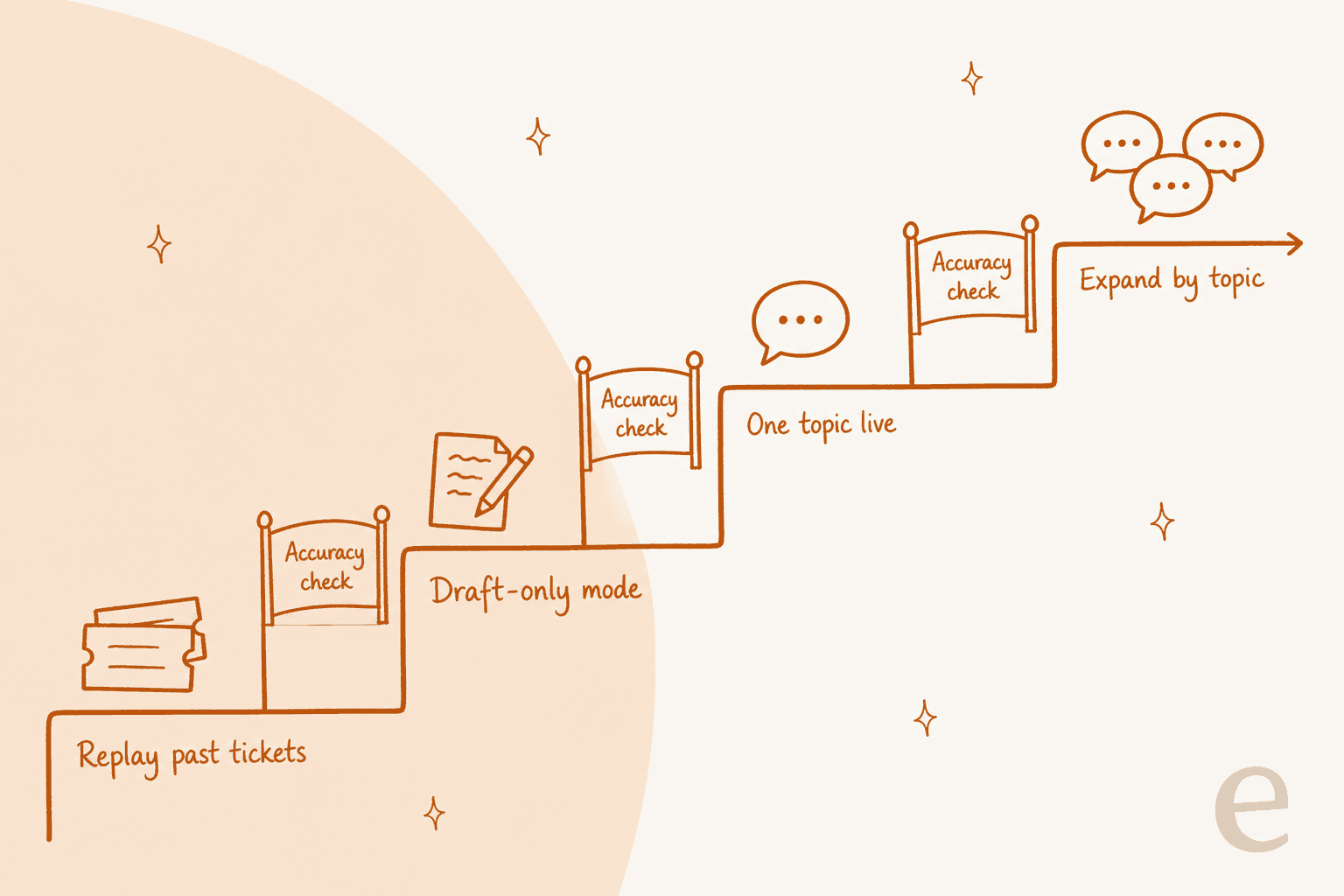
Amogh's read from sales calls is that copilot first, then full AI, is the pattern nearly everyone wants: start in draft-reply mode, switch to full auto once you trust it. A support lead on Reddit described the same thing from the operator side:
"The safest rollout I have seen is: let the agent draft, tag confidence plus reason, require approval for refunds or account changes, and review every reopened conversation for the first month. That review log is usually where the real automation boundary shows up."
So ask each vendor: can it post drafts as internal notes for agents to approve? Can I turn it on for one topic or one channel only? Can I cap how many replies it sends per day? Freshdesk's email agent has exactly that cap, "useful for controlled rollouts" (Freshdesk). Drafting first also gives your team an AI copilot while you gather evidence, so the trial pays for itself in saved typing.
The questions to ask every vendor
Take this into every demo. If a vendor can't answer one clearly, that's your answer.
| Question | Why it matters |
|---|---|
| Can I test it on my own past tickets before going live? | Written scenarios only test what you thought of |
| What is it scored against in that test? | "Answered" is not the same as "correct" |
| Does it learn from our resolved tickets and macros? | That's where your team's tone and real policies live |
| What exactly counts as a billable unit? | "Resolution" means something different at almost every vendor |
| What does my bill look like in our busiest month? | Per-resolution costs rise as the agent improves |
| Does a resolution count spam or abandoned chats? | Inflates both the bill and the reported rate |
| Which actions work on my stack without engineering? | Demo stacks aren't your stack |
| Can it run draft-only, per topic, with approvals on refunds? | Staged rollout is how you avoid a public mistake |
| What does a human receive on handoff? | A bad handoff costs more agent time than it saves |
| Does it work inside my current helpdesk? | Switching helpdesks to get an AI agent is a big hidden cost |
For a ready-made shortlist to run these questions against, see my AI support agents roundup and my list of support automation tools.
Mistakes I see teams make
- Judging on one number. A vendor's resolution rate, or your own "accuracy," hides the story. Track deflection rate, AI CSAT and reopened tickets side by side. As one Hacker News commenter put it, leadership "might see metrics showing that the AI service agent successfully helped with 80% of the questions it is asked, but they don't realize how damaging that 20% is" (cortesoft, Hacker News).
- Testing before pricing. One trial user eesel worked with saw great results in 12 test chats, then asked to cancel on seeing the billing page. Model the cost first, then test.
- Letting the bot be confident about things it can't do. A G2 reviewer noted Ada once offered "actions it isn't actually able to perform (for example, canceling orders)," while adding that coaching fixed it (G2). Test the edge of what it's allowed to promise.
- Skipping the handoff test. Deflected tickets look fine on a dashboard; bounced-back tickets are where CSAT drops.
- Buying a new helpdesk to get an AI agent. Unless you were moving anyway, migrating tools just to get an agent is the most expensive way to automate. Look at options that work in your current Zendesk, Freshdesk or Gorgias setup first.
Try eesel for your helpdesk
If you're choosing an AI customer support agent right now, eesel's AI helpdesk teammate was built around the checks above. It joins the helpdesk you already use (Zendesk, Freshdesk, Gorgias, Front, HubSpot, Help Scout, Salesforce and more), learns from your past tickets and macros on a full connection, and runs a simulation over your resolved tickets so you see where it matches your team and where it doesn't before a customer sees a reply. It starts in draft mode with refunds behind approval, and you widen its scope topic by topic.
Gridwise put it this way after their trial: "In the first month, eesel is resolving 73% of our tier 1 requests." Pricing is one flat plan per ticket worked, from $299/month for 500 tickets, with no seat fees, and spam doesn't count. The free plan gives you 100 credits to see real drafts on your own tickets first.

Try eesel free, or book a demo and bring your brief.