


How Respond.io pricing actually works
The headline on the pricing page is literally "Pay only for the contacts you talk to." That's the whole model in one line. Instead of charging per agent seat like most helpdesk software, Respond.io charges by how many distinct people your team had a conversation with in a given month.
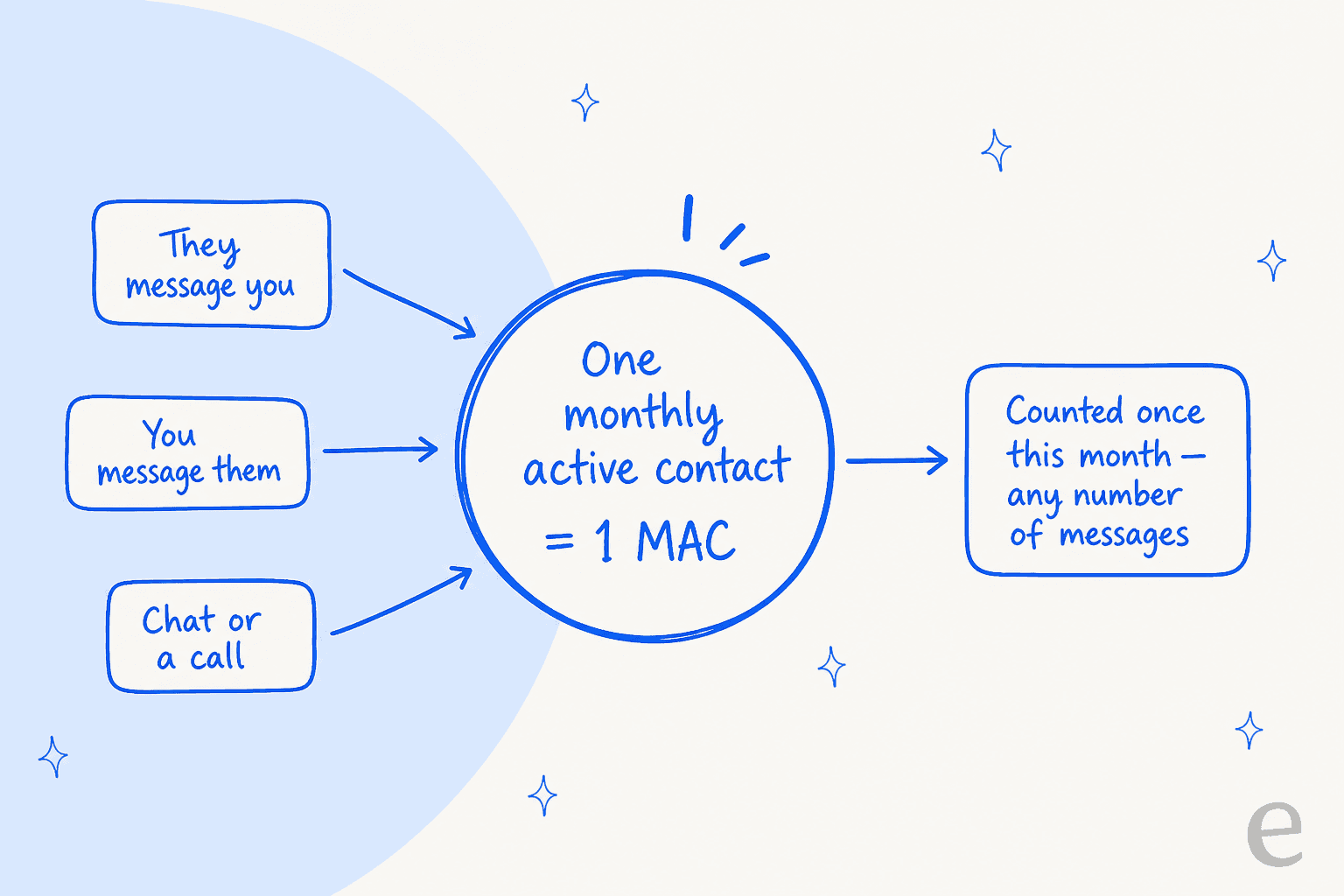
A Monthly Active Contact is any contact you chat or call with during the billing month, whether they message you first or you reach out to them (pricing FAQ). The key nuance that trips people up: each contact counts once, no matter how many messages fly back and forth. A customer who sends you forty WhatsApp messages over a two-week order saga is still one MAC. That's friendly for support-heavy conversations, and it's the opposite of per-message pricing, which punishes exactly the long back-and-forths that good support requires. It's also why the model suits live chat volume, where a single session can run dozens of messages.
Every paid plan "starts at 1,000" MACs, and a slider on the pricing page lets you step up through 2,500, 5,000, 10,000 and beyond. The prices I quote throughout this post are the 1,000-MAC entry prices; move the slider up and the monthly figure climbs with it. That scaling curve is the single biggest budgeting variable, so model your real contact volume before you sign, not the entry tier.
If you want the mechanics of usage-metered AI pricing in general, our guide on cost per resolution walks through why the unit matters more than the rate. It's the same reasoning that separates a rule-based chatbot from an AI agent: what you're billed for shapes how you use the tool.
Respond.io pricing plans
Here's the full plan lineup, priced at 1,000 MACs. The per-month figures are what the page shows with yearly billing; the yearly column is the annual total with the struck-through list total beside it (respond.io/pricing).
| Plan | Per month (billed yearly) | Yearly total | Users included | Extra users | AI Agents | MAC overage |
|---|---|---|---|---|---|---|
| Starter | $79/mo | $948/yr ($1,188 list) | 5 | $12/user/mo | No (AI Assist only) | Not published |
| Growth (Most Popular) | $159/mo | $1,908/yr ($2,388 list) | 10 | $20/user/mo | Yes | $12 per 100 MACs |
| Advanced | $279/mo | $3,348/yr ($4,188 list) | 10 | $24/user/mo | Yes | $15 per 100 MACs |
| Enterprise | Custom | Custom | Unlimited | Included | Yes | Custom |
The plans are a fairly standard good-better-best ladder, but the feature gating is where the real decision lives. Starter is the messaging inbox: team and custom inboxes, the mobile app, basic reports, two-factor authentication, plus the lightweight AI helpers (AI Prompt and AI Assist). Growth is where automation and the real AI turn on: broadcasts, the visual workflow builder, AI Agents, advanced reports, and the Zapier, Make and developer API integrations. If workflow automation is the reason you're buying, this is the floor. Advanced adds the enterprise-adjacent controls: SSO, multiple workspaces, HTTP requests inside workflows, incoming and outgoing webhooks, and phone/email masking. Enterprise unlocks unlimited users and higher API limits.
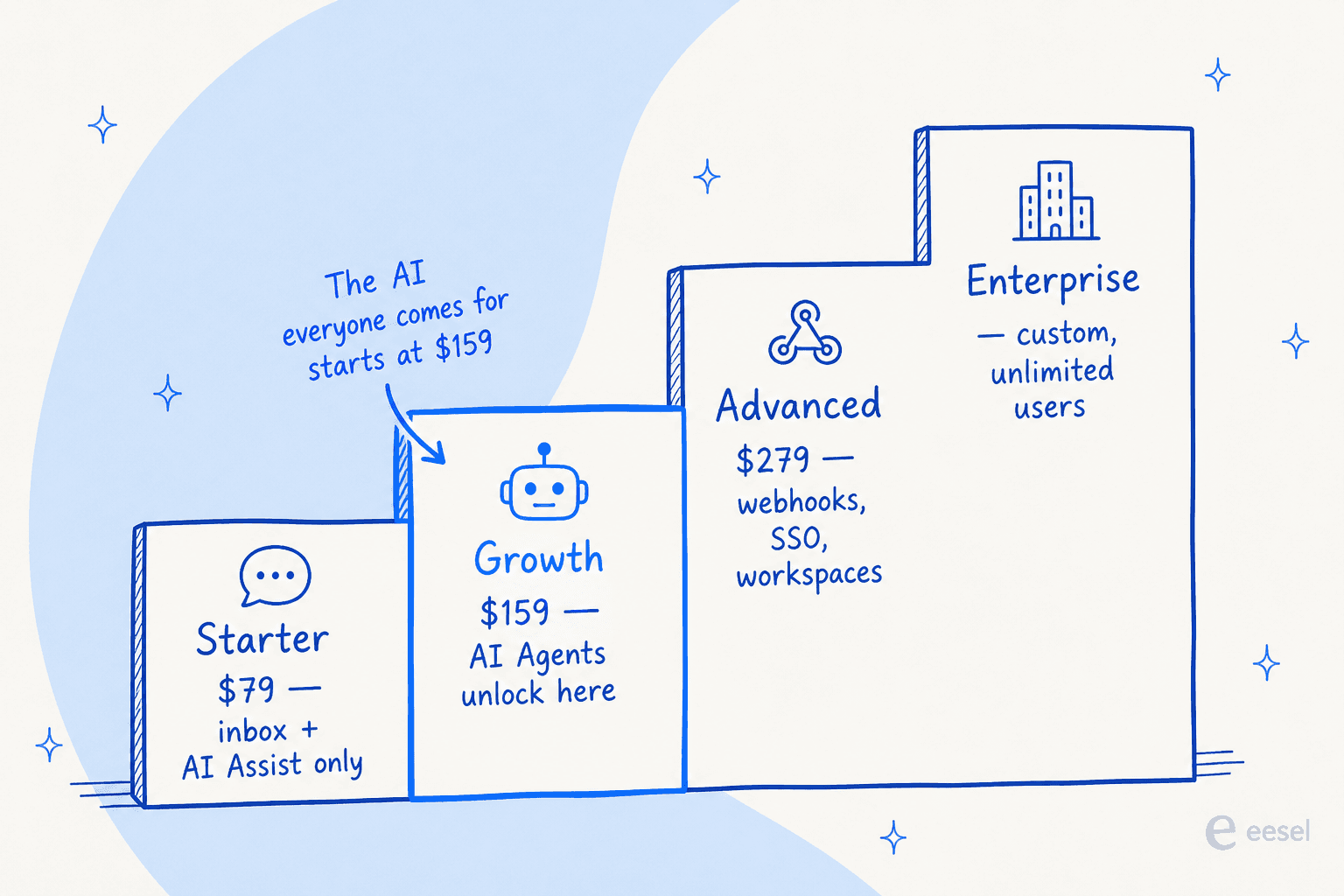
The one gate worth circling: AI Agents require Growth or above. If the reason you're looking at Respond.io is the autonomous agent that qualifies leads and answers customers on its own, the $79 Starter plan won't get you there. Budget for $159/mo as the real floor for anything AI-led.
The costs that aren't in the sticker price
This is the part I'd want a friend to warn me about. The plan price is only the first layer of what lands on your bill.
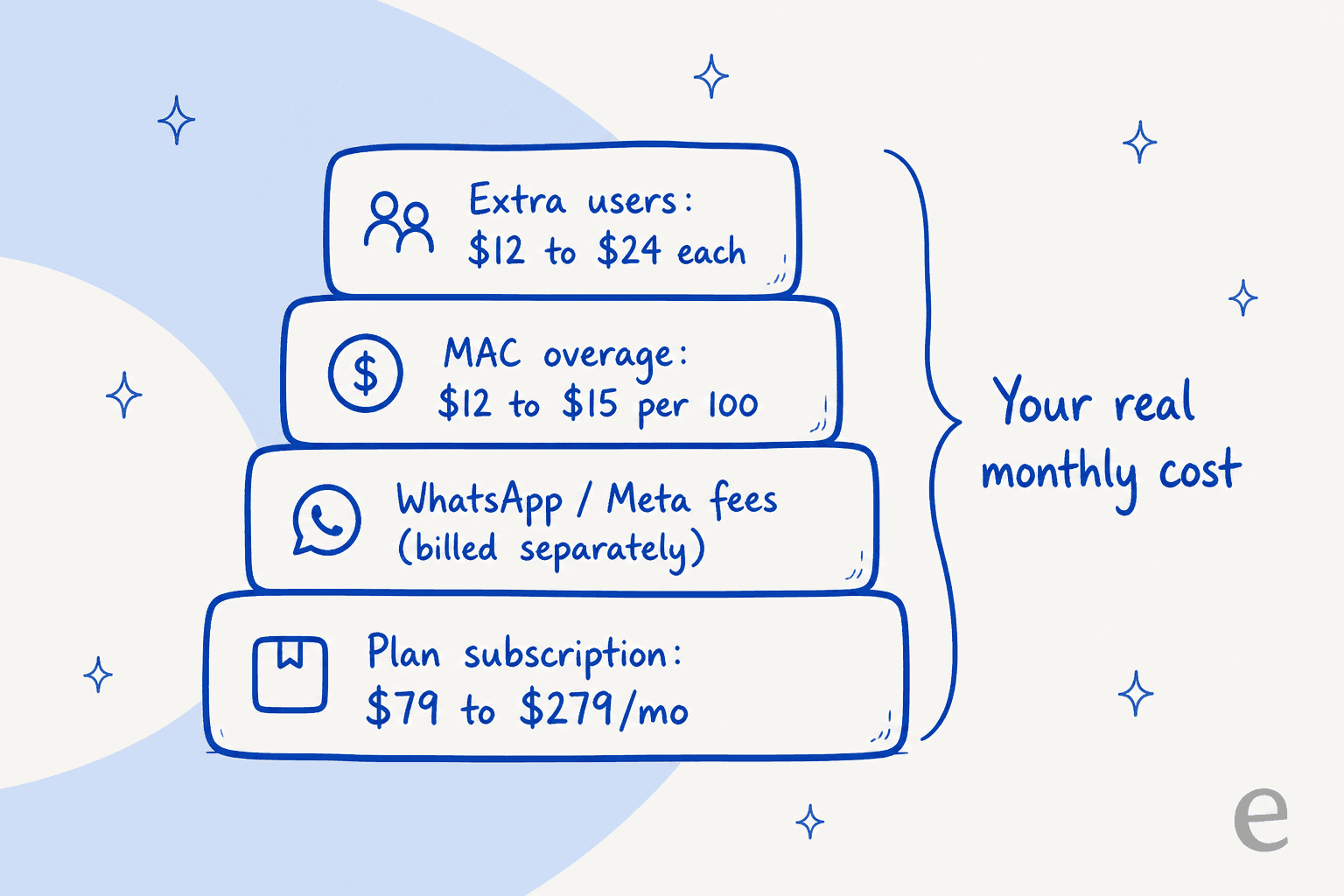
WhatsApp and Meta fees, billed separately. Respond.io is a WhatsApp Business Solution Provider, and messaging charges from Meta are not included in any subscription. To Respond.io's credit, they add no markup: "pay only what Meta charges you" (WhatsApp API page). You top up WhatsApp credit inside the platform. But those rates change by country and conversation category, and Meta has reworked them more than once, so this line is a moving target. Read our rundown of the latest WhatsApp Business API pricing and the Meta policy changes before you assume the subscription is your total spend.
MAC overage. Go past your plan's contact limit and operations keep running, but you're billed on-demand in blocks of 100 MACs: $12 per 100 on Growth, $15 per 100 on Advanced, charged at the end of the cycle (pricing FAQ). It's designed for seasonal spikes rather than steady growth, and it's fair as spike-handling goes. The thing to watch is a business that's permanently over its tier and paying overage every month, which is almost always more expensive than moving up the MAC slider.
Extra users. Seats above your plan's included count are $12 to $24 per user per month depending on tier. Not huge, but it adds up for larger teams and it's easy to forget when you're staring at the base price.
AI credit overage. Each plan carries an AI credit allowance (5,000 on Starter, from 10,000 on Growth, from 20,000 on Advanced, from 40,000 on Enterprise) that grows with your MAC tier. Past it, usage keeps running at $15 per 1,000 extra credits, with a hard cap at 200% of your allowance (pricing FAQ).
Onboarding add-on. The guided 28-day Onboarding Program (run by Respond.io's onboarding specialists) is a separate paid add-on, aimed at B2C companies driving inbound revenue over WhatsApp, and subject to availability (pricing FAQ).
This stacking is the crux of the seasonal-spike problem I see constantly. When one team I worked with modelled a Black Friday scenario, their steady ~1,000-contact month ballooned four-fold, and on any usage-metered model the bill balloons with it while a flat rate stays put. Respond.io's overage is reasonable, but you should run your own peak month, not your average, through the numbers.
A worked example: what a real team pays
Sticker prices are abstract, so let me make it concrete. Say you're on Growth ($159/mo billed yearly) with 1,000 included MACs and 10 included users. A busy month pushes you to 1,600 active contacts and you've added two extra agents. That's $159 base, plus 600 MACs of overage at $12/100 ($72), plus two users at $20 ($40), for $271 that month before a cent of WhatsApp spend. The plan looked like $159; the platform bill was $271, and Meta's messaging fees are still on top.
Plug your own numbers in below. This estimates the Respond.io platform cost (subscription, MAC overage, and extra seats). It deliberately excludes WhatsApp and Meta messaging fees, because those are variable and set by Meta, not Respond.io.
The lesson isn't that Respond.io is expensive, it's that the number you should compare against other tools is the modelled total, not the plan card. This is the same trap I flagged in our breakdown of agent versus human cost: the unit and the extras decide the bill, not the advertised rate.
AI Agents: what you're paying for on Growth and up
The reason most teams look at Respond.io in 2026 is the AI, so it's worth being precise about what the Growth-and-up AI Agents actually do.
Respond.io positions its AI Agents for revenue-critical conversations in mid-market B2C. They qualify leads, recommend products, book appointments, update the CRM, route chats and escalate to a human, across WhatsApp, TikTok, Instagram, Facebook and voice. If you're specifically after a WhatsApp chatbot, this is the piece that does the answering. A live counter on the page claims over 2.2 million conversations handled by AI Agents. Under the hood the notable pieces are:
- Multimodal input. The agent reads text, images, PDFs and voice notes, so a customer can send a photo of a product or a screenshot of an error and the agent works from it.
- Guardrails and human takeover. You define what the agent is allowed to say, do and access; low-confidence or sensitive conversations escalate to a person.
- Approved knowledge sources. Answers pull only from knowledge you've approved, and stay current without retraining, similar to how RAG grounds an AI agent in your own content.
- Voice. AI Agents can handle WhatsApp and VoIP calls in 30-plus languages, with call recording, summary and transcript as higher-tier AI features.
Crucially for pricing: AI usage is included at no extra per-message cost on the self-service Growth, Advanced and Enterprise plans, within a published AI credit allowance and "a fair use policy with generous limits that 99% of users will never reach" (pricing FAQ). That's a buyer-friendly stance compared with per-resolution AI pricing, and it's part of the broader benefits of conversational AI when the vendor doesn't meter every reply, though a very high-automation shop should check its credit allowance against the $15 per 1,000 credits overage. If you're comparing this against per-outcome models, our guide to Zendesk's pay-per-resolution AI pricing and the Gorgias AI agent pricing breakdown are useful reference points.
What users say about Respond.io
Respond.io reviews are strong. It holds 4.8 out of 5 on G2 across roughly 530 verified reviews, with ease of use scored at 9.3 and quality of support at 9.2 (G2). The recurring praise is exactly what you'd hope for in an omnichannel inbox: one place for every channel.
"respond.io makes it so much easier to keep track of all our messages in one place. Before, it was hard managing chats from different platforms, but now..."

The team consolidation theme shows up on Reddit too, where practitioners weighing WhatsApp Business API providers point to it for shared-inbox reliability:
"respond.io makes it easy for the whole team to work from one account without missing messages. Everyone can see all chats, assign conversations..."

On the critical side, reviewers note the platform can feel slow at times and lacks options to edit or delete messages (G2 pros and cons). Neither is a dealbreaker, but they're worth knowing before you commit a whole team to it.
Is Respond.io pricing worth it?
Here's my honest read. Respond.io is well-priced for what it is: a serious, high-uptime WhatsApp-first messaging platform for mid-market B2C teams running revenue-critical chats at volume. The per-contact model is fair, the no-markup WhatsApp stance is refreshing, and bundling an AI credit allowance into the subscription instead of charging per resolution is the buyer-friendly choice. If that's your use case, it's a strong pick and the reviews back it up.
The caveats are the ones this whole post has been building to: your real bill is the plan plus WhatsApp fees plus overage plus seats, the AI you likely want starts at $159, and the MAC slider is the number that actually determines your cost at scale. Model your peak month, not your average, and treat the plan card as a starting point.
There's also a category question worth asking before you buy. Respond.io is messaging infrastructure with AI layered on. If your actual goal is resolving support conversations inside a helpdesk you already run, rather than owning the WhatsApp inbox itself, you may be buying more platform than you need. That's where a different shape of tool fits better.
Try eesel for AI-led support
If the job you're hiring for is "answer and resolve support conversations," not "run my WhatsApp sales inbox," eesel is built for exactly that. It's an AI support teammate that plugs into the helpdesk you already use, Zendesk, Freshdesk, Gorgias, Help Scout and more, learns from your past tickets and knowledge base, and starts drafting or auto-resolving tickets. It's one of the more capable options when you're comparing the best AI agent for customer service. There's also a standalone chat widget you can drop onto any site with one script tag, no helpdesk required.

The pricing contrast is the whole pitch: eesel runs on fixed monthly plans from $299 for 500 credits, where 1 credit is one ticket or chat however many replies it takes. There's no per-seat fee, no per-contact meter, and no separate messaging bill to reconcile (eesel pricing), and you can turn on optional overage with a monthly cap you set so a traffic spike never surprises you. You can try it free with 100 credits and no credit card, and simulate the AI against your own historical tickets before it ever answers a live customer. For teams whose real question is "can AI handle my support queue predictably," that's a cleaner match than a per-contact messaging platform.