What Capacity charges you for, in three parts
Capacity is not a small tool. It was founded in 2017 by David Karandish and Chris Sims, rebranded from Jane.ai after a Series B, and by its own August 2025 announcement it had raised $155M+ across equity and debt, reached $60M ARR, turned profitable, and closed its 10th and 11th acquisitions in the same breath. Unified CX Automation Platform is what it calls itself now. The pitch on its G2 profile is that it replaces four or five disconnected AI point solutions with one.
The consolidation story is real, and it explains the shape of the bill. One vendor owns the knowledge base and the helpdesk, plus the IVR and the agent-assist layer, and what you get for that is a single invoice with several unrelated meters feeding it.
On its pricing page Capacity states the model as three components. A platform fee, described as an "Annual subscription for core platform access and features." Usage, described as "Volume-based pricing for chat, voice, email and SMS agents." And then add-ons, for "Integrations and add-ons." What the summary leaves out is Agent Assist, which is metered on a fourth basis entirely.
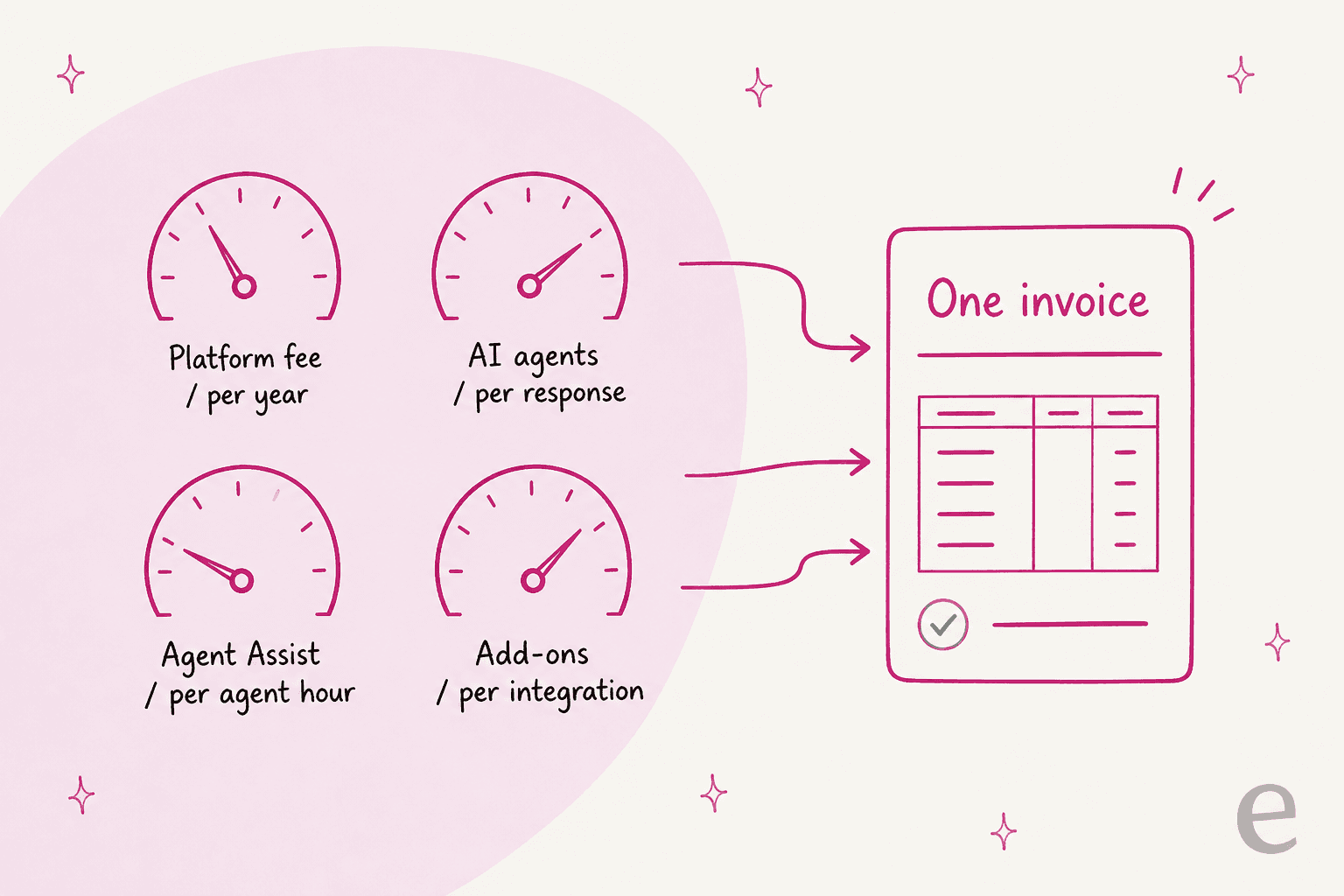
Four meters is not automatically bad. It is how most enterprise contact centre software gets sold, and it is the fair way to charge when a platform really does span voice and chat and workforce tooling. What it does mean is that you cannot sanity-check a Capacity quote the way you check a Zendesk pricing or Freshdesk pricing page, where the per-seat number is right there on the screen.
The three platform tiers, and what each one gates
Here is the page itself, scrolled through. Worth seeing how much detail sits next to how few numbers.
The tiers, reproduced from Capacity's own feature bullets:
| Tier | Published price | Storage | What it adds |
|---|---|---|---|
| Core | Not published | Up to 100GB | Knowledge base, helpdesk and automations, AI Agent Builder, data indexing, out-of-the-box integrations, analytics |
| Pro (marked "Most Popular") | Not published | Up to 1TB | Everything in Core, plus live chat and inbox, real-time Agent Assist, conversation intelligence and AQA, developer platform |
| Enterprise | Not published | Up to 2TB | Everything in Pro, plus campaigns and CRM, advanced workflows, HIPAA package available |
For a support buyer, two of those gates matter more than the rest.
Live chat and the shared inbox are Pro, not Core. So the entry tier hands you a helpdesk and a bot, with no human live-chat surface attached, which is an unusual line to draw when live chat software is table stakes in most stacks. Then HIPAA is Enterprise-only, listed as a "HIPAA package available" bullet. At the company level Capacity does hold SOC 2 Type II, HIPAA, GDPR and CCPA, per the pricing page footer. The packaged version you actually contract for still sits at the top tier though. Healthcare teams should read that as a floor.
Core is built around the knowledge base, and what that means in practice is worth a look. Capacity organises knowledge as "exchanges." Each one has inquiry variants on one side and the response on the other.
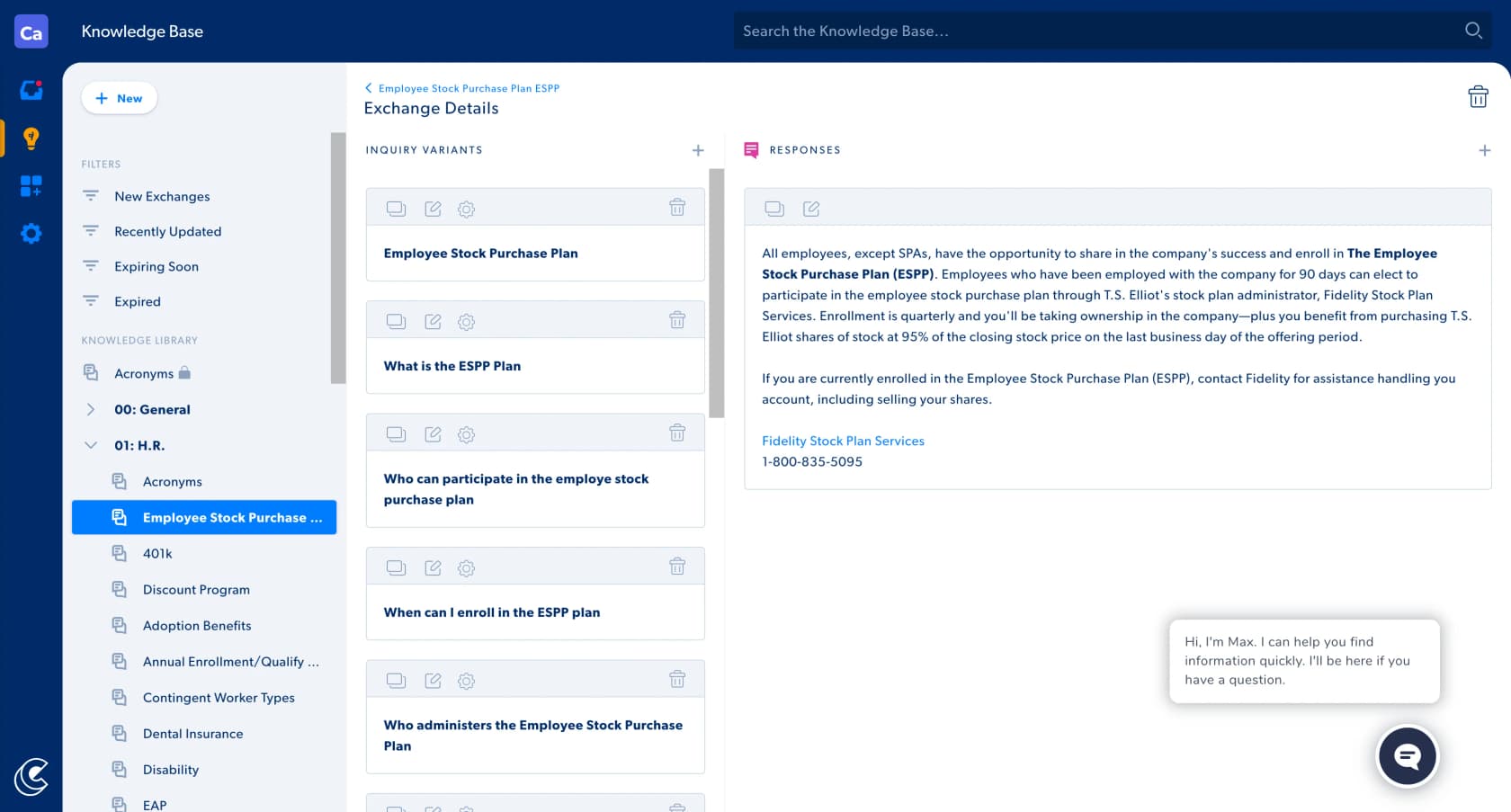
The structure is precise. It is also the reason implementation takes as long as it does, because someone has to sit down and write those variants. Closer to an authored AI knowledge base, in other words, than to a system that reads your existing tickets and infers what good looks like. The review corpus reflects that, and we will get to it.
The AI agent meters: per response is not per resolution
This is the section that should decide the deal.
Capacity's pricing page publishes a clean table of billing units. It is the most useful thing there:
| Agent | Billing unit | Published rate |
|---|---|---|
| Chat | Per response | Not published |
| Voice | Per minute | Not published |
| Per response | Not published | |
| SMS | Per message | Not published |
Underneath, Capacity adds: "Volume discounts available. The more you use, the less you pay per interaction."
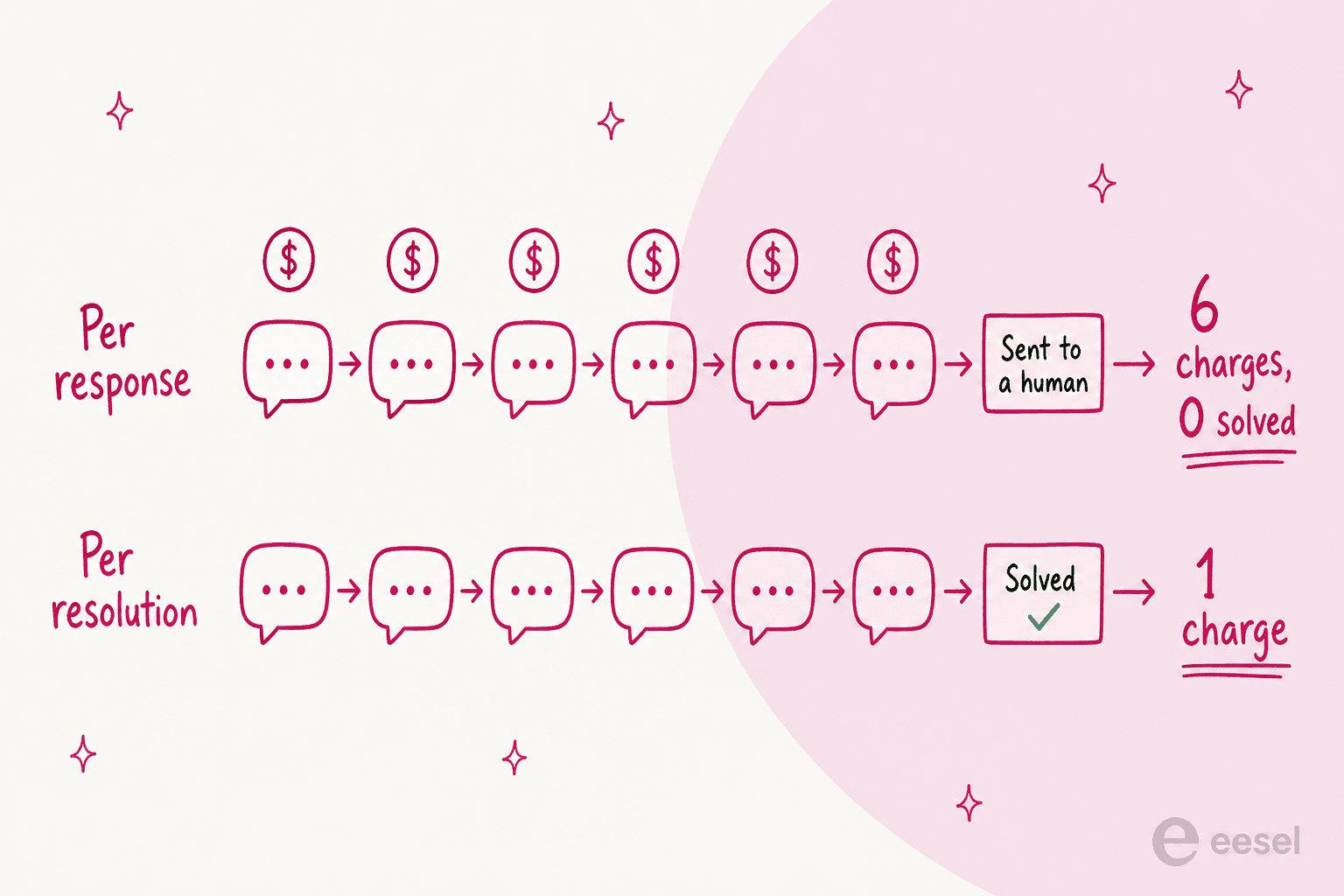
Per response means the meter counts what the agent says, not whether the customer's problem got solved. A customer asks a shipping question, the bot clarifies, the customer rephrases, the bot asks for an order number, the customer gives it, the bot cannot find it and escalates. A handful of billable responses, and a ticket that still lands in your queue anyway.
Three years now I have spent watching teams run AI on live support queues, and this specific unit is the one that surprises buyers most reliably. One buyer I worked with was an email-security company on Freshdesk, scaling toward 20,000 tickets a year, and they burned through 200 interactions in a single day of testing. Then started worrying, immediately, about what that shape of meter would cost at volume. Nothing had gone wrong. The agent was working fine. The counter was just running faster than the mental model.
To be fair to Capacity, a per-response meter is not a trick. When the vendor cannot control how chatty a conversation gets, it is the honest way to bill, and volume discounts do soften it. It also sidesteps the argument every outcome-priced vendor eventually has with a customer over what counts as a resolution. The tradeoff is just that the risk of a long, unproductive conversation sits with you. Compare the outcome-based rates in Zendesk AI pricing or Decagon's pricing, where the vendor eats an unsuccessful conversation. Or eesel's model, where one conversation is one credit regardless of how many replies it takes.
Since Capacity has not published a rate, the dollar figure is not the useful thing to model. The multiplier is: how many billable events your conversation volume turns into. Plug your own numbers in.
At four AI replies per chat, a 2,000-conversation month comes out at 9,600 billable events. A Capacity quote gets built on that number, so it is the one worth walking into the call already holding.
Agent Assist is a third meter, billed per agent hour
One unit covers three products here. Real-time Agent Assist ("Live guidance and suggestions during customer interactions"), agent guidance ("Customized workflows and step-by-step coaching for your team"), and conversation intelligence with automated QA ("Post-interaction analytics, automated QA and CSAT insights").
Capacity's stated unit, verbatim: "Priced per hour of agent time. Bundle real-time assist and conversation intelligence for best value."
In the Console, Capacity's own inbox, the layer looks like this.
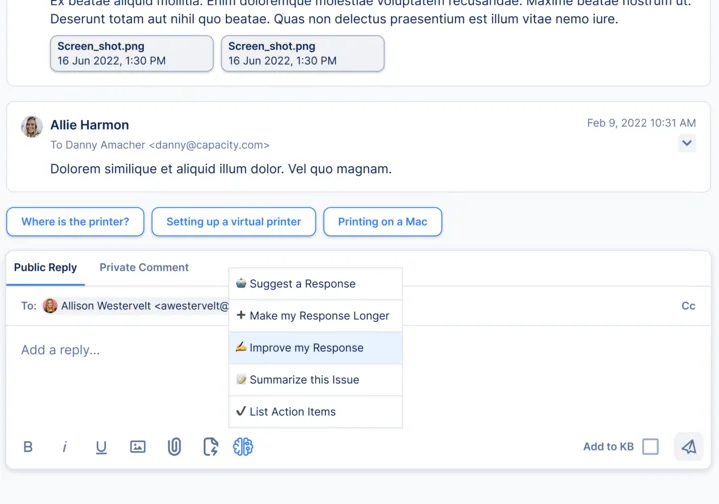
Per-hour-of-agent-time is an unusual unit, and there is a real consequence to it: this meter runs on headcount and shift length, not on how much AI you use. An agent who never once clicks "Suggest a Response" still contributes hours. Predictable, which is a real upside. It also means the layer that is supposed to make agents more efficient gets more expensive as you add agents. Automated QA "scores 100% of interactions" per Capacity's G2 description, and that scale is exactly why the meter is priced on time rather than volume.
Where this sits in the tiers is worth flagging. Real-time Agent Assist and conversation intelligence are both Pro features. On Core you are paying for a bot and a knowledge base, so the AI agent assist tools layer becomes a separate upgrade, and a separate meter with it.
So what does Capacity actually cost?
Capacity is quote-only in practice. So here is everything I could find with a number attached to a unit.
| Source | Figure | What it means |
|---|---|---|
| Capterra | $25,000 / year, plan named "Basic" | Capterra's starting-price field, so this is the entry point, not an enterprise deal |
| Capterra | Free trial: not available. Free version: not available | No self-serve path listed |
| G2 | Single edition, "Capacity Unified CX Automation", listed as 10 User Per Year | Price shown as Contact Us. Pricing info last updated January 23, 2026 |
| G2 | 12% average discount off list | Buyer-reported across 106 reviews |
| G2 | Perceived cost $$$$$ (5 of 5) | Capacity's own buyers put it in the most expensive band |
| G2 | 3 months to implement, 14 months to ROI | Buyer-reported averages |
The $25,000 figure is the one to lead with, and it repays reading carefully. It is Capterra's starting price, on the plan Capterra calls Basic, which maps onto Core in Capacity's own tier names. So $25,000 a year is the floor before you add a single AI response, and before live chat, Agent Assist or automated QA. All three of those sit in Pro.
One contradiction to flag here. G2 and Capterra disagree on the free trial: G2's pricing tab says one is available, Capterra says it is not. Implementation is partner-led per Capacity's own AI Agents FAQ, so I would assume any trial is a scoped pilot with a partner attached, and not a credit card and a signup form.
If the volume side is what you are trying to forecast, Capacity's own analytics at least give you the shape of it. Below is the Chat Usage dashboard. Notice that it counts inquiries and sessions as two different things.
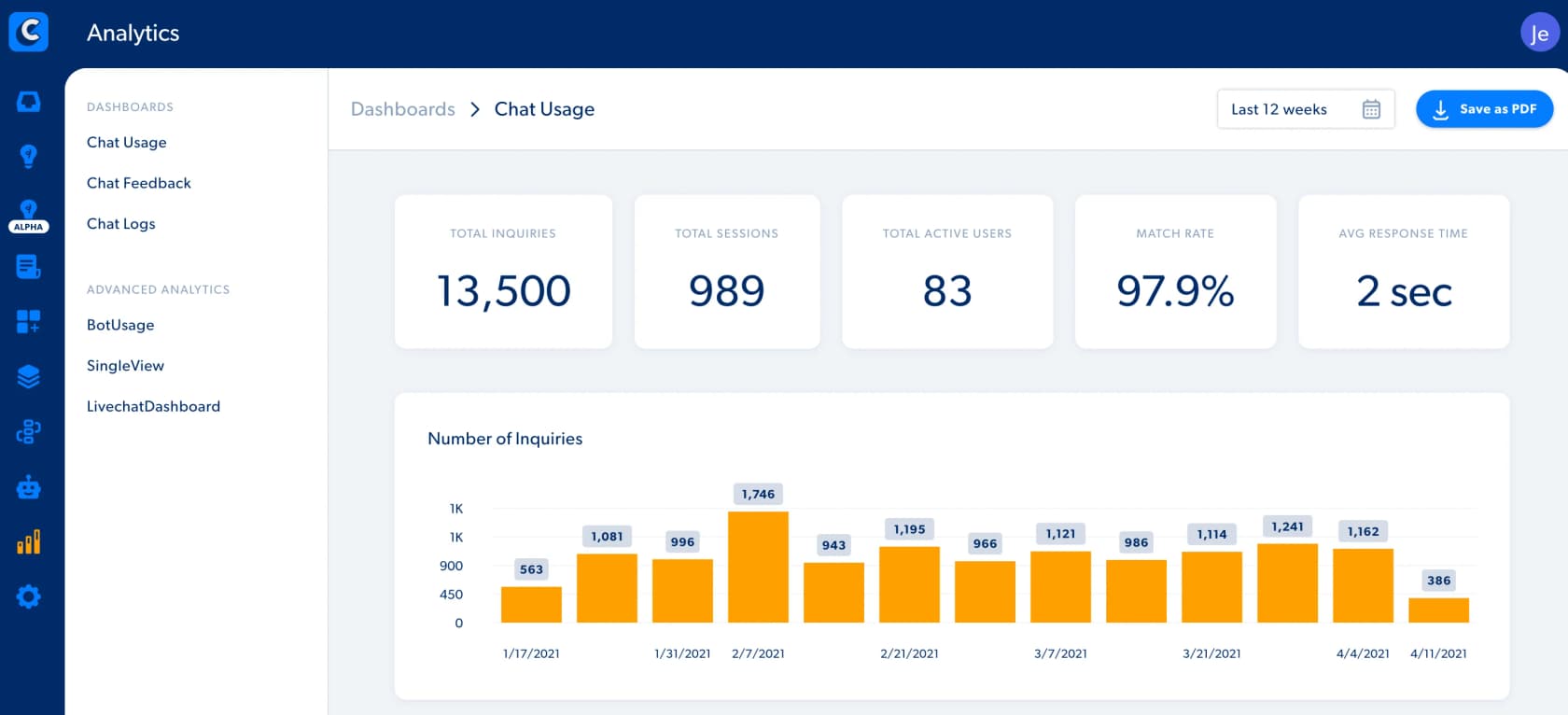
The gap between those two counters is the gap between what you think you bought and what the meter reads.
The costs that are not on the rate card
Three things add real money to a Capacity deployment. None of them shows up as a line item.
Implementation is partner-led. Capacity's AI Agents FAQ says digital channels like chat and SMS "typically go live in a matter of weeks when standard connectors are in place," while "voice deployments are typically production-ready in 6 to 8 weeks," and "all deployments are supported by a partner-led implementation team with hypercare after launch." That is a services line. Services lines get negotiated separately, and priced separately.
Knowledge base authoring is labour. Those inquiry variants do not write themselves. G2's own auto-generated cons list puts Complex Setup and Difficult Setup at the top of the pile, even while Easy Setup sits at number two on the pros list, which reads like a contradiction and is not one. The tool is pleasant to use once configured. Configuring it takes a quarter.
The payback lands after the renewal. If I were putting one slide in front of a CFO, this is the one.
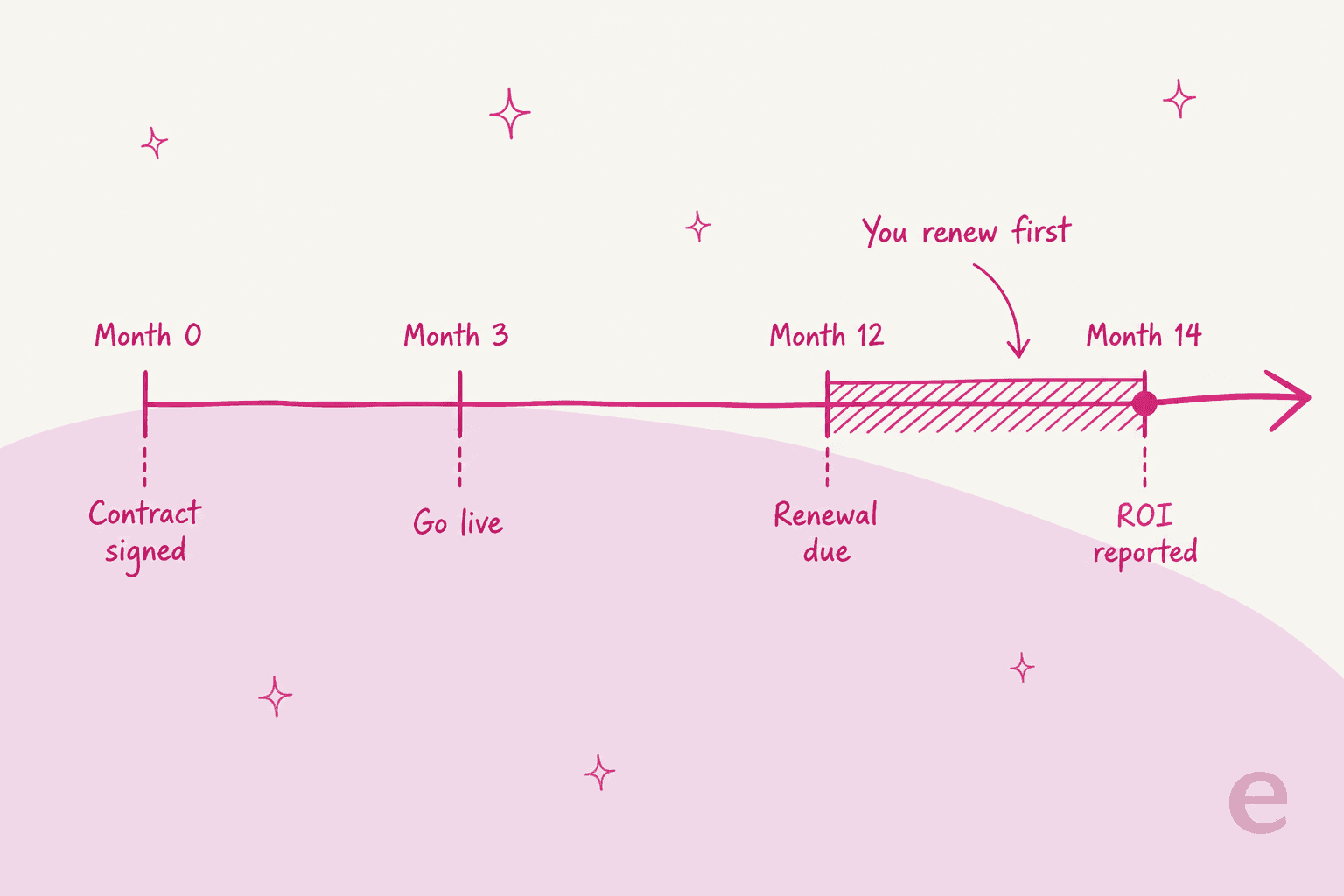
Against an annual subscription, Capacity's own G2 buyers report 3 months to implement and 14 months to return. Do the arithmetic: the renewal decision arrives two months before the evidence does. Common enough across enterprise conversational AI platforms, and not unique to Capacity at all. It is still the reason I push teams to get something answering real tickets in the first month rather than the first quarter.
One more cost, easy to miss: which helpdesk you already run changes what you get. Capacity's integrations directory lists 273 apps, and it tags each one with capability flags. Read the tags instead of the logo wall and the picture changes.
Salesforce and Slack carry API, Indexed and Interface tags, which is the full experience. Zendesk and Freshdesk get tagged API only. No indexed knowledge, no embedded UI.
Three helpdesks are missing from the directory altogether. Run Zoho Desk and the story just ends there.
Same for Help Scout and Kustomer. And if you are a Zendesk shop, what you are buying is a platform whose deepest integrations point somewhere else.
What buyers say about the price
The review footprint is small. Sentiment inside it is clear and pretty consistent though. G2 gives Capacity 4.7 out of 5 across 106 reviews, with 82% five-star. Capterra gives it 4.5 across 14 reviews, though the newest of those dates to April 2023, so treat that listing as historical.
Two integrity notes, both taken from G2's own labels. The recent August 2026 review wave is marked Incentivized · Source: G2 invite. Several of those reviews also carry a note that guest or non-business users are not included in G2 scores. Which means the visible recent reviews and the headline 4.7 are not quite the same population.
The most useful critical review is this one, because it names an actual effort cost:
"I find the initial setup and customization time-consuming if there's a large knowledge base or complex workflows. While the AI is generally accurate, I sometimes need to train it for company-specific terminology, and some advanced configuration options have a learning curve."

Her upside is worth quoting too, since it is the strongest thing about the product: she liked "how well Capacity combines an AI-powered knowledge base with chat automation in a single platform."
Coming from a five-star reviewer, the implementation warning lands harder:
"Don't underestimate the amount of time it will take to get Capacity set up. Be sure that you have a well-rounded implementation team with stakeholder..."
Then from Capterra, a much older and harsher one. I am keeping the date on it, because it shows what a bad Capacity relationship looked like, and because the specific gap has since been closed:
"We asked for a live chat feature for a year before it was offered. Our previous rep with the company was poor at communicating."

Live chat ships in the Pro tier now, so that particular complaint is settled. The pattern underneath it is the thing to probe in references: long waits on roadmap items, and account management that varies by rep.
Who Capacity fits, and who should keep looking
Capacity is a strong fit if you are replacing several tools at once and running voice as a real channel, you live on Salesforce or heavily in Slack, and you have the appetite for a quarter of implementation with a partner alongside you. The consolidation argument is honest. The product is well-liked by the people who finished setting it up. And 100% automated QA coverage is a serious capability that most call center automation tools charge separately for.
Capacity is a harder sell if any one of these is true. Your finance team needs a modelled cost before the sales call, and a per-response meter with an unpublished rate cannot hand them one. You are on Zendesk or Freshdesk, or a helpdesk outside the directory entirely, which leaves you with an API connection instead of the indexed, embedded experience. You need HIPAA and are not budgeting for Enterprise. Or you need something answering tickets this month, and three months of setup plus fourteen months to payback is not a timeline your team can hold.
If you are shopping the category there are plenty of comparison points.
Same enterprise, quote-first bracket: Aisera pricing. And Moveworks pricing for the employee-support angle.
For a vendor that publishes more of the unit story, look at Ada CX pricing and Sierra's pricing.
Salesforce depth is what draws most people to Capacity in the first place, which makes Agentforce pricing the natural alternate to price alongside it.
For the broader shape of what the category costs, start with the AI customer service cost breakdown, then the human agent cost comparison.
Try eesel if you want the bill on screen before you sign
I built eesel partly because of conversations exactly like the one this post describes. A support lead who likes a product, cannot model what it will cost, and has to take a quarter of implementation on faith.
eesel goes the other way on all three. One ticket or chat session is one credit, however many replies it takes, which means a chatty conversation and a one-shot answer cost you the same. Plans start at $299/month for 500 credits. No platform fee. No per-seat charge, and you can turn on overage with a cap you set so that a traffic spike cannot surprise you. The pricing page carries the actual numbers, including two months free when you pay a year upfront, and add-ons such as SSO and MFA from $199/month.

On timeline: eesel connects to the helpdesk you already run instead of replacing it, so the first agent is usually live within 30 minutes. Not a quarter.
That includes the two helpdesks Capacity treats as API-only endpoints. eesel plugs into Zendesk as a first-class integration, reading past tickets and writing replies straight back into the ticket.
Freshdesk works the same way, and so do Gorgias and Salesforce.
Before you turn anything on, you can ask it to run a simulation over your own past tickets, scoring its answers against what your team actually sent. As a way of finding out whether it works, that beats a fourteen-month payback window.
The free plan is 100 credits, no card. That is 100 conversations, which is enough to see the meter move and decide for yourself.
Frequently Asked Questions
How much does Capacity cost?
What is Capacity's pricing model?
Does Capacity bill per resolution or per response?
Is there a free trial or a free plan for Capacity?
What is included in each Capacity plan?
Is Capacity HIPAA compliant?
How long does Capacity take to pay back?


Article by
Kurnia Kharisma
Kurnia is a software engineer and writer at eesel AI with two years of SEO experience, writing about AI tools, helpdesk software, and customer support. He pairs a developer's understanding of how these products are built with search-driven research into what actually ranks and resonates with the people searching for them.