


Why "how much does an AI employee cost" has no clean answer
I work eesel's support queue, and the most common way I watch one of these deals fall apart has nothing to do with whether the AI is any good. It is the pricing page. I once had a cosmetics brand on our old $799 a month flat plan tell me straight out that the number did not make sense for them and that they would build their own if we could not do something. We moved them to a price sized to their actual ticket volume, a number that fit the same work, and they stayed. Same product, same tickets. The only thing that changed was the meter.
That is the real story of AI employee pricing in 2026. The tools are converging on what they can do. What they have not converged on is how they charge for it, and the gap between two vendors' sticker prices tells you almost nothing until you know what each one is actually counting. A per-seat license, a bundle of credits, and a pay-per-resolution rate can describe the exact same month of work at three totals that are not even close.
So this post does the boring, useful thing. It sorts every serious "AI employee", "AI teammate" and "AI agent" product by its billing meter, shows the real entry price behind each one, flags where the sticker hides a floor, and ends with a worked example so you can see the totals side by side. If you want the capability-first version of this comparison instead, our roundup of the best AI employees ranks them by where the work actually stops.
The six meters, and what each one really counts
Almost every AI employee tool bills on one (or a blend) of six units. Knowing which one you are looking at is the whole skill.
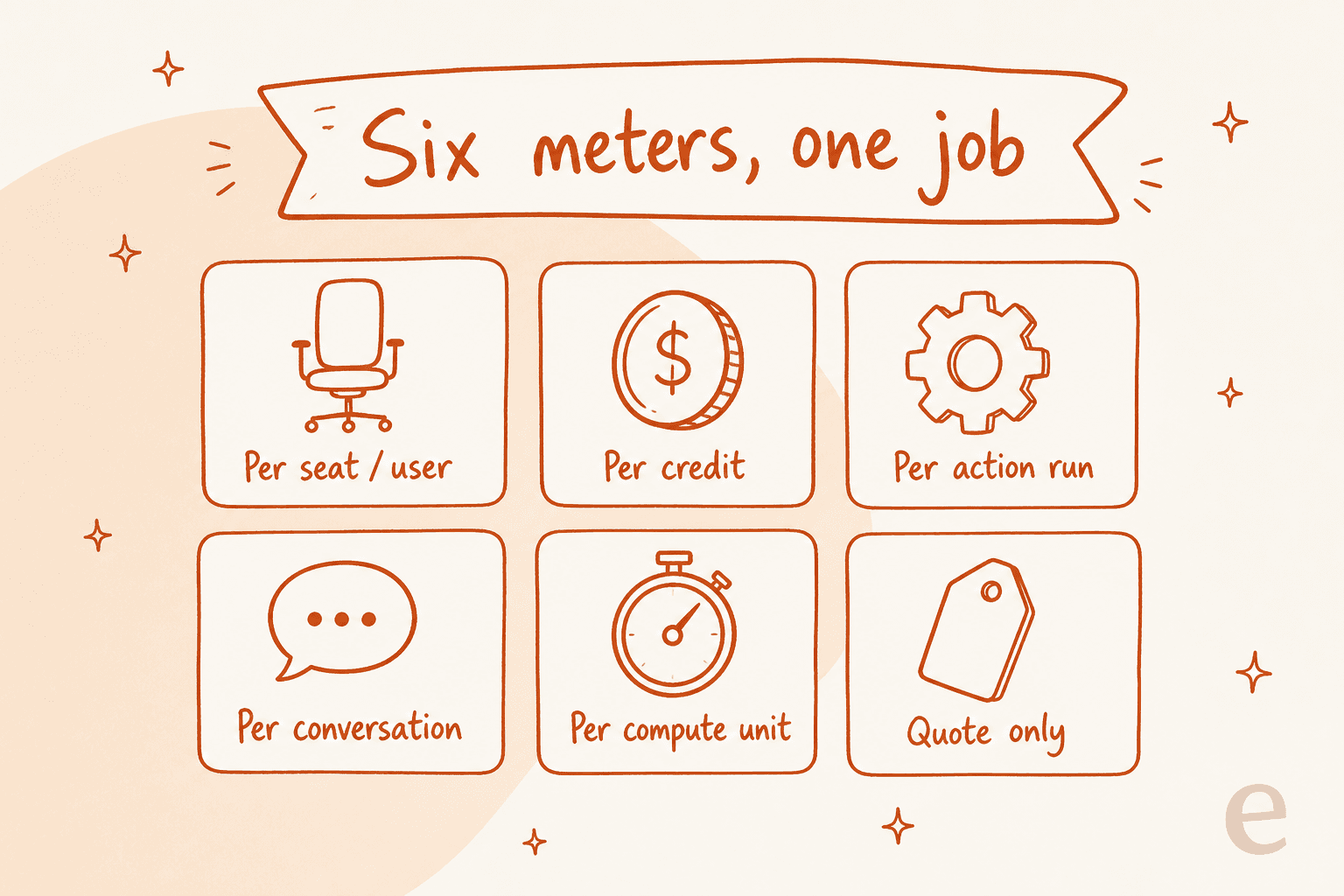
- Per seat / user. The classic SaaS meter. You pay a monthly license per human who uses it. Simple to forecast, but you pay for the license whether the agent does one task or a thousand.
- Per credit. You buy a pool of credits and each action spends some. The catch is that "a credit" is defined by the vendor and often varies by model, so the same task can cost different amounts.
- Per action (a tool run). One credit per step the agent executes, and on some tools a failed run still bills.
- Per conversation / resolution. You pay per customer interaction or per resolved case. This is the meter that maps most cleanly onto support work, and it splits into "per conversation" (billed whether or not it worked) and "per resolution" (billed on outcome). It is the natural fit for an AI ticketing system where the ticket is the obvious unit.
- Per compute unit. An abstract unit of machine work, most common in autonomous AI agents that write code. Hard to forecast because you cannot see it until the work runs. It sits a step beyond an AI copilot or AI assistant, which suggest rather than act.
- Quote only. No published number. You get a "book a demo" form and an outcome-based pitch with no unit, rate or floor attached.
Here is the whole field on one table, sorted by meter, with the cheapest real entry point and whether the price is actually published.
| Tool | What you're billed for | Cheapest real entry | Price public? |
|---|---|---|---|
| Lindy | Per seat + credits | $29.99/user/mo | Yes |
| Devin | Per seat + compute units | $20/mo (Pro) | Partial (ACUs hidden) |
| Relevance AI | Per action + vendor credits | $0 free, $29/mo Pro | Yes (in docs) |
| Cassidy AI | Per credit (token-metered) | Free Starter; paid is quote-only | Partial |
| Sintra AI | Flat plan + per credit | $48.50/mo (sale list) | Yes |
| Artisan | Per credit | $250/mo (hidden Startups tab) | Yes, if you find it |
| Salesforce Agentforce | Per credit / per resolution + edition floor | ~$325/user/mo realistic | Rates yes, floor buried |
| eesel AI | Per credit (1 per ticket or chat) | From $299/mo for 500 credits, no seat | Yes |
| 11x | Per lead, annual only | $3,750/mo (billed annually) | Partial (per-product pages) |
| Ema | Outcome-based, no unit | Quote only | No |
Two patterns jump out. First, the tools built for customer support automation trend toward per-conversation or per-ticket meters, which is the unit support managers actually think in, and the ones aimed at tier-1 support deflection lean hardest into it. Second, the more a tool leans on the phrase "AI employee" in its marketing, the more likely its price is a quote-only form. Ema personifies its product as "she" and puts "Hire Ema" on every button; it publishes no price at all.
Why the sticker price is never the bill
The number on the pricing page is the start of the conversation, not the end of it. Three things reliably turn a small sticker into a large invoice, and all three are checkable before you buy.
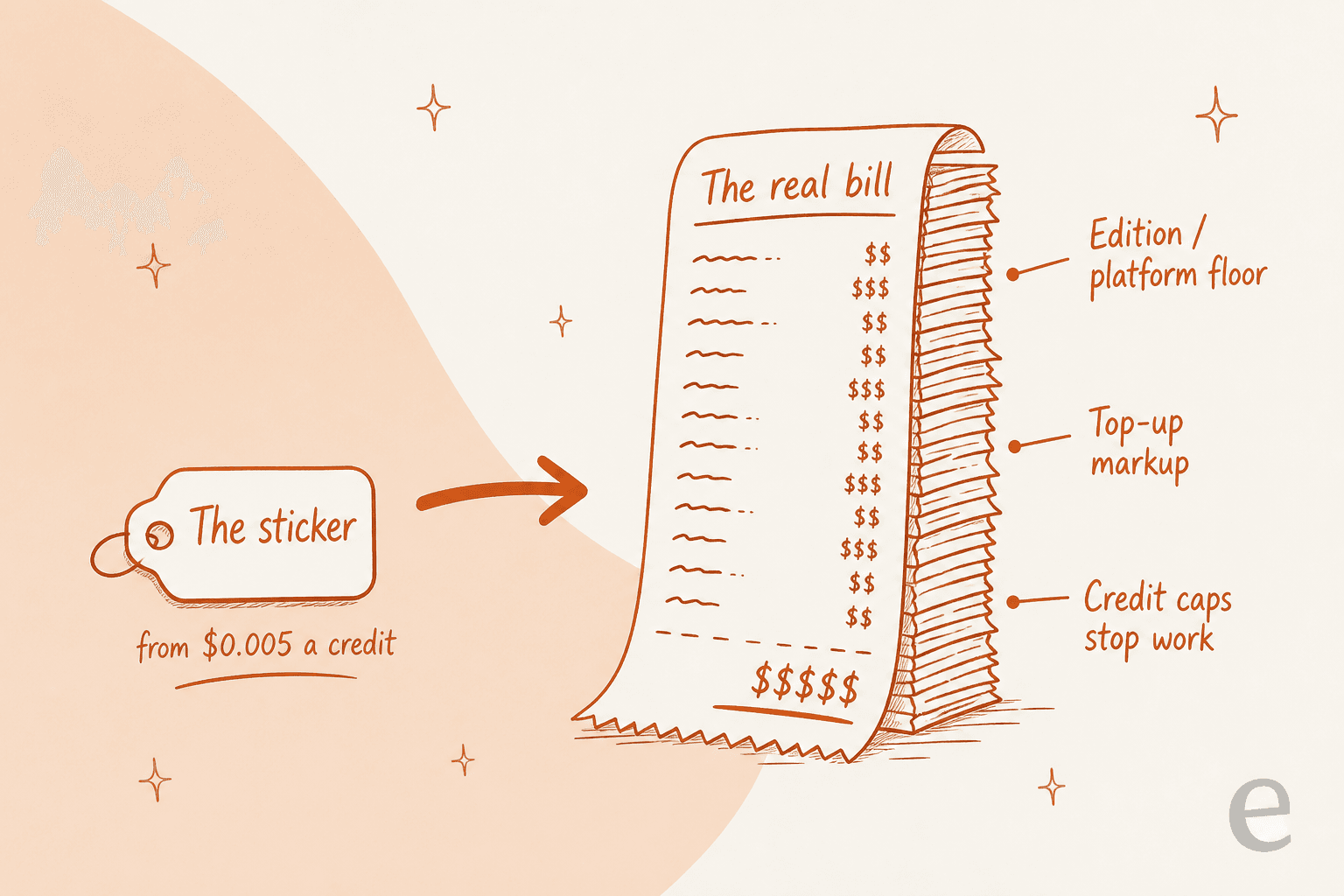
The edition floor. Some agents cannot run until you have bought a platform underneath them. Agentforce is the clearest case: its Flex Credits look cheap at $0.005 each, but they require Salesforce Foundations, which requires Service Cloud Enterprise at $175 per user per month. Add Knowledge Read-Write and Enhanced Messaging and a realistic support seat lands near $325 per user per month before one credit is spent. The credit price was never the cost.
The top-up markup. In-plan credits look reasonable; the ones you buy when you run out often do not. Relevance AI's action top-ups cost $80 per 1,000, which is about 7x the roughly $0.0116 in-plan rate on its Pro tier, with an $80 minimum purchase. Sintra sells top-ups at a flat $0.25 per credit with no volume discount at all. The base plan sets your expectations; the top-up sets your actual per-unit cost once real usage kicks in.
The credit cap that stops work. A few tools simply stop when the meter hits zero. Sintra's own wording is that if a workspace runs out of credits, its helpers stop working, and every tier gets the same 250 credits a month with no rollover. That is not a soft overage, it is a hard stop mid-month. Worth knowing before you route anything important through it.
None of these are dishonest, exactly. But they are the reason a $29 tool and a $99 tool can swap places once you model real volume. Our guide to cost per resolution walks through the same arithmetic for a helpdesk.
Per-seat pricing: predictable, until the seats multiply
Per-seat is the meter most buyers already understand, and Lindy is the cleanest example on the list.
Lindy is the cheapest genuine entry point here at $29.99 per user per month, and the seat price is the credit allowance, so there is no separate platform fee. Credits run about a cent each, with published work bands (a day's support triage is a "deep work" example at 250 to 1,000 credits).
| Plan | Price per user/mo | Credits per user/mo |
|---|---|---|
| Plus | $29.99 | 3,000 |
| Pro | $99.99 | 15,000 |
| Max | $199.99 | 35,000 |
| Enterprise | Custom | Custom |
The trap is subtle. Every Slack @mention creates a billable seat, and Lindy emails admins a removal link, which quietly concedes the seat creep is real. The seat economics also invert what you would expect: one Max seat gives 35,000 credits for $199.99, while ten Plus seats give 30,000 credits for $299.90. Concentrating usage on fewer seats beats spreading it. If you are shopping for a builder rather than a hire, weigh it against Zapier AI and the Make vs n8n comparison, or scan the Lindy AI alternatives.
Per-credit and per-action pricing: the meter that moves
Credit and action meters are where the real modelling work lives, because the unit is defined by the vendor and the price you pay depends on how you use it.
Relevance AI is the best builder's platform on this list, and its real rate card lives in the docs, not on the public pricing page (which is Enterprise-only with no dollar figures). Free is 200 actions a month, Pro is $29 for 2,500, and Team is $349 for 7,000.
| Plan | Monthly | Actions/mo | Build users |
|---|---|---|---|
| Free | $0 | 200 | 1 |
| Pro | $29 | 2,500 | 2 |
| Team | $349 | 7,000 | 5 |
| Enterprise | Custom | Custom | Unlimited |
Two things to model before you commit. The top-up markup is the number I would put on a whiteboard: $80 per 1,000 actions against a roughly $0.0116 in-plan rate. And crossing from two builders to three jumps you from $29 to $349, which is a cliff, not a step. There is no per-seat charge, but seats are hard caps. The full Relevance AI pricing breakdown is worth reading before you plan headcount around it.
Sintra AI bundles twelve named helpers into one plan and gives every tier the same 250 credits a month.
The list price is $97 a month, currently on sale at $48.50, and the "limited-time" sale now appears in the pricing FAQ as the starting price, so treat the sale number as list. Included credits are worth $62.50 at the top-up rate against that $97 list, a single 15-second video is about 40 credits (roughly $10 of top-up), and there is no helpdesk connector at all, which I verified three ways. Sintra is genuinely fun and genuinely likely to surprise you on a bill.
Cassidy AI is the third credit-metered tool, and the honest read is that its pricing page carries no dollar figures anywhere above the free Starter tier. Credits are token-metered at roughly 1x, 3x and 5x by model tier. The detail I keep coming back to is Cassidy's own advice to limit how much knowledge-base context each interaction pulls in, because grounding is what drives the bill. That is a fair warning, and it also tells you the meter rewards giving the agent less context, which is the opposite of what you want from an AI knowledge base tool.
Per-compute-unit pricing: the meter you cannot see
Devin, the AI software engineer from Cognition, is the category's clearest per-compute example, and it is refreshingly honest about the parts it cannot show you.
Devin has a clean self-serve ladder: Free, Pro at $20 a month, Max at $200, and Teams at $80 plus $40 per full seat. The complication is the underlying unit. Agent Compute Units are now Enterprise-only, and no per-ACU dollar rate is published anywhere. Self-serve plans consume quota and then on-demand credits. Devin does publish t-shirt sizing for its review work (XS at 2.25 ACUs up to XL), which is more than most, but you cannot fully price a heavy Enterprise workload before a sales call. At $20 to try, you do not have to theorise about it, which is the right way to de-risk a compute meter: run real work and read the bill.
Per-resolution and outcome pricing: the meter built for support
This is the meter that maps onto customer support, and it is where the "AI employee" pitch either pays off or quietly falls apart. It comes in two shapes that sound alike and are not: per conversation (you pay whether or not it worked) and per resolution or per ticket (you pay for the outcome).
Agentforce sits at the enterprise end. Its Help Agent resolution is genuinely outcome-based at 400 credits, or $2.00, per resolution.
The strategic case for Agentforce is real: an agent that lives inside your record of truth beats one reaching in through an API, and its customer-service surface is its most mature. But the resolution price is not the cost. Flex Credits require Service Cloud Enterprise at $175 per user per month, and a realistic support seat lands near $325 once you add Knowledge Read-Write and Enhanced Messaging. Data 360 unification draws from the same credit pool at $375 per million rows, so an action-count budget understates the bill.
If Salesforce is already your system of record this is the default. If it is not, it is one of the most expensive ways to answer a ticket, so the full Agentforce pricing picture is worth reading before you commit.
eesel sits at the other end of the same meter: a fixed monthly price where 1 credit covers a ticket, with no platform underneath it.

I build and run this one, so weigh the verdict accordingly. eesel sells one fixed monthly price sized to your volume: 1 credit covers a support ticket or chat, however long it runs, and a full blog post is $4.00. There is no per-seat fee and no platform fee, and every integration and channel is included. Questions asked in the eesel dashboard are mostly free.
| Plan | Example | Price |
|---|---|---|
| Free | Try it on real tickets | 100 credits, no card |
| 500 credits | Small queue | $299/mo |
| 1,000 credits | Growing queue | $499/mo |
| 2,500 credits | Busy queue | $999/mo |
| 5,000 credits | High volume | $1,899/mo |
| Blog post | One post, including research | $4.00 each |
Worth being precise about the unit, because I hold competitors to it too: credits are used per ticket handled, not per ticket resolved. Only tickets the agent actually works on count, so spam and auto-replies do not use credits. If you run out, agents pause until credits reset, or you can turn on overage with a monthly cap you set, at $0.80 per extra credit. Pay a year upfront and get two months free. The honest limitations: there is no Zoho Desk, Crisp, LiveAgent or Helpshift connector, and HIPAA is a talk-to-us add-on.
Quote-only pricing: the tier with no number
A whole slice of the market publishes no price. Sometimes that signals genuine enterprise complexity; often it just means budget a procurement cycle.
Ema is the purest case. ema.ai/pricing redirects to a demo form, there is no self-serve signup, no free tier and no trial, and the only stated philosophy is outcome-based pricing with no unit, rate or floor attached. For a large regulated enterprise buying AI for internal support top-down across HR, IT and finance, that is normal. For anyone trying to compare, it is a wall. Buyers ruling it out on price should look at Ema AI alternatives.
11x is quote-adjacent: 11x.ai/pricing 404s, and the real numbers live on per-product pages. Alice Growth is $3,750 a month billed annually for 2,000 prospects, with no monthly option anywhere and no self-serve path. To its credit, 11x charges per lead rather than per send, so message volume does not inflate the bill.
Artisan hides its published prices in plain sight: its pricing page has two tabs, and the one that loads by default shows no dollar figures at all. Click "Startups" and real prices appear, from $250 a month for the Intern plan. It is the fairest-priced entry point in AI outbound, and almost nobody would find it. If lead generation is your job to be done, our guide to AI lead generation tools covers the category.
A worked example: what 1,000 support tickets a month really costs
Abstract rates do not land until you plug in a real number, so here is one. Say you run a support queue of 1,000 tickets a month and you want AI to handle the tier-1 half, so 500 tickets, and escalate the rest with context. What does each pricing model actually charge for that same month of work?
Use the calculator to see how the meter changes the total. The unit is doing all the work here.
At 500 tickets, eesel's 500-credit plan runs $299 a month. A single per-seat generalist seat covers it for $99.99 if 15,000 credits stretch across roughly 30 credits per ticket, which looks cheaper until volume climbs and you buy a second seat. Agentforce's outcome rate is honest at $2.00 a resolution, but the ~$325 edition floor means it starts at $1,325 for the same 500 and only makes sense when Salesforce is already paid for. The meters cross each other as volume changes, which is exactly why a single sticker price cannot answer "how much does an AI employee cost".
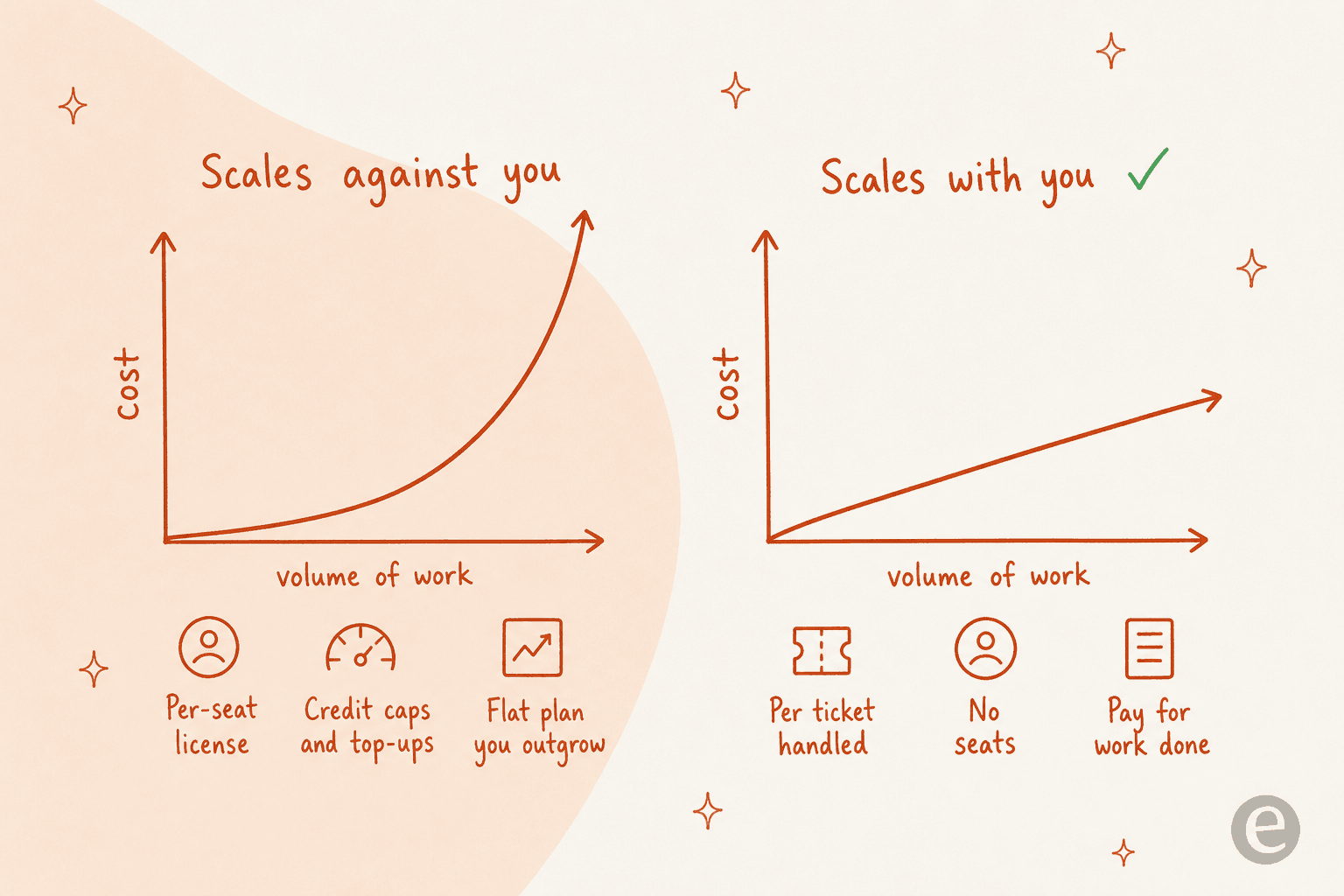
The rule the curve encodes: a meter that scales with the work (credits per ticket handled) tracks your actual usage, while a meter that scales against you (per seat, credit caps you top up, a flat plan you outgrow) makes growth expensive. For a support queue specifically, our comparison of AI agent vs human cost shows why the per-unit view is the only one that survives contact with a real month.
What buyers actually say about AI employee pricing
I hear the same three reactions on sales calls, and none of them are about whether the AI works.
The first is that a confusing meter is itself a dealbreaker. One multi-company e-commerce operator scaling toward 150,000 tickets a month found the difference between per-interaction and per-ticket pricing confusing enough that he did the math live on the call, projected around $30,000 a month at roughly 20 cents a ticket, and got visibly nervous. He was not wrong to; a meter you cannot forecast is a risk even when the rate is fair.
The second is that per-interaction pricing breaks at volume. An operations lead at a payouts fintech doing 7,000 to 8,000 escalated tickets a month told me flatly that a 3,000-interaction monthly allowance was a non-starter. At roughly 500 tickets a day across about four exchanges each, that is around 2,000 interactions a day, so a 3,000-a-month cap burns out in a day and a half. If your volume is real, the difference between "per interaction" and "per resolution" is the difference between a workable bill and an absurd one.
The third is the one I find most telling: price acceptance is a completely separate gate from product quality, and people conflate them. I watched a fashion brand run 12 successful test chats, love the results, then open two cancellation requests the moment they reached the billing page. A working rehearsal does not survive a pricing page you hate. The lesson I took from it is to make the meter obvious and the value visible before anyone reaches the invoice, not after.
How to compare AI employee pricing without getting burned
Five moves, in the order I would do them.
1. Write down the unit of work first. Not "we want AI support". Something like "handle 60% of tier-1 tickets and escalate the rest with context". Now you have a testable spec and a denominator to divide every price by. If tickets are the unit, scan the AI ticket automation category with that number in hand. The AI ticket triage tools roundup helps if routing is the job you are pricing.
2. Normalise the meter before you compare anything. Convert every vendor to cost per unit of finished work. A per-seat tool, a per-credit tool and a per-action tool are not comparable at sticker price. This one step reorders most shortlists.
3. Find the top-up rate, not just the plan rate. That is where the markup hides. Relevance AI's is about 7x its in-plan rate; Sintra's is a flat $0.25 with no volume discount. The base plan sets expectations; the top-up sets your real per-unit cost.
4. Check for a floor underneath the agent. Ask whether the AI needs an edition, platform or minimum you have to buy first. Agentforce's real cost is the Service Cloud edition, not the $0.005 credit. A "cheap" agent on an expensive platform is not cheap.
5. Separate the product test from the price test. Prove the AI works on your own data, then look at the bill as a distinct decision. The tools worth buying let you rehearse before you commit; for support, that means replaying your own past tickets rather than judging a deflection rate on someone else's demo. A good rehearsal on your history, using knowledge base training, is what makes the price worth accepting.
Try eesel for the support role
If the job you need finished is a support ticket, that is the one meter I can speak to from inside. eesel plugs into Zendesk, Freshdesk, Gorgias, Front, Help Scout, HubSpot, Salesforce or Jira Service Management, learns from the knowledge you already have, and handles tickets end to end from $299 a month for 500 credits (1 credit per ticket), with no seats and no platform fee. Route 500 of your 1,000 monthly tickets to it and you pay one fixed $299, not a stack of licenses.

The part I would judge it on is the rehearsal, because it settles the price-acceptance problem before you hit the invoice. Ask the agent in chat to run a simulation and it replays your real past tickets, scores its answers against what your team actually sent, and tells you where the gaps are and which instructions to change. You see the value first, then decide whether to turn it on. Most teams have their first AI helpdesk agent live within 30 minutes, answering in 80+ languages without translating your help centre. Starting is 100 free credits, every feature unlocked, no card required. Try eesel, or run a simulation on last quarter's tickets and see for yourself how many credits it would have taken to close them.