How I judged these, and why the usual criteria are useless
I work eesel's support queue. So I have a specific bias, and you should know it up front: I care less about which model a tool runs on than about what lands in my inbox at the end of a shift.
Nearly every "best AI employee" list scores these tools on model quality, integration count, and a G2 badge. None of that predicts the thing that matters. A tool can have a brilliant model, 1,800 integrations and a 4.8 rating, and still hand you back a draft to read, edit and send. That is not an employee. That is a very expensive intern who cannot post their own work.
If you want the category defined properly before shopping, start with what an AI employee actually is and how it differs from an AI assistant.
Grounded AI agent examples help more than definitions do, and it is worth knowing where the line sits between an agent and a scripted AI agent vs chatbot build.
So I used three criteria instead.
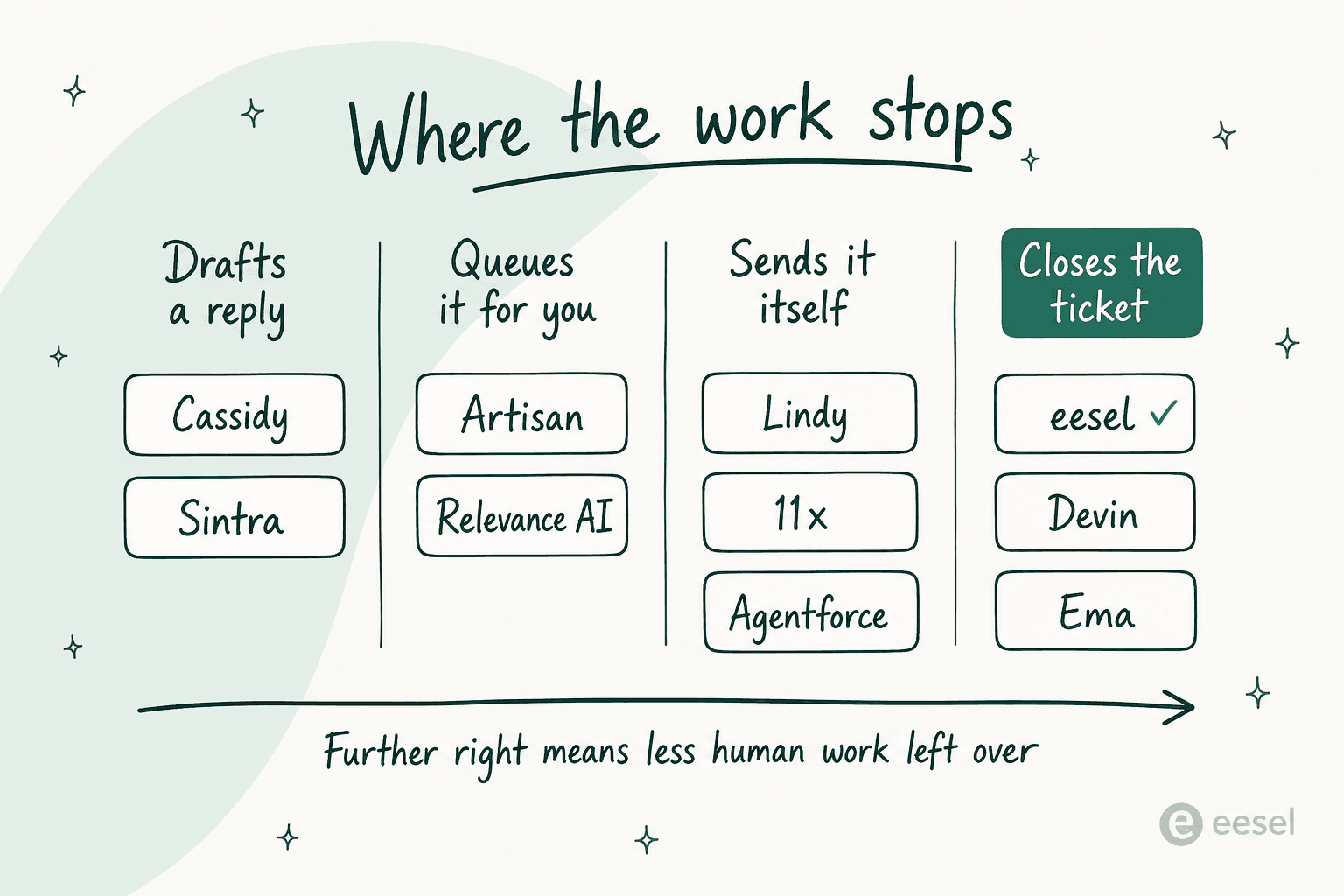
Where does the work stop? Four gates: it drafts a reply, it queues something for you, it sends by itself, or it closes the item and moves on. Only the fourth one removes work from a human.
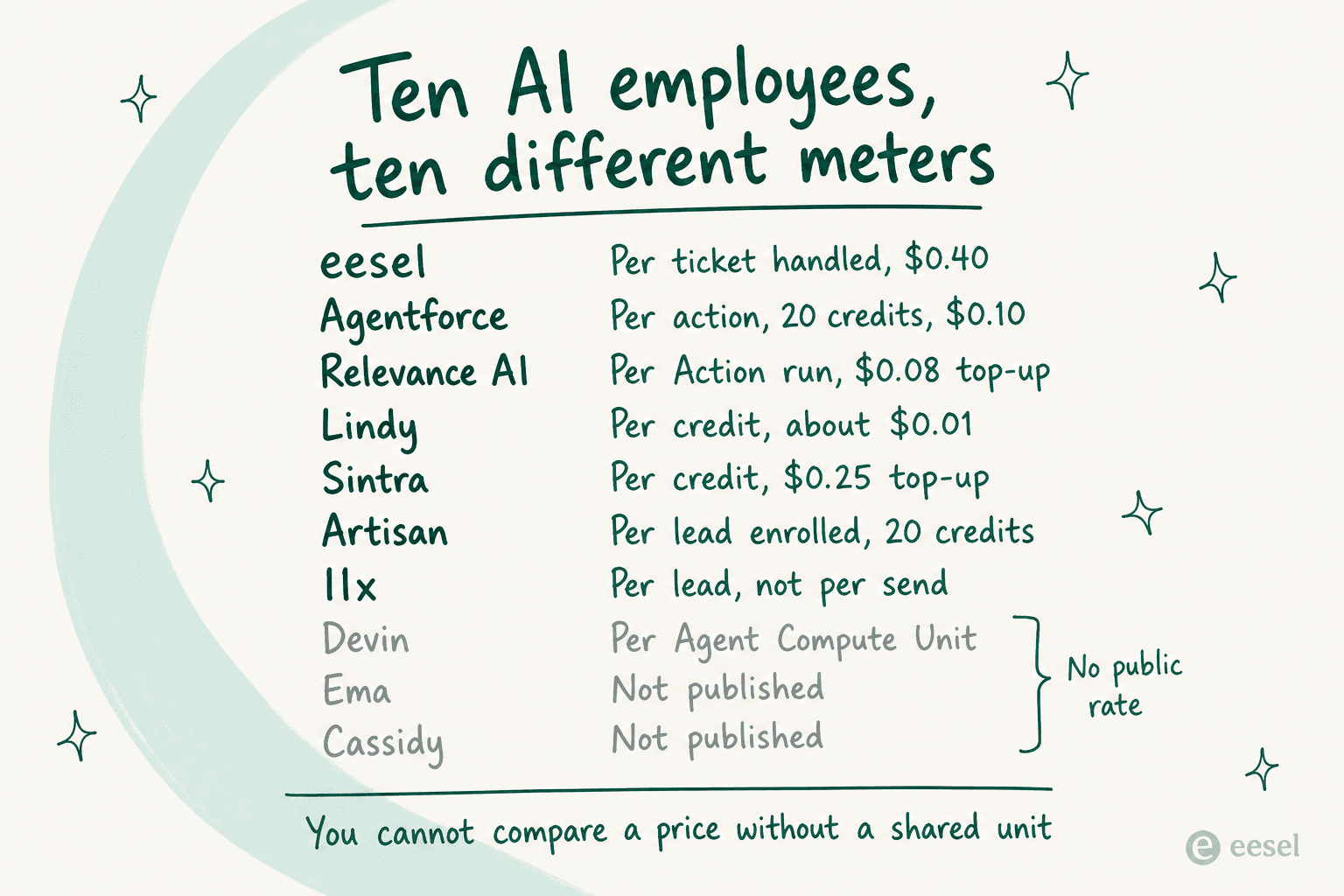
What is the meter? Not the sticker price. The billable unit, and what happens when you hit zero.
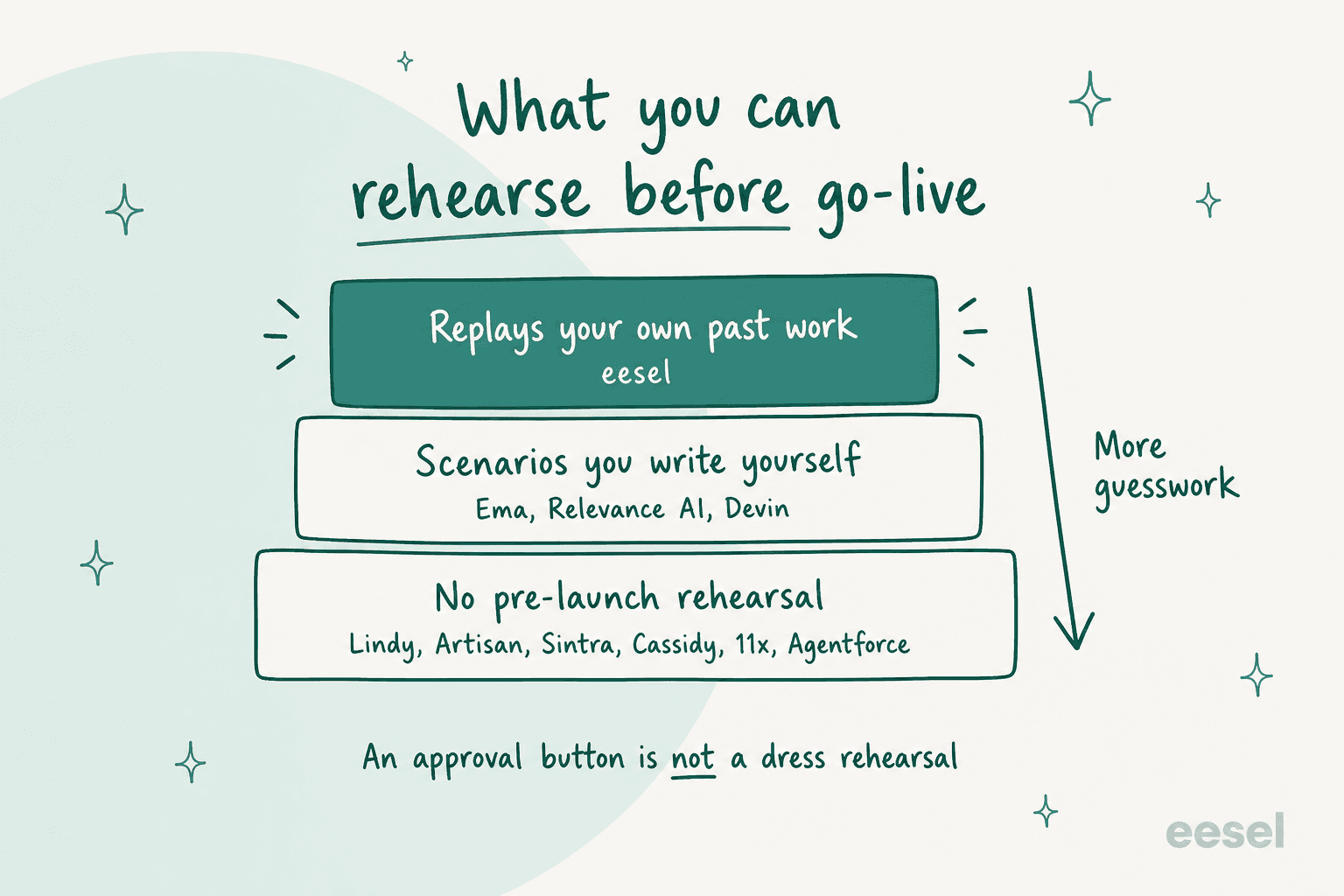
What can you rehearse? Before a customer ever sees it, what can you prove? An approval button is not a rehearsal, it is a manual step you are now performing forever.
That third one is not theoretical here. eesel keeps an incident log of paying customers whose bot fabricated answers when the knowledge base had nothing relevant. One invented subscription claims about solar cells. Another, asked a question it could not ground, answered with "Oxygen" from the periodic table. Both went to real customers. That is the reason we simulate against historical tickets first, and it is why I do not trust a tool I cannot dress-rehearse.
One thing worth saying plainly, because it applies to everything below: buyers do not actually ask for an AI employee. They ask for a percentage and a clean handoff rule. One support manager on Zendesk described what he wanted as an application that could handle 60% of incoming tickets and know when to pull a real person in. That is the spec. Score tools against it, not against the word "autonomous".
The 10 best AI employees in 2026 at a glance
Every price here was read off the vendor's own page on 17 August 2026. Where a vendor publishes nothing, the cell says so rather than guessing.
| Tool | Best for | Where work stops | Billable unit | Entry price | Rehearsal before go-live | Helpdesk connect | Free tier | Public reviews | Security |
|---|---|---|---|---|---|---|---|---|---|
| eesel AI | Closing support tickets | Closes the ticket | Per ticket handled | $0.40/ticket, no seat fee | Replays your real past tickets | Zendesk, Freshdesk, Gorgias, Front, Help Scout, HubSpot, Salesforce, Jira SM | $50 usage + 2 blogs | 4.6/5, 18 reviews on G2 | SOC 2 Type II subprocessors, GDPR, EU residency; HIPAA on Enterprise |
| Ema | Enterprise HR, IT and finance | Closes the request | Not published | Not published, demo only | CSV scenarios you author, LLM-judged | 12 as action tools, none as knowledge | None | G2 profile with 0 reviews | SOC 2 Type II, ISO 27001 and 42001, air-gapped option |
| Devin | Shipping and reviewing code | Opens its own PRs | Agent Compute Unit | $20/mo Pro | Your own test suite and CI | Not applicable | Yes, $0 plan | Active developer community | Enterprise on-prem tiers |
| Artisan | Outbound on a startup budget | Sends and books | Credit, ~20 per prospect | $250/mo annual (Intern) | None pre-launch | No | Yes, 300 credits/mo | 4.1/5, 50 reviews on G2 | SOC 2 Type II, SSO on Enterprise |
| 11x | Outbound at enterprise volume | Sends and books | Per lead, not per send | $3,750/mo billed annually | None pre-launch | No | No | 4.4/5, 33 reviews on G2 | Not published in detail |
| Lindy | One teammate across many tools | Sends, with approval gates | Credit, about $0.01 | $29.99/user/mo | Approval clicks at run time | Via generic connectors | No, 7-day conditional trial | Mixed, thin corpus | Not published in detail |
| Relevance AI | Building a specialist team yourself | Queues for you | Action, plus vendor credits | $29/mo Pro | Agent Evaluations, Enterprise only | Zendesk trigger, Enterprise only | Yes, 200 actions/mo | 4.5 on G2 | Not published in detail |
| Sintra AI | A solo operator wearing 12 hats | Drafts for you | Credit, $0.25 top-up | $97/mo list, often $48.50 | None | No | 3-day, 50-credit trial | 4.4 Trustpilot, contested | Not published in detail |
| Cassidy AI | Document-heavy internal knowledge | Drafts for you | Credit, token-metered | Starter free, rest quote-gated | None | Paid plans only | Yes, Starter | 5.0/5, 5 reviews on G2 | SOC 2, SSO on paid |
| Agentforce | Salesforce as system of record | Sends and resolves | Flex Credit, 20 per action | $175/user/mo edition first | None | Native to Service Cloud | No | Enterprise-scale corpus | Salesforce enterprise posture |
Two columns deserve a second look. Rehearsal splits the field almost in half, and it is the column nobody puts in a comparison table. Billable unit is where the real cost lives: a $29/mo plan with a 7x top-up markup can cost more than a $250/mo plan with a sane one.
Which one actually finishes your job
Pick the piece of work you need closed, not the persona you like the sound of.
Which AI employee actually finishes your job?
Choose the piece of work you need closed without a human touching it.
Pick eesel AI
It is the only one on this list that replays your real past tickets and scores its answers against what your team actually sent, so you see the gaps before a customer does. Billed at $0.40 per ticket handled, no per-seat fee.
Runner-up: Ema, if you are an enterprise buying HR, IT and support together and can live with author-your-own test cases.
Skip: Sintra and Cassidy. Neither reaches a helpdesk queue on a starter plan, so the ticket never closes.
Pick Artisan, under about 1,250 leads a month
Real published self-serve pricing at $250/mo (Intern) or $600/mo (the plan literally called Employee), at roughly 20 credits per prospect enrolled. You can start on a free tier and judge the reply quality yourself.
Above that volume: 11x, which publishes $3,750/mo billed annually for Alice and charges per lead rather than per send.
Check first: message relevance is the most consistent complaint on both. Ask for a sample sequence before you sign anything annual.
Pick Devin
The most literal AI employee here. You assign it a Linear issue or @mention it in Slack, and it opens its own pull requests, then fixes CI across a stack of them. $20/mo to try, Teams from $80/mo plus $40 per seat.
Worth knowing: it opens PRs on its own but does not merge them unattended. Code review stays yours, which is the correct answer.
Skip: everything else on this list. None of them write production code.
Pick Ema
Its homepage is now literally AI Employees for HR, IT, and Finance, and 21 of its 27 named roles are internal. Single-tenant, on-prem and air-gapped deployment, plus SOC 2 Type II and ISO 42001.
Budget reality: no public pricing at all. Every path is a demo form, so plan a procurement cycle, not a trial.
Check first: its knowledge connectors are SharePoint, Google Drive, Confluence and Box only. There is no web crawler, so a public help centre cannot be indexed.
Pick Sintra AI or Lindy
Sintra gives one operator twelve named helpers for $97/mo list, often $48.50 on the running sale, on 250 shared credits. Lindy starts at $29.99 per user for 3,000 credits and reaches far more tools.
The deciding factor: Sintra is a bundle of personas you chat with. Lindy is a builder you configure. Pick by whether you want to talk to it or wire it up.
Watch the meter: Sintra helpers stop dead at zero credits and top-ups run $0.25 a credit. One 15-second video is about 40 credits.
Pick Salesforce Agentforce
If your record of truth is already Salesforce, an agent that lives inside it beats one that reaches in through an API. One standard action is 20 Flex Credits, about $0.10.
The real floor: Flex Credits need Salesforce Foundations, which needs Enterprise edition. That is $175 per user per month before a single credit is spent.
Watch out: Data 360 unification draws the same credit pool at $375 per million rows, so an action-count budget will understate the bill.
Prices verified against each vendor's own pages on 17 August 2026.
1. eesel AI
Best for: teams who want tickets closed, and who want to see it work on their own history first.
I build and run this one, so treat the verdict accordingly. What I can offer instead of neutrality is the measurement, including the parts that do not flatter eesel.
Features
It connects to your helpdesk, reads your existing knowledge, and handles tickets end to end: drafts, tags, replies, escalates. It reaches Freshdesk, Gorgias, Front, Help Scout, HubSpot, Salesforce, Jira Service Management and the Zendesk AI surface. There is no Zoho Desk, Crisp, LiveAgent or Helpshift connector, and Kustomer has been dropped, so check your stack before you get attached.
The part I would actually defend is Simulation. Ask the agent in chat to run one and it replays your real past tickets, scores its answers against what your team actually sent, and hands back specific gaps plus suggested instruction changes. Not a scenario you invented. Your own history, in eesel's words tested against "hundreds of your past tickets". It is now one of twelve shipped skills rather than a standalone feature, and without a helpdesk connected it generates synthetic test cases instead.

Beyond support there is an AI blog writer and an e-commerce agent, plus internal ops through Slack and Teams and three chat-widget surfaces.
Pricing
| Task type | Example | Price |
|---|---|---|
| Light | Dashboard questions, lookups | Free, permanently |
| Regular | One support ticket or chat session | $0.40 |
| Heavy | One blog post, including research | $4.00 |
| Annual commitment | Prepaid year of usage | Up to 25% off |
| Enterprise | Flat platform fee on top of usage | $1,000/mo |
No per-seat fee, no platform fee and no monthly minimum on the default plan. A ticket is one task no matter how many replies it takes. Worth being precise about the unit though: the pricing page says tasks are billed regardless of outcome, so this is $0.40 per ticket handled, not per ticket resolved. Trial is $50 of usage plus two blog generations, with a time limit the page does not state.
Pros
- Only tool here that rehearses against your own past tickets and scores itself against your team's real replies
- Usage-based with no seats, so 200 automated tickets out of 1,000 costs $80, not a licence
- Default $250/mo spend cap with alerts at 50%, 75% and 100%
Cons
- No Zoho Desk, Crisp, LiveAgent, Helpshift or Kustomer connector
- Publishes no headline resolution-rate figure anywhere, which makes like-for-like comparison harder
- HIPAA and BAA sit behind the $1,000/mo Enterprise tier
My take
Take it, and the rest of this post, as an argument about criteria rather than a scoreboard I happen to top. The reason I would still start here for a support queue is narrow and checkable: everything else on this list asks you to trust it, then gives you an approval button. This one lets you watch it fail on last quarter's tickets, on a Tuesday, with nobody watching. A customer at a legal-tech company put the underlying need well, wanting exact guardrails on sourcing and transparent citations so the AI never drifted into giving legal advice.
"It answers confidently but not too confidently, and training it has been super easy."

Skip it if your helpdesk is not on the list, or if you need one tool to also write code and run outbound.
2. Ema
Best for: large regulated enterprises putting AI into HR, IT and finance rather than customer support.
Ema is the vendor that leaned hardest into the actual phrase. The product is personified as "she", every CTA is a variant of "Hire Ema", and the catalogue is 27 named AI Employees you assemble into what the company calls meshes.
Features
The positioning has shifted, and the shift is the story. Of 27 named roles, 21 are internal and six are customer-facing. Underneath sits EmaFusion, a model-routing layer the team documents in a real arXiv paper reporting 94.3% accuracy against o3-mini's 91.7%, at $5.21 versus $16.29 per thousand prompt samples. Deployment goes to single-tenant, on-prem or air-gapped, which is why banks and insurers are the buyer.
Building an employee is a DAG of nodes, documented as eight steps in roughly 15 to 30 minutes. The integration catalogue really does hold 256 distinct names against a "250+" claim, which is rarer than it should be.
Pricing
Nothing is published. ema.ai/pricing redirects to a demo form, there is no self-serve signup, no free tier and no trial. The only stated philosophy is outcome-based pricing with no unit, rate or floor attached. Budget a procurement cycle.
Pros
- The deepest internal-employee catalogue here, and the security posture to match: SOC 2 Type II plus ISO 27001 and 42001
- Air-gapped and on-prem deployment with bring-your-own-models
- A serious founding team, with Surojit Chatterjee as CEO after Coinbase and Google, and over $61M raised
Cons
- Knowledge connectors are SharePoint, Google Drive, Confluence and Box only, with no web crawler, so a public help centre cannot be indexed
- Twelve helpdesks are action tools, not knowledge sources, so Ema can update a ticket without having learned from your ticket history
- Evaluation is a CSV you build and column-map yourself, scored by an LLM judge; the dry run also does not short-circuit the send-email node, so a test can send a real email
- Its G2 profile is claimed but has zero reviews, so every performance number in circulation is vendor-sourced
My take
If you are buying HR, IT and finance automation top-down with a systems integrator alongside you, Ema is a serious candidate and the compliance story is real. It is also the enterprise end of a market with much lighter options in AI for internal support. Be careful with the support pitch specifically: marketing says connect your helpdesk and Ema will ingest past tickets, while the connector docs describe a file-shaped pipeline with no ticket or conversation object in it. Ask which one is true for your instance before signing. Buyers ruling it out for support reasons should look at Ema AI alternatives.
3. Devin
Best for: engineering teams who want a colleague they can assign a ticket to.
Features
Of everything on this list, Devin behaves most like an actual employee. You assign it a Linear issue, or label it !plan or !implement, or @mention it in Slack, and it goes away and comes back with pull requests. It will decompose work into stacks of anywhere from 2 to 100 PRs and quietly fix CI across all of them. There is a persistent auto-triage Devin that watches Slack channels.
The framing has widened from one engineer to "a team of Devins", including a new Security Swarm product built on what Cognition calls Agentic MapReduce. Published numbers are refreshingly specific and refreshingly unflattering: SWE-1.7 scores 77.8% on SWE-Bench Multilingual, 81.5% on Terminal-Bench 2.1, and 42.3% on FrontierCode 1.1 Main. It tops none of the three. The claim is cost-performance, not leadership, and I respect a vendor that says so.
Pricing
| Plan | Price | Notes |
|---|---|---|
| Free | $0 | Legacy Core users were migrated here |
| Pro | $20/mo | Grandfathered $15 still live |
| Max | $200/mo | |
| Teams | $80/mo + $40 per full seat | Grandfathered $30/seat still live |
| Enterprise | Quote | ACUs priced in the order form |
Agent Compute Units are now Enterprise-only, and no per-ACU dollar rate is published anywhere. Self-serve plans consume quota and then on-demand credits.
Pros
- Actually closes a unit of work: an opened, CI-green pull request
- Lives where engineers already are, in Slack and Linear, with three trigger paths
- Published t-shirt sizing for Devin Review work, from XS at 2.25 ACUs up to XL
Cons
- Cannot merge unattended by design; a reviewer still gates every change, and GitLab support is partial while Bitbucket and Azure have none
- No published per-ACU price, so Enterprise cost is unknowable before a sales call
- Writes code, and nothing else on this list's job description
My take
Devin is the clearest proof that the AI employee category is real, and also proof of what "real" costs: a narrow scope and a human gate at the end. The gate is the right call. I would rather a colleague open the PR and let me merge it than merge and let me find out. At $20 to try, there is no reason to theorise about it.
4. Artisan
Best for: outbound teams under about 1,250 contacted leads a month who want a price before a sales call.
Features
Ava sources leads from a claimed 250M+ verified B2B contacts, enriches them across 22+ data sources, writes and sends sequences, handles replies and objections, and books meetings. One hard limit, stated plainly by Artisan: Ava cannot legally make calls, so she queues leads into a dialer for humans. The company publishes its own Level 1 to 5 autonomy framework and places Ava at Level 2, working toward Level 3, which is more candour than this category usually manages.
Four further AI employees have been named across funding announcements and never shipped. Ava is the only purchasable product, and "Full self-driving Ava" is still badged as coming.
Pricing
Here is the bit worth knowing before you visit. The pricing page has two tabs, and the one that loads by default publishes no dollar figures at all. Click "Startups" and real prices appear.
| Plan | Annual | Monthly | Credits | Vendor's lead estimate |
|---|---|---|---|---|
| Free | $0 | $0 | 300/mo | Not stated |
| Intern | $250/mo | $280/mo | 10K/mo | ~500 leads contacted |
| Employee | $600/mo | $660/mo | 25K/mo | ~1,250 leads contacted |
| Team | Quote | Quote | Not stated | ~2,500 leads contacted |
| Scale | Quote | Quote | Not stated | ~6,000 leads contacted |
An end-to-end campaign runs about 20 credits per person contacted, and credits are spent at enrolment rather than at send. The dialer is a separate $67 per seat per month on annual. Note the annual catch: credits arrive upfront, and unused ones do not roll over at term end.
Pros
- Publishes real self-serve pricing, which almost nobody else in outbound does
- Permanent free tier at 300 credits a month, plus a 10K-credit 30-day trial
- Published credit rate card, so you can model cost per prospect before buying
Cons
- Default pricing tab shows no prices, so the published half is easy to miss
- Two completely different plan-name systems on one URL
- Message relevance is the most consistent complaint across every platform
- Salesforce sync is Enterprise-only; HubSpot starts at Intern
My take
Artisan is the fairest-priced entry point in AI outbound, and the reviews are split. Its G2 profile shows 4.1/5 across 50 reviews, with pros clustering on support and lead generation, and cons on accuracy. Read that page with one caveat: most positive 2026 reviews are labelled incentivized or seller-invited, while the harshest are organic.
The most useful complaint comes from a reviewer who scored it 4.5 out of 5, which is what makes it credible:
"We find it difficult having to consistently reconnect mailboxes, as there have been responses missed due to disconnected mailboxes, but we've amended this behavior on our end to mitigate."
One footnote for anyone who remembers the "Stop Hiring Humans" billboards: Artisan retired that slogan in August 2026 and is hiring its first human BDR, by its own account, after spending $2M on the campaign. Judge the product, not the marketing, in either direction.
5. 11x
Best for: enterprise outbound teams at volume who want managed mailboxes included.
Features
Two workers, both alive: Alice for outbound and Julian for inbound voice and chat, the latter built on 11x's acquisition of Opkit. The design philosophy is stated as "Autopilot, not copilot", and it means what it says. There is no per-message approval gate. Human input happens at configuration time through research directives, knowledge scoping and signal definitions. The contact database is claimed at over 400 million verified contacts across 50+ data sources.
Julian's published outcomes are 99% speed-to-lead reduction, +61% inbound conversion, and +3.5% win rate. Founder Hasan Sukkar handed the CEO role to Prabhav Jain in May 2025.
Pricing
11x.ai/pricing 404s. The real numbers live on per-product pages.
| Product and plan | Price | Volume |
|---|---|---|
| Alice Growth | $3,750/mo, billed annually | 2,000 new prospects/mo |
| Alice Pro and Enterprise | Custom | 5,000 and 10,000+ |
| Julian Growth, voice | $5,333/mo | Metered on calls |
| Julian Growth, chat | $2,417/mo | 3,000 chats/mo on the card |
| Julian Pro and Enterprise | Custom | Custom |
Annual only, no monthly option anywhere. The billable unit is quotable: 11x charges per lead, not per send, so three touchpoints or thirty costs the same. Note two contradictions on 11x's own pages: the Alice card says $3,750/mo billed annually while the FAQ below it says $36,000 a year twice, and Julian's Growth chat allowance appears as both 3,000 and 2,000 per month.
Pros
- Mailboxes are bundled, including domain setup, warm-up and rotation, which is a real cost most competitors push onto you
- Per-lead pricing means message volume does not inflate the bill
- Renewal terms are published, including no auto-renew without 30 days' notice
Cons
- Annual-only with no trial, no free tier and no self-serve path at all
- Publishes conflicting prices and allowances on the same pages
- No pre-launch rehearsal, by design
- Its G2 corpus sits at 4.4/5 across 33 reviews, but page-one reviews are all dated March to May 2026 and 7 of 10 are seller-invited
My take
Deliverability is 11x's quiet strength, and that surprised me. Multiple reviewers praise the auto warm-up unprompted, and I found no first-hand reports of blacklisting. The weakness is relevance, not inbox placement. The single most useful account came from an operator reporting good sourcing and poor outcomes:
"I have been using 11x for a few months now, the lead sourcing seems to be on point. Very little responses mostly asking to be removed from the list, I see a high click rate though (but I wrote the emails myself), the time spent on the website is 2 to 3 seconds."

Another user drew the fairest line I have seen on this whole category, which is that a numbers game and a tiny niche are different problems and only one of them is currently solved. If your motion is volume, 11x is worth the demo. If every email needs real research behind it, spend the $45,000 elsewhere. Anyone weighing it should also read up on AI lead generation tools more broadly.
6. Lindy
Best for: one operator who wants a configurable teammate wired across a lot of tools.
Features
Lindy rebranded and repriced since I last looked, so old write-ups are unsafe to quote. The vocabulary is now "AI teammate", the phrase "AI employee" appears zero times, and the old no-code agent builder is explicitly legacy. What you get is a teammate you brief in plain English that then acts across your tools, with an approval gate on every consequential action, a mid-task usage pause, and a plain-English smart filter.
Integration counts are a mess worth noting: the hero says 1,000+, the filter counter says "Showing 100 out of 1400+", the pricing page says thousands. Countable is 100, with any MCP server supported as mitigation. Useful for AI workflow automation if you already think in workflows.
Pricing
| Plan | Price per user/mo | Credits per user/mo | Inboxes |
|---|---|---|---|
| Plus | $29.99 | 3,000 | 2 |
| Pro | $99.99 | 15,000 | 3 |
| Max | $199.99 | 35,000 | 5 |
| Enterprise | Custom | Custom plus bonus | 5 |
Credits run about a cent each, and Lindy publishes work bands: everyday asks are 2 to 250 credits, deep work 250 to 1,000, and big builds 1,000 to 2,500. Triaging a day's support queue is given as a deep-work example. Top-ups are $10 per 1,000. There is no free tier, and the 7-day trial only attaches to teammates who join through Slack.
Pros
- Cheapest genuine entry point at $29.99, with published credit allowances and work bands
- Approval gate on every consequential action, which is the right default for a tool this broad
- The seat price is the credit allowance, so there is no separate platform fee
Cons
- Every Slack @mention creates a billable seat; Lindy emails admins a removal link, which concedes the seat creep
- No dry run, simulation or sandbox anywhere. I grepped nine pages for it
- Three different answers on the same site about what happens when credits run out
- Several Teammate feature docs still sit on coming-soon paths, and the changelog has not moved since October 2025
My take
Lindy is the best-value generalist here and the honest framing is that it is a builder, not a hire. If that is what you are shopping for, weigh it against Zapier AI and the Make vs n8n comparison rather than against the hire-a-role vendors. Watch the seat economics, because they invert what you would expect: one Max seat gives 35,000 credits for $199.99, while ten Plus seats give 30,000 for $299.90. Concentrating usage on fewer seats beats spreading it. If Lindy is not the fit, Lindy AI alternatives covers the neighbours.
7. Relevance AI
Best for: teams happy to assemble their own specialist roles rather than hire a pre-built one.
Features
Relevance AI uses "AI Workforce" heavily and avoids "AI employee" entirely, with the docs offering only the simile that agents work much like human employees. Named agents are now job titles rather than personas: Research and Enricher, Pre-meeting Prepper, Post-call Actioner, Outbound Prospector, Deal Reviewer, Proposal Builder. The old Bosh sales rep is gone and its URL 404s.
It publishes an L1 to L4 autonomy ladder and, unusually, a teardown claiming to replace Zapier, Composio, OpenRouter, Braintrust, CrewAI and Langfuse. Integrations are claimed at 2,000+ and countable at 1,862 on the vendor's own filter.
Pricing
The public pricing page is Enterprise-only with no dollar figures. The actual rate card lives in the docs, which is where I would look first.
| Plan | Monthly | Annual per month | Actions/mo | Build users |
|---|---|---|---|---|
| Free | $0 | $0 | 200 | 1 |
| Pro | $29 | $19 | 2,500 | 2 |
| Team | $349 | $234 | 7,000 | 5 |
| Enterprise | Custom | Custom | Custom | Unlimited |
Two meters since September 2025: Actions, one per tool run, and Vendor Credits at $0.002 each as pass-through LLM cost. A failed tool run still bills one Action. There is no per-seat charge at all; seats are hard caps.
Pros
- Real self-serve pricing published in the docs, with a usable free tier at 200 actions
- Agent Evaluations offer a publish gate with a minimum pass rate that can block a failing release
- Vendor credits carry no markup and roll over indefinitely while you are subscribed
Cons
- Action top-ups cost $80 per 1,000, about 7x the roughly $0.0116 in-plan rate on Pro, with an $80 minimum purchase
- Evaluations are Enterprise-only and still rolling out, and the scenarios are ones you author, so there is no dry run over your own history
- Zendesk, Salesforce and Snowflake triggers are Enterprise-only
- Its own pages contradict themselves in several places, including Pro's vendor-credit allowance as both 10,000 and 3,000
My take
Relevance AI is the best builder's platform on this list, and the top-up markup is the number I would put on a whiteboard before committing. Crossing from two builders to three also jumps you from $29 to $349, which is a cliff rather than a step. Worth reading Relevance AI pricing in full before you plan headcount around it.
8. Sintra AI
Best for: a solo founder or tiny team who wants twelve helpers and no configuration.
Features
One plan, Sintra X, includes all twelve named helpers: Cassie for support, Penn for copy, Seomi for SEO, Soshie for social, Milli for sales, Dexter for data, Emmie for email, Buddy for strategy, Vizzy as a VA, Gigi for coaching, Commet for e-commerce and Scouty for recruiting. On top sits a custom Agent Helper and a marketplace of 50+ community helpers.
The integration list runs to 24 countable connectors, mostly consumer tools like Gmail, Notion and QuickBooks. There is no helpdesk connector, and I verified that three ways: not in the directory, a help-centre search for Zendesk returns nothing, and the nearest neighbours are HubSpot and Salesforce described as CRMs rather than ticketing. Cassie's unit of work is an email, not a ticket.
Pricing
| Term | List price | On the current sale | Billed |
|---|---|---|---|
| 1 month | $97/mo | $48.50/mo | $97 upfront |
| 3 months | $59/mo | $23.60/mo | $177 upfront |
| 12 months | $54/mo on the card | $15.60/mo | $624 upfront, so $52/mo |
Watch the annual row: the card says $54 a month, while the $624 charged upfront works out at $52. Sintra's own help centre and pricing card have disagreed on that figure for months.
Every tier gets the same 250 credits a month, with no rollover. Sintra's own wording is that if a workspace runs out of credits, helpers will stop working. Top-ups are published now, from $37.50 for 150 credits up to $1,200 for 4,800, a flat $0.25 per credit with no volume discount. A free 3-day, 50-credit plan exists but only via the build-an-AI-employee page, not the pricing page.
Pros
- Twelve working helpers for one low price, with almost no setup burden
- Published top-up rate card, which many competitors keep in-app
- A real, if brief, no-card free plan
Cons
- 250 credits is the same on every tier, and helpers stop at zero
- A single 15-second video is about 40 credits, so roughly $10 of top-up
- Included credits are worth $62.50 at the top-up rate against a $97 list price
- No helpdesk connection at all, and Trustpilot carries a recent one-star cluster about the shift from unlimited to metered credits
My take
Sintra is the most fun product here and the one most likely to surprise you on a bill. As a way for a solo operator to stop paying for six subscriptions, it works. As an AI employee in the sense this post means, it drafts and you send. Note too that the "limited-time" sale now appears in the pricing FAQ as the starting price, so treat $48.50 as list. The Sintra AI review goes deeper on credit burn.
9. Cassidy AI
Best for: document-heavy internal knowledge work where a good draft is the actual deliverable.
Features
Cassidy is four products in two layers: Knowledge Base and Meetings for context, Agents and Workflows for automation. Its solution library now runs to 100 templates, with around 45 documented actions and five trigger families. Integrations count 73 live against a "100+" claim.
The detail I keep coming back to is Cassidy's own credit advice, which is to limit how much knowledge-base context gets pulled into each interaction. Grounding is what drives the bill. Its Smart Search setting makes the same trade explicit: off means search the knowledge base every request, which is accurate and expensive, while on lets the model decide. Cassidy's own guidance for grounded answers is to leave it off, so the safe setting is the costly one. Good context for anyone comparing AI knowledge base tools.
Pricing
The pricing page carries no dollar figures anywhere. Starter is free with 3 users, 5 agents, 5 workflows, 10K credits and a 24-hour sync. Business is contact-sales on every cell, and Enterprise appears only in FAQ prose. Credits are token-metered at roughly 1x, 3x and 5x by model tier with no published rate, agent chats run 1 to 30 credits and workflows 1 to 100.
Two things to know before you plan around the free tier. The pricing page gives Starter's storage as both 30,000 pages on the plan card and up to 100K pages in the comparison table. And Cassidy's own billing docs still show a Stripe checkout reading "Subscribe to Cassidy Starter Plan $79.00 per month" while marketing presents Starter as free.
Pros
- Deep knowledge and meetings layer, and a large template library that shortens the first build
- Free Starter tier that is usable for evaluation
- Honest, well-documented guidance about what drives credit consumption
Cons
- No published price above free, so budgeting requires a sales call
- Starter cannot reach a helpdesk at all: Zendesk, ServiceNow and Jira are paid-only, as are SSO, audit logs and retention tooling
- Every published support template stops at a reply draft, with no confidence threshold and no auto-send
- Its G2 listing is 5.0/5 from only 5 reviews, all small business, so the corpus is thin
- Sharing an agent that references a collection the viewer cannot access silently narrows the search scope, so two colleagues can get different answers with no warning
My take
Cassidy is a strong internal knowledge tool and, judged by this post's criterion, not an employee. The support ceiling is a draft, and Cassidy does not pretend otherwise, which I would rather have than a vendor overclaiming. Note that its own "Cassidy vs" comparison series names Zapier, Make, n8n, Glean, Copilot and Claude, and zero helpdesk vendors. That tells you where it thinks it competes, and it is probably right. For a fuller picture, see Cassidy AI.
10. Salesforce Agentforce
Best for: organisations where Salesforce is already the system of record.
Features
The strategic argument for Agentforce is simple and good: an agent that lives inside your record of truth beats one reaching in through an API. Of the surfaces it ships, Agentforce for customer service is the most mature.
There are also dedicated agents for Agentforce employee support and for Agentforce sales development, which is more role coverage than anyone else here offers under one roof.
Pricing
This is where care is needed, because the headline rate is not the cost.
| Item | Rate |
|---|---|
| Flex Credits | $500 per 100,000, so $0.005 each |
| One standard or custom action | 20 credits, about $0.10 |
| Voice action | 30 credits |
| Help Agent resolution | 400 credits, $2.00, outcome-based |
| Advanced Prompts, metered since July 2026 | 16x multiplier, $0.08 per 2,000 tokens |
| Data 360 unification | 75,000 credits per million rows, $375 |
| Required edition | Service Cloud Enterprise, $175/user/mo annually |
Flex Credits require Salesforce Foundations, which requires Enterprise, Performance, Unlimited or Developer edition. Starter at $25 and Pro Suite at $100 cannot run Agentforce for Service at all. A realistic Enterprise support seat lands near $325 per user per month once you add Knowledge Read-Write and Enhanced Messaging, before one credit is spent.
Pros
- Native to the record of truth, so no sync layer and no permission mismatch
- Published multiplier table, so action-level cost is actually modellable
- Foundations ships 1 TB of Data 360 and 450,000 included Flex Credits
Cons
- The real floor is the edition underneath, not the credit price
- Data 360 draws the same credit pool, so an action-count budget will understate the bill
- Credits do not roll over, and two live usage types still read "TBA" with no published rate
- No pre-launch rehearsal against your own history
My take
If you are already deep in Salesforce, this is the default and the integration argument is strong. If you are not, the edition requirement makes Agentforce one of the most expensive ways to answer a ticket on this list. One pattern I would flag from experience: buyers who have been burned by a vendor doubling prices tend to want contractual locks, and a meter with two categories marked "TBA" is the kind of thing to raise in negotiation rather than after. Read Agentforce pricing in full before committing. If the edition floor rules it out, the Agentforce alternatives are cheaper per answered ticket.
What buyers actually ask for, in their own words
Across eesel's sales calls, the thing buyers ask for is never "an autonomous AI employee". It is control. Specifically, they want the AI to act only when it is confident and to stay silent otherwise. One CX lead at a DTC supplements brand on Gorgias, running around 7,000 tickets a month, put it more sharply than any vendor page:
"The AI will never be able to answer 100% of the questions, but if it tries and just answers 'sorry I don't know this,' I cannot go and check all my 7,000 tickets to see if the AI actually made a good answer, then the point is a little bit gone. I need an AI who is only handling the tickets that it's confident to handle and all the other ones, leave them alone."
eesel probably lost that deal over exactly that gap, which is why I remember it. When the team offered analytics as the answer to his routing concern, he pushed back that his customers do not want to wait for someone to run a monthly report. He was right. A dashboard telling you what the AI did last month is not the same as control over what it does right now.
Two other requests come up constantly and neither appears on a feature matrix. One support lead wanted certain ticket types kept away from the AI entirely. An admin wanted the agent to act only when explicitly @-mentioned, not on every incoming message. Both are scope control, and an AI employee you cannot fence off is not deployable no matter how good it is.
There is one more competitor on this list that nobody markets: building it yourself. It is a real option and it wins more often than vendors admit. eesel has lost customers to it, including one who told the founder directly that they would build their own long term because it is so possible now with AI, adding that they probably would have stayed if our support had been faster. The counter-argument came from an engineering lead at a Bitcoin-ATM company who chose to buy:
"We could try to write our own LLM application but we didn't want to invest our time into that. We wanted something that we would not have to maintain."
That is the honest version of build versus buy. Not capability. Maintenance.
How to buy one without regretting it
Five things, in the order I would do them.
1. Write down the percentage and the handoff rule first. Not "we want AI support". Something like "handle 60% of tier-1 tickets and escalate the rest with context". You now have a testable spec and a reason to reject a demo that looks impressive on someone else's data. If tickets are the unit, the neighbouring category worth scanning is AI ticket triage tools.
2. Normalise the meter before you compare anything. Convert every vendor to cost per unit of finished work. A per-seat tool and a per-credit tool and a per-action tool are not comparable at sticker price. Watch the top-up rate especially, since that is where the markup hides: Relevance AI's is about 7x its in-plan rate, and Sintra's is a flat $0.25 with no volume discount at all.
3. Ask what you can rehearse, and be specific. The best buyer I have seen on this asked for 300 random tickets a month across 10 months, excluding the Valentine's and Mother's Day spikes, real rep-handled tickets only. That is a sampling problem, and treating it as one is the difference between a real test and a demo.
4. Start in draft mode, then graduate. Nobody hands over the queue on day one, and the tools worth buying are the ones with a credible path from drafting to autonomy. eesel's own trial data says something useful here: when agents rewrote AI drafts, about 65% of edits were length and tone, roughly 20% needed extra connected data, and only about 5% were the AI being factually wrong. Length and tone are fixable by training on your team's own sent replies. Training on 200 recent replies was projected to move as-is adoption from 12% toward 30 to 40%.
5. Check the price acceptance separately from the product. These are two different gates and people conflate them. I watched a fashion brand run 12 successful test chats, then open two cancellation requests the moment they reached the billing page. A working rehearsal does not survive a pricing page you hate.
Try eesel for the support role
If the job you need finished is a support ticket, that is the one role on this list I can speak to from inside. eesel plugs into Zendesk, Freshdesk, Gorgias, Front, Help Scout, HubSpot, Salesforce or Jira Service Management, learns from the knowledge you already have, and handles tickets end to end at $0.40 per ticket handled, with no seats, no platform fee and no minimum. Route 200 of your 1,000 monthly tickets to it and you pay $80.
The part I would actually judge eesel on is the rehearsal. Before a single customer sees it, ask it in chat to run a simulation: it replays your real past tickets, scores its answers against what your team actually sent, and tells you where the gaps are and which instructions to change. Then you decide whether to turn it on. That order matters, and it is the whole reason I would put it first.

Most teams have their first agent live within 30 minutes, and it answers in 80+ languages without you translating your help centre. Starting is $50 of free usage plus two blog generations, every feature unlocked, no card required. Try eesel, or run a simulation on last quarter's tickets and see for yourself whether it closes them.
Frequently Asked Questions
What is the best AI employee for a small support team?
How much does an AI employee cost per month?
Is an AI employee the same thing as an AI agent?
Can an AI employee work inside my existing helpdesk?
What happens if the AI employee gets an answer wrong?


Article by
Riellvriany Indriawan
Riell is a designer and writer at eesel AI with about two years of experience researching CX platforms, AI chatbots, and helpdesk software. She combines her design background with a sharp eye for how these tools actually look and feel in practice — making her comparisons unusually visual and user-focused.