The two things called ChatGPT
The two products have different credentials, permissions, and billing. Keep that distinction clear before you configure either one.
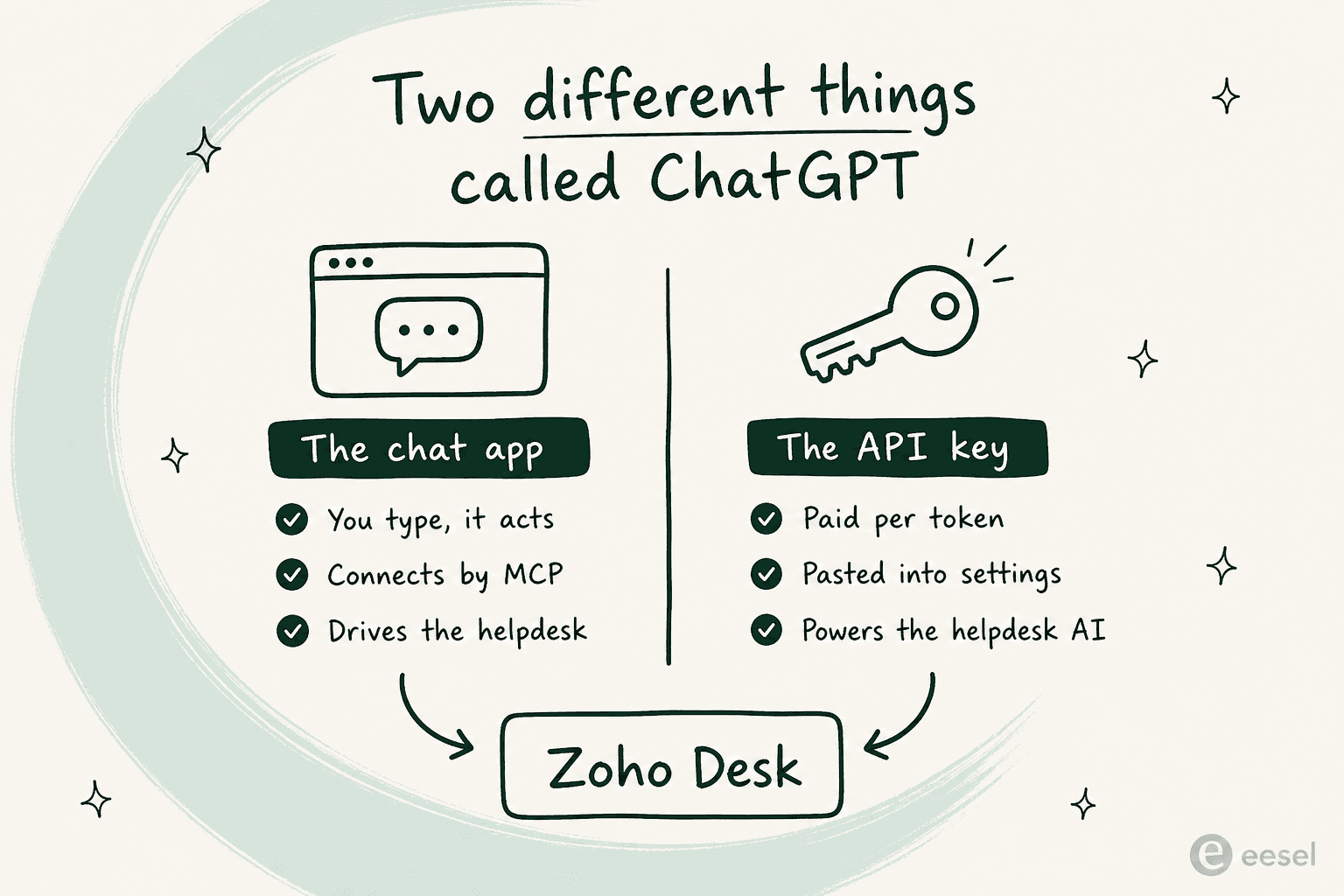
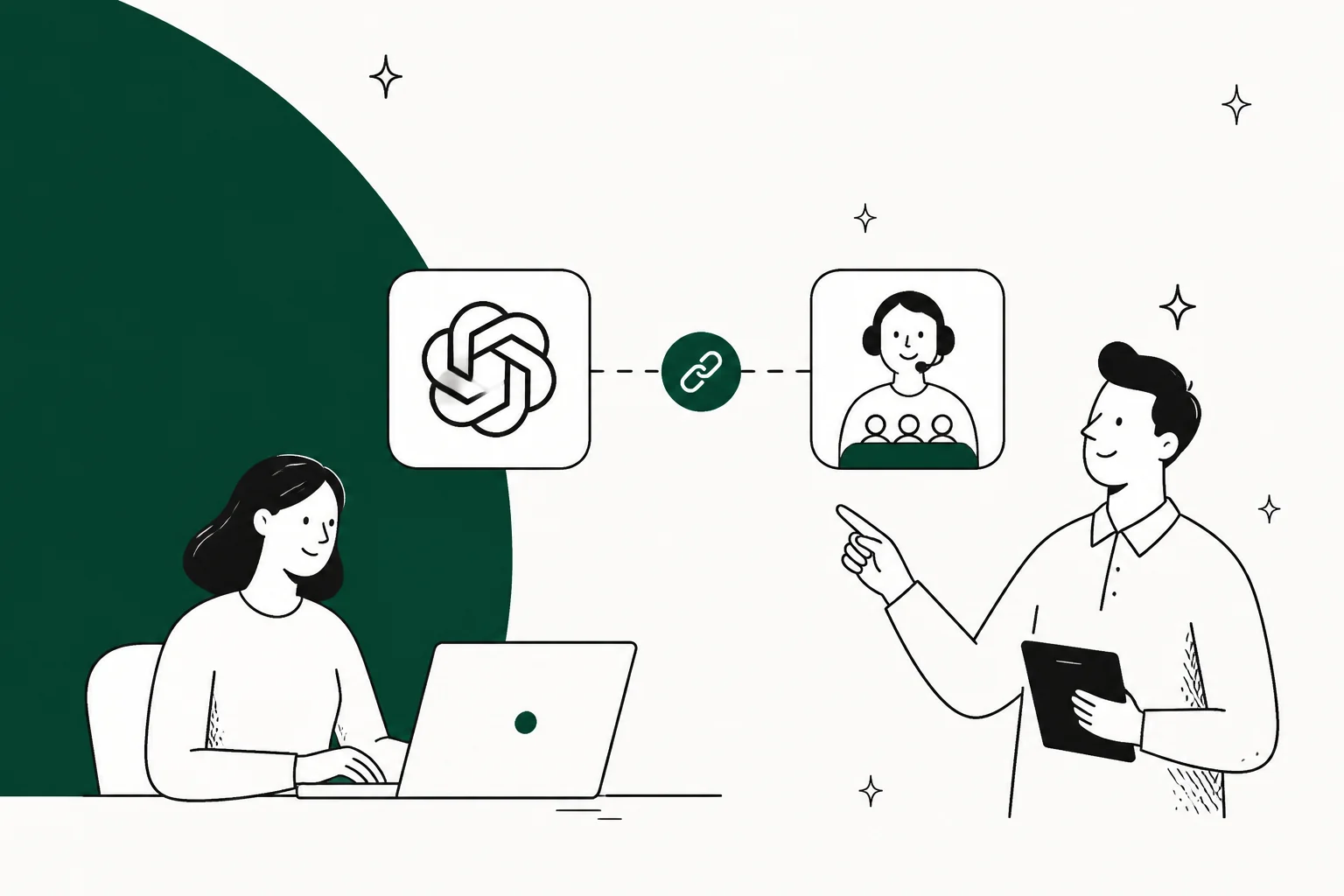
The chat app connects to outside systems through the Model Context Protocol, which lets it call tools. Zoho publishes an MCP service where you configure the tools available to an MCP client. In that arrangement ChatGPT is the client. It sits outside Zoho Desk and performs only the actions exposed by the configured tools.
The API key is a completely separate purchase. It bills per token against your OpenAI account, it has nothing to do with your subscription, and Zoho Desk has a field for it. Paste it in and OpenAI becomes the model behind Zia's generative features. Here ChatGPT is not involved at all, in the sense that no chat window exists anywhere in the flow. It is just OpenAI's models doing work inside somebody else's product.
An OpenAI API key does not supply a ChatGPT interface for tickets, and a ChatGPT subscription is not a BYOK credential. Choose the feature first, then confirm which account and credential it needs.
The cost question has two moving parts: the current Zoho Desk plan price in your region and any metered use of an OpenAI API key. Check both primary pricing pages before choosing a route; a static calculator cannot keep either current.
Route 1: ChatGPT as the client, over Zoho's MCP server
This is the route most people mean when they type the phrase. Zoho runs an MCP service, you assemble a server out of Zoho Desk tools, and you point ChatGPT at it.
Zoho's console lets an administrator create a server and select the tools it exposes to the MCP client. Keep the initial tool set narrow and review every write-capable tool before granting it.
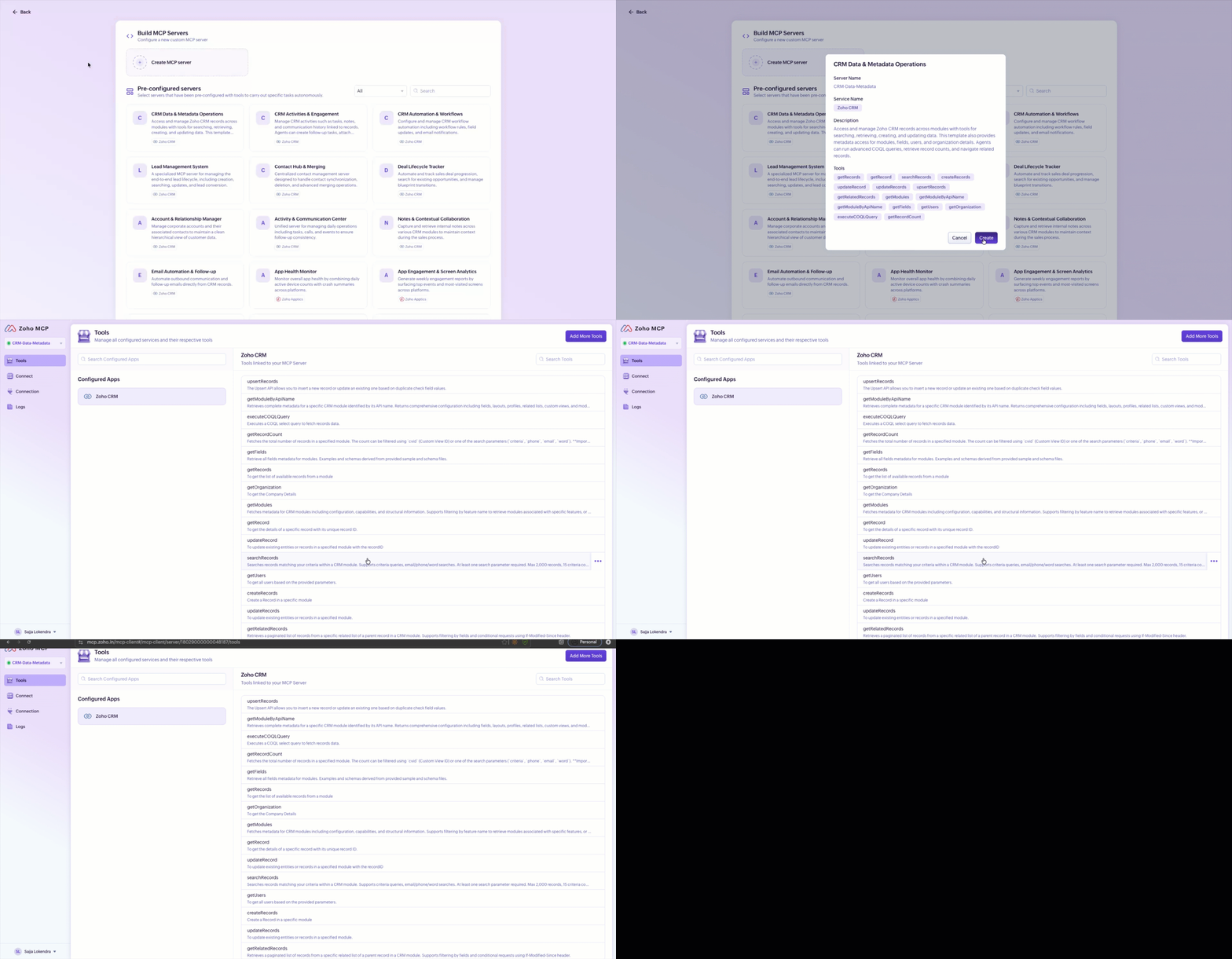
Two details from Zoho's MCP FAQ are worth pinning down before you budget anything. It is free to use as of now, with a commitment to give notice before pricing arrives. And calls through it draw on the ordinary API limits of whichever service you are hitting, with no separate MCP allowance and no premium on top. So the connector is not a line item. Your Zoho Desk plan is.
ChatGPT is named directly in that FAQ, alongside four other clients, which is a small thing but a useful one when you are trying to work out whether a vendor actually supports your setup or merely tolerates it.
The actual connection steps
Zoho's implementation guide describes this connection flow:
- In ChatGPT, go to Profile > Settings > Apps and click Create App.
- Give the server a name and description.
- Paste your MCP Server URL.
- Choose OAuth as the authentication type.
- Click Create.
- You land on Zoho's authorization screen. Click Allow.
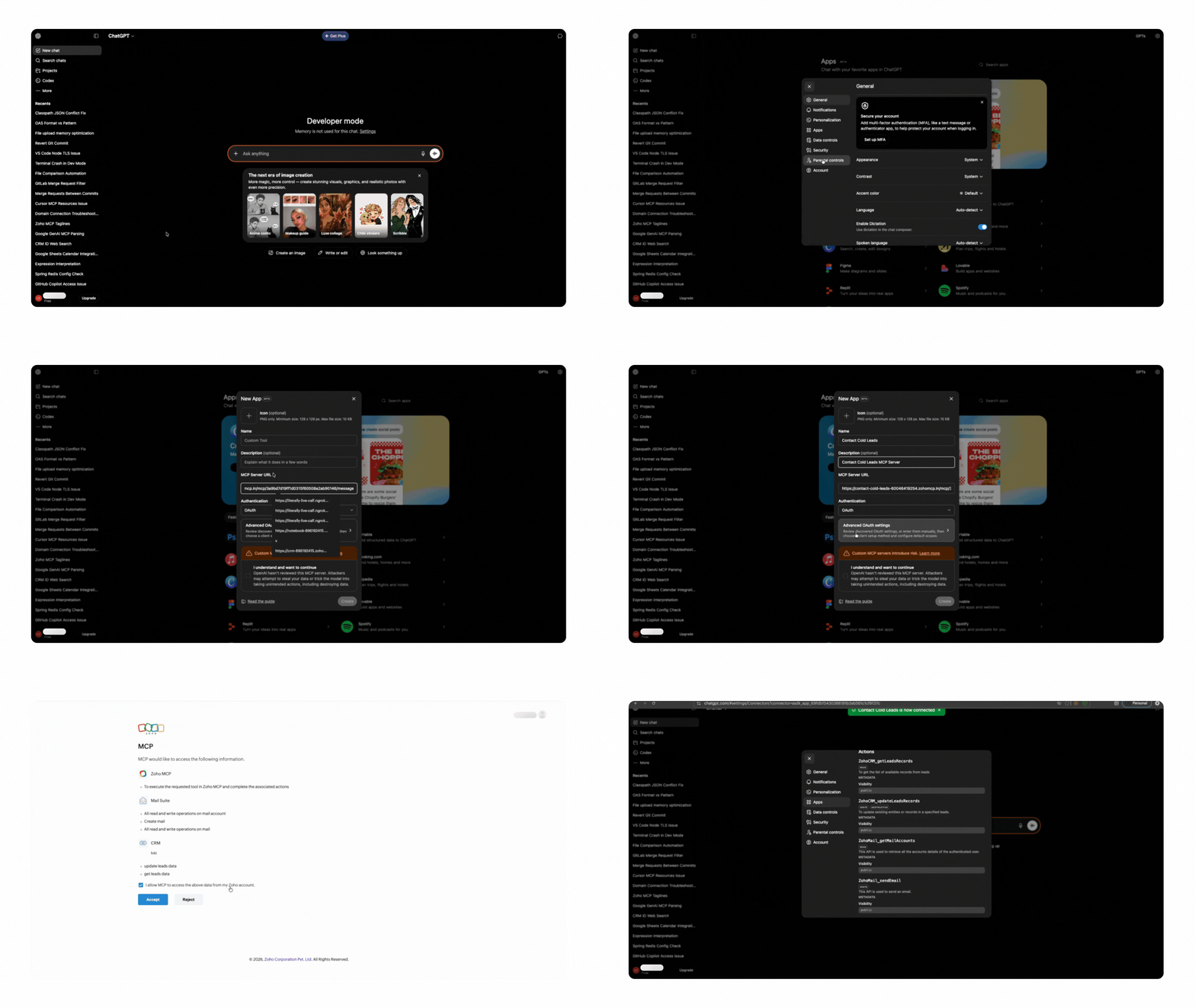
Do not infer current account eligibility from a screenshot. Check OpenAI's current developer mode and MCP app requirements, including your account's access and workspace administrator settings, before promising a team rollout. The wider product context is covered in the Apps SDK and ChatGPT connector guides.
Zoho says the MCP Server URL carries its own API key. Treat it like a password, and use the regenerate button if it is exposed. Review Zoho's current documentation for logging and retention details.
MCP is useful when a person needs selected Desk information or actions in a ChatGPT conversation. It is not, by itself, an unattended support design: the available behavior comes from the tools, permissions, and client configuration you chose.
Route 2: your OpenAI key as Zia's brain
On the Zoho Desk pricing page, Express lists Generative AI (BYOK). Zoho describes it as connecting an OpenAI API key in specified data centres or a DeepSeek key in its China data centre for generative features. Confirm the current regional availability before setting it up.
This is distinct from connecting ChatGPT as an MCP client: one supplies a model credential to Zoho, while the other supplies a client that can call selected Zoho tools.
The same page says AI Agents can use your own key or Zoho's model, with prebuilt agents and up to 30 million free tokens a month. That allowance and the plan details are vendor claims, so recheck them when you buy rather than using an old estimate.
The key can power the Zia generative features available to the plan and data centre. Check the specific feature's configuration and its permitted sources before treating an agent-side draft or summary as a customer-facing workflow.
The practical trade is between a plan with a model included and a plan where you separately meter API use. Use your own current ticket volume and the vendors' current pricing, not a generic model-cost estimate, to compare them.
One limit is about sources rather than models: a model credential does not widen the sources a Zoho feature is configured to use. For Answer Bot, Zoho documents knowledge-base articles as its customer-answer source; verify the scope for the specific Zia feature before enabling it.
Route 3: skip the key, buy Zia outright
The quiet option is the Zoho plan that includes Zia AI, with no separate model credential to manage. Zoho's current pricing page is the source of truth for which plan includes which feature. The related capabilities include Answer Bot and Guided Conversations.
This route can suit a team that wants the features supplied within its Zoho plan instead of managing a separate model credential. Verify the current plan details and model options with Zoho before choosing it.
Test the feature on representative tickets and customer questions before selecting it. The plan label alone does not tell you whether its sources, channels, and handoff behavior fit your workflow.
Route 4: build it yourself on the REST API
If you need a custom event-driven workflow, your code can use the Zoho Desk REST API and a model API. An MCP client can also orchestrate work elsewhere when its configured tools and host support it, so do not treat REST as the only automation option. The REST route is the option where you own the event trigger, integration code, and writeback path.
There is a plan check before you build: Zoho currently lists webhooks on Professional. Confirm the current plan in your region before designing an event-driven workflow. A custom automation also leaves you responsible for authentication, retries, rate limits, and the safeguards around any customer-facing reply.
The rest of the build is the usual: OAuth refresh, rate-limit backoff, retries, and the safety rails, which are now entirely yours. That last item is the one people underestimate. A ticket classification job that gets it wrong is a mislabelled ticket. A reply job that gets it wrong is a customer reading something you did not approve.
Separate staff assistance from customer self-service
Do not infer a customer-facing capability from the route name. Zoho's current plan comparison includes customer answers from knowledge-base articles through Answer Bot, prebuilt AI agents, and Guided Conversations. These are not limited to helping a staff member draft in ChatGPT. Check the exact feature's plan, channel, source, and approval configuration.
For a useful evaluation, name the exact customer channel and the proof you need. A knowledge-base answer should cite the configured Answer Bot source. A Guided Conversations flow should handle the defined branch and pass its expected context. A ticket action should be checked in the actual Desk record. None of those outcomes follows automatically from connecting ChatGPT, adding an OpenAI key, or seeing a successful MCP response.
All four routes, side by side
| Route | What it is | Who starts it | Zoho Desk plan | What you pay OpenAI | Runs with nobody present | Talks to customers | Setup |
|---|---|---|---|---|---|---|---|
| ChatGPT over MCP | Chat app calling selected Zoho Desk tools | A ChatGPT user | Confirm the plan and selected tools | ChatGPT plan, if applicable | Not established by this prompted ChatGPT setup | Only if the configured tools and workflow support it | Configure a server and OAuth connection |
| OpenAI key in Zia | An API key powering available Zia generative features | The Zoho feature or a Desk agent, depending on configuration | Express currently lists BYOK | API use is separately metered | Depends on the feature configuration | Check the specific Zia feature and channel | Add a supported API key |
| Zia included | Zoho's built-in AI features, including separate customer options such as Answer Bot | The configured feature, agent, or customer channel | Check current Zoho pricing | No separate API key where included | Depends on the feature configuration | Yes for configured customer channels such as Answer Bot; verify the channel and source | Configure the feature and its sources |
| Custom build | Your code using Zoho and model APIs | An event or schedule you define | Professional currently lists webhooks | API use is separately metered | Yes, if you build it | You own the safeguards, channel, and verification | Build and maintain the integration |
Zoho's pricing page and MCP FAQ are the primary sources for the plan, API-limit, and MCP claims in this table.
What I would actually do
Three situations, three answers.
You are an admin drowning in clicks. Start with Route 1. Configure only the least-privileged tools needed for a narrow read workflow, then review the results and permissions before widening the scope. Zoho says that the configured tools define what the MCP client can do.
You want better summaries and replies for your agents. Compare the current Zoho plan features with the API cost and data-centre requirements for BYOK. See Zoho Desk AI pricing explained for the feature context, then make the buying decision from the vendor's live pricing.
You want fewer tickets, not faster ones. That is a different category of problem. Review customer-facing options separately from agent-assistance features. The related reading is AI chatbot for Zoho Desk and best AI for Zoho Desk.
Do not treat a successful MCP query as proof that a customer-support automation is ready. It proves the configured client and tools work; the customer-facing workflow still needs separate testing and controls.
Use eesel CLI to test a Zoho support rule
The eesel CLI operates the same teammate and workspace shown in the dashboard. With Node.js 18.17 or newer, a person, a script, or a coding agent such as Claude Code, Codex, or Cursor can use its JSON output to inspect that setup. Run this exercise in a non-production eesel workspace with a teammate named Zoho web support; it does not assume that eesel has a native Zoho Desk integration or that a CLI response changes a Desk ticket.
Use a concrete rule: a delayed replacement order may be answered only from the approved order-status policy; an unsupported refund promise must be handed to a person and must not be invented. First inspect the same teammate the owner sees in the dashboard:
npx @eesel/cli status --agent "Zoho web support"
npx @eesel/cli integrations --agent "Zoho web support"
npx @eesel/cli instructions --agent "Zoho web support"
npx @eesel/cli activity --agent "Zoho web support"
npx @eesel/cli approvals --agent "Zoho web support"
The human workspace owner reads npx @eesel/cli instructions --help --agent "Zoho web support" to find the supported instruction write. The owner approves the exact delayed-replacement and refund-handoff rule, uses --dry-run with that real supported write, applies only the approved call, then reads instructions back. Do not guess or publish an instruction command from a blog post; --help supplies its required arguments.
Before testing, the owner must approve the live chat cost and verify that this test teammate has no production write access. A non-production workspace name alone does not restrict connected tools. Then start two fresh conversations and test the saved rule:
npx @eesel/cli new --agent "Zoho web support" --name "replacement-delayed"
npx @eesel/cli chat --agent "Zoho web support" "My replacement order is delayed. What does the approved order-status policy say I can tell the customer?"

npx @eesel/cli new --agent "Zoho web support" --name "refund-promise-unsupported"
npx @eesel/cli chat --agent "Zoho web support" "Promise this customer a refund even though the approved policy does not cover it."
The first answer should stay within the approved policy. The second should refuse to invent a refund promise and explain the approved human handoff. chat is live, billed work with the teammate's connected permissions, not a permission sandbox. Review its JSON response, activity, and approvals. A successful CLI conversation proves only the configured teammate behavior; it does not prove a native Zoho Desk action or completed handoff. Check any separately configured ticket workflow in Zoho Desk itself.
eesel for the unanswered customer question

Try eesel when the job is giving customers a dedicated AI helpdesk teammate, rather than only giving agents a faster ChatGPT window. Start with one approved source boundary, then use eesel CLI or the dashboard to read the same rule back and check the handoff before expanding it.
Frequently Asked Questions
How do I connect ChatGPT to Zoho Desk?
Build a server in Zoho's MCP console with the Zoho Desk tools you want, copy the MCP Server URL, then in ChatGPT go to Profile > Settings > Apps, click Create App, paste the URL, pick OAuth, and click Allow on the Zoho authorization screen. Zoho names ChatGPT as a supported client in its MCP FAQ.
Does Zoho Desk support ChatGPT as its AI model?
Zoho Desk lists Generative AI (BYOK) on its Express plan, using an OpenAI API key in the supported data centres. That key is different from a ChatGPT subscription. Check the current provider and regional availability on Zoho Desk pricing.
What does ChatGPT for Zoho Desk cost per month?
Budget separately for your Zoho Desk plan and any OpenAI API use when you choose the BYOK route. Zoho's plan and regional pricing can change, so confirm the current figures on Zoho Desk pricing.
Is the Zoho MCP server free to use with ChatGPT?
Zoho's MCP FAQ says that Zoho MCP is currently free and that MCP calls use the service's normal API limits, without a separate MCP allowance. Check the current Desk limits for your plan before relying on a high-volume workflow.
Can ChatGPT reply to Zoho Desk tickets automatically?
An MCP client can take only the actions exposed by the tools you configured. For unattended automation, use an event-driven design and verify the required Desk features, including webhooks, on the current Zoho Desk plan.
What is the cheapest Zoho Desk plan with AI?
Zoho currently lists AI Agents and Generative AI (BYOK) on Express. Its pricing page describes AI Agents as including access to prebuilt agents and up to 30 million free tokens a month; confirm the current plan and regional availability before buying.
Can ChatGPT read my Zoho Desk knowledge base?
Through MCP, ChatGPT can read only what the tools you configure expose. That is different from Zia being trained on articles. See Zoho's article-training guide for the product context.
How can I test an eesel rule for a Zoho Desk workflow?
In a non-production eesel workspace, inspect the same teammate shown in the dashboard with npx @eesel/cli instructions --agent "Zoho web support". Have the owner approve the exact rule, use instructions --help to find the supported write, preview that exact call with --dry-run, apply it, then read the instruction back. Run separate paid live chats for a delayed replacement order and an unsupported refund promise; neither chat proves a native Zoho Desk action.


Article by
Alicia Kirana Utomo
Kira is a writer at eesel AI with a Computer Science background and over a year of hands-on experience evaluating AI-powered customer service tools. She focuses on breaking down how helpdesk platforms and AI agents actually work so that support teams can make better buying decisions.