Sembly AI pricing at a glance
Everything below comes off the Sembly pricing page, checked on 20 August 2026, with a second column of facts pulled from Sembly's help-center article on the March 2026 plan restructure. The two documents do not say the same things, and the difference matters.
| Basic | Pro | MAX | Enterprise | |
|---|---|---|---|---|
| Annual, per month | $10 | $20 / user | $30 / user | Quote |
| Billed monthly | $17 | $29 / user | $39 / user | Quote |
| Annual, as a yearly total | $120 | $240 / user | $360 / user | Quote |
| Real annual discount | 41.2% | 31.0% | 23.1% | n/a |
| Minimum users | 1 | 1 | 3 | 10 |
| Maximum users | 1 | 40 | 500 | Unlimited |
| Cheapest real annual bill | $120 | $240 | $1,080 | Not published |
| Free trial length | 7 days | 7 days | 7 days | Custom |
| Meeting hours per user | Unlimited | Unlimited | Unlimited | Unlimited |
| Upload hours per user | 5 | 10 | 15 | 15 |
| Video capture | None | Standard | HD | HD |
| Video history | None | 1 year | Unlimited | Unlimited |
| Meeting history | 1 year | 2 years | Unlimited | Unlimited |
| Multi-meeting AI chat | No | Yes | Yes | Yes |
| AI Artifacts per user | 0 | 5 | 40 | 40 |
| AI Insights per user | 0 | 5 | 40 | 40 |
| Native automation rules | 3 (workspace) | 5 / user | 20 / user | 20 / user |
| Webhooks | None | 5 / user | 20 / user | 20 / user |
| MCP access | No | Yes | Yes | Yes |
| REST API | Not published | Not published | Not published | Not published |
| Custom SSO | No | No | Yes | Yes |
| Audit log | No | No | Yes | Yes |
| HIPAA | No | No | Yes | Yes |
| Priority support | No | No | Yes | Yes |
| Model-training opt-out | Opt-out setting | Opt-out setting | Opt-out setting | Excluded by default |
| Languages | 40+ | 40+ | 40+ | 40+ |
| Overage rate, any meter | None published | None published | None published | Not published |
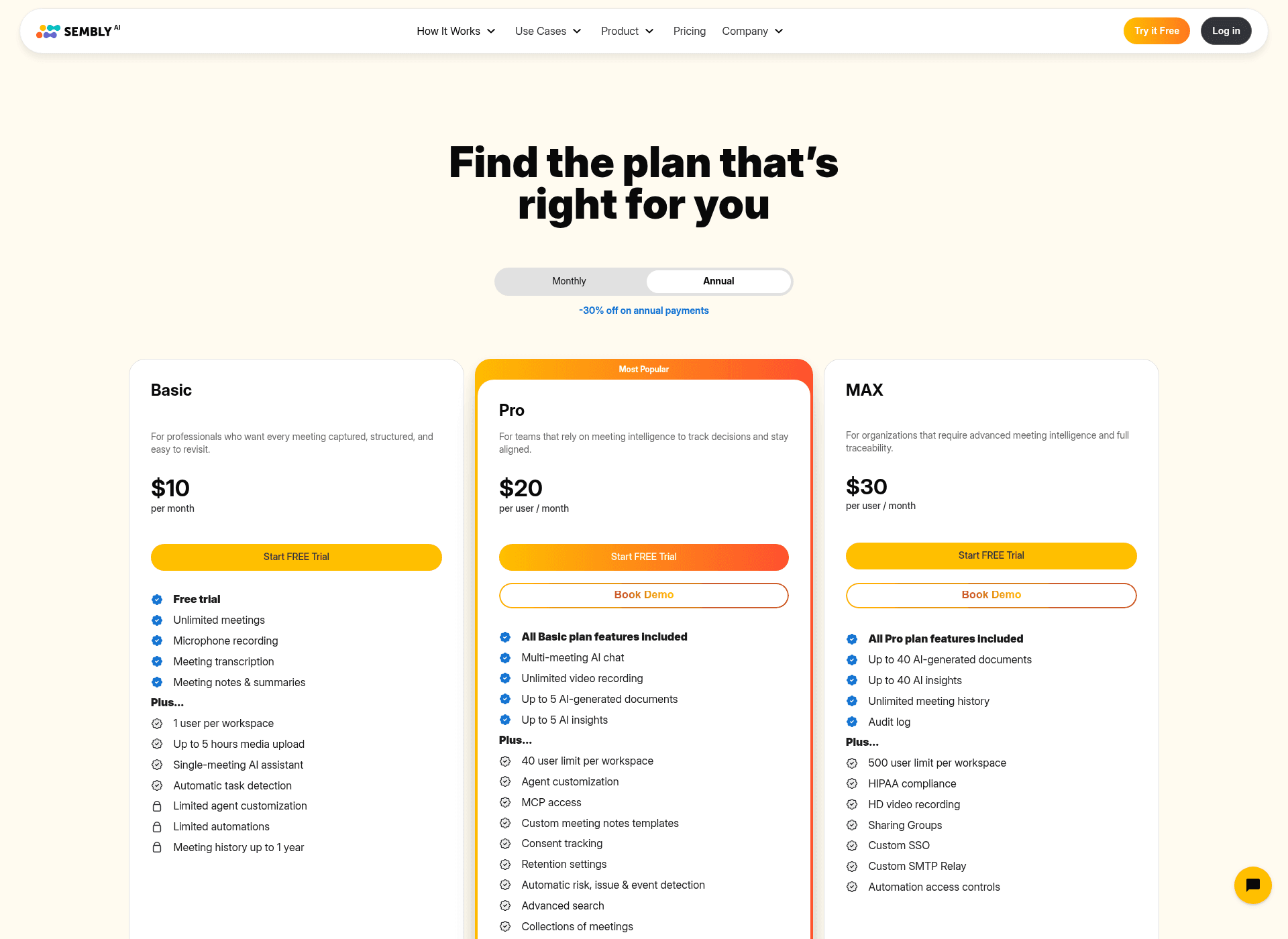
Two things about that screenshot before we go further. The Annual tab is already selected when the page loads, so the $10 / $20 / $30 you see first are the annual-billed rates and not what a monthly subscriber pays. And look at the small print under Basic's price: it reads "per month", while Pro and MAX read "per user / month". That one missing word is the whole story of the cheapest tier.
The four numbers Sembly's price card leaves out
This is the part I would want someone to tell me before a procurement call. All four of these come from Sembly's own properties, so none of it is guesswork, but only one of them is anywhere near the pricing page.
1. The trial is 7 days. The pricing page puts a "Start FREE Trial" button on all three cards and never says how long the trial lasts. Sembly's help-center rate card does, in a plain row: 7 days on Basic, Pro and MAX. Seven days is a tight window for a tool whose value shows up across a month of meetings, and it is worth knowing before you schedule your evaluation.
2. MAX charges for three seats whether or not you have three people. The comparison table lists a minimum of 3 users against MAX, which reads like a rule you might negotiate. The help-center footnote is much more concrete: three seats are created automatically at signup, and once the trial ends "the subscription charge will apply for these three user seats". So MAX's entry price is $90 a month annually or $117 monthly. A solo consultant who needs the audit log pays for two colleagues who do not exist.
3. Enterprise has a 10-seat floor. The pricing page's Enterprise block lists custom contracts, invoicing, security reviews and a dedicated success contact, with no price and no minimum. The help-center table prints a minimum of 10 users. That is a useful thing to know before you ask for a quote, because it sets the shape of the smallest possible Enterprise deal.
4. Annual is billed as a yearly total, not a monthly rate. The website shows $10 / $20 / $30 per month. The help center shows $120, $240 per user and $360 per user per year. Same arithmetic, different psychology, and the second version is what lands on the invoice.
None of that is hidden exactly. It is just filed somewhere a buyer reading a pricing page has no particular reason to look, and the gap between the two documents is where budget surprises live.
The seat rule decides your price, not the feature list
Most pricing pages want you to read down a column and pick the row of features you need. Sembly's does not really work that way, because before the features get a vote, your headcount has already picked your plan for you.
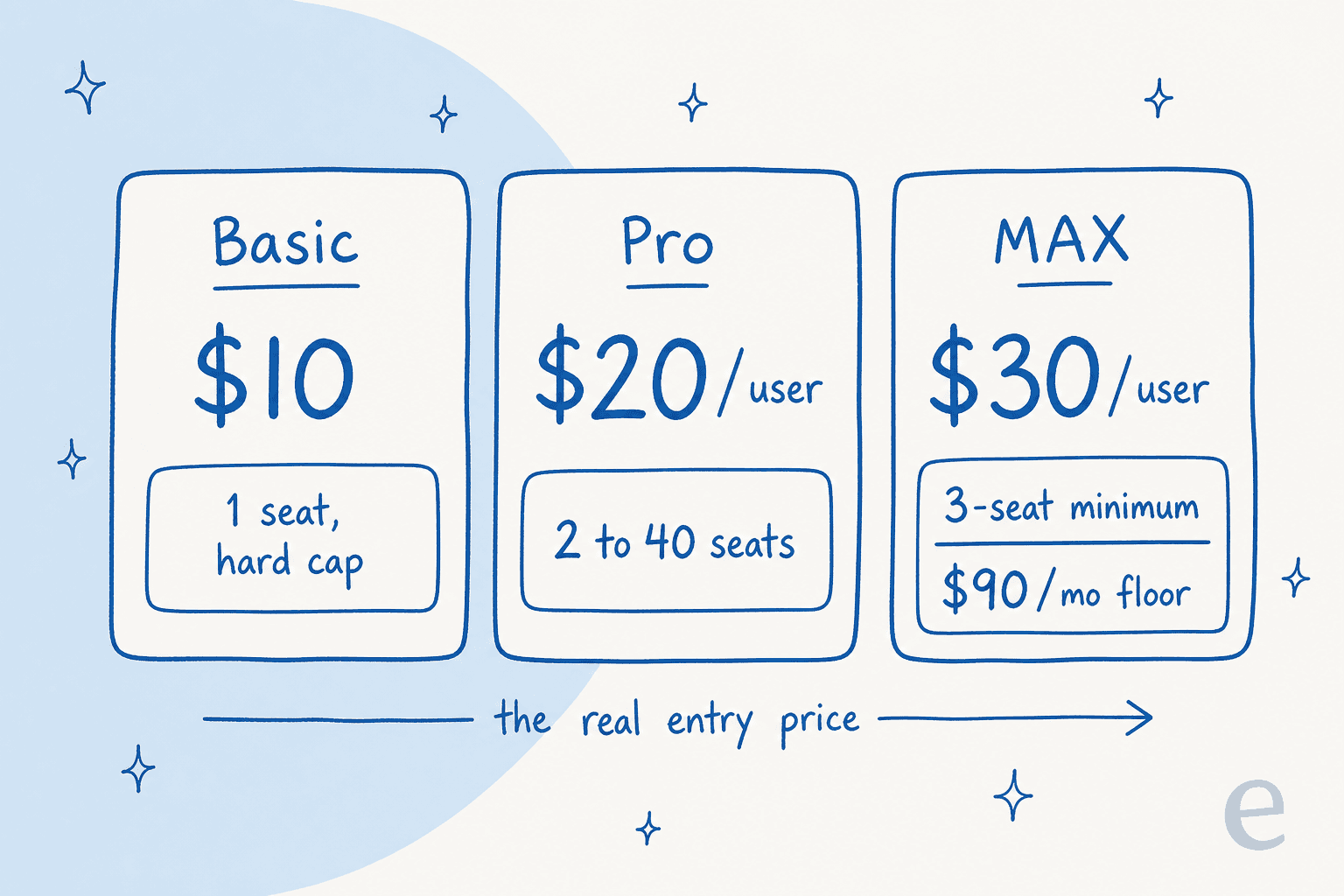
Here is the ladder as you actually walk it. One person, no compliance requirement: Basic at $120 a year, and it is a decent single-seat notetaker. Add a second person and Basic is simply unavailable, because the workspace maximum is one, so you land on Pro at $480 a year for the pair. Add an SSO requirement from IT and you are on MAX, minimum three seats, $1,080 a year, even if the team is still two people.
That is a 9x jump from the cheapest published number to the cheapest number a compliance-conscious small team can actually buy, and none of it comes from a usage increase. The screenshot below is the row that does it, straight out of Sembly's comparison table.
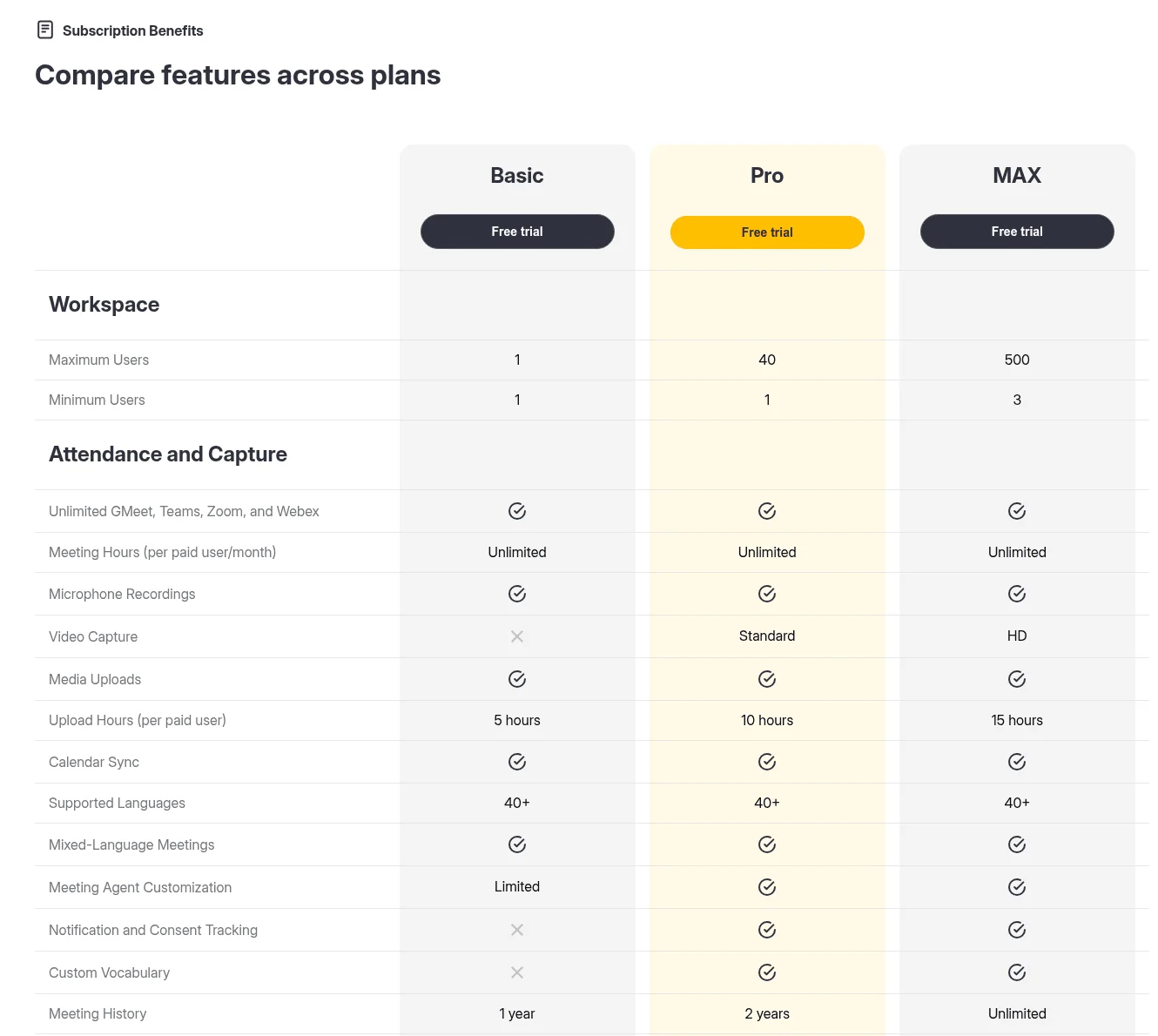
I want to be fair here, because this is not a trick. Sembly publishes both the minimum and the maximum, in a labelled block, near the top of the table. Plenty of vendors in this space publish neither. It is just that the numbers sit in a "Workspace" section that most people scroll straight past on the way to the feature rows, and they are the two cells with the biggest effect on the bill.
The calculator below runs that logic for you. Put in your headcount, tick what you actually need, and it will tell you which plan the rules force you onto and what the invoice looks like both ways.
Tick the SSO box at two seats and the yearly figure goes from $480 to $1,080. Nothing about how much you use the product changed. This is the same pattern I see across AI tools for IT support: the compliance row, not the usage row, is what reprices the account.
Worth saying plainly, because the calculator makes it look worse than it is. Sembly is not expensive for what it does. A ten-person Pro workspace is $2,400 a year for unlimited recording across four platforms in 40-plus languages, which is competitive. The problem the calculator exposes is narrower and it is about shape: the price steps are triggered by rules rather than by usage, so the increments are lumpy in a way a budget spreadsheet does not expect. A team of two that grows to three pays 50% more. A team of two that adds an SSO requirement pays 125% more. Neither of those is a usage change, and both are the sort of thing you want to know in month zero rather than month seven.
What Sembly actually meters
Here is where Sembly is more generous than the category, and also where the real ceiling hides. Meeting hours are unlimited on Basic, Pro and MAX. Microphone hours and video capture hours are unlimited on every paid tier. If your worry is "will it stop recording halfway through October", it will not.
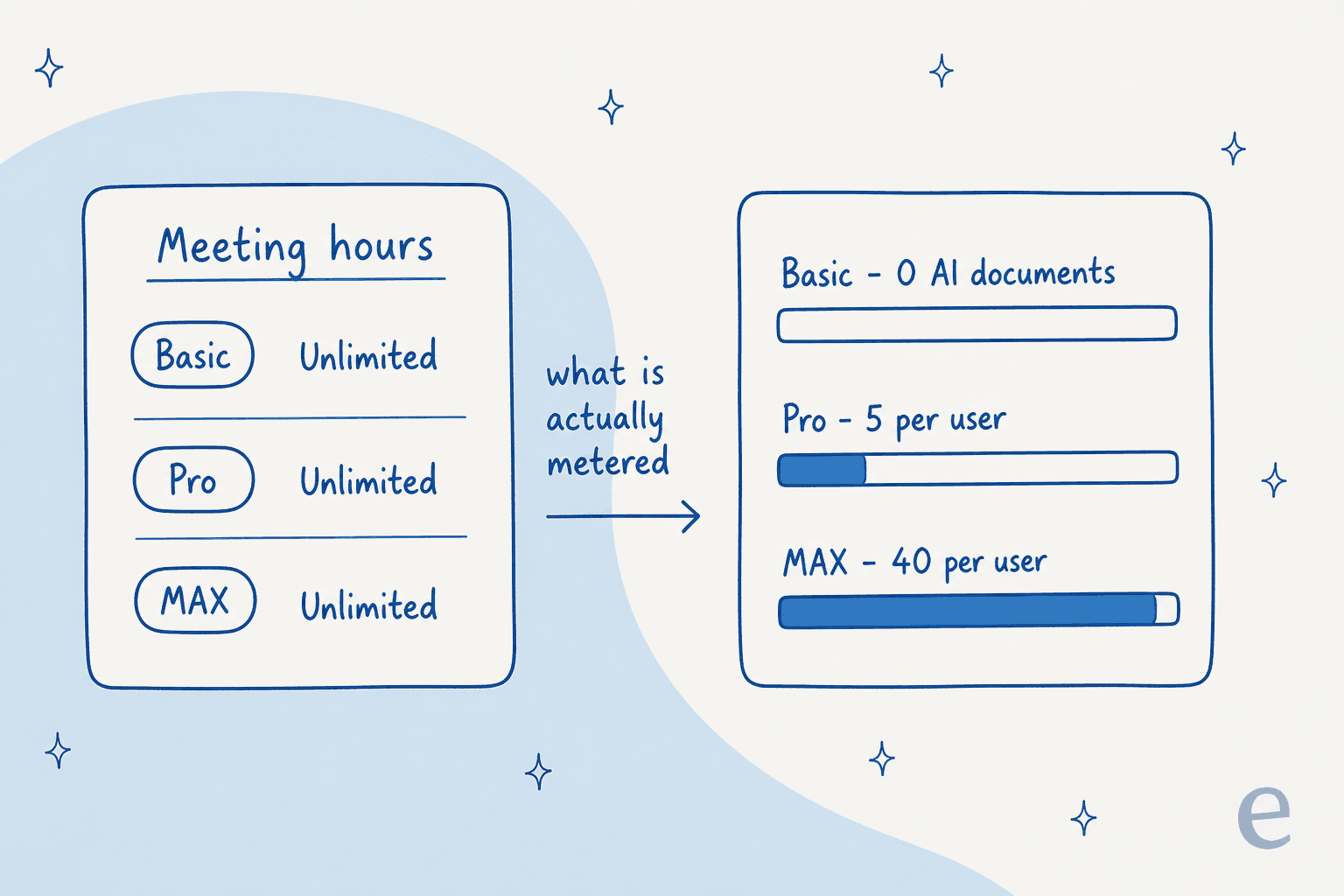
What is metered is the output. AI Artifacts, which is Sembly's name for the generated documents, and AI Insights run 0 on Basic, 5 per user on Pro and 40 per user on MAX. Sembly's own FAQ describes the product as "an agentic meeting intelligence platform, not just an AI notetaker" and names the deliverables it generates: consulting proposals, project reports, gap analyses, board summaries, investment memos, compliance summaries. Those deliverables are the thing you are buying, and they are the thing that is capped. It is the same billing shape you see across the current crop of AI teammates, where capture is cheap and the generated work is the meter.
Task detection sits on the other side of that line. Automatic tasks are included on every plan and are not metered, which puts Sembly level with the sort of action item extraction most tools now ship for free. What costs money is turning those tasks into a document somebody outside the meeting will read.
There are three other meters, all of them quieter:
- Upload hours, at 5, 10 and 15 per user a month. This is the only capture number that never goes unlimited, and it stays at 15 even on Enterprise. Uploaded files are capped at five hours' duration and 500 MB each.
- Automation rules, at 3 on Basic (a flat workspace number, not per user), then 5 and 20 per user. Sembly's footnote defines the unit precisely as "a fixed number of rules that each user or admin can create", so it counts configurations rather than runs. Webhooks follow the same 0 / 5 / 20 shape. Zapier is available on every paid plan, which is the escape hatch when the native rule count runs out.
- Retention, which is a meter with a different face. Basic keeps a rolling year, Pro two years, MAX unlimited, and transcript search reach is pinned to that same window. Paid Basic keeps no video at all, and video history only becomes unlimited on MAX. Retention is also a governance question rather than a storage one, and the same tradeoffs we wrote up for redacting PII in transcripts apply to a meeting archive.
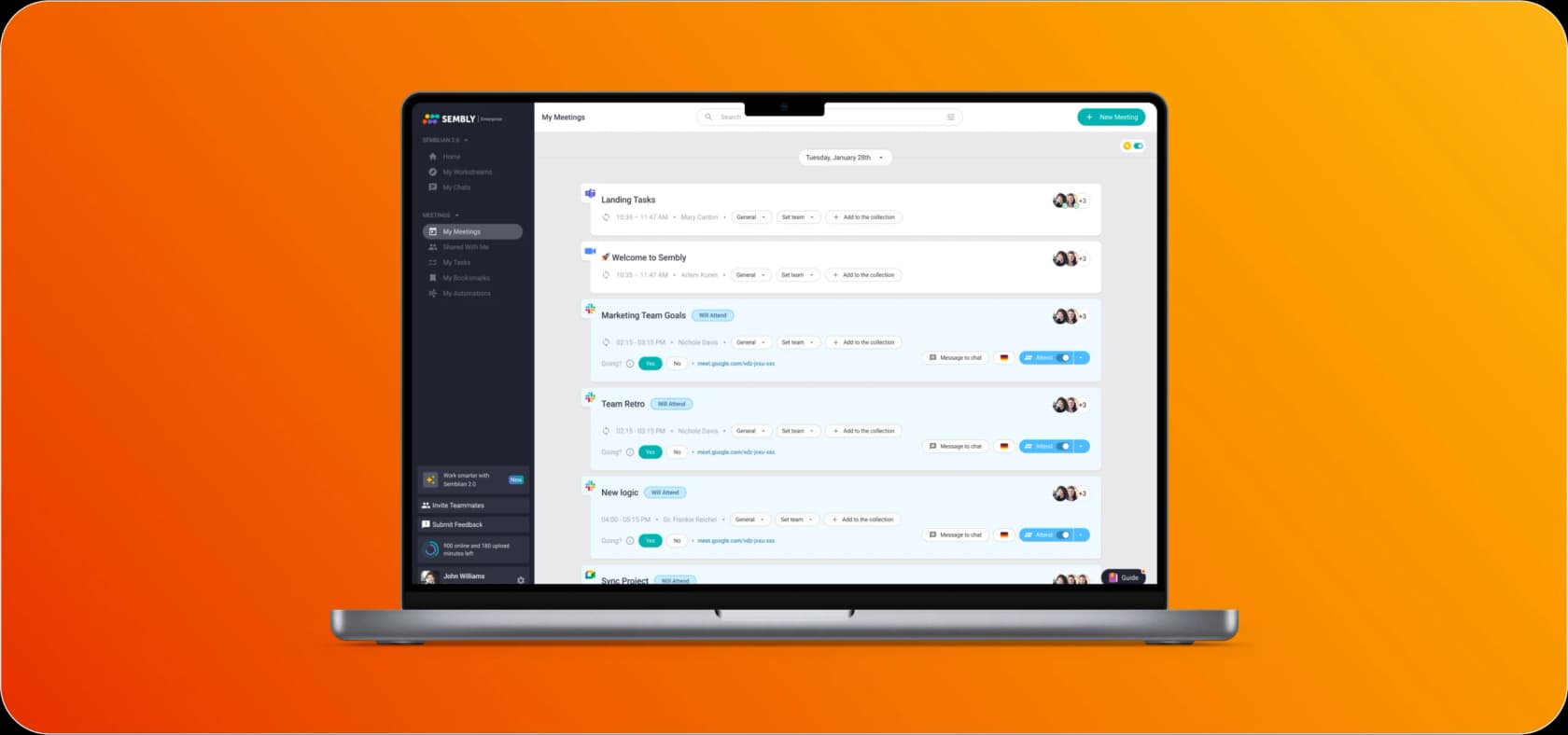
No overage rate is published for any of these. The page states the caps and stays silent on what happens when you hit one, which means the allowances behave like ceilings rather than starting balances with a top-up price attached. Sembly's own app surfaces the counter, which at least means you can watch it drain.
I have a soft spot for this failure mode because I have watched it play out on our own side of the fence. An Ontario naturopathic doctor signed up for a $99-a-month content plan at eesel, generated more than twenty posts across about three weeks, front-loaded everything she needed, and cancelled at the one-month mark. She was not unhappy with the output. She had simply spent the allowance and there was nothing left for the flat fee to buy. An output meter on a monthly subscription rewards bursty use and punishes steady use, and 5 documents per user a month is exactly the sort of number that feels roomy in month one and tight in month four.
The annual discount runs backwards
The billing toggle carries a single line under it: "-30% off on annual payments". That figure is an average of the three plans, not a rate any one of them gets.
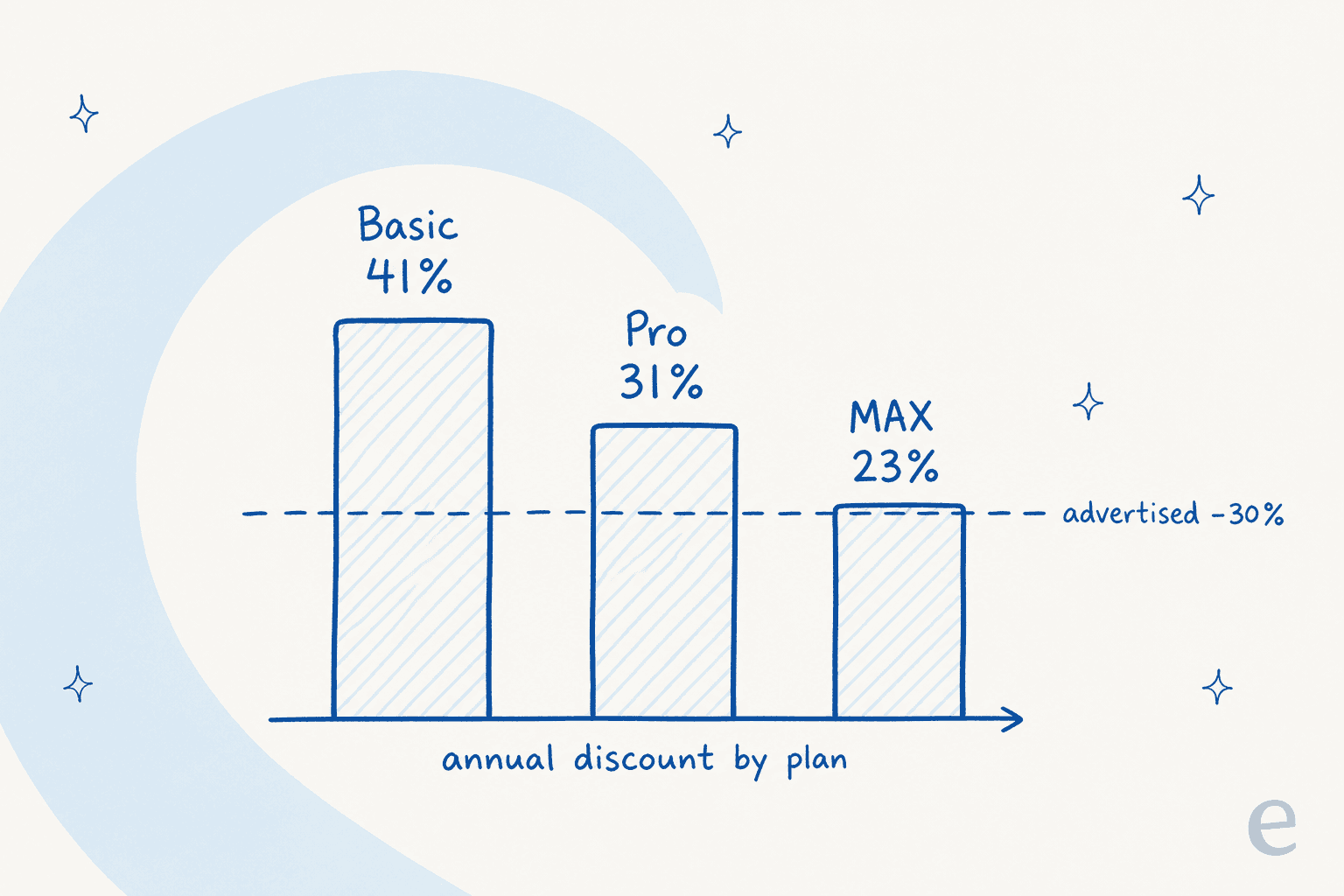
Run the arithmetic off Sembly's own two rate columns and it comes out at 41.2% on Basic ($17 to $10), 31.0% on Pro ($29 to $20) and 23.1% on MAX ($39 to $30). Only Pro is near the advertised number. The plan that asks for the largest annual commitment gets the smallest discount for making it, which is backwards from how volume pricing normally works and worth naming out loud if you are in a negotiation.
In dollars, on a ten-seat Pro workspace the annual commitment saves $1,080 a year. On a ten-seat MAX workspace it saves $1,080 too, on a bill that is 50% larger. Same saving, bigger commitment.
Plan by plan, and who each one is actually for
Basic, $10 a month annually or $17 monthly
A single-seat notetaker, and a reasonable one. You get unlimited meetings across Google Meet, Teams, Zoom and Webex, microphone recording for in-person conversations, transcription, notes, summaries, automatic task detection and single-meeting AI chat. Five upload hours a month, a rolling year of history, three automation rules.
Coverage is one of the un-gated strengths here. Native, no-install joining works on all four major platforms on every plan, so Zoom AI notes and Microsoft Teams AI notes cost the same as each other. In-person meetings are covered by microphone recording, which is available even on Basic. The underlying transcription is time-stamped with speaker identification across 40-plus languages, in the same bracket as any other audio transcription engine you would compare it against.
What is not here is the interesting part, because paid Basic is where the March restructure concentrated its restrictions. No video capture at all, no multi-meeting AI chat, no AI Artifacts, no AI Insights, no custom vocabulary, no consent tracking, no retention settings, no sentiment analysis, no analytics dashboard, no MCP access, no webhooks. And one user per workspace, hard.
If you are one person who wants meetings written down and searchable for a year, this is $120 well spent, and it compares fine against Otter's pricing at the same tier. If you expect to share anything with a colleague, it is not the plan. Anyone weighing the two directly should read our Otter review alongside this, since Otter's Basic is free where Sembly's entry tier is not.
Pro, $20 per user annually or $29 monthly
This is the actual product, and Sembly badges it Most Popular. Pro is where multi-meeting AI chat arrives, which is the feature that turns an archive of transcripts into something you can query, and it is the difference between a notetaker and the AI assistant Sembly is positioning. You also get standard-quality video, a year of video history, custom note templates, sentiment analysis, risk and issue detection, collections, advanced transcript search, custom vocabulary, an analytics dashboard, consent tracking, retention settings, MCP access and workspace-wide automations.
The allowance to watch is 5 AI Artifacts and 5 AI Insights per user a month. A five-person Pro team has 25 generated documents a month between them, which is fine for a team that writes one client summary a week and thin for a consultancy that produces a deliverable per engagement.
Multi-meeting chat is also the feature that makes the archive behave like a searchable internal knowledge base rather than a folder of transcripts, which is a fair chunk of why the jump from Basic matters more than the $10 suggests. If your team already keeps decisions in Notion, our walkthrough of Notion AI meeting notes covers the overlap.
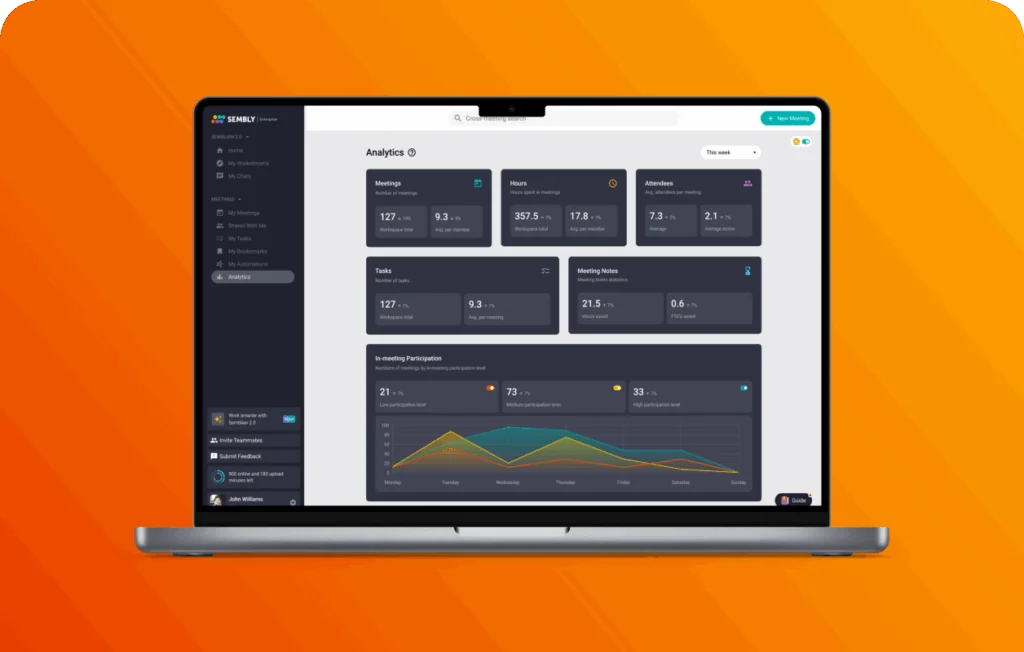
The analytics dashboard above is one of the Pro gates that is easy to overlook and hard to give back once a manager has seen it. It is also, along with auto-sharing and retention settings, the point where Sembly stops being a personal tool and starts being something a team lead reports off.
One card-versus-table mismatch to note: Pro's plan card says "Unlimited video recording" while the comparison table grades Pro's video capture as "Standard" and reserves "HD" for MAX. Both are true. Unlimited quantity, standard quality.
MAX, $30 per user annually or $39 monthly, minimum three seats
MAX buys two distinct things. First, 8x the generative allowance, 40 Artifacts and 40 Insights per user, for a 50% higher seat price, which is the only place in Sembly's ladder where paying more gets you meaningfully cheaper units. Second, and more decisively, the entire compliance and administration block: custom SSO, audit log, automation access controls, custom SMTP relay, sharing groups, HIPAA and priority support. Every one of those rows is No on Basic and Pro.
Which makes MAX less a premium tier than a gate. If your IT team requires single sign-on, your price is $1,080 a year minimum and there is no route around it. That is not unusual, plenty of tools park SSO behind the top tier, but the three-seat auto-provision means the penalty lands hardest on the smallest buyer. Unlimited meeting history and HD video come along too.
Enterprise, quote-only, minimum ten seats
The pricing page describes Enterprise as "everything in Max, plus custom contracts, invoicing, security reviews, and a dedicated success contact", with a contact form and no numbers. It has no column in the comparison table at all. Two facts are worth carrying into that conversation.
The first is the 10-seat minimum from the help center. The second is buried in the privacy block rather than the plan card: "We DO NOT use audio, video, or text data from Enterprise Plan customers for model training. Other plans can manage this with opt-out settings." So training exclusion is default-on at Enterprise and opt-out-only on Basic, Pro and MAX. If model-training posture is a hard requirement in your security review, that sentence is the one that decides your tier, and it is not in any feature table.
Also notable: upload hours do not improve at Enterprise. It stays at 15 per user a month, same as MAX. For a large workspace that is treating Sembly as a system of record, that cap is worth modelling against whatever knowledge base management process you already run, because it is the one number that does not scale with the contract.
Security, compliance, and where the money really goes
Sembly's baseline posture is solid and does not depend on your plan. GDPR compliance and SOC 2 Type II apply across the board, dated on the pricing page to 11 August 2022, with detail in the Sembly trust center. The FAQ adds Microsoft 365 Certification, US and EU data residency, role-based access controls, configurable retention, and compliance claims for FERPA, PCI DSS and EU-USDPF.
What is plan-dependent is everything an administrator needs to prove the posture holds. HIPAA is a MAX row. So is the audit log, and so is custom SSO. Sembly's FAQ phrases HIPAA more broadly, saying it "has undergone HIPAA as part of SOC 2 Type II and HIPAA audit", but the comparison table is the plan-specific answer and the table says MAX. When those two disagree, cite the table. Gating the trail behind the top tier is common enough, and the equivalent Zendesk audit log sits the same way.
The practical version, for anyone who has run a vendor security review: the questionnaire will ask for SSO, an audit trail and a training-data position. Answering all three honestly puts you on MAX at minimum, and the training-data answer specifically pushes toward Enterprise. Budget accordingly rather than off the $30 card. Our notes on HIPAA-compliant AI and on SOC 2 and GDPR cover what those reviews usually ask for.
The legacy-plan cliff, and the one-way door
If you were already a Sembly customer before 1 March 2026, your pricing conversation is a different one, and it has a deadline.
Sembly's plan-change article names four legacy plans, Personal (free), Professional, Team and Team Plus, and treats their customers three different ways. Free Personal users were moved immediately to a capped Basic free trial with no card required and, in the article's own words, "You will not have access to any of the legacy plans." Professional, Team and Team Plus customers were grandfathered: "there will be no immediate changes... You will continue to use Sembly legacy plans as usual by December 2026. We will inform you about automatic migration to new plans later this year."
Three things follow from that, and each one belongs in a budget plan:
- Legacy plans are maintenance-only. They "will continue to receive bug fixes and updates", but "new features will be introduced only to Basic (both free and paid), Pro, MAX, and Enterprise". So the price you are paying is buying a product that has stopped moving.
- Switching is irreversible. The workspace plans screen says it plainly: "this action is final, and you won't be able to switch back to a legacy plan." Billing is handled cleanly, unused legacy balance is prorated onto the new subscription, but the door only opens one way.
- Semblian 2.0 as a paid add-on is gone for legacy Professional, and existing holders keep it only while they stay on the legacy plan with an active subscription through year end. Cancel it and, per the article, "you won't be able to renew it". Semblian is bundled into Pro, MAX and Enterprise, and switching down to Basic removes access.
Sembly's recommended path for a legacy Professional customer with the Semblian add-on is Pro, since Pro includes it by default. Worth pricing that against your current rate before December, because the article publishes no legacy prices at all, so the old-to-new delta is something only your own invoice can tell you.
What buyers actually say about the price
Sembly's review footprint is thin but not empty. G2 carries 46 reviews at 4.6 out of 5, which is the only sample with real weight. Trustpilot has three reviews averaging 3.5, and the Capterra listing has zero reviews despite showing a $20 starting price and 92 tagged features. Nobody in that set calls Sembly expensive in the abstract. The complaint is specifically about how it scales.
"It is pricing and when adding team members it adds up."

That is from a five-star reviewer, which is what makes it useful. Somebody who likes the product still names per-seat scaling as the drawback. G2's machine-extracted cons list runs AI Inaccuracy, Inadequate Summarization, Inadequate Search Functionality, High Subscription Cost, Editing Issues, in that order, so cost is present but not dominant.
The sharpest one for a buyer is a three-star review whose "what do you like" field is the most damaging kind of neutral:
"Same features as other similar tools. It is not a bad product; I would decide based on pricing."
That reviewer's headline was "Common product, bad support", and their specific issue was billing: "We had an issue with an invoice and they did not solve it because their system does not allow them to do it." There is a matching Trustpilot one-star about a CRM automation not working and a refund being refused, and in fairness Sembly replied publicly on that review and reversed the decision, closing with "Since the solution didn't meet your needs, we've issued a full refund." Cite the complaint, cite the refund.
One quote needs a caveat rather than a citation. A reviewer wishes for "more than 10 free AI Chat prompts for the free version", which describes the legacy free Personal plan. That plan no longer exists, so the constraint they hit is not one a new signup will meet. What a new signup meets instead is the 7-day trial and its one-hour capture caps.
And a note on sourcing, because it matters for this vendor specifically. Sembly runs its own subreddit, so its Reddit footprint is largely vendor-shaped rather than independent, and searches for Sembly cancellation, refund and price-increase threads on the allowed community platforms turned up nothing on topic. There is no community evidence of a price rise, so I am not going to imply one.
The question the price card cannot answer
Here is my honest read after going through all of this. Sembly's rate card is more transparent than most of the category, and the product it prices is a real one. The uncertainty is not "how much does it cost". It is "how much of the metered thing do we need", and neither Sembly nor any other vendor can answer that from a pricing page, because it depends on your team's month.
The 7-day trial is where that lands hardest. Seven days of meetings will tell you whether transcription quality holds up on your accents and your jargon. It will not tell you whether 5 AI Artifacts per user a month is generous or tight, because you cannot generate four months of demand in a week. So the honest sequence is: use the trial for accuracy, start on monthly billing rather than annual, watch the usage counter for a full cycle, and only then decide whether to lock in twelve months at the discount that shrinks as you go up-tier.
That is also the single principle I would carry to any tool with an allowance meter, whether it is a meeting notes app or a helpdesk copilot: find out what your real monthly volume is on somebody else's dime before you commit to a year of it. The same trap shows up in the wider Otter alternatives field, where several vendors publish generous capture limits and quiet output limits.
If your real problem is the work that comes after the meeting
One boundary worth drawing, because it is where a lot of buyers get the budget wrong.
Sembly's job ends at the record. It captures the meeting, writes the notes, detects the tasks and generates documents from them, and its automations push those outputs somewhere else. Every verb on its automations page points outward, its Zapier listing carries triggers rather than actions, and there is no helpdesk or ticketing destination in the integration set at all. No Zendesk AI row, nothing for Front, nothing for Jira. Sembly is not trying to be that, and holding it to that standard would be unfair. It is just a real gap to know about if you assumed the notes would turn into resolved work on their own.
The FAQ does claim Sembly "syncs action items to Salesforce, Slack, and 50+ tools" without saying which plan that needs, so treat CRM gating as unpublished. Sync is still a one-way push either way: a task lands in Salesforce or in Slack and then a person picks it up.
If the thing actually eating your team's week is the queue, that is a separate line item with a completely different unit. This is the part I work on. eesel connects to the helpdesk you already run, learns from your past tickets and your knowledge base, and handles conversations end to end rather than summarising them.
Three differences that matter if you have just read this far into a seat-pricing article:
- No seats, and no seat floor. eesel charges from $299 a month for 500 credits, where one credit is one ticket or chat handled, one conversation counting once however many messages it takes. There is no per-user rate, so nothing gets provisioned on your behalf and nothing needs three of anything. A full blog post is priced separately at $4, and dashboard lookups are mostly free. We put the arithmetic side by side in cost per resolution.
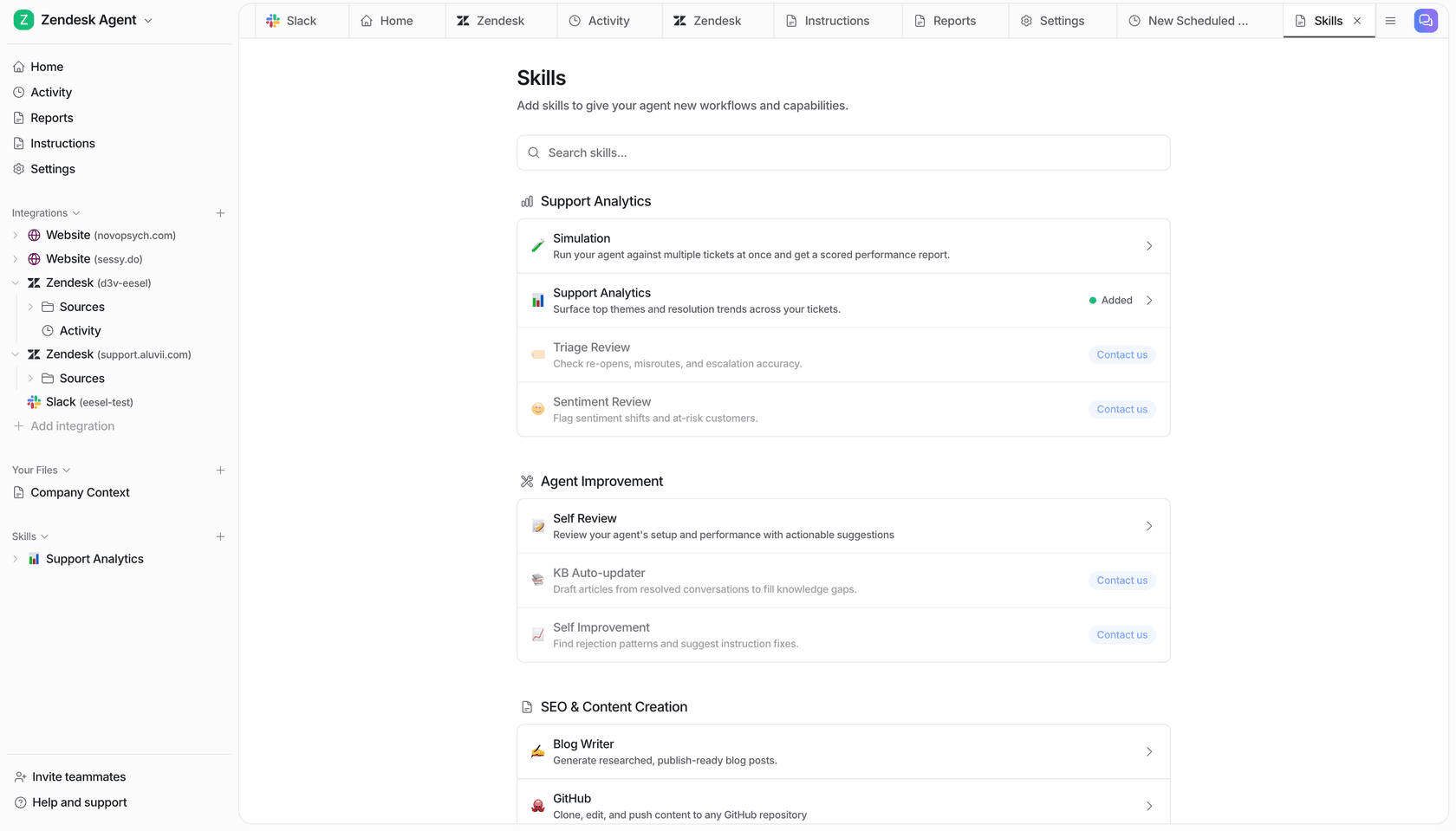
- You can see it work before you pay for it. The Simulation skill replays your own closed tickets and scores the agent's answers against what your team actually sent, then hands back the gaps and the instruction changes that would close them. That is a real dry run on your own history, not a seven-day window and a hope.
- The trial is usage, not a countdown. 100 free credits, no credit card, so the evaluation ends when you have learned something rather than when a clock runs out. Optional overage with a cap you set is available too, which is the thing I would want given everything above about unpublished overage.
If your meetings are the problem, Sembly is a sensible tool and Pro is the plan. If the meetings generate work that then sits in a queue, an AI helpdesk agent is the line item you actually want, and that is what we built eesel for. Try eesel free and point it at your own closed tickets first.
How I would budget for Sembly in four steps
- Count your seats honestly, then check the rule. One person is Basic at $120 a year. Two is Pro at $480. Any SSO or HIPAA requirement is MAX at $1,080 minimum, regardless of headcount, because of the three seats it creates for you.
- Start monthly, not annual. $29 per user on Pro costs $9 more a month than the annual rate and buys you the right to leave. Given the 7-day trial cannot size your document allowance, that is a fair price for one real billing cycle of data.
- Watch the Artifacts counter, not the meeting counter. Meeting hours are unlimited, so they will never be the constraint. The 5-per-user allowance on Pro is what will bite, and no overage rate is published, so find out before you scale the workspace.
- If you are on a legacy plan, decide before December 2026. Legacy plans get bug fixes only, the migration is coming either way, and switching voluntarily is one-way. Pricing that move deliberately beats being auto-migrated into it.
Frequently Asked Questions
How much does Sembly AI cost?
Does Sembly AI have a free plan or a free trial?
What is Sembly AI's pricing for small teams?
Why does Sembly MAX cost more than the $30 on the price card?
What does Sembly AI actually meter?
Is Sembly AI's annual discount really 30%?
Does Sembly AI pricing include SSO and HIPAA?
What happens to Sembly's legacy Professional and Team plans?


Article by
Kira
Kira is a writer at eesel AI with a Computer Science background and over a year of hands-on experience evaluating AI-powered customer service tools. She focuses on breaking down how helpdesk platforms and AI agents actually work so that support teams can make better buying decisions.