The 8 best Sprout Social alternatives in 2026

Kurnia Kharisma

Katelin Teen
Last edited August 29, 2026

Why teams look for Sprout Social alternatives
Let me say the fair part first, because it matters: Sprout Social is genuinely good software. It is clean, it is easy to learn, and its 4.4-star average across nearly 7,000 reviews is not an accident. When people go looking for alternatives, it is almost never because the product is bad. It is because of the bill.
I have spent the last few years around AI support tooling, watching teams pick, outgrow, and switch these platforms, and the same three reasons come up again and again.
Reason one: per-seat pricing punishes growth. Sprout bills per seat, per month, and the seats are not cheap. This is the single loudest complaint in the community, and it is remarkably consistent:
"Sprout is a great tool, no doubt. However, being too pricey hurts the growing teams. Especially the features they are providing."

Every teammate you add is another full seat at the plan rate. A five-person community team is paying five times over even when they are all working the same handful of profiles.
Reason two: the care features live at the top of the ladder. If you are using Sprout for social customer care specifically, the features you need, sentiment in the Smart Inbox, helpdesk integrations, care and productivity reports, and message spike alerts, are all gated to the Advanced plan at $399 per seat per month. Not $199. Not $299. The top self-serve tier.
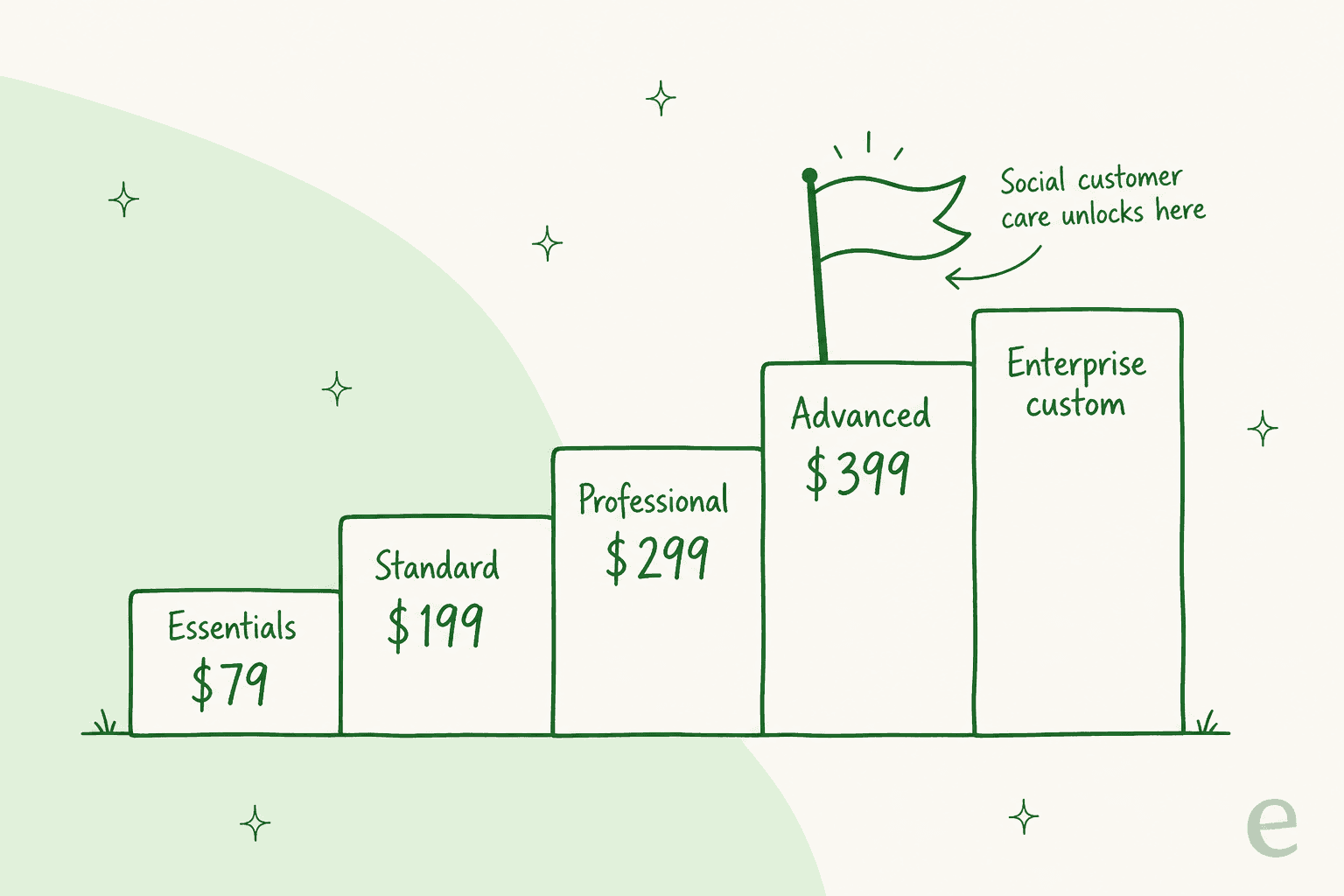
Reason three: listening and analytics are separate add-ons. Premium Analytics and Listening are each sold on top of your seat price, so the "all-in" number a growing team lands on is usually well above the sticker.
None of this makes Sprout a bad choice. It makes it a specific choice, best for well-funded teams that value polish and can absorb the seat cost. For everyone else, there is a good alternative below.
How I picked these Sprout Social alternatives
Quick note on method, so you know where these takes come from. I looked at each tool's own pricing and feature pages, checked what real users say on G2 and Reddit, and captured the current product UI for each. Where a tool overlaps with Sprout on support rather than scheduling, I weighed it on that too, because "Sprout alternative" means different things depending on why you are leaving.
The lineup covers the full range: direct social-inbox competitors, budget schedulers, agency platforms, the enterprise heavyweight, and the AI-support angle that a lot of these roundups miss entirely.
Here is the shortlist at a glance.
| Tool | Best for | Starting price | Billable unit | Social inbox / care | Free plan |
|---|---|---|---|---|---|
| Agorapulse | Closest social-care swap | $79/user/mo | Per user | Yes, ad-comment coverage | Yes (3 profiles) |
| Hootsuite | All-round platform | $99/user/mo | Per user | Yes, AI chatbot at Enterprise | No (14-day trial) |
| Sprinklr | Enterprise social service | ~$199/user/mo (self-serve) | Per user / quote | Yes, full CXM | No |
| Buffer | Budget scheduling | $5/channel/mo | Per channel | No (publishing focus) | Yes (3 channels) |
| Later | Visual / Instagram-first | $18.75/mo | Per plan + social sets | Yes, from Growth | No (14-day trial) |
| Sendible | Agencies, many users | $35/mo | Flat, unlimited users | Yes, monitoring & reply | No (14-day trial) |
| Zoho Social | Zoho users / SMB value | $10/mo | Per plan + brand | Yes, Inbox at Premium | Yes (1 brand) |
| SocialPilot | Budget agencies | $20/mo | Per plan + accounts | Yes, from Standard | No (14-day trial) |
Prices are the entry paid tier; several jump at the plan that unlocks team and care features. More on that below, including a calculator so you can plug in your own team size.
What Sprout's per-seat model really costs you
Before the list, one interactive gut-check. The reason per-seat pricing stings is that it scales with your headcount, not your workload. Slide your team size and compare what Sprout's care tier costs against a couple of the alternatives, including one that bills a flat rate no matter how many people log in.
The gap is stark at any real team size. At five seats, Sprout's care tier is roughly $2,000 a month; a flat-rate tool is a tenth of that. That does not automatically make Sprout the wrong pick, its polish and depth are real, but it should tell you whether you are paying for features you use or for a pricing model you are stuck in.
The 8 best Sprout Social alternatives in 2026
1. Agorapulse, the closest like-for-like swap
Best for: teams that use Sprout mainly for the social inbox and social customer care, and want the same shape for less.
If your Sprout usage is really about the unified inbox, Agorapulse is the most direct swap on this list. It openly names Hootsuite and Sprout as its comparison set, and it competes on the exact things a care team cares about: a shared queue for comments, DMs, mentions, and Google reviews, with assignment, collision detection, and conversation notes.
Its real differentiator is ad-comment coverage. Agorapulse claims to be "the only tool on the market to collect 100% of your ad comments," syncing paid comments from Facebook, Instagram, LinkedIn, and TikTok. If you run a lot of paid social and drown in ad comments, that alone can justify the switch. It also markets a real support SLA (24/7, with a claimed 30-minute average response), which is a nice contrast to Sprout's polarized support reputation.
Pros:
- Genuinely cheaper per seat than Sprout, with a permanent free plan (3 profiles).
- Best-in-class ad-comment moderation.
- SOC 2 and ISO 27001:2022 certified.
Cons:
- Profiles cap at 10 on every paid tier below Custom, so multi-brand operations hit the ceiling fast.
- The best care features climb the ladder too: saved replies start at Advanced, and AI reply suggestions are Custom-only with no published price.
Pricing: Standard $79, Professional $119, Advanced $149 per user/month (annual). Custom is quote-only. 30-day free trial, no card.
Verdict: If you are leaving Sprout over price but want the same social-care workflow, start here. Just budget for Advanced ($149/seat) if you need saved replies, and know that the fancier AI sits behind a sales call.
2. Hootsuite, the widest all-round platform
Best for: teams that want one platform to do everything, with the deepest integration library.
Hootsuite is the grandparent of this category, 18 years old and past 25 million users, and it is still the safest all-round pick. For a support angle, the relevant piece is its social inbox: public comments and private DMs from every major network in one place, with saved and suggested replies, automated Instagram DMs, message routing, and team assignments. Hootsuite also claims the largest integration library of any social tool, which matters if you want it wired into the rest of your stack.
It leans hard on AI too, OwlyGPT, AI smart replies, and an Enterprise-tier generative chatbot Hootsuite says cuts inbox workload by 80%. Fair warning: that chatbot, smart replies, and real-time agent reporting all live at Advanced Inbox / Enterprise, not the entry plan.
Pros:
- Broadest feature set and integration library in the category.
- Named G2's #1 software product for 2026.
- Mature social inbox with SLAs, CSAT, and PII masking.
Cons:
- The strongest AI and support automation are gated to Enterprise.
- Entry pricing at $99/user is not much cheaper than Sprout's Standard.
Pricing: Standard $99/user/month (10 accounts), then Advanced and Enterprise (quote). 14-day trial, no card.
Verdict: The default answer if you want breadth and do not want to think too hard. If price is your main reason for leaving Sprout, though, Hootsuite's Standard tier only saves you a little, look further down the list.
3. Sprinklr, the enterprise social service engine
Best for: large, regulated brands that need social customer service unified with the rest of the contact center.
Sprinklr is a different weight class. It bills itself as a "unified customer experience management" CXM platform, and its Sprinklr Service product unifies social customer service across 30+ voice, digital, and social channels into one AI-native agent desktop. This is the back end that brands like Verizon and Telefónica actually run their social support on. Where Sprout stops at social, Sprinklr keeps going into full contact-center territory, with AI agents, agent copilot, and conversational analytics across 100% of conversations.
The trade-offs are the classic enterprise ones: it is powerful but heavy, with a real learning curve, and pricing is mostly quote-based. G2 reviewers consistently flag cost and complexity for smaller teams.
Pros:
- Genuinely unifies social care with voice, chat, and the rest of the contact center.
- Enterprise-grade AI, governance, and 100+ language support.
- Analyst-recognized (Forrester Wave placements).
Cons:
- Overkill and over-budget for small and mid-size teams.
- Steep learning curve; mostly quote-only pricing (the one public number, ~$199/user for social self-serve, is dated).
Pricing: Sprinklr Service and full Social are demo/quote only. The published Social self-serve figure is ~$199/user/month, but verify it, it dates back to the 2023 launch.
Verdict: Only the right "Sprout alternative" if you are a large brand that has outgrown social-only tools and wants one platform for all of customer experience. Everyone else will find it too much.
4. Buffer, the budget scheduling pick
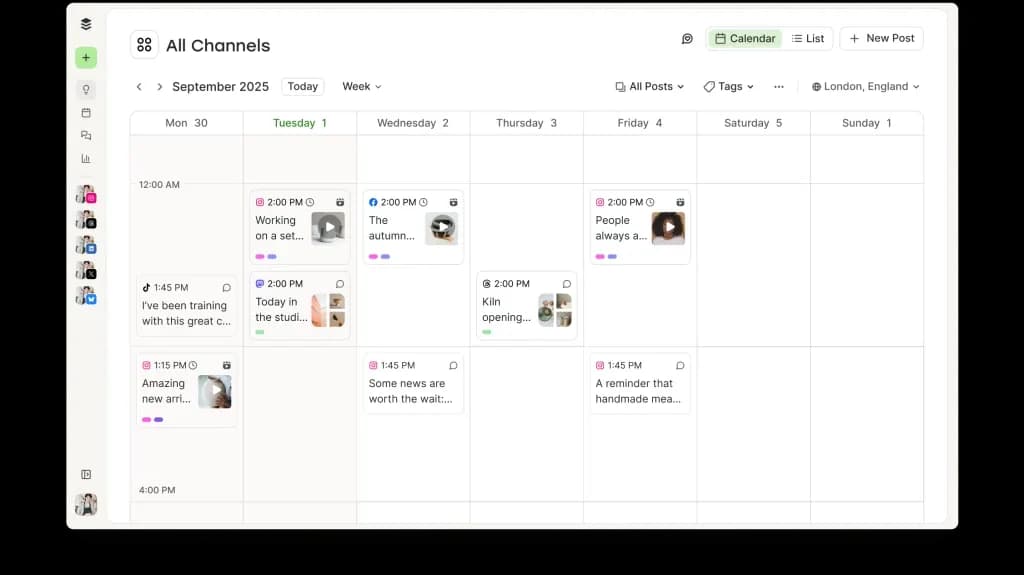
Best for: solo creators and small teams that mostly need clean, cheap scheduling.
If your honest use of Sprout is "I schedule posts and occasionally check comments," Buffer will save you a fortune. It is the cleanest, simplest scheduler in the category, and its pricing model is refreshingly different: you pay per social channel, not per user. Essentials is $5/channel/month billed yearly, Team is $10/channel/month, and the per-channel rate actually drops as you add channels.
The catch, and it is an important one for anyone leaving Sprout for support reasons: Buffer is a publishing tool, not a customer care tool. There is no ticketed social inbox, no case management, no SLAs. Its AI is about writing and repurposing posts, and its "5 AI reply suggestions per week" on the free plan is a light engagement helper, not a support engine.
Pros:
- Genuinely cheap, especially for a few channels; per-channel model rewards focus.
- Free plan for up to 3 channels, forever.
- Dead simple to use.
Cons:
- No real social customer care or ticketing.
- "Unlimited" posts are fair-use capped at 5,000/channel.
Pricing: Free (3 channels), Essentials $5/channel/mo, Team $10/channel/mo (both billed yearly). 14-day trial.
Verdict: The best pick if you are leaving Sprout because you never used the expensive half. If you actually need the social inbox, Buffer is not the swap, look at Agorapulse or Hootsuite.
5. Later, for visual and Instagram-first teams
Best for: creators and brands whose social lives on Instagram, TikTok, and Pinterest.
Later built its reputation on visual-first scheduling, the drag-and-drop grid preview, Link-in-Bio, and best-time-to-post smarts, and it is still the most pleasant tool for a team that thinks in images. It has since broadened into influencer marketing, but the core is a lean, good-looking scheduler with a social inbox that starts on the Growth plan.
It rates well (4.5 stars on G2), and its entry pricing is friendly. The limits are around social sets and users: Starter is a single social set and one user, and you scale by buying more sets and seats.
Pros:
- Best-in-class visual planning for Instagram and TikTok.
- Affordable entry point; social inbox from Growth.
- Strong link-in-bio and creator features.
Cons:
- Support/care is basic; this is a marketing tool, not a helpdesk.
- Social-set and user caps mean add-on costs creep up for bigger teams.
Pricing: Starter $18.75/mo, Growth $37.50/mo, Scale $82.50/mo (billed yearly). 14-day trial.
Verdict: If you are a visual-first brand or creator and Sprout felt heavy and expensive for what you needed, Later is a joy. Support teams should keep looking.
6. Sendible, the agency favorite
Best for: agencies and multi-client teams where per-seat pricing would be brutal.
Sendible's pitch is aimed squarely at the thing that drives people off Sprout: it bills a flat rate per plan with unlimited users. What scales is workspaces and social profiles (each workspace adds 6 profiles), not seats. For an agency with a dozen people touching accounts, that math is dramatically better than paying per head.
It is a full management suite, scheduling, monitoring and replying, reports, content libraries, and client dashboards, with a client-approval workflow that agencies lean on. It is not a ticketed helpdesk, but for social community management across many brands, it is one of the best-value options here.
Pros:
- Unlimited users on every plan; excellent for teams and agencies.
- Client dashboards, approvals, and white-label (on higher tiers).
- Predictable flat pricing.
Cons:
- Profiles are capped per plan (you add workspaces to grow).
- Not a customer-care/ticketing tool in the Sprout sense.
Pricing: Core $35, Plus $99, Premium $199, Elite $299, Enterprise $750/month (all unlimited users). 14-day trial, no card.
Verdict: If you left Sprout because five seats meant five bills, Sendible is the structural fix. The bigger your team, the more it wins on price.
7. Zoho Social, the value pick for Zoho users
Best for: SMBs on a budget, and anyone already living in the Zoho ecosystem.
Zoho Social is the quiet value play. Business plans start at $10/month and top out at $40/month for Premium, which is where the Inbox, content approvals, and the Zoho Desk integration live. If you already run Zoho Desk as your helpdesk, that native tie-in is a real advantage, social messages can flow into the same place your other tickets do.
The billable unit is "Brand" (a bundle of channels) plus team members, with AI metered as credits. It is not as polished as Sprout, but at these prices it does not need to be.
Pros:
- Extremely affordable; permanent free plan (1 brand).
- Native Zoho CRM and Zoho Desk integration at Premium.
- Agency tiers for client management.
Cons:
- The social Inbox is gated to Premium ($40/mo).
- Best value only if you are already in, or open to, the Zoho world.
Pricing (business): Free, Standard $10, Professional $30, Premium $40/month (annual). Agency from $230/month.
Verdict: The smart budget choice for small businesses, and close to a no-brainer if you are already a Zoho shop. Pair it with Zoho Desk and your social support has a home.
8. SocialPilot, budget scheduling for agencies
Best for: small agencies that want scheduling, a basic social inbox, and client tools without the Sprout price tag.
SocialPilot rounds out the budget end. It is a straightforward scheduling suite with a social inbox from the Standard plan, bulk scheduling, analytics, and client-approval tools at Premium. Pricing runs from $20 to $200/month, with add-on social accounts at $4 each and extra users at $5, so you can grow without the per-seat shock.
It is not trying to be an enterprise care platform, and that is the point: it does the 80% most teams use, cheaply.
Pros:
- Affordable, with a social inbox from the second tier.
- Client seats (unlimited) from Premium; good for agencies.
- Cheap à la carte add-ons for accounts and users.
Cons:
- API access and SSO only on the custom Enterprise tier.
- Care features are basic compared with Sprout or Agorapulse.
Pricing: Essentials $20, Standard $40, Premium $100, Ultimate $200/month, Enterprise custom (annual saves 15%). 14-day trial.
Verdict: A solid, cheap all-rounder for small agencies. If you want a real social-care workflow, Agorapulse is worth the extra; if you just need scheduling for clients, SocialPilot does it for less.
The question most of these roundups skip: are you replacing scheduling, or support?
Here is the thing I keep coming back to. Nearly every "Sprout Social alternatives" list treats Sprout as a scheduler and hands you cheaper schedulers. That is right for maybe half of readers. But a big chunk of teams pay for Sprout because of the care side, the DMs, comments, and reviews that are really support tickets wearing a social costume. And for those teams, swapping to a cheaper social inbox just means you are still doing all the replying by hand, for slightly less money.
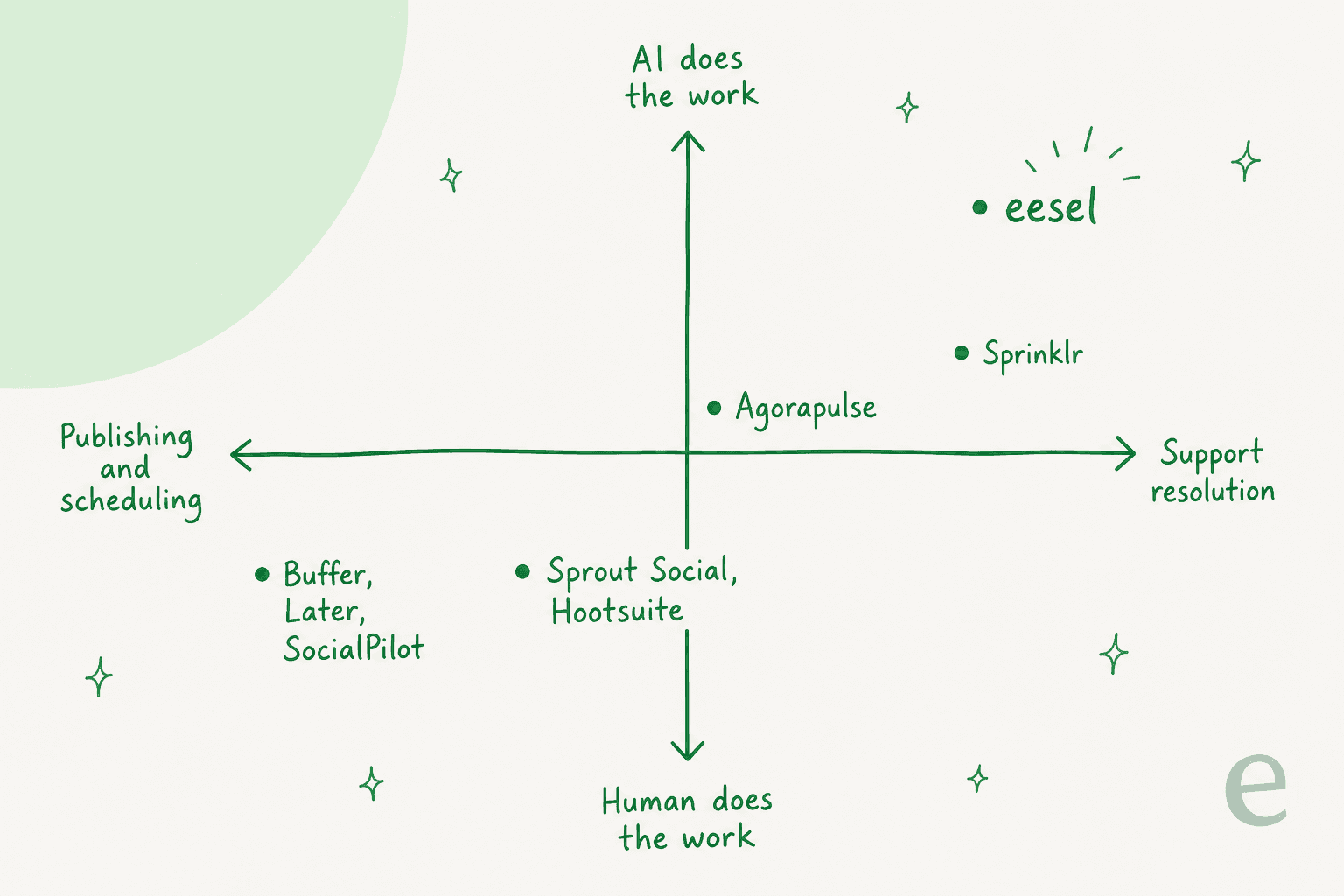
Notice where the tools land. Buffer, Later, and SocialPilot are publishing tools. Sprout, Hootsuite, and Agorapulse are social inboxes that help a human reply faster. Sprinklr goes furthest, but it still centers a human agent. What none of them do is resolve the message for you. Even Sprout's own AI, AI Assist and Trellis, suggest replies and score sentiment; a person still closes the loop. That is a genuine limit, not a knock, it is just a different category of product.
This is where I have to be straight about what eesel is and isn't, because I work on it. eesel does not schedule your Instagram posts. If publishing is your job, pick one of the eight above. But if your Sprout bill is really the price of answering repetitive support questions that happen to arrive on social, that is a problem an AI helpdesk agent is built to solve.
Try eesel for the support side of social
Most teams already route social DMs and comments into a helpdesk like Zendesk, Freshdesk, or Gorgias. eesel is an AI teammate that plugs into that helpdesk and actually drafts and resolves those tickets, learning from your past tickets and help docs, not just your public FAQ.
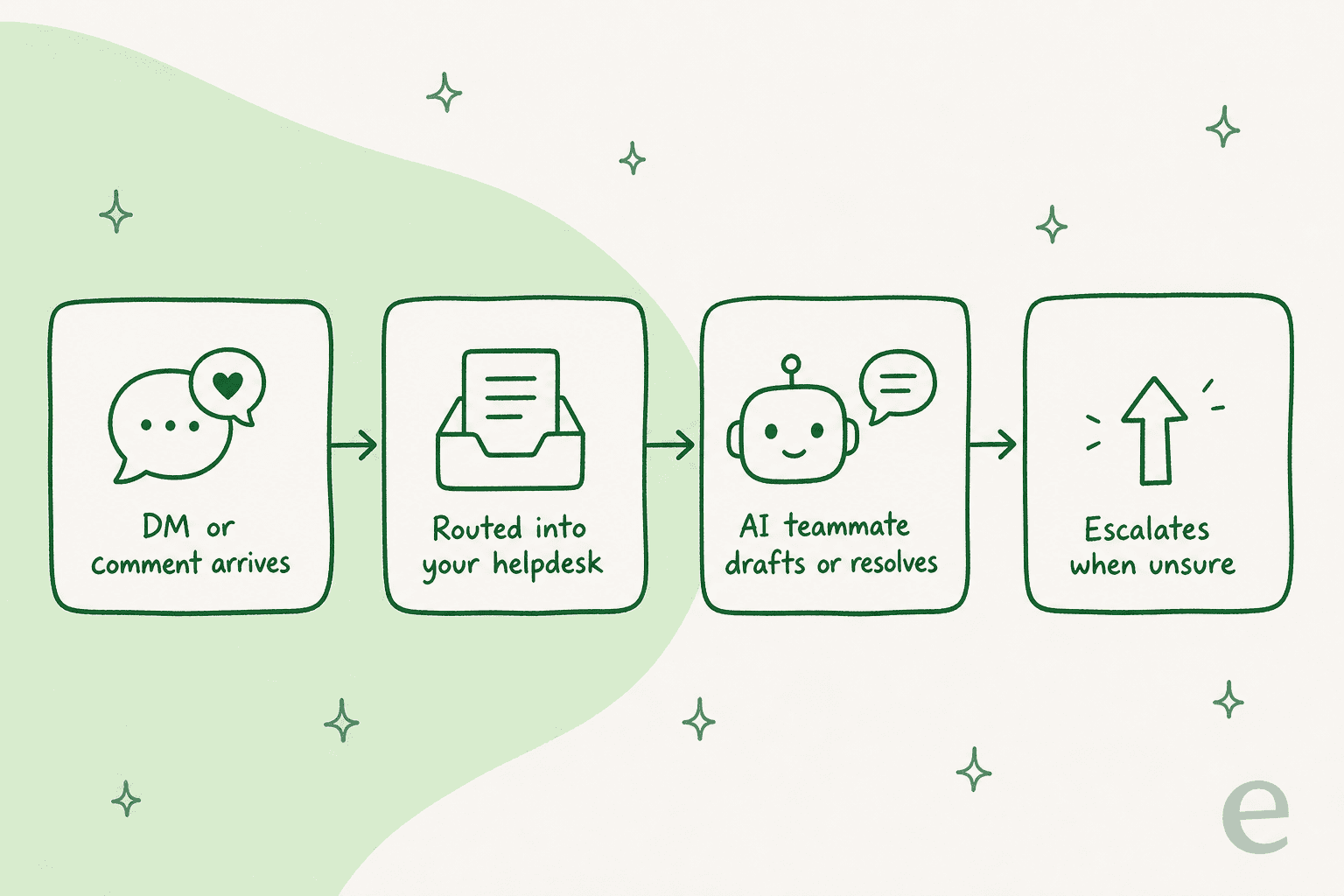
Three things make it a different answer from a cheaper Sprout:
- It resolves, it does not just suggest. eesel handles tier-1 tickets end to end and escalates when it is unsure. Gridwise saw it resolve 73% of tier-1 requests in the first month.
- You can test it before it goes live. eesel simulates on your historical tickets so you see the resolution rate before a customer ever talks to it. That "flip the switch and hope" feeling is exactly what we built simulation to remove.
- The pricing is one fixed monthly price, not per seat. No paying $399 a head. Plans start at $299/month for 500 credits (1 credit per ticket or chat), with unlimited seats, which is the opposite of the model that sent you looking for Sprout alternatives in the first place.
It handles 80+ languages out of the box (Smava runs 100,000+ German tickets a month on it), and most teams are live within 30 minutes. If the support half of your Sprout usage is the part that hurts, try eesel free or book a demo and see it run on your own tickets first.