Get BOB AI alternatives: 10 picks and what one unit costs

Kurnia Kharisma

Katelin Teen
Last edited August 26, 2026

Why I care about the unit, not the sticker
I have spent two years watching keywords like "AI employee pricing" and "AI teammate cost" climb, and the search intent behind them is almost never "what is the monthly fee". It is "will this bill surprise me". Those are different questions, and the rate card only answers the first one.
I know exactly what the second one costs to get wrong, because eesel has been running AI on live support queues for years and the sharpest lesson in eesel's own sales history has nothing to do with model quality. A trial user on Gorgias ran twelve test chats. The agent performed well on all twelve. Then they opened the billing page, and within minutes they had filed a cancellation request. Nothing about the product had changed between chat twelve and the billing page. The unit stopped matching their mental model, and the deal died anyway.
That pattern repeats. A very-high-volume operator on one of eesel's sales calls got mid-conversation confused between per-interaction and per-ticket pricing, did the arithmetic on the wrong one, and projected roughly $30,000 a month at scale. Another buyer burned through 200 interactions in a single day of testing and spent the rest of the evaluation worried about what 9,000 a month would look like. In both cases the product worked. The unit was the problem.
So when I look at Get BOB, the first thing I want is not the price. It is the definition.
What Get BOB actually is
Get BOB is a business-automation platform that packages agents as named colleagues. You describe a job in plain language, or paste an actual job description, then assemble a team of BOBs from a marketplace of ready-made ones or build your own in the BOB Builder. They work across a large connector catalogue, report back through an Insights Feed styled like a social timeline, and the company's framing is explicitly that these are colleagues rather than workflows: "BOBs don't just automate simple workflows. They understand the full scope of actual jobs and deliver real results, entirely on their own."
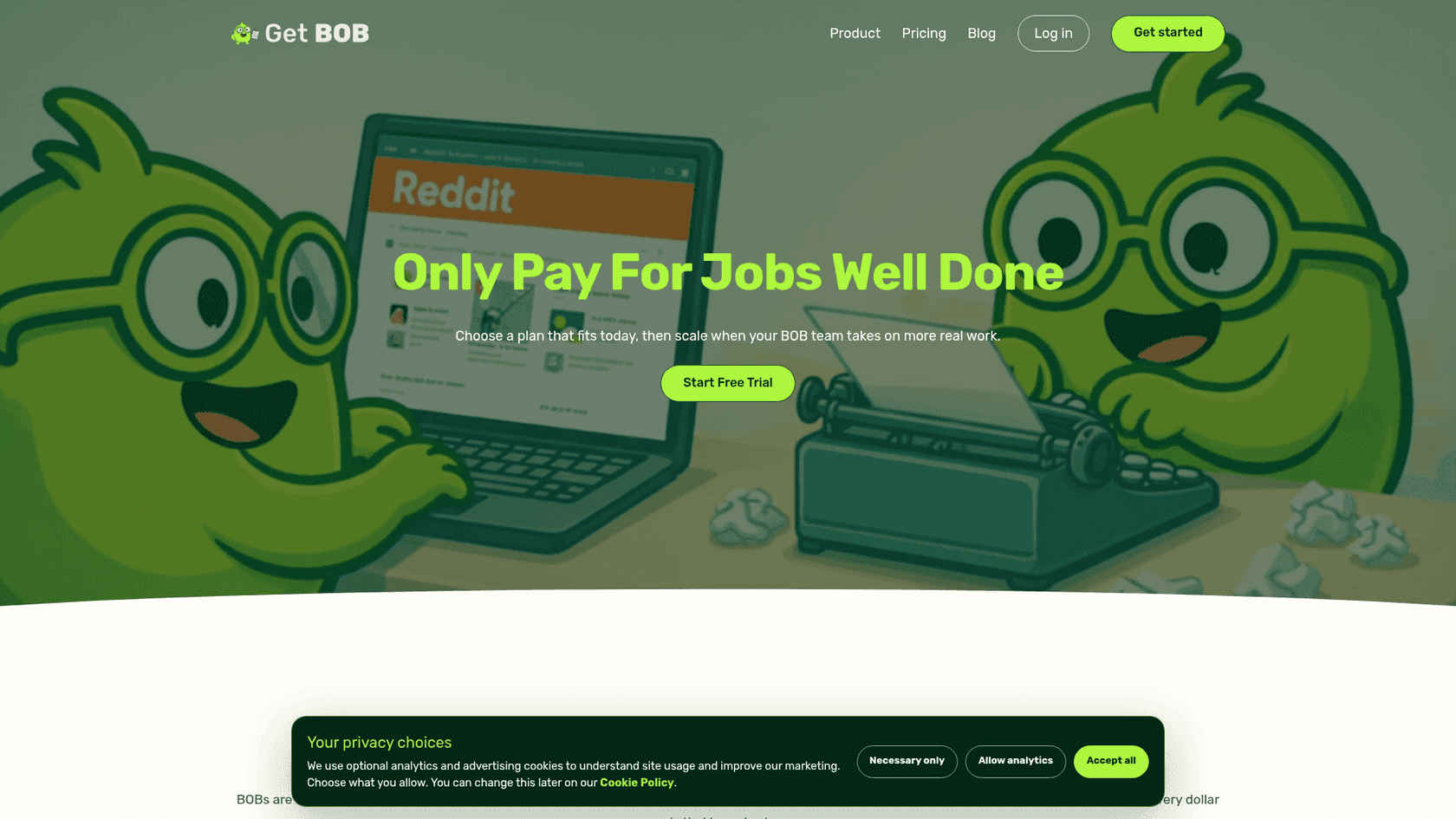
The rate card is short and, refreshingly, entirely public:
| Plan | Monthly | BOB Jobs | Users | Notable |
|---|---|---|---|---|
| Mini BOB | $29 | 50 | 1 | Insights Feed, BOB Builder, both marketplaces |
| Medium BOB | $99 | 200 | Unlimited | Adds Team Management, live onboarding |
| Mega BOB | $499 | 1,500 | Unlimited | Adds Multi-Tenant Orgs, service partner, live support |
Divide it out and the bundled rate improves with volume, as you would expect: $0.58 per Job on Mini, $0.495 on Medium, and about $0.33 on Mega. Every plan carries a one-week free trial on signup, and plans renew month to month with upgrades, downgrades and cancellation available at any time.
Two things are worth flagging before you get to the alternatives, and neither is a criticism of the product.
First, the pay-as-you-go rate is not published. Get BOB's own FAQ says that if you exhaust your Jobs, "you can opt into pay-as-you-go for extra jobs, or upgrade to a larger plan. Nothing happens automatically." The no-surprise-charges behaviour is genuinely good design. But the rate you would pay if you opted in is not on the page, so the one number you need to model a busy month is the one you have to ask for.
Second, the guarantee is a marketing frame, not a warranty. The pricing page is headed "Real Results, Guaranteed", while section 7 of the terms of service provides the service "as is" with no warranties, and section 6 states that decisions made on AI output are made "solely at your own risk". That combination is standard SaaS boilerplate and you will find close variants in most vendors' terms, including eesel's own. The useful move is not to treat it as a gotcha, it is to ask the operational question during the trial: when a Job comes back wrong, does the Job still count against my allowance, and who decides?
One more piece of context that matters for how much weight to put on other people's opinions. Get BOB only opened self-serve signup on 25 August 2026, having run a waitlisted private beta before that. As of writing there is no meaningful review corpus on G2, Capterra, Trustpilot or Reddit, and the single testimonial on the site is from a VP of Marketing at zak.com. That is not a knock on a new product, it is just a fact about what evidence exists. It means the trial is your only real due diligence, so plan it properly.
The one question that decides your bill
Every vendor in this market bills a unit of work. The whole AI teammates category has quietly converged on a competition over how big that unit should be, and once you see it you cannot unsee it.
At the small end, Make charges one credit per module action. Its own FAQ is blunt about the consequence: "Depending on the complexity of the process you're automating, your scenario can perform anywhere from two credits to thousands of credits in a single run." Zapier charges one task per successful action, and a single Zapier MCP tool call costs two.
In the middle, n8n bills one execution per whole workflow run, and markets that as the differentiator: "An execution is a single run of your entire workflow. It doesn't matter how many steps are in the workflow or how much data it processes." Relevance AI's docs define an Action almost identically, as "a single run of a Tool... whether it's a simple task like sending one email or running a complex workflow with many steps."
At the large end sits Get BOB, whose unit is not a run at all but a result.
Notice what happens as you climb that ladder. The bigger the unit, the better the headline price looks, and the more the definition matters. Make's credit is tiny and totally unambiguous. Get BOB's Job is large and, by its own description, elastic.
What one BOB Job actually covers
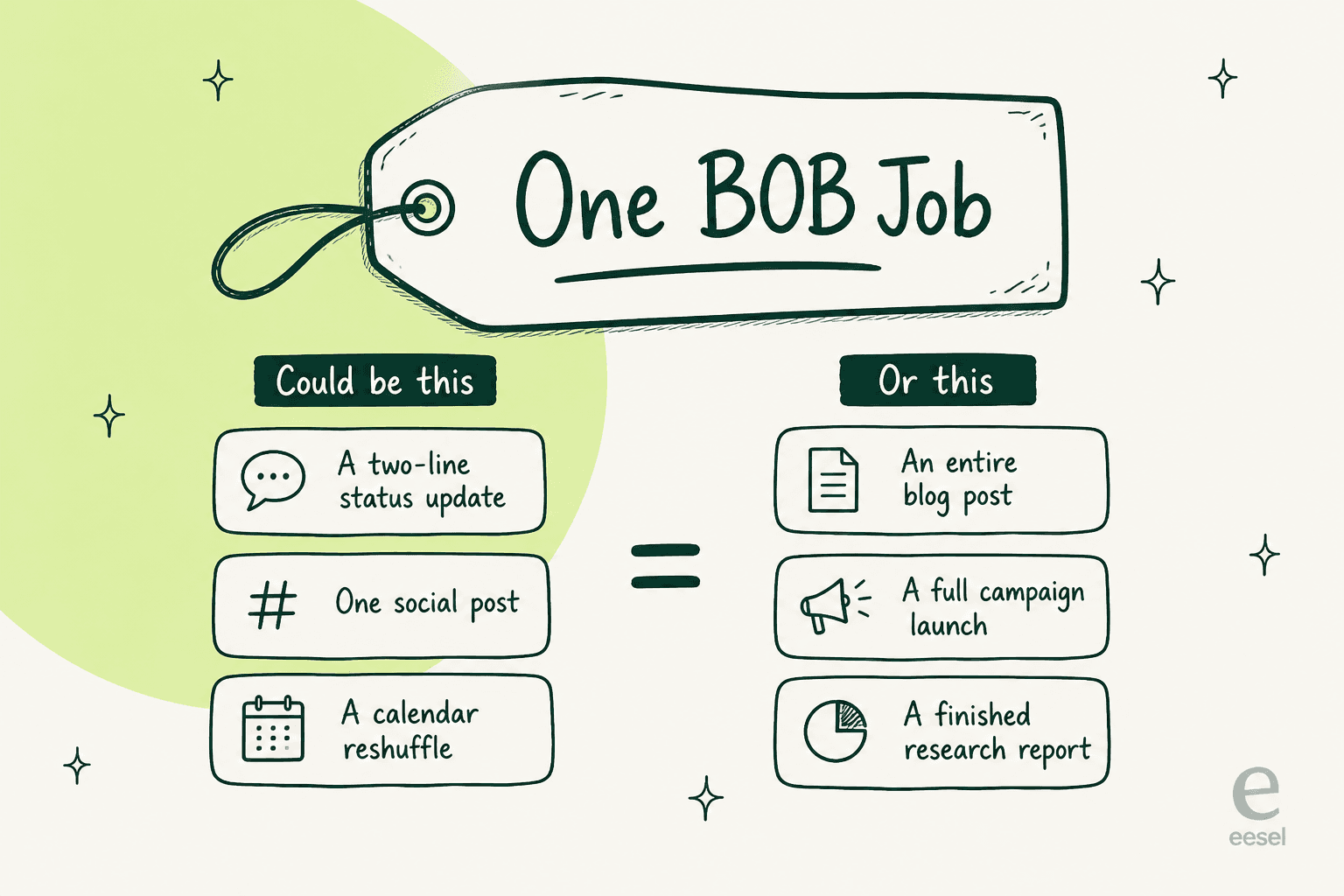
Get BOB's definition, from its own pricing page, is this: a BOB Job is an end-to-end deliverable, "like when a colleague delivers a finished report, launches a campaign, or writes an entire blog post."
Read that list again as a buyer rather than as marketing copy. A finished report, a campaign launch and a blog post are not the same amount of work by any measure you would use to price labour. If all three are one Job, then the per-Job rate is excellent value on the campaign and mediocre value on anything small.
This cuts both ways and I want to be fair about it. An outcome meter really does transfer risk from you to the vendor. If a Job takes forty model calls and six retries, that is Get BOB's cost problem, not a line on your invoice. That is a better deal than a credit meter where every retry lands on your bill. Buyers who have been burned by credit burn are right to find it appealing.
But there is a structural consequence nobody puts on a pricing page, and I have the internal analysis to back it up. An eesel cost comparison built for a jewellery e-commerce buyer running about 1,000 tickets a month showed what happens when your meter is denominated in successful outcomes: at 80% resolution, 1,000 tickets cost $792 a month, and a Black Friday spike to 4,000 tickets cost $3,168, while a flat rate would have kept November identical to March. Per-outcome pricing quietly penalises you for two things you want, which are a higher success rate and a busier month. "Only pay for jobs well done" is the same shape. The better it works, the more you pay.
That is not a reason to avoid outcome pricing. It is a reason to model your worst month, not your average one.
Price one month of work on four meters
Here is the arithmetic, live. Put in how many finished things you need in a month and roughly how many app calls each one takes, and the calculator prices the same work on four published rate cards.
The default numbers give you $12 on Make, $20 on n8n, $33.33 on Zapier Agents and $99 on Get BOB for the same hundred deliverables. Do not read that as a ranking. Make and n8n are quoting you the cost of running a workflow you have already designed, debugged and now own. Get BOB is quoting the cost of not having to. Whether that spread is a bargain or a markup depends entirely on whether you have someone who wants to build and babysit the thing.
The 10 best Get BOB alternatives in 2026
Every item below follows the same five parts: what it is, how it bills, where the work stops, pricing, and a one-line verdict. The billing column is the one I would read first.
| Tool | Billable unit | Entry price | Free tier | Failed run billed? | Overage rate published? | Rate card complete? | Users on entry plan | Best for |
|---|---|---|---|---|---|---|---|---|
| Get BOB | One finished deliverable | $29/mo, 50 Jobs | 1-week trial | No, by design | No | Plans yes, overage no | 1 | Small teams wanting outcomes, not canvases |
| eesel | One ticket, one article | From $299/mo (500 credits), $4/post | 100 free credits, no card | Billed on handling, stated plainly | Yes, optional overage with a cap you set | Yes | Unlimited | Support queues and content pipelines |
| Lindy | One credit, banded by job size | $29.99/user/mo | 7-day trial via Slack | Not disclosed | No top-ups, pauses instead | Yes | Per seat | Slack-native assistant work |
| Zapier | One successful action | Free, then $19.99/mo | 100 tasks/mo forever | No, explicitly | Yes, pay-per-task | Yes | 1 | Breadth of connectors, 9,000+ apps |
| Make | One module action | $12/mo, 10k credits | 1,000 credits/mo | Yes, modules that ran | Yes, 1k and 10k bundles | Yes | Unlimited | Cheapest per action, visual builder |
| n8n | One whole workflow run | $20/mo, 2.5k runs | Free self-hosted | Yes, every fire counts | Yes, €4,000/300k | Yes | Unlimited | Owning the runtime, technical teams |
| Sintra | One credit, 0.1 to 20+ per action | $48.50/mo on sale | None, 14-day money-back | Not disclosed | In-app only | Plans yes, top-ups no | Not stated | Solo operators wanting 12 named helpers |
| Cassidy | One credit, 1 to 100 per run | Not published | Starter, 10k credits | Not disclosed | No | No dollar figures at all | 3 seats | Document-heavy enterprise knowledge work |
| Relevance AI | One Action per tool run | Not on pricing page | 200 Actions/mo | Yes, stated in docs | Yes, in docs, $80/1,000 | Docs only | Not stated | Multi-agent "workforce" builds |
| Tasklet | One credit, rate unstated | $25/mo, 10k credits | 300 bonus credits/day | Not disclosed | No | Plans yes, per-task no | Unlimited agents | Cheap sandboxed autonomous agents |
| Gumloop | One credit plus 8% of model spend | From $37/mo, 20k credits | 14-day trial | Split three ways | Percentage, not a rate | Partly | Unlimited agents | Canvas builders who want BYO keys |
1. eesel

What it is. I build eesel, so treat this section as a disclosed pitch and check every number against the eesel pricing page. eesel is an AI teammate platform, and the way customers buy it is by hiring a ready-to-work teammate for a defined job rather than assembling one. The current roster is two: an AI helpdesk teammate and an AI blog writer. Each arrives already carrying the skills, integrations and company context for its role, which is the deliberate opposite of the empty-colleague-plus-builder model.
How it bills. One ticket or chat session handled is 1 credit, however many replies it takes, on one fixed monthly price: 500 credits for $299/month, 1,000 for $499, 2,500 for $999 and 5,000 for $1,899. One blog post is $4. Questions asked in the dashboard are mostly free. There is no platform fee and no per-seat charge, and if you run out you can turn on optional overage at $0.80 per extra credit with a monthly cap you set. To be precise about a distinction that matters in this company: the unit is a task handled, not a task resolved, and eesel's own pricing FAQ says tasks are billed regardless of outcome. That is a worse-sounding promise than Get BOB's and a more predictable bill, because it does not rise when the AI gets better.
Where the work stops. It does not stop at a draft. The helpdesk teammate joins the queue you already run, reads the docs where they already live, learns tone from past tickets, then drafts, resolves, escalates and writes into the system of record. It reaches eight helpdesk integrations: Zendesk, Freshdesk, Gorgias, Front, Help Scout, HubSpot, Salesforce and Jira Service Management, with Slack and Confluence on the knowledge side. There is no Zoho Desk, Crisp, LiveAgent or Helpshift integration, so check your stack first.
Pricing. Teammate plans from $299/month for 500 credits (1 credit per ticket or chat), $4 per blog post, 100 free credits with no card to start, two months free when you pay a year upfront, and add-ons for SSO and MFA (from $199/month) and HIPAA (talk to us).
Verdict. The best fit if your countable unit is already a ticket or an article, and the wrong tool if your automation is a Stripe-to-Sheets pipeline. Before go-live it replays your own past tickets and scores its answers against what your team actually sent, which is the part I would insist on from any vendor on this list.
2. Lindy
What it is. Lindy is the closest philosophical neighbour to Get BOB on this list: an assistant that lives in Slack, holds workspace context, records and follows up on meetings, manages inboxes and runs scheduled routines. It ships with 40+ skills, computer use, MCP support and model selection.
How it bills. A hybrid, and one of the more honest ones. You pay per seat, and each seat contributes credits to a shared workspace pool. Crucially, Lindy publishes bands for what work costs: everyday asks are 2 to 250 credits, deep work like triaging a day's support queue is 250 to 1,000, and big builds are 1,000 to 2,500. That is the only published attempt on this list to tell you in advance roughly what a job-sized task costs in credits.
Where the work stops. At an approval gate, by default and deliberately. Lindy's own FAQ says anything with outside impact waits for approval, naming sending an email, updating a ticket, posting to a channel and publishing a doc. Read-only lookups run unattended. That is a real safety feature and also a real ceiling on autonomy, so decide which you want.
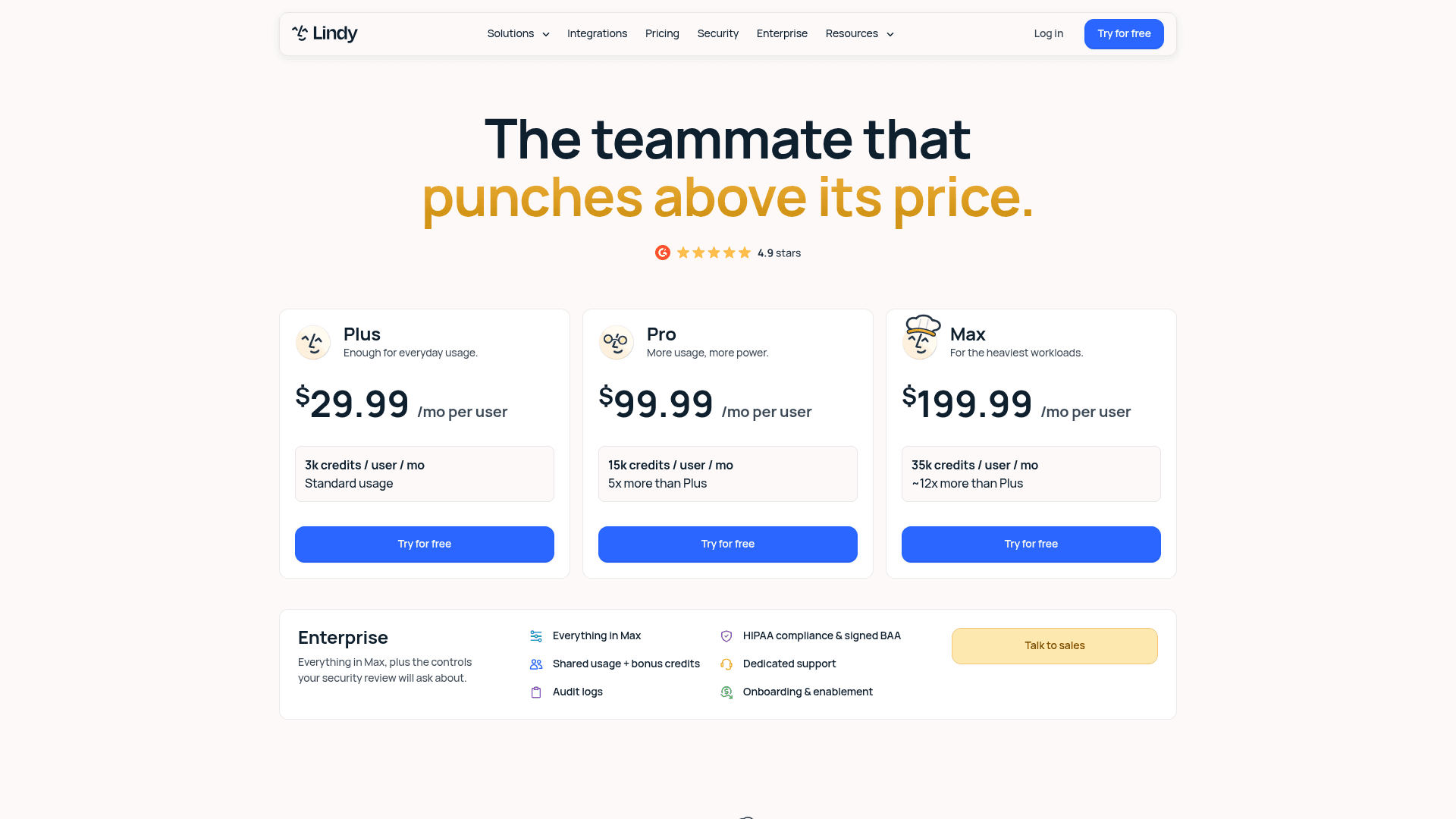
Pricing. Plus $29.99 per user for 3,000 credits, Pro $99.99 for 15,000, Max $199.99 for 35,000, Enterprise for HIPAA with a BAA, audit logs and SSO. Credits do not roll over, there are no top-ups, and Lindy pauses rather than charging you an overage. Anyone who uses it takes a billed seat, including someone who only @mentions it in Slack, and the free week is Slack-join only.
Verdict. Pick Lindy over Get BOB if your work is assistant-shaped, lives in Slack, and you actively want a human approving outbound actions. The published credit bands make it easier to forecast than most.
3. Zapier
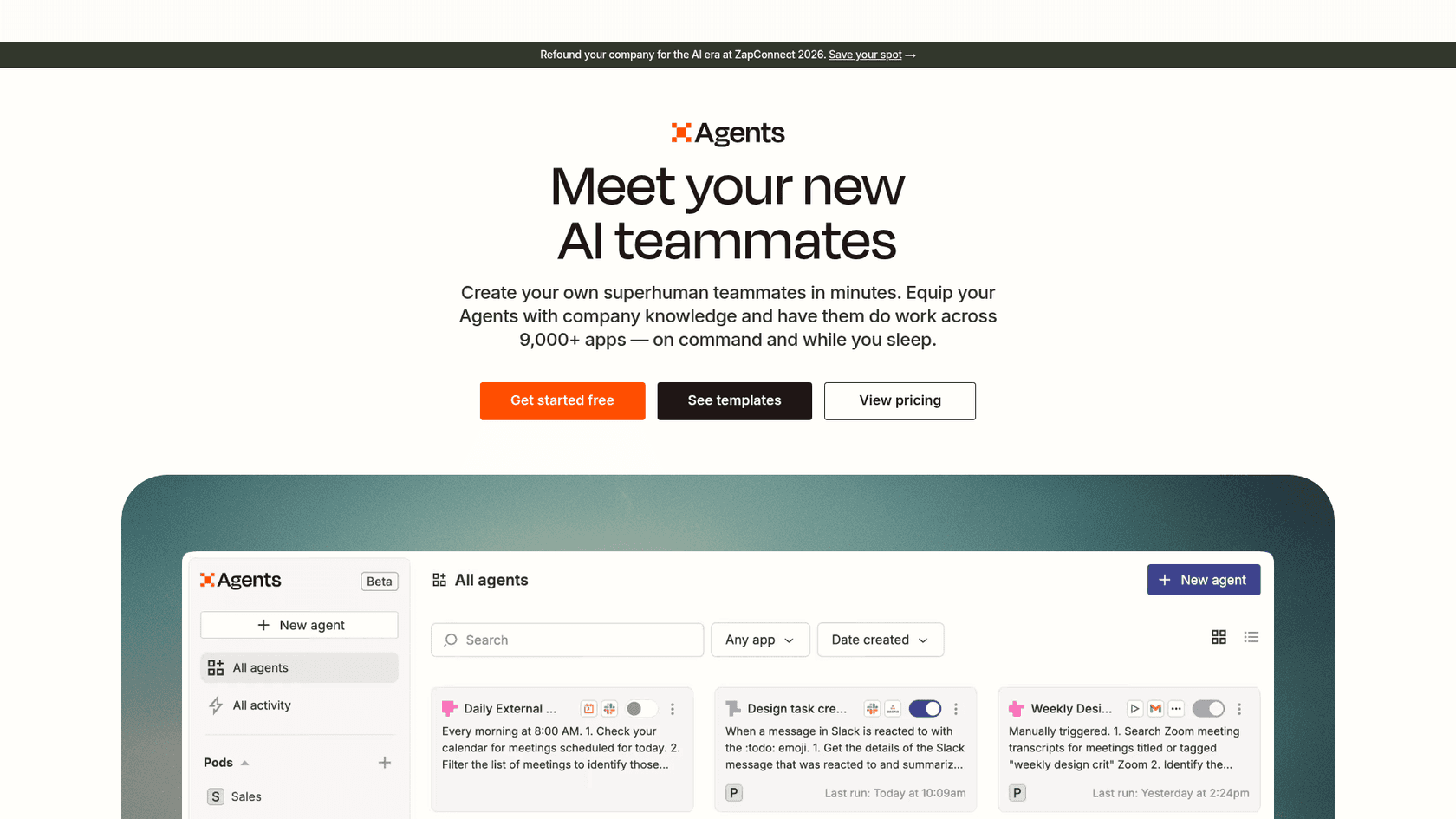
What it is. Two products that matter here. The Zapier platform is the connector layer, now spanning 9,000+ apps with Tables, Forms, MCP and an SDK. Zapier Agents is the AI teammate product layered on top, and Zapier markets it in almost exactly Get BOB's words: "Meet your new AI teammates."
How it bills. A task is one successful action. The rules are unusually clear and unusually generous at the edges: an action that fails does not count against your limit, triggers and polling are free at any frequency, and Filters, Formatter, Paths, Tables, Forms, Delay, Looping, Digest and Storage are all zero-task steps. One MCP tool call costs two tasks. Agents bills separately in "activities", which include actions taken in behaviours or chat, web browsing and knowledge lookups.
Where the work stops. Wherever you wire it, which is both the strength and the catch. Zapier will not decide what your job is. Its own FAQ is candid that agent output varies run to run because of non-determinism, and Agents does not yet respect the app and action restrictions an Enterprise account may have set.
Pricing. Platform: Free at 100 tasks a month forever, Professional from $19.99, Team from $69 with 25 users, Enterprise on quote, with selectable task tiers from 100 up to 2 million. Overage is opt-in pay-per-task at a higher rate than your base tasks, then a pause. Agents: Free at 400 activities a month, Pro at $400 billed annually which is $33.33 a month for 1,500 activities, Enterprise on quote.
Verdict. The reference point for this whole comparison, and the reason the unit question matters. If your work decomposes into countable app calls, nothing here beats it on price or breadth. The AgentKit versus Zapier piece goes deeper on the agent layer.
4. Make
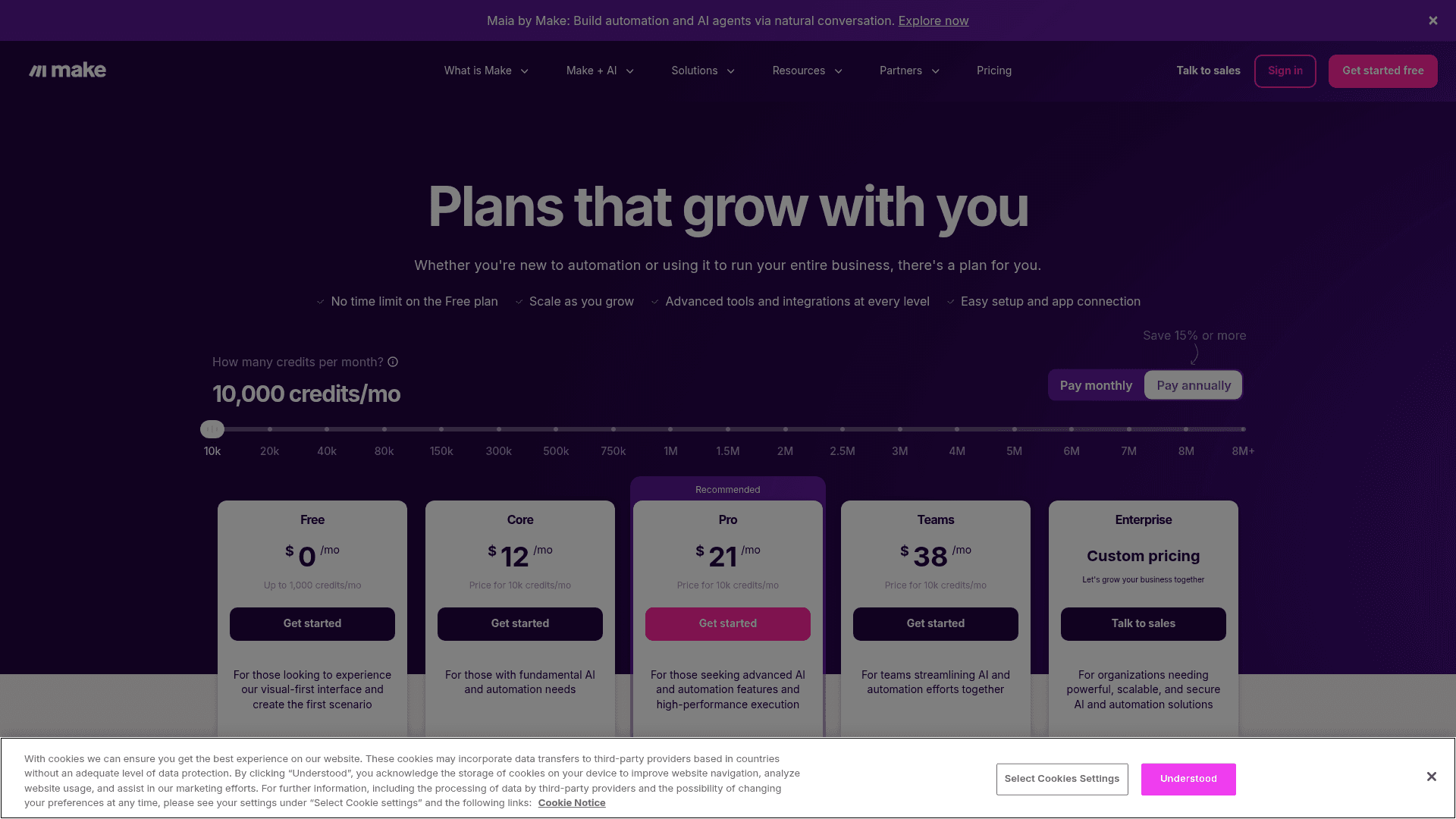
What it is. Make is the visual-canvas automation platform, now with Maia for building scenarios and agents by conversation, plus Make AI Agents and an AI Toolkit that will run on Make's provider or your own LLM key.
How it bills. As of 27 August 2026 the billing unit is called a credit, and one module action is one credit. Error handler modules and the Router are free. Everything else counts, including reads, searches, creates, updates, deletes, transforms, aggregations and iterations. Custom code costs 2 credits per second of execution.
Where the work stops. Make is a builder, not a colleague. It also auto-disables a schedule after repeated failures specifically to avoid consuming operations, which is thoughtful and also means a broken scenario goes quiet rather than shouting.
Pricing. Free at 1,000 credits a month, Core $12, Pro $21 and Teams $38 for 10,000 credits, scaling by slider to 8 million plus, Enterprise on quote. Credits expire at term end and do not roll over. Extra credits come in 1,000 and 10,000 bundles at your subscription's fixed price, with auto-purchase available on Core, Pro and Teams. Credits overage protection is an Enterprise-only feature, so on lower tiers scenarios stop when the balance hits zero.
Verdict. The cheapest per unit of anything on this list, and the clearest definition of what a unit is. The Make pricing breakdown has the volume tiers in full.
5. n8n
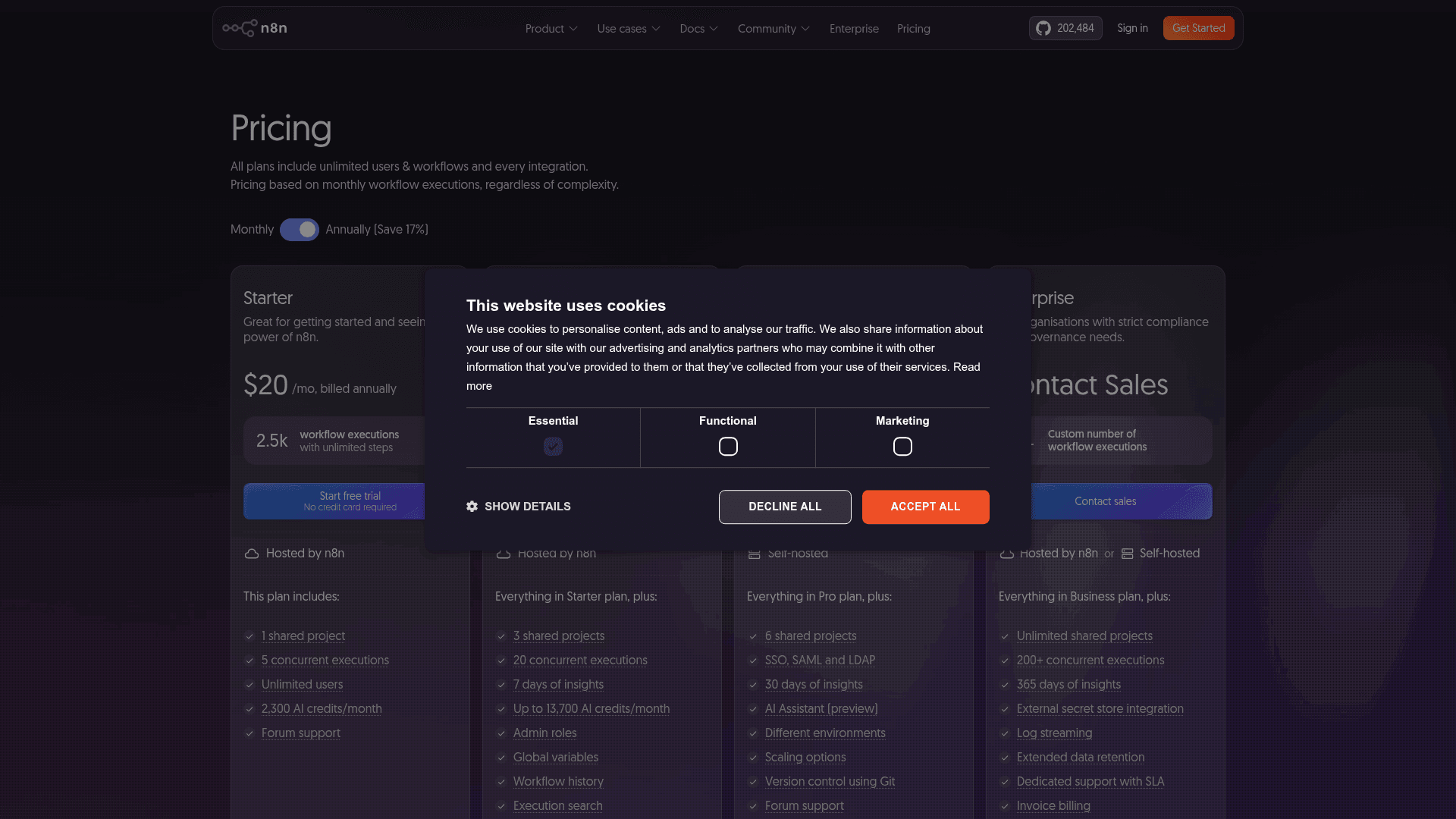
What it is. The open-core automation platform for technical teams, at 202,484 GitHub stars, with a free self-hostable Community Edition and a cloud tier on top.
How it bills. One execution is one full workflow run at any number of steps, and n8n argues the point hard: it says you can do in one execution "what would take 10,000 operations in other tools". There is now a second meter alongside it. AI Assistant credits are bundled at 2,300 a month on Starter and up to 13,700 on Pro, they do not roll over, and you cannot buy more, so the only way to get a bigger allowance is to change plan.
Where the work stops. Further from a finished support outcome than most people expect. The Zendesk node has 23 operations and none of them post a reply to a customer, Freshdesk has no reply verb either, Help Scout is the only helpdesk node that can post into a conversation, and there is no Gorgias node at all. Public replies mean hand-written HTTP requests. Worth knowing before you plan a support build around it. The AgentKit, Make and n8n comparison covers the agent layer.
Pricing. Starter $20 a month billed annually for 2,500 executions, Pro $50 for 10,000, Business $800 for 40,000 self-hosted, Enterprise on quote. Overage is published, which is rare: €4,000 per extra bucket of 300,000 executions, invoiced 45 days later. Community Edition is free and unmetered, though S3 storage and workflow sharing are excluded from it. Under 20 employees gets you 50% off Business.
Verdict. The best value per unit if you have someone who wants to own the runtime, and n8n's own docs are honest that self-hosting is "for expert users". Also the vendor that most clearly explains the unit-size argument, which is why it belongs in a post about units.
6. Sintra
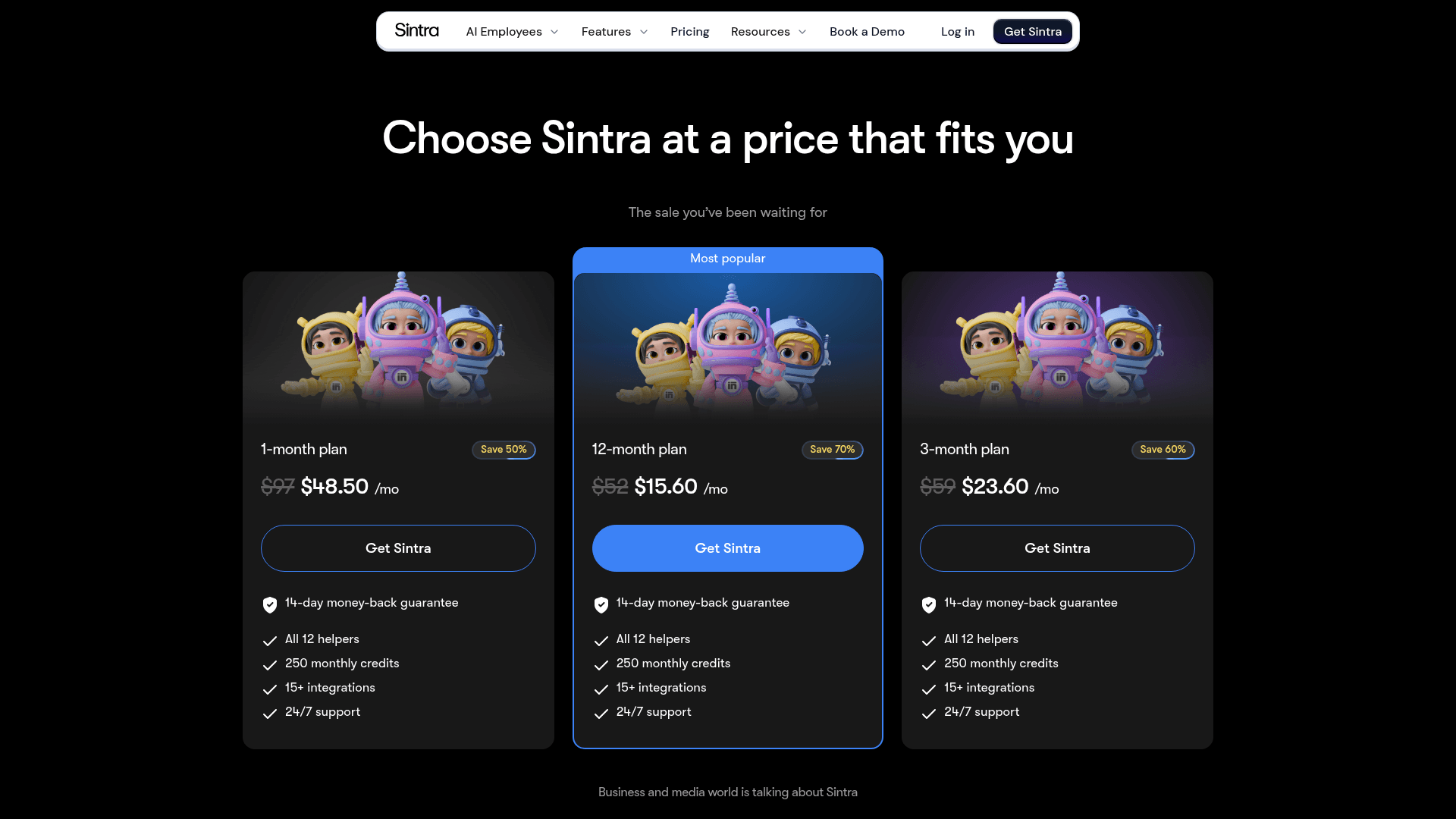
What it is. Sintra is the closest thing to Get BOB in packaging: twelve named AI employees for support, copy, SEO, social, sales, data, email, strategy, VA work, coaching, ecommerce and recruiting, sold as one bundle with an AI Brain knowledge layer and 100+ power-ups.
How it bills. Credits, priced per action rather than per outcome. A chat is 0.1 to 1 credit, an image 0.5 to 1.8, an email or integration action 1, and a scheduled task 1 to 20 or more. Every tier gets the same 250 credits a month, with no rollover, and helpers stop when the balance hits zero. Top-ups are sold as a recurring, non-refundable add-on at in-app prices only.
Where the work stops. At consumer-grade tools. The 15+ integrations are Gmail, Notion, QuickBooks and similar, not Zendesk or Freshdesk, so the support helper is a drafting assistant rather than a queue worker.
Pricing. One plan, Sintra X, billed upfront for the full term. List prices are $97 for one month, $59 for three and $52 for twelve, with a running sale cutting those to $48.50, $23.60 and $15.60 a month. There is no free trial and the 14-day money-back guarantee has to be requested, since cancelling is not the same as refunding.
Verdict. Cheaper than Get BOB per month and much shallower per helper. The recurring community complaint is credit exhaustion within days of a cycle, so treat the 250-credit cap as the real spec, not the twelve names. The Sintra review goes through it helper by helper.
7. Cassidy
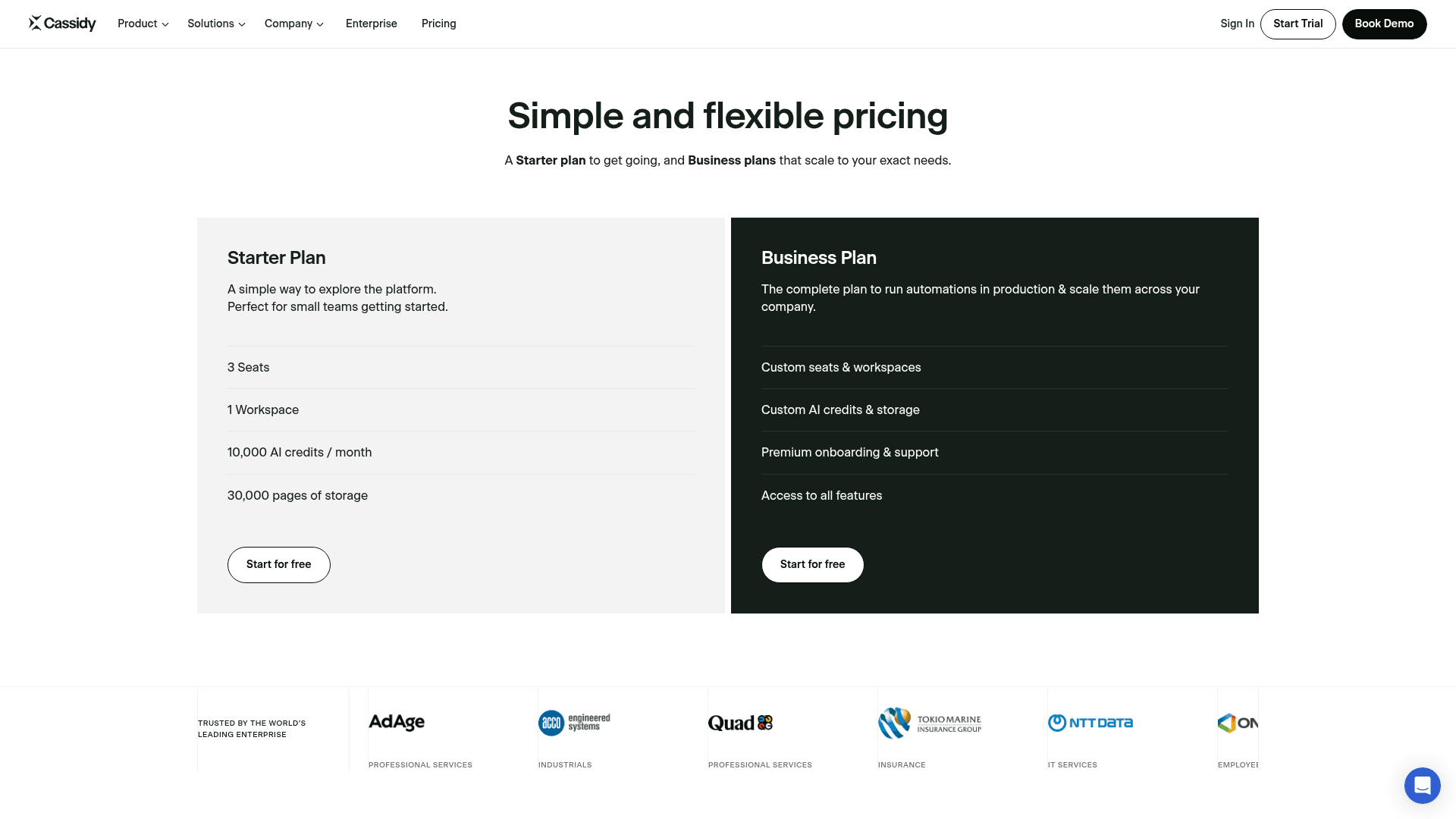
What it is. Cassidy is a no-code agent and workflow platform aimed at document-heavy enterprises, built on four products: a knowledge base and meeting capture for context, agents and workflows for automation. It ships 80+ agent templates and 100+ workflow templates.
How it bills. Token-metered credits, with published ranges of 1 to 30 credits for an agent chat and 1 to 100 for a workflow, and premium models costing roughly 5x standard. The sharpest thing in Cassidy's own documentation is its credit-saving advice, which is to limit how much knowledge-base context gets pulled into each interaction. Grounding is what drives the bill, which is an uncomfortable trade for anyone who chose the tool for its knowledge layer.
Where the work stops. At a draft. Every published support template ends at a suggested reply, with no confidence threshold and no auto-send. The Zendesk connector does help-centre sync, ticket triggers and adding a comment.
Pricing. This is the notable part. The pricing page carries no dollar figures anywhere. Starter is presented as free with 3 seats, 1 workspace, 10,000 AI credits a month and 30,000 pages of storage, and Business is contact-sales on every row. Starter also cannot reach a helpdesk at all, since Zendesk, ServiceNow and Jira sit behind paid tiers along with SSO, audit logs and retention controls.
Verdict. Strong on knowledge, weak on procurement clarity. If you need to price a build before a committee meeting, that missing rate card is a real cost. See the Cassidy pricing analysis and the wider alternatives roundup.
8. Relevance AI
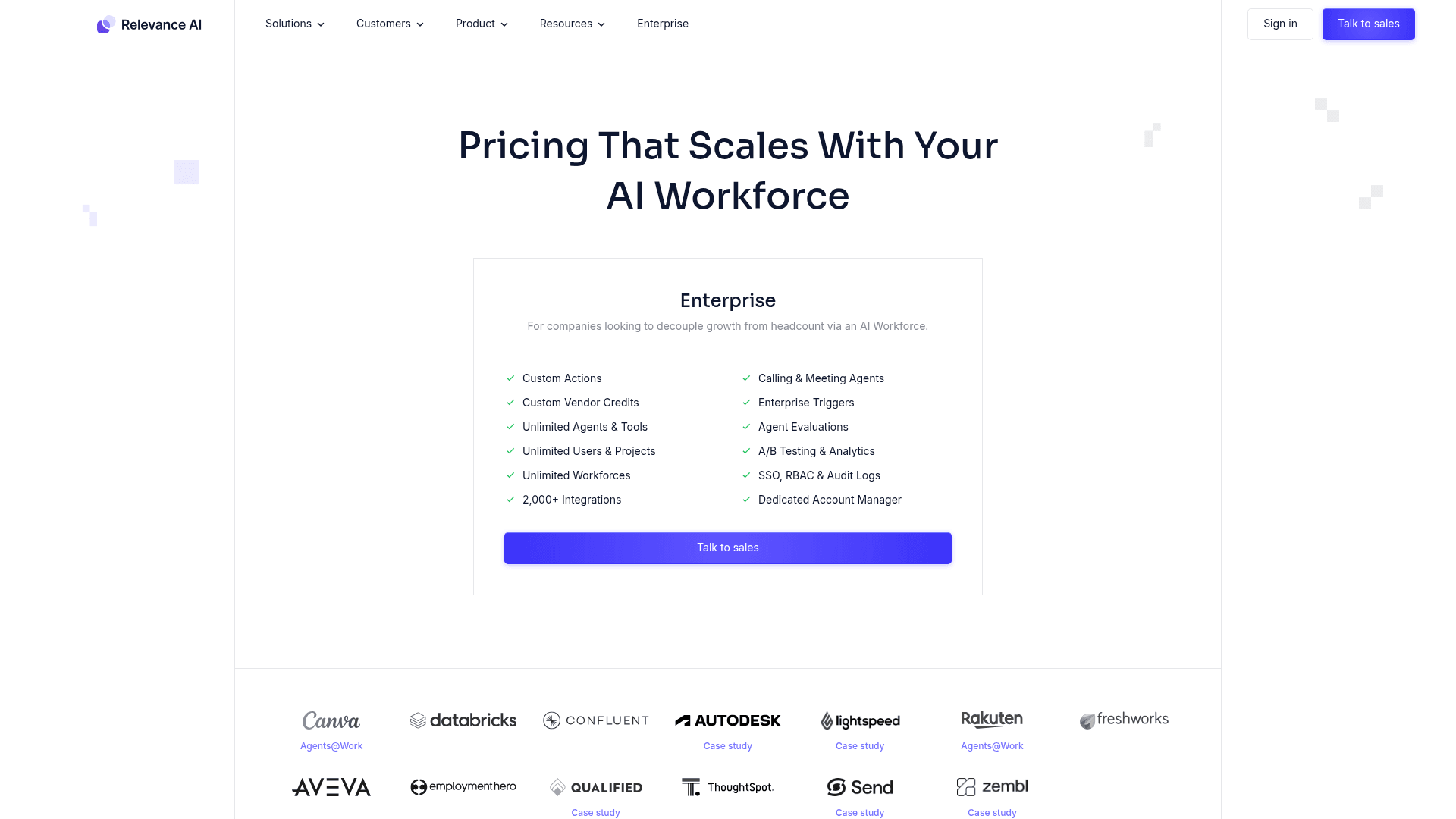
What it is. Relevance AI sells an "AI Workforce": agents, tools and multi-agent workforces with evaluations, A/B testing and 2,000+ integrations, with Canva, Databricks, Autodesk and Rakuten on the customer wall.
How it bills. Two meters, split in September 2025. An Action is one run of a Tool, simple or complex, and the docs state plainly that a failed tool run still counts as one Action. Vendor Credits are the underlying model cost, passed through with no markup, and you can bring your own API keys on paid plans to skip them entirely. Actions reset at renewal while Vendor Credits roll over indefinitely while you stay subscribed.
Where the work stops. At whatever you assemble, with better evaluation tooling than most of this list.
Pricing. The pricing page shows one Enterprise card and no numbers. The real rate card is in the docs, where the free tier is 200 Actions a month plus 1,000 Vendor Credits, and a Pro example shows 2,500 Actions and 3,000 Vendor Credits. The number to notice is the top-up: Actions cost $80 per 1,000, which is $0.08 each, sold only in 1,000 blocks, and Vendor Credits are $20 per 10,000. Action top-ups do roll over, which softens it.
Verdict. Good agent tooling behind a rate card you have to go looking for. If you go this route, model your Actions carefully, because $0.08 per tool run adds up fast when one deliverable takes a dozen. The Relevance AI pricing piece has the full arithmetic.
9. Tasklet
What it is. Tasklet describes itself as IFTTT for the agentic age, with agents that own the work. Agents run in isolated cloud sandboxes with browser automation, tasks are created in natural language, and it is multi-model across Claude, GPT and Gemini. It holds SOC 2 with GDPR in progress.
How it bills. Credits, and the honest summary is that the sticker is cheap and the real cost is hard to forecast. Burn per run varies with complexity, context size, tool use, trigger frequency and the chosen intelligence level from Basic up to Genius, with browser use and higher intelligence burning fastest. There is no published credits-per-task rate and no published overage policy.
Where the work stops. At the sandbox boundary. Unlimited agents and integrations on every plan is a genuine plus, and the 15+ named integrations are business tools like Gmail, Slack, Salesforce, HubSpot, Asana and QuickBooks, plus custom HTTP and MCP.
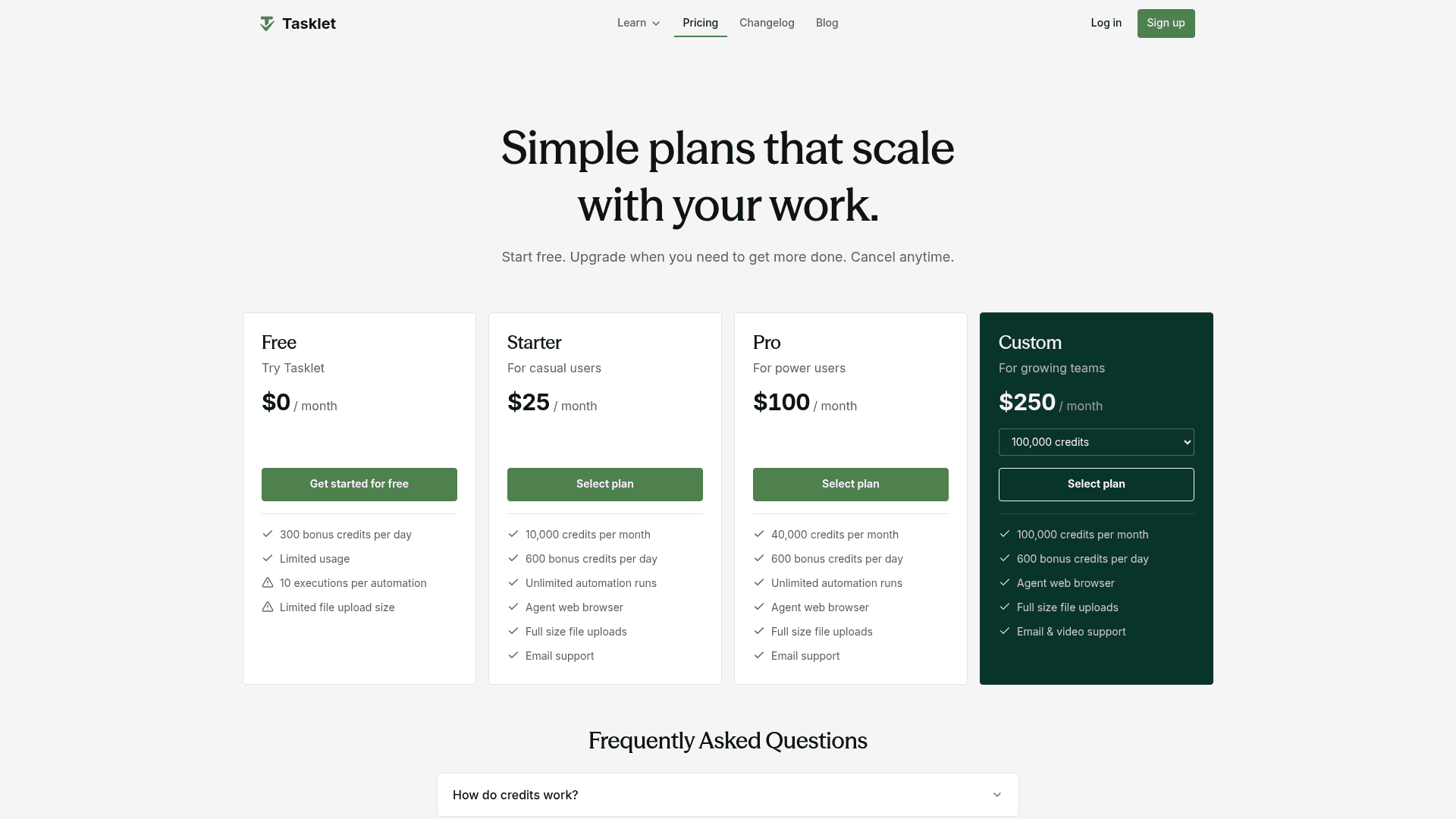
Pricing. Free at $0 with 300 bonus credits a day and a 10-executions-per-trigger cap, Starter $25 for 10,000 credits a month plus 600 bonus a day, Pro $100 for 40,000, Custom from $250 for 100,000 and up. Daily bonus credits reset at midnight UTC and do not stack, monthly credits do not roll over, one-time top-ups run $25 to $10,000 and stay valid a year, and refunds are available within 14 days up to $250.
Verdict. The cheapest way to put autonomous agents with browser access into production, provided you accept that you cannot model the bill in advance. The Tasklet review tests the credit burn.
10. Gumloop
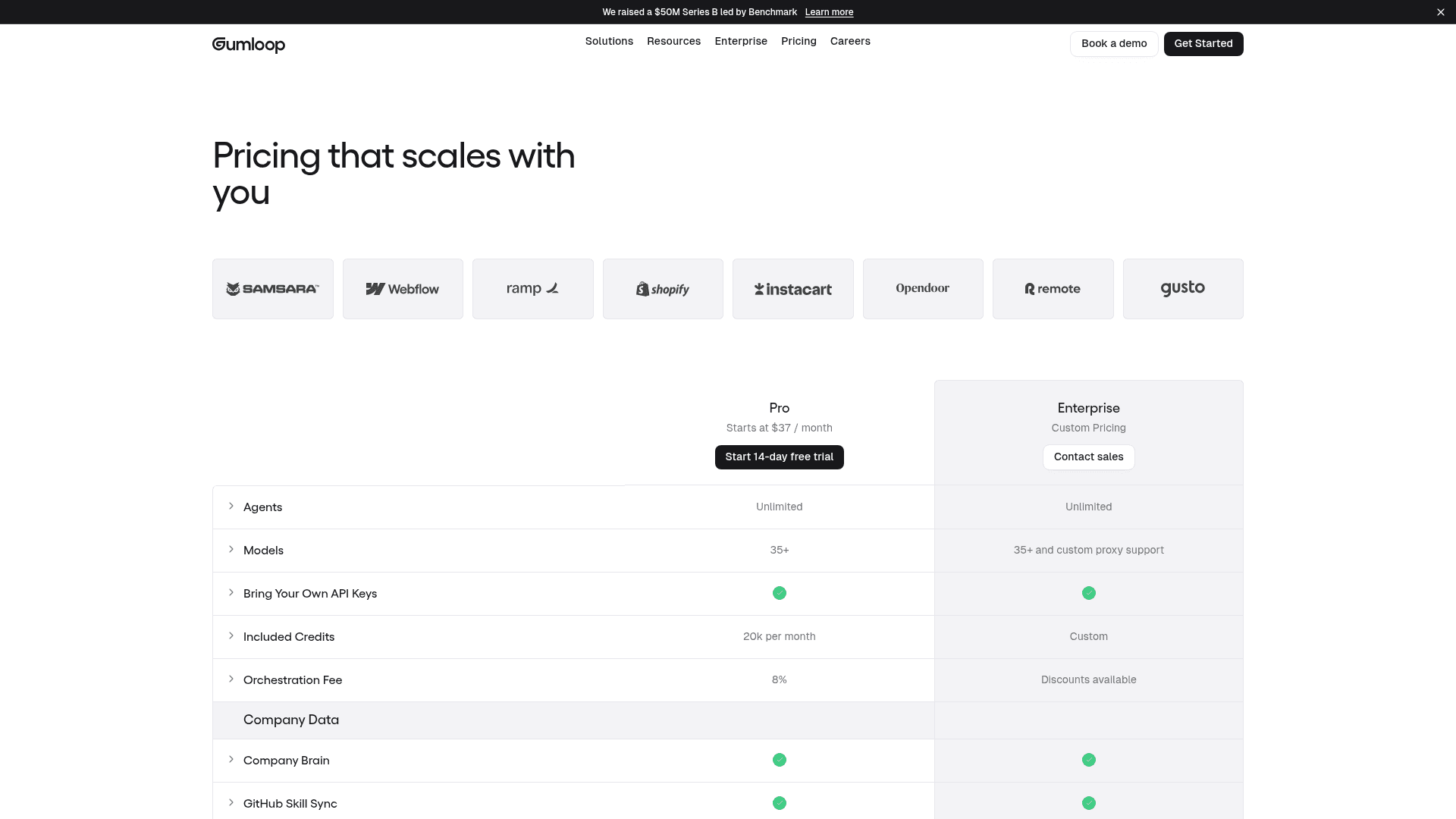
What it is. Gumloop is a node-canvas agent builder with a Company Brain knowledge layer, GitHub Skill Sync, 35+ models and bring-your-own API keys, backed by a $50M Series B led by Benchmark. Samsara, Webflow, Shopify, Instacart and Gusto are on its customer wall.
How it bills. The most unusual meter here, and the one that needs reading twice. Pro bundles 20,000 credits a month, and on top of that sits an 8% orchestration fee, discounted at Enterprise. Because a credit maps to model spend rather than to a piece of work, the bill is a function of what your runs cost rather than how many you did, which makes it the hardest of these to normalise against a Job. On failed runs Gumloop splits three ways: failed tool calls are free, a workflow stopping partway bills only the nodes that ran, and agent-chat failure is unstated.
Where the work stops. At the canvas. The pattern in Gumloop's own community is that week-one users praise the builder and month-three users talk about reliability, credit burn and babysitting, which is a fair thing to know going in rather than a knock on the product.
Pricing. Pro starts at $37 a month with unlimited agents, 20,000 credits and BYO keys, plus the 8% orchestration fee. Enterprise is custom with discounts available. There is a 14-day free trial.
Verdict. Best of this group if you want BYO keys and a real canvas, and the one where I would insist on a month of real usage before extrapolating, because a percentage fee on model spend moves with model prices. The Gumloop pricing piece unpacks the credit definition.
How I would actually choose
Three questions, in this order. They will get you further than any feature matrix.
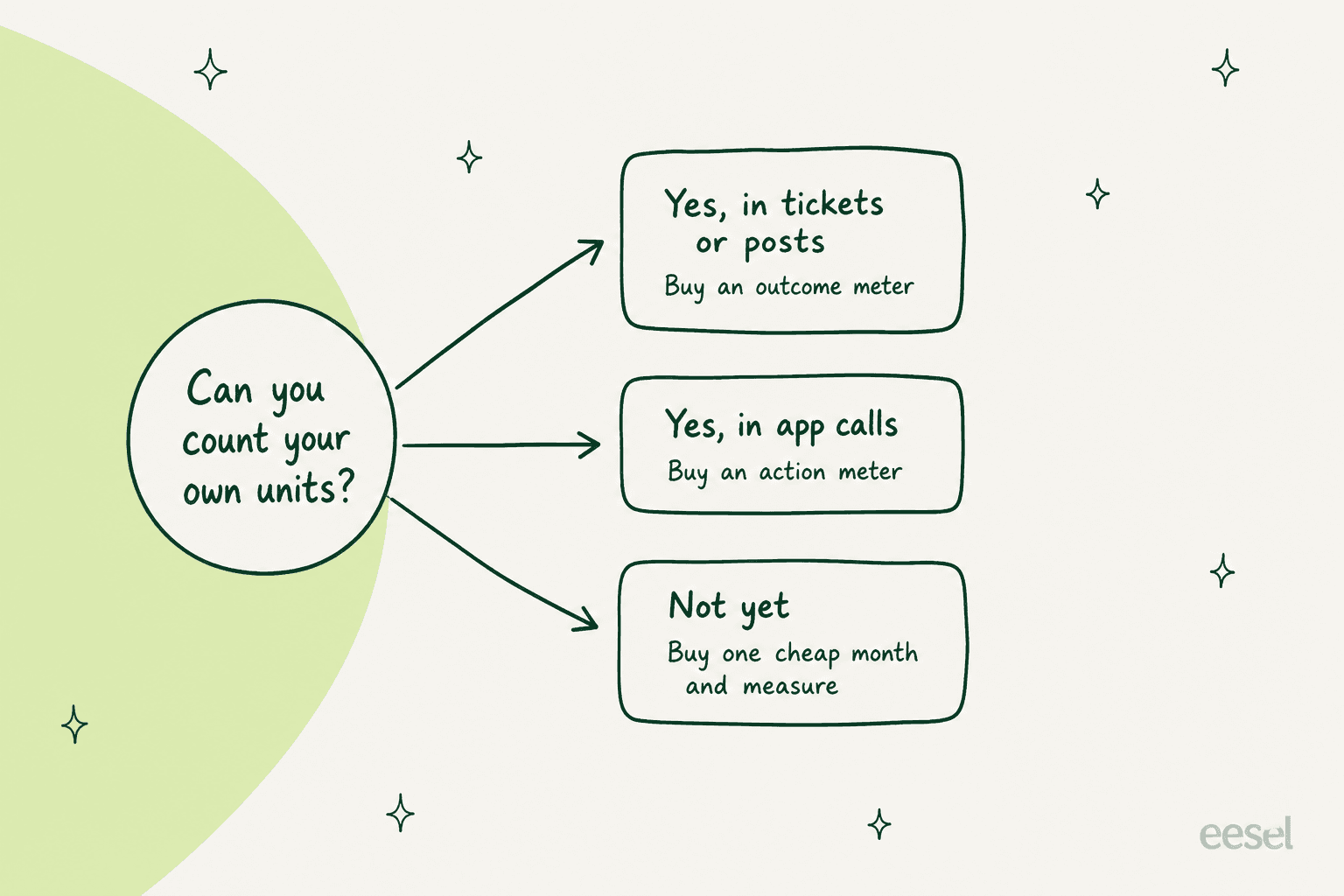
1. What unit can you already count? This is the whole decision. If your organisation already counts tickets, chats, articles or published posts, buy something metered in those and your finance team can forecast on day one. If you count app calls and records, buy an action meter and take the much lower per-unit rate. If you cannot count anything yet, that is fine, but do not sign an annual commitment: buy the cheapest month available, run it, and measure. Get BOB's Mini plan at $29 and Make's Core at $12 are both cheap ways to buy a month of data about yourself.
2. Who writes the job description? Get BOB's onboarding literally asks you to describe a job or paste a real job description, which is refreshingly clear about the deal on offer. You are the hiring manager. You define the work, you assemble the team, and you own it when the definition was wrong. Sintra, Cassidy, Relevance AI, Tasklet and Gumloop all sit in the same place, and so do Zapier Agents and the n8n agent nodes. The alternative model is hiring for a job the vendor has already scoped and pre-skilled, which is narrower by design. Neither is better in the abstract. What matters is whether you have someone whose actual job is to write and maintain those definitions.
3. How will you prove it works before it touches something real? This is the question buyers skip and regret. On eesel's own sales calls the objection that has stuck with me most is from a support lead who said the AI answering everything is worse than useless if you cannot verify it, because they could not go and check all seven thousand of their tickets by hand. The answer is a dry run against your own history plus confidence routing, so the AI handles only what it is sure of. Ask every vendor here what their version of that looks like. If the answer is "start the trial and see", then the pilot is the test and your customers are the subjects. For what good looks like here, start with preventing AI hallucinations. The bar for measuring it is in AI support quality assurance.
If you want the wider field rather than just Get BOB's neighbours, the best AI employee platforms roundup sorts the same market by a different axis. Still deciding what to automate at all? Start from AI agent examples instead.
For the knowledge layer underneath any of this, AI knowledge bases is the primer. The mechanics live in RAG versus fine-tuning.
Try eesel where the unit is already something you count
If you got this far because your real problem is that you cannot forecast the bill, that is the problem eesel is priced around.

You hire a teammate for a job that already has a unit. The AI helpdesk teammate joins the queue you run today, whether that is Zendesk, Freshdesk, Gorgias, Front, Help Scout, HubSpot, Salesforce or Jira Service Management, and costs from $299/month for 500 credits, where 1 credit is one ticket or chat handled. The AI blog writer costs $4 a post. No seats, no platform fee, and optional overage with a cap you set yourself if you want one.
Before it touches live traffic it replays your own past tickets and scores its answers against what your team actually sent, so you find out which themes it is weak on before a customer does. That is the dry run I would demand from anyone on this list.
Start with the 100 free credits, which covers 100 tickets and needs no card, or read what an AI ticketing system actually changes about a queue. If your job is content rather than support, the AI blog writer alternatives roundup is the honest place to compare eesel.
Frequently Asked Questions
What are the best Get BOB AI alternatives in 2026?
How much does Get BOB cost?
What counts as one BOB Job?
Is Get BOB cheaper than Zapier or Make?
Does Get BOB have a free plan or a free trial?
What are the best Get BOB alternatives for customer support specifically?
How do I compare AI employee pricing when every vendor uses a different unit?
Which Get BOB alternatives publish a complete rate card?


Article by
Kurnia Kharisma
Kurnia is a software engineer and writer at eesel AI with two years of SEO experience, writing about AI tools, helpdesk software, and customer support. He pairs a developer's understanding of how these products are built with search-driven research into what actually ranks and resonates with the people searching for them.