Fast.io alternatives: 10 best picks for 2026, fully priced

Kurnia Kharisma

Katelin Teen
Last edited August 26, 2026

The three layers, and why this matters more than the price
I have spent two years watching what people type into Google before they buy software, and "Fast.io alternatives" is one of those searches where the keyword hides three completely different buying questions. Someone types it because their trial credits ran out. Someone else types it because they need a Windows desktop client. And a third person types it because they connected Claude to their files, watched it produce a beautiful answer, and then realised nobody had actually done anything.
That third person is the one I recognise. I work on AI agents that live in support queues, and the single most quoted line in our internal customer notes is eleven words long:
"the response is great but I don't have a way to approve it in Zendesk"
That is a Zendesk admin, in a support chat, describing a product that read everything correctly. The reading was never the problem.
We have the numbers behind that too. On a cross-validated trial against real Zendesk traffic at a German online jewellery retailer running about 1,000 tickets a month on Zendesk and Shopify, our drafts were 88% directionally correct and 12% went out unchanged. Here is the part that reframes everything: when we broke down why agents rewrote the other 88%, roughly 65% was voice and length, about 20% was missing data from systems like their ERP and logistics provider, and only around 5% was us being factually wrong.
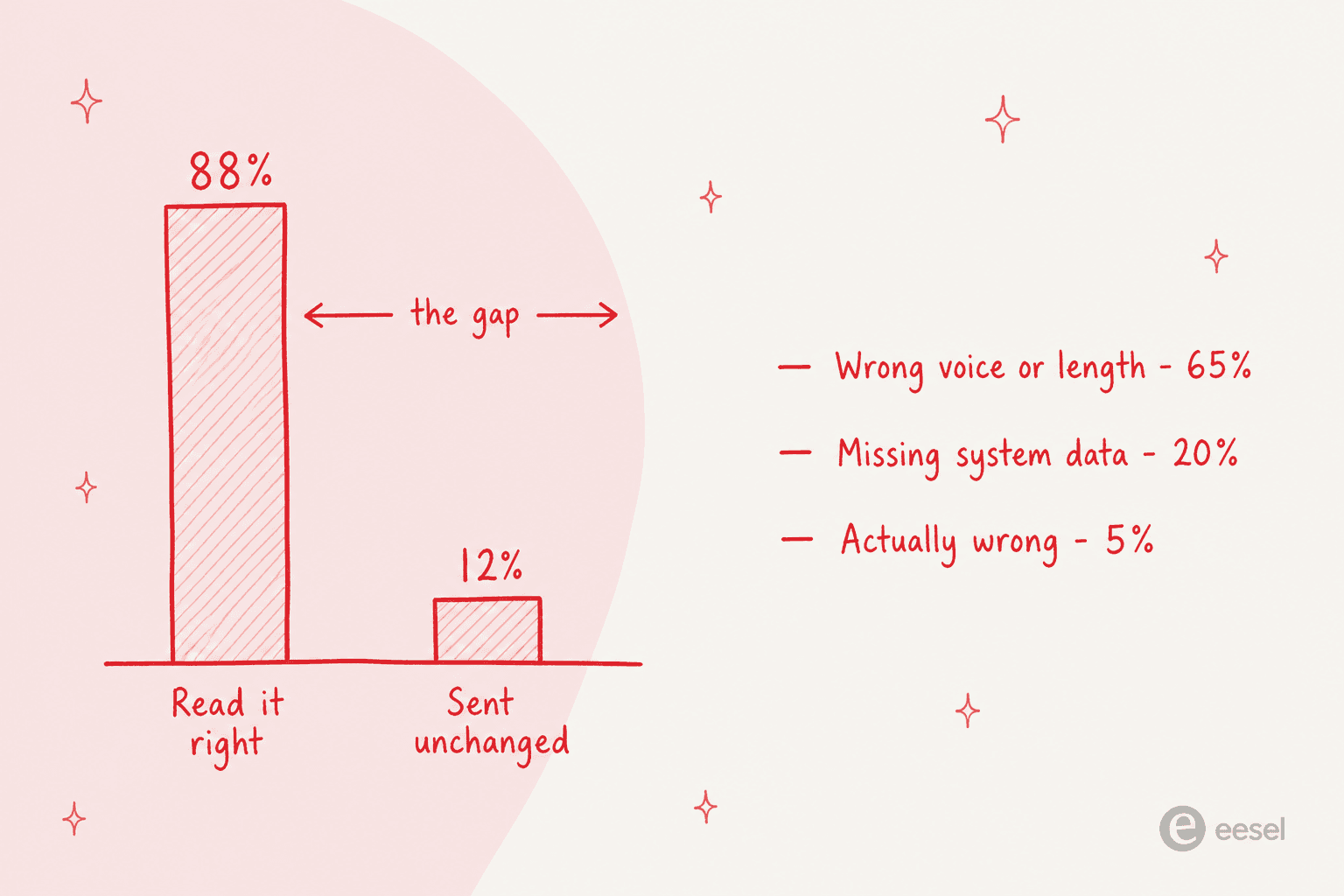
Read that breakdown again. Neither of the two big causes is a comprehension problem, and neither is fixable by moving your files into a nicer drive. One needs the AI trained on how your team actually writes. The other needs it plugged into systems that are not documents at all.
Which is the whole reason to think in layers:
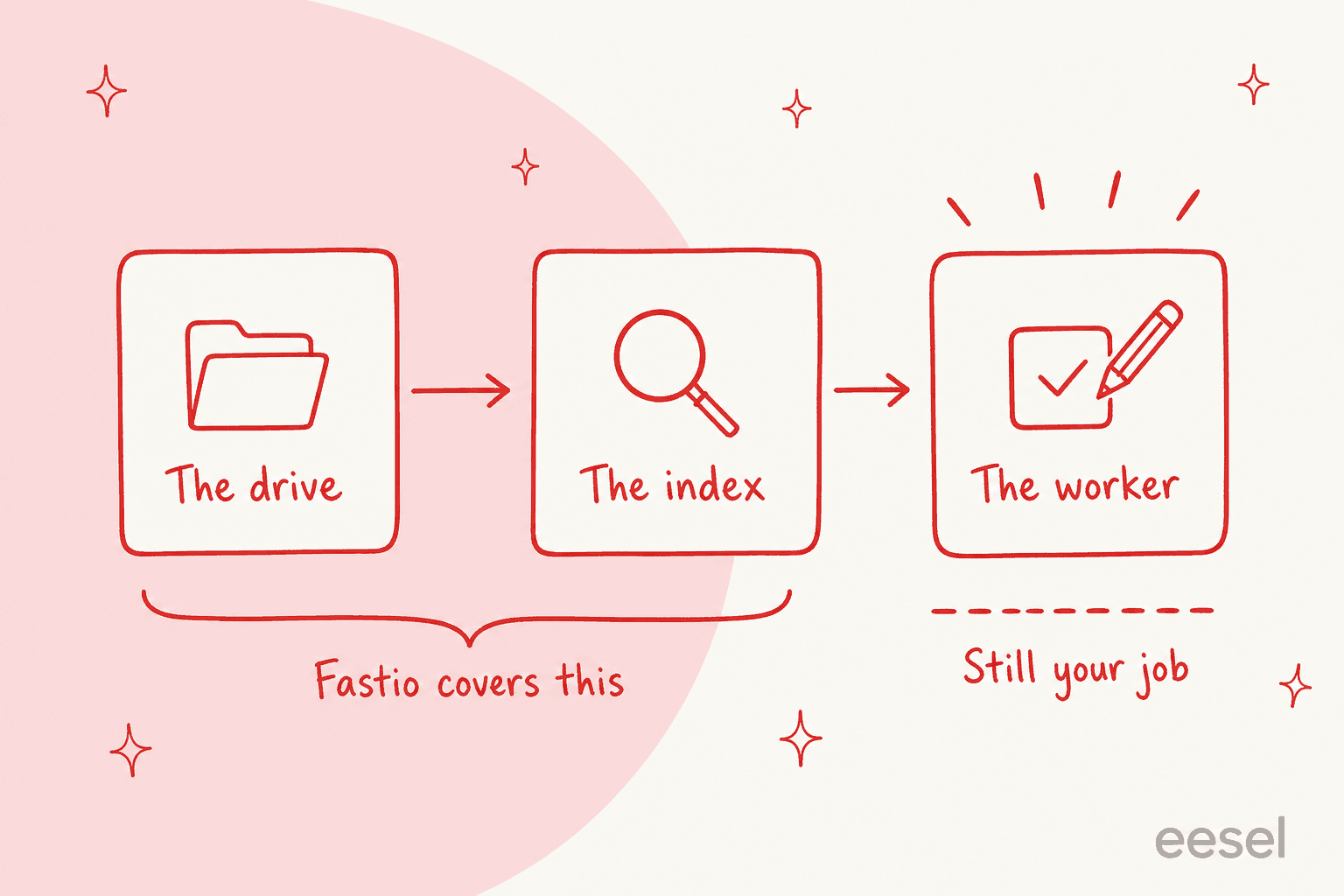
- The drive. Somewhere the bytes live, with sharing, permissions and version history. Dropbox, Box, Google Drive, OneDrive, pCloud.
- The index. Something that reads across your stuff and answers questions about it. Dash, Box AI, Gemini in Drive, Copilot, Glean, Ripley.
- The worker. Something that takes the answer and finishes the job: replies to the customer, updates the ticket, escalates the edge case, closes the loop.
Fastio's own positioning line is "Storage is step zero. We provide the rest." I would put it slightly differently, and I think fairly: Fastio moved the context into the drive, which is a real and clever move. The hands still live in whatever agent you connect.
What Fastio actually is, and what changed in July
Worth being precise here, because a lot of "alternatives" posts describe a product nobody at the company would recognise.
Fastio launched on 28 April 2026 out of The Woodlands, Texas, built by the team behind MediaFire under parent company VividEngine. Its hero line is "Cloud storage workspaces built for agentic teams," and its built-in AI is called Ripley. Ripley automatically reads and indexes everything in a workspace, and its pitch is architectural: "The brain lives in the workspace rather than in the agent."
The agent side is properly built. There is a real MCP server at mcp.fast.io, a documented CLI, a REST API, and 13 documented tools covering workspace creation, storage operations, search, AI chat, webhooks and sharing. A working COO on G2 describes it better than the marketing page does:
"I plugged Claude in through the MCP server in a few minutes, and from that point the agent reads and writes real files in the same folders my team uses. Not a sandbox, not a copy I have to keep in sync."

Then, on 21 July 2026, Fastio published one of the more unusual changelog entries I have read. It removed workflow automation, tasks and approvals, describing it as "a deletion, not a deprecation": roughly 105,000 lines across 345 files from the web app, about 1,150 files from the platform, and around 7,750 lines from the MCP server. Approvals had shipped on 10 April, which means the feature lived about 102 days. The post closes with "Less product, working better."
I actually admire the discipline. But it does settle the question this post exists to answer. Fastio looked at being the place where work happens and decided not to be it. If you arrived hoping for the doing layer, no amount of comparing storage tiers is going to help.
Which layer are you short of?
How I picked these ten
Four rules, applied the same way to every entry.
- Published prices only, or an honest note that there are none. Where a vendor hides its rate card, I checked the AWS and Azure marketplaces, because quote-only vendors often publish real per-seat rates there. Where nothing exists, the entry says so instead of guessing.
- The AI meter gets named separately from the seat. Almost every product here bills the storage and the intelligence on different clocks. A post that only compares seat prices is comparing the wrong number.
- Read versus act, stated plainly. For each tool I looked for a documented action, not a demo verb. Answering, summarising and searching are reading. Writing into a system of record is acting.
- Only vendor documentation and real user posts. Everything cited here is either the vendor's own page or a post on G2, Reddit or Hacker News with a permalink you can click.
I have not used all ten in production for a year, and I am not going to pretend otherwise. What I did was read every published rate card, every AI metering doc, and the reviews from people who have.
The 10 best Fast.io alternatives at a glance
| # | Tool | Best for | Entry price | AI layer cost | AI can act? | Free tier | Storage at entry | Own certifications | MCP / agent access | Desktop apps |
|---|---|---|---|---|---|---|---|---|---|---|
| - | Fastio | Agent-native storage | $29/mo flat | Credits, $10 per 100,000 | Reads only | No, 14-day card trial | 1 TB | None held, states so | Yes, 13 tools | macOS only |
| 1 | eesel | Work getting finished | From $299/mo (500 credits) | Included in the credit | Yes, in the helpdesk | 100 free credits, no card | Not a file store | GDPR, CCPA; SOC 2 underway | Connectors, not a drive | Web, in-helpdesk |
| 2 | Dropbox | Closest like-for-like | $15/user/mo | Dash, $15/user/mo extra | Reads only | 2 GB Basic | 3 TB pooled | SOC, ISO, CSA | Remote MCP server | Win, Mac, Linux |
| 3 | Box | Regulated industries | $15/user/mo | AI Units, $10 per 1,000 | Extract and agents | Dev tier, 1,000 units | 100 GB | HIPAA, FedRAMP, SOC 2 | MCP, billed as API | Win, Mac |
| 4 | Google Workspace | Already paying Google | $7/user/mo | Bundled, gated by tier | Reads and drafts | 14-day trial | 30 GB | ISO, SOC, GDPR | Workspace Studio | Win, Mac |
| 5 | Microsoft 365 | Microsoft shops | $7/user/mo | Copilot, $21/user/mo | Yes, via agents | Copilot Chat only | 1 TB | ISO, SOC, HIPAA | Copilot Studio | Win, Mac |
| 6 | Glean | Search across everything | Quote only | Seats plus FlexCredits | Yes, with approval | No | Indexes in place | SOC 2, ISO | Native and MCP tools | Web, Win, Mac |
| 7 | Notion | Docs over raw files | $10/user/mo | Bundled at Business | Inside Notion, Slack | Yes, limited AI | 5 MB per file free | SOC 2, ISO, HIPAA | MCP available | Win, Mac |
| 8 | Egnyte | Governance-heavy verticals | $10/user/mo | Tier jump to $48 | Workflows at Elite | No | 1 TB per user | HIPAA, FINRA, CMMC | Limited | Win, Mac |
| 9 | Nextcloud | Owning your own bytes | Free self-hosted | Assistant at top tier | Context Agent, yes | Community edition | Your disk | Yours to earn | First-party MCP | Win, Mac, Linux |
| 10 | pCloud | Cheap terabytes, no AI | $399 lifetime, 2 TB | None, no AI at all | No AI | Up to 10 GB | 2 TB | GDPR | None | Win, Mac, Linux |
Prices are the lowest published business rate as of 25 August 2026. Every figure is sourced in the sections below.
1. eesel
Best for: teams whose actual complaint is that good answers arrive and nothing happens.
Let me be blunt about the mismatch before anything else, because it matters: eesel is not a file store. If you came here to park 10 TB and hand out share links, close this section and read the Dropbox or pCloud entries. Nothing about eesel replaces a drive.
What it replaces is the person who was going to read the answer and then do the thing. You hire an AI teammate for a defined job, and it arrives already knowing the role. The AI helpdesk agent sits inside the helpdesk you already run, drafts and resolves and escalates there, and the AI blog writer does the same for content work.
The knowledge side looks superficially like Fastio's pitch and is architecturally the opposite. Instead of asking you to move files into a new drive, it connects to where they already are.
Seven sources are supported today: Confluence, Notion, Google Drive, SharePoint, Google Docs, PDF uploads and a website crawl. None of them is Enterprise-gated. Past tickets are a first-class source too, and that is the one that actually closes the 65% voice gap from the trial data above.
Features
- Nine helpdesks supported. The Zendesk integration is the deepest, with Freshdesk, Gorgias, Front, HubSpot, Salesforce, Help Scout and Jira Service Management alongside it, plus plain email.
- Simulation against your own historical tickets, and it is not plan-gated. It reports coverage per theme rather than one blended accuracy score, so you get lines like "Refund policy, 28%" instead of a number you cannot act on. It also names the missing document.
- Confidence routing, so the agent handles what it is sure about and leaves the rest alone.
- Answers in Slack and Microsoft Teams for internal questions, which is the internal knowledge base use case.
Pros
- One credit is one ticket or chat, not a seat or a message, so the invoice maps to something you already count.
- Simulation before go-live directly answers the fear that kills most of these projects. One CX lead at a supplements brand doing about 7,000 tickets a month put it as well as anyone: "I cannot go and check all my 7,000 tickets to see if the AI actually made a good answer."
- No seat math and no platform fee on any plan.
Cons
- Not storage. No drive, no share links, no version history. This is a real gap versus every other tool here.
- Do not expect a SOC 2 report today. It is underway with continuous monitoring, and the report goes out under NDA when it completes. If your procurement team needs the certificate now, Box and Egnyte have it and eesel does not.
- SSO and MFA (from $199/mo) and data residency ($500/mo) are paid add-ons, and HIPAA is a talk-to-us request.
- Credits are used whether the outcome was perfect or not. The meter is tickets worked on, not resolved. I would rather say that plainly than let you find it on an invoice.
Pricing
| Plan | Price | Credits per month |
|---|---|---|
| Free | $0 | 100 credits, no card required |
| Teammate 500 | $299/mo | 500 credits |
| Teammate 1,000 | $499/mo | 1,000 credits |
| Teammate 2,500 | $999/mo | 2,500 credits |
| Teammate 5,000 | $1,899/mo | 5,000 credits |
| Blog post draft | $4 each | Separate from credits |
One credit is one ticket or chat, any number of replies. Questions asked in the eesel dashboard are mostly free. Pay a year upfront and get two months free. Above 5,000 credits, talk to eesel. Worked example: 500 tickets a month is the $299 plan. Two thousand five hundred is the $999 plan. And if you route only 200 of your 1,000 monthly tickets to the AI, only those 200 use credits.
A named customer describing the acting layer, from a published case study:
"We use it to be the first responder to our Helpdesk tickets in Jira. It essentially acts just like an agent would."
Jason Loyola, Head of IT, InDebted
My take: pick eesel when the sentence that describes your problem has a verb in it. "Tickets are not getting answered," "the team is drowning," "our first response time is embarrassing." Skip it if the sentence is about gigabytes. And if you want the fuller category picture, our AI teammates and best AI employee posts cover the same ground with different competitors.
2. Dropbox
Best for: the closest thing to a like-for-like Fastio swap, if you can afford two invoices.
Fastio runs a whole page arguing against Dropbox, so this is the comparison it wants you to make. Fair enough. Dropbox is still the product most people mean when they say "cloud storage," and its AI layer, Dash, is a real universal-search product with 52 named connectors.
The thing the Fastio comparison page does not mention is that Dash is a separate invoice. The file plans only tease it as "coming soon."
Features
- Dash searches across connected tools, not just Dropbox, which is a genuinely different job from indexing one drive.
- Version history from 30 days on Plus up to a year on Advanced.
- Desktop clients on Windows, macOS and Linux, which is where Fastio currently has a real hole.
Pros
- The most mature sync client in the category, and the one your non-technical colleagues already know.
- Dash's connector list means it can see knowledge that never entered Dropbox.
- Certifications cover Standard, Advanced, Enterprise and Education.
Cons
- Two bills. Standard plus Dash is $30/user/mo, and $39 if you need SSO, which sits at Advanced.
- Crossing 100 seats hurts. Dash for Business is $35/user/mo and yearly billing only, so the AI seat jumps 133% and the monthly option disappears.
- Dash is available in three countries. United States, United Kingdom and Australia, English-language accounts only.
- A regulated buyer has to choose. Dropbox Standard and above will sign a BAA, but Dash explicitly excludes accounts requiring HIPAA compliance. You get the storage or the AI, not both.
- Dash reads and drafts. It does not create the Jira ticket for you.
Not everyone is sold. One user on the searching experience:
"It is very good in terms of search but once it finds something, it ALWAYS opens the file in the browser. So why not use the browser and search instead?"

Pricing
| Plan | Monthly | Annual | Min users | Storage | Version history |
|---|---|---|---|---|---|
| Basic | $0 | $0 | 1 | 2 GB | - |
| Plus | $11.99 | $9.99 | 1 | 2 TB | 30 days |
| Standard | $18 | $15 | 1+ | 3 TB pooled | 180 days |
| Advanced | $30 | $24 | 3+ | 15 TB team | 1 year |
| Enterprise | Quote | Quote | Custom | Custom | 1 year |
| Dash for Teams | $19 | $15 | Up to 100 | - | - |
| Dash for Business | - | $35 | Over 100 | - | - |
My take: the safe institutional choice, and the honest answer for most teams leaving Fastio for boring reasons like "we need a Windows client." Just budget the $30 bundle, not the $15 headline. Skip it if you are in a HIPAA environment, because the Dash exclusion makes that a dead end.
3. Box
Best for: regulated teams that need the compliance paperwork in their own name.
Box is the enterprise content platform that took compliance seriously first, and it shows. It is also the clearest example in this whole roundup of a pattern worth naming: publishing the AI rate is not the same as publishing the AI cost.
Features
- AI Units are the meter, at $10 per 1,000, so $0.01 a unit, minimum 1,000, annual billing only.
- Ask a document, ask a folder, agentic extraction, and Box Agent orchestration at the top tiers.
- The chargeability line is the interesting part: typing a question into the Box web app is free, while the same question through the API, an automation or the MCP server is metered.
Pros
- The deepest certification set here alongside Egnyte. HIPAA and FedRAMP Moderate start at Enterprise, with FedRAMP High and GxP available on top.
- 1,500+ integrations in the catalogue.
- The free developer tier includes 1,000 AI Units.
Cons
- Business and Business Plus include zero AI Units. You buy them. Included allowances only start at Enterprise, at 1,000, 2,000 and 20,000 by tier. The free developer tier gets more AI than the $15 paid plan does.
- The unit-to-action conversion table is gated. The rate is public, what a unit buys is not, and the docs route you to sales for it.
- A second, separate cap. There is a per-user daily Box Agent quota for interactive work, published only as percentages, implying roughly five to twelve complex tasks per user per day at Enterprise Plus. Exhaust it and you drop to "Box Agent Lite."
- Multi-file question answering only arrives at Enterprise Plus, around $50/user/mo.
- Integration count is a catalogue, not an entitlement: Business gets one enterprise app integration, Business Plus gets ten, and unlimited starts at Enterprise.
An MSP operator weighing Box against Dropbox, which is still the honest read on seat price:
"Box still has better pricing and better storage option plans than Dropbox. But, having said that, most people tend to use Dropbox and there's a lot more familiarity with it. We deploy it a lot more than box.com."
Pricing
| Plan | Per user/mo | Storage | AI Units included | Notable gate |
|---|---|---|---|---|
| Business | $15 to $20 | 100 GB | 0 | 1 app integration |
| Business Plus | $25 to $33 | Unlimited | 0 | 10 app integrations |
| Enterprise | Quote | Unlimited | 1,000 | HIPAA, FedRAMP Moderate |
| Enterprise Plus | ~$50 | Unlimited | 2,000 | Multi-file Q&A, Box Agent |
| Enterprise Advanced | From ~$70 | Unlimited | 20,000 | Pro Mode, AI Studio |
| AI Units add-on | $10 per 1,000 | - | - | Annual only, min 1,000 |
My take: if a compliance questionnaire is standing between you and a purchase order, Box is the shortest path in this list. Just do not budget from the $15 row, because that row has no AI in it at all. Skip Box if you are a ten-person team, because the tier where the AI gets good starts around $50 a seat.
4. Google Workspace
Best for: teams already paying Google, who should check one specific gate before assuming they are covered.
Google did the thing everyone said was coming: it stopped selling AI separately and folded Gemini into the base plans, raising seat prices in the same motion. Since 31 January 2025 you are not charged for the old add-on.
There is a catch that costs people real money, though, and it is easy to miss on the pricing page. Gemini in Drive does not exist on Business Starter. The cheapest Workspace seat cannot ask questions across its own files. The entry point for that is Business Standard.
Features
- Gemini across Drive, Docs, Gmail and Sheets, plus Gemini Notebook, the product formerly called NotebookLM, and agents under Workspace Studio.
- Pooled storage from 30 GB to 5 TB per user.
- Third-party IdP SSO on every Business tier, which is unusually generous and worth crediting.
Pros
- The lowest true entry price here at $7/user/mo on annual commitment.
- No separate AI invoice to model on the core tiers.
- A live promotion at 30% off runs 7 September to 7 December 2026 for new customers, first 20 users, 12 months.
Cons
- The AI usage caps are small and specific. A paid Standard seat gets 30 "Organize files" runs a month, five style-match runs, and 100 spreadsheet builds. Several features move from promotional to enforced limits across August, September and October 2026.
- Overage suspends the subscription rather than throttling or billing per gigabyte, and clearing it means buying past your total usage in one move.
- A paid add-on still exists, now called AI Expanded Access, eligible only on Standard and Plus, and Google publishes no price for it.
- DLP enforcement is Enterprise-only. Standard and Plus get visibility reports, not rules.
- All three Business tiers cap at 300 users.
The add-on confusion is real, and this user describes it precisely:
"I have a Google workspace account and I was under the impression that Gemini that was included in the Workspace standard subscription was basically the same usage as Gemini Pro... I wanted to get more usage so I upgraded to the AI expanded access for an additional $20. So about $40mo with workspace license."
Pricing
| Plan | Flexible | Annual | Storage | Gemini in Drive |
|---|---|---|---|---|
| Business Starter | $8.40 | $7.00 | 30 GB | Not supported |
| Business Standard | $16.80 | $14.00 | 2 TB | Yes |
| Business Plus | $26.40 | $22.00 | 5 TB | Yes |
| Enterprise | Quote | Quote | Custom | Yes |
| Extra storage | - | $15 per 100 GB/mo | - | - |
My take: if you are already on Business Standard or Plus, you have most of Fastio's index layer already and did not know it, and the honest move is to try it for a fortnight before buying anything. If you are on Starter, budget the upgrade to $14, not the AI add-on. Our notes on Google Drive's AI limits and Google Docs AI go deeper on where it stops.
5. Microsoft 365
Best for: Microsoft shops, where the index is already half-built and the paywall is a technical one.
The number most people quote for Copilot is out of date. Microsoft renamed and repriced the business add-on: Microsoft 365 Copilot Business is $21.00/user/mo on annual commitment, or $25.20 monthly, with an $18.00 promotional rate for existing Business-plan customers that expires 30 September 2026. The "from $30.00" figure still applies to the Enterprise SKU.
The mechanic worth understanding is the semantic index, and it is the whole story. Microsoft's own words: "We generate a semantic index for users with a paid Microsoft Copilot license." Free Copilot Chat, which is included on every base plan, has no index. It only reads files you hand it by hand.
Features
- Copilot across Teams, Outlook, SharePoint and OneDrive once the index exists.
- Bundled SKUs now exist: Business Standard with Copilot at $23.50/user/mo annual, Business Premium with Copilot at $32.00.
- Copilot Credits for agents at $200 per pack of 25,000, which works out to $0.008 a credit.
Pros
- The broadest cross-application reach of anything here, if your work genuinely lives in Microsoft tools.
- A published per-action credit table, which is more transparency than Fastio, Box or Glean offer on their AI meters.
- SSO and MFA on every plan.
Cons
- Real indexing gaps, documented by Microsoft. Coverage is docx, pptx, pdf, aspx and one only, so no Excel, no images, audio or video. Shared and delegated mailboxes are unsupported, and there is a 512 MB ceiling.
- A freshness delay. New SharePoint files accessible to two or more users index daily.
- Semantic indexing cannot be disabled, and Purview DLP, the only fine-grained way to exclude a folder from it, is a Business Premium purchase.
- Agents are a second, non-rolling meter. Enforcement kicks in at 125% of allocation and unused credits do not carry over.
- Governance costs a tier: Intune, Defender and Purview are all Premium-only, and the 300-user cap is tenant-wide across the whole business family.
Both sides of the value argument exist, honestly held. The enthusiast:
"Copilot is amazing in it's ability to synthesize data across the platform, as well as find things across the platform. It is literally my copilot all day long."
And the sceptic, on the Enterprise price:
"You're paying $30/user/month for a wrapper around models you can access directly for less."
Pricing
| Plan | Annual | Monthly | OneDrive | Copilot |
|---|---|---|---|---|
| Business Basic | $7.00 | $8.40 | 1 TB | No bundle available |
| Business Standard | $14.00 | $16.80 | 1 TB | +$21.00, or bundle at $23.50 |
| Business Premium | $22.00 | $26.40 | 1 TB | Bundle at $32.00 |
| Copilot Business | $21.00 | $25.20 | - | Base plan required |
| Copilot Credits | $200/pack/mo | - | - | 25,000 credits |
My take: the best value on this list if your files are docx and pptx in SharePoint. If your team runs on spreadsheets, read that indexing coverage list again before you spend $21 a head, because Excel is not in it. Our Copilot pricing breakdown and Copilot alternatives have the fuller version.
6. Glean
Best for: answers across every tool you own, when migrating files is off the table.
Glean is the purest index-layer product here, and it is the philosophical opposite of Fastio. Fastio says move your files to where the brain is. Glean says leave your files alone and bring the brain to them.
It is also serious infrastructure: $150M Series F at a $7.2B valuation, more than $100M ARR, 850+ staff, and over 100 million agent actions a year.
Features
- Connectors that fetch content and mirror each source's permissions map, so results respect existing access controls.
- Glean Assistant, Agents and Agent Builder. Notably it does act, via native and MCP tools, gated per tool by "Always allow" or "Needs approval."
- Thinking and Adaptive Reasoning included up to 100 per user per week on the basic and standard models.
Pros
- Genuinely searches across your whole estate rather than one drive.
- It does not become your system of record. Glean's own framing: "Glean never locks-in data or creates walled gardens."
- Per-tool approval gates are a more mature answer to agent permissions than anything Fastio publishes.
Cons
- There is no published price, and the pricing page is gone.
glean.com/pricingnow resolves to the homepage. Every path is "Get a Demo." - The marketplaces do not help. Both AWS listings carry a single placeholder seat dimension at $100,000,000, which is a "request a private offer" signpost, not a rate.
- The meter is public but the rate is not. Enterprise Flex is seats plus pooled FlexCredits, and Glean publishes the credit cost of an Agent Run and a Deep Research task with no credit-to-dollar conversion anywhere.
- Its own connector count contradicts itself. "275+ app connectors" and "With 100+ connectors" appear on the same page.
- It is not purely pointer-based, despite the framing. Connectors "store the information in Glean's systems," tenant-scoped, and content under 16.875 MB is stored and fed to the indexer.
The most useful number in public is a practitioner's:
"cost was the part nobody mentions, glean ended up around 18 dollars per seat per month at our size which is fine for a 200 person org but would have killed it at 50."
My take: if you are over 200 people with knowledge scattered across a dozen systems, Glean is the strongest product in this category and worth the sales call. Under 50 people, the same commenter tells you what happens. Our Glean alternatives and Glean pricing posts cover the cheaper end of that market, and AI enterprise search explains the category.
7. Notion
Best for: teams whose knowledge is documents people write, not files people upload.
Notion is the entry here that is honestly a different shape, and I have included it because a real chunk of people evaluating Fastio do not have a file problem at all. They have a "our knowledge is in eleven places" problem, and files are only one of them.
Notion AI is bundled into Business and Enterprise rather than sold separately, so the effective AI price is the jump from Plus to Business.
Features
- Q&A across the workspace, plus agents that create and edit pages, databases and charts.
- Connectors to Slack, Teams, Google Drive, SharePoint, OneDrive, Jira, GitHub, Linear, Gmail, Outlook and Google Calendar.
- It acts inside Notion, and acts in Slack "as you," posting, replying and reacting.
Pros
- The AI is included at Business rather than metered per query.
- Genuinely good at the write-and-organise loop, which is different from search.
- Certifications cover SOC 2 Type 2 and the ISO 27001 family, with HIPAA at Enterprise.
Cons
- File handling is the weak point, and Notion's own docs disagree with themselves. One help page says paid plans cap PDFs at 20 MB and images at 5 MB, and its own FAQ on the same page says paid plans upload "up to 5 GB each." The 20 MB boundary is corroborated by the API's single-part split.
- No "unlimited" language anywhere. There are two unnumbered windows, six-hourly and monthly, that pause AI features. Credits past the allowance are off by default.
- Custom Agents went metered on 4 May 2026.
- Outside Notion and Slack, connectors read only. Notion's own note says they are "not meant to run complex calculations or perform data analysis."
- SAML SSO arrives at Business; SCIM, audit log and HIPAA are Enterprise-only.
A candid read from someone who came around on it:
"it's funny how adding AI to notion actually made it a lot more usable. Most products force it on you, but here I feel like it's actually a massive benefit... But with their notion AI / MCP it's gotten super easy to get information in and out."

Pricing
| Plan | Monthly | Annual | AI included |
|---|---|---|---|
| Free | $0 | $0 | Limited complimentary responses |
| Plus | $12.00 | $10.00 | Limited complimentary responses |
| Business | $24.00 | $20.00 | Yes |
| Enterprise | $32.00 | $26.00 | Yes |
My take: choose Notion if your knowledge is written rather than uploaded, and do not choose it as a file store. A 20 MB PDF cap is disqualifying for anyone handling real documents. Our Notion pricing, Notion AI review and Notion alternatives posts go deeper.
8. Egnyte
Best for: AEC, life sciences and financial services teams whose auditor writes the shortlist.
Egnyte is the governance answer, and it publishes more of its price list than I expected: four of five self-serve tiers carry public annual rates.
Features
- AI Assistant, AI Search and AI Workflows, all starting at the Elite tier.
- Document Type Classification, Trainable Classifiers and OCR, all Ultimate-only.
- Sensitive data discovery, behavioural ransomware detection and customer-managed keys at the top.
Pros
- The deepest compliance list here: ISO 27001:2022 and 27018 with BSI certificates, SOC 2 Type 2, HIPAA, FINRA and SEC 17a-3 and 17a-4, GDPR with EU-only residency, DFARS and NIST 800-171, CSA STAR, and 21 CFR Part 11.
- Vertical focus is real, covering AEC, financial services, life sciences, media and public sector.
- The quote-gated top tier has a public price on the AWS Marketplace, at $85/user/mo for Ultimate.
Cons
- AI is a tier jump, not a meter. Single-document Q&A is on every plan, but AI Assistant, Search and Workflows all start at Elite, $48/user/mo.
- The vendor contradicts itself on AI packaging. The pricing page bundles AI Assistant into Elite; an Egnyte help doc says it is "available only through the AI Add-on plan" via sales.
- No monthly rate exists on egnyte.com at all. Every published price is annual. Month-to-month only via AWS, where the same plans cost more.
- FedRAMP is Moderate Equivalency, not authorization, and sits in a separate quote-only EgnyteGov SKU.
- Eight of eleven add-ons are quote-only, including every compliance add-on.
- "Compliant Storage" is ticked on every plan including the $10 Team tier, but the controls a regulated team actually needs are Ultimate-only.
A partner's frustration with exactly that structure:
"there's so much AI fluff tossed in that I'm not even sure Egnyte themselves know how to explain or use it. Their tier list is all over the place, with features scattered inconsistently across plans, which makes it frustrating to figure out what's worth positioning to a client."
Pricing
| Plan | Per user/mo, annual | User ceiling | AI features |
|---|---|---|---|
| Team | $10 | Up to 10 | Single-doc Q&A only |
| Business | $22 | Up to 100 | Single-doc Q&A only |
| Enterprise Lite | $39 | Unlimited | Single-doc Q&A only |
| Elite | $48 | Unlimited | Assistant, Search, Workflows |
| Ultimate | $85 on AWS | Unlimited | Adds OCR, classification |
My take: buy Egnyte when compliance is the requirement and the AI is a bonus, and price it from the $48 Elite row if the AI matters at all. Skip it if you wanted usage pricing, because this is a seat-and-tier product through and through.
9. Nextcloud
Best for: teams that want the bytes and the model on hardware they control.
The surprise of this research. I expected Nextcloud to be the worthy-but-clunky self-hosted option and instead found the strongest agent story of any storage product here, including Fastio's.
Nextcloud ships a first-party bidirectional MCP server. Context Agent both exposes an MCP endpoint with app-password bearer auth and consumes external MCP services through an admin config block. Not a community bolt-on.
Features
- Files, Talk and the Assistant, sold as separate product lines.
- Local AI that runs on your own hardware, plus an Ethical AI Rating on each model based on open licensing for inference and training, self-hostability, and training-data availability.
- Full desktop clients on Windows, macOS and Linux.
Pros
- AGPL-3.0, and Nextcloud requires no CLA, which is a real answer to relicensing anxiety.
- The community edition is free and functionally complete. What you buy is support, a five-year-plus lifecycle, early patches, the hardened build and commercial connectors.
- Data residency is whatever room your server is in.
Cons
- The Assistant is Ultimate-only, at €204.75 per user per year. On Standard and Premium that row reads "Not included," and it is easy to miss.
- The minimum is 100 users for every paid tier. There is no smaller Enterprise option.
- Two limitations straight from Nextcloud's own docs. Context Chat does not honour
files_accesscontrolrules, so a user denied a document can still reach it through chat. And Context Agent "is currently not possible to scale." - Local AI needs real hardware: NVIDIA only, 8 GB VRAM plus 12 GB RAM for llm2, with text-to-text provider requirements additive on top.
- The default Llama 3.1 does not score green on Nextcloud's own Ethical AI Rating, because its training data is unpublished. The docs suggest Olmo 3 instead.
- Euro only, net of VAT, with no USD list price published anywhere.
The honest maintenance trade-off, from someone who lived it:
"My biggest gripe with having used it for far longer than I should have was always that it expected far too much maintenance (4 month release cadence) to make sense for individual use. Doing that kind of regular upkeep on a tool meant for a whole team of people is a far more reasonable cost-benefit analysis. Especially since it only needs one technically savvy person working behind the scenes."
Pricing
| Product and tier | Per user/year at 100 users | At 200 users | Assistant |
|---|---|---|---|
| Files Standard | €71.29 | €53.17 | Not included |
| Files Premium | €104.99 | €81.99 | Not included |
| Files Ultimate | €204.75 | €183.75 | Included |
| Talk | €42.00 | €31.50 at 250 | - |
| Community edition | €0 | €0 | Self-installed |
One framing to carry into the spreadsheet: Fastio's price is the whole bill. Nextcloud's price is only the part that goes to Nextcloud. Hosting, storage and admin time sit on top.
My take: the right answer if data sovereignty is a hard requirement and you have one competent sysadmin. Do not pick it for a ten-person team, both because of the 100-user minimum and because that release cadence lands on somebody.
10. pCloud
Best for: buyers who want terabytes, want them cheap, and do not want an AI meter at all.
pCloud is here to make a point. It has no AI features at all, and for a meaningful slice of people leaving Fastio, that is exactly the product they want. Its own Business page lists fifteen features and not one is AI. "Enhanced search" is keyword search by its own description.
The differentiator is lifetime pricing. One payment, then nothing.
Features
- Lifetime plans on personal and family tiers.
- Buyer-selectable data residency, EU in Luxembourg or US in Dallas, at no price difference.
- Desktop clients on Windows, macOS and Linux, plus WebDAV.
Pros
- The cheapest real terabytes in this roundup by a wide margin, over any horizon longer than about two years.
- Residency is a genuine published choice rather than an assertion, at a one-time $19.99 to change.
- Up to 10 GB free with no card.
Cons
- Zero-knowledge encryption is a separate one-time purchase, $150 on promotion against a $229 list, included only in Business. It is the top complaint in pCloud's own G2 reviews. A buyer wanting 2 TB lifetime with client-side encryption pays twice, $549 on promotion.
- "Lifetime" has a definition, and it is in the terms: "in effect for the duration of the lifetime of the account owner or 99 years, whichever is shorter."
- Upgrades are cumulative, not swaps. You pay full price for the new plan, with a hard ceiling of 17.5 TB per account.
- A trap on the biggest tier: Ultra ships 10 TB of storage but only 2 TB of shared-link traffic. If sharing is the job, that is the wrong tier.
- No cross-region "Invite to folder," so EU and US accounts cannot share that way.
- No AI, obviously. That is the trade.
If storage-only is your requirement, Sync.com deserves a mention in the same breath: it includes end-to-end encryption on every plan including the free 5 GB tier, and carries SOC 2 Type 1, HIPAA, GDPR and PIPEDA on the entry tier. It also has zero AI, and its end-to-end architecture makes server-side AI on stored content structurally impossible.
"pCloud offers a 2 TB lifetime offer which makes it the best affordable solution and can be upgraded when needed and shared among your family."
Pricing
| Plan | Promotional | List | Storage | Type |
|---|---|---|---|---|
| Premium | $199 | $299 | 500 GB | Lifetime, one-time |
| Premium Plus | $399 | $599 | 2 TB | Lifetime, one-time |
| Ultra | $1,190 | $1,890 | 10 TB | Lifetime, 2 TB link traffic |
| Family 2 TB | $595 | $890 | 2 TB | Lifetime, shared |
| Family 10 TB | $1,499 | $2,249 | 10 TB | Lifetime, shared |
| Encryption add-on | $150 | $229 | - | One-time, zero-knowledge |
| Free | $0 | $0 | Up to 10 GB | No card |
My take: if your Fastio bill is mostly storage and you never touched Ripley, pCloud is the cheapest exit on this list and the arithmetic is not close. Add the encryption module and pretend it was always part of the price.
What Fastio is genuinely good at
I would be doing you a disservice if this post read like a takedown, because a few things about Fastio are better than what its rivals ship.
The scoped-token model is the clearest example. The agent sees only the workspace and folders you grant it, and every action lands in an audit log next to human activity. As the same COO puts it, "I can show a client exactly what an agent did to their files and when." That is a better answer to agent accountability than most of this list offers, and it is why Fastio has real fans among people running agents on client material.
The workspace-per-client model with guests outside the seat count is also legitimately good design. And the billing behaviour is more forgiving than the rate card suggests: warnings rather than cut-offs, pay-as-you-go overruns, annual rollover. The reviewer's own summary is that it is "the mental model that needs work, not the billing behavior," which is fairer than anything I would have written.
Fastio also moved to Gemini 3.6 Flash as the default across its AI features on 29 July 2026, with no setting to change, and its changelog is unusually candid about what broke and got fixed. For a product four months old, that transparency is a point in its favour, not against.
The two things I would check before signing anything
The credit meter has a rate, not a price
Fastio publishes exactly what a credit costs: $10 per 100,000, which is $0.0001 each. It also publishes what credits are spent on: chat, file ingestion, agent runs and document processing.
What it never publishes is what any one of those four costs.
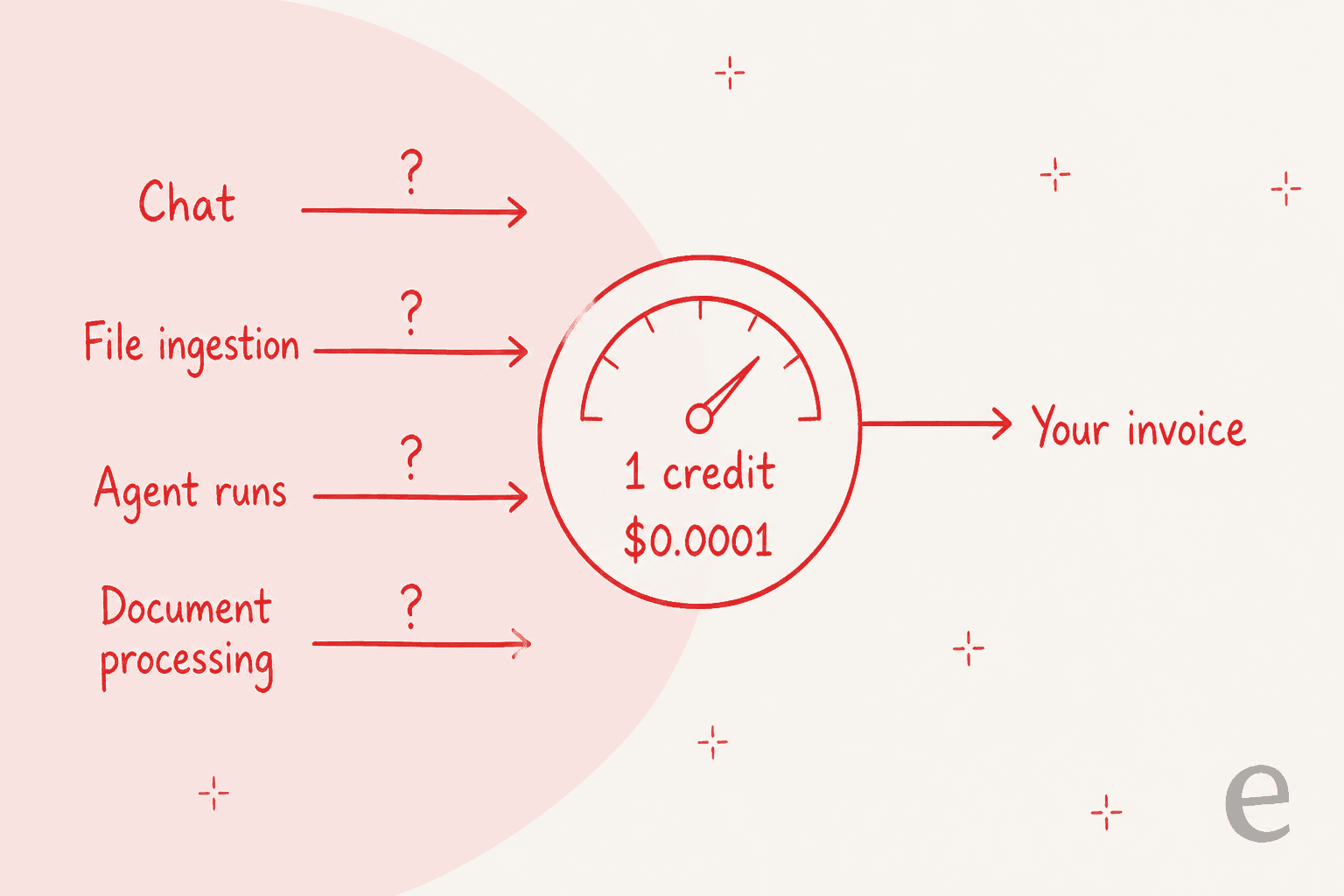
So you can price a credit and still not price a task, which means the 300,000 credits on Starter are not a forecastable allowance. The same gap shows up on Metadata Views, where extraction falls under "document processing" with no per-document, per-page or per-field rate anywhere.
This is not unique to Fastio, to be fair. Box publishes $0.01 an AI Unit and gates the conversion table. Glean publishes credit costs per agent run with no dollar conversion. It is a whole category habit. But it is the habit that produces this, from a real reviewer:
"My first month on Professional I converted a large video backlog and watched the credits move much faster than I expected."
I have watched this exact anxiety kill deals from the vendor side. One prospect burned 200 API calls in a single test day and spent the rest of the evaluation worried about production costs. Another projected roughly $30,000 a month for a high-volume operation and could not tell whether the unit was an interaction or a ticket. A third ran twelve successful test chats, opened the billing page, and filed two cancellation requests within hours. The product worked twelve times out of twelve. The meter ended it.
Whatever you buy, make the vendor answer this in writing: what does one unit of the thing I do most often cost?
The seat cliff is steeper than the tier ladder looks
Starter includes 5 seats. Business includes 20. Growth covers 50 to 200. The $1/seat/mo top-up exists only on Growth, and on Starter and Business it reads "Not available."
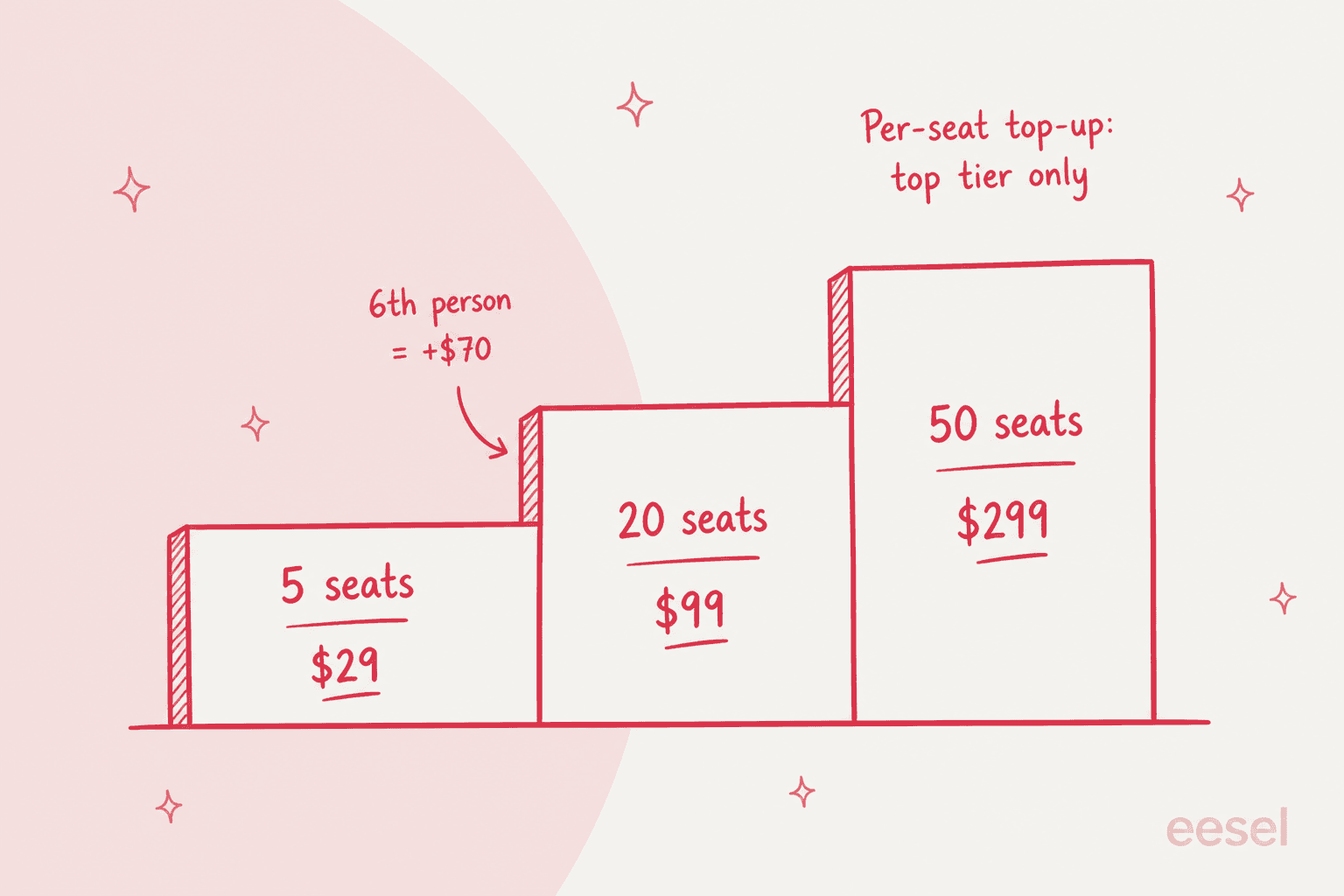
So your sixth teammate does not cost a dollar. They cost $70 a month, because the only way to seat them is a tier jump. That is a design choice, not a bug, and it works fine if you hire in steps of fifteen. It works badly if you are six people.
Two smaller things worth knowing while you are in the rate card. The per-plan monthly figures on the cards ($24, $83, $249) are the annual price divided by twelve, and the rounding is inconsistent, with Business rounding $82.50 up to $83. And the bundled credits retail at $30, $120 and $450 against $29, $99 and $299 stickers, which means topping up costs more than upgrading: Starter to Business is $70 a month for 900,000 extra credits, and buying that same 900,000 as top-ups is $90.
Two other gaps, stated plainly
The desktop app is macOS only across every release from 0.3.2 to 0.5.3. No Windows or Linux client is mentioned anywhere, and Windows users get browser plus CLI.
"The Windows desktop app does not exist yet. The Mac app is good, which makes the gap more noticeable, because half the people I collaborate with are on Windows and for them Fastio is browser plus CLI only."
Fastio holds no certifications, and says so. Its security page states it directly: "Fastio does not separately hold these certifications. We build on certified infrastructure and layer our own security controls on top." Both the SOC 2 Type II and ISO 27001 bullets take our infrastructure partners as the grammatical subject. HIPAA, BAAs and FedRAMP appear nowhere on the site. Encryption is hedged as TLS 1.3 "(where supported by client systems)" and "AES encryption" at rest with no key length published. There are no data residency options, US processing with SCCs for the EU. There is no trust center.
I want to be careful here, because plenty of good four-month-old products hold nothing yet, and saying so out loud is more honest than most. eesel does not have its SOC 2 either, and I said that in section one. But if your procurement process needs a certificate with your vendor's name on it, this is a hard stop rather than a negotiation.
One last note on the published rate card, offered as a caution rather than a criticism: it does not fully agree with the rest of the site. The Ripley page says "Available on Professional and Business plans" and there is no Professional plan on /pricing. The extraction page sells a "Solo" plan at 1 TB where pricing sells "Starter" at 1 TB. The feature matrix gates five AI rows behind "Pro+," which is also not a published plan. And reviewers describe a free tier with 60-day retention that the pricing page does not show. Get whatever you are buying confirmed by name in writing.
How to actually choose
Three questions, in this order.
1. What is the sentence that describes your problem? If it is about capacity, you want the drive layer and you should shop on price per terabyte, where pCloud and Nextcloud win outright. If it is about finding things, you want the index layer, and the honest first move is checking whether you already own it, because a Google Business Standard or Microsoft Copilot seat may cover it. If the sentence has a verb about work not getting done, neither layer helps.
2. What does one unit of your most common action cost? Not the seat. The action. This single question separates every product here into two piles, and only Microsoft publishes a full per-action table.
3. How will you prove it works before it touches something real? This is the one buyers skip and regret. A CX lead I mentioned earlier said the thing that has stuck with me longest: an AI that answers everything is worse than useless if you cannot verify it, because "I cannot go and check all my 7,000 tickets." The answer is a dry run against your own history, then confidence routing so the AI handles only what it is sure of. If a vendor cannot show you that, the pilot is the test, and your customers are the subjects.
For the wider picture, our post on AI knowledge bases covers the index layer properly. If you want the mechanics underneath it, start with RAG versus fine-tuning.
Try eesel for the layer nobody sells you
If you got to the end of this post because your real problem is that answers arrive and tickets do not close, that is the layer we build.
eesel's AI helpdesk agent joins the queue you already run, whether that is Zendesk, Freshdesk, Gorgias, Front, Salesforce or Jira Service Management. It reads your existing docs where they already live, learns your team's voice from past tickets, and then does the part Ripley deliberately does not: drafts, resolves, escalates, and writes into the system of record.
Before it touches live traffic it simulates against your own ticket history and reports coverage by theme, so you find out that refund questions are only 28% covered before a customer does.
It starts at $299 a month for 500 credits, one credit per ticket. No seats, no platform fee. You get 100 free credits, no card, which covers 100 tickets, and questions asked in the dashboard are mostly free. If it turns out your problem really was storage after all, you will have spent nothing finding out.
Start with the free plan, or read what an AI ticketing system actually changes about a queue.
Frequently Asked Questions
What are the best Fast.io alternatives in 2026?
How much does Fast.io cost?
Does Fast.io's AI actually do work, or just answer questions?
Is there a free Fast.io alternative?
What should a small team budget for a Fast.io alternative?
Can I connect Claude or ChatGPT to my company files without Fast.io?
What happens if the AI reads my files and still gets the answer wrong?
Is Fast.io secure enough for regulated data?


Article by
Kurnia Kharisma
Kurnia is a software engineer and writer at eesel AI with two years of SEO experience, writing about AI tools, helpdesk software, and customer support. He pairs a developer's understanding of how these products are built with search-driven research into what actually ranks and resonates with the people searching for them.