


What Flowith actually is
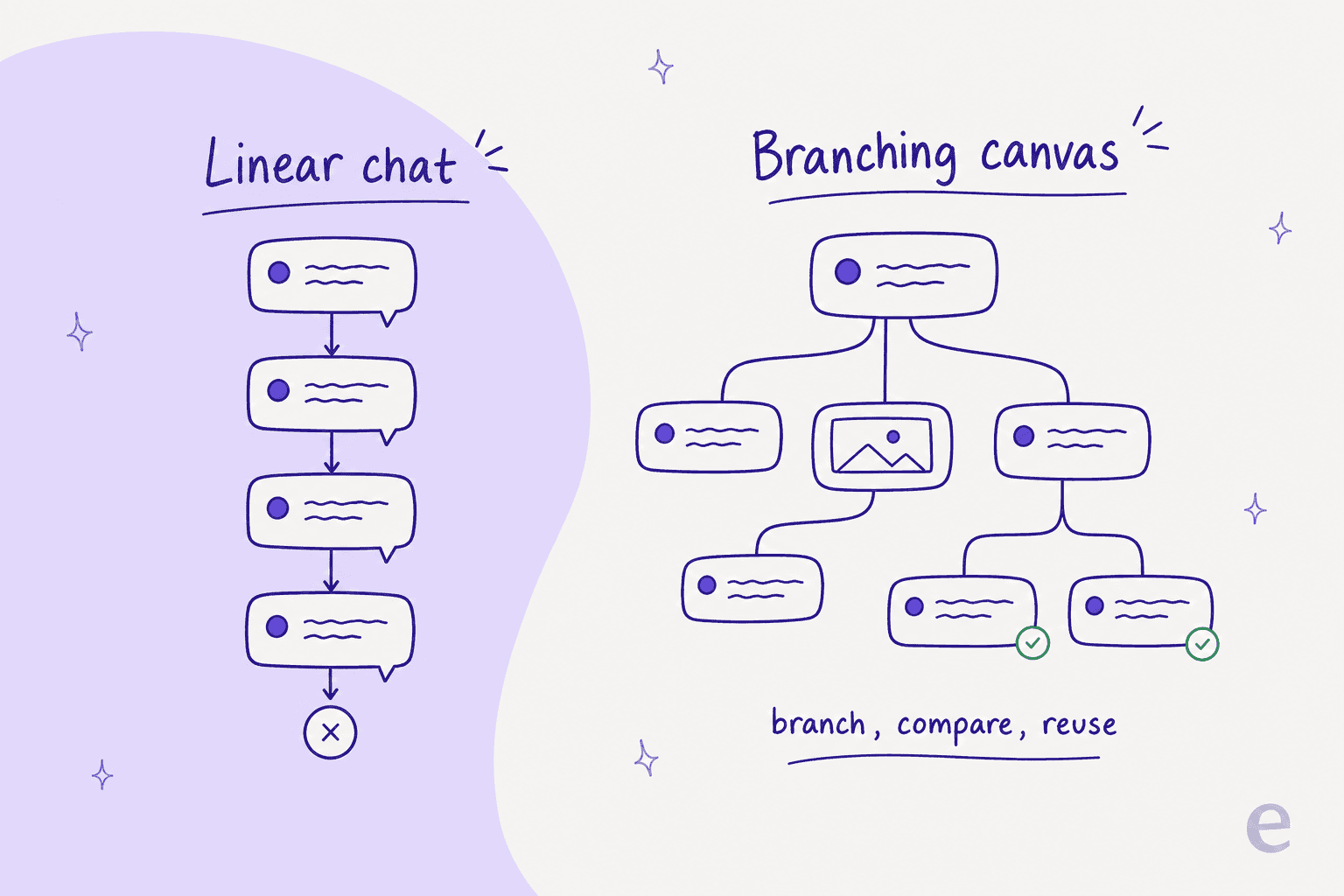
Most AI tools give you a chat thread: you type, it replies, you scroll. Flowith throws that out. It's an AI agent in the fullest sense, one that plans and acts rather than just chatting. Work happens on a two-dimensional canvas where each output is a node you can drag, connect, and fork. Ask a question, branch the answer into three directions, run the same prompt through three different models, and lay all the results side by side without losing the thread you started on.
It launched in 2024 out of Shanghai and San Francisco, and the company behind it is small and young: co-founders Derek Nee (CEO) and Yichen "Zion" Wu (COO) were both named to Forbes 30 Under 30 Asia 2026 for AI. Per its Forbes profile, Flowith has passed 1M+ users and raised roughly $9M in seed funding, with Vertex Ventures leading the first round and Sequoia China's seed fund and LongRiver joining later.
The reason the canvas matters is simple once you've felt the pain it fixes. In a normal chatbot, exploring an idea means one long linear scroll, and going back to try a different fork means copy-pasting or starting over. On a canvas, the exploration is the artifact.
If you've read our take on AI agents vs AI chatbots, this is the interface-level version of that same distinction: a chatbot answers, an agent works. Flowith is trying to make the working visible.
Agent Neo: the "infinite" agent
Neo is the part everyone quotes. Flowith launched it in May 2025 as "the world's first AI agent that supports infinite steps, infinite context, and infinite tools." Strip away the marketing and here's what those three "infinites" actually mean:
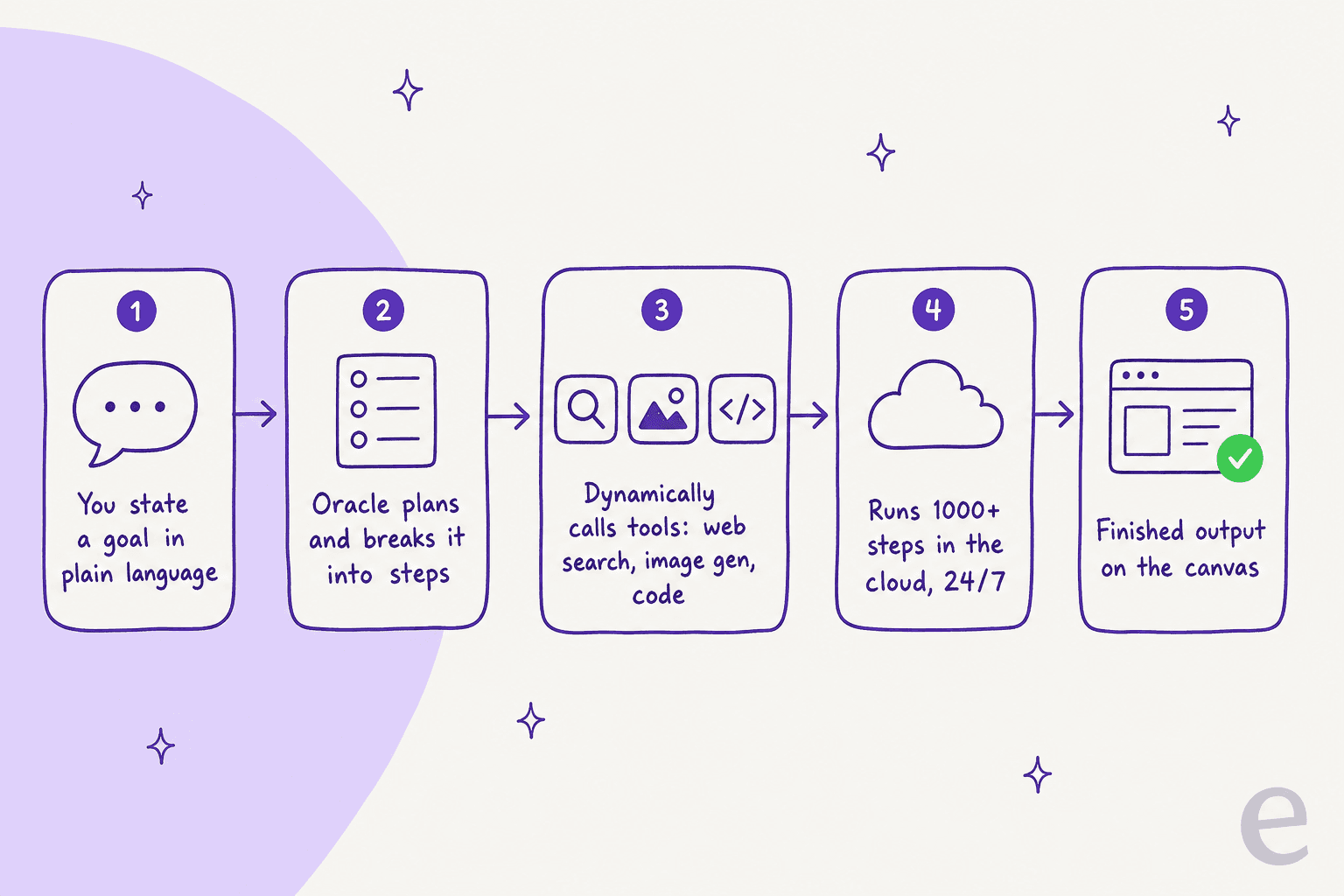
- Infinite steps. Neo isn't capped to a fixed number of turns in its agent loop. Flowith says it can run 1,000+ inference steps on a single task, chugging away until the goal is met, which is what makes multi-hour jobs (a research report, a small game, a whole website) possible in one run.
- Infinite context. A persistent memory of up to 10 million tokens, so Neo can hold an entire research archive or project history "in mind" instead of forgetting what you said 20 messages ago.
- Infinite tools. Through Oracle mode (more on that below), Neo decides which tools to call (web search, image generation, code) on its own, without you toggling plugins.
It runs in the cloud 24/7, so a task keeps going after you close the tab. Flowith also cites a self-reported 90% accuracy on GAIA Level 3, a hard agent benchmark, ahead of older models at launch. Treat that as a vendor claim, since it's Flowith grading its own homework, but the direction is real: Neo is built for long autonomous jobs, not quick Q&A.
Here's where my day job makes me twitchy. "Infinite steps until the goal is met" is thrilling for writing a novel and genuinely dangerous when the goal is fuzzy. We've spent years running AI agents on live support queues, and the single most expensive failure mode we've watched is a confident-sounding agent that keeps going, keeps sounding sure, and is quietly wrong. For a creative task, a wrong turn is a node you delete. For a customer-facing task, it's a bad answer someone acts on. That's not a knock on Neo, it's a reminder that autonomy and reliability are different axes, and Flowith optimizes hard for the first one.
Oracle mode and the Knowledge Garden
Two features do the quiet heavy lifting under Neo.
Oracle mode is the planning brain. You state a goal in plain language and Oracle autonomously plans, breaks it down, and completes complex tasks, generating editable sub-steps on the canvas and picking the right tool for each one. It supports external plugins too, including X/Twitter and Xiaohongshu search, mind maps, slide creation, and webpage generation. The pitch is "no prompt engineering," and for well-scoped tasks it mostly delivers on it.
Knowledge Garden is the memory layer. Upload docs, notes, and links, and Flowith deconstructs them into atomic "seeds" (each seed is one core concept), then retrieves the right seeds when a flow or Neo needs grounding. You can spin up separate knowledge bases (one for brand guidelines, one for coding rules, one for research), a bit like databases in Notion AI, and attach them per task. If you've ever set up a knowledge base for an AI assistant, this is the same idea with a nicer gardening metaphor: it's the RAG layer that keeps answers tied to your material instead of the model's guesses.
The combination is legitimately good. A named operator, Mariusz Kurman, tested Flowith's research output by asking for an Arxiv-style report on attention-mechanism variants:
"Excellent and comprehensive research with appealing visuals; model selection includes both open-source and closed-source options."

The creative studio: image, video, and slides
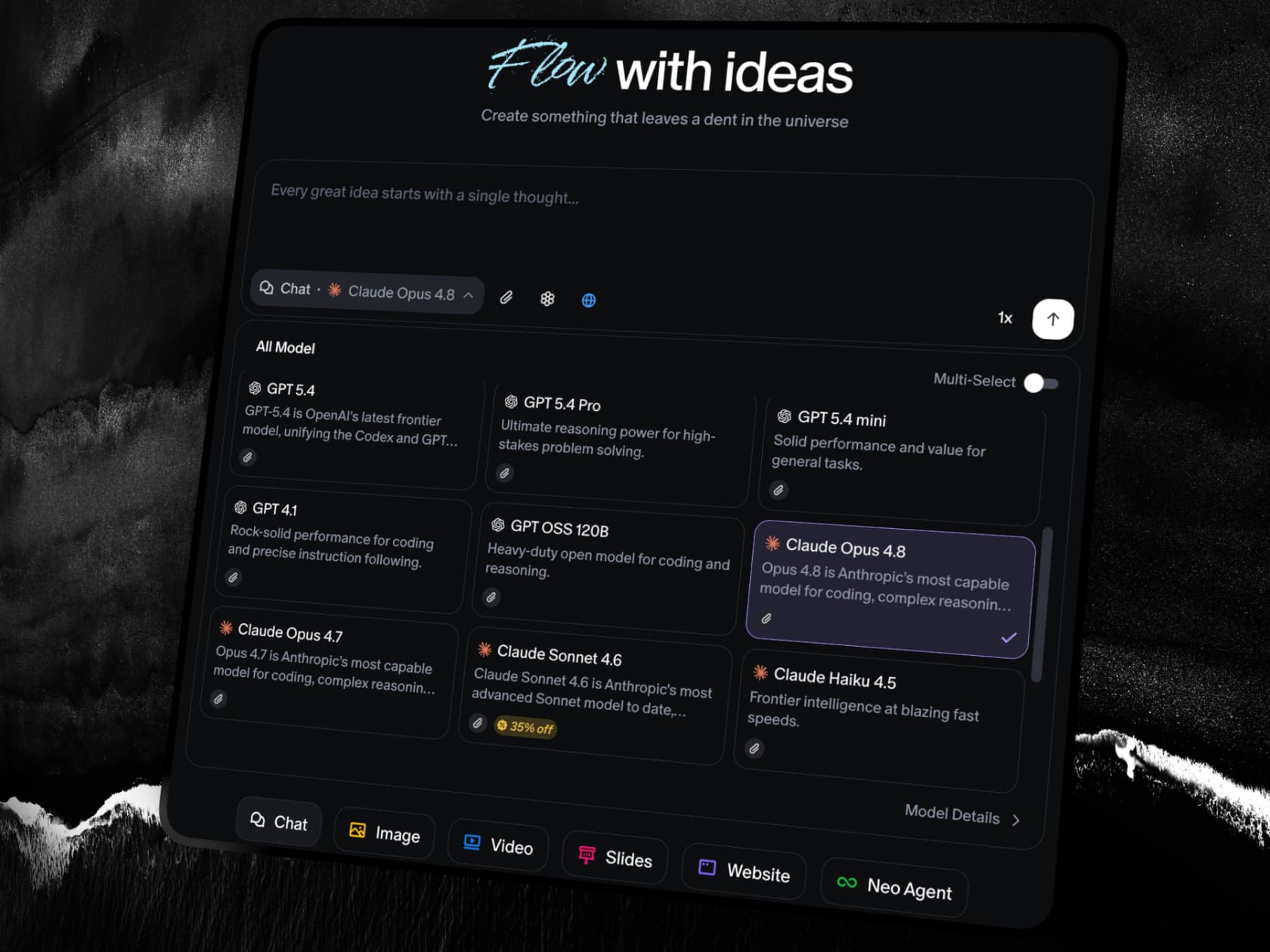
Over the past year Flowith's homepage has leaned hard into being a multi-model creative studio. The top nav now exposes Chat, Image, Video, Slides, Website, and Neo modes, and the real draw is the model marketplace: rather than being locked to one vendor, you pick the best model per task. The catalog spans Claude Opus 4.8, Gemini 3.5 Flash, and GPT 5.5 for text, plus a deep bench of image and video models (Seedream, Nano Banana, GPT Image 2, Flux, Recraft, Reve, and Kling for video).
In practice, the image work is where Flowith shines for most people. The Image Agent enriches your prompt with web search before generating, and there's a full utility belt baked in (background remover, upscaler, uncrop, face swap, photo restoration). E-commerce sellers and marketers use it for product photography and posters, and the output quality is strong:

One honest caveat that no amount of model-swapping fully fixes: AI image models still fumble text. Here's a poster template straight from Flowith's own gallery, and the moment you read past the big word, the fine print dissolves into gibberish ("ornat me the species howing").

That's not a Flowith problem, it's a whole-category problem, but it's worth knowing before you promise a client print-ready posters.
Flowith pricing
Flowith is credit-based. Each plan hands you a pool of credits per month, and every generation spends some. Here's the full pricing table, captured from the live pricing page:
| Plan | Monthly | Effective (billed yearly) | Credits | Model access | Concurrent tasks | Unlimited Pack |
|---|---|---|---|---|---|---|
| Starter | $0 | $0 | 300 (one-time) | Standard only | 5 | No (5 daily Nano Banana) |
| Pro | $19.90/mo | $17.91/mo (10% off) | 20,000/mo | 40+ models | 50 | No |
| Ultimate | $49.90/mo | $44.91/mo (10% off) | 50,000/mo | 40+ premium | 100 | Yes |
| Infinite | $499.90/mo | $399.92/mo (20% off) | 500,000/mo | 40+ models | Unlimited | Yes |
A few things the table doesn't say out loud, and that matter more than the sticker price:
- Credits don't roll over. Paid credits refresh each cycle and any unused balance expires. Only Starter's 300 is a one-time grant.
- Per-generation cost swings wildly. An image might cost a handful of credits; a single video can run into the hundreds or thousands depending on length and quality. That 20,000-credit Pro pool sounds huge until you generate a few videos.
- The Unlimited Pack isn't unlimited speed. On Ultimate and Infinite, designated models stop consuming credits, but those runs go through a lower-priority queue that throttles under load. It's "unlimited quantity," not "unlimited throughput."
- Refunds are tight. Per Flowith's terms, subscription fees are non-refundable unless you contact them within 48 hours of payment and have used fewer than 200 paid credits.
There's also a small internal inconsistency worth flagging: the Pro plan card says 20,000 credits, but the "compare plans" table lists 22,000. Minor, but it's the kind of thing that makes credit accounting harder to trust.
A quick worked example. A solo marketer generating product shots and the occasional short video will chew through the free Starter tier in a day or two, land comfortably on Pro at ~$20/mo, and only feel pressure if they start doing video at volume, at which point Ultimate's credits plus the Unlimited Pack ($49.90/mo) is the real "using this seriously" tier. Infinite at $499.90/mo is for high-volume studios and teams, not individuals.
If you're comparing agent pricing broadly, it's worth reading this against Manus pricing and the wider best AI agents field, since credit-based models like Flowith's are notoriously hard to compare to per-seat or per-task tools.
What real users say
Flowith is small and new, so the honest community picture is "early positive signal," not "verdict from thousands of users." The consistent thing people love is the branching canvas:
"I find it convenient to handle multiple images or conversations within a single interface. Unlike a traditional chat, it features a unique layout that allows for several branching threads, making it easier to manage different tasks at once."

On Product Hunt, one long-time user even picks it over the obvious rival, calling it "choosing the best agent tool available today." But the criticism is just as consistent, and it's about developer depth. The same operator who praised the research output landed his verdict here:
"It lacks a terminal and file access, making Manus AI a superior choice."
That's the recurring split: Flowith wins on the creative/visual side, while Manus and other coding-first agents win when you need to actually touch a filesystem (our Manus alternatives roundup digs into that trade-off). There are smaller gripes too, from position not being saved across branches to a Hacker News commenter annoyed that the site hijacks the browser back button. None of these are dealbreakers, but they're the texture of a young product still smoothing its edges, and worth weighing if you're a small team picking from the AI agents for small business.
Where Flowith actually fits (and where it doesn't)
After spending real time in it, my read is that Flowith sits in a specific corner of the AI agent map: general-purpose and creative-first. It's a fantastic sandbox for anyone whose work is "make me things" (images, decks, sites, research), and the canvas is a better interface for exploratory, multi-branch work than any chat box.
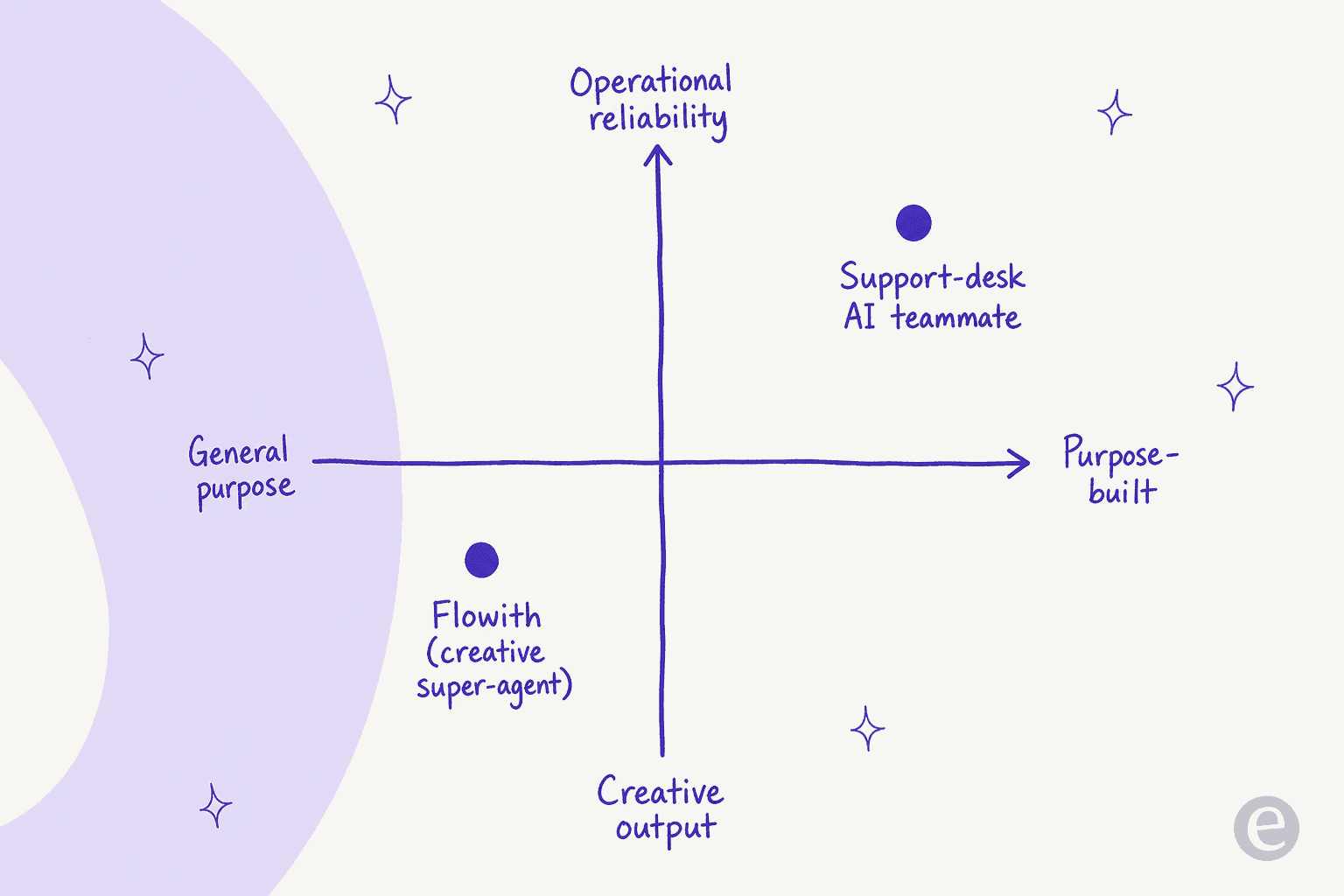
What it is not is an operations tool. There's no helpdesk positioning, no support integrations, no way to point it at your ticket queue and trust it with customers. That's by design, and it's the same line that separates a horizontal super-agent like Manus from a purpose-built one. (The general research-agent category, from Skywork to Perplexity, sits on that same creative side of the map.) A general agent optimizes for "can it do anything." A vertical agent optimizes for "can I trust it with this one thing every single time," which is the whole premise behind the AI agent for customer service. Those are different products, even when they share the same underlying models.
Try eesel for the support side of the agent question
If you landed here because you're evaluating AI agents for your business, here's the distinction that saves you a bad rollout: a creative super-agent like Flowith and a support AI teammate are solving opposite problems.
eesel AI is the narrow, reliable side of that map. Instead of one agent told to try its best, it's a purpose-built helpdesk agent that learns from your past tickets, help docs, and macros on day one, then drafts and resolves tier-1 conversations inside Zendesk, Freshdesk, Gorgias, and 100+ other tools. The feature that answers my earlier worry directly is simulation mode: before eesel replies to a single live customer, you run it against thousands of your historical tickets to see exactly what it would have said, find the gaps, and only then flip it on. Smava runs a fully automated agent on 100,000+ German-language tickets a month this way; Gridwise saw eesel resolve 73% of tier-1 requests in its first month.

Flowith is the tool I'd reach for to design the marketing site. eesel is the one I'd trust to answer the tickets that come in through it. Pick the agent that matches the job. And where Flowith bills you in credits that vanish each month, eesel's pricing is one fixed monthly price from $299 for 500 credits (1 credit per ticket or chat) with no per-seat fees, so it scales with ticket volume rather than headcount. You can try eesel free with 100 credits, no credit card, and simulate it on your own tickets before it talks to anyone.
Frequently Asked Questions
What is Flowith and what does it do?
Flowith is an AI agent and creative workspace built on an infinite, node-based canvas instead of a linear chat window. Its flagship agent, Agent Neo, runs long multi-step tasks (research, coding, image and video generation) autonomously in the cloud, and you can branch and compare outputs from many models side by side.
How much does Flowith cost?
Flowith pricing is credit-based across four tiers: a free Starter plan (300 one-time credits), Pro at $19.90/mo, Ultimate at $49.90/mo, and Infinite at $499.90/mo. Annual billing knocks 10-20% off. Credits refresh monthly and do not roll over.
Is Flowith free to use?
Yes, there is a permanent free Starter tier with 300 one-time credits, standard models, and 5 daily Nano Banana image rewards. It's enough to test the canvas, but the credits run out fast on image and video work, so most active users move to a paid plan.
Flowith vs Manus: which AI agent is better?
They target different jobs. Flowith leans into a visual canvas and heavy multi-model image/video generation, while Manus is stronger for developer workflows with terminal and file access. See our Manus alternatives roundup and the best AI agents guide for the full picture.
Can I use Flowith for customer support automation?
Not really. Flowith is a general-purpose creative agent, not a helpdesk tool, and it has no support-desk positioning or helpdesk integrations. For tier-1 ticket automation you'd want a purpose-built AI helpdesk agent like eesel AI that plugs into Zendesk, Freshdesk, or your existing tools.