


Zendesk will quote you $19 an agent. The knowledge base starts at $55. The knowledge base is almost never in the plan you were quoted. HubSpot leaves the row blank on Free and on Starter, then fills it in at Professional, $90 a seat, and there is a required $1,500 onboarding fee sitting on top of that. Salesforce is stranger still: Knowledge appears at Enterprise, $175, read-only. Letting an agent edit the article costs another $75 per user. Zoho Desk asks $14 and includes it, which makes it the honest outlier here.
Second thing. Guru and Document360, the two big standalone options, both took their public prices down this year. No dollar figure anywhere in 2026, on either site. So if you were budgeting off an older roundup, that number is fiction.
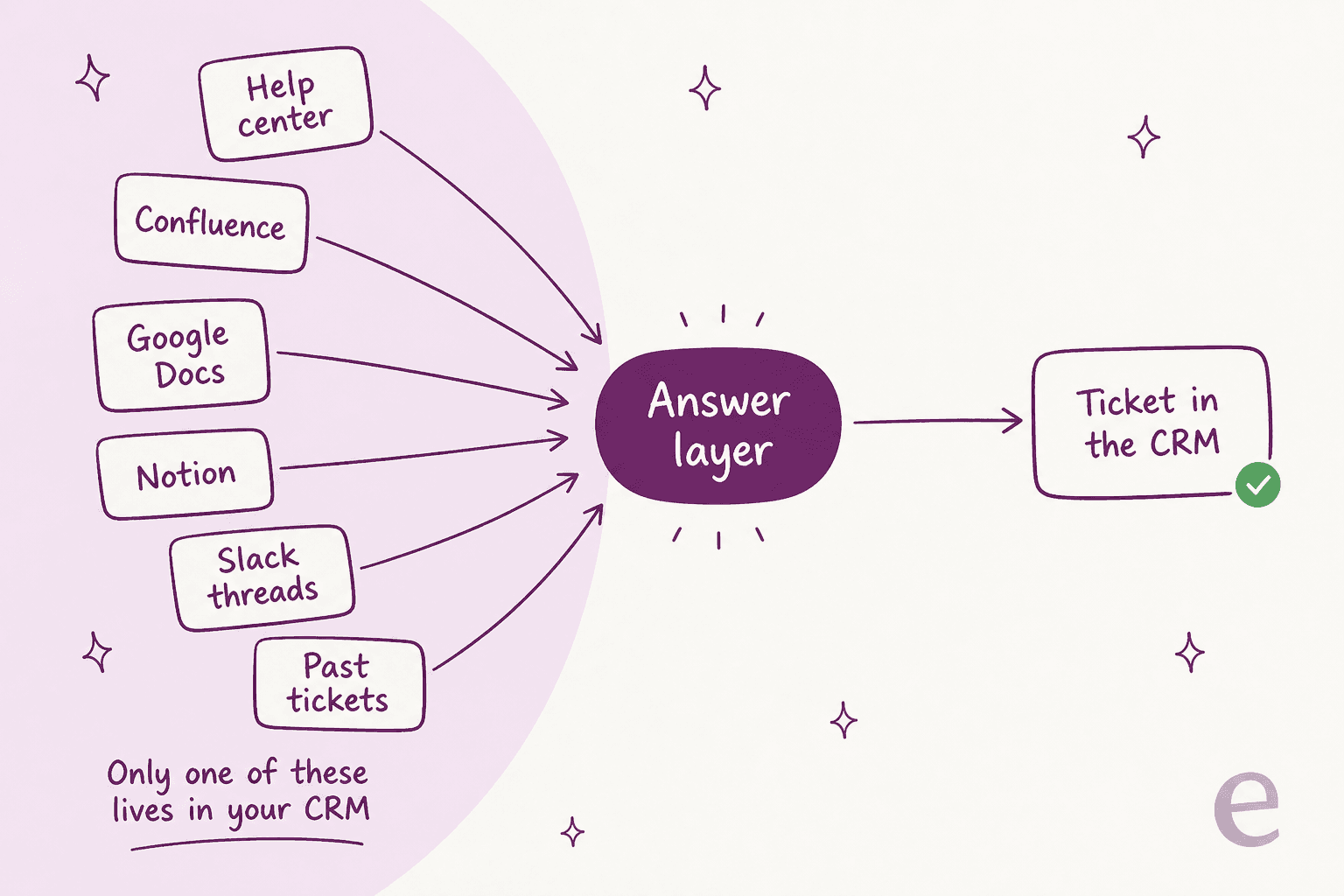
Then the part that actually decides whether any of it works. Your knowledge is not in one place, so a tool that only reads one place cannot answer most tickets. I have spent three years putting AI agents on live support queues at eesel, and the blocker is almost never the article editor. It is that half the real answers are sitting in Confluence, in Google Docs, in Slack, and in 40,000 solved tickets no help center ever indexed. eesel sits on top of the helpdesk you already run and reads all of it. One fixed monthly price, no seat fees, 100 free credits to try, no sales call.
What CRM knowledge base software actually means
The phrase covers two different products. Buyers get burned when they do not notice which one they are shopping for.
The first shape is a knowledge module built into a CRM or helpdesk suite: Salesforce Knowledge, the HubSpot knowledge base, Zoho Desk's help center, Zendesk Knowledge (formerly Guide). Here the article is an object in the same database as the contact and the ticket. An agent on a case searches it in the console, drops it into a reply, and later you can see which article closed the case. The trade is that the module is a plan feature, and the vendor decides which plan.
The second shape is a standalone knowledge base that syncs into the CRM. Guru, Document360, Confluence. The content lives in its own system, usually with better authoring and versioning and a real review workflow, and it reaches the CRM through an app, a browser extension, or an API. The trade there is that you now run two systems, plus the sync between them.
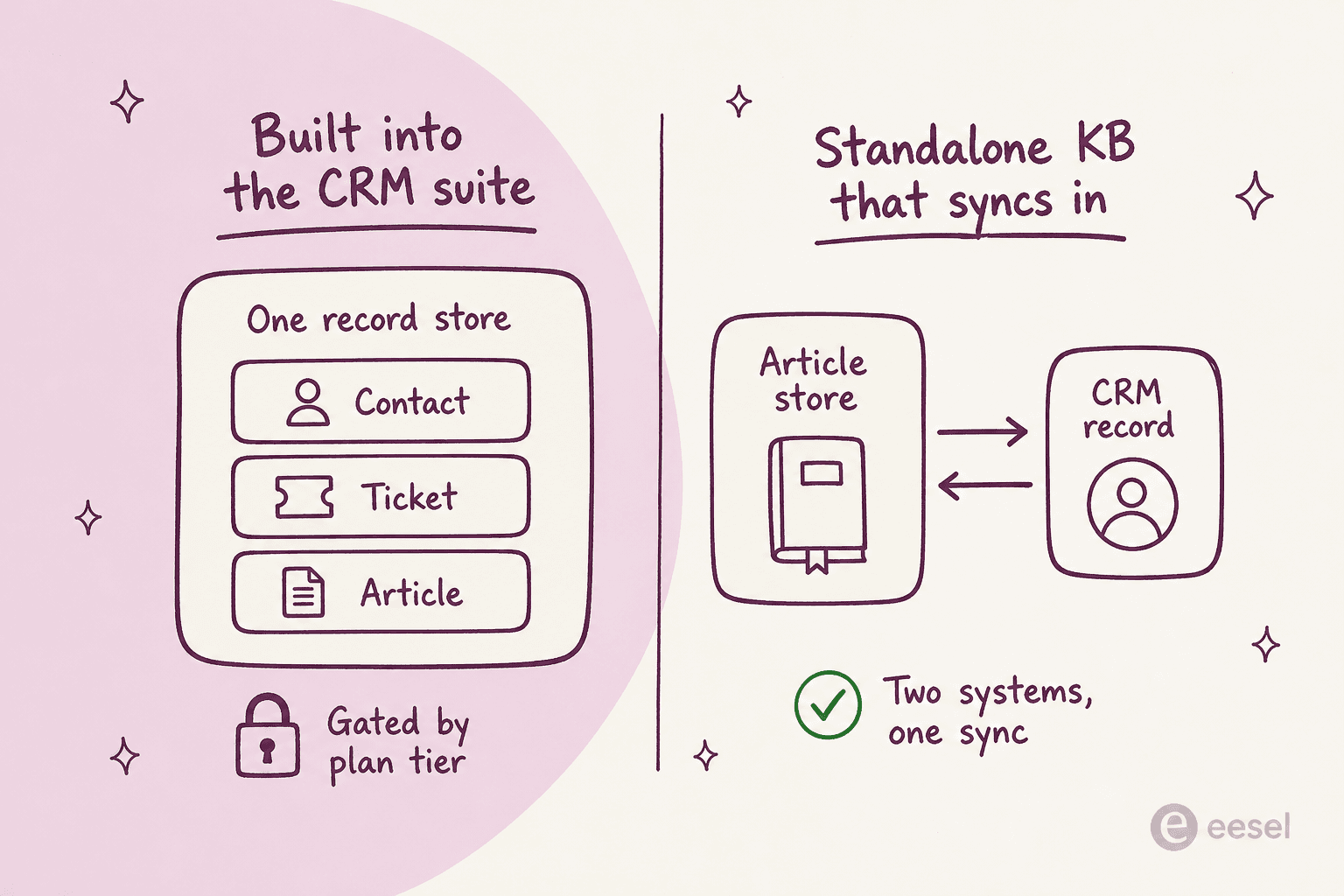
Salesforce is blunt about the point of the first shape. Its own knowledge base guide frames it as connecting the knowledge base to support interactions so AI can speed up case resolution. Zendesk sells the second half of the same idea, describing its ability to turn historical tickets into help content automatically.
The thing neither pitch says out loud is that most support knowledge was never in either system to begin with.
How I picked these tools
I am a software engineer who has spent two years on the SEO side of this space, which means I read a lot of "best CRM knowledge base" lists that were assembled from other lists. So the rule here was simple: every price below was read off the vendor's own pricing page, and where a vendor no longer publishes one, I say so instead of quoting a stale figure.
The five things I weighed:
- Where the knowledge actually lives. In the CRM record, or in a separate store with a sync.
- The tier the knowledge base starts on, not the tier on the billboard.
- How deep the CRM connection goes. A browser extension that overlays cards is not the same as an app that reads the case subject and inserts an article into the reply.
- What the AI meters. Every vendor here sells AI answers on top of the knowledge base, and every one of them bills it separately. The unit matters more than the rate.
- Whether the tool can see knowledge it does not own. This is the one most roundups skip, and it is the one that decides your AI resolution rate.
If you want the wider field rather than the CRM-attached slice, our roundups of knowledge management software and AI knowledge base tools cover the tools that never touch a CRM.
The 10 best CRM knowledge base software tools at a glance
| Tool | Best for | Where the knowledge lives | CRM connection | Entry price | Price where the KB starts | AI unit and rate | Free tier | Public help center |
|---|---|---|---|---|---|---|---|---|
| eesel AI | Answering from knowledge you already have | Stays where it is | Native apps for Zendesk, Freshdesk, HubSpot, Gorgias, Front, Confluence | Fixed monthly price | No seat fee | 1 credit per ticket or chat, from $299/mo for 500 | Yes, 100 free credits | Uses yours |
| Salesforce Service Cloud | Teams already standardised on Salesforce | Knowledge object in the CRM | Native, same database | $25 (Starter Suite) | $175 read-only, $250 with read/write | $2 per conversation, or $0.005 per Flex Credit | No | Yes |
| HubSpot Service Hub | CRM-first teams who want one record | Knowledge base tool in Service Hub | Native, same Smart CRM | $0 (Free, no KB) | $90 + $1,500 onboarding | 50 credits per resolution, ~$0.45 | Yes, no KB in it | Yes |
| Zoho Desk | Tight budgets that still want CRM sync | Desk help center | Configurable sync to Zoho CRM | $0 (3 users, private articles) | $14 | BYO OpenAI key, Answer Bot at $40 tier | Yes, agent-only KB | Yes, from $14 |
| Zendesk | High-volume support with a mature help center | Guide, in the Suite | Native to Zendesk, apps for CRMs | $19 (Support Team) | $55 (Suite Team) | Not published | No, 14-day trial | Yes |
| Freshdesk | A simple, cheap customer portal | Freshdesk solutions | App-based link to Freshsales | $19 (Growth) | $19 | $49 per 100 Freddy sessions after 500 | No, removed in 2026 | Yes |
| Guru | Internal knowledge that follows agents | Guru cards | Browser extension overlay, 100+ sources | Quote only | Quote only | Not published | No | Limited |
| Document360 | Large, versioned documentation sets | Document360 workspace | Deep Zendesk app, Salesforce via Visualforce | Quote only | Quote only | 1 Eddy credit per question asked | No, 14-day trial | Yes |
| Confluence | Teams whose knowledge is already in Atlassian | Confluence spaces | Via Jira Service Management, apps | $0 (10 users) | $5.42 | 25 Rovo credits per user per month | Yes, no anonymous access | Standard and up |
| Help Scout Docs | Small teams wanting a free starter site | Docs site | Help Scout inbox, CRM via apps | $0 (10 articles) | $25 for uncapped | $0.75 per AI resolution | Yes, 10 articles | Yes |
Prices are per user per month on annual billing unless noted. Numbers were read from each vendor's own pricing page during July 2026.
What this actually costs in year one
The table above is a sticker price. The gap that catches people out is between the number a vendor advertises and the number at which a knowledge base actually appears.
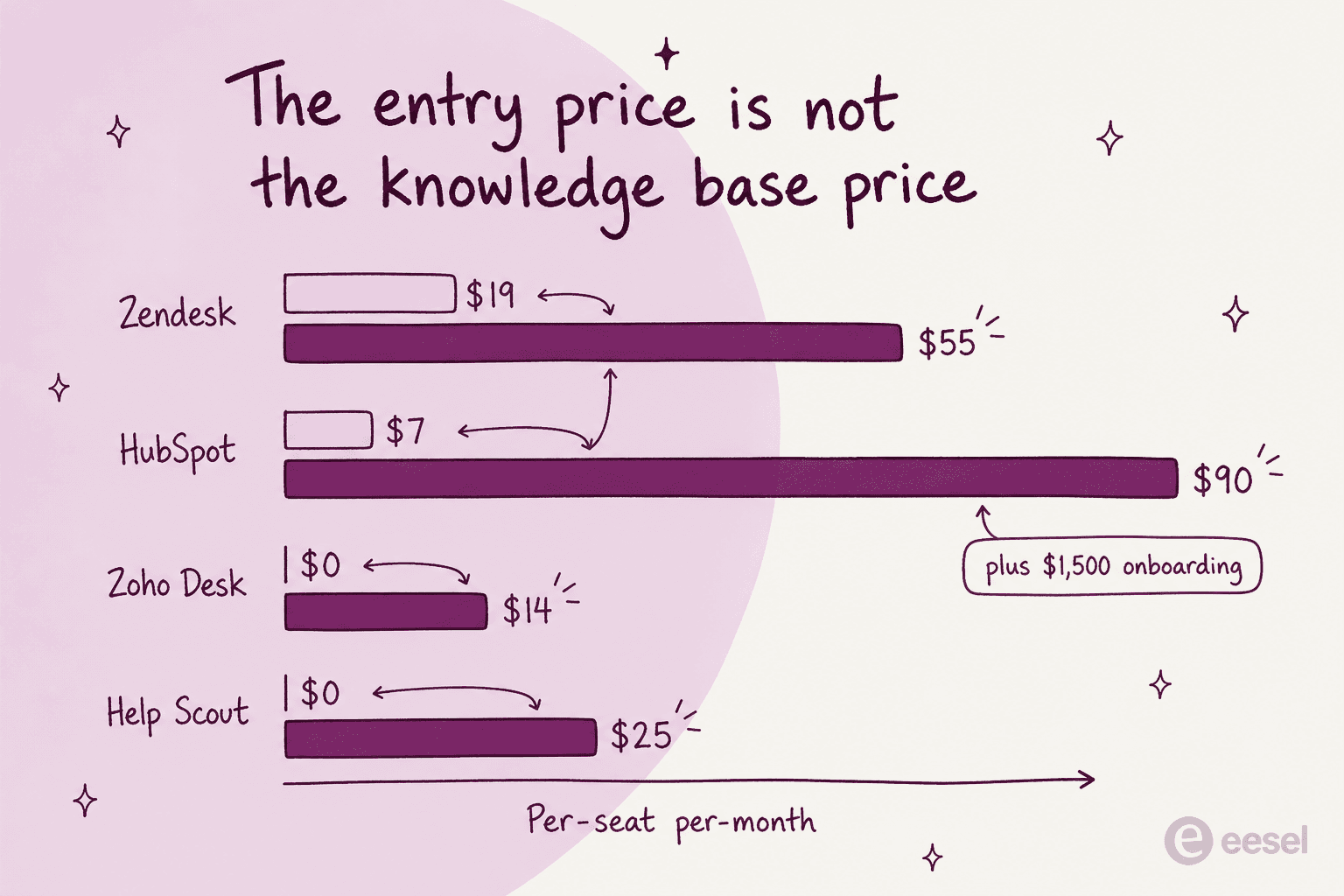
What a team pays is seats times months, plus onboarding, plus a separate AI meter that most quotes leave out. Plug your own numbers in:
Run an eight-agent team through it and the spread is brutal. Zoho Desk lands near $1,300 for the year. HubSpot Professional lands past $12,000 before a single AI answer, because of the seat rate and the onboarding fee together. Salesforce with read/write Knowledge clears $24,000. Same job, roughly twenty times the price.
1. eesel AI
Best for: teams whose real answers are scattered across a help center, a wiki and 40,000 old tickets.
I work on eesel, so read this section with that in mind. It is on the list because it solves a different problem from everything below it, and skipping it would leave a hole in the comparison.
eesel is not a place to write articles. It is the layer that reads the knowledge you already have and uses it to draft and resolve tickets inside the helpdesk your team already opens every morning. It connects to Confluence, Google Docs, Notion, Slack, your public help center, and your history of solved tickets, then answers from all of them at once.

How it connects to the CRM. Native apps for Zendesk, Freshdesk, HubSpot, Gorgias and Front, so the drafts appear in the ticket rather than in a side tool. There is no separate article store to migrate into and no second system for your writers to learn.
Pros
- Reads across sources instead of owning one, which is the shape most support knowledge actually has.
- Fixed monthly credit plan (1 credit per ticket or chat) with no seat fee, so adding a part-time agent does not add a licence.
- Simulates against your historical tickets before going live, so you see the answer quality on real cases rather than a demo script.
- Instructions are edited in plain language, not a rules builder.

Cons
- No article authoring or publishing. If you need a branded, SEO-indexed help center, you still need one of the tools below.
- It assumes you already run a helpdesk. It is a layer, not a replacement.
- No native Zoho Desk app today, so Zoho shops sit in front of it by email rather than inside the ticket view.
Pricing. One fixed monthly price sized to your volume, with no per-seat charge. 1 credit covers one ticket or chat, and plans start at $299/month for 500 credits (1,000 is $499/month, 2,500 is $999/month, 5,000 is $1,899/month). The free plan gives you 100 credits with no card. The pricing page is the current source of truth.
My take: pick it when the honest answer to "where does this live?" is four places. Skip it if what you actually need is an article editor and a public help center, because that is not what it does.
2. Salesforce Service Cloud
Best for: teams already standardised on Salesforce, with the budget that implies.
Service Cloud is the most capable knowledge base on this list and the most expensive by a wide margin. Knowledge is a first-class object in the CRM, so an article lives in the same database as the case and the contact, and Salesforce's own framing is that this is what lets Agentforce ground its answers.
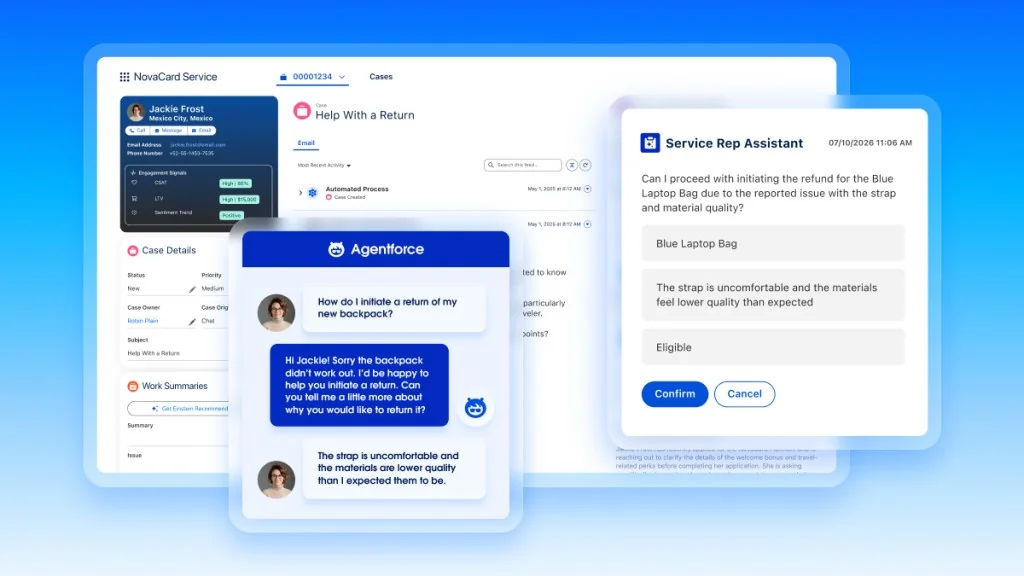
How it connects to the CRM. It is the CRM. Nothing to sync, which is the whole argument for paying the premium. Our overview of Salesforce AI in Service Cloud covers how the pieces fit together.
Pros
- Articles, cases and contacts share one data model, so reporting on which article closed which case is native rather than stitched.
- Article-level data categories and approval workflow are built for teams with compliance review.
- Agentforce grounds AI answers on the same articles, so there is no second index to keep current.
Cons
- Knowledge does not appear until Enterprise, and it arrives read-only. The Service Cloud pricing page states it plainly in the feature matrix: "Read Only. Read/Write available for purchase."
- Letting agents author articles costs an extra $75 per user per month, which turns Enterprise into $250 a seat.
- The AI is a separate meter with its own rules. Flex Credits and Conversations cannot coexist in one org, and unused Flex Credits do not roll over.
- Salesforce sells case deflection but publishes no deflection percentage of its own anywhere.
- Suggested-article matching is shallower than it looks. A Salesforce developer describes the index covering only the case subject plus roughly the first 100 characters of the description, against the article title plus roughly the first 250 characters of body:
"If the error code is explicitly cited in the case description and/or within the KB article content outside of those ranges, Salesforce will be oblivious and never surface the article as a suggested match."

A support rep running Agentforce on a 19-agent Enterprise team is blunter about what happens when you point AI at that same content before cleaning it:
"When we first implemented it, our knowledge base had outdated and incomplete articles, and Agentforce surfaced them with the same confidence as accurate ones — which led to a few instances of incorrect troubleshooting guidance being suggested during live customer calls. Cleaning up our knowledge base took our team approximately three weeks before the AI recommendations became consistently trustworthy."

Pricing
| Edition | USD/user/month, annual | Knowledge |
|---|---|---|
| Starter Suite | $25 | Not listed |
| Pro Suite | $100 | Not listed |
| Enterprise | $175 | Read-only, read/write +$75 |
| Unlimited | $350 | Salesforce Knowledge included |
| Agentforce 1 Service | $550 | Included, plus 2.5M Flex Credits per org per year |
AI is billed on top: $2 per conversation, $2 per Help Agent resolution, or $0.005 per Flex Credit. Salesforce's own worked example puts AI-assisted casework at 60 Flex Credits per case, three cases a day, 100 users, for $1,800 a month. That is $18 per agent per month on top of the seat.
My take: worth it if Salesforce is already your system of record and you have the licences. If you are choosing a knowledge base on its own merits, the $250-a-seat read/write number should stop you. Our write-up of Service Cloud AI limits covers the rest.
3. HubSpot Service Hub
Best for: CRM-first teams who want the ticket, the deal and the article on one record.
HubSpot's pitch is the tidiest version of the CRM knowledge base idea. Tickets are CRM objects sitting alongside contacts and deals, so a support conversation and an open opportunity are two associations on the same customer. The knowledge base is a Service Hub tool with per-article visibility, meaning the same store can serve public help content and gated internal content.
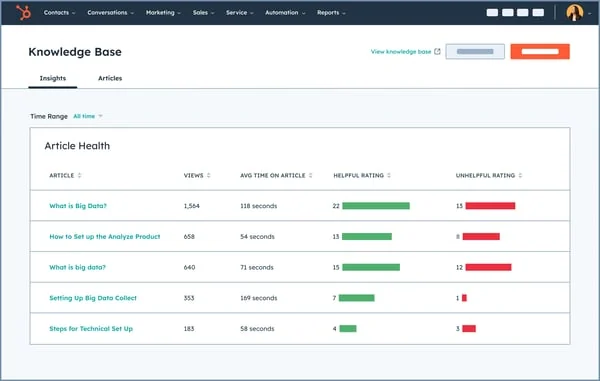
How it connects to the CRM. Natively, on the Smart CRM. Article and ticket are both objects; associations are two-way and show in the record sidebar.
Pros
- The Article Health report above is the best out-of-the-box "is this content working?" view on this list, showing views, time on article and helpful ratings per page.
- Per-article visibility controls (public, access group, or SSO required) mean one repository can do both jobs.
- Breeze Customer Agent answers only from approved content and cites its sources.
Cons
- The knowledge base row is blank on Free and Starter. It starts at Professional, $90 a seat, and Professional carries a required one-time $1,500 onboarding fee, per the Service Hub pricing page.
- Article caps are tier-gated: 1 knowledge base with 2,000 articles on Professional, 100 bases with 10,000 articles on Enterprise.
- HubSpot Credits meter the AI. Breeze Customer Agent costs 50 credits per resolved conversation, and Professional's 3,000 included credits cover about 60 resolutions a month.
- The renewal complaints are real and loud. One HubSpot user on Reddit describes the tier jump bluntly:
"Am I the only one who finds Hubspot's jump from Starter to Pro pricing utterly absurd? My sales rep quoted $17,500/year"
Pricing. Free $0 (no KB), Starter $7 a seat (no KB), Professional $90 a seat plus $1,500 onboarding, Enterprise $150 a seat plus $3,500 onboarding. Year one for a single seat on Professional is $2,580.
My take: the best article experience of the CRM-native options, at a price that only makes sense if you are buying HubSpot for the CRM anyway. If you already run HubSpot on Starter and just want a help center, this is a $2,580 upgrade for a feature Zoho charges $14 for. Our take on HubSpot Service Hub AI digs into whether the Breeze layer earns its credits.
4. Zoho Desk
Best for: tight budgets that still want the knowledge base and the CRM talking.
Zoho Desk publishes the cheapest real public help center in this comparison, and it is not close. Standard at $14 a user includes the knowledge base, the community forum, business messaging and Work Modes, which sort the ticket queue by CRM information rather than just by age.
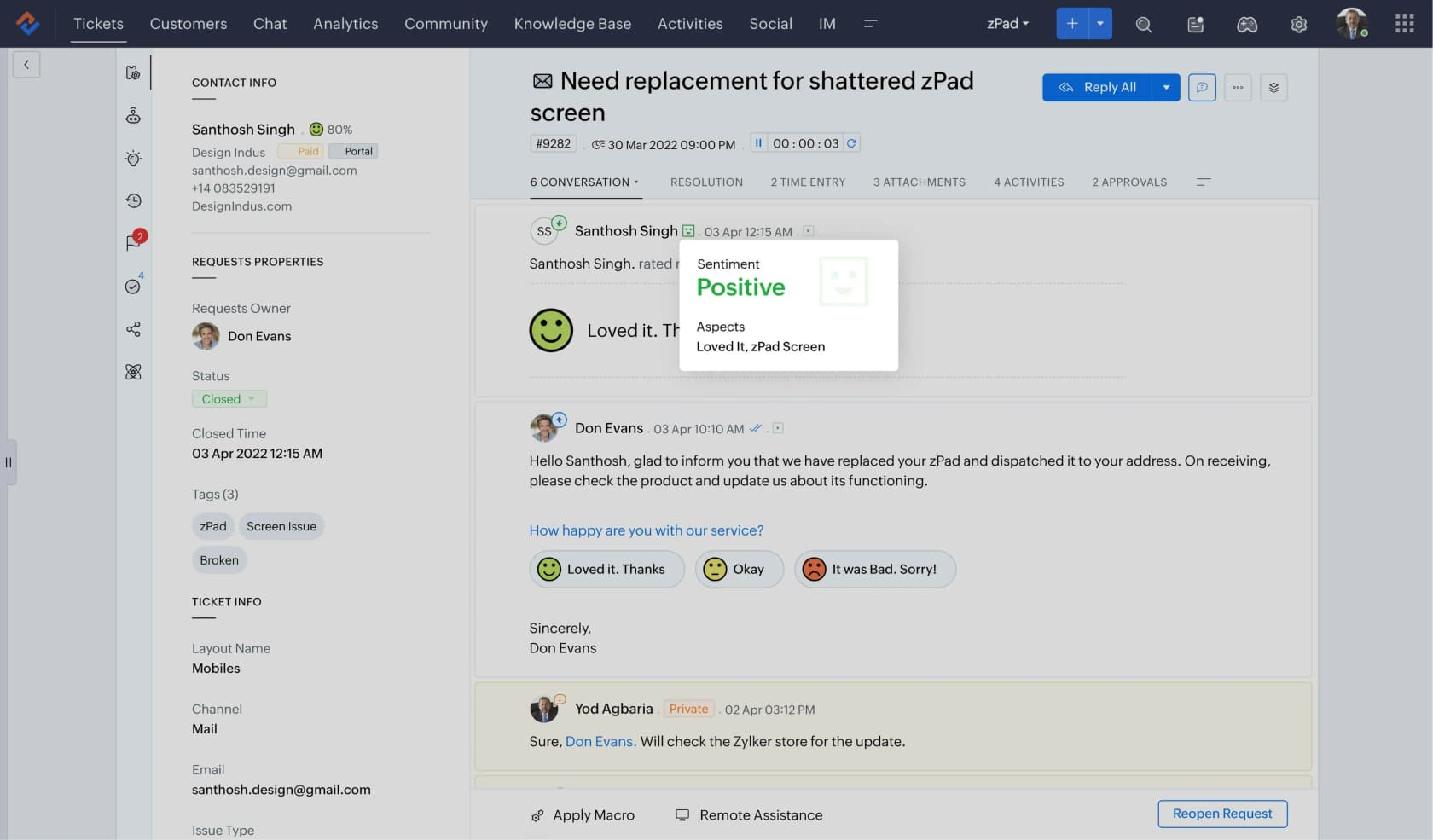
How it connects to the CRM. Through an explicit Zoho CRM integration you configure in Desk. Zoho's own documentation describes a two-way sync of contacts, accounts and products, plus a Handshake Mode that lets agents prioritise by customer type.
Pros
- $14 for a public knowledge base undercuts everyone else here by a factor of four or more.
- Work Modes push CRM context into triage, not just into a sidebar panel.
- The free plan for three agents gives agents a private article store, which is more than most free tiers offer.
Cons
- Desk and CRM are two databases with a sync, not one record. The sync direction is the sharp edge, and getting it wrong is expensive:
"I was using 2-way for way too long (years) and it destroyed my data in crm. So switched to 1-way last week... every single ticket gets turned into a contact in Desk. Every spam email, every SEO marketing email..."
- The free plan's article store is agent-only. A customer-facing help center starts at Standard.
- Generative AI on Standard requires you to bring your own OpenAI key, and the packaged Answer Bot only appears on Enterprise at $40.
Pricing. Free $0 (3 users, private articles), Express $7, Standard $14 (knowledge base starts here), Professional $23, Enterprise $40. Light users are $6 on the top two tiers.
My take: the value pick, and the one I would recommend to a team under 20 agents that wants both halves without an enterprise contract. Check the Zia knowledge base setup before assuming the AI is included, because on Standard it mostly is not.
5. Zendesk
Best for: high-volume support teams with a mature help center and the volume to justify it.
Zendesk Knowledge is the most battle-tested customer-facing knowledge base here. Its differentiator in 2026 is unification: Zendesk claims it can combine help centers, community forums and external sources like Confluence or Google Drive into a single knowledge graph, so agents and AI pull from one index.

How it connects to the CRM. Zendesk is the ticket system rather than the CRM, and connects out to Salesforce and HubSpot through marketplace apps. If your CRM is Zendesk-adjacent rather than Zendesk-native, this is a two-system setup.
Pros
- The most mature theming, permissions and multilingual help center tooling of the group.
- Article suggestion inside the agent workspace is fast and well integrated.
- Its ticket-to-article flow is the closest thing to a built-in knowledge management practice among the suites, and the help center basics are well documented.
Cons
- Knowledge Base is not on the $19 plan. The pricing page lists Support Team at $19 with email, ticketing, routing and automations, and no knowledge base. It appears one tier up, on Suite Team at $55.
- No free plan at all. The trial is 14 days.
- The automated resolution rate is no longer published, which makes the AI line impossible to budget without a sales conversation.
- Content drift is the loudest complaint in its own community. One thread's original poster puts it plainly: "Having a real problem keeping our knowledge base updated. Seems like there is a whole bunch of documentation out of date, misspellings etc." (r/Zendesk)
Pricing. Support Team $19 (no KB), Suite Team $55, Suite Professional $115, Suite Enterprise by quote. All per agent per month, paid yearly.
My take: still the right call above roughly 50 agents, where the help center tooling earns its keep. Below that, the $55 floor and the unpublished AI rate make it hard to justify against Zoho. Our Zendesk pricing breakdown has the full ladder.
6. Freshdesk
Best for: a simple, cheap customer portal without a lot of ceremony.
Freshdesk deserves credit for the one thing the others get wrong: it does not gate the knowledge base behind a mid-tier. The customer portal and knowledge base are in Growth, the cheapest paid plan, alongside ticketing and reports.

How it connects to the CRM. Through the Freshsales Suite app, set up with an API key. Agents see the five most recent deals next to the ticket, and Freshsales users see linked tickets on contact and account pages. It is gated to paid Freshdesk plans.
Pros
- The knowledge base is on the entry paid plan at $19, not two tiers up.
- The knowledge base API is straightforward if you want to script article maintenance.
- Freddy AI Agent includes 500 sessions before you start paying.
Cons
- The free plan is gone. The old free-helpdesk landing page now 404s, and the pricing page lists three plans, none of them $0.
- Those 500 Freddy sessions are once per account, not monthly. After that it is $49 per 100 sessions.
- A session is a 24-hour window for chat and a 72-hour window for email, so one drawn-out conversation is one session but a customer who replies four days later starts a new one.
- The CRM link is an app with an API key, not a shared record.
Pricing. Growth $19, Pro $55, Enterprise $89, all per agent per month billed annually. Freshdesk Omni, the suite version, runs $29, $79 and $119.
My take: the least annoying entry-level option if you want a portal and a ticket queue for under $20 a head. Just budget the Freddy AI pricing separately, because the included sessions run out faster than teams expect.
7. Guru
Best for: internal knowledge that needs to follow agents into whatever tool they are in.
Guru is the strongest internal knowledge product here, and the one whose commercial model changed most this year. Its answer product is called Knowledge Agents, and its distinguishing trick is verification: every card has an owner and a review cadence, and unverified cards land in a queue that nags someone.
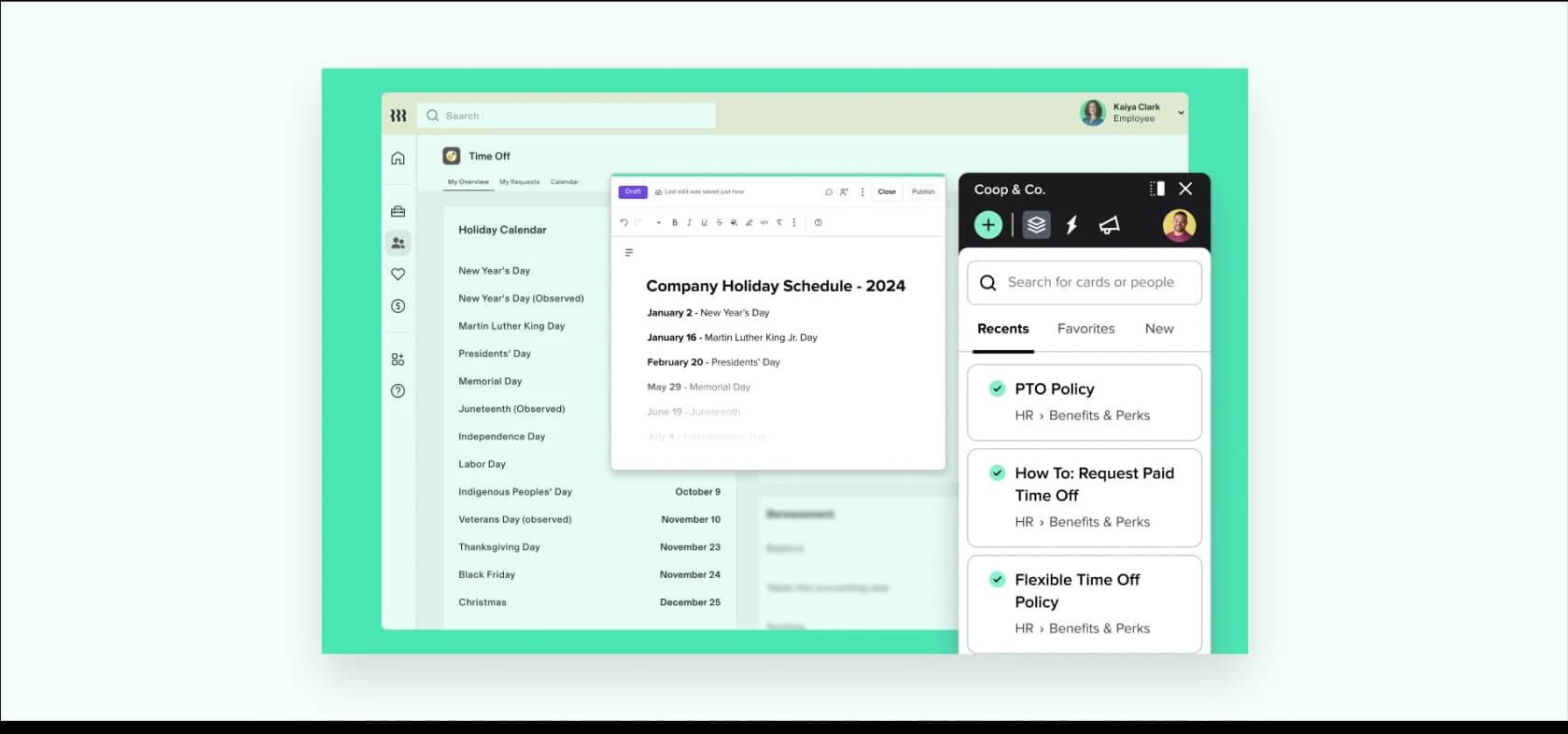
How it connects to the CRM. Through the browser extension, not a native app. Guru's own integration directory tags Chrome, Edge, Slack, Teams and ChatGPT as places you search from, while Salesforce, HubSpot, Zendesk, Zoho and Freshdesk are listed as sources you search, marked "works with extension". Knowledge Triggers are what surface a card over a CRM page.
Pros
- Verification workflow is the best answer to content drift on this list, because staleness has a named owner rather than a nag email.
- The extension means one knowledge layer works across every tool an agent touches, including ones with no integration.
- Permission-aware answers with citations and lineage, plus SOC 2 Type II and HIPAA on the governance layer.
Cons
- Guru publishes no price at all in 2026. The pricing page has no plan cards and no numbers, only "book a call". Its FAQ says the investment is scoped to your organisation's scale and AI maturity.
- No free plan, no advertised trial, and no self-serve signup. You cannot create a workspace without going through sales.
- The overlay model is shallower than a native app. A card floating over a case is not an article inserted into a reply.
- It is built for internal enablement first. A customer-facing, SEO-indexed help center is not its strength.
- The card format fights long documentation. A knowledge specialist who otherwise praises Guru's re-verification workflow writes:
"The card-based UI/UX is overly rigid for long-form technical documentation, causing fragmentation. Additionally, onboarding new users is difficult because the advanced search requires highly precise keywords, often leading to initial navigation frustration and steep adoption curves."
Pricing. Quote only. Any per-user figure you find in an older roundup is stale, including on our own Guru pricing page, which we are updating.
My take: the best tool here for keeping internal knowledge trustworthy, and the hardest to buy. If you need a number in a spreadsheet this quarter, look at Guru alternatives first.
8. Document360
Best for: large, versioned documentation sets that need real editorial workflow.
Document360 is the most serious authoring tool on this list. Versioning, workspaces, review reminders, localisation variables and a category tree that flags stale articles are all first-class, which is what you want when you have thousands of pages and more than one writer.
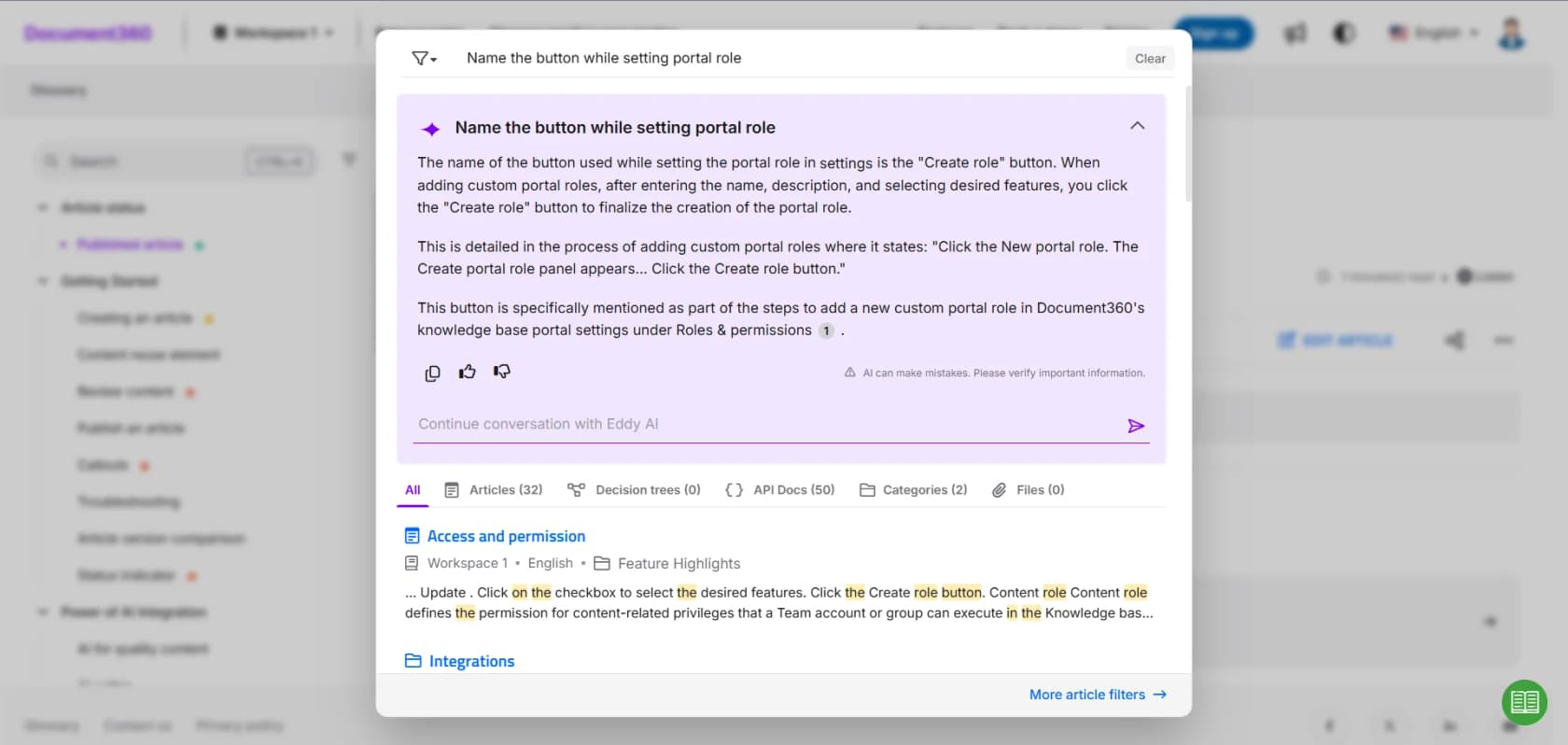
How it connects to the CRM. Its Zendesk app is the deepest third-party integration in this roundup: it auto-searches on the ticket title, surfaces up to five suggested articles, lets an agent link, preview or insert full article content, drafts replies with Eddy in the conversation's language, and can create a draft article from inside the ticket. The Salesforce path is thinner, needing Lightning plus a Visualforce page, and it recommends articles by keyword match on the case Subject field alone.
Pros
- Review reminders and a stale-article indicator built into the category tree, so drift is visible rather than discovered.
- Localisation is a real strength, with a Crowdin integration and per-workspace language settings.
- The Zendesk app does the thing most integrations only claim to do, which is put the article into the reply.
Cons
- Pricing is now a three-step lead form. There are no published figures, and its own FAQ names six variables that set the quote: team accounts, workspaces, languages, SSO, the privacy model, and AI Premium Suite usage.
- No free plan. A 14-day trial only, and you cannot buy AI credits during it.
- The AI unit is coarse: one Eddy credit equals one question asked by a user, whether that question was useful or not. When you hit the cap the button greys out, and top-ups happen by emailing support.
- No HubSpot integration and no Zoho CRM or Zoho Desk integration. The only Zoho item in its directory is PageSense, an analytics tool. For a CRM knowledge base shortlist, that is a real gap.
Pricing. Quote only. See our Document360 pricing page for what is knowable, and Document360 AI for how Eddy is scoped.
My take: the right choice if documentation is a job someone owns full time and Zendesk is your helpdesk. Wrong choice if your CRM is HubSpot or Zoho, because the integration simply is not there.
9. Confluence
Best for: teams whose knowledge already lives in Atlassian and is not going anywhere.
Confluence is on this list because it is where an enormous amount of support knowledge already sits, not because it was designed for support. It is a wiki with excellent editing, spaces, permissions and a deep Jira relationship.
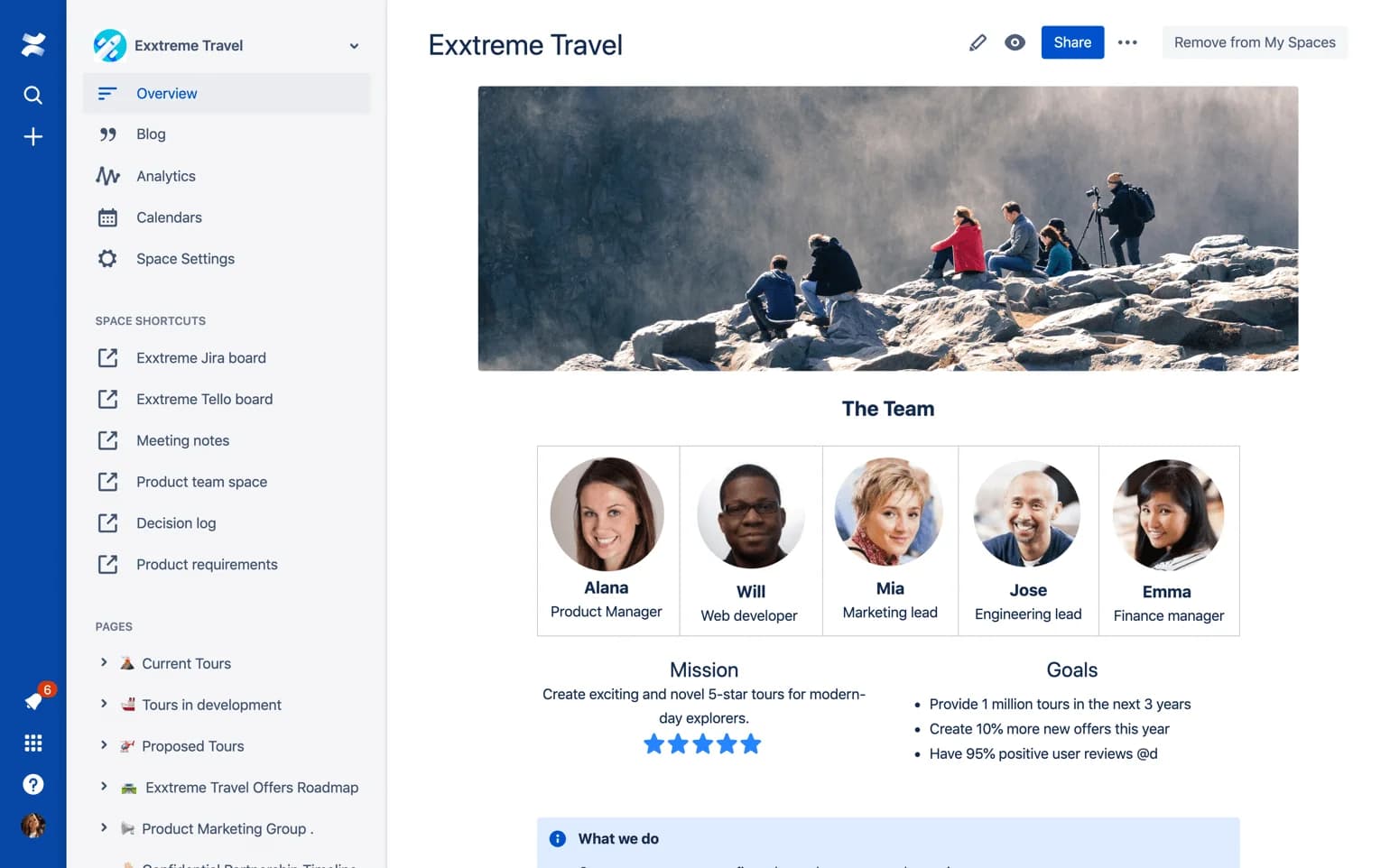
How it connects to the CRM. Through Jira Service Management for ITSM teams, and through apps or AI layers for everything else. There is no native path from a Confluence page to a Salesforce case.
Pros
- $5.42 a user on Standard is the cheapest per-seat price on this list by a distance.
- Editing, page hierarchy and cross-linking beat every helpdesk-native editor here.
- Most engineering and product knowledge is already in it, which is exactly the content support teams struggle to get at.
Cons
- The free plan has no anonymous access at all, so customers cannot read it. Public sharing starts on Standard.
- It is not a help center. No article ratings, no deflection reporting, no customer portal.
- Rovo AI is paywalled off the free plan, and Standard gives only 25 credits per user per month; Premium at $10.44 gives 70.
- Search inside a large Confluence instance is the reason "we have it documented somewhere" is a running joke. A developer in r/ExperiencedDevs puts the failure mode more memorably:
"Some people call Confluence a "knowledge base". I prefer to call it a "knowledge graveyard". Wikis seem to be inherently write-only mediums."
Pricing. Free $0 (10 users), Standard $5.42 a user, Premium $10.44 a user, Enterprise by quote. All billed annually.
My take: keep it as the writing surface, do not try to turn it into a support knowledge base. The better pattern is to leave the content where the authors are and put an AI layer over Confluence that can answer tickets from it. If you are weighing a move, our Confluence alternatives roundup covers the rest.
10. Help Scout Docs
Best for: small teams who want a real help center live this afternoon for nothing.
Help Scout is the honest one on pricing. Docs, its knowledge base product, really is on the free plan: five users, one Docs site, live and branded.
How it connects to the CRM. Through the Help Scout inbox natively, and through apps for CRMs. Like Zendesk, it is a helpdesk that talks to a CRM rather than a CRM with a knowledge module.
Pros
- A live, branded help center at $0 is a real thing here, not a marketing claim.
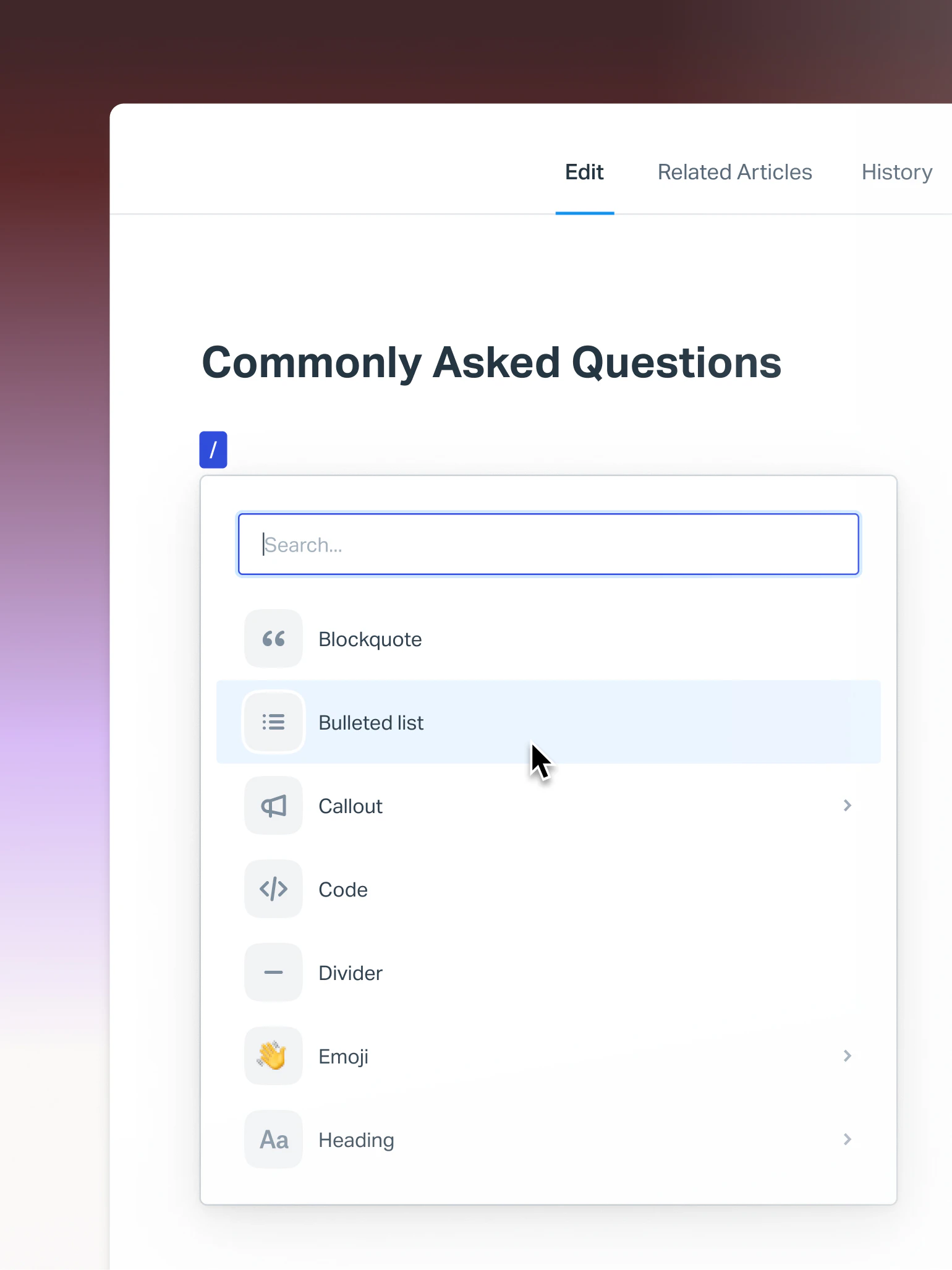
- The editor is the most pleasant of the helpdesk-native ones, with a clean slash-command flow.
- AI Answers is priced transparently at $0.75 per resolution, which is rare on this list.
Cons
- The free plan caps you at 10 articles and 100 contacts a month, which is a starter FAQ.
- Uncapped articles start at Standard, $25 a user. Extra Docs sites are $20 a month each.
- It tops out earlier than the suites on routing, custom objects and reporting.
Pricing. Free $0 (5 users, 1 Docs site, 10 articles), Standard $25 a user, Plus $45, Pro $75 by demo only. Our Help Scout pricing page has the caps in detail.
My take: the best starting point for a team of five that has never had a help center. When you outgrow 10 articles, compare Standard at $25 against Zoho Desk at $14 before you renew, and look at Help Scout alternatives if the routing limits start to bite.
The part that decides whether any of this works
Every tool above assumes the answer is in one place, and that someone is keeping it current. In practice neither holds. The most-upvoted description of the problem I found is also the plainest:
"I run a small team, and we have an internal wiki for processes, FAQs, and troubleshooting. The problem? No one updates it. People keep asking the same questions in Slack instead of checking the wiki."
That was tolerable for years, because a human agent who found a stale article would notice and go ask someone. An AI agent will not. As one commenter in r/CustomerSuccess frames it, the failure usually is not the model at all:
"The dangerous state is when two docs disagree and the bot silently picks one. In that case the model did not really hallucinate; the knowledge base gave it a bad choice."
I have watched this play out on live queues for three years, and the pattern repeats. A support manager at a bus-tracking service, running 200 to 250 Zendesk tickets a month, had a knowledge base that was complete, current and useless: every article had been written for the administrators who bought the product, while every ticket came from the riders who used it. The content was not stale. It was aimed at the wrong reader.
A Danish vehicle-telematics team on Zendesk found the sharper version of the same problem. Their knowledge base said the product supported all car models, so their bot confidently told customers it supported models that were not in the database. The AI was doing exactly what the knowledge base told it to.
That is the real risk of buying a knowledge base tier and calling it done. An AI agent inherits the accuracy of whatever it reads, and a confident wrong answer costs more than no answer at all. It is why every rollout we run gets simulated against a team's historical tickets first, so you see what the AI would have said on real cases before a customer ever sees it. Our guide to AI hallucinations in support covers how to build that guardrail regardless of which vendor you pick.
The scattering is the other half. One customer, a payments company, was answering internal questions out of Confluence and reported up to 80% time savings once an AI layer could read it directly. Another, a meeting-productivity SaaS, put it this way:
"Our agents can instantly draft replies to customers. We don't have to look through all our documentation on Notion, Google Docs or our help center anymore because eesel AI does it for us."
Three sources, one answer. No migration. That is the shape most teams actually need, and it is the shape a single-store knowledge base cannot produce on its own. If you are working out where the handover to a person belongs in that flow, our notes on AI agent handoff are the practical version.
How I would choose
- Already on Salesforce with the licences? Use Salesforce Knowledge and budget the extra $75 for read/write. Fighting the platform costs more than the add-on.
- Already on HubSpot Professional? Use the built-in knowledge base. If you are on Starter, do not upgrade for the knowledge base alone; $2,580 in year one is not a help center price.
- Under 20 agents and price-sensitive? Zoho Desk at $14, without hesitation. Set the CRM sync to one-way.
- Over 50 agents with a mature help center? Zendesk, and accept the $55 floor.
- Documentation is a full-time job and you run Zendesk? Document360, once you have a quote.
- Internal enablement is the real problem? Guru, once you have a quote.
- Knowledge already lives in Confluence? Leave it there and put an answer layer over it.
- Five people and no help center at all? Help Scout's free Docs site, today.
- Shopping the wider AI helpdesk market first? Start with our AI helpdesk roundup and come back to the knowledge layer after.
And if the honest answer to "where does the knowledge live?" is "four places", the knowledge base tier is not your bottleneck. The reading layer is.
Try eesel for your CRM knowledge base
If your team is already paying for Zendesk, Freshdesk, HubSpot, Gorgias or Front, you do not need another article store. You need the articles you have to start closing tickets.
eesel connects to your help center, Confluence, Google Docs, Notion and your history of solved tickets, then drafts and resolves inside the helpdesk your agents already have open. It is a fixed monthly credit plan (1 credit per ticket or chat) with no seat fee, so it does not care how many agents you add, and every rollout is simulated against your own past tickets first so you see the answer quality before a customer does.

You can connect a source and watch it answer a real ticket in a few minutes. Try eesel free, or book a demo if you want us to run the simulation on your queue with you.