


Almost every tool on this list publishes a decent FAQ page. Almost none of them get your answer to the other three places a customer will ask the same question, which is Google, the chat widget, and the agent's reply. Pick for reach, not for the editor.
Prices, quickly. Help Scout is the only real free start, and it caps you at 10 articles. Freshdesk is the cheapest uncapped paid FAQ, $19 per agent per month. If you hate seat maths there are two flat-rate options: Crisp at $95 a month for ten people, Helpjuice at $249 for a big help center. HubSpot is the most expensive door in the category, $90 per seat plus a required $1,500 onboarding fee before you publish a single answer.
The catch nobody prices in: the plan that publishes your FAQ is usually not the plan that lets it rank. Freshdesk hands you a sitemap at $19 but holds meta tags back until $55. Zendesk's automatic sitemap is not available on Suite Team, the very plan that unlocks the knowledge base. Zoho generates no sitemap at all unless the help center is domain-mapped.
The number nobody puts on their pricing page is what the AI reading that FAQ costs, and it is a separate meter on every tool here. If your FAQ is already reasonable, the cheaper move is usually not to migrate it. I build AI agents at eesel, and pointing one at the help center you already run starts at $299 a month for 500 credits with no seat fee, and there is a free plan with 100 credits to try it first.
How I judged these
I have spent the last three years building the retrieval side of AI support agents at eesel, which means I read a lot of help centers that were never written for the person asking. One moment stuck: a support manager I worked with had a complete, well-maintained knowledge base, and terrible answers coming out of it. The whole thing was written for administrators, and every ticket came from end users. The software was fine. The audience was wrong.
That is the lens for this roundup. I scored each tool on five things, all of which decide whether an answer reaches a person, and none of which is the editor:
- The real FAQ price floor. The cheapest plan that publishes a public page, on the vendor's own pricing page, with the billing unit named.
- What is capped. Articles, help center sites, seats, storage.
- Whether the page can rank. Sitemaps, meta tags, canonical and hreflang tags, custom domains, and per-article indexing control.
- Where else the answer shows up. Chat widget, in-product embed, and the agent's draft reply.
- Whether the tool tells you what people searched for and did not find. This is the single most useful report in the category and most tools do not have it.
Prices are the vendors' own published 2026 figures, annual billing where a discount applies. Where a vendor does not publish a number, I say so rather than estimating.
An FAQ is not a knowledge base article
These get used as synonyms and they are not the same page. The distinction is worth ninety seconds because it decides which tool you need.
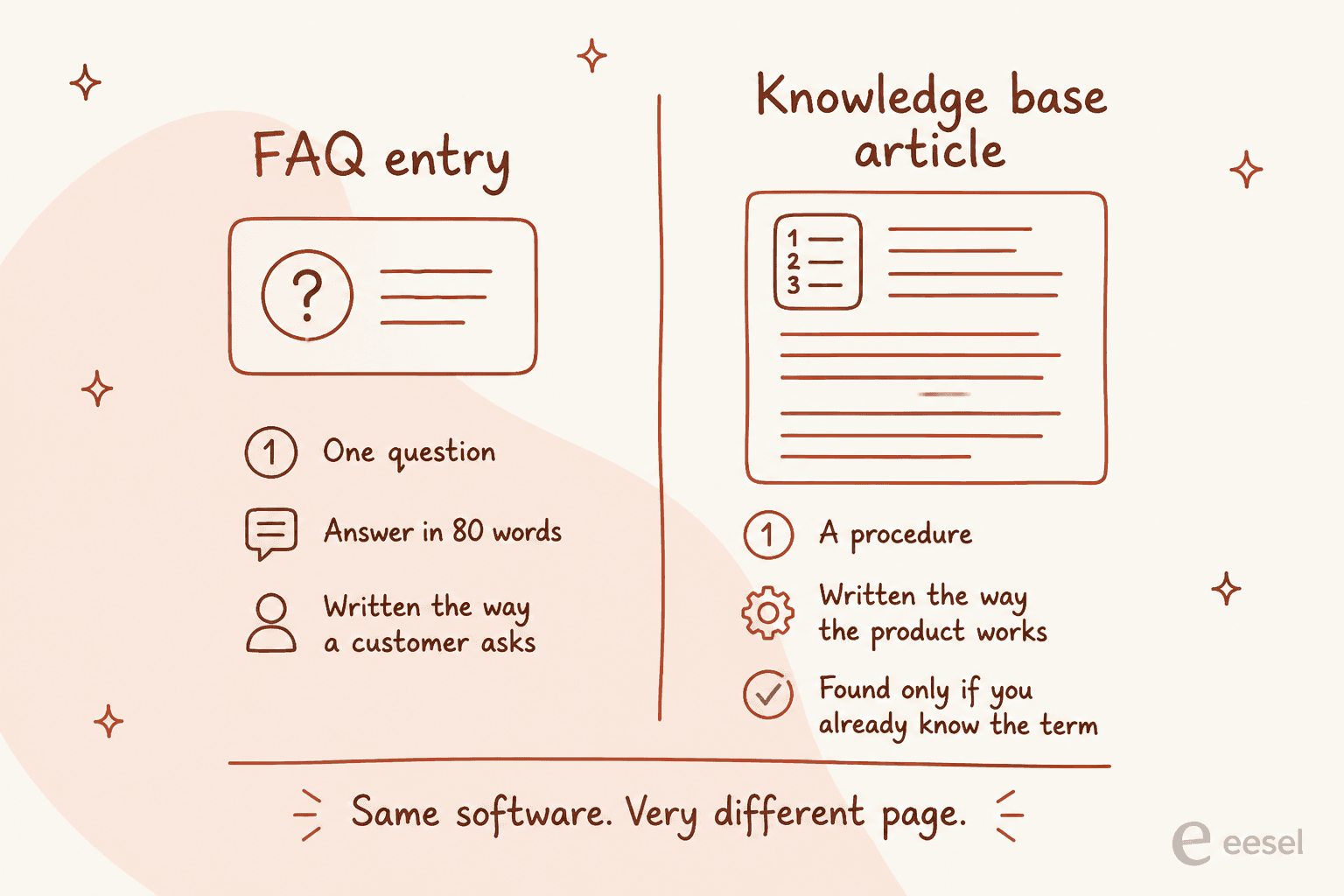
An FAQ entry answers one question, in about eighty words, phrased the way a customer would ask it. "Where is my order?" A knowledge base article documents a procedure, in the vocabulary your product uses. "Order tracking and fulfilment statuses."
Both live in the same software. But a help center full of the second kind is exactly the failure I described above. Complete, accurate, and invisible to anyone who does not already know your internal term for the thing. If your top ten repeat tickets are not sitting on the site as questions, your FAQ does not cover them, no matter how many articles you have published.
This is also why the knowledge base management habit matters more than the platform. A tool cannot tell you that "RMA initiation workflow" is not how anyone asks for a refund.
The four places one answer has to land
Here is the part most buyers skip. You do not publish an FAQ answer once. The same question arrives on four different surfaces, and the tool you pick determines how many of them you cover.
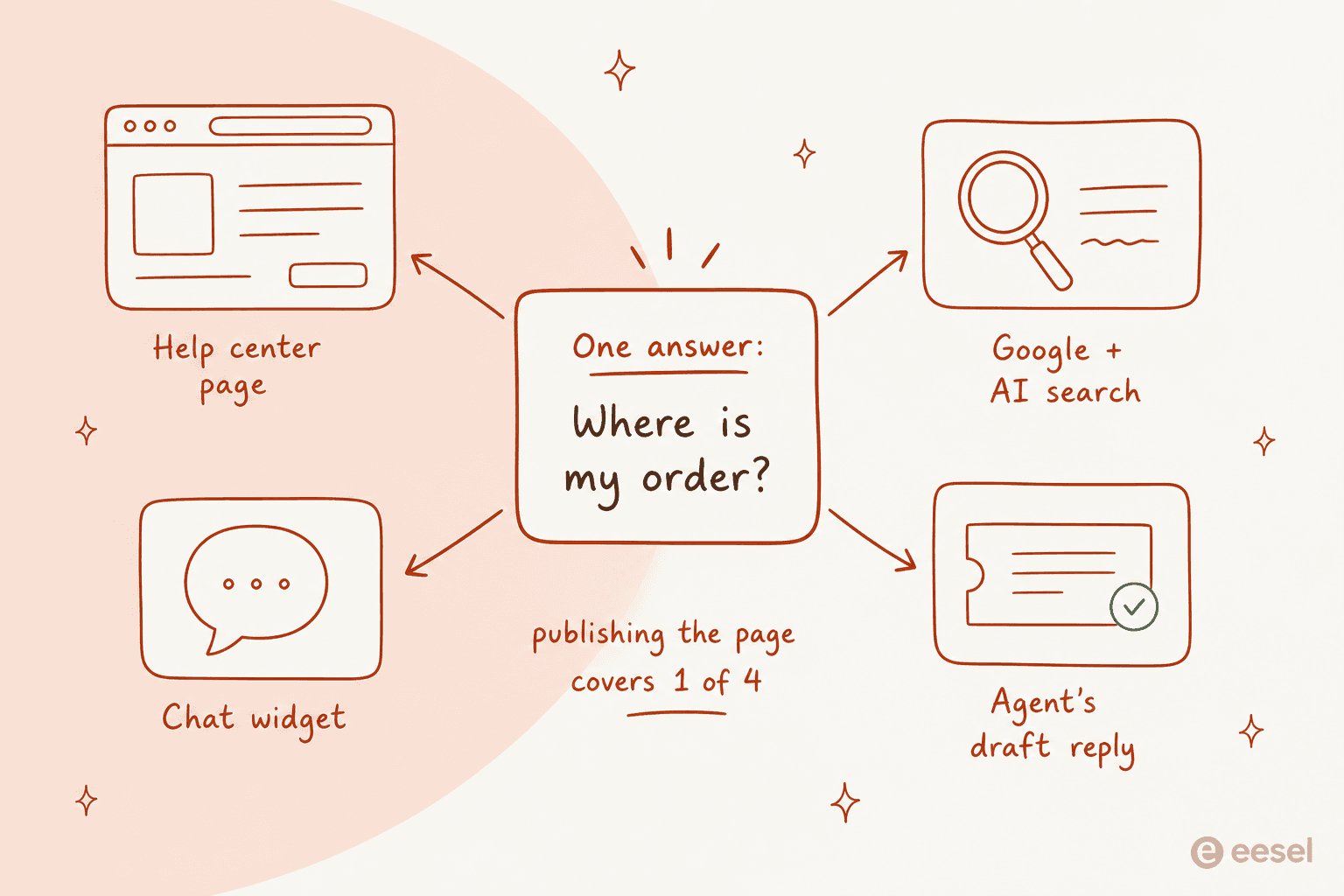
Click through the four surfaces below. The trap at the bottom of each panel is the one I see teams walk into most often.
The four places one FAQ answer has to land
Most teams buy help center software, publish the page, and stop. Click through the four surfaces a customer can meet the same question on, and see which tools actually cover each one.
Customer lands on your help center and searches.
- Everyone covers this. It is the feature every vendor sells.
- Cheapest real floor: Help Scout Docs at $0, capped at 10 articles.
- Cheapest uncapped: Freshdesk Growth at $19 per agent per month.
- Cheapest that does not scale with headcount: Crisp at $95 a month flat for 10 seats.
The trap: the search box is the surface teams over-index on. It only helps the customer who already decided to visit your help center, which is the smallest of the four groups.
Customer types the question into Google, ChatGPT or Claude instead.
- Needs an XML sitemap, meta tags, canonical and hreflang tags, and public articles that crawlers can reach.
- Zendesk ships all of that, with one catch buried in its own docs: the automatic XML sitemap is not available on Suite Team, the cheapest plan that includes the knowledge base.
- Crisp lists sitemap and SEO metadata in its plan table. Gorgias makes indexing an explicit per-article choice: Public is searchable, Unlisted is not.
The trap: this is the surface with the largest audience and the least attention. A help center behind a login is not crawlable at all, so a private FAQ answers nobody who has not already signed in.
Customer opens the chat widget and asks in their own words.
- This is where the AI meter starts running, and it is billed separately from the help center on every tool here.
- Published rates: Help Scout $0.75 per resolution, HubSpot about $0.50 per resolved conversation, Gorgias $0.85 to $1.00 per automated interaction, Freshdesk $0.49 per session.
- Zendesk publishes the unit and the allowance but not the rate.
The trap: the bot is only as good as the FAQ under it. If two articles disagree, the answer changes between customers.
Customer skipped all of it and emailed you anyway.
- The FAQ still has a job: it should be in the agent's draft before they start typing.
- Zoho Desk and Freshdesk convert a good reply back into an article, which is the loop most teams never close.
- Zendesk surfaces article suggestions inside the ticket.
The trap: a team that only measures deflection ignores this surface entirely, even though it is the one that writes next month's FAQ for you.
Prices are the vendors' own published 2026 figures, annual billing where a discount applies.
The 10 tools at a glance
| Tool | Best for | FAQ price floor | Billing unit | Article cap | Public FAQ on free plan | SEO controls | Failed-search report | AI meter on top |
|---|---|---|---|---|---|---|---|---|
| eesel | Answering the FAQ you already published | No seat fee | Ticket | Hosts nothing | n/a | Inherits your existing site | Gap analysis in simulation | From $299/mo (500 credits) |
| Zendesk | The deepest search reporting in the category | $55/agent/mo | Agent seat | Unlimited | No free plan | Automatic, but not editable | Yes, in a dashboard tab | Unit published, rate is not |
| Freshdesk | The cheapest uncapped paid FAQ | $19/agent/mo | Agent seat | Unlimited | No free plan | Auto sitemap, meta tags at Pro | None, vendor points to GA | $0.49 per session |
| Help Scout | Starting free and reporting content gaps | $0, then $25/user/mo | User seat | 10 free, then unlimited | Yes, 10 articles | Branded Docs subdomain | Yes, a named report | $0.75 per resolution |
| HubSpot | An FAQ that has to sit on the CRM | $90/seat/mo + $1,500 | Seat + credits | 2,000 on Professional | No | Search pages blocked by default | Article health only | About $0.50 per conversation |
| Gorgias | A Shopify storefront FAQ | $40/mo plan floor | Plan + per ticket | 10 help centers | No | Per-article Public or Unlisted | Enterprise only | $0.85-$1.00 per interaction |
| Crisp | Ten people who hate seat maths | $95/mo flat | Workspace | Not published | Free plan has no KB | Only one that serves from a path | Not published | Credits, about $25 a month |
| Zoho Desk | Turning a solved ticket into an FAQ entry | $14/user/mo | User seat | Not published | Agent-only on free | Per-page meta tags, editable | Yes, in a dashboard tab | Tiered, plus 30M tokens |
| Document360 | Governance on a big, reviewed FAQ | Quote only | Quoted | Per project | 14-day trial only | Custom domain per project | Not published | AI credits, quoted |
| Helpjuice | A large multilingual FAQ with no seat maths | $249/mo flat | Flat, 30 users | Unlimited | No | Not published, GA integration | Search tracking, unnamed | AI starts at $449/mo |
The plan that publishes your FAQ is rarely the plan that makes it rank
This is the finding I did not expect, and it is the most expensive thing in this post. Four of these vendors sell you the help center on one plan and the ability to compete in search on a different one.
| Vendor | You get the FAQ page at | You get it to rank at |
|---|---|---|
| Freshdesk | $19 per agent, with an automatic sitemap on day one | Meta titles and descriptions at Pro, $55 per agent |
| Zendesk | Suite Team, $55 per agent | XML sitemap is not available on Suite Team |
| Zoho Desk | Standard, $14 per user | Sitemaps only for domain-mapped help centers |
| HubSpot | Professional, $90 per seat | Search-result pages are blocked from search engines by default |
Budget for the second column, not the first. An FAQ page exists to answer the question before it becomes a ticket, and most of those questions get typed into Google rather than into your help center's own search box. Pricing pages are written for the first column because that is the cheaper number to advertise.
Crisp deserves a specific note here. It is the only vendor in the group that documents serving the help center from a path on your own root domain, via a reverse proxy at yoursite.com/help. Everyone else is a CNAME'd subdomain, and Help Scout is explicit that it has to be a subdomain of a domain you own.
1. eesel: best for answering the FAQ you already published
Best for: teams whose help center is fine and whose answers are not.

I am putting eesel first and immediately telling you what it is not: it does not publish a help center. There is no article editor, no theme, no subdomain. If you need somewhere to host an FAQ page, skip to Freshdesk or Help Scout and come back.
What it does is the other three surfaces. It connects to the help desk and the docs you already run, learns from published articles and solved tickets, and answers or drafts from there, across 100+ integrations and 80+ languages.
Same answer, two shapes. The AI Agent handles it in chat. The AI Copilot puts it in the agent's draft reply instead.
Where it falls short: if your FAQ does not exist yet, this is the wrong first purchase. It also cannot fix the audience problem I opened with. If every article is written for admins, a better reader gives you better-sourced wrong answers.
Pricing: from $299 a month for 500 credits, one credit per ticket, no seat fee, no per-message charge for follow-ups inside the same ticket. The free plan is 100 credits without a card.
Verdict: the cheapest correct answer for most teams reading this, because most teams reading this already have an FAQ and think the tool is the problem. Run it in simulation against past tickets first and it will show you the coverage gaps before you pay for a single resolution.
2. Zendesk: best search reporting, with a sitemap catch
Best for: teams that want to know exactly which questions their FAQ is failing.
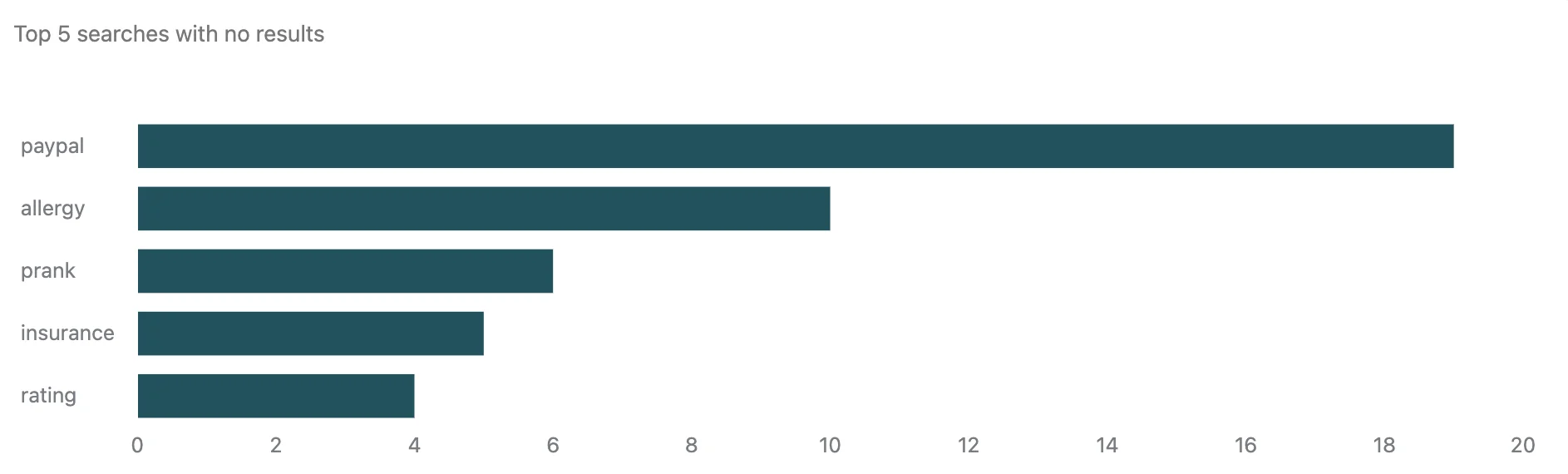
Nothing else in this list reports on FAQ failure as well as the Zendesk Knowledge dashboard in Explore. Seven tabs, and the Search tab is the one to open on day one: total searches, searches with no results, average click-through rate, a bar chart of the top five searches returning nothing, and a ticket-to-search ratio that tells you where people give up. Data goes back 390 days.
The SEO story is better than its reputation and worse than its documentation, and both halves are on the same page. Zendesk's own SEO article confirms automatic meta description tags, canonical URLs, hreflang tags, HTTPS, and an automatic XML sitemap refreshed every two hours. So the widely repeated "Zendesk Guide has no sitemap and no meta tags" line (Guide is now called Zendesk Knowledge) is out of date. What is true is that you do not get to write any of it. The meta description is generated from the first 140 characters of the article, so on a Zendesk help center your SERP snippet is whatever you happened to type first. Put the answer in the opening sentence and treat it as ad copy.
The control gap is old and still open. A community feature request for editable meta titles and descriptions documents the workaround and why it breaks: you can inject tags through the document_head.hbs template, but Zendesk keeps generating its own in the format "{Article Name} - {Site Name}", so both end up on the page with no way to suppress the automatic one. The sitemap also carries its own caveats in Zendesk's docs: it excludes community content, it will not generate at all if your help center requires sign-in, and Zendesk says plainly that it "does not improve individual ranking" of pages. And it is not available on Suite Team, which is exactly the plan that unlocks the knowledge base.
Where it falls short: the Support Team plan at $19 does not include a knowledge base at all. You need Suite Team at $55 per agent paid yearly, which is nearly three times the headline. Creating an article from inside a ticket needs Suite Growth or higher, and even then Zendesk's docs are blunt that "information from the ticket is not automatically populated in the article". It is a launcher, not a converter. As a writing environment it is divisive:
I have lots of experience with Zendesk Guide and yes it's true, it's very clunky if you're using it as a writing/content management system. It was designed to allow support agents to quickly create knowledge base articles. That's the beauty of Zendesk, the help articles integrate with the ticketing system, so if your company's support team uses ZD, that might be something you should deeply consider before bailing on it.

Pricing: Suite Team $55, Suite Professional $115 per agent per month paid yearly. Automated resolutions are allocated at 15 per agent per month on Enterprise, 10 on Professional and Growth, 5 on Team, capped at 10,000 per account per year, with the per-resolution rate unpublished.
Verdict: buy it for the reporting, not the editor. If you are already on Zendesk, the eesel Zendesk integration is the cheaper way to add answers on top without moving to a higher tier. My fuller notes on the platform are in Zendesk knowledge base basics and customizing the help center.
3. Freshdesk: cheapest uncapped paid FAQ
Best for: small teams who want a real, unlimited help center for the least money.

Freshdesk does not gate the knowledge base behind a mid-tier. The Growth plan at $19 per agent per month billed annually includes the customer portal and knowledge base outright, which makes it the cheapest uncapped public FAQ on this list. You also get an automatic sitemap on day one and a custom portal URL, plus the ticket-to-article loop: an agent can push a reply into a solution article draft, so the answers you type twice become the FAQ entry you type once.
Where it falls short: two things, and they are both about what happens after launch. Meta titles and descriptions are a Pro feature, $55 per agent, so the $19 plan publishes a page you cannot write a snippet for. And there is no failed-search report at all. The curated knowledge base reports cover most viewed, least viewed and most liked, and Freshdesk's own advice for search terms is to bolt on the Google Analytics app.
Freshworks concedes the point in the cons column of its own knowledge base product page: "Limited user analytics and insights available for knowledge base sessions." For an FAQ, that is the report you needed most.
The free plan is also gone. The old free-helpdesk landing page now returns a 404, and the pricing page lists three paid plans and nothing at $0. The 14-day trial on Enterprise ends with the page's own FAQ saying "your account will be suspended" unless you add a card, and Freshworks' help center documents a separate Free Program for up to 2 agents for 6 months. Reviewers also flag the tier ladder:
The design is maybe not the best, like add-ons feature requires expensive plans. The software can feel expensive and slow when handling large ticket volumes. There are too many notifications sometimes, and the integration setup could be better.

Pricing: Growth $19, Pro $55, Enterprise $89 per agent per month billed annually. Freddy AI Agent includes the first 500 sessions per account, then costs $49 per 100 sessions, which is $0.49 each. Freddy Copilot is a separate $29 per agent per month on Pro and Enterprise.
Verdict: the value pick if you are paying for a help desk anyway. Note that the 500 free Freddy sessions are per account rather than per agent, so a busy FAQ burns them fast. The Freshdesk integration is the usual escape hatch once the session meter starts to sting, and the knowledge base API is how you get articles in and out in bulk.
4. Help Scout: the only real free start, and the best gap report
Best for: a small team that wants a live FAQ page today for nothing.
Docs is the friendliest editor here and the free plan actually publishes: 5 users, 1 Docs site, 10 articles, 100 contacts a month. Ten articles is a starter FAQ, but it is a real one on a real branded site, which is more than HubSpot or Tidio give you at $0.
The reason to take Help Scout seriously is the Docs report. Failed searches get their own table, next to visits, articles viewed per visit and conversations created. Help Scout markets it as content gaps, which is the right name for it: the list of questions your customers asked that your FAQ could not answer is the single best writing brief in support.
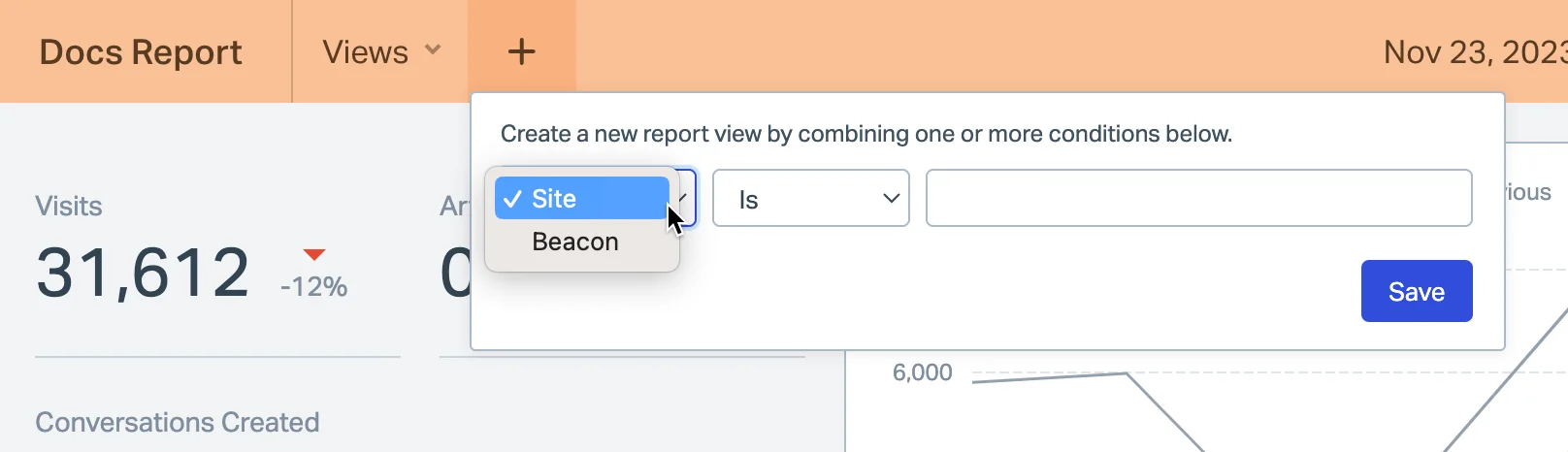
Help Scout is also the only vendor here that publishes the fix, not just the report. Its guide to fixing failed searches gives the exact ranking order Docs search uses, which is keywords first, then exact title, partial title, keywords again, then body, and notes that "keywords are the highest ranking section and impact your results the most." That means a failed search is often fixable by adding the customer's phrasing as a keyword on an article that already answers it, without writing anything new.
Where it falls short: the article cap bites early, and extra Docs sites are charged separately at $20 a month paid annually. The report has two stated blind spots: searches your agents run from the reply editor are excluded, and so are searches made through the API. AI Answers is metered on top at $0.75 per resolution on all three paid plans with no included allowance, though you can set a monthly spend cap and there is a three-month unlimited trial from account creation.
Pricing: Free $0, Standard $25, Plus $45, Pro $75 per user per month. Standard is the first plan with unlimited articles and multiple knowledge bases.
Verdict: the best place to start from zero, and the tool I would recommend to a five-person team without hesitation. Read Help Scout self-service and Help Scout pricing for the fuller picture, and note that the Help Scout integration exists if the per-resolution meter outgrows you.
5. HubSpot Service Hub: the most expensive door in the category
Best for: teams who need the FAQ to live on the same record as the customer.
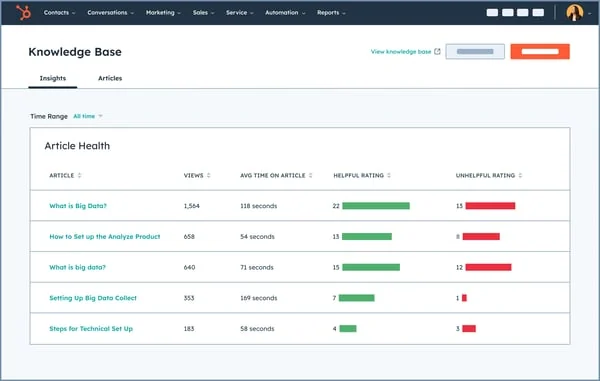
If your support team already lives in HubSpot, the argument writes itself: the FAQ, the ticket, the contact and the deal are one object graph, and Article Health gives you views, average time on page and helpful ratings without exporting anything.
Where it falls short: the price, the way the free plan is marketed, and one default that quietly costs you traffic. The Knowledge base row is blank on both Free and Starter in the Service Hub comparison table. It appears at Professional, $90 per seat per month annually, capped at 1 knowledge base and 2,000 articles, and the Professional card carries a required one-time $1,500 onboarding fee. That is $2,580 in year one for a single seat, the widest gap between "free" and "knowledge base" of anything here. HubSpot also blocks knowledge base search-result pages from search engines by default, which is a sensible default and worth knowing before you wonder why those URLs never appear.
The credit maths is the second trap. Professional includes 3,000 HubSpot Credits, and the Breeze customer agent spends 50 credits to resolve one text conversation. That is 60 AI resolutions a month, then $0.50 each. Credits are shared across hubs rather than added together, and they do not roll over.
Pricing: Starter $20 per seat pay-monthly with no KB, Professional $90 annual or $100 monthly per seat, Enterprise $150 per seat with 100 knowledge bases and 10,000 articles.
Verdict: worth it only if the CRM integration is the whole point. Otherwise you are paying help-desk-plus-CRM money for an FAQ page. See HubSpot knowledge base software for the detail, or the HubSpot integration if you want to keep the CRM and put the answering somewhere cheaper.
6. Gorgias: the ecommerce FAQ with per-article indexing control
Best for: a Shopify store whose FAQ is mostly shipping, returns and order status.
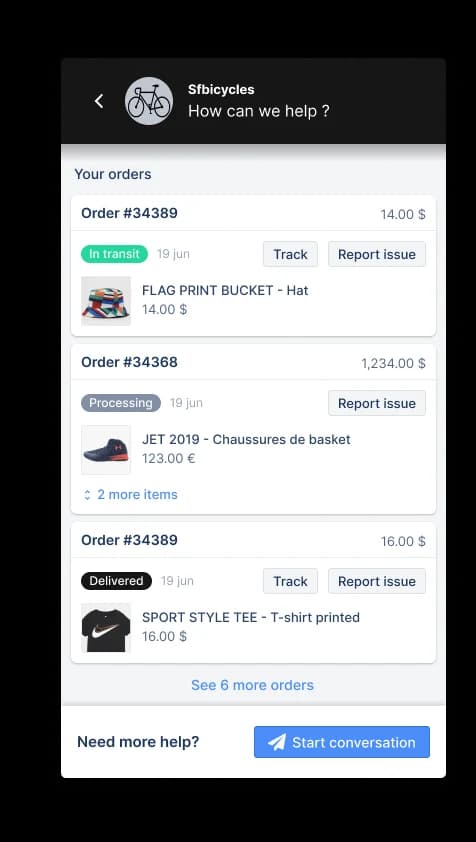
Gorgias puts the Help Center on every plan, 10 of them, unlimited on Enterprise. Two things make it good specifically as FAQ software. First, article visibility is a real choice per article, set at authoring time: Unlisted is reachable by URL only and stays out of search results, Public is searchable and indexable. Second, the link between the FAQ and the bot is the tightest of any tool here. existing help center articles are automatically part of your knowledge, with no re-adding, and you can publish new articles straight from the Knowledge page.
Gorgias is also refreshingly honest about the failure mode I keep seeing. Its docs state that guidance carries the most weight among knowledge types, and that contradictory content produces inconsistent answers: if one article says the return window is 30 days and a guidance note says 14, the Gorgias docs warn that "AI Agent might not respond the same way every time".
Where it falls short: there is no direct export, you have to ask support for a data dump, which is a real lock-in consideration for content you wrote. Knowledge does not pool across multiple Shopify stores. Proactive knowledge-gap detection is Enterprise-only. And on the one-page layout, font size caps at 16px with no heading styles.
Pricing: Starter $40, Basic $90, Pro $550, Advanced $1,430 a month, with tickets metered at $0.40 or $0.36 each and automated interactions at $0.85 to $1.00 each depending on the plan.
Verdict: the right answer on Shopify, with the per-interaction rate modelled before you switch the bot on. More in the Gorgias help center and the Gorgias integration.
7. Crisp: flat-rate FAQ for a team of ten
Best for: a small team that refuses to pay per seat for a help center.
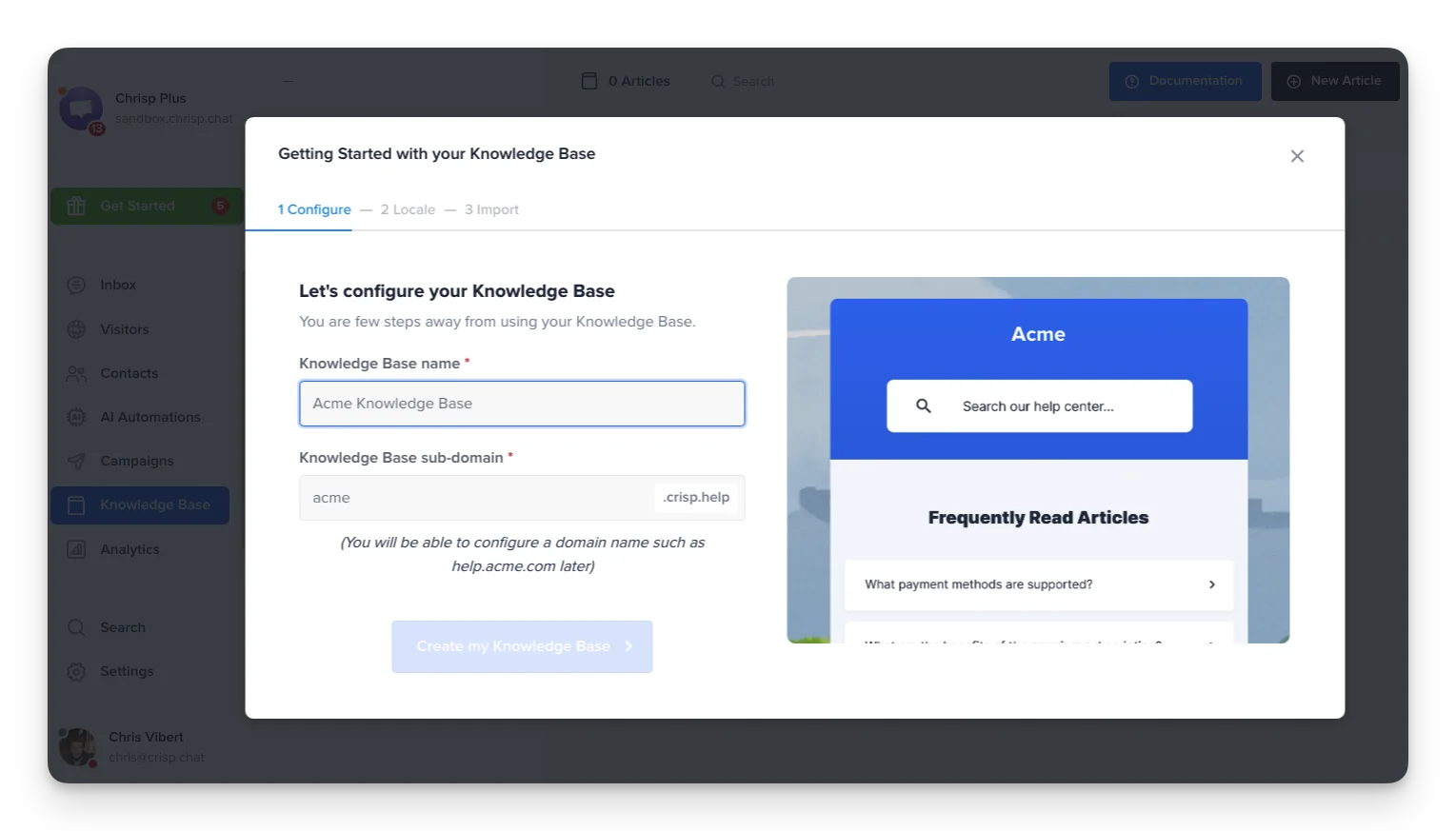
Crisp charges per workspace, so $95 a month covers ten seats and the help center that comes with them. Sitemap and SEO metadata are named in the plan table alongside article feedback, help center search and a Help Center SDK, and the site takes a custom domain or even a reverse proxy route so it can live at yoursite.com/help. For an FAQ that is meant to rank, serving it from your own domain rather than a vendor subdomain is worth more than any editor feature.
Where it falls short: the knowledge base is Essentials and Plus only, so the free-forever plan everyone talks about has no help center in it. Multilingual is a container rather than a translation engine, and Crisp says so: "articles are not translated automatically, so each language should be reviewed and localized manually".
Pricing: Free $0 for 2 seats, Mini $45 for 4, Essentials $95 for 10, Plus $295 for 20 or more, with extra agents at $10. AI credits are quoted as included spend rather than a rate: $5 on Mini for around 90 automated conversations, $25 on Essentials for around 450, $75 on Plus for around 1,350.
Verdict: the best flat-rate deal in the category under $100, and the plainest pricing page. See the Crisp AI chatbot for how the widget side works.
8. Zoho Desk: the only real one-click ticket to FAQ entry
Best for: turning the answer you just typed into the FAQ entry you should have written.
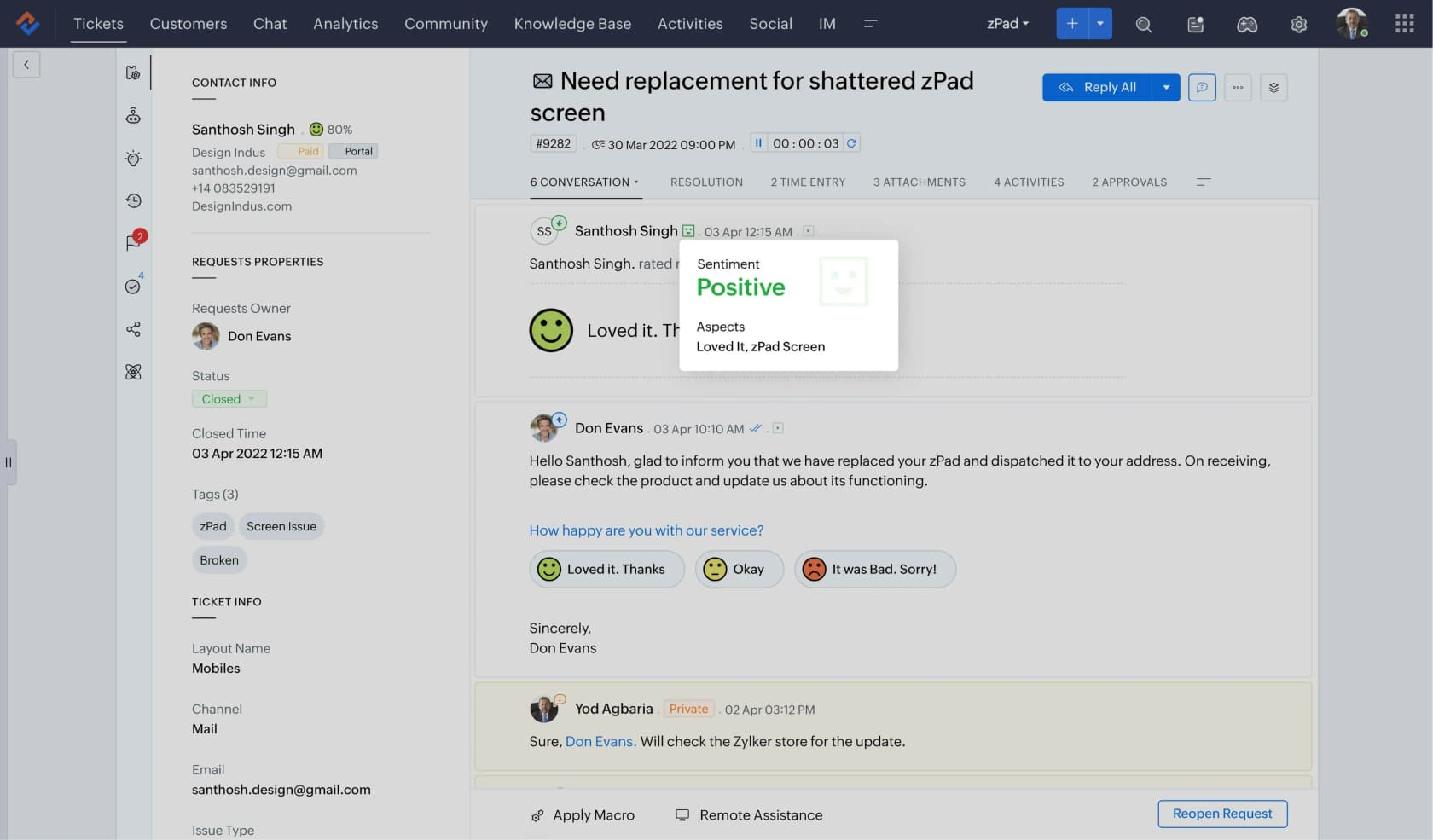
Every vendor talks about the ticket-to-article loop. Zoho Desk is the one that actually converts the ticket content into a draft rather than opening an empty editor, which is why it earns a slot even though its help center is otherwise unremarkable. For an FAQ specifically, this is the highest-leverage feature in the whole roundup: your repeat questions are already sitting in your solved tickets, phrased exactly the way customers ask them.
Zoho also quietly has the meta-tag control Zendesk users have been asking for since 2023. The Help Center SEO page carries Title, Meta Description and Meta Keywords fields, with an "apply these values to all pages" checkbox you can leave unticked to author different tags per page.
Where it falls short: the conversion has hard edges. One ticket only, one department only, no attachments, and no way to append a later conversation to an article you already generated. The free plan's article store is agent-only, so a public FAQ starts at Standard. The sitemap has a prerequisite that catches people out: XML sitemaps can only be created for domain-mapped help centers, so an FAQ still on the default Zoho subdomain gets none, and even once mapped it refreshes every five days rather than Zendesk's two hours. And Zia is tiered rather than metered: the KB-grounded answer bot unlocks at Standard, $14 per user, full Zia at Professional $23, and Zia Actions plus the prebuilt Desk agents are Enterprise-only at $40.
Pricing: Standard $14, Professional $23, Enterprise $40 per user per month. Zia AI Agents are metered in tokens with up to 30 million a month included and no published rate beyond that.
Verdict: cheap, and the loop is real. Read Zoho Desk Zia for how the self-service answers behave in practice.
9. Document360: governance for an FAQ that has to stay right
Best for: a regulated or high-stakes FAQ where a stale answer is a real problem.
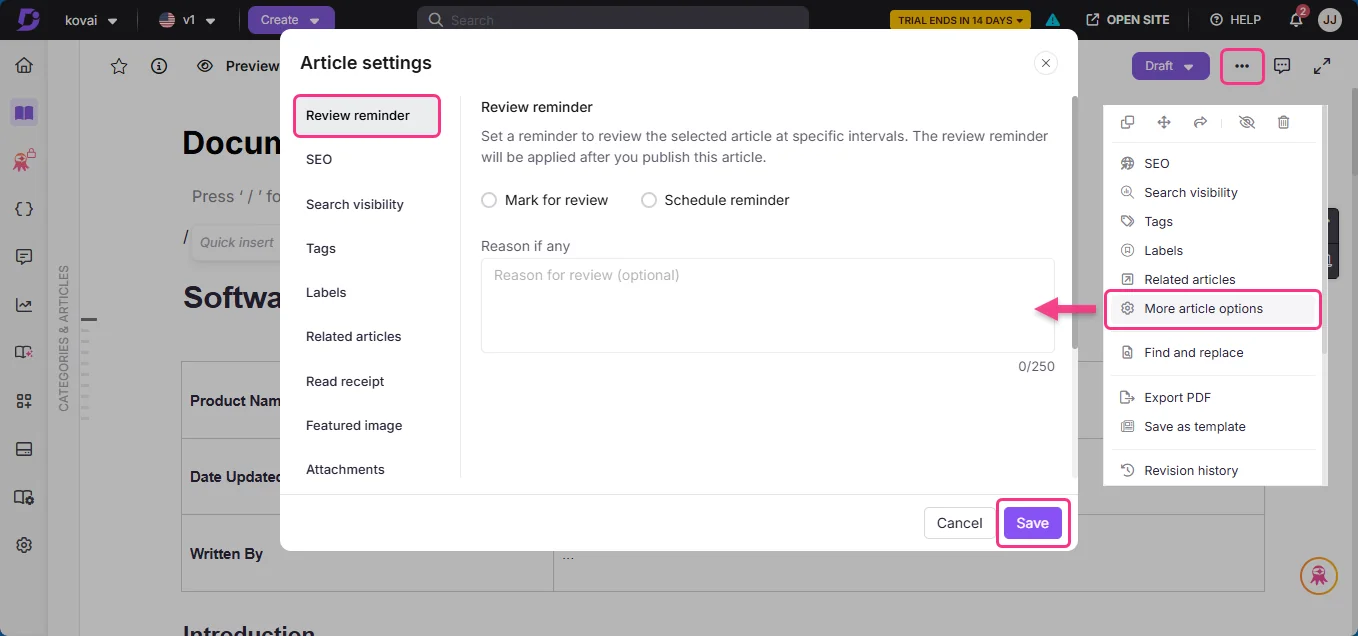
This is a standalone documentation platform rather than a help desk, and it exists on this list for one feature: scheduled review reminders per article. If your FAQ carries prices, policies or compliance answers, a tool that nags an owner on a date is worth more than a nicer editor. Document360 also publishes SOC 2 Type II, ISO 27001:2022 and GDPR badges on every step of its pricing form, and names McDonald's, NHS, HP and Samsung as customers.
Where it falls short: pricing went quote-only in 2026. The pricing page is now a three-step lead form with no plan names and no dollar figures. Its own FAQ explains that six variables move the quote: team accounts, workspaces, languages, SSO and security, the privacy model, and AI Premium Suite usage. There is no free plan, only a 14-day trial, and AI credits cannot be purchased during it.
Pricing: not published. Budget for a sales cycle, not a card.
Verdict: the right call when review discipline is the requirement and the wrong one when speed is. See Document360 pricing for what is still knowable.
10. Helpjuice: flat-rate FAQ that scales to many languages
Best for: a large multilingual FAQ where per-seat pricing would be absurd.
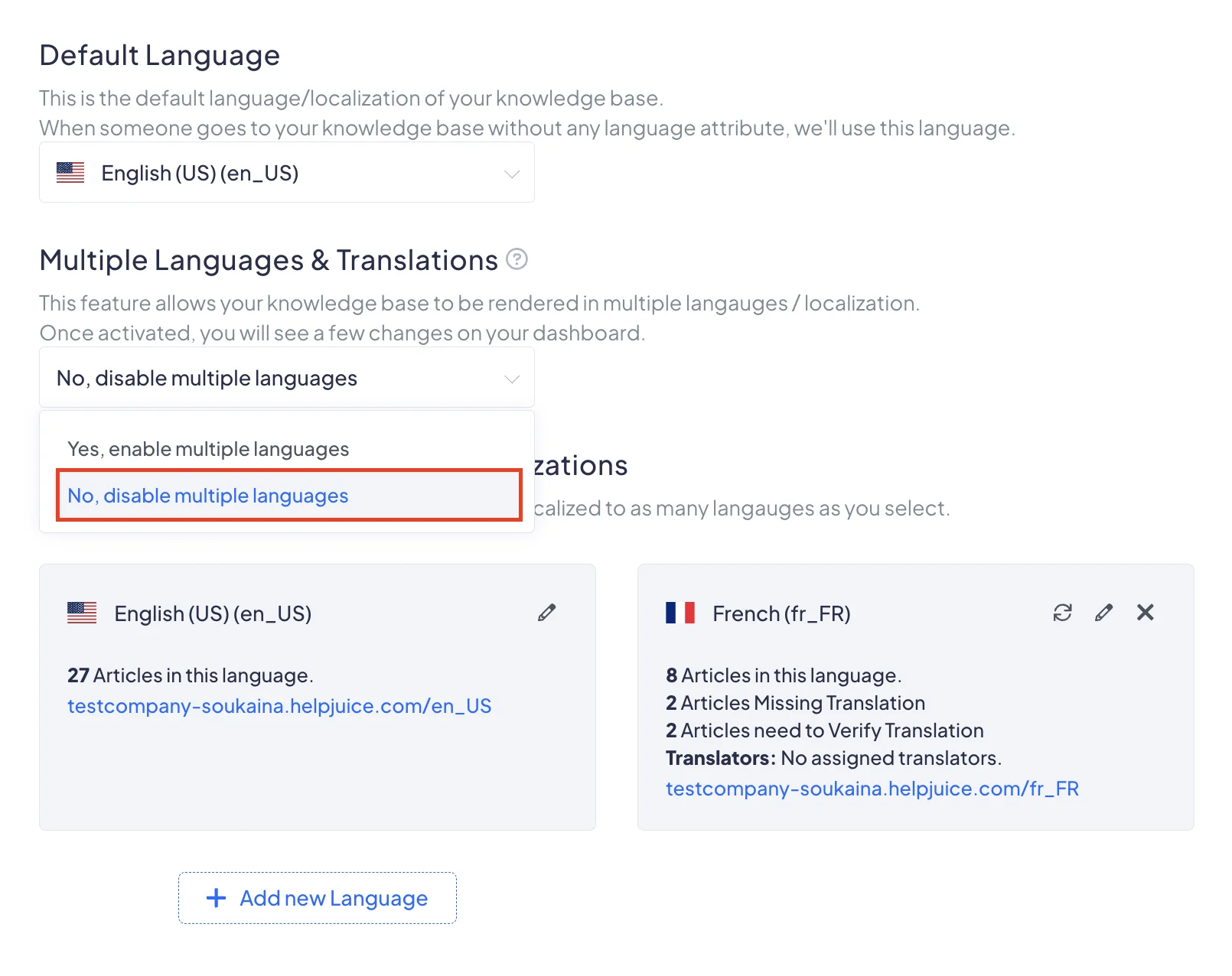
Helpjuice is flat: $249 a month for 30 users and 12GB, with no per-seat option, so a three-person team pays the same as a thirty-person one. Localization is on every plan including the cheapest, covering 50+ languages with one-click AI article translation to 40+, plus per-language status tracking for what is missing or needs re-verification. That last screen is the thing a multilingual FAQ actually needs and almost nobody ships.
Where it falls short: the entry plan has no AI in it at all. Its own card carries an "AI Suite Not included" block, and the cheapest plan with AI is $449 a month. Storage tops out at 38GB even at $799, which is worth checking if your FAQ is video-heavy.
Pricing: $249 for 30 users, $449 with the AI suite, $799 at the top.
Verdict: the flat-rate answer for a big help center, as long as you read the $249 tier as a well-designed static FAQ rather than an AI one. My broader roundup of AI knowledge base tools covers the alternatives.
Also worth knowing: HelpCrunch has the cheapest failed-search report
HelpCrunch does not make the main ten because it is a chat-first tool rather than a help center platform. It earns a section anyway, because it does the thing the expensive tools bury, at the cheapest price in this post.
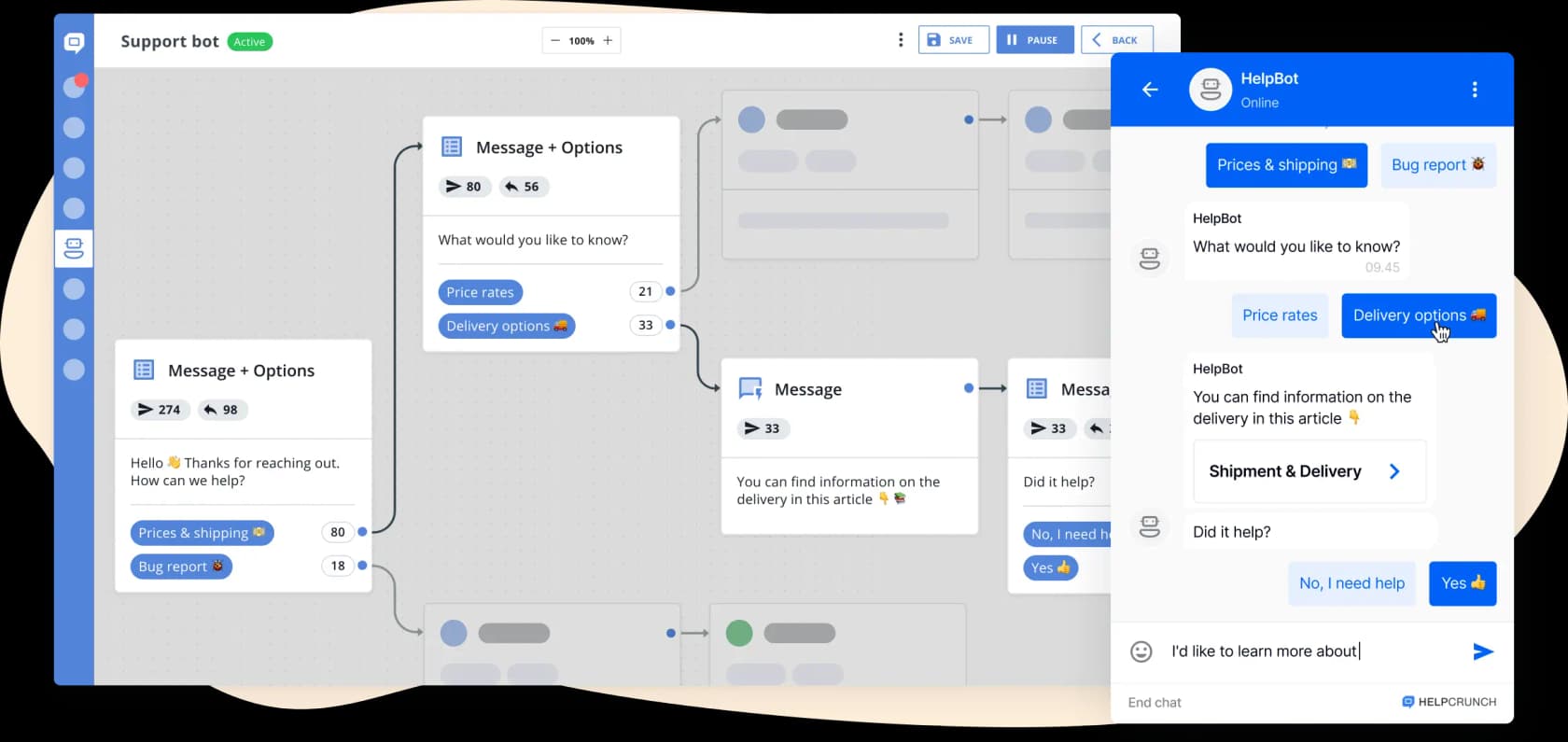
The public knowledge base sits on the entry Basic plan rather than a mid-tier, with monolingual as the gate rather than the feature itself. A capture of the live pricing page on 22 June 2026 recorded Basic at $12 a month billed annually for one seat; the page renders its prices client-side, so date that figure rather than treating it as permanent.
What it ships for the money is a Failed Searches report under Reports, subtitled by HelpCrunch itself as "ideas for articles you need to add to your knowledge base", with two columns: the query, and how many times it came back empty. That is one of only two named failed-search reports in this whole roundup, and the other one is Help Scout's. Its bot also surfaces contextual articles inside the widget, which is the pattern that works on a small site: answer in the chat, link the article, escalate if it misses.
Two things to check before you commit. HelpCrunch branding stays on the FAQ until the Pro plan, and articles count as "AI data sources", included at 200 on Pro, so a help center over 200 entries hits a second meter before a single AI conversation is billed. More in the HelpCrunch knowledge base.
What deflection actually looks like
Every vendor page in this category quotes a deflection number. It is worth knowing what the research says before you build a business case on one.
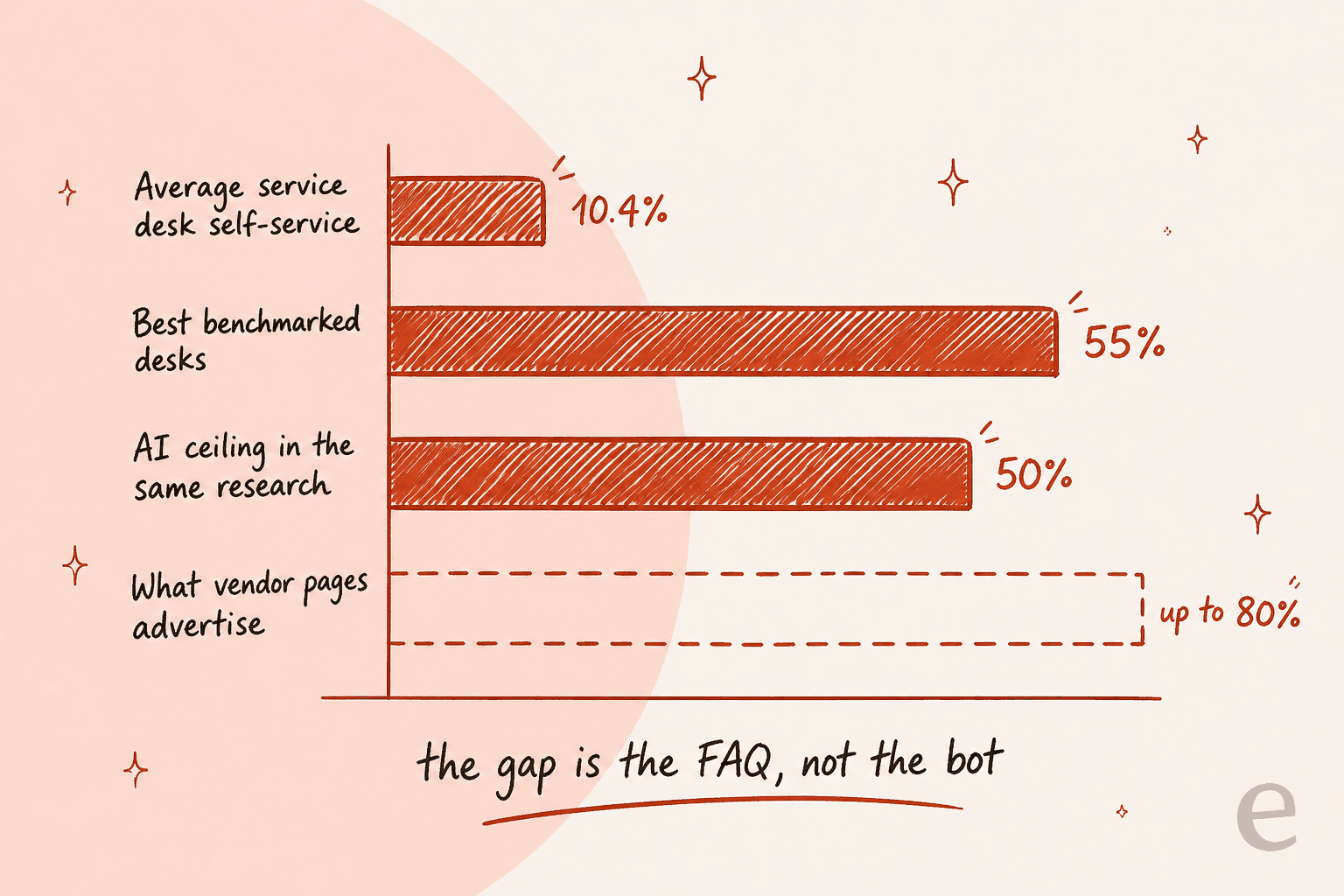
MetricNet's benchmarking database puts the average self-service completion rate at 10.4%, ranging from zero for desks with no self-service at all up to 55% for the best, per HDI's Metric of the Month. MetricNet's own read on AI is that leading organizations automate up to 50% of interactions, while Zendesk's service page advertises up to 80%.
The gap is not the bot. It is what the bot is reading, and whether anyone measured the difference between deflecting a ticket and solving a problem:
depends entirely on what you're measuring. if you measure 'did we deflect tickets' then sure, most AI CS tools look great in the first month. but if you measure 'did the customer actually get their problem solved' the numbers look very different. the AI solutions that work are the ones with access to real customer context - account history, product usage, previous conversations. the ones that fail are basically a chatbot sitting on top of your help docs, giving technically correct answers to the wrong question.
That is the whole argument for treating your FAQ as a real artefact rather than a page you filled in at launch. There is a measurement guide in measuring AI deflection and a practical one in improving self-service.
Where FAQ pages go wrong
Four failure modes, in the order I see them.
Nobody owns it. This is the top complaint in every thread I read, and the best summary came from a Zendesk consultant: "Weekly reviews are great in theory but rarely survive contact with real workloads." A Zendesk moderator in the same thread had the fix, which is to use search analytics as the forcing function rather than a calendar: misses justify new articles, hits on old articles justify a review. That is a workflow you can build on any tool with a search report, and detecting outdated help center content covers the automated half.
Two articles disagree. Harmless while humans read them, actively dangerous once a bot does. The mechanism is exactly as Gorgias describes it and as a practitioner put it in an r/Zendesk thread on optimizing docs for AI: the model "finds it nearly impossible to distinguish between the old and the new content and therefore can give outdated responses." Staleness converts directly into wrong answers.
The negative case is never written. My favourite concrete failure from the same thread, because it is so reproducible:
great starting article, but seems we need to be a lot more specific in the docs we create for the model. For example, if product A has attribute x but product B does NOT have attribute x, we need to specify that in product B docs, else my chatbots are saying that product B does have attribute X (I assume it's reading from Product A doc).
I have watched this exact shape in production. Paying customers whose bot hallucinated answers to real customers when the knowledge base had no relevant content is not a hypothetical for me, it is the bug report that made simulation against historical tickets a precondition for going live rather than a nice-to-have. If your FAQ does not say what a product does not do, something will eventually fill that silence. There is more on the failure mode in AI hallucinations in support.
It was written for the wrong reader. Back to where I started. Run the check now: open your ten most common tickets, and search your own FAQ using the customer's exact words from each one. However many come back empty is your real article count.
What I would actually do
- You have no FAQ and no budget. Help Scout free, ten articles, written from your ten most common tickets in customer phrasing.
- You already pay for a help desk. Use the help center you are entitled to. Freshdesk at $19 and Zoho Desk at $14 both include it on the cheapest paid plan.
- You want the FAQ to rank. Custom domain, answer in the first 140 characters, and check the second column of the table above before you sign. On Zendesk the sitemap is not on Suite Team, on Freshdesk the meta tags are not on Growth, and on Zoho there is no sitemap until you map the domain.
- You want to know what to write next. Help Scout or HelpCrunch, the only two with a named failed-search report. Everyone else makes you go find it in a dashboard tab, or in Google Analytics.
- You are on Shopify. Gorgias, with the per-interaction rate modelled first.
- You are ten people who hate seat maths. Crisp at $95 flat.
- Your FAQ already exists and the answers are the problem. Do not migrate. Put a better reader on it.
Whatever you pick, week one is the same everywhere: pull the failed searches, write the top five missing entries as questions, and delete anything that contradicts something newer. No tool on this list does that part for you, and it beats the tool choice by a distance. The payoff is covered in deflecting FAQs and self-service solutions.
Try eesel on the FAQ you already published
If the page exists and the answers are the problem, that is the gap eesel was built for. It plugs into Zendesk, Freshdesk, Gorgias, HubSpot or Help Scout in a few minutes, learns from your published FAQ entries and your solved tickets, drafts entries for the questions your help center is missing, and answers only when it is confident enough, leaving the rest for a human.

Run it in simulation against your last few thousand tickets first, see which themes your FAQ actually covers, then decide. It is from $299 a month for 500 credits with no seat fees, and the free plan is 100 credits with no card. If you would rather see it on your own queue, book a demo, or read how to build an AI helpdesk first.