The short answer, and why the obvious one is a trap
If you paste "write me an FAQ page about my product" into any decent model today, you'll get a publishable-looking page back in under a minute. By that test, the answer is an easy yes. Modern AI writing tools are very good at producing structured, readable copy.
The trap is mistaking "looks right" for "is right." A support engineer who writes help docs for a living put it perfectly on LinkedIn:
"These days, AI tools can spit out a draft KB(Knowledge Base) article in under 5 minutes. It is fast, it sounds right, and it is rarely wrong. But I do not just publish it. We still need a human to do the final check... A doc can sound great and still not work for a real customer. Those are two different things."
Ella Choi, Technical Support Engineer, on LinkedIn

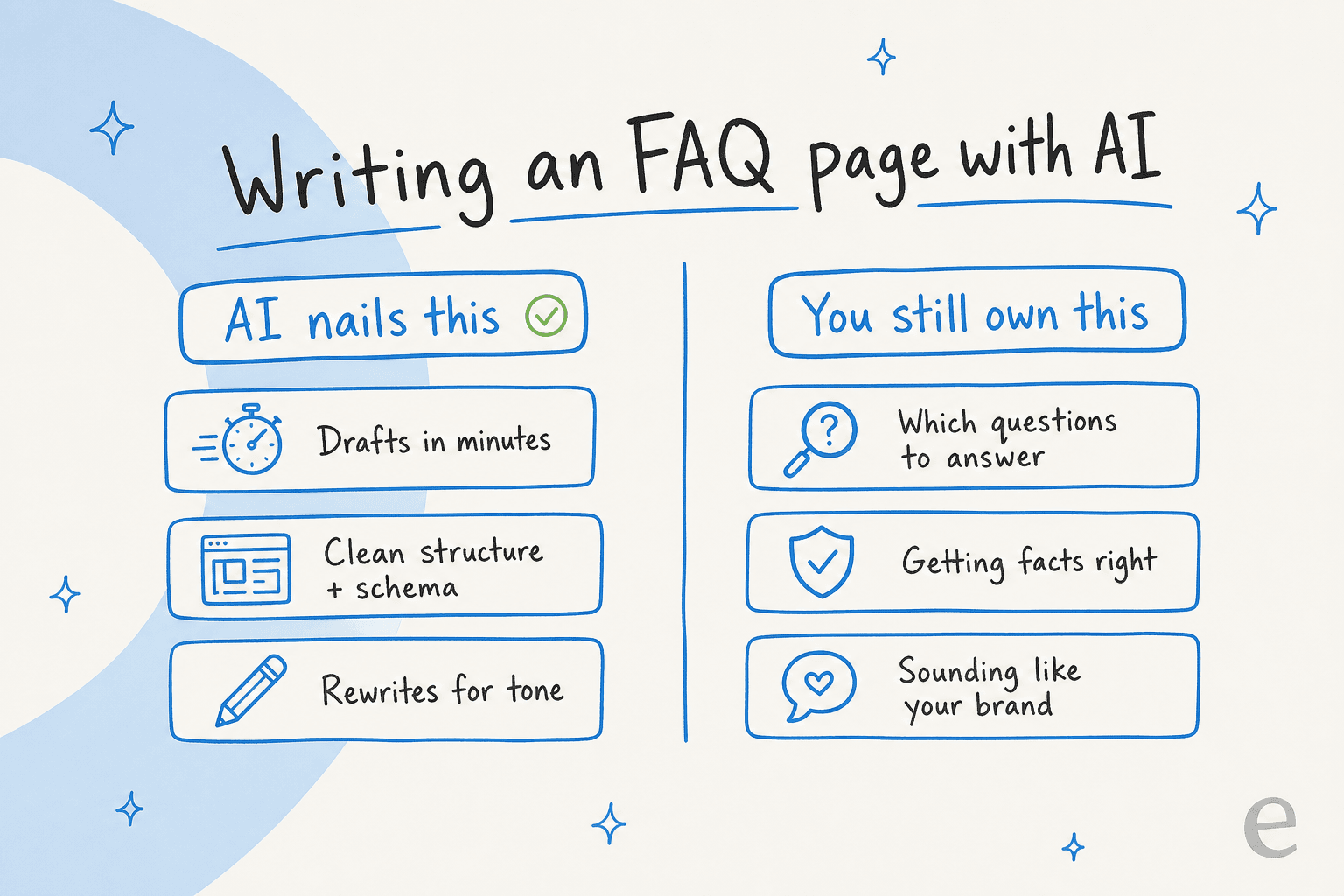
That gap between "sounds great" and "works for a real customer" is the whole story of AI FAQ writing. Let me split it into the part AI handles brilliantly and the part you still own.
What AI is actually good at
Credit where it's due. For the mechanical work of building an FAQ page, AI is a real time-saver, and these are the jobs I'd happily hand it:
- First drafts at speed. Feed it your existing help articles, product docs, or even a messy internal doc, and it returns a clean draft in minutes instead of an afternoon. One German ecommerce brand I came across ran this loop again and again to spin help and SEO content out of a single keyword.
- Structure and FAQ schema. AI is reliable at the question-and-answer format, consistent heading levels, and the FAQPage structured data that gets you rich results in search. This is fiddly, rules-based work, exactly what models are good at.
- Tone and tightening. Got an answer written by an engineer for other engineers? AI will rewrite it for a customer reading it at 11pm, mid-problem. It's a strong editor, especially with the right human-sounding prompts.
- Volume and refreshes. When you've got 200 FAQs to migrate or a pricing change that touches 30 answers, AI handles the grind, the same way AI blog writing tools handle content at scale. This is where AI content pipelines earn their keep.
If your FAQ work is currently stuck because nobody has time to write it, AI removes that excuse entirely. That's a real win, and it's why so many content generation tools now ship an FAQ template.
But notice what every item on that list has in common: it assumes you already know what to say and that it's correct. That's the part AI can't do for you.
Where AI-written FAQ pages quietly go wrong
Here are the three failure modes I see most, in rough order of how much damage they do.
1. It answers the wrong questions
Ask a model to write FAQs for your product and it will happily invent a tidy list: "What is X? How do I sign up? Is there a free trial?" The problem is those are the questions you think people ask, scraped from your own marketing copy. They're often not the questions real customers type at 2am when something breaks.
I saw this play out with a support team at a bus-tracking service. Their entire knowledge base was written for administrators, while the actual tickets came from riders, a fundamental audience mismatch that produced confusing answers no matter how well-written they were. An AI trained on the admin docs would have cheerfully extended the same mistake into a whole FAQ page.
A solo maintainer writing docs with AI described the same shallowness:
"The documentation quality is ok, but oftentimes very literal and short-sighted... the output doesn't consider the deeper motives, workflows beyond the codebase, and is blind to the mental states or questions that readers may go through when reading it."
u/JuroOravec, r/technicalwriting on Reddit

An FAQ that answers questions nobody asks is worse than useless. It's bad for SEO, because it signals to search engines that your page doesn't match real intent.
2. It gets facts wrong, confidently
This is the one that keeps me up. When an AI doesn't have a real answer, it doesn't say "I don't know." It fills the gap with something plausible.
I've seen this fail in production more than once. One paying customer, a Danish solar-energy provider, had its bot fabricate solar-cell subscription claims and send them to real customers when its knowledge base had no match. Another support team worried, with good reason, that the AI would over-confidently confirm car models it didn't actually support, because the knowledge base said "we support all models." And a medical-marijuana telehealth marketer caught an AI-written compliance post stating a possession limit that was off by more than ten times the real figure.
Now imagine those errors baked into a static FAQ page that nobody re-checks for six months. A content operator summed up the structural risk:
"Content production speed has increased drastically for teams using AI tools. Content review speed has not changed at all. That gap is where the problems are building... Speed without review infrastructure isn't an efficiency gain. It's a liability."
Sophie Baker, content operator, on LinkedIn
This matters more the more regulated you are. As a co-founder at a legal-tech company using our AI blog writer for compliance-sensitive content told us, "you can't afford to get anything wrong." The fix isn't to avoid AI, it's to never let it answer from thin air. More on that below.
3. It sounds like everyone else
The third failure is softer but real: default AI prose has a texture, and readers (and increasingly AI-detection tools) clock it. An FAQ full of "In today's fast-paced world..." padding reads as filler. The first thing I do with any AI draft is cut the throat-clearing and put the actual answer in the first sentence.
Start with the questions people actually ask
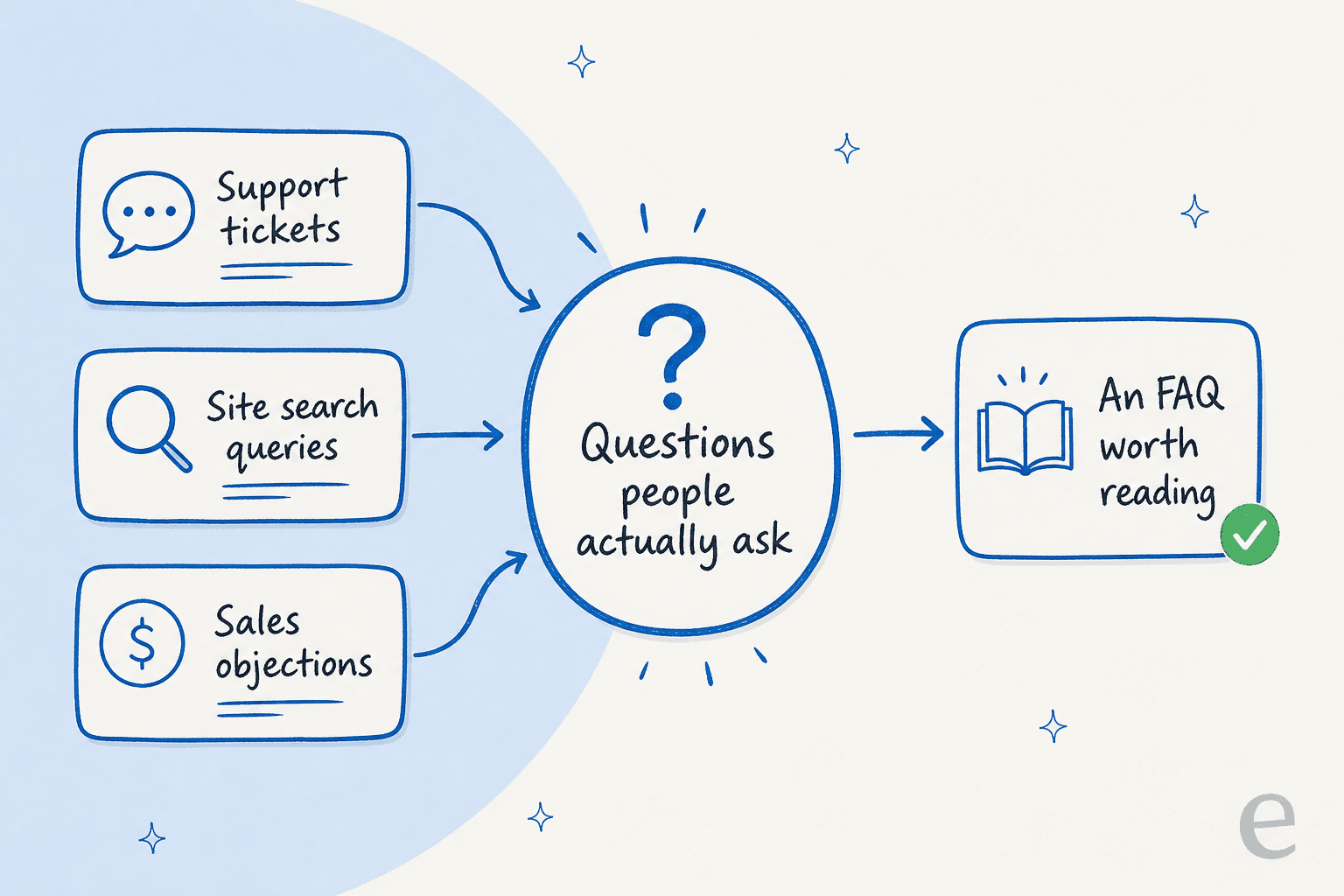
If there's one move that separates a useful AI-written FAQ from a generic one, it's this: don't let the AI guess the questions. Give it the real ones.
The good news is you're sitting on them already. Your support tickets, your site search logs, and the objections your sales team hears every week are a far better source of FAQ questions than anything a model will invent. This is the part most teams skip, and it's the highest-leverage step.
This is also where an AI support tool does something a pure writing tool can't. Because the eesel helpdesk agent sits on your real ticket history and knowledge sources, it can run a simulation across thousands of past conversations and tell you exactly which topics keep coming up and which ones your current docs don't cover. It even drafts articles to fill those gaps. That turns "what should our FAQ answer?" from a guessing game into a knowledge management report.

How to write FAQ pages with AI without it backfiring
Put the pieces together and you get a repeatable workflow. This is roughly how I'd brief any team using AI for FAQs, whether you reach for a general AI writer or a dedicated support tool.
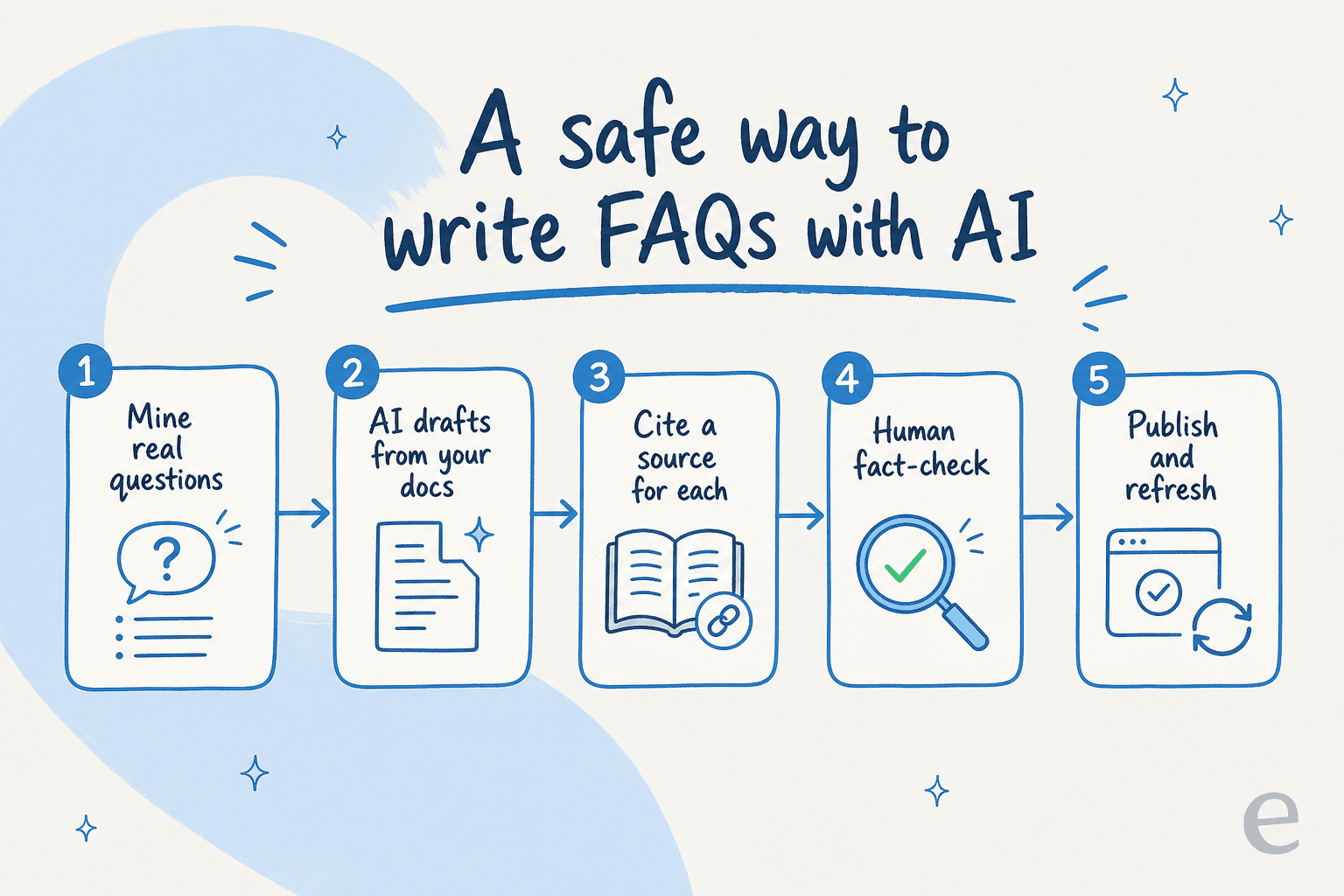
- Mine real questions. Pull the actual phrasing from tickets, search logs, and sales calls. This is your question list, not the AI's.
- Draft only from your own sources. Point the AI at your verified docs and help center, and tell it to write only from that material. This is the single biggest guard against hallucination, and it's why grounding the model in a real knowledge base beats letting it free-associate.
- Require a citation per answer. Every answer should trace back to a source you can check. If the AI can't cite one, that's your signal the answer is invented.
- Human fact-check, every time. A person who knows the product confirms accuracy and brand voice before anything publishes. This is the non-negotiable step the quotes above keep pointing at.
- Publish, then keep it alive. Facts change. Re-run the draft against updated docs on a schedule so your FAQ doesn't drift into being wrong.
None of this removes AI from the loop. It just puts the human where they add the most value: judgment, not typing.
The bigger question: do you even need a static FAQ page?
Here's the reframe I'd leave you with. A static FAQ page made sense when the only way to answer a customer's question at scale was to write it down once and hope they find it. But it has two permanent problems: it can only answer the exact questions you anticipated, and it's wrong the moment a fact changes.
An AI answer layer fixes both. Point an AI knowledge base or AI chatbot at the same source content, and a customer can ask in their own words and get a grounded answer instantly, updated the second the underlying doc changes. The static page still earns its place for SEO and skimmers, but it stops being your only line of defense.
My actual recommendation for most teams: use AI to draft the FAQ page from real questions, and point an AI agent at the same knowledge so the long tail is covered too. One source of truth, two surfaces. That's the setup that makes customer support automation pay off instead of generating a wall of stale text. If you're choosing the engine underneath, our take on which LLM is best for support is a good next read.
Try eesel for FAQ content that stays true
If you want AI to write FAQ pages and keep answering the questions once they're live, that's exactly what eesel is built for. The eesel AI writer drafts research-grade content from a keyword or your existing docs, and because it works from sources you connect, it isn't guessing.

The differentiator is the support side. Connect your help center and past tickets, and eesel will tell you which questions actually need answering, draft those answers from your real knowledge, and then handle them live across your helpdesk and chat channels with confidence-based routing so it declines to guess when it isn't sure. One team saw it resolve 73% of their tier-1 requests in the first month. You can try eesel free, no credit card needed.
Frequently Asked Questions
Can AI write FAQ pages well enough to publish?
Is AI-generated FAQ content bad for SEO?
How do I stop AI from putting wrong answers in my FAQ?
What is the best AI for writing FAQ pages?
Should I use a static FAQ page or an AI chatbot?


Article by
Kurnia Kharisma Agung Samiadjie
Kurnia is a software engineer and writer at eesel AI with two years of SEO experience, writing about AI tools, helpdesk software, and customer support. He pairs a developer's understanding of how these products are built with search-driven research into what actually ranks and resonates with the people searching for them.