
Why "just ask ChatGPT to write it" usually disappoints
Most people start the same way: open ChatGPT, type "write a knowledge base article about resetting a password," and paste the result into their help center. The draft looks great. Then a customer follows it, hits a step that doesn't match your actual product, and opens a ticket anyway.
The problem isn't the writing. Modern models write clean, readable prose effortlessly. The problem is that a blank-page prompt forces the model to invent the specifics, and a knowledge base lives or dies on specifics: the exact button label, the real plan limit, the one edge case that trips everyone up. When the AI doesn't have those, it fills the gap with something plausible. That's the same failure mode that makes AI support bots hallucinate: when retrieval comes up empty, the model writes from its training data instead of your reality.
I've seen this play out with real, paying customers. A bot trained on a knowledge base that said "we support all models" confidently told a customer "yes, we support your car" for a brand that wasn't in the database at all. In another case, a help bot answered a product question with "Oxygen (periodic table)." The lesson isn't "AI is bad at this." It's that AI is only as accurate as the material you point it at, and a generic prompt points it at nothing.
So the rest of this guide is the workflow I'd actually use, the one that gets you the speed of AI without the made-up steps.
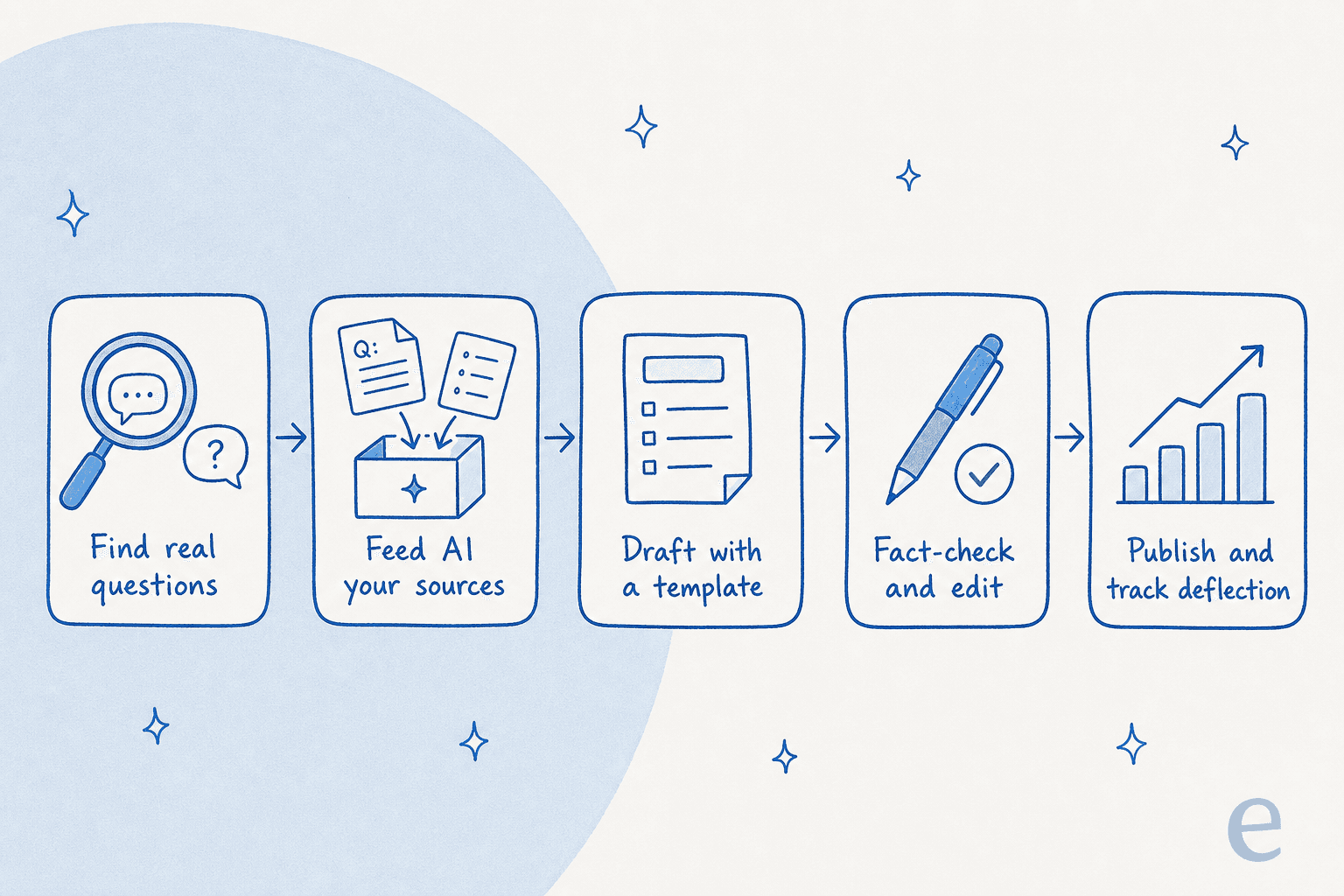
Step 1: Start from real questions, not a blank page
The hardest part of a knowledge base isn't writing the articles. It's knowing which articles to write. Most teams guess, and end up with a tidy-looking help center that documents the things that were easy to write rather than the things customers actually struggle with.
Here's the shortcut: your support queue is a ranked list of every article you're missing. Every repeat ticket is a vote for a document that doesn't exist yet (or exists but isn't findable). Before you write a word, pull the last few hundred tickets or chat transcripts and look for the questions that keep coming back.
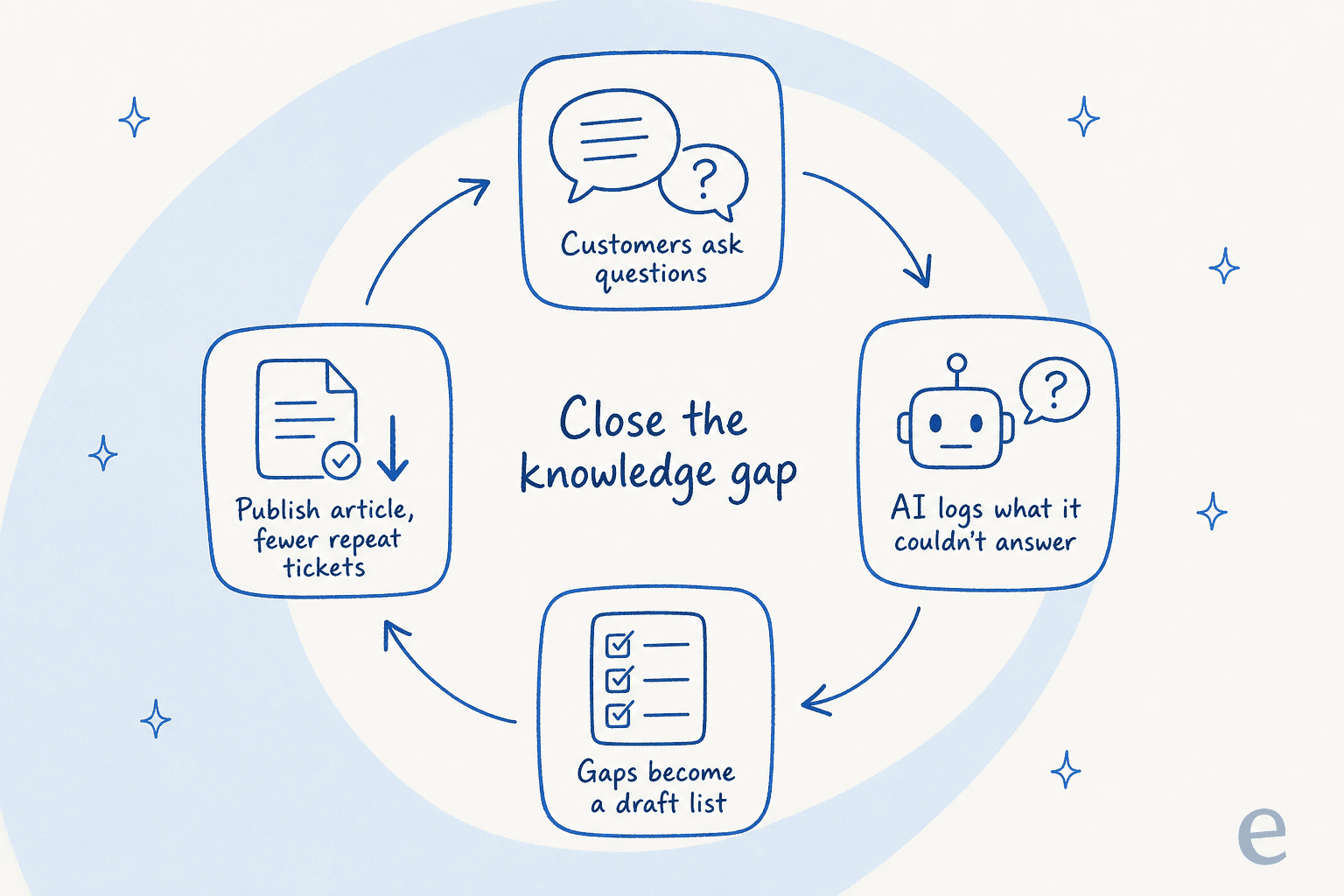
If you're already running an AI helpdesk agent, this gets easier. A good one logs every question it couldn't answer with confidence, which is effectively a to-do list for your knowledge management system. eesel does this automatically: it surfaces uncovered topics from real conversations and can even draft the article to fill each gap. That turns "what should we document?" from a quarterly guessing exercise into a live feed.

This is also where the "knowledge gap loop" becomes a habit rather than a project. Customers ask, the AI flags what it couldn't answer, those gaps become a draft list, you publish, and the repeat tickets drop. Then the cycle repeats with whatever's now at the top of the list.
Step 2: Feed the AI your real sources
Once you know what to write, the next move is the one that separates a useful draft from a generic one: give the AI your actual material to work from.
Gather the raw inputs for the article: the relevant product spec, any internal notes, screenshots of the real UI, the best past ticket where a human already explained this well, and any existing doc that's close but outdated. Hand all of that to the model and tell it to write only from those sources. The instruction matters. "Write from this material and say so if something isn't covered" produces a very different draft than "write an article about X."
This is exactly why support teams that connect their docs to AI stop dreading the inbox. As one team running on Notion and Google Docs put it:
"Our agents can instantly draft replies to customers. We don't have to look through all our documentation on Notion, Google Docs or our help center anymore because eesel AI does it for us."
Said by a support team at a meeting-productivity SaaS that answers tickets off Notion and Google Docs.
The same grounding principle applies whether the AI is drafting a reply or a help article: it's pulling from your knowledge, not the open internet. If your documentation is scattered, this step doubles as a cleanup. A system programmer I read about summed up the trigger nicely: "Our vast documentation needed to be organised." Pulling sources together for the AI is often the first time anyone audits what you actually have.
The payoff is real. Global Payments reported up to 80% time savings finding answers across their documentation once it was connected to AI, because the knowledge stopped being something people had to dig for.
Step 3: Draft in a fixed structure
AI is at its best when you give it a template. A knowledge base article has a predictable shape, and pinning that shape down keeps every article consistent and skimmable, which is half of what makes a help center actually helpful.
A structure I'd reach for:
- The problem, in the customer's words. The title and first line should match how a real person would search for this.
- Who it's for / prerequisites. What the reader needs before they start.
- Numbered steps. Short, one action each, with the exact button or menu name.
- A screenshot per tricky step. Show the real UI.
- Edge cases and "what if it doesn't work." The part most articles skip and most readers need.
- Related articles. Link out so the reader can keep going.
Give the AI that skeleton plus your sources from Step 2, and ask it to fill each section. You'll get a draft that's 80% of the way there in a couple of minutes. If you want to go deeper on getting clean, human-sounding output, my AI writing tools comparison and these prompts that make AI write like a human both help. The same structure-first habit is what separates good drafts from generic ones across any AI content generator.
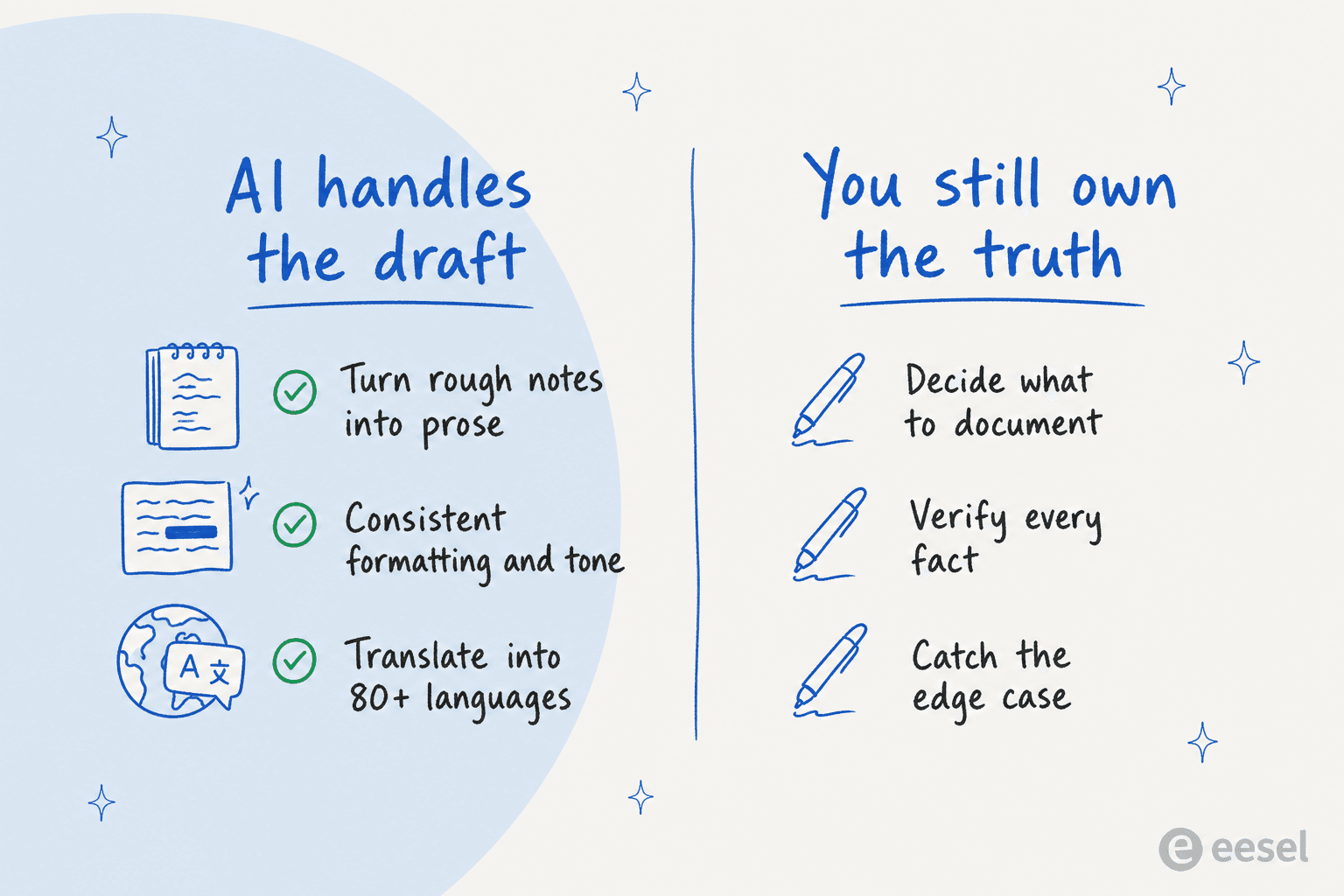
Here's the honest split of what the AI does well versus what you can't delegate:
Where should AI fit in your workflow?
Not every article needs the same amount of AI. Drafting from scratch, updating an existing doc, and translating one are three very different jobs, and the right level of trust changes with each. Pick your situation:
Step 4: Fact-check before you publish (the step nobody skips twice)
This is the step that makes the whole thing safe, and the one teams are most tempted to rush.
A human has to verify every factual claim in an AI-written article before it goes live. Not skim it, verify it: open the product, follow the steps, confirm the numbers. The reason is simple, and I've watched it bite people. One marketer using AI to draft compliance-sensitive content nearly published a legal limit that was off by roughly 13x. The prose was flawless. The number was dangerously wrong, and only a human catch stopped it from shipping.
The stakes scale with your domain. As a co-founder at a legal-tech company told us about using AI for their content, "there's a fine line between being helpful and overstepping." If you're in fintech, healthcare, or anything regulated, the fact-check isn't a nicety, it's the entire point of having a human in the loop.
Two practical habits make this faster:
- Ask the AI to cite its source per claim. When it has to point at the spec or ticket it pulled from, unsupported sentences become obvious.
- Test the article the way a customer would. Hand it to someone who's never done the task and watch where they get stuck.
If you want to go further on keeping AI answers grounded and honest, my piece on customer support automation digs into confidence thresholds and decline-to-answer fallbacks.
Step 5: Publish, then measure whether it actually works
A knowledge base article isn't done when it's published. It's done when it stops a ticket.
The mistake here is treating "article live" as the finish line. The real test is whether the questions you wrote the article to answer actually go down. If the same ticket keeps arriving, the article either isn't findable, isn't answering the real question, or is written for the wrong reader (more on that in the pitfalls below). Connect your help center to your helpdesk so you can see which articles resolve real conversations, which is also the cleanest way to measure AI support cost savings.
This is where the loop closes back to Step 1. The articles that don't move the needle become your next round of edits, and the new questions that surface become your next drafts. A knowledge management setup that's wired into support stops being a static library and starts being a living system.
Common mistakes to avoid
A few traps I see again and again when teams write knowledge base articles with AI:
- Writing for admins, not end users. This is the big one. One support team's entire knowledge base was written for administrators, but every ticket came from end users (riders, in their case). The articles were technically correct and completely useless to the people reading them. Always write at the reader's level, and the reader is almost never an internal expert.
- Trusting a confident draft. Fluent prose feels authoritative. It isn't evidence. Verify anyway.
- Documenting what's easy instead of what's asked. If you're not starting from real questions, you're writing articles nobody searched for.
- One-and-done publishing. Products change. An AI-written article from six months ago can quietly go stale; build a refresh cadence.
- Letting the AI answer from a gap. If your source material doesn't cover something, the AI should say so, not improvise. Configure it to decline rather than guess.
Picking a tool for the job
There's no single "best" tool, just the right fit for what you're doing. Broadly, three buckets:
| Type of tool | Best for | Trade-off | Examples |
|---|---|---|---|
| General AI writers | Quick one-off drafts, brainstorming structure | No hosting, no grounding in your docs, you supply everything | ChatGPT, AI writers |
| Knowledge base / docs platforms with AI | Teams that want writing + hosting + search in one place | Strong on storage, lighter on knowing what to write | Document360, GitBook, Guru |
| Support-trained AI agents | Teams who want the AI to find gaps from real tickets and draft to fill them | Built around the support workflow, not generic blogging | eesel |
If you're comparing dedicated platforms, my roundups of the best AI knowledge base tools and AI documentation assistants go deep on each. It's also worth skimming the knowledge retrieval tools post if search is your bottleneck.
For a ChatGPT-only approach, the ChatGPT knowledge base guide walks through the setup. And if your articles double as marketing content, the AI blog writing tools comparison is the better starting point.
The distinction that matters most: a writing tool helps you write the article you already decided to write. A support-trained agent tells you which article to write in the first place, and notices when it's missing.
Try eesel for knowledge base articles
If your knowledge base exists to deflect support tickets, the fastest way to write the right articles with AI is to let the AI watch your tickets. eesel plugs into your existing helpdesk and docs (Zendesk, Freshdesk, Help Scout, Notion, Confluence, Google Docs), learns from your past tickets and help center on day one, and surfaces the exact topics customers keep asking about that you haven't documented. It can draft those articles for you, answer in 80+ languages, and route low-confidence questions to a human instead of guessing.
The part I'd flag as different: because eesel learns from your solved tickets, not just your help-center content, it knows how your team actually answers things, so the drafts read like you. You can simulate it against past tickets to see exactly what it would have answered before it goes anywhere near a customer. It's free to try, no credit card, and you can have it reading your existing docs in a few minutes.

Frequently Asked Questions
How do I write knowledge base articles with AI without sounding generic?
Can AI write a whole knowledge base article on its own?
What is the best AI tool for writing knowledge base articles?
How do I stop AI from putting wrong information in my help articles?
How long does it take to write a knowledge base article with AI?
Should knowledge base articles be written for customers or for staff?
How do I know if my AI-written knowledge base articles are working?


Article by
Kurnia Kharisma Agung Samiadjie
Kurnia is a software engineer and writer at eesel AI with two years of SEO experience, writing about AI tools, helpdesk software, and customer support. He pairs a developer's understanding of how these products are built with search-driven research into what actually ranks and resonates with the people searching for them.