


Let's be honest, nobody likes waiting around for a support agent. When your customers have a question, they want an answer right away, not in a few hours. This is why self-service has become a cornerstone for any business that cares about keeping customers happy and running a smooth operation. A well-organized knowledge base is the engine behind great self-service, giving people the power to solve their own problems, 24/7.
HelpCrunch offers its own knowledge base solution built right into its platform, designed to help you create a central hub for help articles. In this guide, we'll take a close look at the HelpCrunch knowledge base. We'll walk through its features, how you can customize it, what it costs, and where it has its limits. By the end, you should have a clear idea of whether it's the right choice for your support team.
What is the HelpCrunch knowledge base?
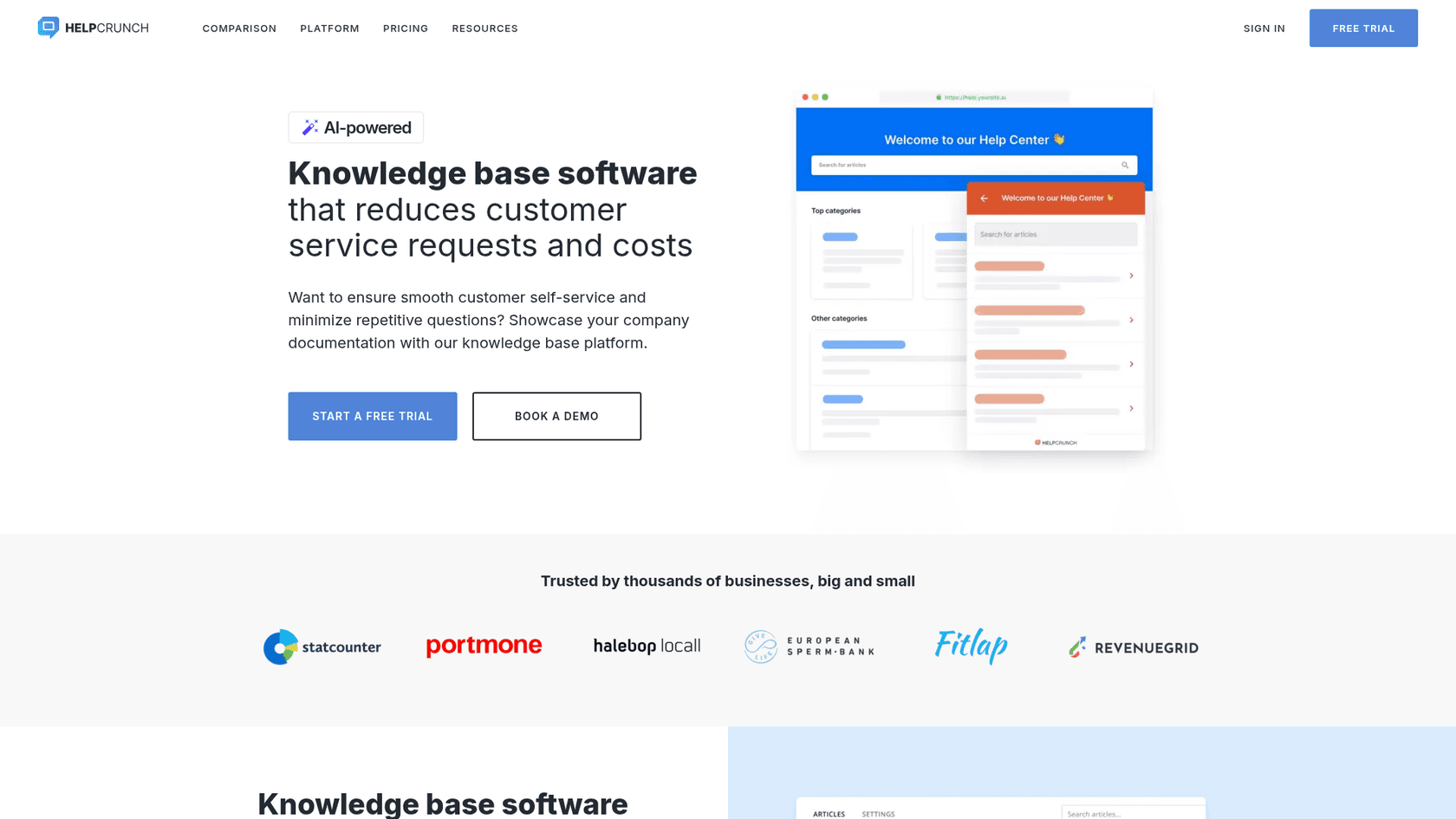
The HelpCrunch knowledge base is a tool inside the main HelpCrunch platform that lets you build and publish a self-service help center. Think of it as a central library for all your support articles, how-to guides, FAQs, and product manuals.
The main idea is to answer common customer questions before they even need to contact an agent. This frees up your support team and gives users instant answers. Customers can get to the knowledge base through a specific URL or right from the HelpCrunch chat widget, where they can search for help before starting a live chat. Because it's all connected, it fits right into the support process, aiming to make customers happier and your team more productive.
Core features of the HelpCrunch knowledge base
HelpCrunch gives you a decent set of tools to build a help center that’s both functional and easy for customers to use. It covers the essentials, from writing content and customizing the design to tracking how well your articles are performing.
Content creation and management
The content is what makes or breaks a knowledge base, and HelpCrunch gives you a simple editor to get the job done. It uses a "What You See Is What You Get" (WYSIWYG) editor, so you can format text, add headings, and make lists without touching a single line of code.
Here’s what you get for creating content:
-
Rich media support: You can pop images, videos, tables, and code snippets directly into your articles. This is great for making your guides clearer and more engaging than a wall of text.
-
AI Editor: To help you write faster, HelpCrunch has an AI-powered editor. It can help you rephrase sentences, fix grammar, switch the tone from formal to friendly, flesh out a quick point, or trim down a long paragraph.
-
SEO settings: Every article has fields for the URL slug, meta description, and keywords. This helps your support content show up in Google searches, which can bring more users to your site.
-
Organizational structure: You can arrange articles into categories and sections. This creates a logical flow, making it much easier for people to browse and find what they're looking for.
Design and customization
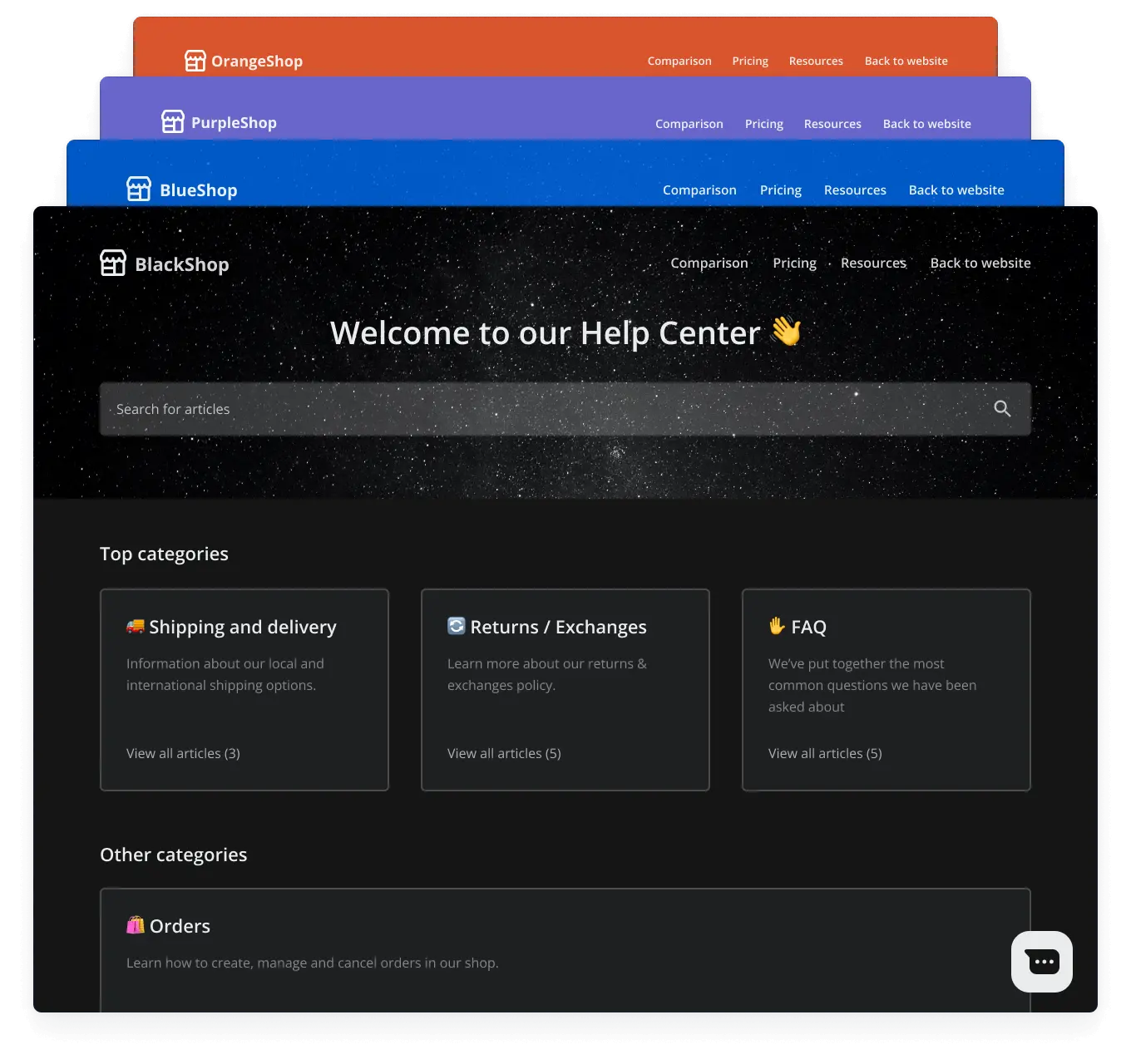
Your knowledge base should look and feel like it’s part of your brand, not some generic third-party site. HelpCrunch gives you several options to match its appearance to your website. You can upload your company logo and favicon, change the header color, or use a custom image. You can also tweak the color scheme to align with your brand's palette.
If you need more control, you can add your own header and footer links (maybe to your main website or social media) and even apply custom CSS and JavaScript. This level of flexibility ensures your help center is a true extension of your brand.
Reporting and performance analysis
Writing articles is just the first step. You also need to know if they’re actually helping people. HelpCrunch provides two key reports to see how your knowledge base is doing:
-
Articles to Review: This report highlights articles that are getting a lot of negative reactions from users. It’s a quick way to spot content that might be confusing, wrong, or just plain unhelpful, so you know what to fix first.
-
Failed Searches Report: This one is incredibly useful. It shows you the search terms people are typing in that don't bring back any results. It’s basically a ready-made to-do list of new articles you need to write, based on what your customers are actively looking for.
Extending the knowledge base with integrations
While the knowledge base works well on its own, it becomes much more powerful when connected to the rest of your support tools. Since HelpCrunch is built as an all-in-one platform, its tools are designed to work together smoothly.
Native and Zapier integrations
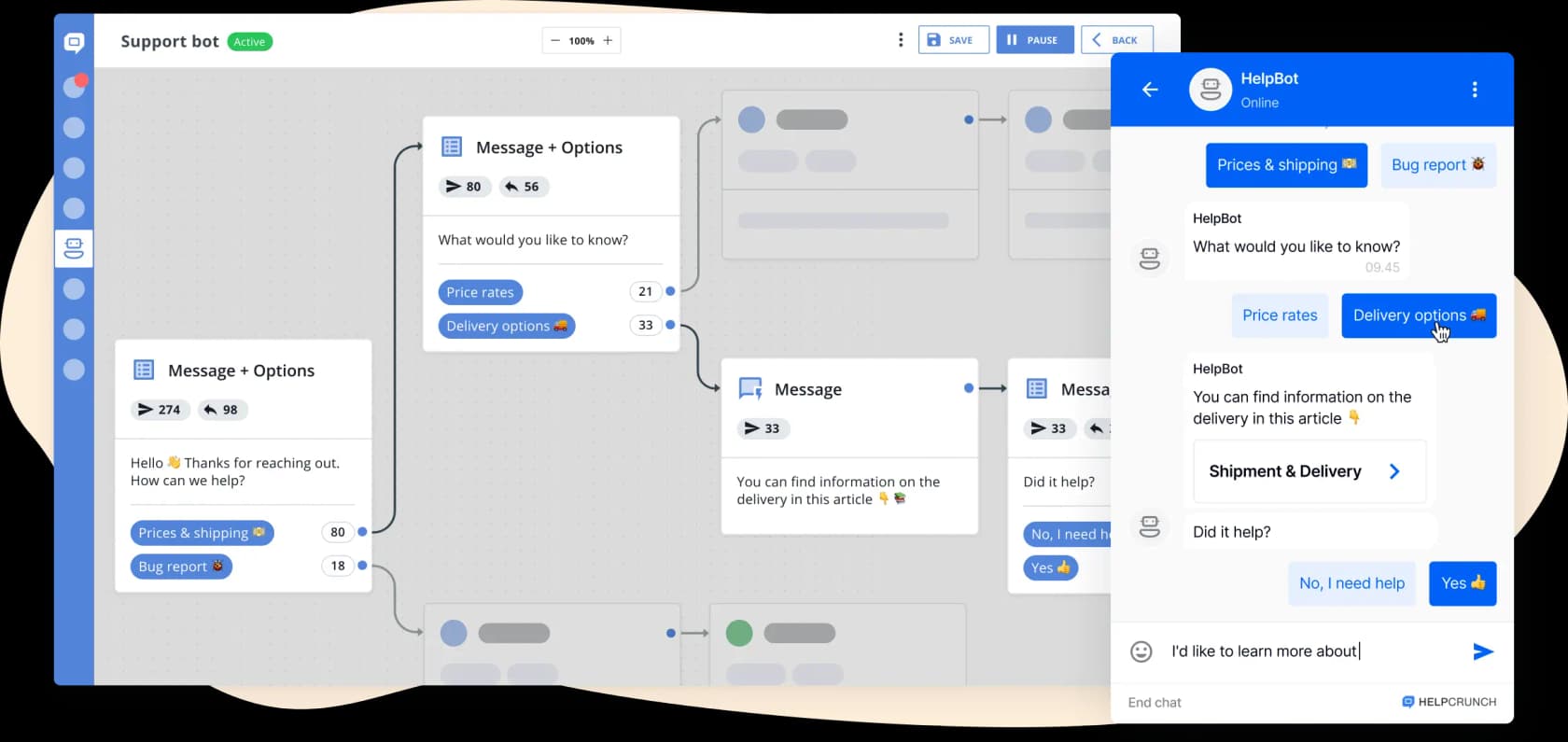
The most important connection is with the HelpCrunch chat widget. You can set up the widget to suggest that users search the knowledge base first before starting a chat with an agent. This pushes self-service and can really cut down on the number of chats your team has to handle.
HelpCrunch also connects to thousands of other apps through Zapier. For instance, you could set up a Zap to post a message in a Slack channel every time a new article is published. Or you could have it create a task in your project management tool whenever an article gets a thumbs-down rating. These integrations require a bit of setup, but they let you create workflows that fit how your team operates.
Multilingual support
If your business serves customers around the world, offering support in their native language is a big deal. The HelpCrunch PRO and Unlimited plans include a multilingual knowledge base. You can write different language versions of your articles, and the platform will automatically show the right one to visitors based on their browser settings. One language is the primary one, and a translation can't be published unless the article exists in it, per the multilingual settings doc. This small touch can make a huge difference in the customer experience.
HelpCrunch knowledge base pricing
The HelpCrunch knowledge base isn't sold separately; its features depend on your HelpCrunch subscription plan. The more advanced stuff, like multilingual support and AI features, is only available on the higher-priced tiers.
Here’s a quick breakdown of the plans and what you get for your knowledge base, according to their pricing page:
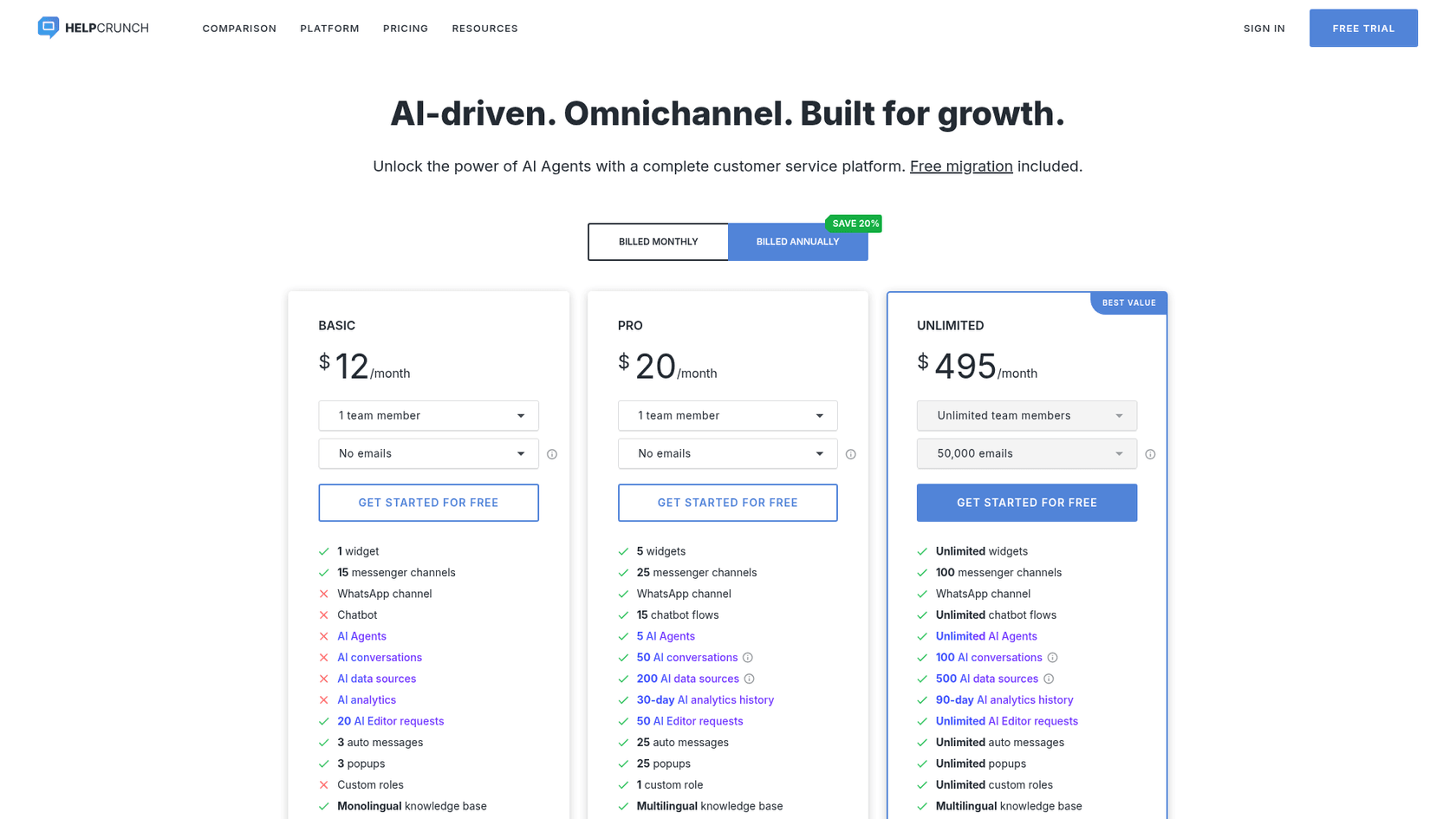
| Feature | Basic Plan | PRO Plan | Unlimited Plan |
|---|---|---|---|
| Price (per member/mo, billed annually) | Starts at $12 | Starts at $20 | Custom pricing (starts at $495/mo) |
| Knowledge Base | ✅ Monolingual | ✅ Multilingual | ✅ Multilingual |
| Full Customization | ✅ (except custom CSS/JS) | ✅ (includes custom CSS/JS) | ✅ (includes custom CSS/JS) |
| AI Editor Requests | 20 per team member | 50 per team member | Unlimited |
| HelpCrunch Branding Removal | ❌ | ✅ | ✅ |
A few takeaways:
-
The Basic plan gives you a functional, single-language knowledge base, but you can't do heavy customization and you get very few AI editor credits.
-
You'll need the PRO plan if you want a multilingual help center or need to use custom CSS/JS for deeper branding.
-
The Unlimited plan is really for larger teams who need unlimited AI usage and other premium features across the whole platform.
-
AI Agents that answer from your help center start on PRO, with 5 agents and 50 free AI conversations a month. Extra conversations are sold in bundles, and your articles count toward a separate AI data source limit of 200 on PRO and 500 on Unlimited.
| AI add-on (billed monthly) | Extra AI conversations | Extra AI data sources |
|---|---|---|
| Small bundle | 100 for $29 | 100 for $5 |
| Mid bundle | 500 for $125 | 500 for $23 |
| Large bundle | 1,000 for $200 | 1,000 for $45 |
Limitations of the HelpCrunch knowledge base: Where a dedicated AI platform might be a better fit
The HelpCrunch knowledge base is a solid choice for companies that are already all-in on the HelpCrunch ecosystem. But its design as a self-contained tool shows some cracks when you compare it to more modern, specialized AI platforms.
The problem with knowledge silos
Here’s a headache every support team knows: your company’s knowledge is all over the place. Sure, some of it is in the official help center, but a ton of useful info is buried in old support tickets, internal wikis like Confluence, shared Google Docs, and team conversations in Slack.
The HelpCrunch knowledge base only knows what you tell it, its AI Agents answer from your knowledge base articles and custom answers, and the docs don't list wikis or tickets as sources. This means a huge amount of your company's actual knowledge is left untapped. It also means you're stuck in a constant cycle of manually updating articles, and your self-service tool is always working with incomplete information.
This is where a tool like eesel AI takes a totally different path. Instead of making you build yet another information silo, eesel connects to all the places your knowledge already lives. It plugs into your help center, past tickets, Confluence, Google Docs, and more to create one unified brain that has the full story.
Moving from content help to automated answers
HelpCrunch's AI Editor is handy for creating content more quickly. It helps your writers, but it doesn't directly help your customers or automate ticket resolutions. It's an assistant for your team, not an agent for your customers.
To truly automate support, you need AI that can understand a customer's question, search across all of your company's knowledge to find the right answer, and deliver a complete resolution on its own.
The eesel AI Agent is built to do exactly that. It doesn't just help you write articles; it reads them (and everything else) to resolve customer tickets automatically, 24/7. It can answer questions, tag and close tickets, and hand things off to a human agent when it gets stuck. This is a leap beyond simple content assistance and can lead to real drops in ticket volume and faster response times.
HelpCrunch knowledge base: A solid tool, but with a ceiling
The HelpCrunch knowledge base is a capable and nicely integrated tool for businesses using the all-in-one customer communication platform. Its easy-to-use editor, customization options, and useful reports give you a strong start for building a self-service portal.
But its effectiveness is ultimately capped by the knowledge you manually feed into it. For teams that want to tap into all of their company-wide knowledge and start automating support for real, a dedicated AI platform is the next logical move.
Supercharge your knowledge with eesel AI
Instead of spending months trying to build the perfect knowledge base, what if you could automate support using the knowledge you already have? eesel AI connects directly to your existing tools, including your helpdesk and knowledge sources like Confluence, Google Docs, and Notion.
Our AI Agent learns from your past tickets and documentation to provide instant, accurate answers, deflecting up to 70% of common questions. You can go live in minutes, not months, and see just how much you can automate with our risk-free simulation.
Ready to turn all your scattered knowledge into automated resolutions? Get started with eesel AI today.
Frequently asked questions
What exactly is the HelpCrunch knowledge base and how does it benefit customer support?
The HelpCrunch knowledge base is a built-in tool within the HelpCrunch platform that allows businesses to create and publish a self-service help center. It aims to provide instant answers to common customer questions, reducing direct support inquiries and improving customer satisfaction by offering 24/7 assistance.
What kind of content can I create and manage within the HelpCrunch knowledge base?
You can create articles, how-to guides, and FAQs using a user-friendly WYSIWYG editor. This editor supports rich media like images and videos, offers an AI assistant for faster content creation, and includes SEO settings to improve article visibility in search engines.
Can I customize the appearance of the HelpCrunch knowledge base to match my company's brand?
Yes, the HelpCrunch knowledge base offers various design customization options to align with your brand. You can upload your logo, change header colors, adjust the overall color scheme, and add custom header/footer links. Higher-tier plans provide even more flexibility with custom CSS and JavaScript.
How is the HelpCrunch knowledge base priced, and what features are available across different plans?
The HelpCrunch knowledge base is included as part of HelpCrunch subscription plans, rather than being sold separately. The Basic plan offers a functional, single-language knowledge base, while PRO and Unlimited plans provide multilingual support, increased AI editor requests, and more extensive customization features.
How does the HelpCrunch knowledge base help me understand if my articles are effective?
It provides useful reporting features to track article effectiveness. You get an "Articles to Review" report that highlights content receiving negative user feedback, and a "Failed Searches Report" which indicates search terms that yielded no results, pointing to gaps in your existing content.
What are the main limitations of the HelpCrunch knowledge base when it comes to leveraging all company knowledge?
The HelpCrunch knowledge base primarily works from the articles and custom answers created directly within HelpCrunch. HelpCrunch's docs list knowledge base articles and custom answers as the sources its AI Agents use, and don't list internal wikis, Google Docs, or past support tickets, which limits how much company knowledge it can draw on.