

Why most AI support pilots prove nothing
I work the support queue at eesel every day, and I spend a lot of that time on the other side of this exact process: teams halfway through a trial, trying to work out whether what they're seeing is real. The pattern I see most is not a bad AI. It's a pilot with no pass mark. The trial starts, the vendor's dashboard fills up with green, and three weeks later someone has to decide on a contract using numbers that were defined by the company selling it.
That's not a dig at any vendor. It's that "resolved" means a different thing on every platform, and each definition is also the billing unit:
- Zendesk counts an automated resolution (explained in the Zendesk automated resolutions guide) only when the customer doesn't follow up and an LLM reads the transcript and confirms it was resolved. Conversations that fail that check are "contained", not resolved. The window is
2 hoursfrom the first message on messaging (adjustable up to 72) and72 hourson email. - Gorgias counts an automated interaction when "the customer does not require the involvement of a human agent within 72 hours."
- HubSpot sets resolution status 72 hours after the last visitor reply, and says plainly that "deflections do not always indicate resolution", because a customer who gave up and left looks the same as one who got an answer.
- Freshdesk bills the Freddy AI Agent per session,
$49per 100, whether the session resolved, escalated or was abandoned.
None of those definitions checks whether the same customer writes in again next week about the same problem. That's the number that tells you whether the AI fixed something or just ended a conversation, and it's the one you have to measure yourself.
""Deflection" in the customer service world means when you prevent a customer from talking to a human. It's a critical metric for CSR orgs. Often you improve deflection rates by putting hurdles between a customer and a rep."

I went deep on the definitions in CX AI metrics; this post is about using them to make a buying decision.
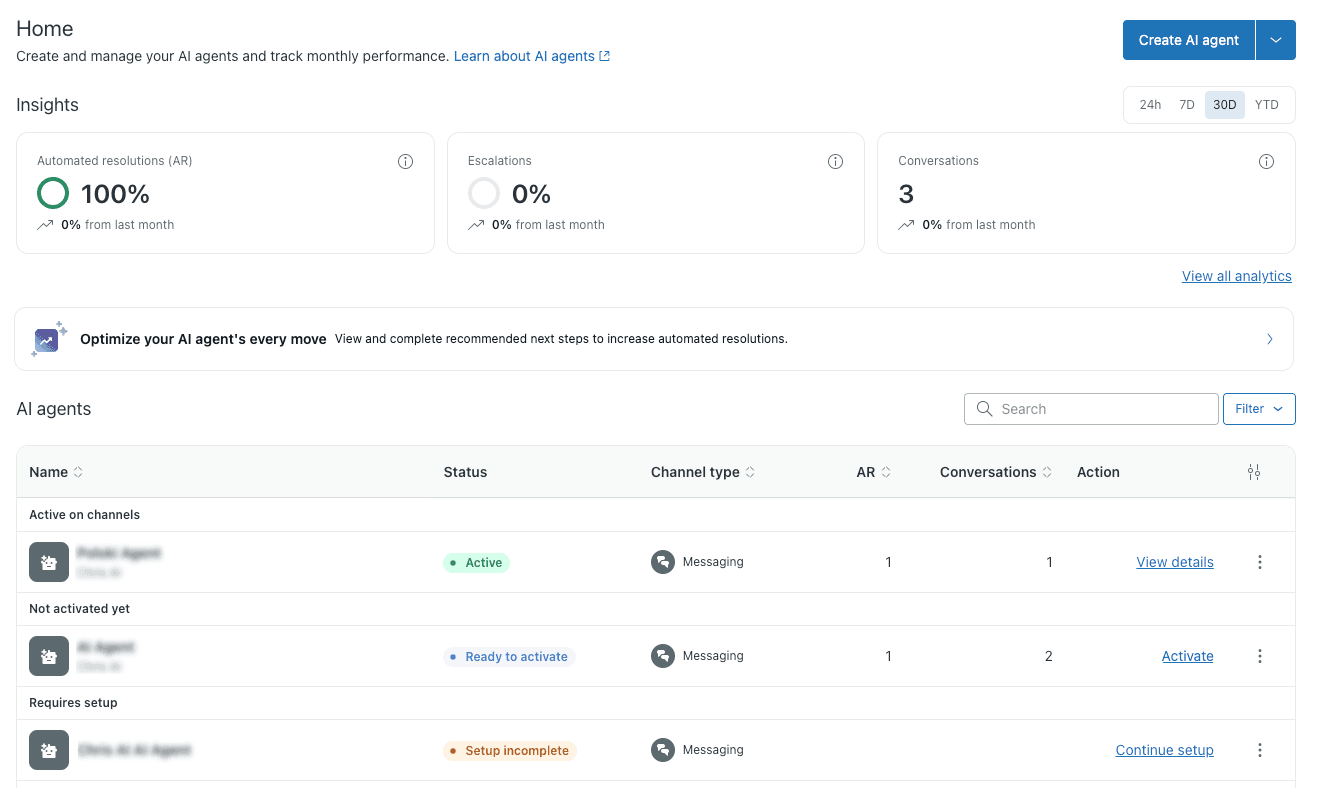
That screenshot is Zendesk's own help-center example, and it's a good reminder of what a dashboard will happily show you: 100% automated resolutions on 3 conversations. Nothing is wrong with it. It's just not evidence of anything yet, and early pilot numbers often look exactly like that.
What goes on an AI pilot scorecard?
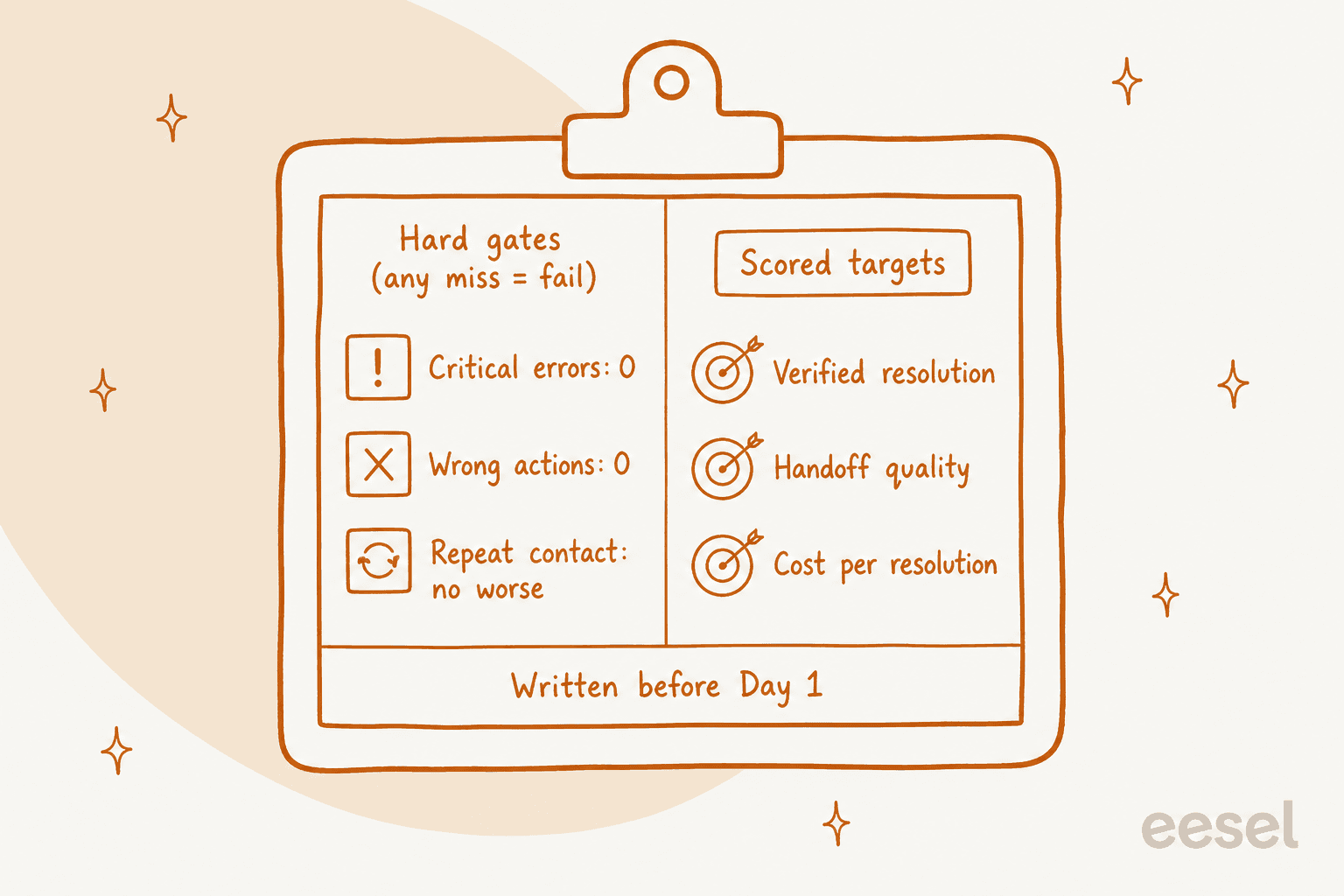
Six numbers, split into two kinds. Gates are pass/fail and can't be traded off: a pilot that resolves 60% of tickets but refunded the wrong order once has failed. Targets are the numbers you're actually buying, and you set them from your own baseline before the pilot starts.
| Number | Type | How you measure it | Pass mark to agree up front |
|---|---|---|---|
| Critical errors | Gate | Every refund, cancellation, account change or policy statement in the pilot, checked by a person | 0 |
| Wrong actions | Gate | The AI's activity log against what the customer actually asked for (right order, right account, right amount) | 0 |
| Repeat contact within 7 days | Gate | Customers on AI-resolved tickets who write in again about the same issue, compared with the holdout lane | No worse than the holdout |
| Verified resolution rate | Target | Resolutions that survived the 7-day check, divided by everything the AI touched in its lane | Your number, set from the ticket types in scope |
| Handoff quality | Target | A sample of escalations: did the human get the order number, what was tried, and why it was handed over? | Agent doesn't have to re-ask the customer |
| Cost per kept resolution | Target | AI spend for the pilot divided by resolutions that stuck | Lower than your cost per human-handled ticket |
I'd keep AI CSAT on the report but off the scorecard during a pilot. Response rates on short trials are small, and on Zendesk the BSAT survey isn't sent on escalated conversations, so it skews toward the easy ones.
The resolution target is the one people get wrong in both directions. Vendor case studies quote big numbers from mature rollouts, and month one rarely looks like that. Set it from the share of your volume that's actually in scope. If order-status questions are 30% of your tickets and you pilot only those, a 25% overall resolution rate is a great result, not a disappointing one. The AI resolution rate guide has more on what a realistic number looks like.
How to set up the pilot so the numbers mean something
A scorecard is only as good as the comparison behind it. Three set-up choices decide whether your numbers will hold up when finance asks about them.
Pick a lane, not the whole inbox
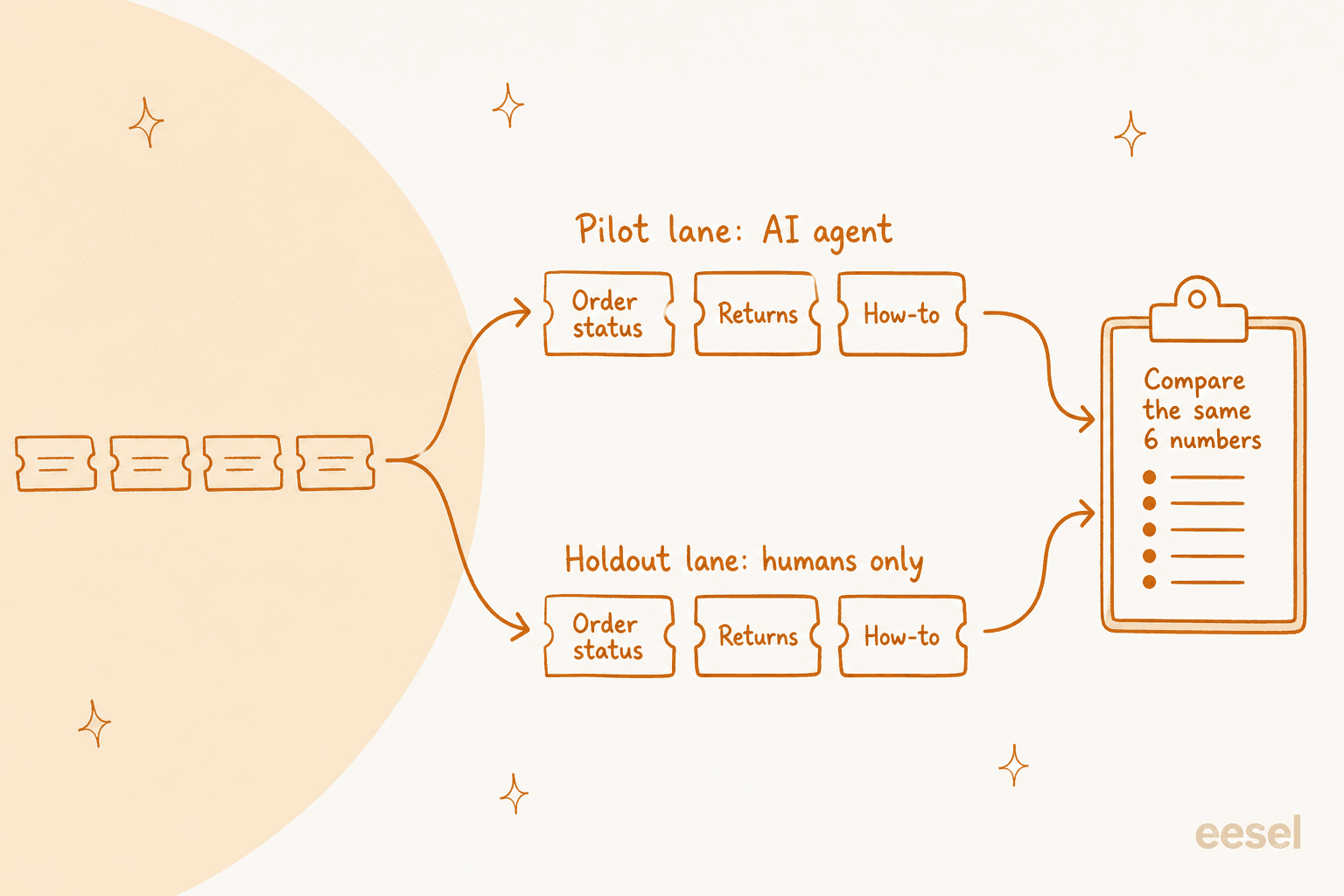
Choose two or three ticket types that are high-volume, answerable from your docs, and low-risk if the AI gets one wrong: order status, returns policy, password resets, how-to questions. Put one channel in scope (email or chat, not both on day one). Everything else stays with your team. Every vendor supports some version of this, and it's the difference between a pilot you can read and a pilot where every bad answer turns into a debate about whether that ticket type should have been in there.
An IT manager on Reddit described the same shape for a first-line bot:
"I'd be wary of making the bot the only front door, especially for a distributed user base. A good first-line flow should handle a small set of low-risk, high-volume requests and make escalation obvious when confidence is low or the user is stuck. Put a prominent "talk to a person" path beside the guided steps, not three screens deep. Measure containment together with reopen rate, time to resolution, transfer rate, and user satisfaction, because deflecting a ticket that comes back angry is not a win. I'd pilot it with one office or request category, review the transcripts with the service desk every week, and keep a human fallback for outages and accessibility issues."

The weekly transcript review is the part teams drop first, and it's the part that finds the problems.
Here's what each helpdesk gives you for scoping a pilot lane:
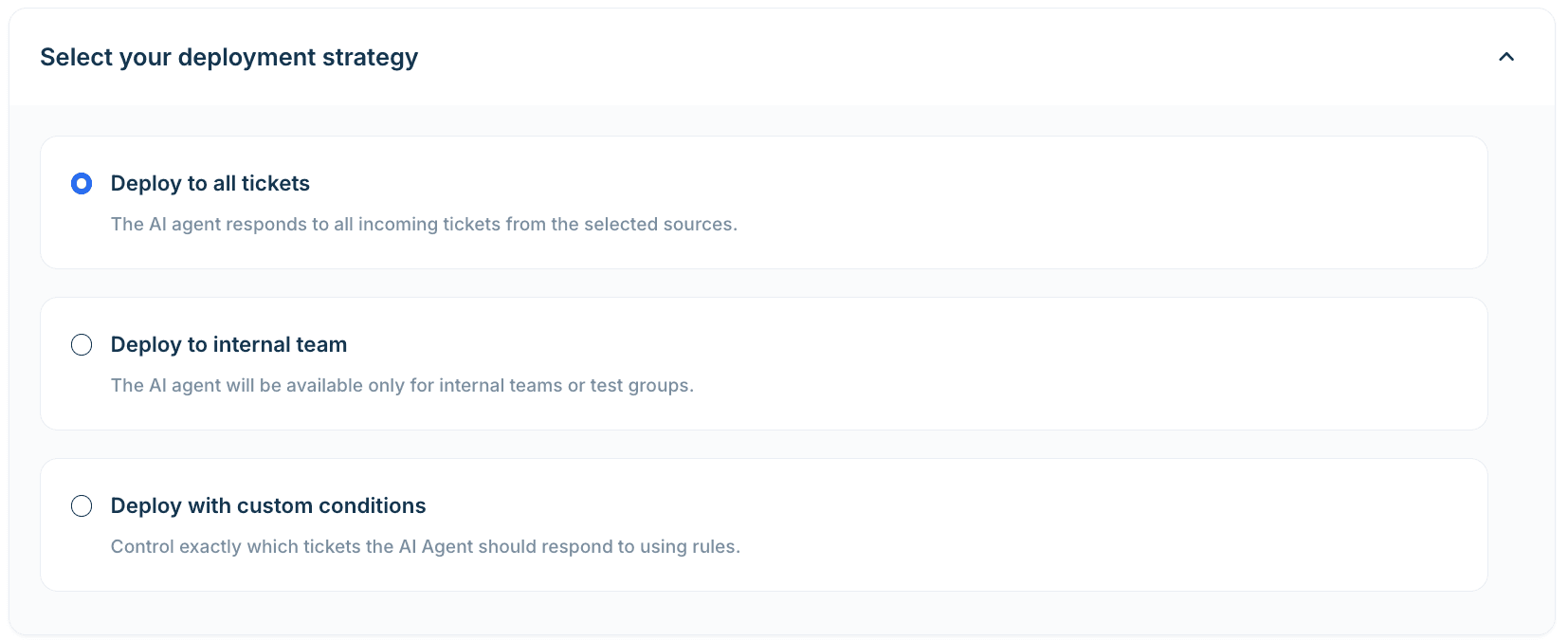
- Freshdesk: the email AI Agent has a "Deploy to internal teams" option, which Freshworks itself describes as "a safe pilot rollout", plus custom rules with up to five levels of AND/OR logic, so you can target "returns emails on the main mailbox" and nothing else.
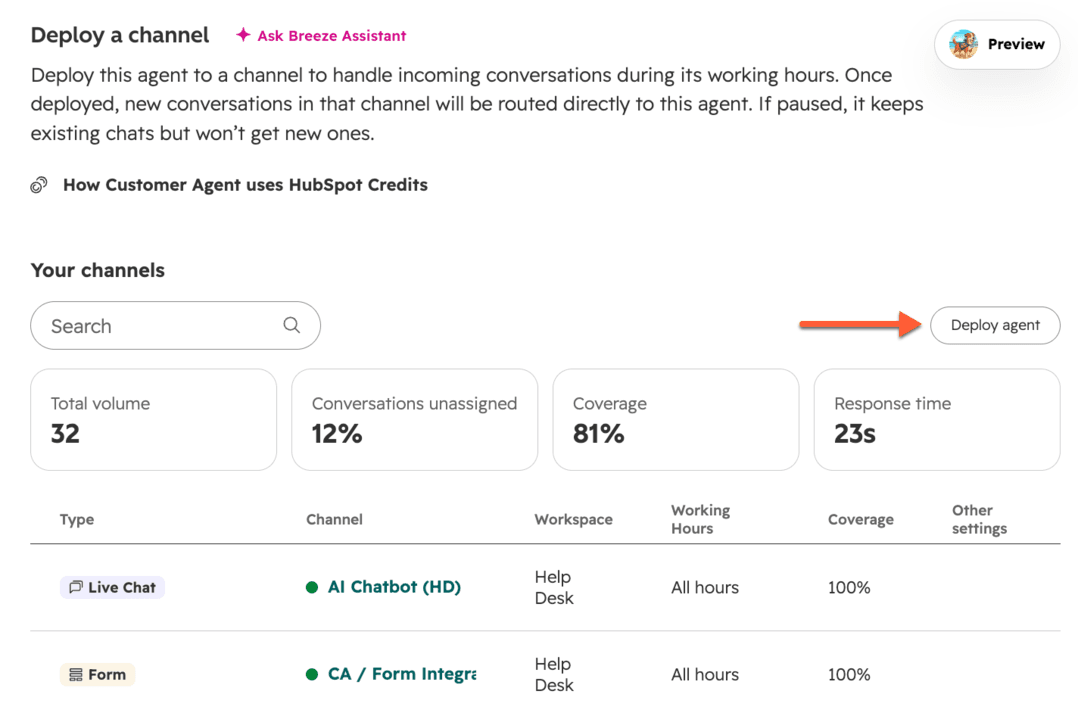
- HubSpot: each channel deployment has a "Conversation coverage" percentage, working hours, and include/exclude contact lists on email. HubSpot suggests starting low and raising coverage as it performs.
- Zendesk: you pick channels per AI agent, and an email agent is scoped by an editable trigger, for example a separate support address.
- Gorgias: AI Agent is switched on per channel (email, chat), and Gorgias frames the rollout as one skill or conversation type at a time.
- Help Scout: Scout (the renamed AI Answers, see Help Scout pricing) can be limited on email to "Only customers matching these conditions".
Keep a holdout lane
This is the step almost nobody does, and it's the one that makes the repeat-contact gate work. Route the same ticket types, on the same channel, to humans only for a slice of the traffic. It's also how you measure first contact resolution honestly. Then you can compare like with like: if customers come back within 7 days after 9% of AI resolutions and after 6% of human ones, the AI is creating work, however good its resolution rate looks.
"And before-and-after is not evidence. Volume shifts, seasonality, ticket mix, and the agent itself changes which cases humans see, so the human baseline you're comparing against no longer exists. If you want to actually prove improvement rather than assert it, keep a holdout, route some percentage to the old path permanently. It costs a few percent of the gain and it's the difference between a number and an argument. Most teams skip it and then spend six months debating attribution."
That last line is the honest cost of a holdout: you give up a few percent of the gain during the pilot, and in exchange the result can't be argued away as a quiet month.
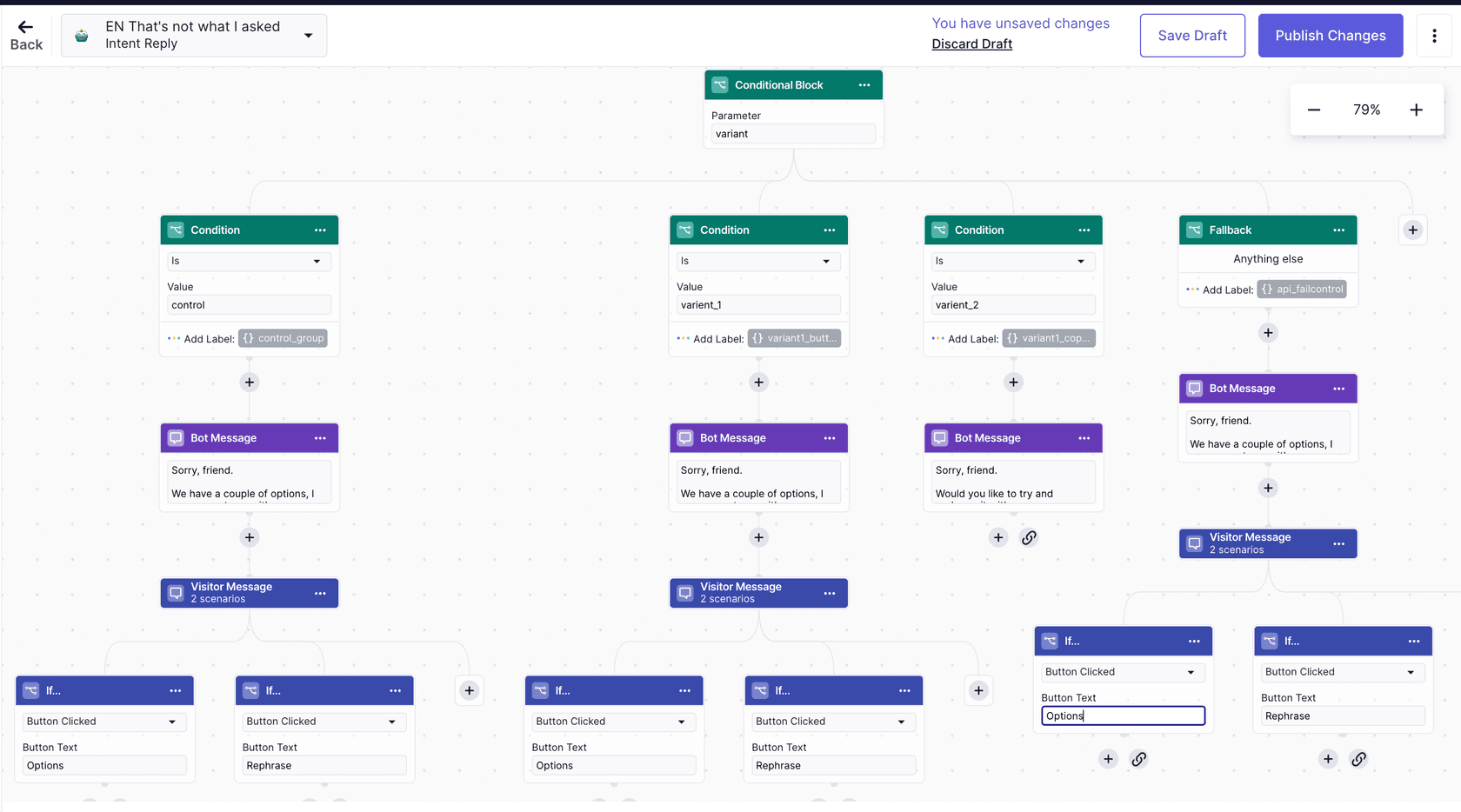
Only one of the big helpdesks documents a real control group. Zendesk's A/B testing guide describes a trafficSplit method that randomly assigns conversations to variants ("1,1" is a 50/50 split, and "the first group will always be the [control] group"). It runs inside messaging flows, and you have to ask your Zendesk account manager to turn it on. If one variant is a straight handoff to a person, you have your holdout.
Everywhere else you build the holdout yourself. HubSpot's coverage percentage is the easiest: at 50% coverage, half the channel's conversations go to people. HubSpot treats that setting as a ramp rather than a control group, so you'll be comparing the two halves in your own report, but the split itself is there.
On Freshdesk, Gorgias or Help Scout, alternate days work (AI on weekdays and humans at weekends is too skewed), or a rule on a customer attribute such as an even or odd customer ID. You don't need statistics software. You need the same ticket types handled two ways over the same weeks.
Tag everything the AI touches
You'll want to pull the pilot's tickets out of your helpdesk later without relying on the vendor's report. SE Ranking did this well: they asked for an ai_handled tag on every ticket eesel touched, plus helpful and not-helpful tags, so containment is counted in Zendesk rather than guessed. Now that they're trialling direct email replies, the test tickets are picked out by subject line and each thread gets a tag for open, resolved, escalated or with a person. That's a pilot you can audit with a saved view and a spreadsheet.
Start in draft mode for the first week
Before the AI replies to anyone, let it draft replies or internal notes on real incoming tickets for a week, and have your team rate them. It costs you nothing in customer risk, and it's where most of the fixable problems show up. I covered the full pre-launch sequence in AI support agent testing, so I'll keep this short: your pilot clock for the scorecard starts when the AI goes live on its lane, not when you connect it.
How long should an AI support pilot run?
Three to four weeks of live traffic, plus one more week before you read the final numbers. Here's why it's longer than most free trials.
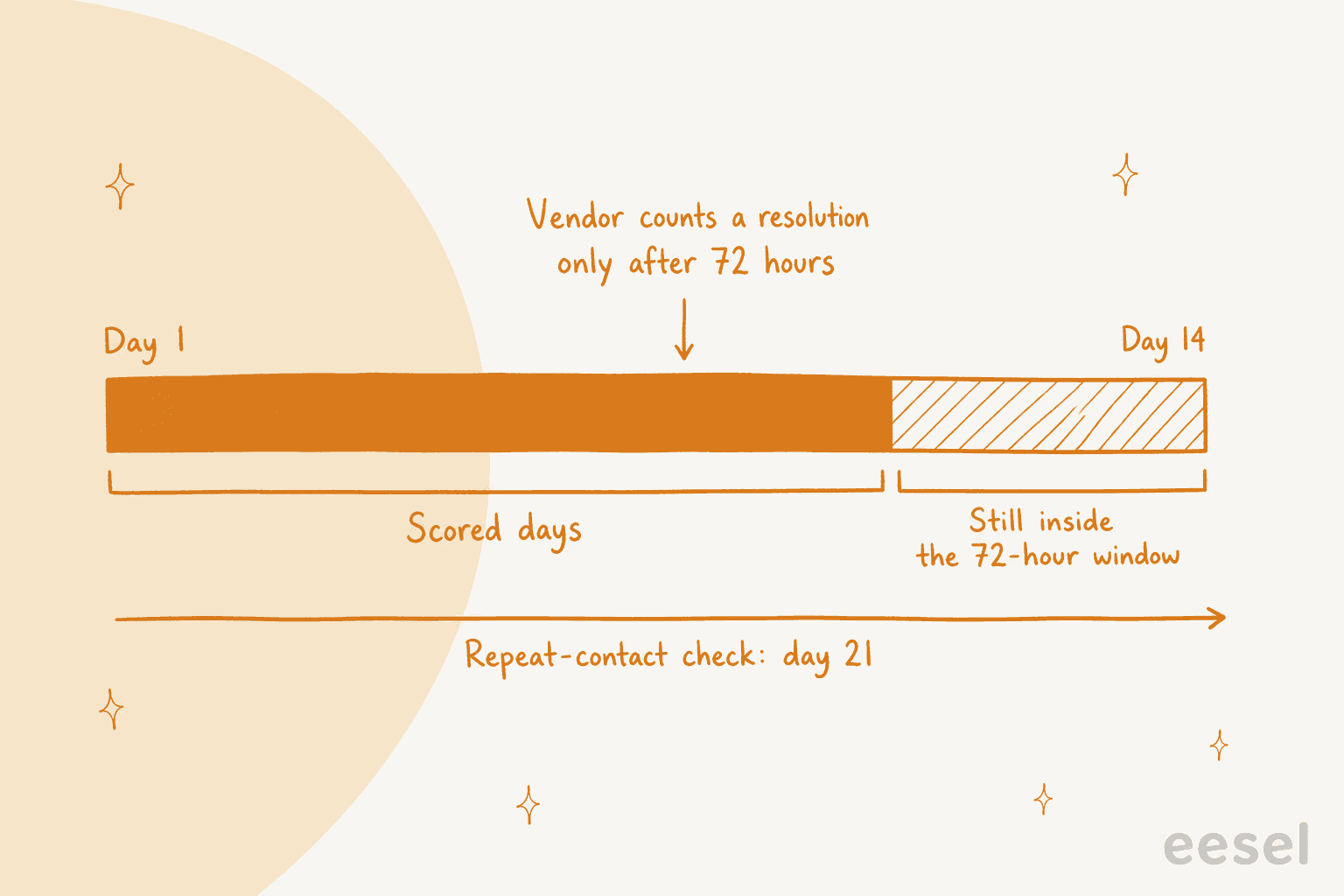
The resolution windows push your data later than the calendar suggests. Gorgias says it outright: an interaction is billed as automated only after 72 hours without a human handover, "so the most recent 3 days aren't immediately reflected" in the metric. HubSpot sets resolution status 72 hours after the last visitor reply. Zendesk's email window is 72 hours from the first email. On a 14-day trial, you're reading 11 days of settled data at best.
Then add your own 7-day repeat-contact check on top. A ticket the AI "resolved" on day 13 can't be confirmed until day 20. If the vendor's trial ends on day 14 and the sales call is day 15, you're signing on numbers that haven't finished counting.
Volume matters too. A week with 40 AI conversations will swing wildly. HubSpot's own help-center example shows a deflection rate that jumps between 0% and 81.82% month to month on a handful of conversations a week:
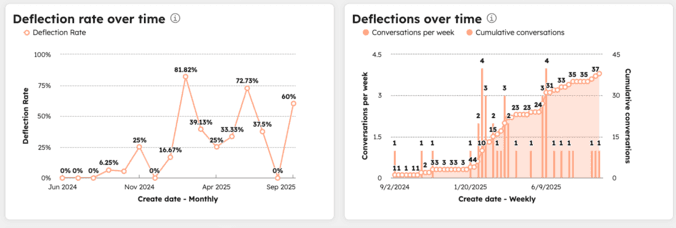
As a rough floor, I'd want a few hundred AI-handled conversations in the lane before trusting the rate to a few points. If your volume can't get there in three weeks, widen the lane before you extend the clock.
Free trials are shorter than the pilot you need, so check what each one actually gives you before you plan around it:
| Helpdesk | Free trial or allowance | Testing billed? | Pilot catch |
|---|---|---|---|
| Zendesk | 14 days, no card, AI agents included | Test widget, simulator and sandbox don't use automated resolutions. An email agent tested in production does | Email's 72-hour window eats the last 3 days |
| HubSpot | 14 days of free access, opt-in, Professional or Enterprise | Preview, test and batch tests use no credits | The agent "will automatically turn off" when the 14 days end |
| Freshdesk | 500 one-time sessions | Previewing chat agents uses sessions; email agent preview doesn't | Not time-boxed, but unused sessions don't carry over |
| Gorgias | Free trial, no card (length not published) | Test conversations are free and don't touch reporting | Last 3 days not yet in the automation rate |
| Help Scout | 3-month free trial of AI Answers | Not stated | Long enough for a proper pilot |
| Salesforce (Agentforce) | Free Developer Edition | Testing Center unmetered since Summer '26 | Live pilot routing is a flow you build |
If the trial is 14 days, ask the vendor for an extension in writing before day one, with the scorecard attached. A vendor that's confident in its product will usually say yes, and how they answer tells you something either way.
How to score each number
Set up a shared sheet with one row per week and one column per scorecard number. Fill it from your helpdesk export, not the vendor dashboard, and use the dashboard only to cross-check.
Verified resolution rate: check the "resolved" pile by hand
Every week, pull 30 to 50 conversations the platform marked as resolved and read them. Mark each one: actually answered, customer gave up, or answered wrong. If two reviewers disagree on the same ticket, run a quick QA calibration before you trust the tally. This is how you catch the gap between "the conversation ended" and "the problem was solved". In a 100-ticket cross-check on a jewelry retailer's inbox during an eesel trial, the drafts were directionally right 88% of the time, but only 12% were sent without edits and 7% had a factual error. One accuracy number would have hidden all three of those findings.
One operator's checklist goes past the dashboard number in exactly the right way:
"That's why I wouldn't measure this only by "tickets deflected." I'd also look at: Average human handling time after AI is involved Repeat contacts/reopens How often the customer has to repeat themselves after escalation Whether AI is actually removing repetitive work from the team And, obviously, whether customers are still getting the problem solved"
Repeat contact: the 7-day lookback
For every AI-resolved ticket, check whether the same customer opened another ticket, on any channel, within 7 days. Do the same for the holdout lane. Most helpdesks can do this with a requester-based search or a report filtered by customer, and it's the one number no vendor dashboard gives you directly. Gorgias opens a new ticket on email only if the reply comes more than 10 days after the last message (3 days on chat, SMS and voice), and on HubSpot an email reply after 72 hours reopens the conversation and can be billed as a second resolution. So a returning customer either lands on the same ticket or on a fresh one, and you have to look for both.
Critical errors and wrong actions: read the log, not the reply
A reply can read perfectly and still sit on top of a wrong action: refunding order 4417 when the customer asked about 4471, quoting a return window you changed last month, promising a delivery date nobody can guarantee. Review every action the AI took that touches money or an account, and every reply that states a policy. When you find one, a short error analysis usually traces it to a missing rule or a stale article. Keep refunds, cancellations and account changes behind a human approval for the whole pilot; approval workflows cost you a few minutes a day and remove the most expensive failure from the test.
Handoff quality: sample the escalations
Pull 20 handed-over conversations a week and ask your agents one question: did you have to re-ask the customer anything? If the answer is often yes, the AI is saving time on the tickets it closes and spending it on the ones it hands over. The handoff best practices post has a checklist for what a good handover note carries.
Cost per kept resolution: price it on the resolutions that stuck
Take your AI spend for the pilot period and divide by verified resolutions after the 7-day check, not by the vendor's resolution count. Then compare it with your fully loaded cost per human-handled ticket. The chatbot ROI guide lists what goes into that number. The billing unit changes the answer a lot, which is also why AI customer service metrics rarely line up across vendors:
| Helpdesk | What you're billed for | What it means for the scorecard |
|---|---|---|
| Zendesk | $1.50 committed / $2.00 pay-as-you-go per verified automated resolution | The window closes at 2 hours (messaging) or 72 hours (email), so a customer who returns later doesn't change the count |
| Gorgias | $0.85 to $1.00 per automated interaction, and a fully AI-resolved ticket can also count as a helpdesk ticket | Two fees can land on one ticket on current pricing |
| Freshdesk | $49 per 100 sessions, whatever the outcome | Divide session spend by kept resolutions, not by $0.49 |
| HubSpot | HubSpot Credits per resolution; a reopened email thread can bill again | Credits are free during the 14-day access period, so price the pilot at full rate |
| eesel | 1 credit per ticket or chat it works on, from $299/month for 500 | Flat per ticket, so cost per kept resolution falls as resolution improves |
For the Zendesk detail see Zendesk AI pricing; Gorgias is broken down in Gorgias AI Agent pricing, and Freddy in Freddy AI pricing.
Plug your own numbers in here. The defaults show a common result: a resolution rate that clears the target, and a pilot that still fails because customers come back more often than they do after a human answer.
What does real pilot data look like?
Honest pilot data is lumpier than a case study. A few things I've seen across real trials on eesel:
- Most early fixes are knowledge, not model. A knowledge gap analysis on week one's misses is the fastest way to raise week two's number. In that jewelry trial, about
65%of the edits agents made to drafts were length and tone, fixable by training on the team's own sent replies. About20%of edits needed data the AI didn't have yet (order and shipping systems), and only about5%of edits were fixing a factual mistake. (The7%factual error rate above counts all drafts; this split counts only the edits.) - The rules grow week by week. Stil Classics has its drafting agent on Gorgias reading the Shopify order before it writes a line,
230order lookups across320tickets in a month, and its instructions are on their ninth revision, with each week of tickets adding a rule. A pilot is where those first revisions happen, so score the last week more heavily than the first. - A short trial can still prove something on a narrow lane. Gridwise set eesel up on Zendesk during a 7-day trial and wrote afterwards: "In the first month, eesel is resolving 73% of our tier 1 requests." Note the shape of that claim: tier 1, first month, after the trial. That's a scoped number, which is what makes it believable.
And the warning on the other side, from a SaaS team that measured the wrong thing for a quarter:
"We were excited about AI taking care of Level 1 support. The numbers looked great. Fifty percent of tickets were resolved without a human. Response times dropped to seconds, and support costs went down. Leadership loved the dashboard. Then Q3 renewal data came in. Net retention fell by 6 points."
Sign, extend, or stop: the decision rules
Write these three rules into the pilot plan and get the vendor to see them before day one. It changes the conversation at the end from "how do you feel about it?" to "which box did it land in?"
- Stop if any gate failed: a critical error or wrong action that reached a customer, or repeat contact worse than the holdout. Ask the vendor what changed to prevent it, then decide whether a second pilot is worth it.
- Extend if the gates held but a target was missed. Usually that means the lane was too narrow to hit the volume, or the top knowledge gaps weren't fixed (a knowledge base audit helps here). Two more weeks, with a written list of what changes.
- Sign if both gates held and the targets were met on resolutions that survived the 7-day check. Then expand one ticket type at a time, and keep the same scorecard running every month after launch.
The test I like best for whether your result is real came from an operator on Reddit:
"On a returns-triage agent we ran, the only number leadership cared about was human hours the process no longer consumed, measured before and after on the same queue. Same intake, fewer human hours per week, error rate no worse than baseline. Eval scores and resolution rates never moved them. Those are agent metrics. Execs stop trusting agent metrics after about a month. My rule of thumb now: if the vendor dashboard vanished tomorrow, could you still prove the value from your own systems? If yes, you have ROI. If no, you have a dashboard."
Two contract points are worth raising before you sign, because the pilot will have shown you why they matter: whether you can export raw conversation data (not just the dashboard) if you leave, and how resolutions are disputed when a "resolved" conversation turns out to be a customer who gave up.
"The hour later example is what I'd put in the contract, because the hard part is the clock, not the words. Most vendor logs call that ticket closed and billable, since their resolution means their ticket status. So put the metric on events you can pull yourself, like a refund id or an appointment that stayed booked. Anything with no clean system event bills at base price only. Otherwise the agent just gets good at closing tickets."
Common AI pilot mistakes
- Letting the vendor pick the ticket types. They'll pick the ones their AI is best at. Pick the ones that cost your team the most time, like order status questions.
- Comparing vendors on different lanes. If you're running two pilots, use the same ticket types and scorecard for both, as in choosing an AI support agent.
- Piloting on every channel at once. You won't be able to tell whether a bad week was chat, email or the knowledge base.
- No baseline. If you don't know your current repeat-contact rate or cost per ticket, nothing in the pilot can be compared to anything. Pull last quarter's numbers before day one. The customer service KPIs guide covers how.
- Fixing problems quietly mid-pilot without noting it. Do fix them, that's the point. But log the date of every change so you know which weeks reflect which setup.
- Reading the results on the last day of the trial. The 72-hour windows and the 7-day lookback mean the final week isn't scored yet. Book the decision meeting a week after the pilot ends.
The longer list of rollout mistakes lives in AI customer service implementation mistakes.
Run your AI support pilot with eesel
eesel is an AI teammate that joins your existing helpdesk (Zendesk, Freshdesk, Gorgias, HubSpot and others) and works the queue like a new hire. For a pilot, three things make the scorecard easier to fill in:
- A score before the first live ticket. The Simulation skill replays your real past tickets, compares its answers with what your team actually sent, and suggests instruction changes. It doesn't send anything to customers.
- Draft mode and approvals by default. It starts with every reply as a draft or internal note, and actions like refunds stay on "Needs approval" until you move them. Approvals never run on their own after a timeout.
- A log you can audit. The Activity page lists every ticket it handled, what it searched, each action, who approved it, and its reasoning. Skipped tickets are listed with the reason, which is exactly what you need for the critical-error gate.

Pricing is one fixed monthly plan where a ticket or a chat is 1 credit: free for 100 credits with no card, then from $299/month for 500 credits. Spam you tell it to skip doesn't count. That makes the cost line on your scorecard simple to work out, since you're not paying per "resolution" as the vendor defines it. smava has run eesel on its Zendesk since December 2024, and its current three-agent setup, live since June 2026, handles 27,000 tickets a month. If you're about to start a pilot, run the free plan on your own queue first and bring the simulation report to the vendor comparison. Try eesel.