Why logistics support breaks differently
I have spent enough time in support queues to know that not all ticket volume is the same. A SaaS team gets feature questions. An e-commerce brand gets sizing and returns. Logistics gets something nastier: volume that spikes with things you do not control, like weather, carrier delays, customs, and peak season.
The shape of it is specific. A freight forwarder, a 3PL, or a last-mile delivery company fields a relentless stream of "where is my order" (WISMO) and "why is my delivery late" tickets, and every one of them is a customer who is already a little anxious because their stuff is somewhere on a truck. Then Black Friday hits, or a port backs up, and the same team that was coping at 500 tickets a week is suddenly staring at 2,000. The questions did not get harder. There are just a lot more of them, and they all want an answer now.
That is the exact problem AI is good at. The hard, judgment-heavy logistics tickets (a damaged pallet, a customs classification dispute, a bulk-rate negotiation) are a small slice of the total. The giant slice underneath is repetitive and answerable from data you already have: tracking status, your shipping policy, your returns rules. Clear that slice and the queue stops feeling like a flood.
What logistics teams actually get asked
Before automating anything, it helps to look honestly at the ticket mix. When I dig through a logistics helpdesk, the tickets sort into two piles surprisingly cleanly.
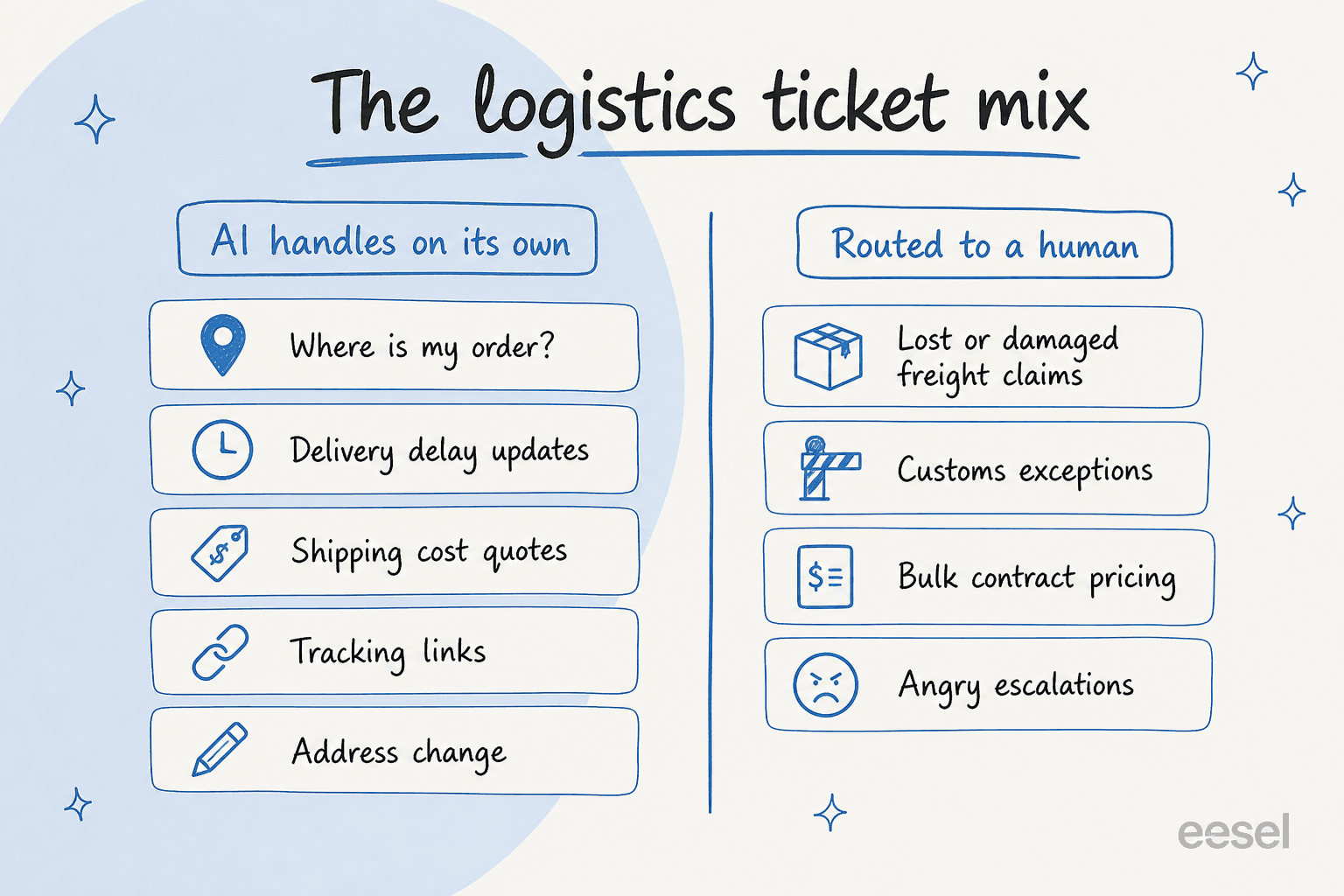
The left pile is big and boring: order status, delivery-delay updates, shipping quotes, tracking links, address changes. These are perfect for tier-1 deflection because the answer lives in a system or a help doc, not in a human's head. The right pile is small and genuinely needs a person: freight damage claims, customs and compliance exceptions, contract pricing, and the angry escalation that needs de-escalating by someone with authority.
The trap is treating both piles the same. Teams either throw humans at everything (expensive, slow, burns people out) or try to automate everything (and the bot fumbles the claim that needed empathy). The whole point of AI support for logistics is to split those piles automatically: the AI owns the left, routes the right, and your agents finally get to spend their time where it matters. We wrote more about that division of labour in our take on AI for agent productivity.
What AI support can and can't do here
Let me be straight about the ceiling before the floor, because over-promising is how these projects lose trust.
AI support for logistics is built to own high-volume, knowable tier-1 questions: tracking, delivery windows, shipping costs, returns policy, address and delivery-instruction changes, and basic account questions. With order data wired in, it can give a real status instead of a canned "let me check." It is also excellent at triage and classification: reading an incoming ticket, tagging it, and routing it to the right team or queue. That alone saves a surprising amount of time on a busy day.
What it should not do on its own is the judgment work. A lost-freight claim with an insurance angle, a customs hold that needs a broker, a key account renegotiating rates, a genuinely furious customer: those need a human, and a well-configured agent knows to escalate them rather than guess. One CX lead I came across put the philosophy perfectly:
"The AI will never be able to answer 100% of the questions... I need an AI who is only handling the tickets that it's confident to handle and all the other ones, leave them alone."
That is exactly right, and it is the mindset that separates a deployment that works from one that gets switched off in week two. (That quote is from a DTC supplements CX lead in our research; the principle travels straight to freight and delivery.)
How AI support actually works for a logistics team
Under the hood, the thing that makes this safe is not magic, it is routing. Every incoming ticket runs through a confidence check before anything reaches a customer.
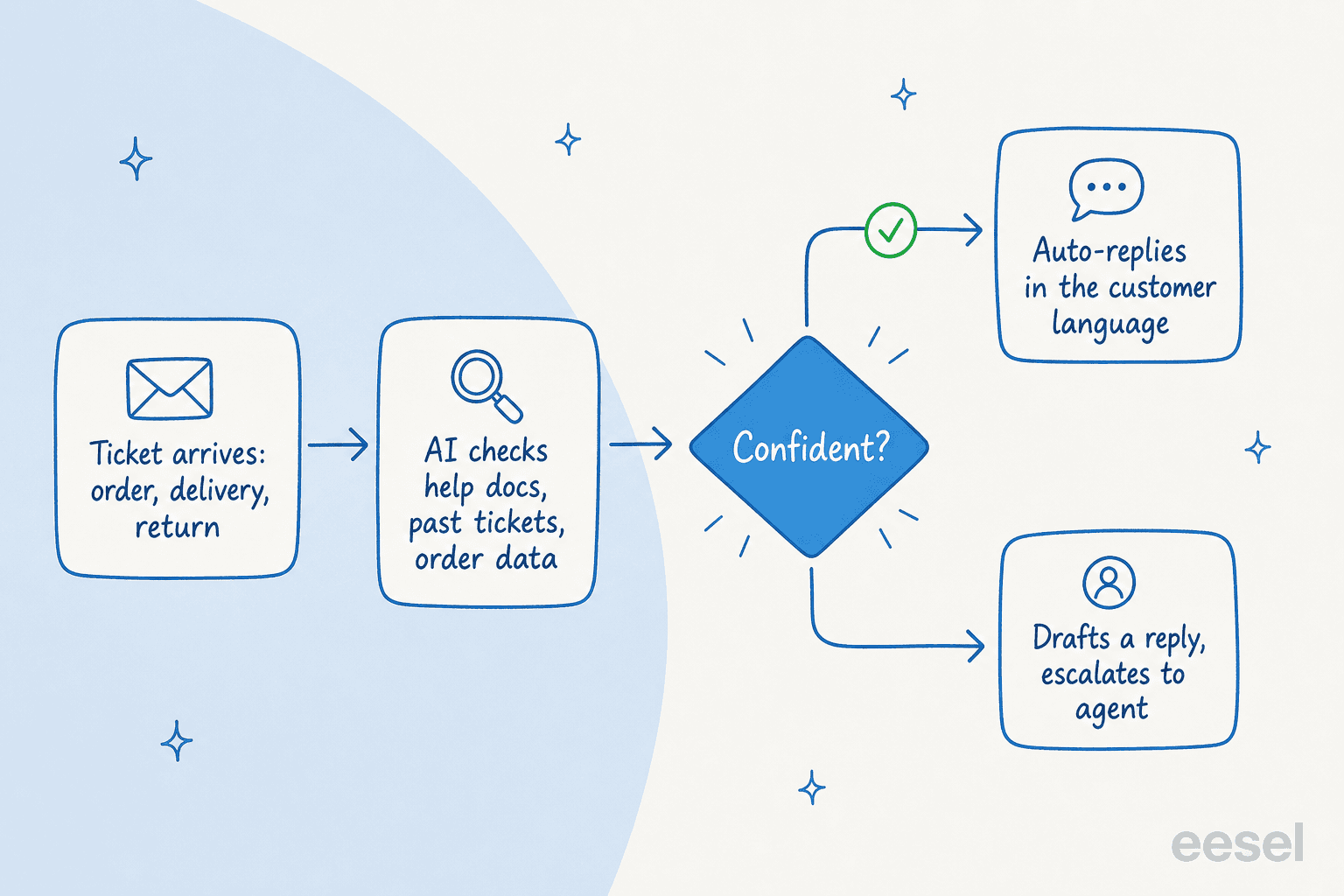
Here is the flow. A ticket arrives ("where's order #4471?"). The AI reads it and checks your connected knowledge: help docs, past resolved tickets, and any order or tracking data you have hooked up. If it is confident it has the answer, it resolves the ticket in the customer's language. If it is not confident, it does not bluff. It either drafts a reply for an agent to approve or escalates the whole ticket to a human, with the context attached.
This is also why training on your own history matters so much. An agent that learned from your last year of solved tickets already knows that your "delayed" macro links to the carrier tracking page, that your returns window is 30 days, and how your team phrases a delay apology. That is the difference between an answer that sounds like your brand and one that reads like a generic chatbot. A service desk lead at a logistics and warehouse-management SaaS described what that felt like in practice:
"It is getting us to the right articles really quickly and easily, as well as curating well-formed responses with consistent, on-brand tone, still keeping our own style and still keeping that human touch."
Eddie Stephens, Service Desk Lead, CartonCloud
That team runs eesel as a copilot across Salesforce Service Cloud and Slack, drafting replies from 717 knowledge items so agents are not digging through documentation on every ticket. The "human touch" line is the part I would underline: the goal is not to remove people, it is to stop them retyping the same tracking answer forty times a day.

Connecting AI to your logistics stack
An AI agent is only as good as what it can see, so the integration step is where logistics teams should spend real attention.
Start with the helpdesk, because that is where the tickets live. eesel plugs into Zendesk, Freshdesk, Salesforce Service Cloud, and Front, so the AI works inside the tool your agents already use rather than asking them to learn a new one.
Then connect knowledge. Your shipping policy might live in Confluence, your SOPs in Google Docs, and a lot of tribal knowledge in Slack. eesel pulls from all of them, plus your past tickets, so the agent answers from one consolidated picture instead of a single stale help-center article. With 100+ integrations and an API, you can also wire in order and tracking data, which is what turns a generic "let me check on that" into a real status reply.
Slack is worth calling out for logistics specifically. A lot of the real knowledge in a warehouse or dispatch operation never makes it into a help center, it lives in the channel where ops answers questions. Pointing the AI at that, or letting agents ask it questions there, is one of the fastest ways to get value. It is the same pattern we cover in our guide to AI for Slack support.
Multilingual support, because freight crosses borders
If your shipments cross borders, your tickets do too. A delivery company in Belgium is fielding questions in Dutch, French, and English on the same day, and a freight forwarder might add German, Spanish, or Italian on top.
This is one of those areas where AI quietly outperforms a human team, because you do not have to hire a Dutch speaker to answer a Dutch question. eesel answers in 80+ languages, matching the customer's language automatically and learning tone from your multilingual ticket history. One Belgian delivery team on Freshdesk tested this on day one by asking, in Dutch, how much it costs to ship to Germany. The AI found the right tariff docs and came back with a specific, detailed quote in Dutch. That was the moment the trial converted.
A German ferry and transport operator runs the same idea customer-facing: a branded, German-language chatbot on Zendesk that handles everything from timetable questions to ticket inquiries, around the clock. For a sector where "when does it arrive" is the number-one question, having that answered instantly in the right language is most of the battle. It is the deflection-then-handover pattern we break down in our live chat deflection guide.
Keeping the AI accurate and on policy
The fastest way to lose trust in logistics is for the bot to confidently quote a delivery date, a customs rule, or a refund it should not have. So accuracy is not a nice-to-have, it is the whole game.
Two things keep it honest. The first is confidence routing, which I covered above: when the AI is not sure, it drafts or escalates instead of guessing, which is the core defense against hallucinated answers. The second is testing before you go live, and this is the step most teams skip and later regret.
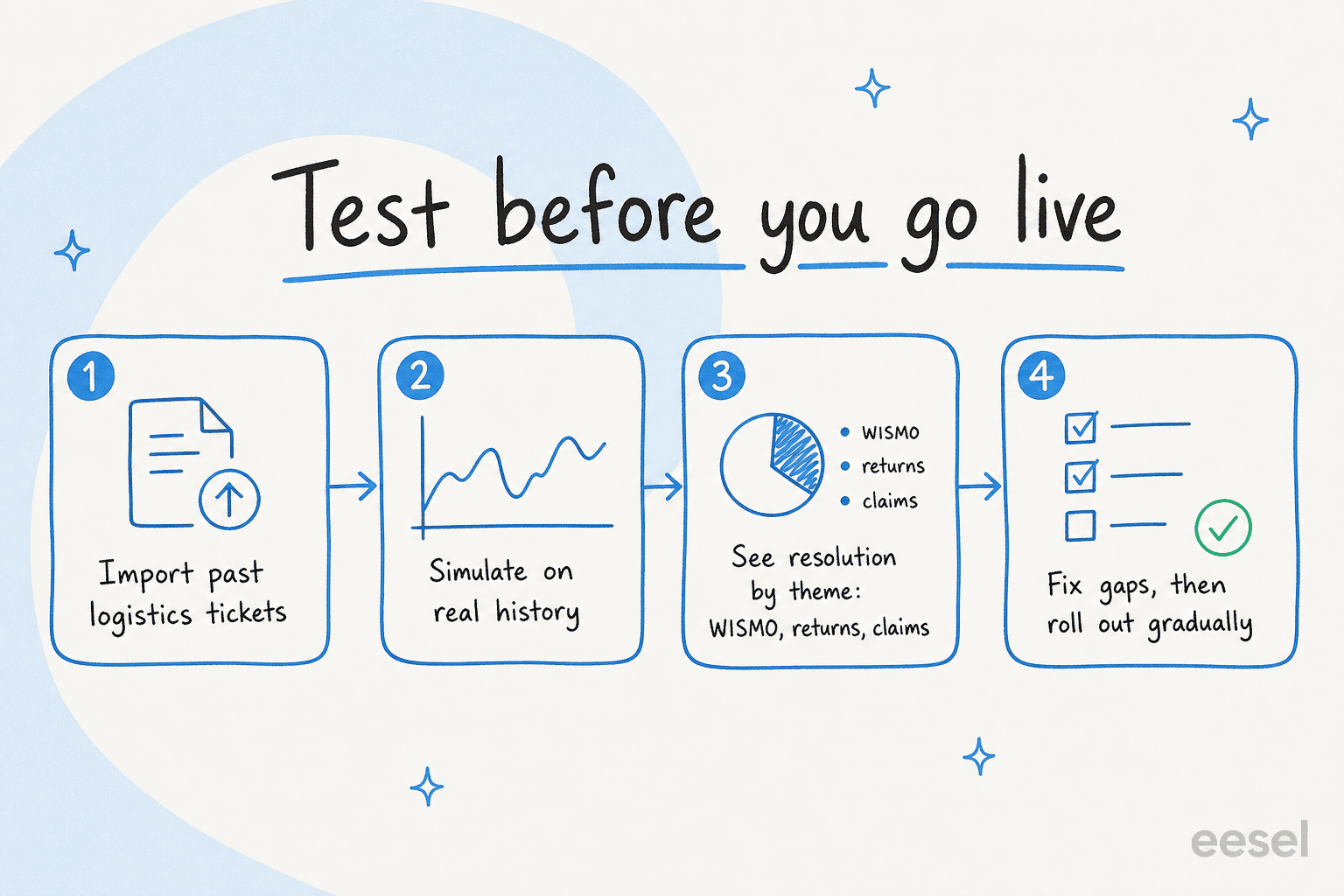
The honest version of a rollout looks like this. You import a chunk of your past logistics tickets and run the AI against them in simulation, so you can see exactly how many it would have resolved, broken down by theme: tracking, returns, claims, billing. You find the gaps (maybe it is weak on customs questions because that knowledge was never written down), you fill them, and you re-run. Only then do you turn it on, and even then you start narrow: let it handle tracking questions only, watch the resolution rate and CSAT, and widen scope as it earns trust.
We have learned this the hard way over three-plus years of putting AI agents on live support queues: we have watched a confident-sounding bot quietly give wrong answers, which is exactly why we now simulate every rollout against historical tickets first. The teams that simulate first are the ones still running the AI a year later. One Belgian logistics team ran 329 real chats over a 20-day trial before deploying to production on live Zendesk tickets, in Dutch and English, and that gradual approach is precisely why it stuck.
What logistics AI support costs
Pricing is where a lot of logistics teams get burned, because the legacy model (pay per resolution, or pay per seat) punishes you exactly when volume spikes during peak season. You should not pay double in November just because demand doubled.
eesel is usage-based and flat: $0.40 per ticket or chat handled, no per-seat fee, no platform fee, no minimum. Here is the full picture.
| Plan / item | Price | What you get |
|---|---|---|
| Free trial | $0 | $50 of free usage plus 2 free blog generations; every feature; no credit card |
| Pay-as-you-go | from $0.40 / ticket | One ticket or chat = one task, no matter how many messages; no seat or platform fee |
| Light task | Free | Dashboard questions and simple lookups |
| Regular task | $0.40 each | A support ticket or a chat session |
| Annual commit | 25% off | Commit to ≥$300/month for the year; billed monthly at the discounted rate |
| Enterprise | $1,000/month + usage | Dedicated solutions engineer and account manager, higher knowledge limits, SSO, HIPAA, BAA |
| Default spend cap | $250/month (adjustable) | Email alerts at 50/75/100%; agents auto-pause at the cap |
The worked example matters more than the rate card. A 3PL handling 1,000 support tickets a month pays about $400, and if you only route 200 of those 1,000 to the AI during your pilot, you pay for 200 ($80). You are never charged for tickets your human agents handle. Compared with a per-resolution model that meters every single answer, that flat per-ticket math is far easier to forecast, which is the comparison we run in detail in cost per resolution with and without AI, and against an offshore support team.
Try eesel for your logistics support
If you run support for a freight, 3PL, or delivery operation, eesel is built for exactly the queue you are staring at. It drops into Zendesk, Freshdesk, Salesforce Service Cloud, or Front, learns from your past tickets and shipping docs, and starts clearing the tracking-and-delivery flood while routing the real exceptions to your team, with confidence-based routing so it never bluffs a delivery date. The differentiator I would point to: you can simulate it on your own historical tickets before it answers a single live customer, so you go in knowing what it will resolve.

Start free with $50 of usage and no credit card, run a simulation against your last few months of tickets, and see your real resolution rate by theme before you commit. You can try eesel today.
Frequently Asked Questions
What is logistics AI support?
Can AI handle order tracking and WISMO tickets for a logistics company?
How much does logistics AI support cost?
Will an AI agent give customers wrong shipping or delivery information?
Can logistics AI support answer in multiple languages?
How do I roll out AI support without breaking customer trust?
Does logistics AI support connect to my WMS, TMS, or Slack?


Article by
Riellvriany Indriawan
Riell is a designer and writer at eesel AI with about two years of experience researching CX platforms, AI chatbots, and helpdesk software. She combines her design background with a sharp eye for how these tools actually look and feel in practice — making her comparisons unusually visual and user-focused.