
How I picked these 9
Quick note on method, because "best" lists rarely say where the picks came from.
What's in scope. Tools that publish a customer-facing FAQ or help center. Internal-only wikis are a different purchase, so they aren't here.
What I compared. Where the knowledge base itself starts, not the cheapest plan on the pricing page, because on several tools the KB is locked behind a higher tier. Whether the free tier is real or time-boxed. How the AI answering is billed, since it's almost always a separate line on top of the base plan. And how much manual work it takes to keep the content current once it's live.
Where the numbers came from. Every price below was read off the vendor's own pricing page, and each one is linked so you can check it yourself.
Why eesel is first. I'm on the eesel team, so treat that as the disclosure it is. It leads because the biggest change in this category is the shift from static pages to AI answering, and eesel is built for that job on top of a helpdesk you already run. Everything after it is ordered by how cleanly it fits a specific kind of team, not by a made-up score.
The 9 best FAQ software tools at a glance
Here's the full comparison before we go tool by tool. I've included the dimensions I'd actually screenshot and send to a teammate: where the knowledge base starts, whether there's a real free tier, and how the AI answering is priced.
| Tool | Best for | KB starts at | Free tier | AI answers | Standalone or helpdesk |
|---|---|---|---|---|---|
| eesel AI | AI answers on your existing help center | Fixed monthly price | 100 free credits | From $299/mo (500 credits) | Layer on top of any helpdesk |
| Zendesk | Enterprise help centers already on Zendesk | $55/agent/mo | 14-day trial | Add-on / higher tiers | Helpdesk |
| Freshdesk | A KB bundled into every plan | $0 (Free) | Free (2 agents, 6 mo) | Freddy AI add-on | Helpdesk |
| Zoho Desk | Cheapest KB inside a full helpdesk | $14/agent/mo | Free (3 agents) | Answer Bot (Enterprise) | Helpdesk |
| HubSpot Service Hub | Teams already on HubSpot CRM | $90/seat/mo | Free (no KB) | Breeze, 50 credits/convo | Helpdesk + CRM |
| Help Scout | Simple, clean KB for small teams | $25/user/mo | Free (5 users) | $0.75 / resolution | Helpdesk |
| Document360 | A standalone, docs-heavy KB | Custom quote | Free trial | Eddy AI suite | Standalone |
| Helpjuice | A heavily-customized dedicated KB | $249/mo flat | 14-day trial | AI suite (from $449) | Standalone |
| Notion | A lightweight FAQ site from your workspace | $0 (basic site on Free) | Free plan | Notion AI trial; Notion Agent on Business ($20/member/mo) | Workspace with web publishing |
How the 9 compare on the work of running an FAQ
Price tells you what you'll pay. This table is about what you'll actually do with the tool on a Tuesday: write articles, get them checked before they go live, see whether they landed, and sanity-check the AI before your customers meet it.
| Tool | Authoring | Approval before publish | Analytics | Sits where | AI answers, and how you check them | Pricing model |
|---|---|---|---|---|---|---|
| eesel AI | None, it answers from what you already wrote | Not applicable | Simulation runs show what it would have answered and where the gaps are | Layer on your helpdesk and docs | Replays your past tickets before go-live; low-confidence questions go to a human | Fixed monthly plan, from $299 for 500 credits (1 credit per ticket) |
| Zendesk | Help center authoring, plus generative AI that drafts articles from tickets | Not confirmed, Zendesk's feature pages wouldn't load for me | Content analytics on article performance and gaps | Full helpdesk | Generative answers built on your help center | Per seat |
| Freshdesk | Custom categories and folders, one-click ticket-to-article via Freddy Copilot | None documented | Article views, ratings and feedback | Full helpdesk | Freddy article suggestions and drafting, billed per session | Per seat, plus AI sessions |
| Zoho Desk | Article editor with versioning and auto-translation to 50+ languages | Yes, review and publish | Views, likes and dislikes, plus most-searched keywords | Full helpdesk | Answer Bot, Enterprise tier only | Per seat |
| HubSpot Service Hub | Drag-and-drop editor, Breeze Copilot drafting | Yes, comment and approve before an article goes live | Dashboard for top articles and searches that returned nothing | Helpdesk plus CRM | Breeze answering, billed in credits per conversation | Per seat, Professional and up |
| Help Scout | No-code Docs sites with an AI article editor | None documented | Docs report, including searches that failed | Full helpdesk | AI Answers, billed per resolution | Per seat, plus usage for AI |
| Document360 | Markdown and WYSIWYG editors with revision history | Yes, a custom workflow builder with roles and stages | Article, search and ticket-deflector analytics | Standalone, connects to helpdesks | Eddy AI search and chatbot | Custom quote |
| Helpjuice | "Powerful Editor" with internal blocks and versioning | None documented, permissions only | Advanced analytics, including what people searched for | Standalone, connects to helpdesks | Swifty AI chat and AI search | Flat rate |
| Notion | Page editor; any page publishes to the web as a Site | None documented, edits to a published page go live automatically | Page viewers and views over time (Free and Plus) | Workspace, publishes to the web | Notion AI works for workspace members; no visitor-facing AI answering listed on the pricing page | Per member, plus a custom domain add-on |
Two things worth pulling out of that table. First, only three of the nine can stop a half-written article reaching customers, and if you're in a regulated or multi-team setup that's usually the column that decides it. Second, none of the vendor pages I read documents a way to replay your past tickets against the AI before it answers anyone, which is the one check I'd want most, and it's the reason simulation gets a mention in the eesel section below.
What FAQ software actually does
Strip away the marketing and FAQ software does one thing: it captures the answers your team gives over and over, and publishes them somewhere customers can find them without opening a ticket. That's called deflection, and it's the metric I care about most on the frontline.
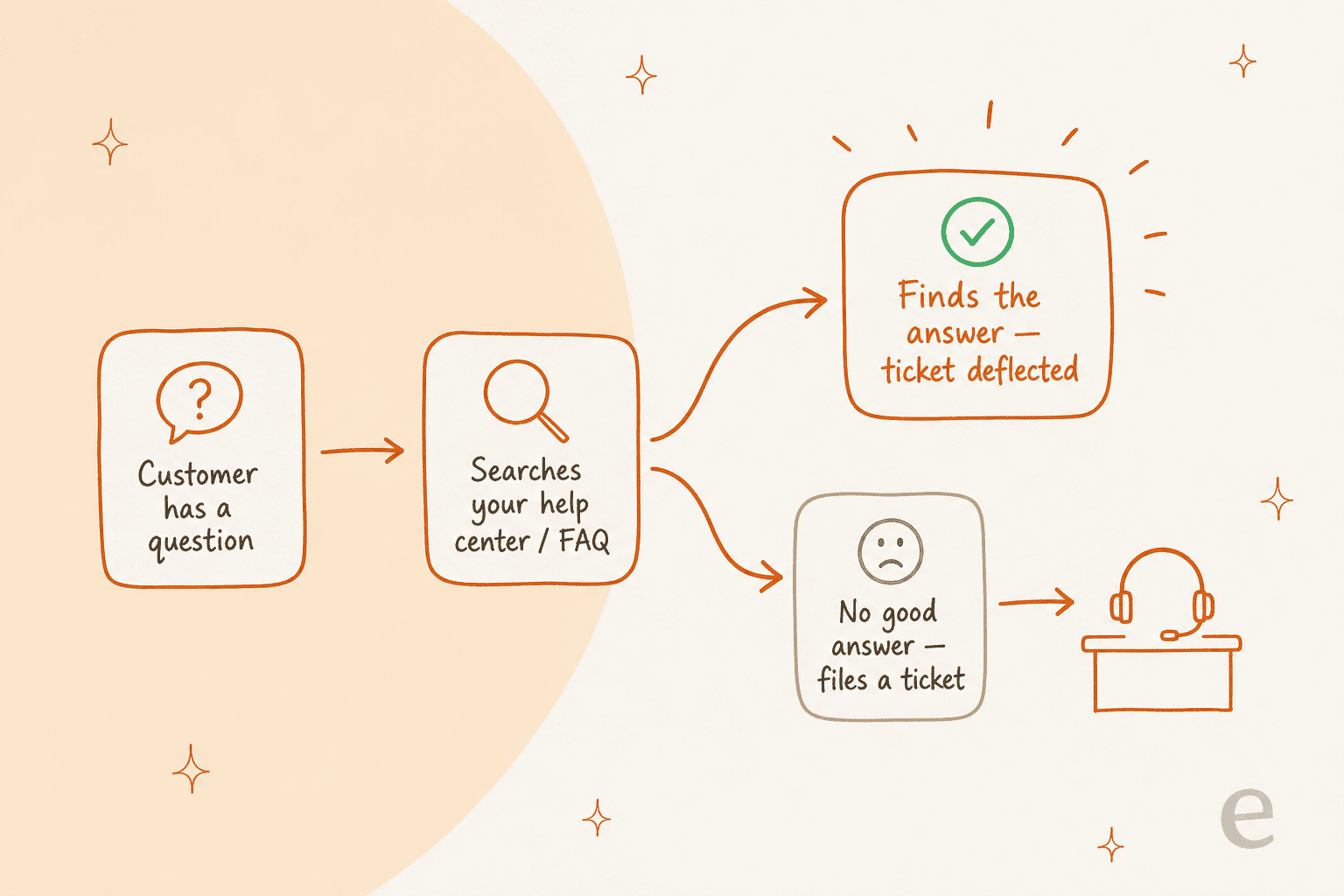
The loop is simple. A customer has a question, they search your help center, and either they find the answer (ticket deflected, everyone's happy) or they don't (they file a ticket and it lands on my desk). Every article that answers a common question is a ticket that never gets created.
The numbers back this up. Zendesk customer Qualia hit 91% help center usage and a 30% decrease in daily tickets, and Tesco grew self-service from 30% to 73% over three years with 5 million annual help center visits. Good FAQ software really moves the needle. The catch, which I'll come back to, is that a static page only works if the customer does the searching and reading themselves.
What to look for when choosing FAQ software
Before the list, here's what actually separates these tools once you're past the feature checklists. I've bought and lived with a few of these, so this is the shortlist I'd hand a teammate.
How it's priced. This is the biggest hidden decision, and vendors bury it. There are three models, and they suit very different teams.
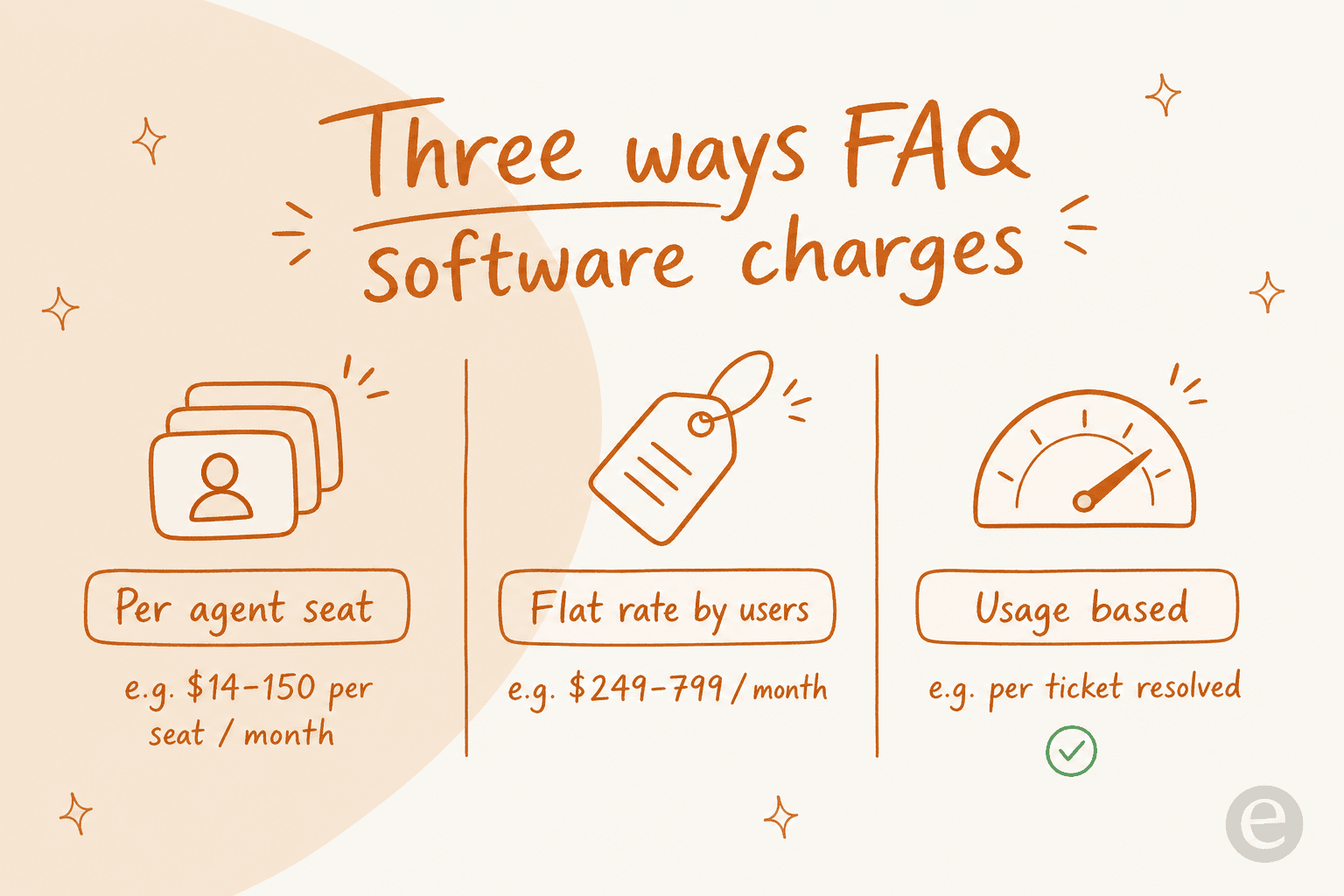
Per-seat helpdesks (Zendesk, Freshdesk, Zoho Desk, HubSpot) bundle the knowledge base into a per-agent price, so cost scales with your team size. Flat-rate specialists (Helpjuice, Document360) charge a fixed monthly fee no matter how many agents you have, which is great once your team is large. Usage-based tools only bill when the tool does work, per resolution or per ticket, which is the fairest model if your volume is spiky.
Whether it's standalone or bundled. If you already run a helpdesk, buying a separate knowledge base is often duplicated spend. If you don't, a dedicated tool gives you more design control.
Whether it has an AI answer layer. A searchable FAQ is table stakes now. The tools worth paying for in 2026 read your articles and answer questions directly, which is the same job an AI support agent does if you add one later. Watch the pricing here, because the AI is almost always a separate line item on top of the base plan.
How easy it is to keep current. The FAQ nobody updates is worse than no FAQ, because it confidently gives wrong answers. Tools that auto-draft articles from your resolved tickets (Zendesk, Zoho's Zia, eesel) keep the content alive with far less manual work.
1. eesel AI: best for AI answers on your existing help center
Let me be upfront: I'm on the eesel team, so treat this as the insider's pitch rather than a neutral review. But the reason it's first is real. Every other tool on this list gives you a place to store FAQ articles. eesel AI is the layer that answers with them.
Here's the problem it solves. A static FAQ page still puts the work on the customer, they have to search, pick the right article, and read it. Most people don't. They open a ticket instead, and it lands on my queue. eesel reads your existing help center, past tickets, and docs, then answers the question directly, either as a customer-facing reply or as a draft for an agent.
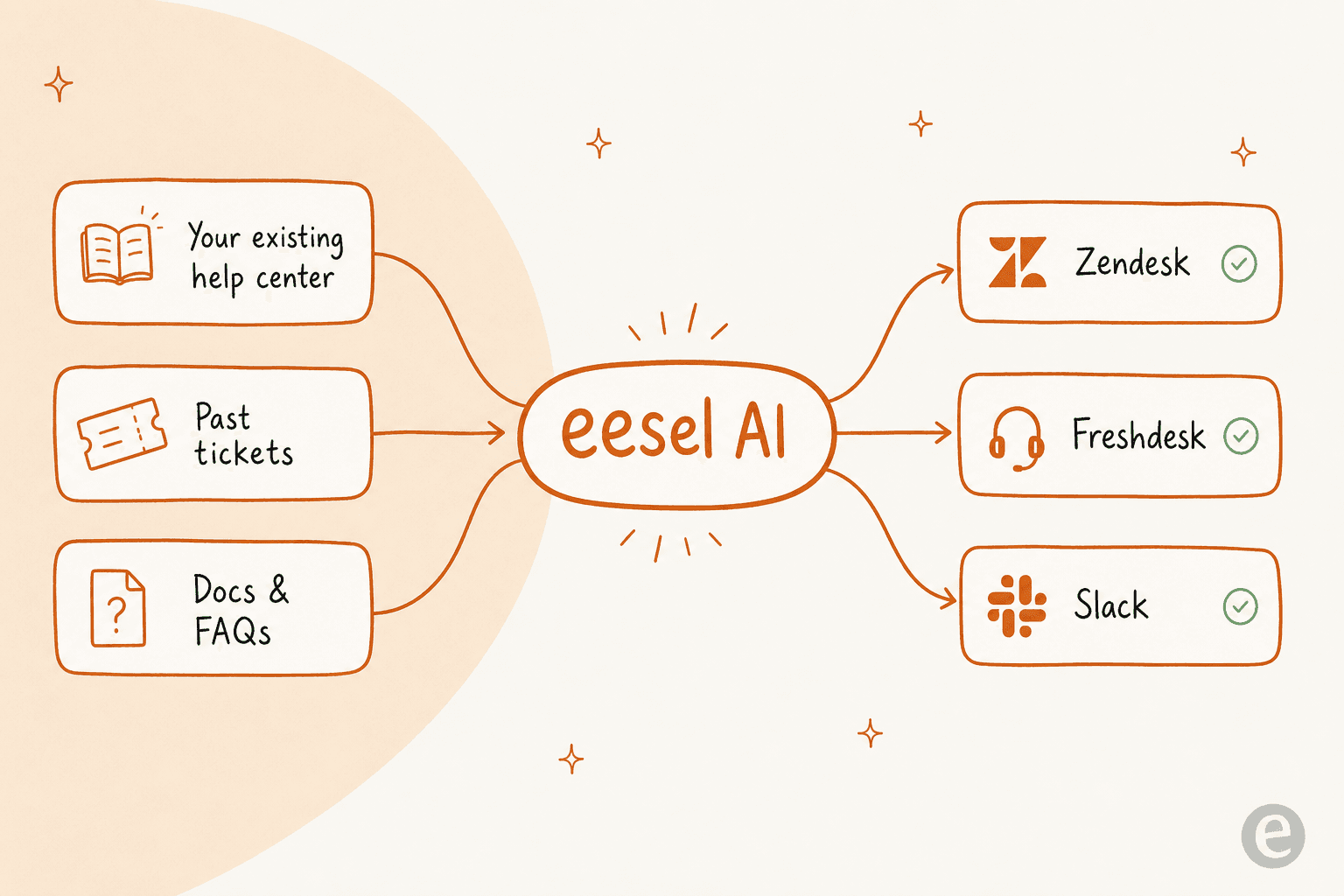
Features. It plugs into Zendesk, Freshdesk, Help Scout, Front, and 100+ other tools, learns from your solved tickets rather than just your help-center content, and answers in 80+ languages. The feature I'd flag most for a nervous support lead is simulation mode: you run it against your past tickets first to see exactly what it would have answered, find the gaps, fill them, and only then go live.
Pros. It sits on top of the FAQ software you already have, so you're not migrating anything. It's honest about what it can't answer, low-confidence questions get left for a human instead of guessed at. And the fixed monthly price is sized to your volume, so you pick the plan that matches the tickets you actually expect.
Cons. It's an answering layer, not an authoring tool, so you still need somewhere to write the articles (any of the tools below works). And if you don't have a helpdesk or any existing docs at all, you'll want to build those first.
Pricing. One fixed monthly price sized to volume, with no per-seat fee and no platform fee. One credit covers one ticket or chat, and plans start at $299 a month for 500 credits. You start with 100 free credits and no card. A team running 500 automated tickets a month pays $299; 1,000 tickets is $499.
Verdict: Pick eesel if you already have a help center (or a helpdesk) and the real problem is that customers aren't reading it. It won't replace your FAQ software, it makes the FAQ you already wrote actually answer people. In our own rollouts, eesel resolved 73% of tier-1 requests for Gridwise in the first month.
2. Zendesk: best for enterprise help centers already on Zendesk
Zendesk's knowledge base, historically called Guide, is the self-service layer inside the most established helpdesk on the market. If your team already runs on Zendesk, this is the path of least resistance.
Features. You get a fully brandable help center and FAQ pages, a unified knowledge graph that pulls in community forums and external sources, and generative AI that turns tickets into articles. Content analytics show you which articles perform and where the gaps are. For an internal FAQ, Zendesk also sells Knowledge for Employee Service.
Pros. Deep, mature, and proven at scale, Tesco runs 5 million annual help center visits on it. The AI article generation from tickets is properly useful for keeping content fresh.
Cons. The knowledge base doesn't come with the entry Support Team plan at $19; it starts on Suite Team at $55/agent. It's also a lot of platform if all you need is an FAQ page. If you're weighing it up, our Zendesk AI review goes deeper on whether the native AI earns its price.
Pricing. The knowledge base is bundled from Suite Team at $55/agent/mo, with Suite Professional at $115 and Enterprise on a sales call. A 14-day free trial is available.
Verdict: The obvious choice if you're already a Zendesk shop and want everything in one place. If you're not, the $55 floor and platform weight make a lighter or standalone tool a better buy. Either way, eesel plugs into Zendesk to answer from that same knowledge base.
3. Freshdesk: best for a knowledge base bundled into every plan
Freshdesk takes the opposite approach to Zendesk on one key point: the knowledge base is included on every plan, including the free one. For a small team that wants a real FAQ page without a per-seat surcharge, that matters.
Features. A customer portal, multilingual help desk, and knowledge base ship even on the lower tiers. Freshdesk's AI, Freddy, can draft and deflect, and higher plans add custom portals and routing.
Pros. The bundled KB and a genuine free tier make it one of the cheapest ways to stand up FAQ software. The interface is approachable for a team that's never run a helpdesk.
Cons. The free plan is time-boxed to $0 for up to 2 agents for 6 months, not free forever. And Freddy AI is a separate usage charge on top: 500 free sessions, then $49 per 100 sessions. If Freddy's limits pinch, see our Freshdesk AI alternatives.
Pricing. Free (2 agents, 6 months), Growth $19/agent, Pro $55, Enterprise $89, all billed annually with the KB included at every level, per the Freshdesk pricing page.
Verdict: The best-value bundled option if you want ticketing and an FAQ in one tool without paying extra for the knowledge base. Watch the Freddy AI add-on costs separately. eesel connects to Freshdesk if you'd rather bring your own AI layer.
4. Zoho Desk: best for the cheapest knowledge base in a full helpdesk
If budget is the deciding factor, Zoho Desk is hard to beat. It packs a multi-brand knowledge base into a helpdesk that undercuts almost everyone, and 125,000+ companies run support on it.
Features. You can organize the knowledge base by brand with separate help centers, auto-translate articles into 50+ languages, and use Zoho's AI, Zia, to turn tickets into articles. The ASAP widget embeds self-service into any page or app. There's also a review-and-publish approval flow, which bigger teams will appreciate.
Pros. Cheap, multilingual, and multi-brand out of the box. If you're already in the Zoho ecosystem, everything wires together.
Cons. The native Answer Bot AI is reserved for the Enterprise tier ($40/agent), and the sheer breadth of Zoho settings can feel busy. Our take on Zoho's AI accuracy is worth a read before you lean on it.
Pricing. Free (3 agents), Express $7/agent, Standard $14, Professional $23, Enterprise $40, billed annually per the Zoho Desk pricing. The knowledge base unlocks at Standard.
Verdict: The value pick for a full helpdesk with a capable FAQ layer, especially for multi-brand or multilingual teams. Just know the good AI answering sits at the top tier. For more options, see our Zoho Desk alternatives.
5. HubSpot Service Hub: best for teams already on HubSpot CRM
HubSpot's knowledge base is the self-serve piece of Service Hub, and its real advantage is wiring your FAQ into the same Smart CRM your sales and marketing teams already use.
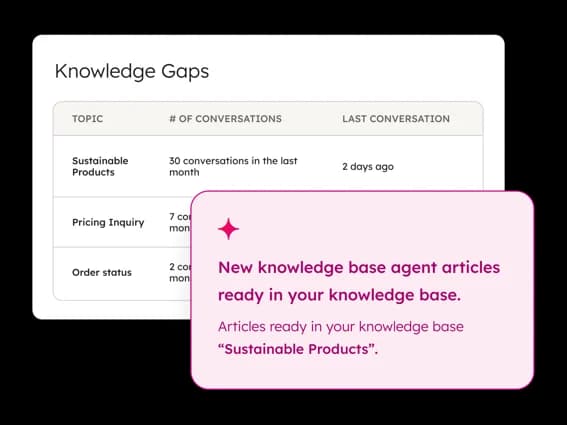
Features. Turn your most frequent questions into a search-optimized help center, with multi-language publishing, a reporting dashboard that flags search terms with no results, and Breeze AI both to draft articles and to answer customers. The "Knowledge Gaps" view above, which surfaces the topics customers keep asking about, is the kind of thing I wish every tool had.
Pros. If your company already lives in HubSpot, the CRM context is a real advantage, the KB knows which articles a customer has already seen. The analytics for spotting content gaps are strong.
Cons. The knowledge base is Professional-tier and up only, so it's the priciest entry point here. Breeze answering bills at 50 credits per conversation on top. Our honest take on whether HubSpot Service Hub AI is worth it digs into the total cost.
Pricing. Professional at $90/seat/mo (1 KB, 2,000 articles) and Enterprise at $150/seat/mo (100 KBs, 10,000 articles), per HubSpot's pricing. Free and Starter plans do not include the knowledge base.
Verdict: The right call almost exclusively if you're already committed to HubSpot. Otherwise the price floor is steep for what is, at its core, an FAQ page. Teams wanting the answering without the seat cost often look at Service Hub AI alternatives.
6. Help Scout: best for a simple, clean knowledge base for small teams
Help Scout has always won on simplicity. Its Docs knowledge base is one of the cleanest to set up, and the whole product is built so a small team can learn it in an afternoon. That reputation shows up in the wild:
"From your list, Help Scout's often a winner for simple email flows and mobile access; Freshdesk might offer better bang for low volume without overkill features. Zoho's solid if you want integrations."

Features. No-code Docs sites with custom branding, public or private access, an AI article editor, and a Docs report that surfaces failed searches so you can spot content gaps. AI Answers is the autonomous chatbot layer built on your KB content.
Pros. Fast, clean, and friendly for non-technical teams. The knowledge base is included on every paid plan, and even the free plan gets one Docs site.
Cons. Help Scout publicly wobbled on its pricing in 2025, briefly moving to per-contact billing before reverting to per-seat, and that shook some long-time customers' trust. It's also less customizable than a dedicated KB tool. If it's not the fit, we keep a list of Help Scout alternatives.
Pricing. Free (5 users, 1 Docs site), then Standard $25/user/mo, Plus $45, Pro $75 on monthly billing, with 16% off if you pay annually, per the Help Scout pricing. Docs sites scale with the plan: 2 on Standard, 3 on Plus, 5 on Pro, and $20/mo for extras. AI Answers is a usage add-on at $0.75/resolution with a 3-month free trial.
Verdict: The best pick for a small team that wants a tidy, low-fuss FAQ without a steep learning curve. Its AI Answers pricing is refreshingly usage-based, though the per-resolution cost adds up at volume. eesel also connects to Help Scout if you want to train the AI on solved tickets, not just Docs.
7. Document360: best for a standalone, docs-heavy knowledge base
Unlike everything above, Document360 isn't a helpdesk, it's a dedicated knowledge base platform. If your FAQ is really product documentation, SOPs, and API docs, this is the specialist. It's rated 4.7/5 on G2 across 1,400+ reviews.
Features. A serious authoring stack, Category Manager, workflow builder, versioning, and an interactive decision tree. Its AI suite, "Eddy," includes AI Search that cites every source, an AI chatbot, and a support ticket deflector. It carries SOC 2 and ISO 27001 certifications, and connects to Zendesk, Salesforce, GitHub, and 60+ other tools.
Pros. Best-in-class for structured, technical documentation. Fastmag cut support tickets 15% after localizing its KB, and SafeBreach grew doc traffic 30%.
Cons. As of mid-2026 the pricing page is a custom-quote configurator with no public tier prices, which makes budgeting harder. And because it's standalone, you'll still need a helpdesk for actual ticketing.
Pricing. Custom quote only, with a free trial (no card). The old public Professional/Business tiers are gone.
Verdict: The one to beat if you're building serious product documentation rather than a light support FAQ. The quote-gated pricing is the main friction, so budget in a sales conversation.
8. Helpjuice: best for a heavily-customized dedicated knowledge base
Helpjuice is the other pure-play knowledge base here, and its calling card is customization: the team hand-skins your KB to be pixel-perfect and on-brand. It's been at this since 2011 and claims 7,000+ companies including the WHO, Hertz, and Amazon.
Features. A powerful AI search that understands intent, its Swifty AI chat assistant, an AI writer that turns tickets into draft articles, and heavy theming and access control for public or internal KBs. There's even an auto-updating Chrome extension.
Pros. Deep customization and a flat, predictable price regardless of team size, which gets cheaper per head as you grow. Strong for teams running both a public help center and an internal wiki from one tool.
Cons. The flat fee is a high floor for a tiny team, and like Document360 it's a standalone KB, not a full helpdesk. The AI Suite only appears on the higher tiers.
Pricing. Flat-rate by users on the Helpjuice pricing page: Knowledge Base $249/mo (30 users), AI-Knowledge Base $449/mo (100 users, AI Suite + SSO), and Unlimited AI-Knowledge Base $799/mo. 14-day free trial, no card.
Verdict: Worth it for a mid-to-large team that wants a beautiful, fully-branded standalone knowledge base and values predictable flat pricing over per-seat. Overkill for a small team that just needs a basic FAQ.
9. Notion: best for a lightweight FAQ site published from your workspace
Notion isn't a helpdesk or a dedicated knowledge base tool, it's a workspace that can publish any page to the web. If your team already writes its docs in Notion, publishing a customer-facing FAQ from there is the lowest-effort way to get something live, and Notion Sites lists a help center among its template types.
Features. Notion Sites publishes an unlimited number of pages to the web, with search engine indexing and a notion.site domain. A published page updates automatically as you edit it, and you can embed published pages into another website. Paid plans add site customization (homepage, header, theme, favicon, Google Analytics), and custom domains are an add-on.
Pros. Almost no setup if your content already lives in Notion, and the free plan can publish a basic site. Adding an FAQ entry is just editing a page.
Cons. It's not a helpdesk, so ticketing lives somewhere else. Edits to a published page go live automatically, so there's no review step before customers see a change. Notion AI works for members inside the workspace, and the pricing page doesn't list AI answering for visitors to a published site. Page analytics on Free and Plus are a list of viewers and a chart of views over time.
Pricing. Free at $0, Plus at $10 per member/month, Business at $20 per member/month, and Enterprise on a sales call, per Notion's pricing page. A custom domain is $8/month per domain paid annually, or $10/month paid monthly. Notion AI is a limited trial on Free and Plus, and Business adds the Notion Agent.
Verdict: A sensible start for a small team whose docs already live in Notion and that just needs a public FAQ page. Once you need ticketing, approvals, or AI answers for customers, one of the tools above fits better, and eesel can connect to Notion to answer from those same pages.
The thing every one of these still leaves on the table
Here's the honest close from someone who reads support tickets all day. Every tool above is a place to write and store FAQ articles. That's necessary, but it's only half the job.
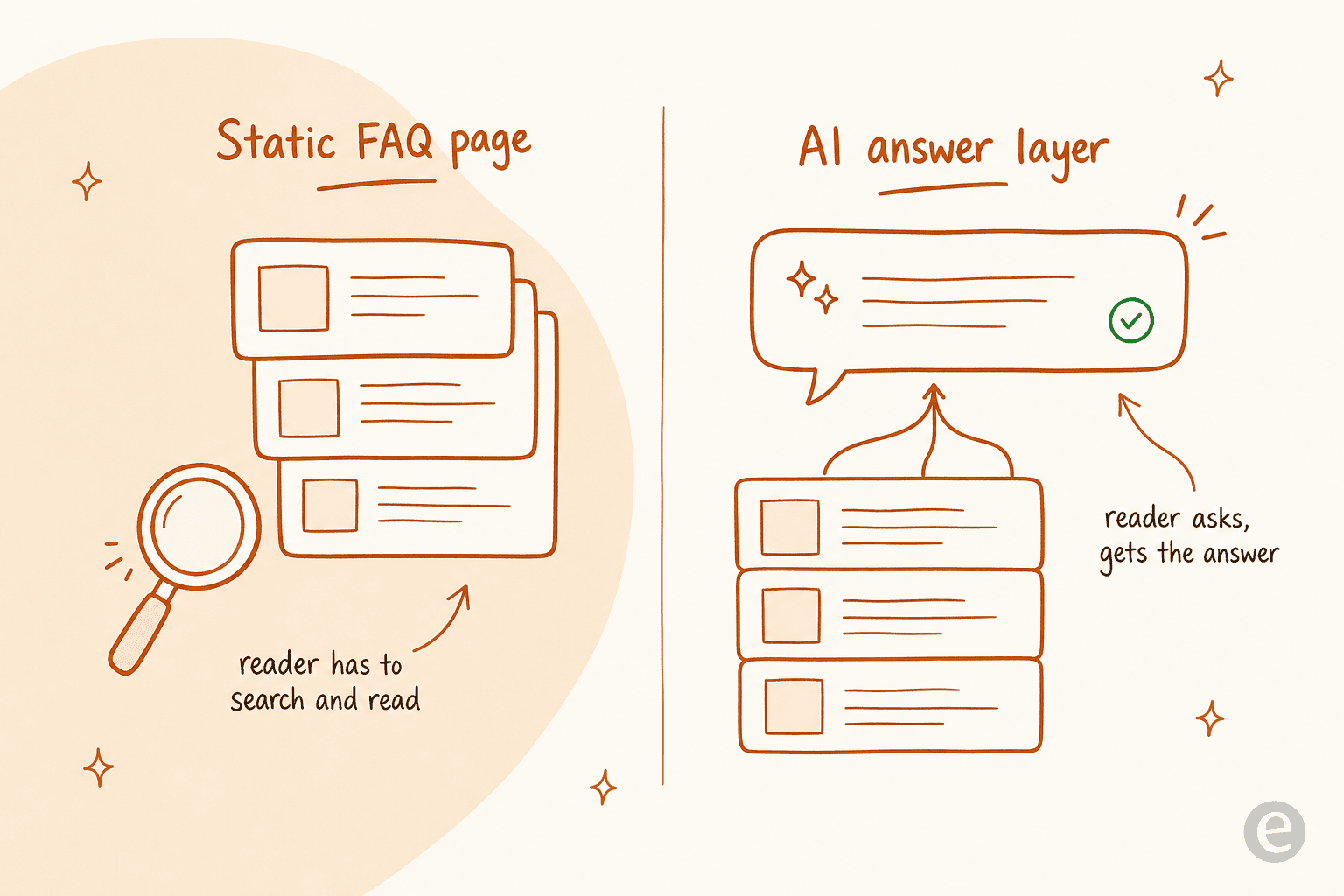
A static FAQ page still assumes the customer will search, pick the right article, and read it. On my queue, most won't, they'll skim, give up, and open a ticket. The best FAQ content in the world doesn't deflect a thing if nobody reads it. That's the gap between having a knowledge base and actually cutting your ticket volume, and it's exactly where an AI answer layer earns its keep.
Try eesel on the FAQ you already have
If the real problem isn't "we don't have an FAQ" but "our FAQ isn't stopping tickets," that's the exact job eesel is built for. It's not another place to store articles, it's the AI teammate that reads your existing help center, docs, and past tickets and answers questions directly, either as a customer-facing reply or a draft for your agents.
Because it plugs into Zendesk, Freshdesk, Help Scout, and 100+ other tools, you don't migrate anything, it sits on top of the FAQ software you already picked from this list. And with simulation mode, you can see exactly how it would have answered your last few thousand tickets before it ever goes live. It's free to start with 100 free credits and no card.
Whichever FAQ software you land on, make the content answer people, not just sit there. That's the difference between a help center that looks busy and one that actually gives me my afternoon back.
Frequently Asked Questions
What is FAQ software?
What is the best free FAQ software?
How much does FAQ software cost?
Does FAQ software actually reduce support tickets?
What's the difference between a knowledge base and FAQ software?


Article by
Riellvriany Indriawan
Riell is a designer and writer at eesel AI with about two years of experience researching CX platforms, AI chatbots, and helpdesk software. She combines her design background with a sharp eye for how these tools actually look and feel in practice — making her comparisons unusually visual and user-focused.