What Halo AI agent pricing includes
The current Halo pricing page describes an all-inclusive platform licence with AI capabilities, including triaging and suggested replies. It offers named and concurrent licences at the same per-agent price. End-users accessing the portal are not licensed agents.
Onboarding packages are required and priced according to scope. That is a reason to request a line item, not to apply a universal $4,000 estimate. The enterprise offer is a separate option; do not treat its terms as the default contract.
A named licence belongs to a specific agent; concurrent licensing counts simultaneous agent use. Review the relevant working pattern before deciding which count represents your team.
Get a quote that can be checked
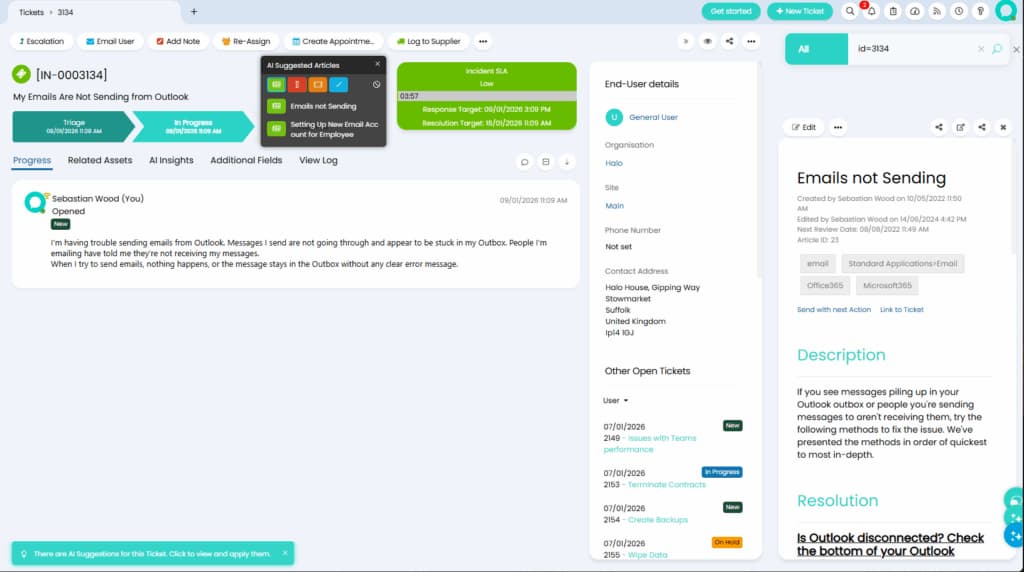
This retained Halo product example shows assistance inside a ticket, not a pricing quote. Confirm the features and configuration covered by your Halo agreement.
The public calculator's extracted values did not show a consistent selected configuration during this review. This article therefore does not reuse an older £55 price or claim a 250-agent floor. Check the calculator with your own inputs and obtain the selected terms in writing.
I would ask for the following:
| Cost input | What to record | What to clarify |
|---|---|---|
| Licences | Count, type, currency and unit price | How changes during the term are charged |
| Billing term | Monthly equivalent and amount due | Annual payment and renewal conditions |
| Onboarding | Required scope and one-time charge | Training, migration and configuration deliverables |
| AI configuration | Included features and chosen model connection | Any separate provider usage or implementation work |
| Ongoing operation | Maintenance and review responsibilities | Who handles policy changes and failed actions |
This is a buying checklist, not a list of extra fees Halo necessarily charges. Have the supplier distinguish included work from separately priced work.
For a unit price quoted per month and paid annually, the base licence calculation is licence count × monthly unit price × 12. Add only the other charges that apply to your agreement. Keep currencies separate until you choose and document an exchange-rate assumption.
Separate the first year from later years
An onboarding project should not be silently repeated in every annual estimate. Equally, recurring model usage or internal administration should not disappear after launch. Put one-time costs and recurring costs on separate lines.
If you already run Halo, compare the incremental cost of the native AI workflow with the incremental cost of an alternative. If you are replacing the service desk, include the broader platform decision. Those are different buying situations.
Compare per-agent and task-based costs fairly
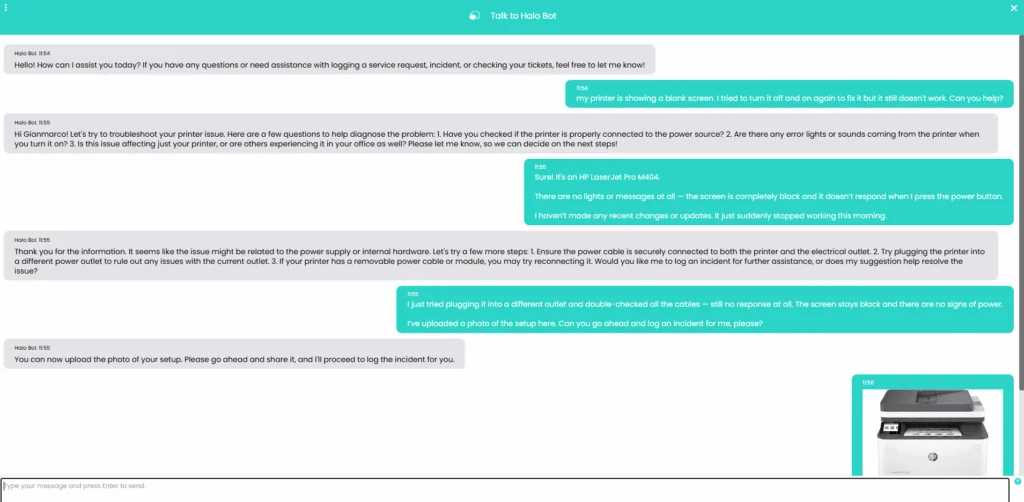
The Halo Virtual Agent example illustrates a conversation. An offer to log an incident does not establish completion or a measured cost saving.
A licence buys access to the platform, not just one AI answer. A task-based agent charges for work it performs, but may still require the helpdesk you already pay for. Neither model is automatically cheaper.
Use the same scope for both sides: the same request types, knowledge, necessary actions, review process, and integrations. Compare the cost of a useful outcome, including human review and corrections, rather than assuming every AI-handled request saves the same amount of time.
For eesel's Teammate plan, the pricing guide sets one fixed monthly price by credit volume, starting at $299/month for 500 credits. One credit covers one ticket or chat, however long, with no platform fee and no per-seat fee. Credits are used regardless of outcome, so specify the plan size when comparing.
As a hypothetical example, a workflow that generates 500 tickets or chats a month would fit the 500-credit plan at $299/month. That is not a quote for replacing Halo: it excludes any existing helpdesk licence, integration work, other actions such as Slack questions or scheduled agents that also use credits, and the team's review time. It also does not predict how many credits your workflow will use.
Review an alternative AI budget through eesel CLI
The eesel CLI works with the same eesel agent and workspace as the dashboard. A person can use it from a terminal, a script can read its JSON output, or Claude Code, Cursor, or Codex can help collect the evidence. For a pricing review, start with inspection rather than generating additional work.
Identify the workspace and current workload
With Node.js 18.17 or newer:
npx @eesel/cli login
npx @eesel/cli whoami
npx @eesel/cli agents
npx @eesel/cli billing
npx @eesel/cli automations --agent TEST_AGENT_ID
npx @eesel/cli activity --agent TEST_AGENT_ID
npx @eesel/cli status --agent TEST_AGENT_ID
Replace TEST_AGENT_ID with the selected agent. Billing describes the workspace; do not attribute the whole amount to one agent merely because the activity command was scoped. Check the dates, included agents, and task types before comparing totals.
These inspection commands are different from chat: the CLI guide identifies chat as billed work. A command that reads billing does not estimate future usage, update a cap, or validate a Halo connection.
Ask a coding agent to produce a bounded cost review

This eesel screenshot uses a Zendesk workspace, not Halo. It illustrates activity inspection, not an invoice breakdown or the results of the commands in this article.
A useful first request is:
Read the selected eesel workspace's billing state and the selected agent's automations and activity. Identify the reporting period and what each total includes. Separate observed usage from assumptions. Do not run chats, change billing, create automations, or connect systems. Report anything you cannot attribute or verify.
The coding agent can collect JSON results and prepare a comparison. Have it flag missing information instead of filling gaps with a guessed task count. For example, an activity list may not cover the full billing period or establish which invoice line belongs to a particular workflow.
| Question | Evidence to use | Avoid assuming |
|---|---|---|
| What has been spent? | Workspace billing for the relevant period | One agent caused the entire balance |
| What generated work? | Matching activity and automation scope | Every listed run represents a successful resolution |
| What happens at higher volume? | Explicit volume and task-type assumptions | A short pilot predicts every seasonal peak |
| What is the total alternative cost? | Usage plus retained systems and integration work | Task spend alone replaces the whole platform |
Define a small pilot before forecasting savings
Choose one service-desk request type and an approved procedure. Check the selected agent's instructions and permissions first:
npx @eesel/cli instructions --agent TEST_AGENT_ID
npx @eesel/cli integrations --agent TEST_AGENT_ID
Existing automations may already be active. Keep account-changing actions and outgoing messages off for a fictional policy test. If the approved procedure is available, an example is:
npx @eesel/cli new --name "service-desk-budget-pilot" --agent TEST_AGENT_ID
npx @eesel/cli chat "Fictional evaluation: an employee cannot connect to the VPN. Use the approved procedure to propose the next step, identify missing information, and say when a human should take over. Do not contact anyone or change accounts." --agent TEST_AGENT_ID
This is a billed chat test, not a free historical simulation. A new conversation does not disable the agent's tools. Check the answer against the source and record the review effort; a correct-looking answer is not proof of a resolved employee request.
Before estimating a monthly volume, define which real events would start work, which requests are excluded, and how repeat or escalated cases are handled. Do not enable a broad automation just to obtain a sample bill.
Review spending controls and integration costs
Open Workspace settings > Billing & Usage to inspect the plan and any overage cap. When credits run out and overage is off, agents pause until credits reset. Decide how your human team handles requests during a pause.
Treat Halo connectivity as a separate requirement. The eesel documentation index checked for this guide does not list a built-in Halo connector. General Network Access may be relevant to a custom API design, but authentication, permissions, ticket events, and write behavior must be verified for your deployment.
Include the effort to build and maintain that connection if it is required. A successful billing inspection does not establish that eesel can read or update your Halo tickets, and a domain allowlist is not a read-only permission guarantee.
Make the price comparison match the decision
Ask Halo for a quote with the selected licence and onboarding terms. For eesel, use the CLI to inspect actual work and define the assumptions behind a pilot budget. Keep platform replacement, AI task usage, and integration work distinct.
Try eesel with one approved service-desk scenario before projecting savings across the queue.
Frequently asked questions
Is Halo AI a separately priced add-on?
Halo lists AI among its included platform capabilities. Check your licence quote and any separate provider costs for your configuration. See Halo pricing.
Is there a universal 250-agent minimum for Halo AI?
This guide does not establish that minimum. Use the current calculator and a written quote for your team instead of an older price. See the pricing page.
How much is Halo onboarding?
The current page says onboarding packages are required and priced according to scope. It does not establish one universal onboarding fee. See onboarding terms.
What does eesel CLI show about pricing?
The billing command reads the workspace's live billing state. Activity and automations help inspect the work behind it. These are not a Halo quote or a forecast. See the CLI reference.
Is eesel billed per seat?
No. The Teammate plan is one fixed monthly price sized to volume (from $299/month for 500 credits), with unlimited seats and no platform fee. See eesel pricing.
What happens when eesel credits run out?
When credits run out, agents pause until they reset, or you can turn on overage at $0.80 per extra credit with a monthly cap you set. Review the plan in Billing & Usage. See spending controls.
Does a CLI cost review prove eesel connects to Halo?
No. Budget inspection and integration feasibility are separate. A built-in Halo connector was not listed in the documentation index checked for this guide. Evaluate any required custom API access separately.


Article by
Kurnia Kharisma
Kurnia is a software engineer and writer at eesel AI with two years of SEO experience, writing about AI tools, helpdesk software, and customer support. He pairs a developer's understanding of how these products are built with search-driven research into what actually ranks and resonates with the people searching for them.